-
AIUTO...CHI CONOSCE L’ITALIANO? PARTE DODICI
GenX supporta solo fino a G3, e lo sviluppatore purtroppo è deceduto
SingularBlue sta lavorando alla versione 2. Era già uscita su GitHub, ma ha dovuto tirarla giù, come ha detto Imago. Io faccio storie transgender (se non si capiva dal nome o dal mio DeviantArt), e quel plugin sarebbe davvero una manna dal cielo, anche se dovessi comprarlo a prezzo pieno! Molti colleghi usano GenX, ma io ho tutto per G8. Per trasformare un G8M in G8F e viceversa devo fare tanti passaggi oggi come oggi :/
Guarda avevo fatto qualche tentativo coi bebè perché in una mia storia 2 protagonisti si sposeranno e avranno un figlio, e mi piace quel prodotto di Zev0 Growing Up: https://www.daz3d.com/growing-up-bundle-for-genesis-8-female-s-and-male-s
Se ricordo bene, prendi un personaggio che ti pare e usa il prodotto :)
Io visto di sfuggita il bebe di Sixus1 per G8, e devo dire che lo preferisco a quello della DAZ (ma io sono di parte, perchè adoro Les e Bekha). Per lo swap dei morph stavo provando anch'io a trasferirli da uomo a donna, per G3 ce l'ho fatta, ho trasferito il Turtle Dude di Joequick da uomo a donna, ma non ho nulla di interessante per G8 che me lo faccia desiderare. Con G2 è molto più facile.
New Dude - Elios 8...though I haven't seen the Convergence Outfit sans torso armour & boots (hopefully the pants are ankle-long trousers when there are no boots).
Yes you can wear them without boots and armour. Good excuse for a quick play render :D
Untuck the pants morph, loosen the ankles and use the Adjustable weightmap layer to fix any poke throughs from the shoes. I added Cool Styles shoes in this image.
@Mada, Brilliant! Thank you so much for the render. That is a flattering casual outfit, appropriate for my leading men. I'm glad I got the extra textures. Thanks for the tailored shoulders on your The Count and Pack Leader coats. I can always use more!


Look at all those gorgeous folds and creases on these clothes!!!
How to Use dForce: Creating a Blanket, Draping Clothes on Furniture, and Much More [Commercial]Thanks again L'Adair. I also tried the script Richard mentions in this thread to transfer my entire workspace design from 4.10 to 4.11, not only the layout of the panes but also my custom dForce menu. I did this on the release before the current one, so I don't know if it works on the most recent.
Thanks for the link to the script. Unfortunately, something in it messed up my dForce Menu. Good thing I had saved the layout a while back. I was able to get it back. Using the script, with a bit of modification, I was finally able to switch my layout from City Lights Lite to the full City Lights, and keep my custom menus and toolbars. It took some deep-diving into the dsx files for older layout saves and the new one, and some copy/paste from one file to another, but I finally got it done.
It sure would be nice if Daz had a script that would let you change layouts without losing your customizations. It took me about an hour and a half to do something that a well written script could have accomplished in under a minute.
But at least it's done.
New Dude - Elios 8...though I haven't seen the Convergence Outfit sans torso armour & boots (hopefully the pants are ankle-long trousers when there are no boots).
Yes you can wear them without boots and armour. Good excuse for a quick play render :D
Untuck the pants morph, loosen the ankles and use the Adjustable weightmap layer to fix any poke throughs from the shoes. I added Cool Styles shoes in this image.Lola FreebiesLola got a Bikini:
Action Actress Bikini for Toon Grrl Lola
https://www.renderosity.com/mod/freestuff/action-actress-bikini-for-toon-grrl-lola/82421And Action Actress Lola for Toon Grrl Lola was updated 2019/06/07: Added to them Lalo's morph.
https://www.renderosity.com/mod/freestuff/action-actress-lola-for-toon-grrl-lola/82252How to Use dForce: Creating a Blanket, Draping Clothes on Furniture, and Much More [Commercial]Thanks again L'Adair. I also tried the script Richard mentions in this thread to transfer my entire workspace design from 4.10 to 4.11, not only the layout of the panes but also my custom dForce menu. I did this on the release before the current one, so I don't know if it works on the most recent.
DoA's Marie RoseYeah, I was still miles off and had to make a few rather dramatic adjustments. I opted to continue working with the preexisting model since the cheeks were painstaking to get shaped from zero to the way I wanted with respect to the rest of the face. On top of doing 30+ other morph adjustments, I found I had to change the face angle by around -50% based on the reference image of the side-shot of her face, which made a world of difference. Image is rendering at the moment and will post it later!
 Fit Control for Genesis 8 (Commercial)
Hmmm... Try this morph combo as a rough guide.
It works! Thanks a lot :D
Fit Control for Genesis 8 (Commercial)Hmmm... Try this morph combo as a rough guide.
Fit Control for Genesis 8 (Commercial)Hey guys! I got the problem solved, it was an error that caused by the serves online that somehow I tried to install the studio again and refill the welcome window, and then it backed to work!
But I got another question, as the fit control for G8M has morphs for pants, would it also apply for G8F? When I apply the fit control to G8F and use the Down All morph to drag down the pants, the lower part is always twisted, so I am wondering if there are any good ways to just pull down the upper part of the pants without effecting the lower parts. :)
Ivy's Freebies (updated 6/10/2019 )Click to play
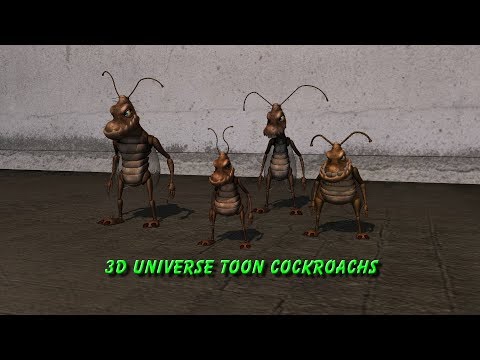
Description:
These aniblocks and poses where made specially for the Bugsy 3du toon cockroach character,
And made to work for Bugsy gang characters as well using just one preset.
Instructions:
"Keep Limits Off" when applying poses.
Aniblocks are drop & drag onto the animate2 timeline.
the walk cycle can be looped.
Added Squish morph built into the squish pose and Bug size scale added as a preset for easy scene set up.
Note:Animate2 timeline is required for aniblocks. https://www.daz3d.com/animate2
Usage Rights:
This set is free to use in commercial and non-commercial renders & animations only.
Do Not resell or redistribution. these poses or aniblocks,
Do Not include them in other pose & aniblock sets to be given or sold as a bundle.
Please do not use them in scripts for game engines without my consent.Happy Rendering
Download hosted at sharecg.com Link https://sharecg.com/v/92372/browse/21/DAZ-Studio/Poses-and-AinBlocks-for-the-3DU-Toon-Cockroach
I miss Bijou's insane pricehttps://www.daz3d.com/bijou-for-genesis-2-female-s
Has been in my wishlist since I first saw the character at $1000 or however much it was. Daz really need another character like Bijou, with an insane price and some interesting additions - seeing the price always made me smile.
Just noticed that the price had been reduced to more normal character prices; and figured to see how she transferred to G8. Manual morph transfer, and used the other site's transfer system for the textures. (Not cause I think it's better). Seemed to transfer pretty well.
Aegeus Hair morphs?I noticed on the description for the Aegeus Hair there is a morph for Bang Down but none of the pictures show this or any of the other morphs. It would be helpful if the artists would include pictures of at least some of the morphs included so we know what they look like. Can someone who bought this post a picture of the bang down so I can see what it looks like before I decide to buy? Also, every other picture on the ad is a blank white square. Is this just a glitch or are there missing pictures?
New Dude - Elios 8I wasn't a big fan of the straight cut between horse and human with Centaur 7.
Did you see RawArt's Regan and Rogan centaurs? They have a much more natural centaur look IMO. (I might not have picked up the centaur packs without them.) If they did a satyr the same way, I'd be thrilled.
https://www.daz3d.com/rogan-for-centaur-7-male
https://www.daz3d.com/regan-for-centaur-7-male
Not only did I see them, I grabbed them and wrestled them into my shopping cart. I love those two a lot, as they were made more like believable centaurs. I haven't used them for a while but I believe it was quite difficult to morph their heads and faces in order to create more original characters. That would be my only gripe, but if they did, hypothetically, make a Centaur 9, then I hope they would look at Rogan and Regan for ideas.
Which G8F Character Is This?I'd say a customised or self-generated; the breasts look impressive, and don't recall seeing the like on released characters.
I assume that every character is customized to a certain extent these days. I mean, what's the point of using something that looks exactly like the same product that everyone else is using? To me, it kind of defeats the entire point of DAZ in the first place, which is to create your own original vision.I have entirely too many characters in my library, and morph sets out the wazoo for all of the generations. I modify the characters I use in my renders maybe 30% of the time. For me, personally, the enjoyment I find is in putting the scene itself together, not in tweaking the character for ever and ever. When I use a character, I just go through my library until I find one has a look that feels right for the image I'm trying to create. Another way to look at it is that it's kind of like hiring a model for a photo shoot.
That's not to say I don't morph my own characters some, I've got several that I have done that with, one of which I'm very proud of. But the time I spend morphing up a new character is time I'm not spending putting the scene together. But that is how I personally create my own original vision. You create yours your way, which is different from mine. And that's awesome. It's one of the best things about art, of any type. There is no right and wrong way to do it, everyone has their own methods and styles.
just to be clear, when I said I assume everything to be modified, I was referring to people constantly searching for X-face or y-face that they saw in a promotional image. I've lost track of how many threads I've seen asking where someone can buy the characters that Joel Geckko, Zeddicus, Goldtassel and so many more use for their promos.when most of them will never be made commercially available, because they are hybrids of other products. So, my assumption when I see an image in a promo, is to assume that while the elements may be available commercially, they are most likely not going to be found exactly "as is" in any store. And when I said "it defeats the purpose of Daz in the first place", that wasn't meant to knock artists who do use products straight "out of the box" as it were, but rather, to point out that having a unique visual signature is a key element of being a sucessful commercial artist. Yes, one can acheive that unique look by other means, like custom postwork or camera effects, but when your goal for the image is to sell a 3D product, you're pretty much restricted to things that won't obsure the product being sold. (And, of course, if people keep posting "what was that character" every time you use your custom Girl X or Dude Y mix, it means that people keep coming back to look at your product and some of those will eventually buy, so it's a win win.)
All of which, in summary, means that it's often much easier to find the source of things used in promo illos if one breaks them down to their base elements and look for those, instead of something that looks exactly the same.
(sorry if that came off a bit long winded, but I'm mainly using speech to text at the moment as a result of breaking my dominant hand, and it's just too damn much effort to go back and edit into something shorter.)
Lola FreebiesThanks for your kind comments guys :)
But mind it is actually only one model, @nonesuch00 -- this last one is just a morph!
@Kerya No small deal either! You do a great job with the wiki. Keep it on! :D
Cheers @mininessie! A pharao maybe? ;)
Upgrading a character?Sickleyield has a tutorial that covers this https://www.deviantart.com/sickleyield/journal/Tutorial-Transferring-Character-Morphs-G1G2G3G8-409437916
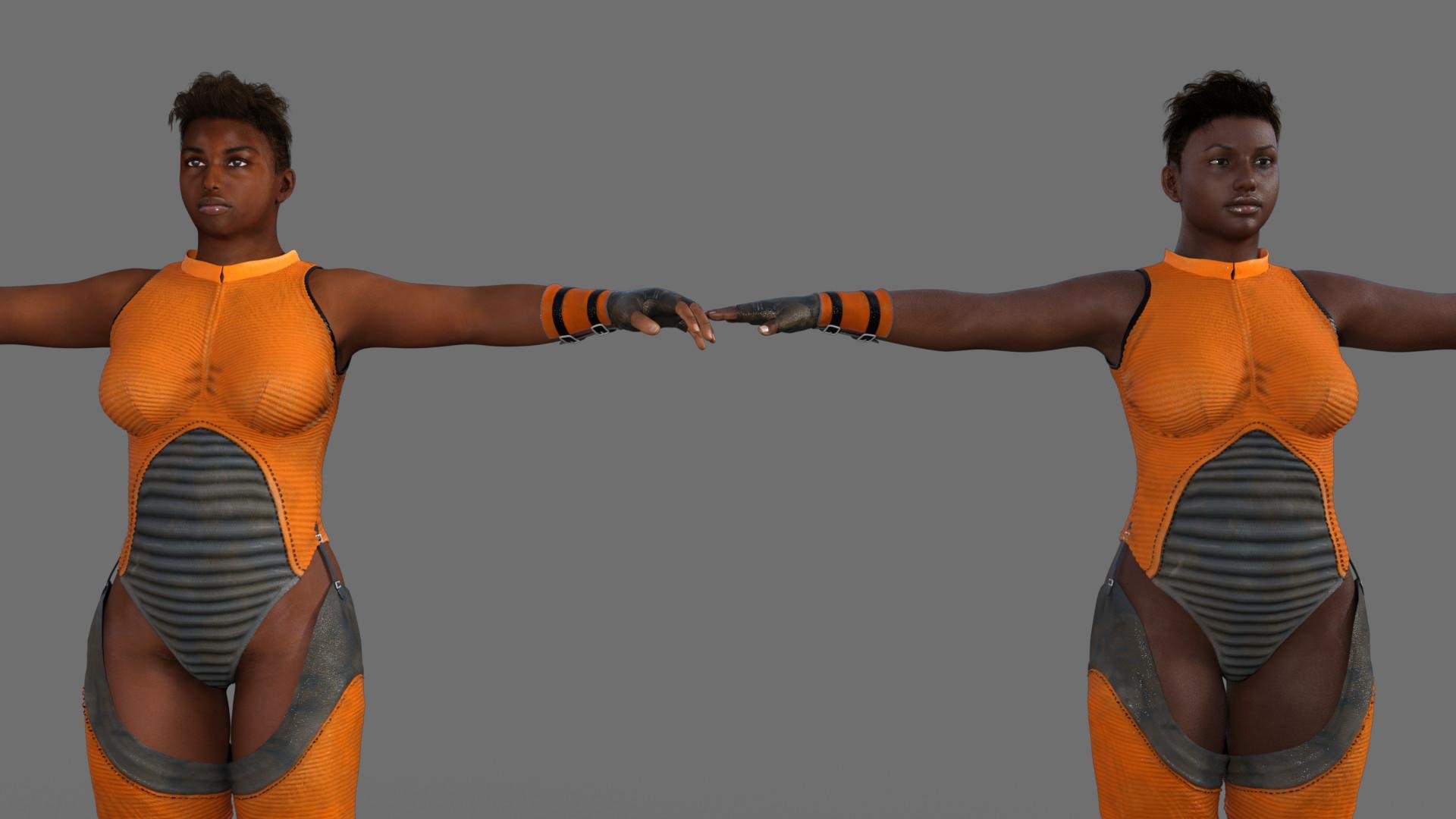
I tried transferring my one of my own characters by just moving dials by hand. The one on the left is Genesis and the right is G3. It probably took me an hour to make the new figure. I didn't want to buy a utility just to transfer the textures over, so I just added a G3 texture. Also, the original used the Stephanie character which I don't own for G3, but it worked out ok without it.
 New Dude - Elios 8
Thankful for a male, though his skin and morph do not appear to be on the levels of Nix & Edward & Floyd, or even Christian & Vladimir & Lee. Really more of a third or fourth tier quality behind Landon, The Brute, etc.
I'd really like for the Daz Originals menswear modelers to start giving us pointed, tailored shoulders on male coats and jackets rather than M4 shoulders. I have countless female outfits with pointed shoulders but male coats and jackets with pointed shoulders are frustratingly rare. I have some shoulder multi-morphs that allow me to ALMOST approximate the look, but not quite there.
Clothing & Transfer Utility ProblemHi All.
I've been trying to make some shorts I created in MD fit a Genesis 3 character as conforming clothing using the Transfer Utility.
What happens is the garment drops so that the crotch is down towards the knees. So I found a previous thread which is here - https://www.daz3d.com/forums/discussion/87901/clothing-and-transfer-utility-problem.
I tried Gederix's advice which is this
Select G1/G2 and then the item with ctrl+click in Scene Tab (in this order). Click on the tiny icon that looks like three lines and a triangle to the upper right of this. Activate Edit—Rigging—Transfer Rigging (Figure Space). Now it should be fitted to G1/G2 properly but still have its extra bones.
Now when I try this, the garment goes up to where it should be but - it's now shrunk so that the torso part of the shorts is only as wide as the legs. It disappears into the figure.
The last part of Gederix's advice is this - "Save the clothing item to library and reload. Do not move or morph G1/G2 before you do so."
My problem is I can't work out how to actually do this. There's no apparent way I can see to select just the garment and save it and when I try deleting the figure in the hope that the garment will hang around to be saved to the library, the garment disappears as well.
New Dude - Elios 8To be perfectly honest I never use characters straight out of the box and mostly buy male characters for new skins to enhance my Daz3D gene pool, but there are some pretty strong facial features on these characters to morph into great original characters.
Daz 3D is part of

Connect
DAZ Productions, Inc.
7533 S Center View Ct #4664
West Jordan, UT 84084Licensing Agreement | Terms of Service | Privacy Policy | EULA
© 2026 Daz Productions Inc. All Rights Reserved.