-
Morphs from G3 to G8
When you say "addon" are meaning there's an add-on to the script or are you referring to the script itself? I've heard the term "addon" bandied about on here a few times as of late and I feel like I'm behind the curve somewhat.
yeah i mean the script, is really hard how to proper call it, normally this type of script i see being called addon or mod in others places then is complicated know what to call him here.
Bummer, I thought I found a solution for a replacement for GenX but the script freezes after %27. Can you please help me?
It's a known issue: https://github.com/ArchitectMCP/GenNext/issues/1
I've not been able to test the new script much, but I THINK it might have something to do with the folder in "data" >> "Architect" >> "GenNext" >> "Holding" >> "Objs" - I think if you remove everything from that folder except the "null.gnxt" that seems to do the trick as far as getting it to go past 27%.
Every morph one tries to transfer puts Objs there and that seems to keep the script from going forward with the next morph transfer. That's just my guess though, as it seemed to work better once I cleared out the Objs from that "Holding >> Objs" folder and just left the null.gnxt file there and nothing else. One would have to clear that folder of everything except for "null.gnxt" after every morph transfer.
@Divamakeup - I saw your tip on Github and tried it, and didn't have any luck :( I've only been able to have it run successfully once or twice for the entire figure (head & body), but mostly it's worked for just the head. I'm really excited at the possibilities though! :)
Saving garment after using transfer utilityThanks for taking the time to reply.
I've tried what you suggested. I can't find it in the library once I've done this.
I've tried following the advice in a different thread on how to use the transfer facility for clothing created in MD. It goes out of synch with the figure.
I've tried following the advice in yet another thread on how to edit the rigging and it moves to the correct space but crumples to half the size in the Z axis.
I've followed your advice, as I say and nothing is viable.
I must be a halfwit or something. I cannot come to grips with Daz. Every time I've opened it over the past couple of years, it just ............. well. There's no point swearing and cursing about it and there's no point getting depressed about it and there's certainly no viability in persisting with it.
The library structure was a nightmare. The upgrade seems more rational but things have literally vanished. Things I spent money on have literally disappeared with the upgrade to Daz 4.10.
If I can't make my own assets and get them to work in Daz..........something as simple as a pair of trousers or a t shirt, then there's really no point.
I'll have to try to do something with Poser or Blender. Hopefully, the money I've spent on Genesis 3 figures won't be a total waste.
Thank you for taking the trouble to respond. Seriously. Thank you.
All the best to you and all of those talented people who can actually use Daz.
Before you go, (pardon my ignorance), can you search your computer for the most recent file when you save as a wearable to learn the path to where you are saving? Once you have the path, you can then decide where you want the wearable to go, create metadata (I can lead you to a tutorial) so that it shows up up in Smart Content, or drill down to find it in the library.
Morphs from G3 to G8When you say "addon" are meaning there's an add-on to the script or are you referring to the script itself? I've heard the term "addon" bandied about on here a few times as of late and I feel like I'm behind the curve somewhat.
yeah i mean the script, is really hard how to proper call it, normally this type of script i see being called addon or mod in others places then is complicated know what to call him here.
Bummer, I thought I found a solution for a replacement for GenX but the script freezes after %27. Can you please help me?
It's a known issue: https://github.com/ArchitectMCP/GenNext/issues/1
I've not been able to test the new script much, but I THINK it might have something to do with the folder in "data" >> "Architect" >> "GenNext" >> "Holding" >> "Objs" - I think if you remove everything from that folder except the "null.gnxt" that seems to do the trick as far as getting it to go past 27%.
Every morph one tries to transfer puts Objs there and that seems to keep the script from going forward with the next morph transfer. That's just my guess though, as it seemed to work better once I cleared out the Objs from that "Holding >> Objs" folder and just left the null.gnxt file there and nothing else. One would have to clear that folder of everything except for "null.gnxt" after every morph transfer.
Saving garment after using transfer utilityThanks for taking the time to reply.
I've tried what you suggested. I can't find it in the library once I've done this.
I've tried following the advice in a different thread on how to use the transfer facility for clothing created in MD. It goes out of synch with the figure.
I've tried following the advice in yet another thread on how to edit the rigging and it moves to the correct space but crumples to half the size in the Z axis.
Maybe I'm being too ambitious in trying to create and fit clothing without knowing the ins and outs of the program.
I think I'd better go and watch some tutes.
Thanks again for trying to help an incompetent newbie.
Morphs from G3 to G8When you say "addon" are meaning there's an add-on to the script or are you referring to the script itself? I've heard the term "addon" bandied about on here a few times as of late and I feel like I'm behind the curve somewhat.
yeah i mean the script, is really hard how to proper call it, normally this type of script i see being called addon or mod in others places then is complicated know what to call him here.
Bummer, I thought I found a solution for a replacement for GenX but the script freezes after %27. Can you please help me?
srry i not tried yet use this script yet, then i can't help for now.
hey guys going back to my "crossgender" talk back, here my first attempt to make a "female reptilian and i can say which it worked really nice:
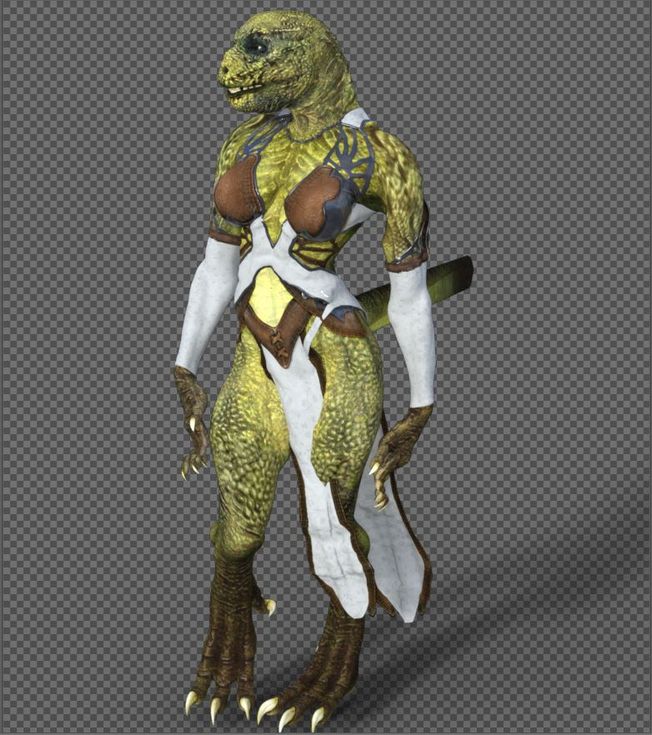
the only issues i get where on the tail, because the tails is a "male acessore" and i used the autofit on it and the other issue i noticed was some poses with the hands, like the fingers streching too much but overal, the transfer was almost a sucess, to make the repitilian "more round and big breast" i've used victoria 6 body as base, but i'm planning to use the true genesis 2 female body as mold base then add the body later, because when i was making the morph for head and body it ended a little bugged because the head also morphed the body a little more due to victoria morph but i'm planning to fix it later, if everything works fine then it's really possible to make a cross gender, even without need to use teh xgen script, i did that following the tutorial video someone posted few pages ago and this is a full female character which can use any "female morph" or cloth for genesis 2, soon i'm fix the lizard i will get my hands on the minotaur to test it too, if everything goes as planned then it can be done with any genesis from 2 to 8, the only issue would be which for the "texture" you would need to use a swap uv addon from here for genesis 3 and 8 characters, genesis 2 looks like don't have that issue since it's seens which both male and female share exactly the same uv form, then you can use a male texutere in female character and the opposite while g3 and 8 would need a addon from here to work(well so far at last the lizard base male texture can be used without any trouble for a female character).
Saving garment after using transfer utilityHow does one select a clothing object to save to the garment library?
There doesn't seem to be a way of selecting it separately to save after using the transfer utility. Deleting the figure in the hope that the garment will hang around to be saved doesn't work. The garment disappears with the figure.
KinleyHair to OOTBaseHair Cap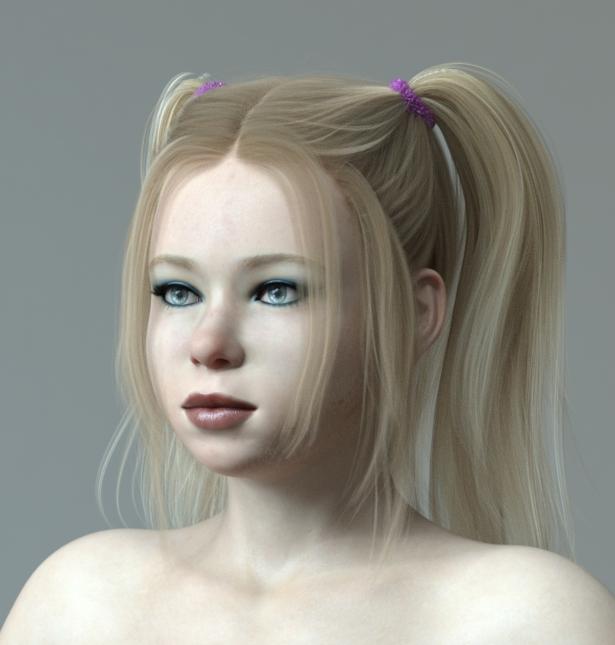
Hi everybody,for this freebie, you'll need: https://www.daz3d.com/double-tails-hair-for-genesis-3-and-8-females
and: https://www.daz3d.com/kinley-hair-with-dforce-for-genesis-3-and-8-females
double Tail Hair by outoftouch is great, but too bad its tails are not dforce ready.
So, my solution is to make the dforce ready kinley Hair tails fit to outoftouch's double tail hair Cap.
I've added two morph targets, that will do that.
You will find those morphs in your Parameter tab under "MASTERSTROKE"
"KinleyHair OOT fit" will put the tails in the right position to fit the OOt Hair cap, "KinleyHairCap gone" will hide the Kinley Hair base.when you use dforce, I recommend to set the opacity values of every KinleyHairCap related surface to zero.
Hope this works for you.
BTW: In order to make the two different hair shaders match, search for: PhilW's "Hair LustreShaders". This helped a lot with the hair materials.
https://sharecg.com/v/93980/browse/21/DAZ-Studio/KinleyHairtoOOTBaseHair-CapAIUTO...CHI CONOSCE L’ITALIANO? PARTE DODICIPurtroppo non tutto è già pronto...
Un buon 70% delle mie librerie è composto da morph, textures e prop creati da me.
E penso al "pezzo" perchè mi dici che sono tutti schifati... Quel elemento è l'unico di cui non si piò discutere apertamente.Infatti, e forse è proprio per questo che a tante persone piacciono queste storie, visto che non sono facili da fare.
Ma figurati, quella parte se proprio vuoi farla (a me è capitato per una commissione, altrimenti non mi piace soffermarmici) è la più facile di tutte, devi solo comprare 2 prodotti in quello store che non si può nominare.
Schifati nel senso che fa strano dire che faccio storie transgender xD
Che poi una buona percentuale di quelli che mi seguono lo fanno solo per i render normalissimi non collegati alle storie.AIUTO...CHI CONOSCE L’ITALIANO? PARTE DODICIPurtroppo non tutto è già pronto...
Un buon 70% delle mie librerie è composto da morph, textures e prop creati da me.
E penso al "pezzo" perchè mi dici che sono tutti schifati... Quel elemento è l'unico di cui non si piò discutere apertamente.AIUTO...CHI CONOSCE L’ITALIANO? PARTE DODICIBeh... Con Genesis1 lo puoi fare in modo nativo...
Hai tutto lì, senza dover comprare plugin o morph speciali. Ti basta spostare uno slider e passi da uno all'altro.
Se poi non vuoi spendere e avere "il prodotto completo" puoi trovare il "pezzo mancante" su ShareCG, cerca la libreria di Ghastly. Se frughi bene puoi torvare anche la pari grado di genre opposto li.Grazie per i consigli :)
Sì lo so che Genesis 1 ce l'ha di default. La mia schifosissima primissima storia la feci con loro.
Non so perché pensi sempre al "pezzo" quando parlo di transizioni, di solito sono pure vestiti quando accade quello xD
Ho già comprato di tutto e di più! Alla fine è una parte importante delle mie storie, e il Patreon sta andando bene.
E' enorme quella libreria! Stai parlando di G1 o di G8?
Ho già Skin Blender, UV Swap, i morph transgender rigged (che portano G8F identica a G8M e viceversa).
Ho imparato a mettere tutti i morph su un unico slider.
La scocciatura è che ora come ora mi serve scrivere prima i dialoghi, partire dalla G8F finale, andare a ritroso passo per passo e salvare via via gli shape preset...una scocciatura :/
Chi usa Genesis 3 invece ha GenX che crea direttamente lo slider da un personaggio all'altro.
Ho provato questo tanto acclamato GenMaster ma mi pare proprio inutile da questo punto di vista.AIUTO...CHI CONOSCE L’ITALIANO? PARTE DODICIBeh... Con Genesis1 lo puoi fare in modo nativo...
Hai tutto lì, senza dover comprare plugin o morph speciali. Ti basta spostare uno slider e passi da uno all'altro.
Se poi non vuoi spendere e avere "il prodotto completo" puoi trovare il "pezzo mancante" su ShareCG, cerca la libreria di Ghastly. Se frughi bene puoi torvare anche la pari grado di genre opposto li.Issue with EJ Body Shape and Detail MorphsThat morph is linked by addition to the Abdomen Upper Bend and to the Body Rectangle shape, so it kicks in when either is applied - I wonder if one of those should be multiplying rather than adding, so it shows only when both are set. You could open a Technical Support ticket to query this. In the emantime just zeroing it will clear the effect, it's showing as used becuase it has a non-zero local value to offset the non-zero value from the bend.
Issue with EJ Body Shape and Detail MorphsYes, I see the morph in Currently Used.
There are no warning messages when I load the scene with figures.
After further testing it appears the morph appears when a pose is applied to the figure. I loaded a new scene, loaded base Gen 8 Female. No changes at all to the base figure. Applied a pose and the 'Upper Abs Only' morph suddenly appears in the Currently Used list. Perhaps this is why the morph doesn't disappear from Currently Used when it is dialled to 0 like other morphs - because the pose was still applied?
Issue with EJ Body Shape and Detail MorphsDo you see the morph on the figure in Currently used? Are you getting any warning when you load the scene with your figures? Did you load a fresh figure and does it happen to the new one?
Daz Studio Beginner Tutorials (UPDATED EVERY SUNDAY)Hi I'm Parmy!
I'm a Daz Studio Artist, who is here to start my #Joy movement and bring #Joy through my art, comic books and Daz Studio Tutorials and Guides.
I created these Daz Studio Beginner Tutorials so that you can save TIME, MASTER key concepts & level-up your SKILLS!
Part 1 will be covering:
1. The User Interface
2. How to add a figure and an environment
3. How to morph a figure
4. Change the pose of a figure
5. How to move a figure in the scene
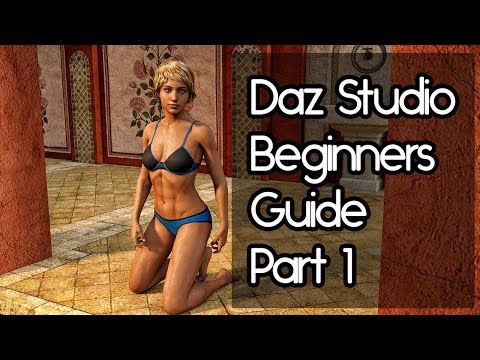
Kind regards
Parmy
Issue with EJ Body Shape and Detail MorphsI bought and installed EJ Body Shape and Detail Morps yesterday. Now one of these morphs, 'Upper Abs Only' is being dialled in on characters in scenes I saved before I bought the product. I have never used this morph before.
I dialled it to 0, but instead of disappearing from the list of currently used morphs it persists.
I shaped a new character subsequent to installation of the morph package and even used one of the EJ morphs. I did not use 'Upper Abs Only'. When I open the saved scene the 'Upper Abs Only' morph is absent.
Is this a bug? Can anyone suggest how I can get rid of the 'Upper Abs Only' morph?
Matt Castle does some stuffVery rough test render of transferring Kate over to G8F; Singular Blue's GenNext script was used to transfer the SD shape, with Blender used to convert the HD morph. I've set the HD component rather too high in this render, but it's at least a solid proof of concept for the method.
Fortunately, tomorrow I should no longer be forced to render on a low power laptop, so I'll have the opportunity to do something a bit more robust than character tests and half-rendered mini-scenes.
 How about partial Smoothing Modifiers?
You can create a morph from a shape that was made with the smoothing modifier and collision. Export an OBJ of the posed and smoothed figure in base resolution hide everything else in the scene, the collision will still work with the hidden collision items. Take into account that a squished butt not just compresses but also maintaines volume so you would need to add a DFormer and scale it up to compensate the compression maintaining the volume.
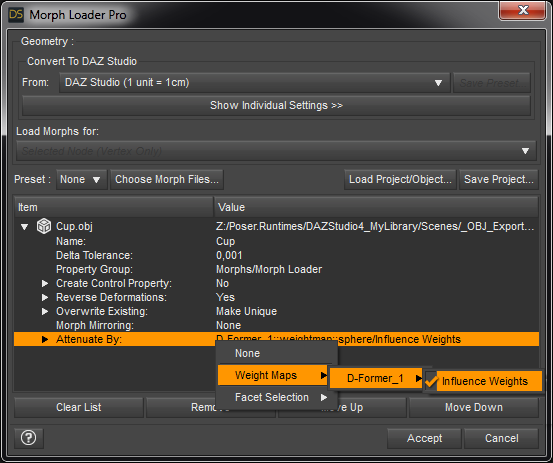
Next add a second DFormer to the figure and switch it to weight map influence. You can do that by selecting the DFormer then activate the Node Weight Map Brush tool and open the Tool Settings pane. There will be a Unused Map called Influence, press the button Add Map. The default sphere influence of a DFormer is best placed on a figure in default pose but once you set the DFormer to Weight Map the DFormer Field placement is ignored and you can paint the influence on the weight map with the brush dircetly onto the figure where lateron the smoothing should be applied.
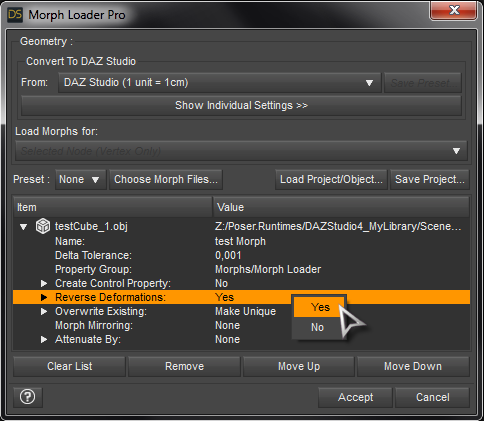
The idea is not to use the DFormer to shape the mesh but to select the Weight Map influence in the extended options called Attenuate By of the Morph Loader Pro while you are loading your "smoothed" shape exported OBJ. The DFormer Weight Map influence selected in Attenuate By orption will add the smoothed shape only on the pained area of the figure.
This method is a bit more complicated with the extra step of exporting but will allow you to partialy smooth the mesh and load the collision shape. Also you are limited to the figures base mesh smoothing if you want to load it as a morph. If your figure was exported with a character shape and poses applied also don't forget to select Reverse Deformation in the Morph Loader Pro options.
 Has anyone had issues fitting dforce G8F stuff to G3F?
search for: sickleyield clothing transfer deviantart
She has a good tutorial on fitting clothes back and forth between G3 and G8 and vice versa, foolproof enough for me to use. I do own several of the conversion scripts she did with Riversoft, and they are faster, but the tutorial method is more reliable IMO. For using converted G8 dforce clothing on G3, I find it helpful to get G3F into a G8F position. The tutorial talks about what that entails.
apply characters and sub-charactersThanks

Quando compri un personaggio che per esempio richiede un altro personaggio base per funzionare cosa significa? che se non avessi installato quel personaggio base, quel personaggio non funzionerebbe? per esempio, ho Victory 8, quindi ho caratteri che richiedono Victory 8. Cosa dovrei fare? dovrei prima mettere in scena la genesi 8 e poi aggiungere Vittoria 8 e poi il personaggio? Oppure posso applicare il personaggio senza bisogno della vittoria 8. Spero che con il mio pessimo inglese riesca a farmi capire lo stesso. Grazie per la tua cortese risposta
La maggior parte dei personaggi che dicono di "richiedere" un altro personaggio usa un po 'del morph di quel personaggio (o morph testa o morph del corpo o entrambi) e varia da carattere a personaggio quanta parte del morph del personaggio "richiesto" viene usato). Se non hai il carattere "richiesto", puoi comunque usare l'altro personaggio che lo richiede, ma non avrà lo stesso aspetto. Non dovrebbe esserci alcuna necessità di "mettere in scena" qualcosa, basta caricare il carattere (sia dalla scheda Contenuto intelligente o dalla scheda Libreria del contenuto) solo i morph che hai installato saranno disponibili, quindi potresti ricevere un messaggio di errore quando carichi il personaggio se il carattere richiesto non è installato, ignora semplicemente il messaggio di errore. :)
Anche se il personaggio può sembrare molto diverso senza il carattere richiesto, a seconda di quanto del morph del personaggio richiesto viene solitamente usato con il personaggio. A volte il personaggio sembra bello senza il carattere richiesto, altre volte avrà un aspetto piuttosto brutto, ma varierà.
You have to be careful if you're using previous generations, these Daz base characters use (mostly) different UV maps, not having the matching UV map results in weird looking textures.
Here's a render with the original Bethany 7 skin on a G3F without having/ using the Bethany 7 UV map, but it depends, if you see a character which is made for Bethany 7 e.g.,
but there's something in the description like "This character uses the G3F Base Mesh", you are safe (except for the morphs).
Daz 3D is part of

Connect
DAZ Productions, Inc.
7533 S Center View Ct #4664
West Jordan, UT 84084Licensing Agreement | Terms of Service | Privacy Policy | EULA
© 2026 Daz Productions Inc. All Rights Reserved.