-
transfer utility problems, Help!
Another question of the same topic. Even it is doing a lot better than before I get yet some pinching. Any solution for this?
I have set the source as morph, choosen the correct morph and then set the reverse source shape from target
I basically would expect that the shape should not change at all when doing the transfer utility, and afte that it can follow the poses. Not sure why deforms in this way, even a lot less than before.
looking for female Sasquatchno..there are no textures for the female because the geografted female parts will not fit on the male
and I make anatomical element textures for almost every character I make male and female
With all that fur I am terrified about what sort of renders people are intending doing with the female morph, not that I should judge just the mind boggles
https://www.amazon.com/gp/product/B00US9H36W/ref=dbs_a_def_rwt_hsch_vapi_tkin_p2_i5
How to apply altered model from hexagon to daz?That sounds as if a different scale is being applied - or possibly as if there is scalimg baked into the morph. Was the figure scaled when you sent the clothing to Hexagon? If so try setting the scale to 100% and try again.
How to apply altered model from hexagon to daz?I'm new to daz. I have read maybe all of the question related to morph in hex to daz but that didnt work. I have clothes model that overlap with each other in specific area on gen 8 female. I want to alter one of the clothes model mesh so it looks a bit bigger. I select the clothes model and click file -> send to hexagon. I made one simple manipulation, I altered one of the face using soft selection with radius to translate in x-direction so it looks bigger. I click send to daz studio. The morph loader pop up and I click accept. I found my morph on the parameter with 0 value. When i increase the value, it is not alter the specific area in the model like the one I edit in hex but all of it surface become bigger. My question is how to apply the altered model in hex to daz?
SimTenero Randomizer Characters Showcase Thread Everyone WelcomeI have a ton of morphs but I tend to use only a few normally but using the Randomizer allows me to use more of the morphs to acheive different looks .I'll start with a full character then play with the Randomizer to change the look then throw in Cartoonizer or Toon Generations to Toonify it . Fun Fun I've made the presets for whole morph set then broke them down into individual sub groups you can use higher percentages with the sub groups ....
transfer utility problems, Help!I'm not entirely following what you are doing, but if possible clothing should be modelled around the base shape and if that can't be done then in the Transfer Utility dialogue you need to set the Source Shape to whatever you modelled around and then in the options check Reverse Source Shape From Target..
transfer utility problems, Help!Im trying to add some pants to a character that has been created by a morph. The morph has been set as character with the script shape rigger plus.
When I drop the OBJ with the pants, then I run the transfer utiliy and the pants don't chage at all his shape in the original not morphed character (a G8 female) but when morphed they contract, keeping the relative shape relation with G8 female and not the new morph. Any solution?
What I would expect is the pants don't change his shape at all and being able to deform with any pose of the new morph, but instead they are using as reference G8 and not the new morph.
I have tried to tick off the morph option in the transfer utility with no difference,
AIUTO...CHI CONOSCE L’ITALIANO? PARTE DODICIVisto che ci sono, e che sapete un milione di cose, ci provo.
Questa è un vecchio uomo, nella pagina iniziale di una nuova storia. L'ho trasformato in una 21enne. Vorrei chiudere la storia con lei negli stessi vestiti, che però mantengono le stesse dimensioni, e poi usarci dForce sopra per aumentare il realismo.
Sapete come fare?

Ho provato a levare autofollow dai morph, ma è manuale per ognuno di essi e poi ci sono un sacco di poke through e non ci ho capito niente...
How To Prevent The Clothes From Changing With The Figure?Here I am again. Maybe I'll be luckier this time!
So, I'm doing a practical example of what I'd like to do.
I've attached a figure of an old fast man with some clothes.

I'd like to transfer those clothes to a shorter and thinner figure, without losing their current shape.
Then, I'd like to use dForce on them, to make them look baggy, oversized and more realistic.Does someone know how to do this, please?
looking for female Sasquatchno..there are no textures for the female because the geografted female parts will not fit on the male
and I make anatomical element textures for almost every character I make male and female
With all that fur I am terrified about what sort of renders people are intending doing with the female morph, not that I should judge just the mind boggles
Miscellaneous Hexagon Modeling@Kitsumo Thanks on the numbers, now I have to make the dartboard.
Indeed how it goes witht the workflow... With the following evidence:
^__^
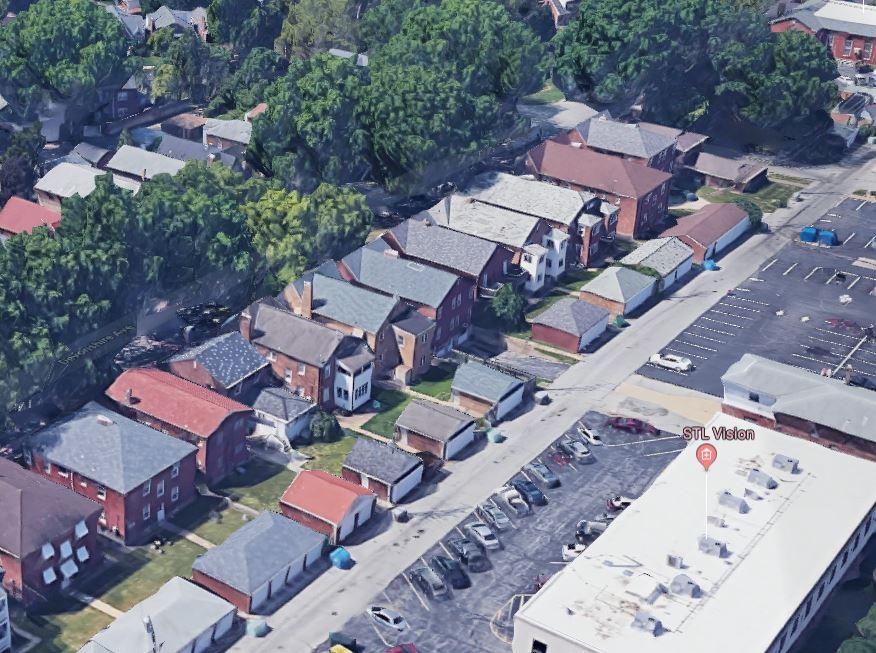
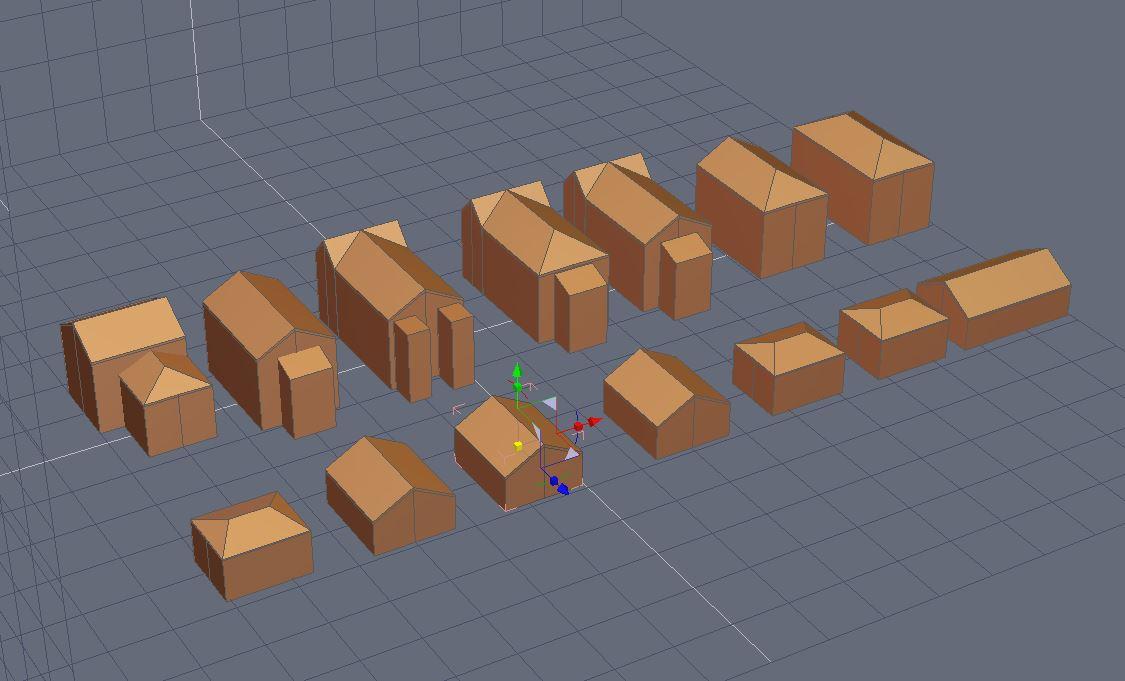
Here is an experiment observing the simple geometric variation of apartment buildings.I think it is possible to create one model that could with the help of a preset morph. material combination generate the variety of low-poly houses and apartments in a neighborhood. I know somebody has already done this, no?
 looking for female SasquatchWell, now I have to ask - where is Bigfoot's big...anotomical element? It says it comes with that, but I don't see it in the, um, package!
It comes with textures for it, not the part itself.
If you apply the part from your library and then apply the textures, it should all be good
the "anatomic elements" texture is just for "male" or you also make one for "female"??, this is something i noticed, you rarelly make "anatomical elements textures", specially for female.
about the previous "gender topic", i'm also learning in try to fix this for myself, the "only one gender issue" after learn how to create some basic morphs, the only current issue is the fact which G3 and G8 male and female don't share the same "body UV", which means you can't use a female texture on a male or the oposite unlike G2 where they could use the same UV making easy to use the oposite texture on the other character, i did that for the reptilian G2 created my own female version and using the male textures, it work perfect, would be really good and awesome see you add at last a "female morph" to old male characters, the only issue would be lack of "female moprhs" like breast morphs but not really a big deal and better than nothing
keep the awesome work.
Bra less morph?I've always assumed that's what the "Breasts Natural" morph is for.
Same here! there are a tons of morphs in the different morph packages avaliable that give your model saggy breasts
Bra less morph?I've always assumed that's what the "Breasts Natural" morph is for.
AIUTO...CHI CONOSCE L’ITALIANO? PARTE DODICIHai presente i Clones? Stesso funzionamento, grosso modo.
In pratica si prende la Figura1, le si dà la forma della Figura2 in modo che i poligoni siano quanto più simili possibile e gliela si fa "indossare", poi si aggiunge alla figura 2 il morph che vuoi trasferire alla Figura1. Figura1, che ora si comporta come una tuta integrale, seguirà la forma di Figura2.Poi si esporta Figura1 con la nuova forma e si fa il Morph Loader Pro sul originale... Ed ecco trasferito il morph da una generazione all'altra!
AIUTO...CHI CONOSCE L’ITALIANO? PARTE DODICIMa scusatemi, tecnicamente come fa un morph ad essere passato da una generazione ad un altra? sono differenti il numero di poligoni, di vertici, e cosi via. Non riesco a capire come possa funzionare.
Bra less morph?Is there a morph to give G8F a bra-less look? What I mean is a well endowed woman wearing clothes but not any bra support. I know V4 had some morphs like that but does G8F have any?
More Non-photorealisitic Renders (NPR II)Playing around with G2F. I've injected Hitomi for G1's head morph into the mix via GenX.
Fantastic! The lighting has complimented the shading of skin for a believable npr style. Nice iris and pupils too.
Remote Future: Collision SystemIt would be nice but, I think Daz studio would be better off with a 3D game engine to create quick and instant animations! I believe this because it is a pain rendering animations in Iray and 3delight too slow(this is why I purchased iclone 7 and the transfer software to get my figures into iclone 7). I would also beefup the OpenGL engine to have shadows and more options because that render engine is my go to render engine on my cheap laptop and it would open up more rendering options for Daz Studio and more customers. A true collison system would be like dforce simulation calculations and would slow everything down without a higher end computer and ram. Don't get me wrong on my workstation dforce and iray work great but not everyone can afford expensive hardware.
Hardware is getting more powerful by the day, what we easily do today was unthinkable some years ago! :D
Remote Future: Collision SystemIt would be nice but, I think Daz studio would be better off with a 3D game engine to create quick and instant animations! I believe this because it is a pain rendering animations in Iray and 3delight too slow(this is why I purchased iclone 7 and the transfer software to get my figures into iclone 7). I would also beefup the OpenGL engine to have shadows and more options because that render engine is my go to render engine on my cheap laptop and it would open up more rendering options for Daz Studio and more customers. A true collison system would be like dforce simulation calculations and would slow everything down without a higher end computer and ram. Don't get me wrong on my workstation dforce and iray work great but not everyone can afford expensive hardware.
Daz 3D is part of

Connect
DAZ Productions, Inc.
7533 S Center View Ct #4664
West Jordan, UT 84084Licensing Agreement | Terms of Service | Privacy Policy | EULA
© 2026 Daz Productions Inc. All Rights Reserved.