-
Zone smoothing G8F
Hello, I am working with a G8F character that I have dial spun and applied HD detail morphs to the character. At sub-d 4 level all the details render great except for an area around the chest area that has a visible line from a morph that needs to be smoothed out. If i add a smooth modifier to the character it smooths all the morphs and hd details over the whole character. Was hoping there was a zone smoother for G8F like this one https://www.daz3d.com/zone-smoother-for-genesis-3-female-s, but I don't think there is. Is there a product or DS technique I can use to smooth a particular zone?
Toon Hero for Genesis 8 Male
I think it's just the girl 8, I'll go back and check. It's from the promo where she's carrying the hero on her back. I may have just not dialed the head in all the way.3dOutlaw said:I am curious about the promo image for the Sale, it has the Toon Hero in there, and also other things like the catgirl, but on the top right appears to be a stylized female, which may be a counterpart? She does not seem to match any of the 8 releases...unless I am missing it?
Also, question for anyone that got Toon Hero...can the head and body be dialed in seperately, or is it a full figure morph?
 Toon Hero for Genesis 8 Male
I am curious about the promo image for the Sale, it has the Toon Hero in there, and also other things like the catgirl, but on the top right appears to be a stylized female, which may be a counterpart? She does not seem to match any of the 8 releases...unless I am missing it?
Also, question for anyone that got Toon Hero...can the head and body be dialed in seperately, or is it a full figure morph?
Looks to me like the toon female is The Girl 8 (who looks more like Callie 6 now than The Girl anymore).
Laurie
how to apply morph sliders onto another Figure (same generation)Hello,
I have a Generation4 figure with some attached morph sliders, and now i want to be able to have these sliders on other Victoria 4 figures.
I want to be able to transfer these morphs to other V4 figures.
The same way i can "inject" different morphs with the power loader (or by clicking the provided injections of say Freak, Aiko, Girl etc)
Most preferred would be to be able to add morph sets to the power loaders, but would be satisfied to have a file to click on, then getting the morph sliders available to the figure.
Maybe I'm looking in the wrong places, but all that i find seems always the other way around:
Saving Morph assets saves specified morph to a certain figure, so that it always loads with said morph sliders.
Which is not what i want.
Toon Hero for Genesis 8 MaleI am curious about the promo image for the Sale, it has the Toon Hero in there, and also other things like the catgirl, but on the top right appears to be a stylized female, which may be a counterpart? She does not seem to match any of the 8 releases...unless I am missing it?
Also, question for anyone that got Toon Hero...can the head and body be dialed in seperately, or is it a full figure morph?
Ellithia 8Though now I kinda wish the HD morph wasn't so expensive...
I raised her render subd to 3 and I got some nice details from the base model. Im wondering if the HD might be a bit severe?...
Creating Morphs in Objects?Use a dForm to chnage the shape, then use the Spawn Morph button in the dForm pane. or export as OBJ, modifiy without chnaging the vertex count or order in a modeller of some kind (such as Hexagon), and reimport (using the same preset) via Edit>Object>Morph Loader
Ellithia 8Alright, let's give this a try...
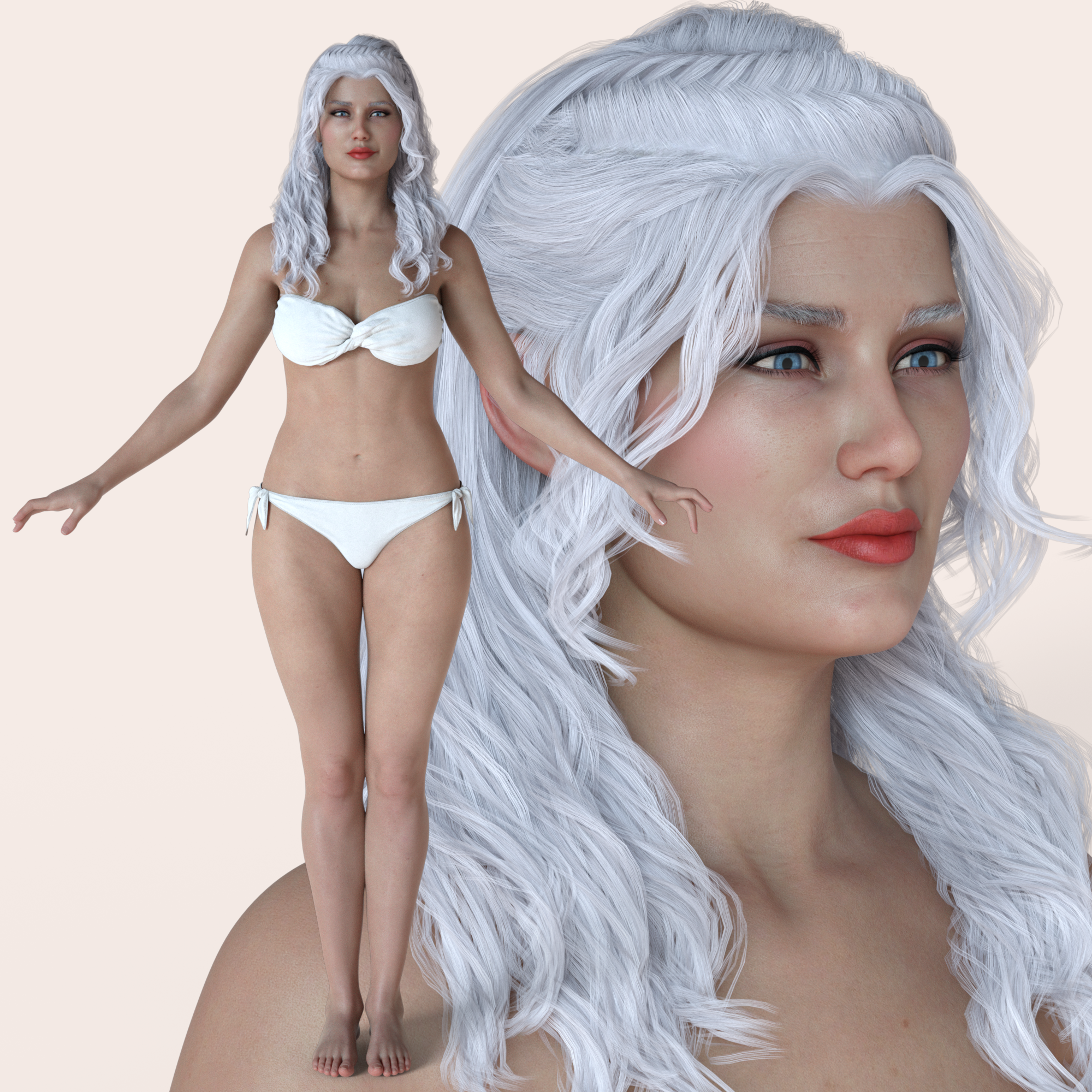
Yeah, Iron Warrior doesn't seem like a really fantastic fit for a character description. She seems a little less Athena and a little more Hera. Otherwise, the body shape is great! She could make a good stand in for Lilith with the right texture pack and clothes. Though now I kinda wish the HD morph wasn't so expensive...
AIUTO...CHI CONOSCE L’ITALIANO? PARTE DODICIPoser non è mai stato di DAZ da quel che ricordo, solo un antagonista col quale ogni tanto si collabora.
Mi spiace vedere Smith Micro affondare... Prima Content Paradise e ora Poser. Credo che non siano riusciti a rinnovare abbastanza Poser, negli anni non ho mai visto nessun progresso eccezion fatta per le recentissime Morph Zones. E poi anche i modelli supportati sono atroci. Si salva l'ultima ragazzotta ma solo perchè scimmiotta il sistema di DAZ Studio.
Quello che li teneva ancora vivi era Moho, poi Anime Studio e ora nuovamente Moho. Sono troppo lenti, ci hanno messo dieci anni ad aggiungere il supporto nativo Bitmap e a rinnovare la gestione degli oggetti 3D.Uno che sta nel mondo storie TG da 20 anni una volta mi ha detto che la Daz nasce da un gruppo di ex dipendenti Poser che si sono messi in proprio, e poi hanno assorbito il software originale. Non c'è anche una sezione del forum su Poser?
Un'altra volta avevo letto su Reddit che un investitore si era lamentato dell'esistenza di Daz Studio perché la Daz già aveva 3 programmi in quell'ambito e quindi si faceva concorrenza da sola.
Poi magari mi ha detto cose non vere.
Per quanto riguarda i capelli, non ho capito. Va bene che non puoi venderli, ma non puoi nemmeno farli per te stesso?
Sono sempre contrario ai limiti messi a prescindere artificialmente. Come Intel che blocca l'overclock su processori non K, o Nvidia che ha tolto l'accelerazione nativa dei CUDA core per vendere più Quadro.
AIUTO...CHI CONOSCE L’ITALIANO? PARTE DODICIPoser non è mai stato di DAZ da quel che ricordo, solo un antagonista col quale ogni tanto si collabora.
Mi spiace vedere Smith Micro affondare... Prima Content Paradise e ora Poser. Credo che non siano riusciti a rinnovare abbastanza Poser, negli anni non ho mai visto nessun progresso eccezion fatta per le recentissime Morph Zones. E poi anche i modelli supportati sono atroci. Si salva l'ultima ragazzotta ma solo perchè scimmiotta il sistema di DAZ Studio.
Quello che li teneva ancora vivi era Moho, poi Anime Studio e ora nuovamente Moho. Sono troppo lenti, ci hanno messo dieci anni ad aggiungere il supporto nativo Bitmap e a rinnovare la gestione degli oggetti 3D.si chiama proprietà e privileggio :p ... diciamo che lavorare per la DAZ deve pur darti dei vantaggi :D :D ...e cmq non è così semplice ;)
No, si chiama "fartela vedere ma non dartela"

Se dai un occhio al promo vedrai che sbandierano la peluria dinamica come se non ci fosse un domani, facendoti intendere che "anche tu potrai".
Ma, come dicevo, il non avere il supporto direttamente dal tool importa poco, basta esportare in OBJ e aggiungere un pò di weight map e DForce. Magari il tool applica meglio un buon gradiente di weight e permette di scegliere con maggiore facilità i vari parametri, ma è fattibile.
A meno che DAZ non rimuova l'opzione di esport! (ಠ_ಠ)
Why is there still no official Genesis 3 Powerpose template? (solution)The Genesis 8 templates are saved here for example: Content Library/data/DAZ 3D/Genesis 8/Female/Tools/PowerPose
For Genesis 3 you can also save the tempalte here: Content Library/data/DAZ 3D/Genesis 3/Female/Tools/PowerPose
I'm currently working on a solution for the Genesis 3 face rig: PowerPose Templates generator script
I figured out a few things about PowerPose the last few days. First right-click on the pane gets you to the Edit Mode but not if you are currently using genesis 8 those files are encrypted so you get an error message.
While starting on creating a face template as an addition to the PDSmiths updated version for Genesis 3 and saving it with the PowerPose pane (you can do that in edit mode) I realized that you can save a "Base" and also "Add-On" templates that you can choose from in the pane.
So you can have multible templates for one figure - what people did until now is I think editing the base template and using only the files in the PowerPose plugin path inside of the Daz Studio application path eg. DAZ 3D/DAZStudio4/plugins/PowerPose. See that I have selected the new Set "Genesis 3 Female with Face Control" in my first screenshot there is still the original Base Set available.
If you think of how the PowerPose plugin update handles the template Sets now, almost like figure morph assets, is an advantage in my oppinion. You have a seperate templates.dsx and a bipedDynamics.dsx file for every figure and gender now.
The "Add-On" template Sets gets saved in "Content Library/data/DAZ 3D/Genesis 3/Female/Tools/PowerPose/Sets/[templateSetName]" I did save my edited Genesis 3 template there.
Then I copied it over to "Content Library/data/DAZ 3D/Genesis 8/Female/Tools/PowerPose/Sets/[templateSetName]" and it worked. Now I can select another editable template for my genesis 8 figure from the top menu in the PowerPose pane. Also the Template Set name showen in the PowerPose pane gets directly read in from the folder name so you don't get errors if you create and edit those "Add-On" Set folders.
See the second sceenshot where it says New Version. BTW that is how my G3F template looks like. I will use a resolution of 480x720 that is what the G8 uses so you can change the backround png file anytime if you don't like tha face. I wil ltry to match the points location to the original.
My PowerPose Templates generator script will create all code for the control points of all face rig bones that you can then copy into the G3F-Face.dsx or G8F-Face.dsx template file.
Currently with my script the points are all very close so you would need to eigther edit the x/y coordinates manualy in the text file or load this template file in DS and use the Edit Mode with right-click on individual control points to place them properly on the provided backround image. What my script dosn't do is creating Node Group Points where multible bones can be controled with one point. This is something you have to setup manualy in Edit Mode if you like.
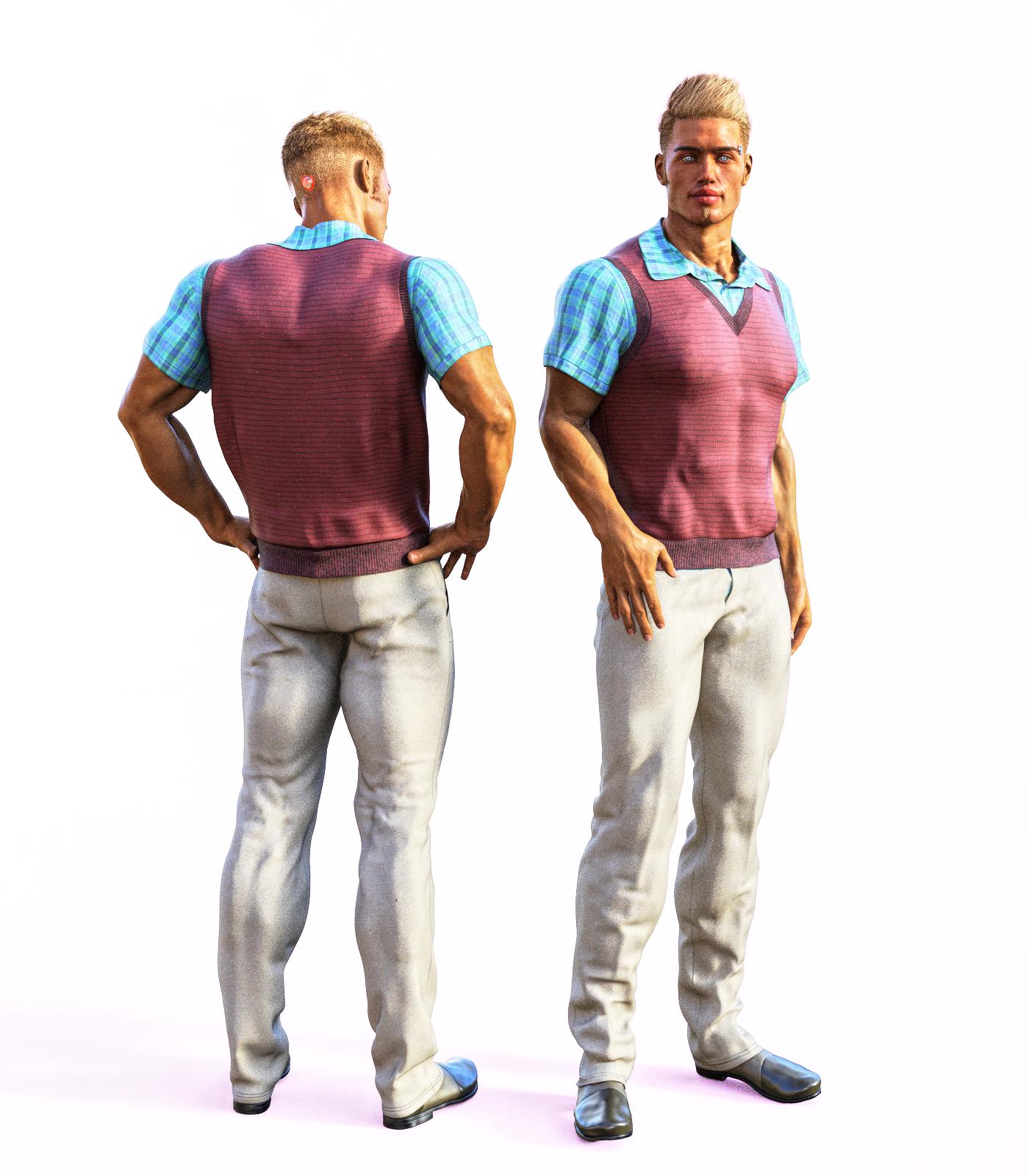
SereneNight's Sci-Fi Fun Thread 2Dforce Semi Casual Outfit for Genesis 8 Males. This was released yesterday and looks really good. I ran into some clipping with the shirt and the sweater vest, but the shirt and vest have some corrective morphs, and the realism of the fit, is a refreshing change.
I like the crispness of the collar, and you can morph the shirt to untuck which was a nice touch.
 Is there a way to record a script from actions? Want to change max/min values on rotation...
You can mass editing properties / morph sliders like the rotations with the Parameters pane just right-click on it to go to edit mode and now you can select all rotations at once with Ctrl+Click or Shift+Click. Then right click one of them and in the menu choose Set > Set Min/Max also make shure Use Limits is enabled also available in this menu. Finaly you can also lower the Set > Sesitivity on all of them at once - floating point values allowed maybe set sensitivity to 0.02. Sometimes the universal tool translations in the viewport can be too fast then I set the translation values to a sensitivity of 0.002 and work with the Parameter pane sliders instead.
Sim Tenero Randomizer 2 vs originalThat's not exactly what I was meaning. I was talking about a way to get a random shape I like but then automatically deselect the morph check boxes in the preset so I could keep the shape but not have any morphs selected. Then I could add new morphs to the preset to randomize. That was before I fully understood how the presets work. Now I see you can have more than one preset loaded at a time, each with their own morphs and each one can be deleted. So, I can easily start with a fresh list whenever I want.
 Who's that girl??
You're a legend, thank you so much!
This one with bigger lip morph:
https://www.daz3d.com/p3d-danny-for-genesis-3-and-8-femaleSim Tenero Randomizer 2 vs originali bought 2 on sale..super tedious to set up presets. check check check check, oops double hit..check check check check ... over and over a million times.
I just got it while on sale too. It's been in my wish list for a long while. There really is a lot of clicking, especially if you have a bunch of add-on morph products. I still really like the plugin and what it does though. It can take a lot of time for me to go through all the morphs and dial them one at a time to see how it changes the look of a character, so selecting a bunch of morphs I want to use and pushing a button to create random characters isn't any more time consuming in my case. It's also kind of fun to watch the changes. Sometimes the outcome is quite shocking and ridiculous if I get too carried away with adding morphs but also humorous. It would be nice if there was a way to add a bunch of morphs by clicking a product grouping instead of having to add them all one at a time. Another useful feature would be a button to uncheck all the selected morphs at once so we can select new ones quicker. I can see myself using it often even as it is though.
Zero Figure shape will uncheck all the morphs or Zero on the preset will do that too
Renderosity owns Poser?A Paraphrased repost of my comment on the rendo announcment thread:
Do not chase after genesis in poser unless they are going to properly use the DSON Spec as the developer of the DEX plugin for Maya Did and received official support from Daz with access to internal Daz SDK's to complete his upcoming Genesis plugin for Autodesk Maya:
https://www.daz3d.com/forums/discussion/278111/dex-dson-exchange-plugin-for-mayaIMHO the best things the new owners could do would be to continue to promote the development of the La femme figure.
and ,whatever eventual Male, as the flagship poser figures and establish UNIFORM STANDARDS for content creation with some official content dev tools.Developing content for the poser natives needs to be
easier for aspiring content devs.
Poser needs an equivalent of the DS transfer utility
The fitting room is not that great IMHO.REVIVE PYTHON!!
Reallusion (wisely) added an Python open API for Iclone 7 last year and now has a plugin marketplace where users are extending iclones functionality in some really cool ways.Update the vestigial "animation" tools from the late 1990s era
and fix the IK solver and capitalize on their partnership with Reallusion with a focus on
animated filmmaking using poser figuresIf the Lafemme base was still free
I would love to test the rig in Iclone and produce some animations with the figure now that my long term animated feature film is nearing completionRendo/Bondware has a great opportunity here to potentially revive this application&market
Dont let it languish.
Misadventures with Adventurer Knight [Pretty much SOLVED]I was using the scaling because I can't afford Fit Control until next month. The undershirt clipped through AK Coat, since the coat sits a lot closer to the figure's body.
The Cartoonized morph (Body Brave) seems to be the one causing most of the problems. I think I can get close to the right shape without relying on it, and it might also make it easier to hide the clipping polygons under the coat (So that only the sleeves are the part that appear).
Pose and animation conversion for multiple generations of DAZ figuresThanks for this very useful tool and I'm hoping someone out there may know the solution to this as it has stumped me for the past few hours now ever since I found this post.
I am trying to get Genesis 3 female animations to work with Genesis 2 female and your tool works flawlessly one way as expected when I copy a G2 animation to G3, however I had seen you mention that you may be able to use new animations with older models if you followed the PDF to generate a fixed pose.
Starting with a Genesis 2 female I use a clone of G3 so the pose lines up 100% and I do the Fixed Pose Generate script and create a Fixed Pose V7-V6.dsa and when I look at the contents it does appear to be different than the other ones (different file size) but it doesn't have anything under oldname newname for the bones, so I have tried to change it manually to reverse oldname newname from the V6-V7 file thinking that may have worked (it didn't).
Your script executes but the G2 remains with arms out stretched when I try to do anything from a newer model to an older one. Is there any solution as this seems like the only method I've found after hours upon hours of looking for this answer?
I could post screenshots but basically G2 and G3 line up 100% morph wise when I use the fix pose generate script, and it acts like it works just doesn't change the physical properties of the G2 model in either animation or a singular pose.
Thank you
Sim Tenero Randomizer 2 vs originali bought 2 on sale..super tedious to set up presets. check check check check, oops double hit..check check check check ... over and over a million times.
I just got it while on sale too. It's been in my wish list for a long while. There really is a lot of clicking, especially if you have a bunch of add-on morph products. I still really like the plugin and what it does though. It can take a lot of time for me to go through all the morphs and dial them one at a time to see how it changes the look of a character, so selecting a bunch of morphs I want to use and pushing a button to create random characters isn't any more time consuming in my case. It's also kind of fun to watch the changes. Sometimes the outcome is quite shocking and ridiculous if I get too carried away with adding morphs but also humorous. It would be nice if there was a way to add a bunch of morphs by clicking a product grouping instead of having to add them all one at a time. Another useful feature would be a button to uncheck all the selected morphs at once so we can select new ones quicker. I can see myself using it often even as it is though.
Daz 3D is part of

Connect
DAZ Productions, Inc.
7533 S Center View Ct #4664
West Jordan, UT 84084Licensing Agreement | Terms of Service | Privacy Policy | EULA
© 2026 Daz Productions Inc. All Rights Reserved.