-
Filament tutorials/shaders/lights?
@Zilvergrafix that's not what I meant by , I mean when setting the proper material once , you don't need to edit it ever again no matter what light or scene you have . It will looks always good
The huge problem is that many channels and functions in the base shader mixers not responding in Filament as they do in Iray , they need to be simplified to the minimum base
for example I have ground plane with water and stones based on textures , I need a map to control the reflectance of the stones and water , when I use the linear glossy input for the maps it will not works in Filament , not because it is wrong as it works great in iray, it's because this shader function is not activated in Filament and I have to switch to Reflectance value and plug my map there to fix it. Another example, some values for PBR material are available only in linear grayscale color values , that when I need to use the glossy input again as the other not support linear values etc.. and Filament will not render it
Most real time render engine don't have the options for editing Reflectance for non metal materials, so no matter skin or plastic the reflectance render out always at the same values, the only option is roughness , bump maps and normal maps. We are lucky to have a greater options in iray to control it exactly we want to the fine details.
The problem here is
1. Everyone create stuff based on how it looks for them in the scene ( for the eyes) then need to edit it again once the light changes ( old ways with older engines and shaders )
2. Many PBR shaders that people create use more advanced iray shaders settings that can't be rendered in Filament at this moment ( it is a simple lightweight engine that can't process everything that why it is fast and not need Cuda cores )
3. Most of the shaders presets people create have nothing to do with iray or Filament or PBR ( fake it until you make it )
Daz Studio 4.14 on linux testHello! John here! so .. i'm using linux with the playonlinux emulator (with lastest version of wine) and i just install without any configuration .. i downloaded the new version of daz ... and to my surprise-- it works! ... just for a small detail .. after a few minutes Daz studio freezes ... I know it's because of the opengl .. but it would be useful for linux users inside the render setting tab (editor), that the engine filament has its own render button as iray, separated from the viewport ... because in the sub menu there is not that option, there is only the viewport ... I tried to render in a new window and it works ... but I quit activated filament in the viewport everything freezes ... it would be very useful to render without activating the viewport
I understand that it is already done and that it is difficult .. but if you could give me the option of not activating the viewport and making a render in a new window with the filament engine it would be great ....!Hi
There is a long running Linux Forum thread here.
Best to post there in the future, as Linux users keep an eye on it and responses should be quicker. I came across this by chance.
For reference, It's useful to know what distro of Linux and release version, and you say you're on the latest version of Wine, but giving the Wine version anyway is useful too, I've had ocasionaly problems with the off Wine release and either had to roll back to previous or wait for an update to clear some problem.
I've gotten freeze-ups once in a while, but usually as a result of some action, never on it's own after a few minutes. Don't think I've ever had issue with OpenGL
Filament is still rather new, just officially launched in the recent 4.14 release, I'm not sure where it's headed yet, but seems more suited to animation. At the moment it seems to as a quicker more responsive viewport engine.
Making it Easier to Rollback Daz StudioI also wish they would. I have 4.10, but missed out on 4.11 so my options are either don't use SBH (or fur) and quite a few plugins and other items that I've paid for, or use a version that floods my GPU and consumes 4GB of VRAM just from having it open because GTX is no longer supported and leaves me with so little VRAM that I've yet to be able to optimize things enough to prevent CPU fallback.
Which version does that? I've used versions after 4.10 (including 4.14) with GTX cards and haven't noticed unusual memory usage..

Just loading the 4.12 beta (empty scene, no Iray preview) would consume around 4GB of VRAM of the 8GB available on my 1070 Ti. The 4.14 beta overwrote that and now will take anything from 2GB to 4GB empty, depending on its mood, the alignment of the planets, etc. It's related to NVIDIA's code and updates to Iray, I assume, but GTX has been a complete mess for me since 4.12. According to Richard earlier this year regarding someone else's situation, "Both of your cards are non-RTX, that does mean Iray is now passing more code across to them and so you are more likely to have the render drop to CPU," and also, "GTX has to use an extra chunk of code to mimic the RTX features, which increases memory use."
VRAM usage is through the roof with GTX over here and the really fun part about that is, the optimization tools I've bought rely on having VRAM to process textures, which ends up being an agonizingly slow process because lots of scenery that I own will obliterate the remaining 4GB long before it's finished processing so that I can try to make it fit for rendering (which I have never successfully done), and the optimization process itself drops to CPU.
I just tried it with a generation older GTX 970 in the 4.14 release (not beta) driver 457.09, and the Vram usage didn't even move past negligible for an empty scene. Loading a naked G8f in Iray preview mode put it up to around 1.1 GB total for the entire system. This unit is used for occasional renders too, and hasn't noticeably changed in memory usage as far as I can tell (if anything it's got smaller), without ever dropping to CPU once (3d backdrops/multiple figures).
"RTX" related issues shouldn't in theory make it use 4GB for an empty scene a normal viewing mode, as it's not Iray anything (I assume it's OpenGL) so there's no RTX anything involved. I know there have been a few weird driver releases, and maybe the betas have a few weirdnesses in. Have you tried the full release?
The best optimization process is always deleting stuff. For anything not very close, remove normal/bump (you wont even notice most the time) and basically all maps but diffuse/specular (even those can often go). People like to have subdivision level 106 things with 16k maps in every slot, but once you get a few meters away the difference is basically invisible.
Loading a single naked G8M figure in the 4.14 beta using Iray preview is taking 2.8GB for me on a GTX 1070 Ti. Happily 4.14 is better about not doing the ludicrous 4GB thing that 4.12 did for me, I would open 4.12 from the desktop and half my VRAM would be consumed in the process using a non-Iray mode, but my system is still requiring more than twice the VRAM to do the same thing in Iray that yours is. If you can tell me why that is and how to fix it, I will be eternally grateful. No sarcasm there, I really will be because this is absolutely ridiculous.
Unfortunately until I can drop crazy money on new hardware I will not be able to test the release version of 4.14, or wherever we are by then, because DAZ only allows one release and one beta and with their refusal to allow downloads of older versions I'm not willing to sacrifice the one I have. I would rather use the release version but the way things are makes it one or the other.
I've tried deleting stuff but when all the cameras I would use to determine what can be deleted entirely and what is far enough back that it'll look okay with the maps deleted (yes, that's part of my process already) are for Iray, and switching to Iray preview to check on the map issue tanks my system... Filament has at least been helpful on the geometry front, since the cameras included with many sets work with it and show something other than black cutouts. It's still silly that something I should be able to use a tool to do in one fell swoop, like remove all those maps once I decide what can afford to lose them and resize textures if they have resolution to spare, won't work because Studio wants so much VRAM to make it happen.
Maybe it's Iray. Maybe it's Studio. Maybe it's my computer. I can only go by what DAZ and their agents have said, which is that GTX cards are going to have issues from 4.12 onward. I've more or less accepted that I'll need to drop a couple thousand at least on a new system and probably do a clean installation of everything from the OS up to be able to use anything effectively. IDK I'm just exhausted and frustrated at this point.
New DS Filament Render EngineUsing some of the products available for Filament
 New DS Filament Render Engine
Where is the Filament Skin Shader Shell housed/kept? I've just been rendering skin as it is.
Genesis 3 & 8 Face ControlsThat makes sense, thanks for explaining. Meener's point about the panel not being parented to the head worries me though, I assumed it would be. Can this be remedied?
I think if you select the head then load the tool it parents it automatically. If not just drag and drop the tool on the head joint in the Scene tab.
@Faux2D If you ever release a standalone pack of face movement/speaking animations I would pick those up in a heartbeat. The one that includes head movement (I think it's example 2?) is especially awesome.
There should be a pdf file in the Genesis Face Controls location. If you open it there are 3 YT links with timestamps. They have the audio which accompany the facial animations. With the new Filament renderer you can quickly render out the provided mocap animations and then synch them up with the audio in a video editor tool.
Oh interesting, thanks for that info! I missed that there was a PDF. I probably won't use audio with these, but I love being able to pull single frames from the timeline to use as expressions. :D
Spring Dynamics! AWESOME!Spring Dynamics is fantastic! I think this is a game-changer for people who like to do animations! I've been wanting a product like this in Daz Studio for a long time! This is great! Thank you, 3D Universe, for the amazing product!
Here's a quick animation test with Spring Dynamics (I added it to the hair fringe and the left and right pectoral). Rendered at lighting fast speed with Filament.
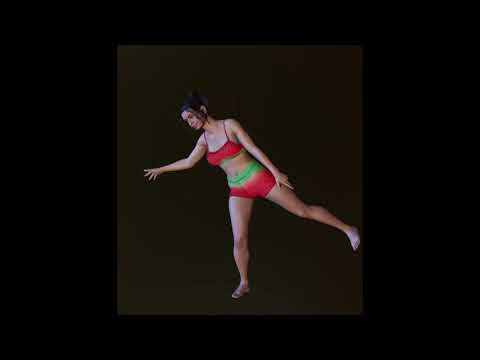
That looks awesome! :D
Between this and the face controls I'm actually animating things and it kind of rules? I really want to experiment more with using this on hair and trying node weight maps and dFormers. Last night I made a simple pose transition animation and applied the script to the rigged version of this hair, on the bones of the braid and the bangs. The effects were pretty cool and being able to get bounce effects on hair consistently would be amazing.
Genesis 3 & 8 Face ControlsThat makes sense, thanks for explaining. Meener's point about the panel not being parented to the head worries me though, I assumed it would be. Can this be remedied?
I think if you select the head then load the tool it parents it automatically. If not just drag and drop the tool on the head joint in the Scene tab.
@Faux2D If you ever release a standalone pack of face movement/speaking animations I would pick those up in a heartbeat. The one that includes head movement (I think it's example 2?) is especially awesome.
There should be a pdf file in the Genesis Face Controls location. If you open it there are 3 YT links with timestamps. They have the audio which accompany the facial animations. With the new Filament renderer you can quickly render out the provided mocap animations and then synch them up with the audio in a video editor tool.
Spring Dynamics! AWESOME!Spring Dynamics is fantastic! I think this is a game-changer for people who like to do animations! I've been wanting a product like this in Daz Studio for a long time! This is great! Thank you, 3D Universe, for the amazing product!
Here's a quick animation test with Spring Dynamics (I added it to the hair fringe and the left and right pectoral). Rendered at lighting fast speed with Filament.
This looks really fun. I've never done animations, but I'm going to start playing around with it.
New DS Filament Render EngineAnother Filament test for fun
Looks great;)
New DS Filament Render EngineAnother Filament test for fun
FilamentSo how do I render in Filament? In render settings all the options I hacve is Iray 3dl and opengl
New DS Filament Render EngineIf anybody bought https://www.daz3d.com/spring-dynamics-for-daz-studio
could you please share your filament rendering animations.
I would like to know if it looks ok, or shall I still use only Unity for rendering animations.
Thanks in advance.
There is some trial and error to get the parameters right (like I think I have the settings up too high in the following animation as there's quite a bit more breast movement than is necessary there), but all in all it's pretty straight forward and I REALLY like it! It's something I've been wanting to see in Daz Studio for quite some time! I think it will be a game-changer for animators!
A very quick and dirty test of Spring Dynamics rendered with Filament (the animation is full of mistakes, but it's just a super quick test):
Spring Dynamics were added to the hair "fringe", as well as her Left and Right Pectoral. Again, I think I have the settings up too high, as there's a lot more movement than probably should be. But I do think that Spring Dynamics is pretty awesome and once I get the hang of what settings are best for what types of "bones" it will probably be something I use quite often!
EDIT: You'll want to be quite selective on what bones you use it on -and for goodness sake don't do what I did at first and apply it to like all the bones! lol Nightmare fuel, that was! lol
Thanks a lot, 3Diva, to make a test of it. The results looks really promising.
New DS Filament Render EngineIf anybody bought https://www.daz3d.com/spring-dynamics-for-daz-studio
could you please share your filament rendering animations.
I would like to know if it looks ok, or shall I still use only Unity for rendering animations.
Thanks in advance.
There is some trial and error to get the parameters right (like I think I have the settings up too high in the following animation as there's quite a bit more breast movement than is necessary there), but all in all it's pretty straight forward and I REALLY like it! It's something I've been wanting to see in Daz Studio for quite some time! I think it will be a game-changer for animators!
A very quick and dirty test of Spring Dynamics rendered with Filament (the animation is full of mistakes, but it's just a super quick test):
Spring Dynamics were added to the hair "fringe", as well as her Left and Right Pectoral. Again, I think I have the settings up too high, as there's a lot more movement than probably should be. But I do think that Spring Dynamics is pretty awesome and once I get the hang of what settings are best for what types of "bones" it will probably be something I use quite often!
EDIT: You'll want to be quite selective on what bones you use it on -and for goodness sake don't do what I did at first and apply it to like all the bones! lol Nightmare fuel, that was! lol
The hair looks great. But yeah, that top isn't providing a lot of support.
 New DS Filament Render Engine
Sorry. i've started now to read the thread, but i'm curios about a thing, is better user 3Delight shader or Iray shader for Filament?
AIUTO...CHI CONOSCE L’ITALIANO? PARTE DODICIWP Guru è sempre sul pezzo.
Sinceramente, ho provato Filament solo in preview, senza nodi o altro, e devo dire che è molto interessante.
E' simpatico e sono contento che esista.
Ma, in qualità di "giovane iperattivo", faccio davvero difficoltà a seguirlo: è lento persino a 1.5x, e mi sento come mentre il sacerdote fa l'omelia: spacing out.
Preferirei di gran lunga se editasse un po' i video e li facesse più dinamici.
Penso che Blender Guru sia il gold standard, peccato che non usi Daz.Avete visto che bel pacchetto per Octane hanno fatto?
https://www.daz3d.com/octane-render-kitNon che mi interessi, Iray è diventato un botto più veloce adesso!
Nell'Iray benchmark, apparentemente 2x3090 sono andate da 28 iter/s a 36...wow :OHow to disable tonemapper and environment options from appearing in scene tabCan anybody tell me how to disable the tonemapper and environment options from appearing in scene tab.
Many Thanks
Steve.P.S.
When is the forum seach facility going to changed so it is useful ?Just for clarity, if you delete those enviroment and tonemapping options from the scene, you lose the ability to adjust them when you render. You see the options in the scene because Daz Studio has changed to have better bridges to renderers like Octane, Blender, and Filament (they have those settings as options in the scene too). Probably the best option is to contact Customer Support to see if yu can access an earlier version of Daz Studio which doesn't display them.
Spring Dynamics! AWESOME!Spring Dynamics is fantastic! I think this is a game-changer for people who like to do animations! I've been wanting a product like this in Daz Studio for a long time! This is great! Thank you, 3D Universe, for the amazing product!
Here's a quick animation test with Spring Dynamics (I added it to the hair fringe and the left and right pectoral). Rendered at lighting fast speed with Filament.
AIUTO...CHI CONOSCE L’ITALIANO? PARTE DODICIWP Guru è sempre sul pezzo.
Sinceramente, ho provato Filament solo in preview, senza nodi o altro, e devo dire che è molto interessante.
Octane Content in Sales TickerThis crept in when logging in, https://www.daz3d.com/are-you-ready-for-octane with Filament coming out of left field, we now have what could be major in roads into Octane.. As one of the interesting products on that page is https://www.daz3d.com/octane-render-kit looks like we are being spoiled with render engine choices this year..
Daz 3D is part of

Connect
DAZ Productions, Inc.
7533 S Center View Ct #4664
West Jordan, UT 84084Licensing Agreement | Terms of Service | Privacy Policy | EULA
© 2026 Daz Productions Inc. All Rights Reserved.