-
Look at my Hair (LAMH) Official Thread: update 1.6.0.2 released
I was playing around with DAZ's new strand based hair and was wondering if there a way to export the density maps from LAMH?
The maps are stored, at least temporarily, in one of the folders where the exported geometry goes, or perhaps in one of the other temp folders. I know I have done it, but I just can't remember how.
Sounds like I might need to download a Beta version, as well, and find out what this new feature is...
Thanks for the tip. I couldn't seem to find it in the temp folder with the geometry. I'll have to keep looking.
I love the new strand based hair option (even though we won't be able to create dynamic strand based hair ourselves), but AM's LAMH animals are so magnificent that nothing I have tried to create with it compares to their quality and craftsmanship. I was hoping that by using existing density maps I could figure out how AM gets such great results. ;)
About Crashing LMAH .. I tried a lot now .. and it seems LMAH don´t like any other objects inside DAZ only the one you work with also it should not be stored inside a Group or something .. The First Time I worked 2 Hours without a Crash and Exportet to Fiber Hair .. For better Grooming I imported the Fiber Mesh into ZBRUSH and made a Morph could be a cool resolution but I wonder to use the Strains inside DAZ don´t know how that works but this is a solution for me I can work with a bit .. Maybe someone helps
Yeah, LAMH can be pretty finicky. Grouping it crashes my machine every time.
I really didn't start doing a lot of animals until the release of "LAMH 2 Iray Catalyzer". It works so much smoother because you just have to hit Catalyzer's render button to render as many LAMH animals as you want in a scene without having to do the manual conversion. Unfortunately it only works with AM's animals, hopefully, it will eventually work with the OLD LAMH presets. But from what I hear that s a major problem converting them to work with it.
That said, the reason I do so many experiments with LAMH and IRAY since I am still looking for a smoother process. Here are some tips I have learned.
1) NEVER SAVE THE DAZ STUDIO FILE WITH THE CONVERTED OBJ (it takes forever and sometimes corrupts on me)
2) Build your whole scene first, SAVE then right before you render convert the LAMH to and OBJ. After you render delete the OBJ
3) Play around with lowering the hair quality, most of the time the preset number is way too high so it takes forever to convert to an OBJ. I like to keep things at a max 500000. If this isn't enough increase the root and tip thickness.
4) I always change the material for the OBJ by applying "!Iray Uber Base", then set it to "PBR specular/glossiness" and set the "glossiness" to 0. This gets rid of the "fireflies" in the hair and makes everything render faster.There are a few more items I have learned for my experiments but these are the things I do every time I use the old LAMH and IRAY.
The new strand based system looks amazing so far and the people on the official forum discussion are doing some amazing stuff with it [ https://www.daz3d.com/forums/discussion/326996/dforce-hair-as-well-as-strand-based-hair-and-the-strand-based-hair-editor-in-public-beta ]. Plus they are really friendly about sharing their tips and tricks
How to prevent part of a geograft following figure morphs?Ok - now I have a related problem:
I have a geograft 'armoured helmet' (is best I can describe it) - It's attached to the head and has solid-metal with eye-slits over the face (obviously I need that to not deform much). I can do the rigidity group as above, but then that part seems to stick in place - if I add a morph to the figure that makes it taller, the top of the helmet (not in the rigidy group) goes up but the face-plate stays where it is (stretching the mesh).
Any ideas? It's fitted to and parented to the head. The follow-group can reference the head bone or not with no change.
OBJ files save the morphs used?You are not supposed to merge the whole dialed in custom character shape to a single morph. Shure its possible and you made it work with Adjust Rigging to Shape, but it seems as you fit the hair to your new "merged" character shape morph Daz Studio fails to generate a new "fitting morph" for the hair. Usualy you turn up the base character (model) and other morphs independently this will also allow the hair to adapt to the shapes independently and works far better most times.
Since this is the technical help forum I will talk about all the complicated technical stuff next that is associated with the issue you have. I tried to explain this as easy as possible but also tried to cover everything and by doing so my post got quiet long sorry for that I just couldn't stop writing. Feel free to correct me if I'm wrong with some explanations but I hope it all makes sense and it is helpful to you.
Conforming Figures, Autogenerated Morphs
The hair is a "conforming" figure and which ever morphs are dialed up on the genesis figure the hair tries to follow the shape. It works like this: morphs on the genesis figure that are set to "autfollow" gets projected to the hair. BTW you can turn off autofollow on most expressions so for example the hair bangs don't follow the brows movement anymore. Those projected morphs are called "autgenerated" morphs and every morph dialed up on the gensis figure gets its counterpart with the same name on the fitted hair or other "conforming" items like clothes. If a "autofollow" morph with the same name already exists on the conforming figure those don't get updated. It is possible to manualy replace "autgenerated" morphs with adjusted ones for example imported with OBJ if you give them the same name like the morph set to "autfollow" on the genesis figure.
Sometimes if you get issues with those "autgenerated" morphs you can unfit the conforming hair or clothes select it and use Edit>Figure>Clear Generated Morphs to delete them. Next time you fit the conforming hair or clothes new "fitting" morph will get generated. This is useful if you have updated some morph on the genesis figure but you also want to update the generated morphs on the conforming item.
The big advantage of autogenerated morphs is that the user don't have to care about this most of the time, the conforming items automaticly fit to the figure shape. Also the conforming item dosn't need to provide the "fitting" morph, its all generated on the fly so the product artists don't need to necessarily prepare any "fitting" morphs and those don't have to get saved as morph assets. Ofcourse you can provide "fitting" morphs if you like for example for the base characteres shapes that you have currently available for the genesis figure if you think the autogenerated ones are not that good.
If you manualy replaced "autgenerated" morphs to fix issues with distortions or anything don't forget to save those with File>Save As>Support Asset>Morph Asset this will make shure the morphs will be available everywhere not just for the current scene. Well for example you could also save the hair as Wearable preset to have all the morphs available, but only if you load this Wearable preset, because before you save the Morph Asset the morphs get saved embedded in the Scene, Subset or Wearable/Character Preset file.
Transfer Utility
Instead of having the "fitting" morphs generated on the fly you can also use the Transfer Utility. Mark your morphs as Favourits on the genesis figure, then open the Transfer Utility elect the genesis figure as Source, the hair as Target, select only Morph Targets in the dialog and in the options select only to to transfer "Favourits and Sub-Components". The varoise sliders and checkmarks in the Projection Options on top of the Transfer Utility dialog like Projection Tolerance gives you options how the morphs will get projected. I guess with the right settings its possible to get better "fitting" morph results compared to the autogenerated ones. Then I would save those Morph Asset so next time you load the conforming item from the content library it will include the better fitting morphs.
Transfer Utility dialog: The screenshot shows the Morph Tagets extended options menu From Source: "Favourits and Sub-Components" - ignore the other settings showen

ZBrush Morph, Reverse Deformations
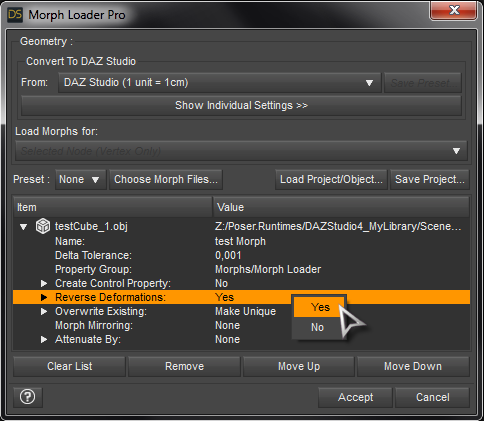
If you export your dialed character shape with an OBJ to ZBrush to make adjustments and bring it back to Daz Studio I highly recommend you to use the option in the Morph Loader Pro called Reverse Deformations. With this you don't have to zero your current character shape. The ZBrush morph imported with Reverse Deformation will only add the shape adjustements you made on top of your current character shape in the scene.
Then you can save the new ZBrush morph with File>Save As>Support Asset>Morph Asset to the content library so it will load everytime with the genesis figure and not just with the figure in your saved scene.
You can also save a Character or Shape preset to the Content Library to load your custom character into other scenes, but to avoid issues with embedded morphs I would save the Morph Asset first.
 Fit Control equivalent for V4?
There's a free "Breast Spandex" morph for V4 here: https://www.renderosity.com/mod/freestuff/?item_id=58436
It's not like Fit Control, or other similar products, but helps even out cleavage cling on some tops. It was made for second skins usage, but adding a smoothing modifier to the V4 top should fix poke through. Probably wouldn't work well with things like bikini tops because it basically pushes out the V4 mesh between the breasts.
Hello!
I have found Fit Control to be indispensable. Would anyone happen to know if there is a functional equivalent for V4? It would be excellent to have that functionality, since I still use that platform a fair bit. Any related suggestions would be welcome.
Thank you!
Make hair upside downIf memory serves me right https://www.daz3d.com/free-spirit-hair-for-genesis-3-female-s or it's morph packs has some morphs that could be used for upside down look.
Your Most Preferred 3-Finger + Thumb Daz-Compatible Products?The M4,V4 and Genesis(1) Creature Creator Morph sets had three finger two finger+thumb morphs (and two toe) but not four finger three finger+thumb.
Several of RawArts characters have 4 finger three finger+thumb hands but they're full body morphs so would need arcane rituals or maybe just CGI3DMs Shape Splitter product to use on other figures.
Also the old Brute X and extensions had 4 fingers three finger+thumb but that's a stand-alone so not very useful with any Genesis models.
Edited to differentiate thumbs and fingers in digit tallies
can i export a high subdivision level?What if I want to create a new morph from a High-res model? There is no way to import the OBJ back right?
Shape transfer eye distortionWhat I forgot to mention is that you propably also need to adjust the rigging for the morph if this wasn't already done by the script you've used.
Try an expression or just open the mouth to see if the rigging is working. I guess because the face is further to the front all the face rigging bones are no longer aligned with the head shape.
To fix that have the morph dialed up, then select the Joint Editor, right-click the Viewport and choose Edit>Adjust Rigging to Shape, go to the Parameters pane select your morph, right-click ERC-Freeze to save the rigging adjustments to the morph and repeat File>Save As>Support Asset>Morph Asset with all the same settings to update the original morph asset.
How would I tell whether the rigging is working? The mouth does open with or without that adjustment, but I do see the bones change. ...I'll do it just to be sure.
OBJ files save the morphs used?Hello good peoples,
So I am an hobbyist trying to figure things out. It is actually hard to explain because I don't have the technical vocabulary for the problem I get. So I start my figure with a model and then I add some existing morphs from sliders alright. Then it's not exactly like I want it so I export the figure OBJ and load it in zbrush lets say. Go back to Daz, zero my figure and apply the morph (rig figure to shape to get the bones right, ERC freeze the thing and save as a morph asset. I thought OBJ files were only the polygons. But, atm I have a problem with some hair product that gets distorted when I apply my custom morph to the figure. The said hair was on the figure I made the morph for. Even in a new scene, I apply the morph to a new figure, load the Hair in question and it gets distorted still. So the morph knows that the hair was fitted to the figure before I export the OBJ of the model.
So, How do I bypass this when creating the morph? Can I save the said morph I made?
Am I understandable here?
thanks in advance
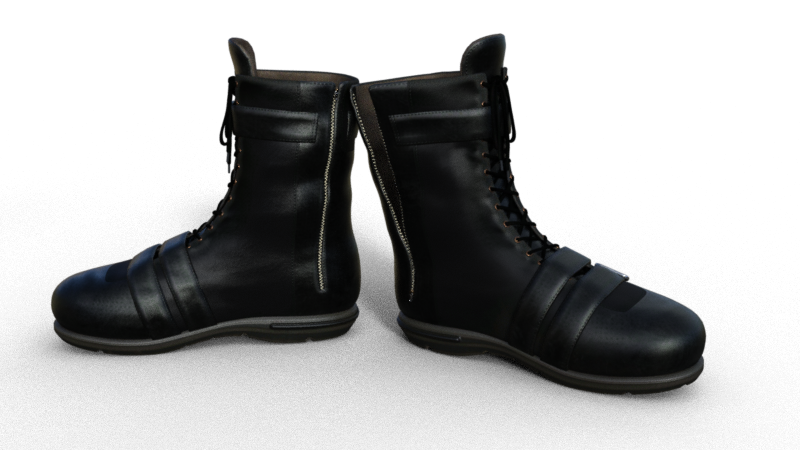
Anyone knows boots for G8F that can actually pull the zipper down?Hey guys! I am wondering if there are any boots that can pull the zipper down?
I watched some videoes about editing the models and create morph, but still wondering if there are any products like that :D
There's Zoro_d's www.renderosity.com/mod/bcs/chameleon-rose-biker-outfit-for-chameleon-rose-g8f/126601 currently on sale. The boots just have a morph for open and closed states.
 Shape transfer eye distortion
What I forgot to mention is that you propably also need to adjust the rigging for the morph if this wasn't already done by the script you've used.
Try an expression or just open the mouth to see if the rigging is working. I guess because the face is further to the front all the face rigging bones are no longer aligned with the head shape.
To fix that have the morph dialed up, then select the Joint Editor, right-click the Viewport and choose Edit>Adjust Rigging to Shape, go to the Parameters pane select your morph, right-click ERC-Freeze to save the rigging adjustments to the morph and repeat File>Save As>Support Asset>Morph Asset with all the same settings to update the original morph asset.
No eyelashes for two G8F characters (SOLVED)HOLY CARP!!! thats why I didn't have lashes on load, thanks guys *walks away mumbling* "now I feel like a newb!" (jumps up and clicks heels together) lol now off to morph!
Moph says noThat should mean you are trying to load the original, not the morph
Where are the genesis 3 head morphsFacegen takes a front and or side view and lets you make faces for your gen 2 or 3 model. This involves creating a face morph and textures.
I've included the instructions.
Before 4.9, this was automatic. Make your face, name it, save it, badda bing badda boom, you have a new morph control slider in Daz Paramaters Actor Head. You can then use the slider and apply the textures and you get a gen 2 model that looks like nineties B movie actress Angel Boris star of Python and one of the Sharknado movies.
Since 4.9 due to something, I have to do it manually. No problem for gen 2. Gen 3 SHOULD go here...
C:\Users\Owner\Documents\DAZ 3D\Studio\My Daz Connect Library\data\cloud\1_21630\data\daz 3d\genesis 3\female\morphs\daz 3d\head
But it doesn't appear in the parameters folder when I restart Daz.
Gen2 is a bit of a handful in Motionbuilder. It doesn't have roll bones and I want to try the gen 3 face rig.
I need to put the morph file Facegen makes in the same folder as the gen 3 base mesh. Facegen must detect it or it won't let me continue. Since 4.9 it has popped up an error that it can't find the g3 base mesh. Not really sure about this because the folder I mentioned has only morphs, not the base mesh. But it's detecting something about the folder I listed above that allows me to contiue.
So basically if I were creating a morph, I'd need to put it somewhere so the morph slider would appear in DAZ.
Hope that makes things more clear. Thanks.
Can someone make Lydia HD for Victoria 8?All of Maelwenn's characters are gorgeous, imo. But if a character isn't exactly to your liking you can always adjust it to get it to look exactly how you want it. There's the base Daz face morphs but there are also quite a few other morph packs that give a huge variety of face shaping options. One of my favorites is RareStone's - but there are also other great sets by Thorne, Dogz, EmmaAndJordi, etc etc. There are quite a few face and body morphs available. There's no need to wait around for something that may not happen (the original artist recreating the G3F character and releasing it on G8F) and just create something for yourself that you're more happy with. :) Dial spinning a character can be a lot of fun too.
Moph says noHi everyone! I export my GF OBJ as tool to abd import it to zbrush because my GOZ doesnt work, im fine with this but all of a sudden anytime i try and load a morph i have made on zbrush on to my GF OBJ i get a messege box saying "one or more changes made no effects" can someone please provide some insight to this problem
Can someone make Lydia HD for Victoria 8?You've asked about this before, but the answer is still if anyone other than the original author sold a version of that character for G8, it would be copyright infringement.
While the end user is permitted to convert characters between generations for their own use, and Singular Blues is working on a tool to help transfer the SD portion of the morph, transferring HD morphs between generations (or sort of transferring them, anyway) is the rather tedious process I explained before (except this time on one of your Ophelia threads) about using Blender to convert an HD morph to a displacement map.
Your Most Preferred 3-Finger + Thumb Daz-Compatible Products?Three fingers plus a thumb has a long tradition in animations and art. For those of you who participate, or appreciate, which products would you most recommend for Daz compatible projects? Could be figures, morph packs, etc.
Why 3 fingers? This video has some interesting info.
 Converted clothing does not align with figure correctly
When you use the G8 feemale body morphs height slider, it changes the Y transform for the hip of the character ... This hip adjustment does not happen with G3 using the same slider from the G3 version of the morph pack.
Thank you very much for sharing what you found. This is interesting. Also please let us know what the customer support replies.
Eyelashes not rendered properlyWhich figure is it?
It's a genesis 3 male with a morph.
Daz 3D is part of

Connect
DAZ Productions, Inc.
7533 S Center View Ct #4664
West Jordan, UT 84084Licensing Agreement | Terms of Service | Privacy Policy | EULA
© 2026 Daz Productions Inc. All Rights Reserved.