-
Misadventures with Adventurer Knight [Pretty much SOLVED]
One thing that's tsill a bit of an unknown ot me is this manual converting process. I followed the youtube video on my existing character (?!) and after fitting, got a pretty big mess for the undershirt. Is this one of those cases where it makes more sense to do this to a standard Genesis 8 Male, and then apply the character morphs afterward? Or is there more that needs to be done in the Bone Editor (Wasn't touched on in the youtube video, but was mentioned in the tutorial). Or maybe I'm supposed to adjust the shape and position of the outfit via basic posing tools and/or deformer morphs prior to Transfer Rigging (Figure Space).
EDIT: Second problem is that the sleeve, cuff and two collar surfaces keep reappearing whenever I load the scene. I would have to go in and turn their visibility off every time, which is why I'd prefer to delete the things. For now I'll just set their opacity to 0.
WASN'T THERE A FIX FOR WONKY EYES AFTER MAKING A MORPH?Am I crazy? I could have sworn there was a fix for repositioning eyes for Genesis 8 due to the fact that sometimes the eyes kinda go wonky after creating a morph. I've searched and I can not find it anywhere on the forums... I'm lost and desperately need it...
Does anyone know if Darius 8 skin texture has a no stubble option?Darius 8 comes with only one skin texture, no options for facial hair. The stubble and pores are in the base skin bitmap. You can alter it in your favourite graphics app, or use another character's texture, but there's no guarantee it won't have the same characteristics. Stubble-free and poreless is more of an artificial toon/stylized character skin.
Do you know if it's possible to transfer Darius 7 texture to Darius 8 without any problems?
Easiest way is to use this product, which gives G8M, Darius 7's UVs and other unique G3M UVs, like The Guy 7, etc. https://www.daz3d.com/genesis-3-character-uvs-for-genesis-8-maleOh, right. Forgot I had that.
Does anyone know if Darius 8 skin texture has a no stubble option?
Easiest way is to use this product, which gives G8M, Darius 7's UVs and other unique G3M UVs, like The Guy 7, etc. https://www.daz3d.com/genesis-3-character-uvs-for-genesis-8-maleDarius 8 comes with only one skin texture, no options for facial hair. The stubble and pores are in the base skin bitmap. You can alter it in your favourite graphics app, or use another character's texture, but there's no guarantee it won't have the same characteristics. Stubble-free and poreless is more of an artificial toon/stylized character skin.
Do you know if it's possible to transfer Darius 7 texture to Darius 8 without any problems?
Does anyone know if Darius 8 skin texture has a no stubble option?Darius 8 comes with only one skin texture, no options for facial hair. The stubble and pores are in the base skin bitmap. You can alter it in your favourite graphics app, or use another character's texture, but there's no guarantee it won't have the same characteristics. Stubble-free and poreless is more of an artificial toon/stylized character skin.
Do you know if it's possible to transfer Darius 7 texture to Darius 8 without any problems?
How to make a single dial from a mixture of morphs, which then available as an asset?You would need a new Control Property
- create a new Control Property in the right-click menu of the Prameters pane if it's in Edit Mode
- right-click on that new property and choose ERC Freeze - you get a list of all properties with values that are currently not at default state
- press accept and ERC Freeze will save those property and values to the Control Property
- go to File>Save As>Support Asset>Morph Asset to save the new Control Property to have the morph available on the figure in other scenes
[Edit]: Sorry didn't refresh the page just saw Richards comment after posting this.
A single slider for your custom character shape is nice to have but it is more complicated than saving Shaping Presets. Using Shaping Presets is also more flexible if you want to change someting, editing Control Properties is also not that easy if you decide to further customize the character shape.
You should be able to save Shaping Presets seperate for head and body if the morphs in use are split up like this. It is not that efficent to have a fully dialed in custom character and then selecting the properties you want to save in the Shaping Presets save dialog depending on if it is a head or body shape.
You could just dial up the shapes you want for the head or if you work on the custom character dial down the body shapes and save Shaping Preset. Then do the opposite for the body Shaping Preset.
In the Shaping Preset save dialog you also have an Option Menu button on the upper right use Check All Modified Only while saving. This will make shure that the Shaping Preset will not reset other morphs currently on the figure if loaded. In addition to that you also have the Shaping Preset Load options by holding Ctrl while loading the preset.
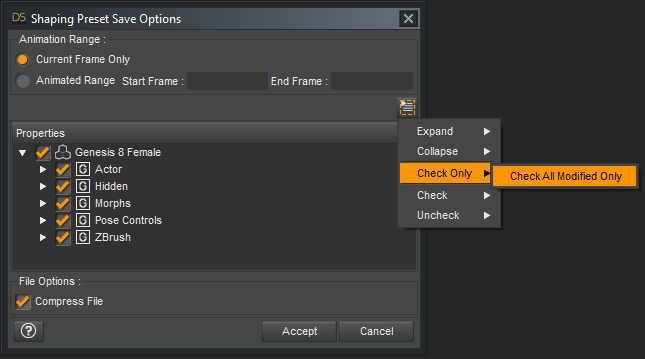
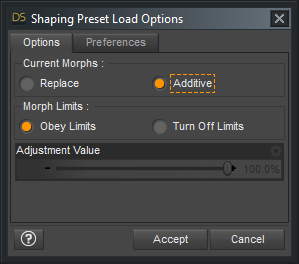
But first of all make shure that every of your custom ZBrush morphs is already saved as morph assets. If they are saved embedded in the scene file they are not available on a fresh loaded genesis figure.
If Shaping Presets got saved with embedded morphs that don't exist on the figure obviousely they can't work the same applies to morphs that you link to new Control Properties with ERC Freeze.
Also there seems to be a bug with ERC Freeze that it shows a list of changed properties of everything in the scene making it harder to select single properties that you want to have as sub-components in the control property. You can have it simple and just start with a new scene and load the figure you want to create properties for with ERC Freeze. Or if you work with a crowded scene select everything else but not the genesis figure and use Memorize Figure / Item. If you want to have seperate head / body sliders you could also memorize the figure with only the body shape applied then load the full Shaping Preset again, create the head controller and use ERC Freeze. Then do the opposite memorize all head morphs and create the body controller.
How to make a single dial from a mixture of morphs, which then available as an asset?A better option is to create a master slider, since spawning the comcpound shape to a new single shape will lose any corrective morphs.
- Apply the shape, and nothing else.
- Right-click on the Parametrs pane and put it in Edit Mode, if it isn't
- Right-click in the group you want to add the slider to and select Create New Property (or possibly Add New Property - going from memory), adjust settings as desired (you may want the min. Leave the default value at 0, though.
- Set the new property to 1
- Right-click on the new property and select ERC Freeze - check that the sub-components are only the things you want, click Accept
- Test, if it's working File>Save As>Support Assets>Morph Asset
How to make a single dial from a mixture of morphs, which then available as an asset?Shaping preset is just a script which applies morph settings, it doesn’t include the morph itself.
If you want an actual morph you need to save a morph asset.
How to make a single dial from a mixture of morphs, which then available as an asset?I have a (G8f) character head which is a complex mixture of morphs (some commercial and some Zbrush I have made myself). I want to condense this in to a single dial so that I can quickly try mixtures of this character head with other character heads. This is not for commercial resale or for redistribution in any way, shape or form.
I can export the figure as a head only morph to a obj file and then loading that through Morph Loader Pro, however I want the dial to always be available for all G8f characters, or be loadable from an icon.
I have tried Save As: Shaping preset... and this allows selection of various body parts and other properties. When I select the Head under the Hip property, and save that, then the resulting icon does nothing at all when applied to a new character. If instead I select the Head under the Actor property, then the resulting icon not only changes the Head of the character but also the body (even though the body was completely zeroed when I saved the Shaping Preset).
I want to be able to produce a dial (or access to a dial via an icon) that changes only the head.
Tools for Generating Game-Usable AssetsBad idea for two reasons, one is that DAZ mesh, even with the interactive license, can't be used for game mods which is what porting into an existing game is. The second is that if you spend any time in a game community such as the nexus, you know full well that as soon as a tool like what you want becomes a reality DAZ assets will be posted all over the web for users to d/l and put in the games, that is just the nature of the game community.I think that is a bad reason to avoid making these tools. That's basically saying that users who pay Daz for the models have to have the value of the product reduced because someone they don't know MIGHT use the tool to break their TOS.
I spend a lot of time in that community. That's what brings me here. There are apparently bandit-like sites around. But, Nexus takes intellectual property seriously and any Daz content being shared there would be taken down.
If you are only talking specifically about Elder Scrolls and Fallout games then you could just "trace" over the Daz body in Blender/Maya/3DSM. TES/Fallout uses facial morphs for its characters, which is why if you look at FO4 model extracts for Nate and Nora the faces looks nothing like they do in game. Because its only a base male/female head that is being extracted and not the morph data that fine tunes it to make it look like Nate/Nora. So all you can really use out of the Daz models are the bodies. It would probably be much easier to just take a CBBE body and adjust the verts on it (or use bodyslide) until its contour is similar to that of the Daz body. People make characters from scratch using ortho front and side pics. Basically you make a 3d object out of several 2D reference pictures. But with a 3d objects as a reference it is much easier to make another 3d object because in a way all you are doing is making a 3d trace.
You should ask on the Nexusmods forums why nobody uses Daz assets in Oblivion/Skyrim/FO3 and FO4 mods. Its possible that you dont see it a lot NOT because of a lack of tools. It could be something else like CBBE bodies and textures are already really good, or that the really nice looking Daz clothes arent video game friendly since thats not what they were designed for. Like i made a character for some personal renders but she would fit right into a FO3/FO4 post-apocalyptic type game, but she has like 1.4million tris which i think is a bit too high for a game.
Yes. Only bodies are really usable. To a large degree, that is what brings me here. It's quite a bit of work cutting the head and hands off the mesh and lining them up with the Fallout 4 head/hand meshes. It seems that someone with advanced knowledge of Daz could make a template file that would have pre-built planes in place to help pose and cut the meshes perfectly before export.
Indeed, it is easier to make a custom CBBE shape. But, the base shape and sliders available for CBBE for myself (and many others) isn't great. (No offense to the author). Daz offers a higher level of quality and customization options. I can say that if someone could make using Daz bodies usable in FO4 or Skyrim as easy as using bodyslide, there would be a huge market of buyers in the mod community. The demand is there.
I am a long-time modder in that community. In fact, a lot of people ARE using Daz content in their private games (not sharing with anyone). It's just that it's a decently high bar for an average modder to learn the tools and have the time to cut up, re-align the meshes. Few can really do it.
Novica & Forum Members Tips & Product Reviews Pt 12Also playing with Longdrape hair and getting better results after workng out a few things, will share my learnings when the scene is finished but there aren't many pre simulation shapes (like there are with the other similar product from this artist). I tried creating my own using morph loader like you can do with older dforce hair (cloth) products but I get the "Geometry did not map, failed to Morph" error and wasn't able to get past this. Perhaps Morph Loader doesn't work with strand based hair? Anyone been able to do this? For this particular scene I can't do it all through movement from memorized posie or animation frames as there is oher loose fitting dforce clothes involved and clothes out of position and getting mixed with the hair.....
3D Art Freebie Challenge-June 2019-"Winners Announced Summertime Pin-Ups" -Entries Thread Only
Title: Boys Boys Boys
DAZ Studio and Photoshop. Version before post-work attached below.
Freebies:
1) HDRI Skydome by Agent Unawares: https://www.deviantart.com/agentunawares/art/Skyset-002-705701571
2) Island by Herminio: https://www.sharecg.com/v/75857/related/5/3D-Model/Dream-Small-Tropical-Island
3) Loincloth by 3DND: http://www.threednd.com/warduke.html
4) Thong by squarepeg3D: https://www.renderosity.com/mod/freestuff/fantasy-amazon-bundle-for-g8f---100-free/79046
5) Morph by bu_es: https://www.renderosity.com/mod/freestuff/saud-for-g3m-g8m/78849
6) Dreads by Aprils Vanity: http://shop.aprilsvanity.com/free-items/ciri-hair.html
7) Strap by SickleYield - https://sharecg.com/v/72661/gallery/21/DAZ-Studio/SY-Impractical-Rogue-G
8) Thong by 3DND: http://www.threednd.com/efreeti.html
9) Torque from Lynettes Dark Nights (bi-weekly DAZ freebie)
10) Cowboy Hat by Versatile Peter: https://www.sharecg.com/v/90616/browse/21/DAZ-Studio/
11) Aviators by Adam Thwaites: https://www.most-digital-creations.com/free_poser_poses_textures_morphs_props_48.htm
12) Speedo by Troglofauna - http://www.sharecg.com/v/89258/browse/21/DAZ-Studio/G8F-Tyris
13) Mohawk by sedartonfokcaj: https://www.deviantart.com/sedartonfokcaj/art/Dante-Hair-for-Genesis-435979176
14) Harness by Karth: http://www.maleposerotica.com/?page_id=42
15) Daisy Dukes by scheusal242: https://www.renderosity.com/mod/freestuff/contributor/scheusal242
16) Flag by mjc26250: http://www.sharecg.com/v/82066/related/21/DAZ-Studio/Flag
17) Plane by printable models: https://free3d.com/3d-model/airplane-v1--79106.html
18) Poses by Thorvan: https://www.renderosity.com/mod/freestuff/30-mirrored-poses-for-genesis-8-male/77781
Wet skin achieved by following the first half of this tutorial: https://thinkdrawart.com/how-to-get-wet-skin-in-iray
Purchased:
1) SWOLE
2) Jepe's Bodyhair Project
3) Fit-Control
4) Ajax Hair
5) Hair Set for G8MNo-Counts:
- G8M Head Morphs
- G8M Body Morphs
- Wild ManeAIUTO...CHI CONOSCE L’ITALIANO? PARTE DODICIMa di che state discutendo? (ಠ_ಠ)
E poi tu, Muscleman, ancora rifiuti di ammettere la superiorità della figura unica? ┻━┻ ︵ヽ(`Д´)ノ︵ ┻━┻
E' come diceva Tolkien: Una Figura per domarli, Una Figura per trovarli, Una Figura per ghermirli e a DAZ Studio incatenarli. (づ◔ ͜ʖ◔)づ
Io ho una libreria di vestiti per Genesis1 enorme... Non capisco da dove ti esca che non ci sono abbastanza abiti.Quello che mi dispiace maggiormente, quando riuscirò a trasferire tutti i miei morph, sarà perdere tutte le UV map compatibili con le figure precedenti.
A numeri, genesis 1 ha meno cloths. Mentre le figure "separate" hanno una maggiore produzione di clothes....e anche di espansioni successive ( figure add on = Freak, Girl, Seth, Anika etc...)....ingfati siamo tornati alle due versioni per entrambi i motivi appena detti....e purtroppo sono tornati pure i bambini....non li sopporto... XD XD
Cos'hai contro i bambini? E quali sarebbero, poi?
Quanto agli abiti... E certo che le figure doppie ne hanno di più, se ne devono fare due!

Poi tu vai a guardare solo gli abiti per Genesis1, ignorando la retrocompatiiblità con un sacco di figure precedenti... Il che ingrossa ancora di più il guardaroba delle figure successive. Share your Message-Shirt-Magic Creations! [Commercial]
Thanks a lot for the update, 3D Universe. It extended script possibilities a lot.
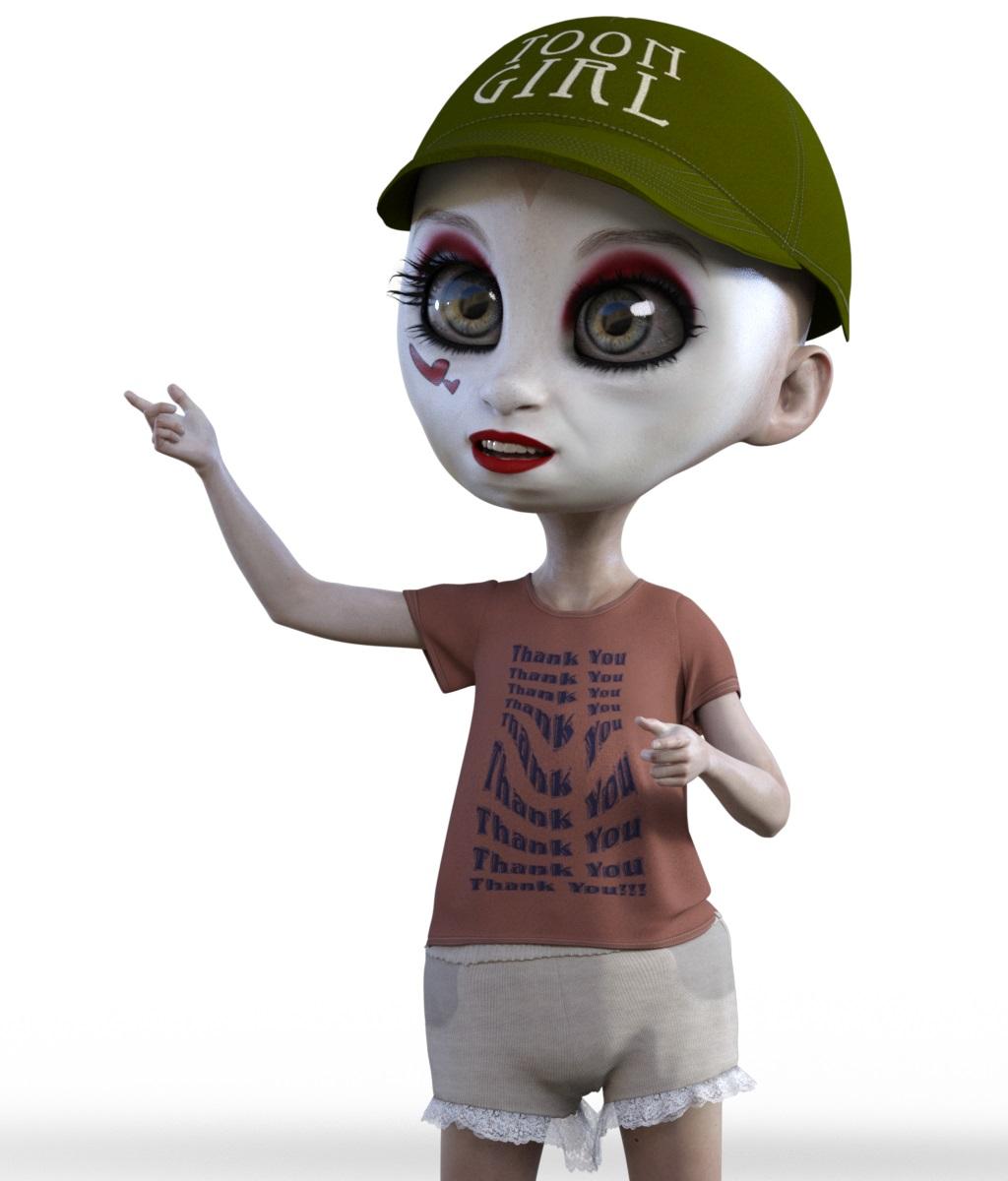
Why is the text so distorted on her shirt? Is it because of the character morph used? Is there a way to fix that so the text looks straight and undistorted, like it would on a real shirt?
I can only imagine, since the character is pretty much extremely morphed (JoeQuick creation) the clothes also are distorted in some way.
Genesis 8 female what's going on?This just happened to me, I deleted big girl morphs, and it changed nothing. I got rid of every morph that had to do with g8f and it didn't help. don't like the result of the base correction, has anyone figured out what's causing this? Do I have to delete the entire daz 3dc library and restart?3D Art Freebie Challenge-June 2019-"Summertime Pin-Ups" -Main Thread OnlyTitle: Boys Boys Boys
OK, let's try this again. The reworked version has been up for about 24h, so I hope this means it's ok.
DAZ Studio and Photoshop. Version before post-work attached below.
Freebies:
1) HDRI Skydome by Agent Unawares: https://www.deviantart.com/agentunawares/art/Skyset-002-705701571
2) Island by Herminio: https://www.sharecg.com/v/75857/related/5/3D-Model/Dream-Small-Tropical-Island
3) Loincloth by 3DND: http://www.threednd.com/warduke.html
4) Thong by squarepeg3D: https://www.renderosity.com/mod/freestuff/fantasy-amazon-bundle-for-g8f---100-free/79046
5) Morph by bu_es: https://www.renderosity.com/mod/freestuff/saud-for-g3m-g8m/78849
6) Dreads by Aprils Vanity: http://shop.aprilsvanity.com/free-items/ciri-hair.html
7) Strap by SickleYield - https://sharecg.com/v/72661/gallery/21/DAZ-Studio/SY-Impractical-Rogue-G
8) Thong by 3DND: http://www.threednd.com/efreeti.html
9) Torque from Lynettes Dark Nights (bi-weekly DAZ freebie)
10) Cowboy Hat by Versatile Peter: https://www.sharecg.com/v/90616/browse/21/DAZ-Studio/
11) Aviators by Adam Thwaites: https://www.most-digital-creations.com/free_poser_poses_textures_morphs_props_48.htm
12) Speedo by Troglofauna - http://www.sharecg.com/v/89258/browse/21/DAZ-Studio/G8F-Tyris
13) Mohawk by sedartonfokcaj: https://www.deviantart.com/sedartonfokcaj/art/Dante-Hair-for-Genesis-435979176
14) Harness by Karth: http://www.maleposerotica.com/?page_id=42
15) Daisy Dukes by scheusal242: https://www.renderosity.com/mod/freestuff/contributor/scheusal242
16) Flag by mjc26250: http://www.sharecg.com/v/82066/related/21/DAZ-Studio/Flag
17) Plane by printable models: https://free3d.com/3d-model/airplane-v1--79106.html
18) Poses by Thorvan: https://www.renderosity.com/mod/freestuff/30-mirrored-poses-for-genesis-8-male/77781
Wet skin achieved by following the first half of this tutorial: https://thinkdrawart.com/how-to-get-wet-skin-in-iray
(Didn't do the part with the Geo Shell... couldn't make it work for some reason.)Purchased:
1) SWOLE
2) Jepe's Bodyhair Project
3) Fit-Control
4) Ajax Hair
5) Hair Set for G8MNo-Counts:
- G8M Head Morphs
- G8M Body Morphs
- Wild ManeAnd now, for some kinda-sorta "freebies" of my own...
To get the "caveman" skintone, load G8M base mats and adjust following parameters:
Base Color: 0.729919 / 0.535642 / 0.415148
Translucency Color: 0.632043 / 0.442323 / 0.329729
Transmitted Color: 0.789314 / 0.470440 / 0.329729To get the "caveman" green eyes, load G8M base mats and adjust following parameter for only the iris:
Base Color: 0.715465 / 0.560499 / 0.0938759To get the "cowboy" skintone, load G8M base mats and adjust following parameters:
Base Color: 0.915750 / 0.638779 / 0.442323
Translucency Color: 0.867136 / 0.605484 / 0.453456
Transmitted Color: 0.789314 / 0.470440 / 0.329729To get the "Cowboy" blond hair, load the "Wild Mane" hair and adjust following parameter:
Diffuse Color: 232 / 193 / 128To get the "kinkster" skintone, load G8M base mats and adjust following parameters:
Base Color: 0.744530 / 0.744530 / 0.744530
Translucency Color: 0.867136 / 0.529523 / 0.288816
Transmitted Color: 0.680020 / 0.373615 / 0.223310(All other skintones and eyes were adjusted in Photoshop, so I'm afraid I can't share them...)
Also attaching the map I made for the "patriotic speedo"; load on Tyris undies by Troglofauna.
All Links Check Out Plz Move To Entries Thread
AIUTO...CHI CONOSCE L’ITALIANO? PARTE DODICIMa di che state discutendo? (ಠ_ಠ)
E poi tu, Muscleman, ancora rifiuti di ammettere la superiorità della figura unica? ┻━┻ ︵ヽ(`Д´)ノ︵ ┻━┻
E' come diceva Tolkien: Una Figura per domarli, Una Figura per trovarli, Una Figura per ghermirli e a DAZ Studio incatenarli. (づ◔ ͜ʖ◔)づ
Io ho una libreria di vestiti per Genesis1 enorme... Non capisco da dove ti esca che non ci sono abbastanza abiti.Quello che mi dispiace maggiormente, quando riuscirò a trasferire tutti i miei morph, sarà perdere tutte le UV map compatibili con le figure precedenti.
A numeri, genesis 1 ha meno cloths. Mentre le figure "separate" hanno una maggiore produzione di clothes....e anche di espansioni successive ( figure add on = Freak, Girl, Seth, Anika etc...)....ingfati siamo tornati alle due versioni per entrambi i motivi appena detti....e purtroppo sono tornati pure i bambini....non li sopporto... XD XD
MimicMolly's Renders & WIPsThe technique I used to convert the skin is somewhat straightforward. However, this was done for my own personal renders and I can't redistribute this result as is. And you shouldn't either.
What you'd need to do this yourself is your G3F/G8F merchant resource skin of choice. And a figure with both V4 and G3F/G8F UVs (usually G1 or G2F, I used G1.) I applied the desired texture onto G1, and hit CTRL + Z, so it could be untextured. Then, I went back and manually re-applied the base/diffuse textures onto G1.
I did this because I use Map Transfer to convert it to G8F. Map Transfer will transfer all textures (base/diffuse, opacity, bumps, normal, etc.) of the figure. I only wanted the colored skin. I created a folder in my Runtime Textures folder to save these conversions.
I used GIMP to turn the G3F/G8F Merchant Resource skin a similar shade of gray as Nieves. I need the MR to reduce visible seams. What I do is after coloring it, I copypaste the Map Transfer result over it in another layer. Then I erase the edges of the Map Transfer result until it's blended with the MR. I repeat with the torain, limbs, other makeups. I did go back and forth to check if there's very noticable seams.
I return to DS, and load up the G8F in the Developer Kit, because she's skinless. I turn her white in the Surfaces tab. Then, manually add my edited V4 in G8F UV texture. I save this as a material preset (I can't recall what it's called but it saves the diffuse base setting only.) Afterwards, I loaded the Base G8F material. And clicked this preset I made to replace the base diffuse textures only. (Just in case, I mess up and don't need to manually apply textures again.) Then I applied Altern8, but any skin shader settings of choice are fine. I made sure to keep and not replace textures. Then, I tweaked the colors until it was close to the promo images.
I don't feel like I should waste my time converting the original bump maps and specular. The base G8F maps are superior. Though this might be tricky for other skins that have unique effects. You're better off re-saving the skin texture as a .DUF to use with the Cayman Studios geografts. I could've done the same here, but I didn't want to. Mostly because might want to use LIE or Diffuse Overlay makeups on her.
Animation Not Exporting ProperlySo you say it morphs faults in this Pedro? I could disable them entirely in this case. If it is that it would be interesting. I swore in my test run I kept them on and it was fine. Weird. Will poke this in a bit. I must say Blenders results were terrifying unexpected as well.
I'm saying it's those specific morphs' fault . I suspect there are supposed to be JCM's, but they don't export correctly from DS (You don't get JCM's in FBX from DS, nor do you get HD or correct subd in other programs when using FBX ) . But it works to correct the issues you describe and in your screenshot for other programs. If you search, it's been discussed before in other threads
You don't need to disable exporting morphs completely. You can keep the other ones like character morphs etc... if you need any parameters animated (otherwise they can be baked). It's usually only those specific ones with bones in their name. In other programs, the movements get doubled or tripled up because of the morph. It's expressed in the joint/bone rotation, then again as a morph - hence the distortions. In your earlier screenshot with C4D, you could also disable those specific ones in the pose morph tag, and you'd see it works too. But it's "smarter" to not even export them (since they don't work like they are supposed to anyways), to keep the filesize down
In the other tests, if those specific movements were not used in the movements - they would not be activated as "animating" the in the FBX export options automatically, thus you would not be affected in those other tests
June 2019 - Daz 3D New User Challenge - Scenes and LandscapesDecided to give this a bash, going for a planetary harvester type monolith thing
still lots to be done, including make the monolith look like something more than a slightly textured pillar and fix the tiling on the lava.
Terrain is a plane sent over to hexagon, displaced and then sent back as a morph.
burt out 'trees' are using the daz 4.11 strand based hair stuff.
Lava is a plane with a texture and displacement map.
monolith is currently just a cube, I'm thinking of splitting it and having some blobs of molten something being levitated from bottom half into the top
as well as adding some pipes or anchor chains/bridges.Daz 3D is part of

Connect
DAZ Productions, Inc.
7533 S Center View Ct #4664
West Jordan, UT 84084Licensing Agreement | Terms of Service | Privacy Policy | EULA
© 2026 Daz Productions Inc. All Rights Reserved.