-
CAT girl G8
@Mab , since you're visiting and answering questions, maybe you can shed light upon something I noted earlier when someone asked about morphs.
Why doesn't this set include a simple "cat nose" or "hare lip" morph? Back with the original version of this product for Aiko 3, it wasn't much of an issue.
Another set, the extended morphs for A3 (I think) offered a simple "cat mouth" (hare lip) type morph. But unless I'm mistaken (and I admit I might very well be), I don't recall an equivalent for the Genesis 8 female, at least nothing that is part of a 'DAZ original" set of morphs. Maybe in a vendor's set, but if so, I don't know which one.
Those two lil' morphs would have added so much to this package.
Sincerely,
Bill
why is it that all you have on your web is womenyes, i know but why can't they make it for men and women together so if you make a wardrobe or armor you have it for men or women like a matching set I'm not talking about putting on women stuff on men either.
Initially I thought the same, Peter. Until I noticed the section I bolded here. The design for a set of armor for men and women would likely be different. They may have the same theme, but if the goal isn't simply to make the woman's armor fit on a guy (which we could do already) that implies making outfits specifically designed for each body type.
Also don't forget the morphs are very different as well. So even if you're talking about a basic set of practical whole body armor (i.e. non-fantasy / skimp armor) with the same basic shell, adding a morph for Olympia 8 is significantly different than doing the same for David 8. You could get away with "auto follow", but those results typically aren't quite as good as when someone takes the time by hand to support the different body types.
Cannot load morph from HexagonHello,
I'm not sure what I'm doing wrong.
I load simple dress to daz 3D (no figure, nothing else in the scene).
I export dress as obj. If I import this obj file (no changes) back to daz 3D with morph loader pro, everything is fine.
When I open this obj file with hexagon and export it as obj (I make no changes here) I cannot import it to DAZ 3D with morph loader pro. It writes "Geometry did not match, failed to create morph."
But I didn't change geometry in hexagon so there has to be other problem. I only export this obj as obj.
So where is the problem? Why I cannot import morph when I export it from hexagon (with no geometrical changes)?
I attach my export and import settings.
Thank you
CAT girl G8The renders you all are doing are better than our promo images! I'm loving them! For those curious about the morphs I used in the promos:
The ones by Will were pretty basic just one character morphs like Aiko 8 and Karyssa 8 and Tika 8. Me, I got a little crazy and used all kinds of morph mixtures, but I prepared instruction images, in case you all had some of the same morphs.
AIUTO...CHI CONOSCE L’ITALIANO? PARTE DODICIAncora ti stupisci, Crios?
 Ovvio che per fare i colossal devi usare i software giusti!
Riguardo i bambini... Come sono riusciti a farli così brutti? E le pieghe sono del tutto innaturali, sembrano fatti di gomma sciolta male!

Ho visto un morph di una bambina di circa due anni graziosissima su "quel sito là" basata sul pupo ( brutto!) di Sixus1... Magari prendere spunto?
Facial expressions - ARKitHi I'm a C4d user who uses daz character and was wondering if there was any way to utilise Apples ARKit to the max.
I can export general face morph and roughly connect them but some i feel it require alot of tweaking and end up not looking so great
Im using cinversity CV-ar to connect these morphs and animate my character facial expressions through the front facing camera .
Would be great if Daz reslease a pack for Gen8 character morphs which allowed the ease of use of to animate these characters facial expressions
I've attached a screen Shots of the facial expression that the Iphone depth camera can pick up
If anyone know a smarter and easier way to approach this would be great to hear.
Another "What hair is this?" Theda for Ellithia 8I was going to guess that it's Xenya Hair from Rendo.
Looks like an exact match to me.
Assuming the promo isn't flipped, it's almost certainly Xenya. Xenya goes down the right side; Jett goes down the left. Jett also appears to have a stronger skullcap.
I mean in hindsight, maybe it is the new one with a morph that makes the hair look like it goes straight down instead of back... this is driving me batty.
I thought it might be Pepper Hair but it isn't that either, I don't think.
What do you mean, "straight down instead of back"? Both Jett and Xenya split over the shoulder.
Toon Hero for Genesis 8 MaleI just picked this one up. I've been on a serious purchasing diet, but as soon as I saw this one I knew I had to get it. It looks like it will play well with the many G8 (and G3 and G2!) toon morphs that are in my library.
Always excited to have a new toon morph!
Alistair HD for Genesis 8 MaleJust a heads up to those who have purchased Alastair HD, I had to uninstall him via DIM after I discovered he's dialing in to all Genesis 8 male characters even the base character. I will submit a bug report later. I'm on my phone and can't get on my computer to connect to the internet at the moment.That happened with James for me. But with Alistair it's not quite the same, when he loads he looks more like G8M base character especially the body, The Basic G8M does load and I can load my own morphs, they are as they should be. There is no Alistair morph at all in the Parameters. Characters don't load properly from Smart Content though.
How did you install?
Alistair HD for Genesis 8 MaleJust a heads up to those who have purchased Alastair HD, I had to uninstall him via DIM after I discovered he's dialing in to all Genesis 8 male characters even the base character. I will submit a bug report later. I'm on my phone and can't get on my computer to connect to the internet at the moment.That happened with James for me. But with Alistair it's not quite the same, when he loads he looks more like G8M base character especially the body, The Basic G8M does load and I can load my own morphs, they are as they should be. There is no Alistair morph at all in the Parameters. Characters don't load properly from Smart Content though.
Another "What hair is this?" Theda for Ellithia 8I mean in hindsight, maybe it is the new one with a morph that makes the hair look like it goes straight down instead of back... this is driving me batty.
I thought it might be Pepper Hair but it isn't that either, I don't think.
2nd of nine lives Cat Girrrl render thread prrrIn this image the cat girl space cadets were created using Genesis 8, the Catgirl Megapack, HFS Ultimate Shapes for Genesis 8 Female, and EJ Teeth Collection for Genesis 8 Females. I picked up the HFS Bundle ages ago in one of the sales in the hope that I'd pick up some useful textures along the way. This is the first time I've used it.
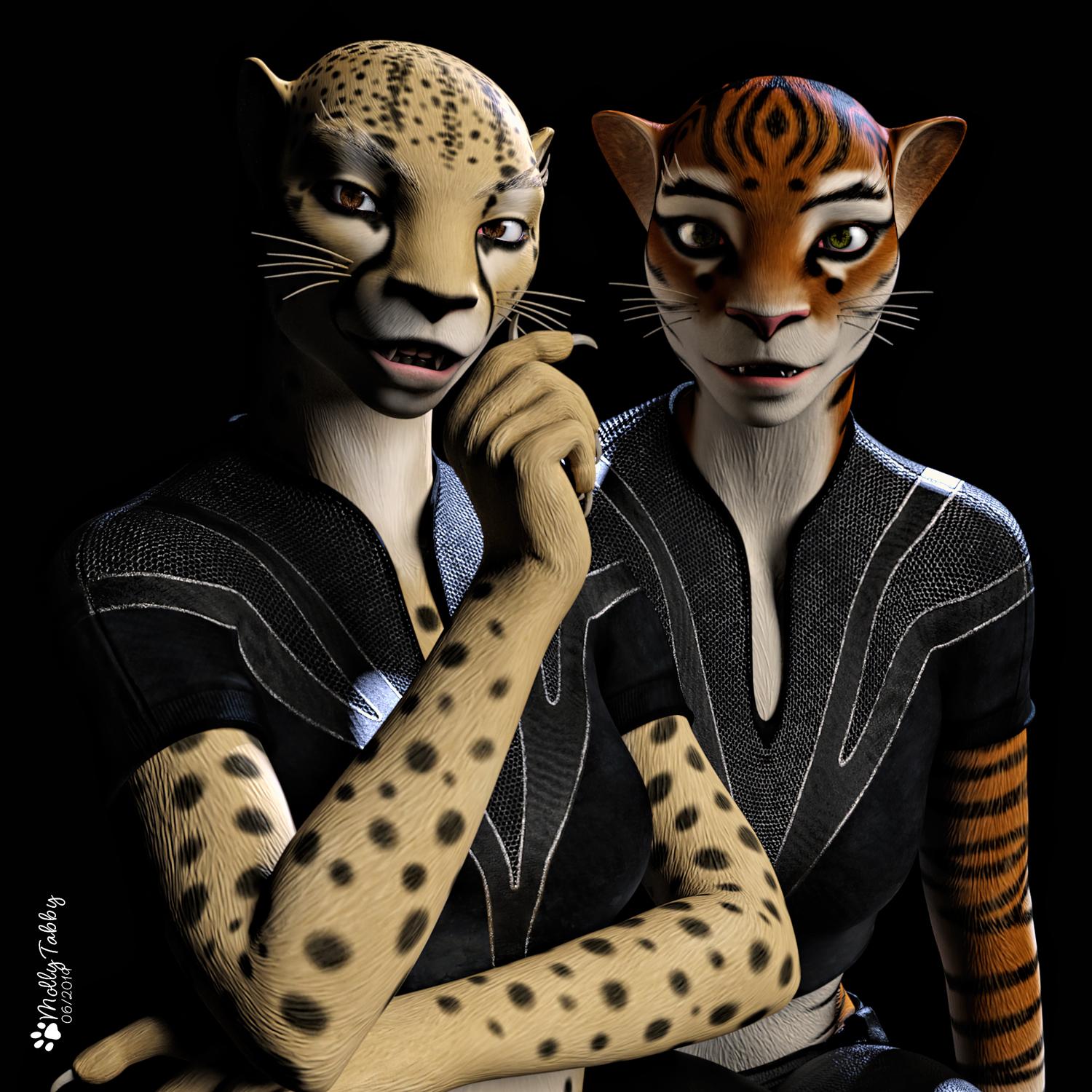
Love the characters and the render. The contrast and the nice back lighting really make the render pop.
I was just searching the other day for cat / feline morph packs to take the new mega cat pack faces to the next level. Same for the teeth. Thanks for posting that as I just added both to my wishlist. Quick side question since you own the HFS Ultimate Shapes for Genesis 8 Female pack. Does it include that untextured strandy hair mesh seen in the promo pictures? I'll attach a screenshot below.
dForce Hair (as well as strand based hair and the strand based hair editor) in public betaI know I'm just getting started with seriously learning to use the Strand-Based Hair, but I think hair caps for human figures, at least, is the way to go. I'd love to see Redz put together a skull cap product with skull caps for all the Genesis generations. Maybe a second skull product for generation 4 and earlier. Maybe Daz could buy them and make them DOs or, better yet, PC+.
Then if Daz ever adds the capability to move SBH from one object to another, (please, Daz, this would be awesome,) we could create a hair on a G8M cap, then transfer it to a G8F cap. From there, a simple matter of modifying the existing settings to optimize the style for the ladies. Or transfer it to an earlier generation male, and tweak. And so on…
dForce Hair has the potential of being totally awesome, and I'm looking forward to seeing a lot of it in the store within the coming months. However, we don't have to wait for a PA to create the hair we've been hoping for. We can do that ourselves with the SBH editor. I get that SBH isn't going to work well with animation, but it can be great for still images.
And who knows? Becoming adept at SBH could be the first step toward becoming a PA.
"GYN-01 for Genesis 8 Female" problem using it on figuresI tried using [GYN-01 for Genesis 8 Female] it on another figures. But seems not to work like in product photos.
My results are only something like bodypainting with weak depths (e.g. ribs) also at 100% morph.
Any suggestions?
How to set up a follower morph for clothing?OK. SickleYield helped me understand this with her tutorial about JCM's from a Blender tutorial she wrote a while back.
What I needed to do was of course make my fix morph (I use ZBrush), save it out as what ever name you want as you will change that when your hooking it up, which is actually done automatically. So my current fix was for the pJCMThighSide_85_R so when I brought up the Morph Loader Pro and browsed to my fix morph for the trunks I renamed it to "pJCMThighSide_85_R" and then chose the Reverse Deformations option and chose the Overwrite Existing: Deltas and ERC Links and clicked OK. Trunks issue was fixed perfectly. I knew it was easy but my old brain was just really having a time with remembering.
Wrote down and saved it out a new text file to refer to! WHEW!
Daz Breast Control for female figureAny character preset should load all the avaialble morph assets, so that sounds very odd. Are you using the character preset that came with the set to load, or are you using some other method?
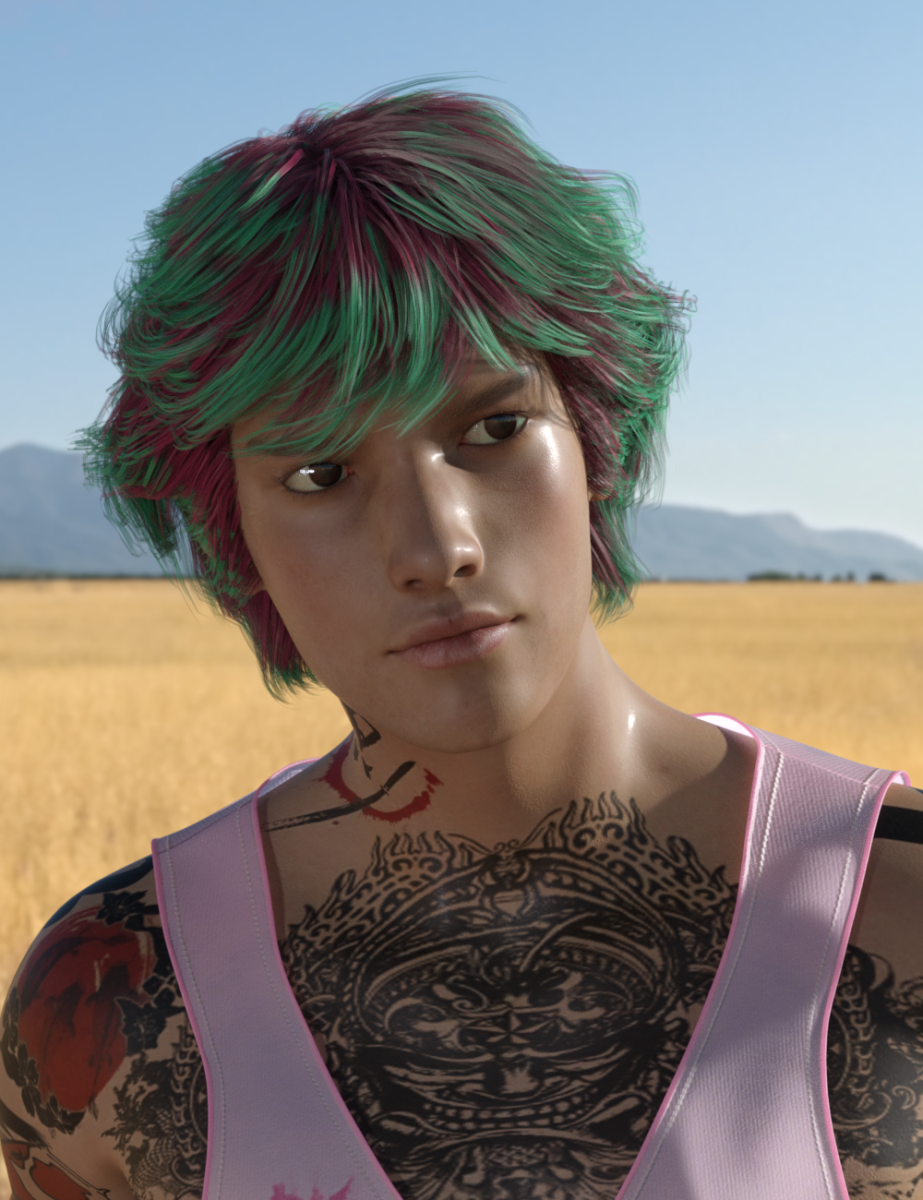
Darwins' Schtuff Pt DeuxNext morph: Named Jo Yun. Base reference is Park Hyung-sik. Skin is my Yukio for Lee 8.
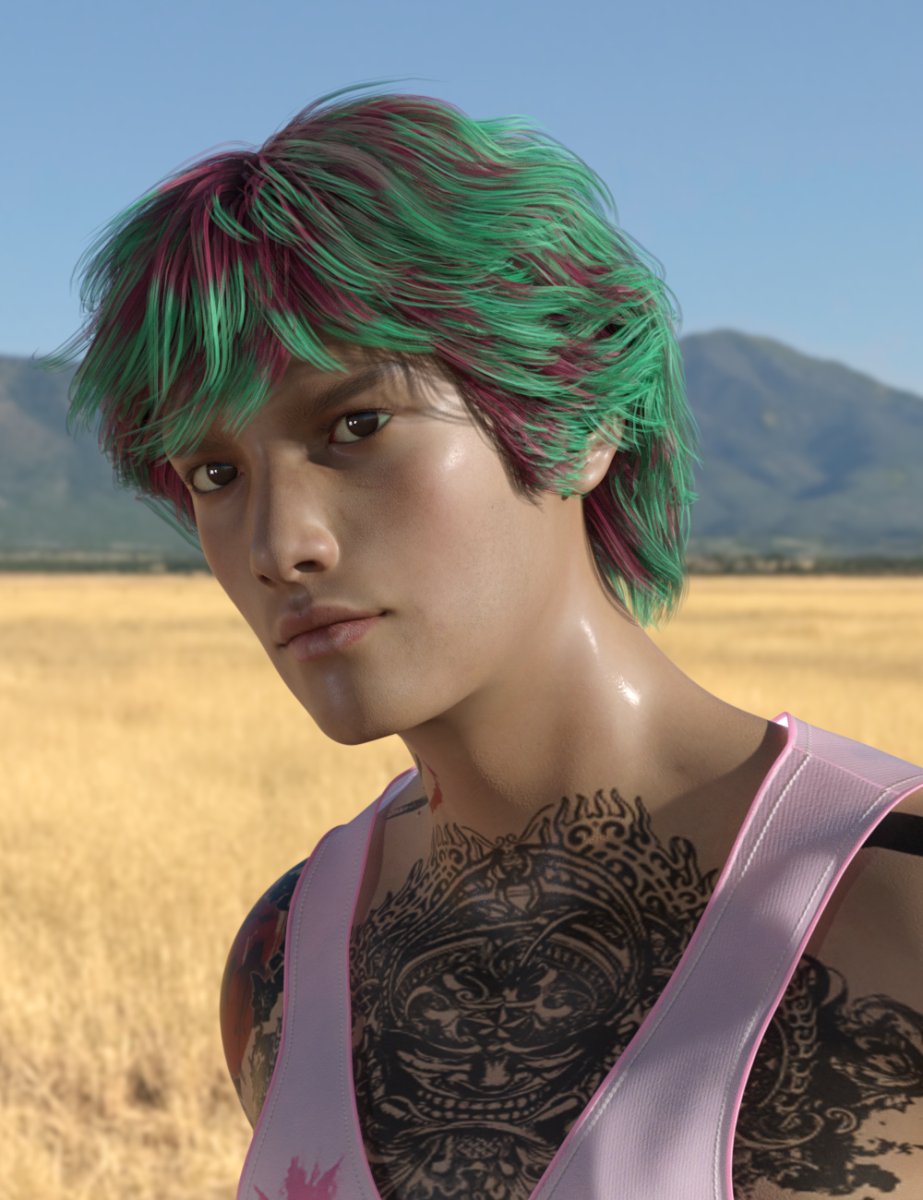
I have two more rendering which I'll post when they are finished. I still have to go through each morph set to check the eyes (if they close correctly) and make corrective morphs, as well as a couple of JCM's for certain areas. But, I have one more base head/body/full morph set to finish before starting the fine tuning process. :D
A full front face shot: I do believe I am in need of much more practice working on facial structures for Asian features. While I like this morph, it is not where I want it to be. However, I at least managed to get the lips/nose area to look how I wanted it to.
 Animated / Rigged SubD export
Pardon my cheek for necro'ing a year old thread, but I stumbled onto this via google while looking for a potential solution to this problem. This thread was a top result. I have a quick and easy solution, though it may require 3ds Max or Maya, as I use a functionality that may be peculiar to autodesk products.
TLDR: This is how I got a SubD Smoothed Genesis 3 figure into Unreal Engine with working hd morphs and weightmaps.
Problem: I want to animate a SubD Smoothed Genesis figure outside of Daz Studio without losing morph resolution.
Solution (Summarized): Use Transfer Utility to create a rigged high resolution duplicate of Genesis (or any figure with subd levels). Export that to FBX and import into 3ds Max. Save its weight maps to file. Then, dial up your character in Daz Studio, and lock the SubDivision Level Parameter, setting the minimum resolution to the level you want to export at. Export that figure to FBX, then load it into 3ds Max. Load the previously saved weight maps from file to apply on your finalized figure. This process is a one-off. Once you generate that weightmap file, you can skip the first two stages in the procedure below.
Solution (Details):
Stage 1: Daz Studio, Create a conforming High Resolution copy of your Figure.
- Load a default Genesis figure and export it to .obj at the SubD level you want to export your final figure at, leave the figure in the scene.
- Import that obj back into Daz Studio and use the Transfer Utility to conform it to the Genesis character you still have loaded. While you have the Transfer Utility window open, leave eveything at default, but check the 'UV Space' box. This will ensure that the transferred weights will be nice and accurate. You can test this on the eyes and mouth to see. We'll call this newly transferred mesh 'HD Genesis'.
- Now that HD Genesis is rigged, unfit and unparent it from the original Genesis figure you just conformed it to. Hide or delete that original Genesis, and select HD Genesis.
- Export HD Genesis to FBX. The settings aren't important here, As long 'Figures' is checked, the FBX will contain the weightmaps we need. Now, we move over to 3ds Max.
Stage 2: 3ds Max, Create a file containing High Resolution weight maps for your Figure.
- Import the HD Genesis FBX.
- Select the Skin Modifier in the Modifiers List and expand the Advanced Parameters Tab.
- Click the Save button to create an env file. This file contains the weightmaps for this skin modifier. It can be loaded onto another skin modifier, which is what you'll do in a minute.
- Reset your 3ds Max Scene, you won't need the HD Genesis figure again after this, so you can delete the FBX, as well. Hold on to that Env file, though.
Stage 3: Daz Studio, Export a High Resolution FBX of your Figure using the Parameter Lock trick.
- Load or dial up your Genesis character.
- With your Genesis figure selected, Lock the 'SubDivision Level' Parameter and set its minimum level to whatever SubD level you exported your HD Genesis to. Lock the 'Resolution Level' parameter for good measure, as well.
- Now export your figure to FBX. Make sure that 'SubD Information' is checked, as well any other settings you may need (morphs, merge clothing, animation and so on).
Stage 4: 3ds Max, Load the High Resolution weight maps onto your Figure.
- Import your new character FBX into Studio Max. You'll see that your Genesis figure is at its appropriate SubD, but the weightmaps aren't applying properly. There's no weight data for the SubD vertices, just the vertices from the Base Resolution Mesh.
- Select the Skin Modifier in the Modifier List, and expand the Advanced Parameters tab.
- Click the Load button, then navigate to where you stored that env file. Load it.
- When you're prompted with the envelope window, click the 'match by name' button to make sure that the weights are applied to the proper bones. Also ensure that the 'Load Vertices By Index' box is checked, this will ensure that the imported weights are accurate.
And that's it, from there I was able to export to Unreal Engine. Again, I apologize for bumping this old thread, but since this was a top result in my web search, I figured this was a good place to throw a bone to anyone else who was stuck on this conundrum.
Now they have the hair ....Carrara Puppeteer always confuses me as it creates no real keyframes or anything I can save as an NLA clip and won't work with Mimic
I use it for animation groups of objects, hair and clothing morph movements but never characters as it basically locks me out of adding anything else like lipsync, expressions etc afterwards
CAT girl G8There seems no morphs for the nose in that product.
Any ideas what nose morphs are used in the promo images?
I don't think any were used. I think it's just an "effect" of the "nose pad" color in the face texture. the "illusion" works better with a spmewhat wide and flat nose.
Yeah, I think the product missed an opportunity by not offering a simple "cat nose" and "hare lip" morph. One could have used either or both for their preferred style of ailuromorph.
Sincerely,
Bill
Agree, at the very least we need one of those 'cat got the cream' smiles that some anime girls get
Daz 3D is part of

Connect
DAZ Productions, Inc.
7533 S Center View Ct #4664
West Jordan, UT 84084Licensing Agreement | Terms of Service | Privacy Policy | EULA
© 2026 Daz Productions Inc. All Rights Reserved.