-
Issues with morphs projected on to geografts
@yaruuvva Thanks for the compliment. I'm quite happy with it, hence a bit sad I can't solve this issue. If I could, I would like to do an equivalent left hand, perhaps extend to the whole arm. (Sharp line at the join needs attention too.)
@Syrus_Dante I don't think rigidity (or lack of) is the problem here. I have a rigidity map applied, basically completely rigid except around the with G3F, and it works. Applying a full body morph like Weight, which does not alter the figure height, doesn't alter the graft's shape and the rigging still works (well enough). The problem is the bones of the graft not moving in line with the figure's bones when a figure morph moves the arm bones of the figure, specifically the Right Forearm Twist.
As to adding bones from the hand to the hip, if I merge hierarchies in the Transfer Utility I get those bones, but the many bones in the graft are destroyed along with the weight mapping. In theory, I could re-create all the graft bones and re-map them, but the lack of tools in Daz Studio for rigging as accurately as is required here makes this a very unattractive prospect. Frankly, doing it once was enough. I just cannot find a combination of options in the TU which does not destroy the graft bones but does give me the bones from Right Forearm Twist to Hip.
The new Centaur 'n stuff thread - reloadedI have Harry and completed a morph for a G8 centaur in hexagon. However, there are still some issues. Daz screws up the rigging when I save and reload the figure. Plus I do not know if there are unused morph channels in the cr2 that I can use for a morph injection.Eleanor HD For Genesis 8 Female no eye reflection?Question (because I don't have the character): did you try turning on/up the cornea bulge morph? Eyes look flat to me unless I push the cornea bulge up to 100 (or even more sometimes).
Laurie
Thanks ..I was wondering about thaqt. One of the things I've notice is that it looks like the eyes have a grayish film over them ... I will try the corneal bulge thing.
Medieval Lands to 3DL?You can as I do with other sets try selecting a ground piece individually and saving it as a materials preset and a shader, I often do both
then applying to a primitive
it can be confusing on the whole set as sometimes fancy brick functions are being used at least with the SM sets I mentioned, I suspect AP is not as complex but honestly don’t know.
with fancy MDL shaders you don’t necessarily see it all in the shader parameters outliner either
I checked the base color channel, both the image editor and LIE, for some tiling that wouldn't transfer to 3DL, couldn't find anything, but maybe I've overlooked something, not at all familiar with the ins and outs of the IRay Uber. And anyway, Ivy managed to make it look good, so...
The new Centaur 'n stuff thread - reloadedI'd love a centaur morph for Harry, too ... but I still use v4.
Eleanor HD For Genesis 8 Female no eye reflection?Question (because I don't have the character): did you try turning on/up the cornea bulge morph? Eyes look flat to me unless I push the cornea bulge up to 100 (or even more sometimes).
Laurie
Star Wars Renders 2013 +Where did you get Greedo? Is that a morph or a non-DAZ assest?
Being pedantic, anything not bought at daz3d.com is a 'non-DAZ asset,' even if it's for Studio, since 'DAZ' is a company. But to be useful and actually anxwer your question: the head is a static prop, in Poser format if I remember correctly. Probably I got it from R'osity? (I'm not at home so I can't check for a readme.) There's also an obj version floating around somewhere.
The body is Genesis 1, using HFS morphs (from R'osity) for the hands. You can do a pretty similar morph with M4.
So to return to pedantry, I suppose the Rodian is in fact a non-DAZ asset. :)
Shape Splitter - Divide, Combine and Save (The new version is already available. 1.2.1)[Commercial]what directory are the xmorphs-generated morph assets saved to, by default?
thanks!
j
Uniform rant!I am full of gratitude and admiration for our artists. I hope that they will forgive me if I give in to a long time subliminal simmering frustration.......
U N I F O R M S ..... (sigh)
Again and again, new ones come out .... and systematically they are unusable for all non "pin up" users with a claim to minimal realism! And when finally something "real" comes along, we go straight to the other extreme: Shirt jacket tie in one single block. And not a single shirt on all the uniforms with useful shoulder straps for epaulettes and stuff (this is just one example). I'm sorry but we can not do business on this base.
I'm not a prude! No problem if one can morph the clothing, open, cut off, roll up and even pull over the head - I don't mind at all because my philosophy is "the more options the better". But please, please dear artists, the base should be reasonably right! Isn't it exactly the difference between uniform and civilian clothes that there are lashes, buttons and hooks to attach badges and kit?
By the way - a backpack radio would be a great thing to have :-)
It had to be said! Thanks to the artists for the great work.
making a modified V4 made in poser work in dazwell I got the genesis morphs to work another way with v4. After I change the weight mapping of v4 it is selectable in transfer utility. you can add what ever morphs you want and their seems to be no flaw except now v4 clothes do not recognize the figure as v4 and so then I have to fit them on G2F add fit control unfit them and fit that clothing on to v4 and edit it to make it fit as best as possible. The other flaw I ran into is the breast movement does not work in morphs++ everything else works including the expressions. The dials for poses and expressions still work also but I don't know how to save it so I have it as a scene subset the file below is v4 with she freak and minotaur with clothing and hair made for G3F in iray
SereneNight's Sci-Fi Fun Thread 2Ah, OK. I was wondering because Sara is so freckly that she almost makes him look like that's where he's supposed to be, as opposed to "this is what happens when aliens who don't understand human skin tones tinker," if you see what I mean. I like the way he looks with Sara, myself, but I kind of like where you had him originally, as well.
I toyed with the idea that Owen might have freckles. He is of the fair skinned ancestry. But, it makes him look too different. A few, maybe.. But a full face of freckles makes him look a bit too Jimmy Olsen for my liking.
By "impervious skin", do you mean that he's basically bulletproof now? Is that a futuristic-soldiers-technology thing or an "aliens didn't realize that human skin doesn't work that way" thing? (And if it's an aliens thing, how much experimentation has he had to endure from his own side to try to uncover his biological secrets?)
He can die. But it is unlikely that he can be cut, stabbed, or stuck with a needle, and bullets, would bruise and rebound. He couldn't get a tat, or a vaccination. He can breath through his skin, so he can't drown, unless something is wrong with the water.
Owen doesn't actually know the extent of his upgrades, as he is a careful soldier, and not prone to acts of heroism. . Some of his plattoon members are far from the same however.
The aliens are color blind, but I think they are familiar with humans. Centuries of abducting and probing humans, has revealed all there is to know about humanity. However something happened to these aliens.... They developed an abherrant trait called empathy. They were hunted, and outcast and shamed by their own kind, so they live in hiding, exploring what it means to have empathy and how they can best help, rather than harm.
When they accidentally injure Owen and his platoon, they are morally bound to correct this issue. And since they are ethical grays, correction is taken to an entirely new level.
You see, humans are flawed, so very flawed. Their cells degrade and age! They must fix that. They communicate with devices implanted in their skulls! How inefficient!
They are telepathic, and they can read the minds of their victims quite easily. They know for example, Soldier-so-and-so has been unable to afford a new body, soldier-so-and-so is infertile. So, they fix those things.... While they are tinkering around. Alterations, corrections, and improvements are kindness. They are only giving people their hearts desires. a bonus for the hurts, they cause.
Owen's skin is burned so it must be replaced, but it would be wrong to give him skin which could be so easily damaged again. So Owen's skin is stronger, with some unusual qualities. Most of which he has not fully uncovered yet.
It is probably a bit self-serving to give Owen and his platoon these skills and abilities as well. they know, Owen and his men, will now be strong enough to stop some of the more dangerous enemies. So it is a bit win win.
This does pose problems for Owen, when he returns to base. He faces some tremendous pressure to body transfer.
The aliens for the most part, consider their alterations rather tame. They have group mind, and decide on committee what the best good they can do for each person. But they still ultimately are grays. And some of the old ways... Are hard to overcome.
They would, for example, be upset to know they had made mistakes. they would insist on correcting their pigmentatin errors, with more lengthy procedures.
July, 2019 - Daz 3D New User Challenge - Portrait RenderingAs a result of the kind suggestions made by Kismet2012 and Ariochsnowpaw, I have updated the two renders, as attached.
The 'Contemplating the Ruins' image went reasonably well. The cornea bulge worked well. I softened the shadows by changing the sun size from 4 to 16, and tweaked the drape of the figure's hair. I kept the sun as sun rather than mesh because, well, I can understand its positioning more easily. I like the soft, low angle of the sun at high latitudes, so dial in a date of 21 June, latitude 80 to 85 degrees north, 10 pm local time, then spin the dome to get the light from the right direction. If I want less yellow light, I simply change the time closer to mid-day.
The 'To the Wok Festival' was a bit more of a problem. The clothes were for G3F, the hair was for G3F, so, as the character base had G3 & G8 options, I originally made it G3F. G3F has no cornea bulge morph. So, I put in a tiny spotlight pointing at each eye with a luminance of 15 lux, and made the eye surface as reflective as I could. The figure's right eye reflection was out of shot for the camera. The left eye, well, it's not quite right. The iris rather than the cornea is doing the reflection. Consequently there is no reflection at the pupil. I will have to try to correct this, and when I do so, I must remember to hide the other figure. Her hair adds 3 minutes to the computer's time thinking about starting a spot render. For interest, I added a full colour rendered version, which confirms my belief that a monochrome render was the best option for this scene. I stopped the render at 38%, by which time it gives a good idea of the finished render.
Regards,
Richard
Not all images convert well from colour to black and white. I agree with you that "To the Wok Festival" is a better black and white image than it is in colour. Although it adds interest I find the grafiti on the wall distracting in colour.
You really did capture that contemplative expression and pose in "Contemplating the Ruins".
Any way to stop auto loading of hidden morphs?I meant to turn off the auto-follow checkbox on the figure morphs but yeah there is also an auto-follow checkbox that you can turn off on the auto-generated morph on your clothing. I always get confused by whether to turn off auto-follow on the figure or clothing.
However with turning off the auto-follow checkbox you still got those ugly deforming morphs in your clothing. If you plan to release this tank-top as a product and you don't want to have those useless morphs here is another trick to turn them into empty morphs.
Set the Parameters pane to Edit Mode, select all auto-generated morphs you don't want with Ctrl+click or select first and then Shift+click last (in Edit Mode you can select multible morphs at once), right-click on one of the selected morphs and in the right-click menu you can choose Auto-Follow>Disable Auto-Follow on Selected Properties (this will disable all at once without going into the Parameter Settings).
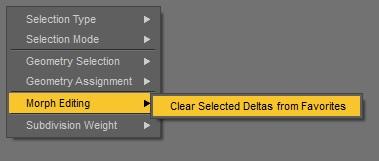
Next comes the trick to turn them into empty morphs: right-click again and choose Favourites>Add Selected Properties to Favourites, switch to the Geometry Editor tool and press Ctrl+Numpad-Multiply or use the viewport right-click menu to select all, then right-click the viewport again and choose Geometry Selection>Convert Selection>Convert to Vertex Selection. The geometry selection will turn into dots and in this mode if you right-click the viewport you can find Morph Editing>Clear Selected Deltas from Favourits. Since the whole geometry is selected all morph deltas will get deleted and you get an empty morph that you can finaly save as morph asset and will only be a few kilobyte on disk. Clear Selected Deltas from Favourits is a bit hidden in the Vertex Selection mode but this may be for a reason, be carefull with this not deleting morphs you want to keep.
Cleaning Up Morphing Mistakes - Youtube
Clear Selected Deltas from Favourites - can't find this function anymore in the new DS version
 BetterStar Wars Renders 2013 +
And the other pictures I've had stored up for a bit:
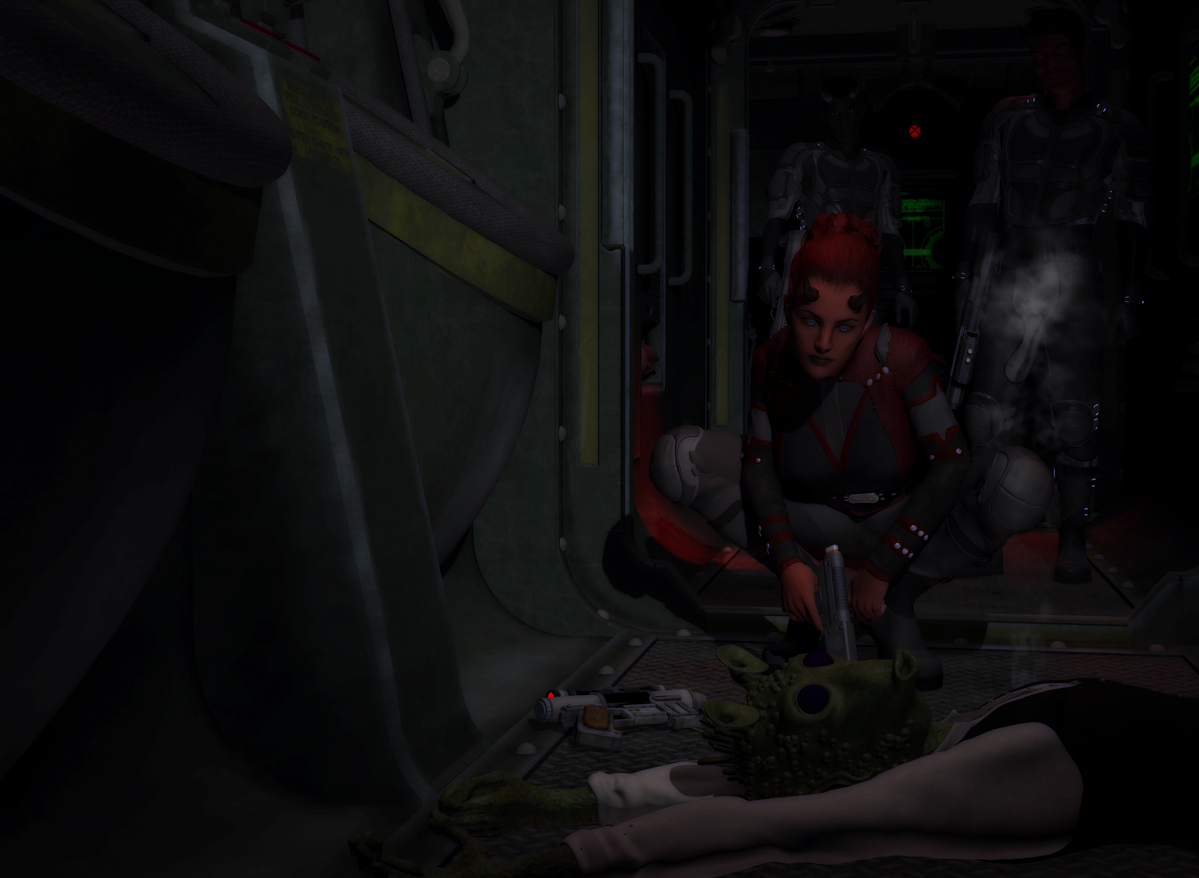
Under Arrest: some bounty hunters exceed their mandate, again. I did this a while back when I picked up the devils for G3 and decided they'd make good Devaronians. This looks a bit dark on the library computer - please let me know how it seem to all of you!

Pilots Pose. Everyone in this is G1. Well except for the droid of course. The red flight suits fly the Vipers (which I think looks like an Incomm craft and so it is in my world); the blue suits are the crew (with the droid) of the Y-WACS, a sensor/control ship based on a BTL-B. The flight suits are for V3, autofitted, and the helmets are Bazze's free clone pilot helmet.

Dagger Team. This is a group of Special Boarding Infantry, which are like marines, but for space. They aren't actually marines, because marines work on the water. Thus the name, "Marine." I grant you the only thing in this shot that's explicitly Star Wars is the E-11's, which are kitbased up from Panko's Sterling SMG.

Different Counterparts. I think this is my current favourite of my own stuff. The RA-7 is the "mainframe" robot from R'osity, with an OBJ head I don't know where I got and the "waist" texture from John Mallis' C-3PO. The C1 is of course Rduda's Chopper with some kitbashing to create a "stock" C1. I enjoy the irony of using frankensteining to create a droid out of a 3d model of a droid that was, in character, frankensteined out of whatever Hera could find.
Where did you get Greedo? Is that a morph or a non-DAZ assest?
Teen Jane 8..so about Sarah, do you need Teen Jane or will she work with just G8F. She has a much more "mid teens" look and I love those freckles particularly with ginger hair.
Both of the images I posted above (links down below) are Sara without the Teen Jane morphs loaded in because I didn't buy Teen Jane yet. You can definitely use her without Teen Jane. Just realize she isn't going to look exactly like she would if she had the Teen Jane added in which @dkgoose said was dialed in at 100% when he answered my question. I still think she's rather cute and teen-looking without Teen Jane.
https://www.daz3d.com/forums/discussion/comment/4719431/#Comment_4719431
https://www.daz3d.com/forums/discussion/comment/4720461/#Comment_4720461
...I do have the Growing Up morphs.
I think you would need those morphs on Jane anyway, she does not look like a teenager. And with Growing Up morphs, you can make pretty much any character look like a teen.
Personally, I would recommend Jane to people who like a generic character that they can tweak and make their own. I don’t think she even adds much to the gene pool, but she’s really easy to morph into whatever you want her to be. Rendering Aleena now (addon) and she’s very pretty but in no way looks like a teen!
..yeah I see your point. I have been creating teen and even tween characters since the Gen4 days when we had none without specialised utilities such as the Growing Up Morphs. Used to be a lot of work back in the day. With Growing Up and the plethora of teen characters since the introduction of Genesis, I feel like i'm cheating.
Not to hijack the thread but here is the latest rebuild of my signature character (post hard drive crash) Using G3F, a mix of Molly, Tween Julie, and Zahara (the latter via GenX) with the Growing up Morphs and skin created in SBP3. This would have taken weeks in the Gen4 days as opposed to a couple evenings today.
The new Centaur 'n stuff thread - reloadedHi Hemi, long time no see. Good to know you are still around :)
I too would be interested in a morph for the HiveWire Horse+G8
Misleading product page.....
Since we are enjoying a good whine

I occasionally come across this rather annoying discontinued product in my library
http://docs.daz3d.com/doku.php/public/read_me/index/169/start
it was a morph pack for some really old Zygote clothing for V1 to update it to V2 apparently
http://docs.daz3d.com/doku.php/artzone/azproduct/169
destinied to never be useable in any way

my own silly fault for buying it but it was only a couple dollars I see
the sad thing it was actually years before I realised I cannot use it
I have it too but as part of the Victoria 2 Bundle which also contains the clothing pack it's for. Got the whole thing for less than $10 here at DAZ.
I actually have all those others things listed too but not that one pack, bought separately
its no biggie just raising as it was a classic case of something being very unclear in its product description, it simply sounded like an upgrade for V2 but irrelevant as no longer in the store
the Original Poster’s example is pretty clear in its description that it’s a texture addon so has no case in my opinion at all.
Misleading product page.....
Since we are enjoying a good whine
I occasionally come across this rather annoying discontinued product in my library
http://docs.daz3d.com/doku.php/public/read_me/index/169/start
it was a morph pack for some really old Zygote clothing for V1 to update it to V2 apparently
http://docs.daz3d.com/doku.php/artzone/azproduct/169
destinied to never be useable in any way
my own silly fault for buying it but it was only a couple dollars I see
the sad thing it was actually years before I realised I cannot use it
I have it too but as part of the Victoria 2 Bundle which also contains the clothing pack it's for. Got the whole thing for less than $10 here at DAZ.
The new Centaur 'n stuff thread - reloadedHey Hemi long time no see!! How's everything going? and yup I pretty much do the Milhorse with your morph for any figures I want that I want the horse body to have more shapes , did you ever do a morph for the HiveWire horse?
Why, after all this time, does GoZ still not work properly in DS?I use GoZ many times a week and see this problem frequently enough to know what to do about it. As Richard said clearing the GoZ cache and rechecking the path inside ZB usually fixes it right up. From time-to-time, I have GoZ really get stuck. Using DIM to uninstall and reinstall the GoZ plugin seems to put things right in that case. I have usually found this a more sure solution than using Preferences->GoZ->Force Reinstall to from inside Zbrush.
Since I hate losing my sculpts, I often can save out the .obj (it's in Lightwave Scale, 1u = 1m) and load it back with Morph Loader Pro set "Reverse Deformations" to "yes".
I find frequently clearing the GoZ cache (when DAZ Studio is closed) reduces the issue.
Daz 3D is part of

Connect
DAZ Productions, Inc.
7533 S Center View Ct #4664
West Jordan, UT 84084Licensing Agreement | Terms of Service | Privacy Policy | EULA
© 2026 Daz Productions Inc. All Rights Reserved.