-
Don't know if anyone else has noticed
Blando Calrissian said:
Almost as popular as the fascination with the female midriff... Victoria's friends probably refer to her as "the crop-top girl" when she's not around.

Aye. As someone who make paracozy book covers, I love the graveyards. The more the merrier. Female midriffs, on the other hand, I have zero use for. Or "assassin" outfit that conisist of high heels and and two strips of spandex.
Don't know if anyone else has noticedBlando Calrissian said:
Almost as popular as the fascination with the female midriff... Victoria's friends probably refer to her as "the crop-top girl" when she's not around.
Oh yeah, reminds me I need more belly button rings in the store, LOL
 Don't know if anyone else has noticed
Almost as popular as the fascination with the female midriff... Victoria's friends probably refer to her as "the crop-top girl" when she's not around.
Character rendering in a different colour light to the sceneIn my opinion the default skin of some vanilla characters is a little bit too red tinted, for example Victoria.
Combine that with a lighting that reinforces that effect and you get a skin that looks too red and unnatural.
I don't own the Elizabeth character but I guess that might be the issue in your case too.
Have you tried reducing the translucency of the skin?
Because the red tint may be caused by the translucency color.
Or maybe you have accidentally set the translucency color to high in the skin options and as a result the skin looks now too red.
In my case that helped.
Using DAZ/3D figures ‘as is’ in (semi-)professional 3D productions?FSMCDesigns said:
I do consider it lazy, especially since there are more than enough tools, morphs and skins to create plenty of unique characters, so why stick with the defaults that DAZ created. Ask yourself, do you want people to see your work and go there is victoria 8 or wow, what a great looking character, wonder what software they used.
Can't contest that FSMCDesigns, thanks for your feedback. I recently learned in the area of skins that some users would like to have certain skins from older generations applied to Gen8 and there are indeed tools (or skills) to do so, I wonder what they discovered that made that 'old skin' so precious! As to ('lazily') using unaltered figures in renders, I must confess there is one particular figure that makes me smile every time I see it used (unmodified) in renders, the 'feast of recognition' accounts for something I guess and it also suggests this character is living the life, moving from one crazy adventure to another!
Using DAZ/3D figures ‘as is’ in (semi-)professional 3D productions?I do consider it lazy, especially since there are more than enough tools, morphs and skins to create plenty of unique characters, so why stick with the defaults that DAZ created. Ask yourself, do you want people to see your work and go there is victoria 8 or wow, what a great looking character, wonder what software they used.
What's the Deal With Victoria 8's Pucker/Pressed Morphs? [SOLVED]So for some reason, Victoria 8's Lips Pucker/Pressed just makes the face look goofy. The same parameter seems to function just fine for V8.1 and V7 models respectively. I don't remember when this started, but I recall not having this issue before. Does anyone else have this issue with Victoria 8/Genesis 8 Female models? Attached is a side-by-side comparison of V7, V8, and V8.1 with the Lips Pucker/Pressed morph at 100%. Is this just one of those "You gotta update the program version and it'll go away" things?
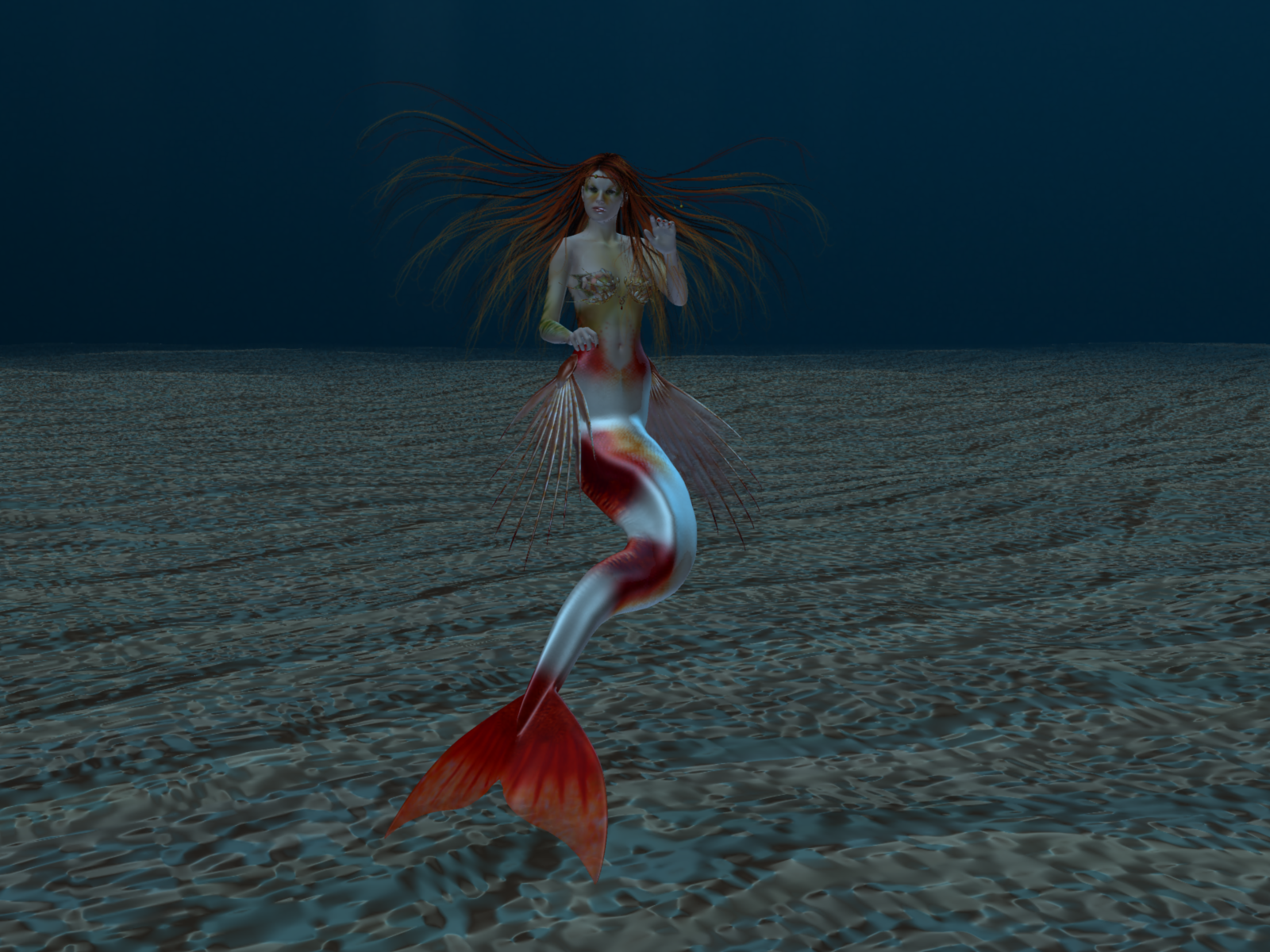
I'm using DAZ version 4.15.0.2 Pro Edition (64-bit).Carrara Challenge #62 "Clowns and Other Circus Stuff" - WINNERS ANNOUNCED!!ENTRY # 5
ARTIST NAME - Bunyip02
TITLE OF WORK - ClownFish Take2
LINK TO WIP(S) - https://www.daz3d.com/forums/discussion/comment/7457631/#Comment_7457631
CREDITS - Victoria 4 - https://www.daz3d.com/victoria-4-2-base
Hesperia Hair - https://www.daz3d.com/hesperia-hair
SeaFolk Bundle for V4 and A4 - https://www.daz3d.com/seafolk-bundle-for-v4-and-a4
UltruMarine Ocean - https://www.daz3d.com/ultrumarine-oceanANY COMMENTS OR TIPS ON HOW YOU MADE THIS IMAGE/ANIMATION
 Dial Fusion for Genesis 2 to 8.1 (Commercial)
I use HD characters; but I am experiencing a problem.
After having created the dials, when I load Victoria 8.1 HD i receive a warning that there are duplicate entries in the asset; afer completing the file load thing semms working. Is that an importat issue? How can i avoid this?
Thanks.
Francesco from Italy
Carrara Challenge #62 "Clowns and Other Circus Stuff" -UnifiedBrain said:
Is there a newer (NEWER) product that is easy to use and works well? Right now I'm not seeing it.
yes DAZ studio 4.20.1.38 (May 20, 2022)
Genesis 8
an iPhone 10+
https://www.daz3d.com/face-mojo--facial-mocap-retargeting-genesis-3-and-8-bundle
DAZ has not touched Carrara for almost a decade and Michael and Victoria 4 even longer
there is no new technology for legacy content, Lipsync and Mimic were the last innovations
Does anyone know who these characters are ?Going by facial features (and more specifically the textures), the two on the left look like Teen Josie (7 or perhaps one of the other generations of Josies/characters based on her shape) and Victoria 7. I would say the body shapes could be any character or combination of morphs; I'm just going by faces. Victoria appears to have been morphed to be younger with a more rounded face. There's also something about the third girl that reminds me of Belle 6, but I don't think that's her face exactly. Maybe her textures...? I hope that helps your search a bit or gives you some ideas!
Can you fit Genesis hair onto Michael 4 and Victoria 4?Thank you for the response! Though, your explanation may be a little above my pay grade. :)
I'm trying to position Nuru Hair for Genesis 2 Female to Victoria 4.2, but the problem is that when I attempt to move the hair using the translation sliders, it responds as though the hair is on a pendulum; it swings left and right, fore and aft, but I can't get it to go any higher than V4's face (see attached).
The hair is not fitted to or parented to V4, so I thought I could move V4 into position under the hair instead, but the hair behaves as though it's attached to V4's face; I don't understand this. Fortunately, this model is destined for Blender so I can reposition the hair there, but it would be nice to get it positioned correctly in DAZ studio. Per your suggestion, I moved the hip bones for both the hair and V4, but the problem remains. Any other suggestions for a Genesis novice? Thanks again.
Can you fit Genesis hair onto Michael 4 and Victoria 4?I'm still working with Michael 4 and Victoria 4 because I have a library of clothes and poses for them that aren't available for Genesis figures. Question: Is there any reason I can't apply hair created for Genesis figures to M4 and V4? I realize the hair would need to be fitted manually, but before I invest in more hair I just want to be sure there's no reason this wouldn't work. Thanks!
Arcadia 8.1Looks like a Victoria 8.1 Jacqueline 8.1 Coral 8.1 for me. Not sure if it's because of the similar eye shape or the 8.1 skin. I found Genesis 8 skins more realistic than 8.1.
AIUTO...CHI CONOSCE L’ITALIANO? PARTE TREDICIKainjy said:
Non per fare il gradasso... ma il clone per passare da V4 a G8 con un solo passaggio lo puoi fare da te (io ne ho creato uno mio).
Oppure li puoi comprare già fatti: https://www.daz3d.com/sy-victoria-4-and-michael-4-clones-for-genesis-8Attenzione: i cloni vanno bene per vestiti attillati come bodysuit o tutine, vestiti larghi o con oggetti particolari (armature con spuntoni o elmi chiusi) danno molti problemi.
Vabbé, la mia era la soluzione free, comunque concordo con il fatto che vestiti "particolari" danno problemi, questo perché se un vestito ha magari che so dei bones aggiuntici, per fare cose particolari, esempio stupido ha delle ali attaccate. Quando lo converti da una figura ad un altra, il vestito riceve lo scheletro della figura ricevente, perdendo i bones aggiuntivi. Se invece ha dei morphs, la dipende, a volte funzionano a volte no.
AIUTO...CHI CONOSCE L’ITALIANO? PARTE TREDICINon per fare il gradasso... ma il clone per passare da V4 a G8 con un solo passaggio lo puoi fare da te (io ne ho creato uno mio).
Oppure li puoi comprare già fatti: https://www.daz3d.com/sy-victoria-4-and-michael-4-clones-for-genesis-8Attenzione: i cloni vanno bene per vestiti attillati come bodysuit o tutine, vestiti larghi o con oggetti particolari (armature con spuntoni o elmi chiusi) danno molti problemi.
A Shout Out to Capsces Digital InkThe morphs Beth made were during the years of the legacy figures, from Victoria 1/2 up through Victoria 4. Once the Genesis line started, she tapered off on the morphs, focusing upon poses until she just stopped (the morphs).
A little tutorial for making stuff useable for Victoria4.2 figures.It's easier for Genesis figures to use the Transfer Utility function in Daz Studio but if you like me and love the Victoria 4.2 figures, than you might want to know how to fit stuff to the figure and at the end you could use about anything that will load into carrara to fit on V4.2.
After some research i found a topic in Daz Forum with a little tutorial for that thanks to the User jktarwater_8568c339b9
Original Thread: https://www.daz3d.com/forums/discussion/52699/need-tutorial-for-making-clothes-for-victoria-4-2)
I have now used this method for clothing and hair, will test it out with figures later too but i think this should work too.
So first step, take the 3D object you like, any cloth or hair. If you already have the item as an .obj file, it's easy but if you don't you just need to export it as an object file.
- So in Carrara i load my morphed figure, if i want to place a dress that was modeled to the figure, or i just load a normal V4.2 figure into the scene.
No morphs or textures needed for this.
- Than i import the object i want to fit on the figure, like a Haircut or a Dress and set the size (Overall) and position where it should be, with a Dress, i might model it into position that no skin shines through.
- After that is done i export the object as WaveFront Obj. and use the Target DazStudio (Full Scene). Textures aren't that important right now as you can do it later in Daz Studio or in Carrara if you have finished the whole process.
- Open Daz Studio and first load V4.2 figure or your custom figure into the Scene (no morphs needed). Click the Figure in the scene Tab, than go to Edit > Figure > Rigging > Convert Figure to Weight Mapping.
Than choose the option TriAx Weight Mapping and click ok.
- The next Step is just load the item you like to fit, the .obj file into the Scene as import, Convert to Daz Studio from Carrara. No other settings have to be done, just click ok and the object should than load in place.
Best thing to put or save the obj file into ...\Documents\My DAZ 3D Library\Runtime\Geometries\ (you can than create a folder you like to use). Be careful where to put the files as Daz Libary will be in public and in user documents, that can be a little confusing, you can also use both of them but you should know where the files are.
- After importing the obj. file you can than if you like add textures to it or you go directly to the next step.
- Select the Hair in Scene and Editor Tab and click: Edit > Object > Transfer Utility, As Source Scene Item you can now choose Victoria 4.2 and as Target the object you like to fit and hit ok.
- Select the Hair again in the Scene and Editor Tab and export it as a Poser CR2 File in this location: ...\Documents\My DAZ 3D Library\Runtime\Libraries\Character\...
You can also create a folder you like for this and hit ok. As Export Options nothing have to be changed, just click Ok.
- Daz might ask you for the location of the Object file as if you already have set it to the Geometries Runtime you can just click the file there, otherwise you should add the file there now as Daz will say that it's not the correct location if you put it somewhere else.
- After that is done there is only one step left. The hair still selected, or if not select it again and go to File > Save As > SupportAsset > Figure/Prop/Asset and save the file here: ...\Documents\My DAZ 3D Library\Runtime\Libraries\Character\... you can create your own folder again where you want to have it within the libary and just save the file.
As options for saving you can just take a look at the Metadata, the first option is SetContent Type, if you click Follower, you can than click for example Hair.
SetCompatible With should be activated, there should be Generation4/Victoria4 if it is, than just click Accept.
That was the last step, the file is now in your libary and you can update your Folders within Carrara, than just go to the location where you have saved it and you can load it directly into the scene and fit it to V4.2 figures.
I like to test out later to import a custom figure (from game for example) to make it like a full dress for the figure, than adding it, making V4.2 invisible and it sould be like an own figure where you can use all the V4 poses you have (but you still need to select V4.2).Is there anyway to fix this clothing distortion?felis said:
Is it using generic autofit, or do you have V4 clones, uch as https://www.daz3d.com/rssy-clothing-converter-from-victoria-4-to-genesis-8-female
Is the character the base G8, or morphed.
The problem you are seeing is not unusual, but can often be minimized by using clones.
Hi. Yeah it's generic autofit. What are V4 clones? (sorry if it's a noob question) The character is GF8 morphed it's not original genesis 8 female.
Carrara Challenge #62 "Clowns and Other Circus Stuff" -UnifiedBrain said:
Diomede said:
This is the old spirit of the challenges that I liked the best, stretching are skills and challenging us to get out of our comfort zone.On a mico level, I do that in every Challenge. But learning animation is on the macro level, because characters tend to move and clothing must conform. Until now, I have successfully avoided thigs like transfer utilities and clothing converters, because I can make just about anything fit in the Carrara modeling room in a single frame render. Now I find myself flailing away in DS, hoping to get something to work.
For example, I am currently trying to get a clothing item (OBJ) to fit V4. I can get it to conform to G3 in DS, but where to go from there?
In short, to do what I want, I now apparently have to relearn DS.
I also have to learn how to conform clothing.
I also have to learn how to use the Carrara animation timeline.
I also have to learn basic animation skills (ironically, this may be the easiest part).
I also must brush up on video editing skills.
For sure, all of these things are valuable. And if HW extends this Challenge for another month of two, I might get something done.

Have to admit, I am counting on this challenge having a longer than typical period of time for works in progress.
Other than encouragement, admit I can't be of much help for the animation timeline, basic animation, or video editing. However, I might be able to help with the V4 issue. Carrara 8.5 is fully compatible with the rigging setup of Victoria 4, Michael 4 and similar Poser figures prior to Poser 9. Daz was making figures and content for Poser prior to the release of their genesis figures. V4's native rigging is actual for Poser. Do you have an old version of Poser(or even a new one)? Not necessary, just curious. Do you have the VWD draping plugin and Philemo's bridge? Again, not necessary, just want to know the options.
Can you provide more specifics? Did you model the OBJ? Is it a clothing item made for a different figure? Does it generally line up with V4, or is significant alteration required? You have quite a few choices. One option is to attach the obj directly within Carrara without ever going to Studio. Probably not what you are going to want to do, but again depends on the specifics.
Daz 3D is part of

Connect
DAZ Productions, Inc.
7533 S Center View Ct #4664
West Jordan, UT 84084Licensing Agreement | Terms of Service | Privacy Policy | EULA
© 2026 Daz Productions Inc. All Rights Reserved.