-
Feng Character Morphs
gfdamron1 said:
I have a non-Feng characer in the scene, and I have her in a pose that bends both spine 2 and spine 3. In Currently Used in the Parameters Tab, I don't see anything related to Feng listed. Where should I be looking to see what's being applied to the figure?
Do you show Hidden properties ?
If there is a problem, with the bone (spine 2 or 3) selected and in the Parameters tab, list all Currently used parameters and you should see if any of your Feng's character has the problem: every one of them who is concerned will have an property active and set to 1.00.
Once I know which character had at least one problematic property, I did it like explained in the previous message (it was easier to look for any bone with a sub property to see if the 2nd stage was correctly set than to active each bone one at a time looking for hidden properties), but as long as you can access their body morph slider to drag and drop it onto the 2nd stage property, you will be able to fix them.
Edit: I have a screenshot, I'm editing it and will attach it once it's done.
Edit 2: Here's the screenshot, with Genesis 9 Base and no other morph active. After bending Spine 3, properties from Ethan and Eleanor were active, when they should not:
 Feng Character Morphs
gfdamron1 said:
Thanks for that explanation, Barbult. I'm going to have to look into the process of making the correction. I would rather spend my time rendering...
It's a couple of minutes per character once you know what to do.
An easy way to found the ones that are missing correctly set second stage controller (you may already know how to do some of the steps).
1. Load a Feng character you want to check / fix
2. With the Parameters tab active, switch to Edit mode
3. The character should still be selected at this point, but if it's not, select it and then make sure the Parameters tab while show the various morphs sliders related to the character (easiest way, Currently used then filter by the character name), you may need an easy access to them later.
4. Right click on any property and go all the way down the menu to click on Show in Property Hiearchy (it's just to open it, there is likely another way but I don't know it)
5. Filter by the character name, which should show you that character at the top of the windows, then open the Bones sub-menu.
6. Check any bone with a sub-menu, to see if the 2nd stage controller is correctly set and take note of their names, you'll need them later (you can take a screenshot, it could be useful for remembering them and to open an ticket to ask for an official fix). As an example, on Eleanor, spine 2 and 3 don't have any 2nd stage controller defined:

7. from the Parameters tab, drag and drop the body morph of the character you're fixing onto Controller > 2nd Stage, do that on any problematic property. You should end with something like this on Eleanor:

8. Then, go to File > Save As > Support Asset > Save Modified Assets. Once the window is open, uncheck anything not related to what you changed. As an example, I don't know why but when I opened the windows, Daz listed other elements, including Genesis 9, and I didn't modified any of them. So I unselected them to be safe. I also don't know how to avoid my username being set as the author but it's not important and the files will be replaced once an official fix is deployed so I didn't bother looking for a solution.
Here's how it looked after fixing Eleanor (Daz usually don't compress file, but it's checked by default):

Bonus step. If you have the time, open a ticket to ask for an official fix (I don't know if it's possible to open one ticket for all character of if it's need to be one for each character).
@vwrangler saw the same problem on some Feng's characters with a correctly set second stage controller but it was not the case of the two I own so no idea what's causing it and how to fix it.
[Released] Hat Check for Genesis 9 [Commercial]willowfan said:
Great product in the main. I've found that it (a) does not like ears if the hat sits too close to them (like a baseball cap) and (b) doesn't look good if the hair has a lot of volume (away from the head), producing an unnaturally sharp cutoff where the feathering morph ends.
However I can confirm that it does indeed work with dforce strand based hair (see pic).
Thanks for the confirmation. I'll get and try it out.
[Released] Hat Check for Genesis 9 [Commercial]Great product in the main. I've found that it (a) does not like ears if the hat sits too close to them (like a baseball cap) and (b) doesn't look good if the hair has a lot of volume (away from the head), producing an unnaturally sharp cutoff where the feathering morph ends.
However I can confirm that it does indeed work with dforce strand based hair (see pic).
Feng Character MorphsElor said:
From what I'm seeing, on Eleanor, spine3_FNEleanor_CTRLMD_N_XRotate_35 and spine2_FNEleanor_CTRLMD_N_XRotate_40 don't have a second stage set.
Once I have added her body morph as a second stage controller, I just have to save modified assets and I'm good ?
Yea, I think you're good then.
Feng Character MorphsFrom what I'm seeing, on Eleanor, spine3_FNEleanor_CTRLMD_N_XRotate_35 and spine2_FNEleanor_CTRLMD_N_XRotate_40 don't have a second stage set.
Once I have added her body morph as a second stage controller, I just have to save modified assets and I'm good ?
Are there 2 types of strand based hair? Like a consumer version and locked version?FrankTheTank said:
crosswind said:
Then what really matters in your case is Hair Generation Mode. Fortunately Moshi the Kitten's fur is generated by Target Surace rather than Root Radius. So it's easy to lengthen the fur by tweaking PR/PS hair generation settings...
'You even can "groom" the fur in external modeling software by exporting the polyline of the fur...then import as a morph, or deform the fur by using D-Formers in DS.
Do you know of any good tutorials on this? I'm lost with some of the terminology you're using there. I've found like one tut on SBH, but it doesn't go into all that.
I've seen no full tutorial about settings of hair generation / simulation on SBH's surfaces, but you still can experiment the properties yourself. I quickly tweaked some settings there and use a D-Former to shrink the ear hair after holistically lengthening the fur length. Scene file is attached. You may give it a try and finetune the values. (Preview PR Hair is turned on in the scene, so it'll take some time when opening the DUF file... as per your PC's performance ~~)
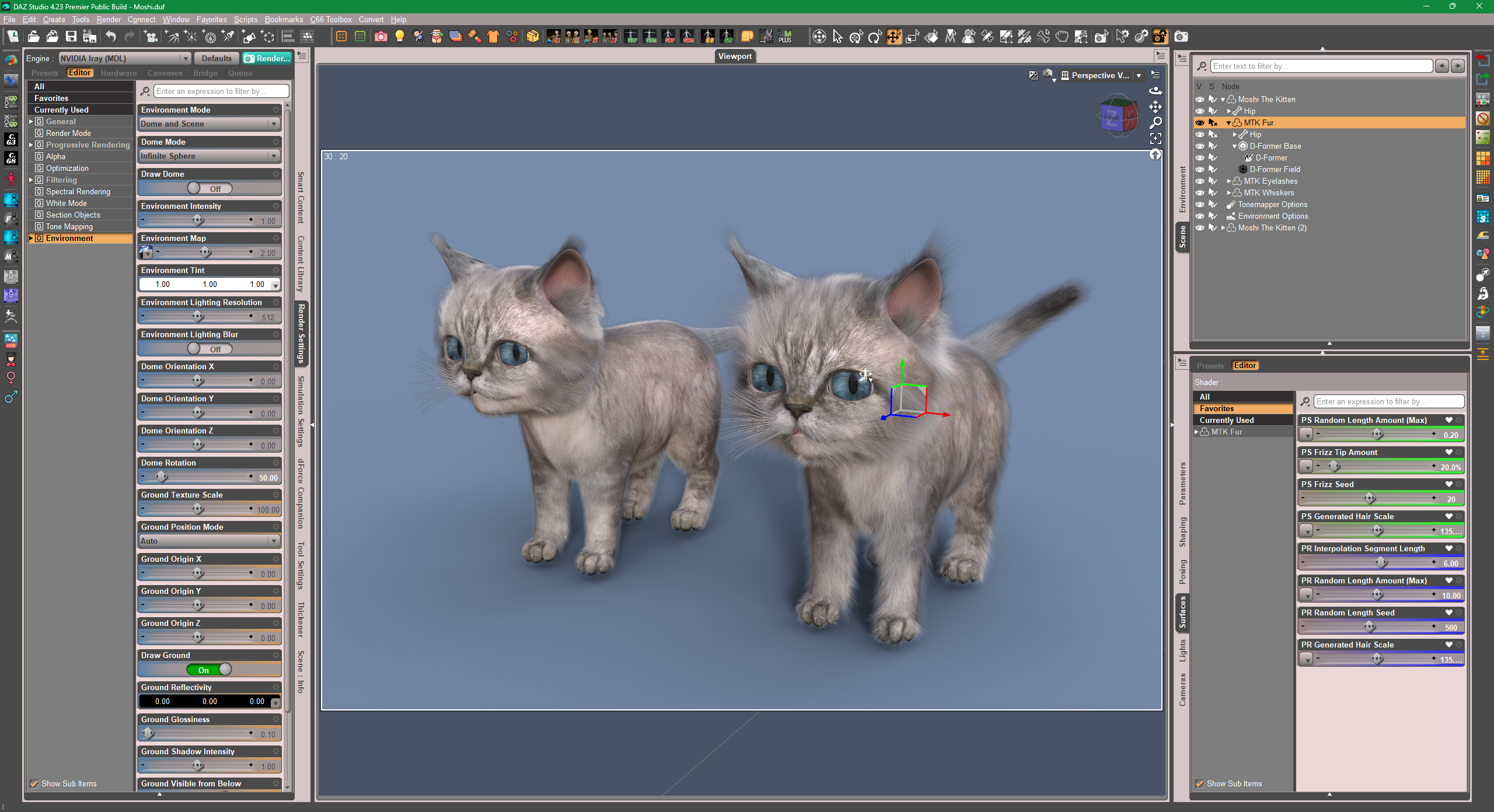
Edit:
Also, you can make separate maps for the mappable slots relating to length and frizz etc.... but that'll be another story. (check some suggestions from OSO... https://www.daz3d.com/forums/discussion/654366/question-about-changing-dforce-hair-length-solved)
Another thread of how to use SBH base polyline to make hair shapes, some tricks as well as the way of using D-Former : https://www.daz3d.com/forums/discussion/706571/really-like-the-look-of-the-bangs-in-the-promo-for-dforce-strand-based-autumn-style-bob-hair-for-gen
Are there 2 types of strand based hair? Like a consumer version and locked version?FrankTheTank said:
crosswind said:
Then what really matters in your case is Hair Generation Mode. Fortunately Moshi the Kitten's fur is generated by Target Surace rather than Root Radius. So it's easy to lengthen the fur by tweaking PR/PS hair generation settings...
'You even can "groom" the fur in external modeling software by exporting the polyline of the fur...then import as a morph, or deform the fur by using D-Formers in DS.
Do you know of any good tutorials on this? I'm lost with some of the terminology you're using there. I've found like one tut on SBH, but it doesn't go into all that.
If you have purchased SBH from the Daz store, it is likely to have the dHair Modifier applied to it, and it will not be editable in the SBH Editor. You can still "tweak" the hair settings because such hair will expose parameters on the Surfaces tab which are similar to the SBH Editor parameters. Therefore, the settings Crosswind is referring to are found on the Surfaces tab.
Re-styling the hair through morphs or d-formers will be more difficult.
Are there 2 types of strand based hair? Like a consumer version and locked version?crosswind said:
Then what really matters in your case is Hair Generation Mode. Fortunately Moshi the Kitten's fur is generated by Target Surace rather than Root Radius. So it's easy to lengthen the fur by tweaking PR/PS hair generation settings...
'You even can "groom" the fur in external modeling software by exporting the polyline of the fur...then import as a morph, or deform the fur by using D-Formers in DS.
Do you know of any good tutorials on this? I'm lost with some of the terminology you're using there. I've found like one tut on SBH, but it doesn't go into all that.
Daz to Unreal bridge: Exported Morph Targets for some clothing items are not showing up in UnrealRan into an issue when trying to export this clothing item fitted on a default Genesis 8 figure: AJC Aero Fitness BodySuit https://www.daz3d.com/ajc-aero-fitness-outfit-bodysuit-for-genesis-8-and-81-females
None of the morph targets selected for export are showing up in the resulting UE skeletal mesh. Several other clothing items I tried earlier have been imported successfully with morphs, with no obvious difference in export settings. This seems to happen with any morph target selected (I tested it with "Scale", "Height" from the parent actor figure, and with several morphs from the clothing item itself - made no difference).
I tried checking the temporary Daz to Unreal bridge folder, there are several .fbx files stored there after the export process finishes:
- [exported_name].fbx
- [exported_name]_base.fbx
- UpdatedFBX\[exported_name].fbx
The exported morphs are present in the first two intermediate FBX files (confirmed by importing them separately into UE via plain FBX import), but not in the FBX stored in the "UpdatedFBX" folder (as far as I can tell, this is the final FBX which includes various import modifications and gets imported into UE by the bridge plugin).
Celebrity Look-a-Likes for 3D figures Part 4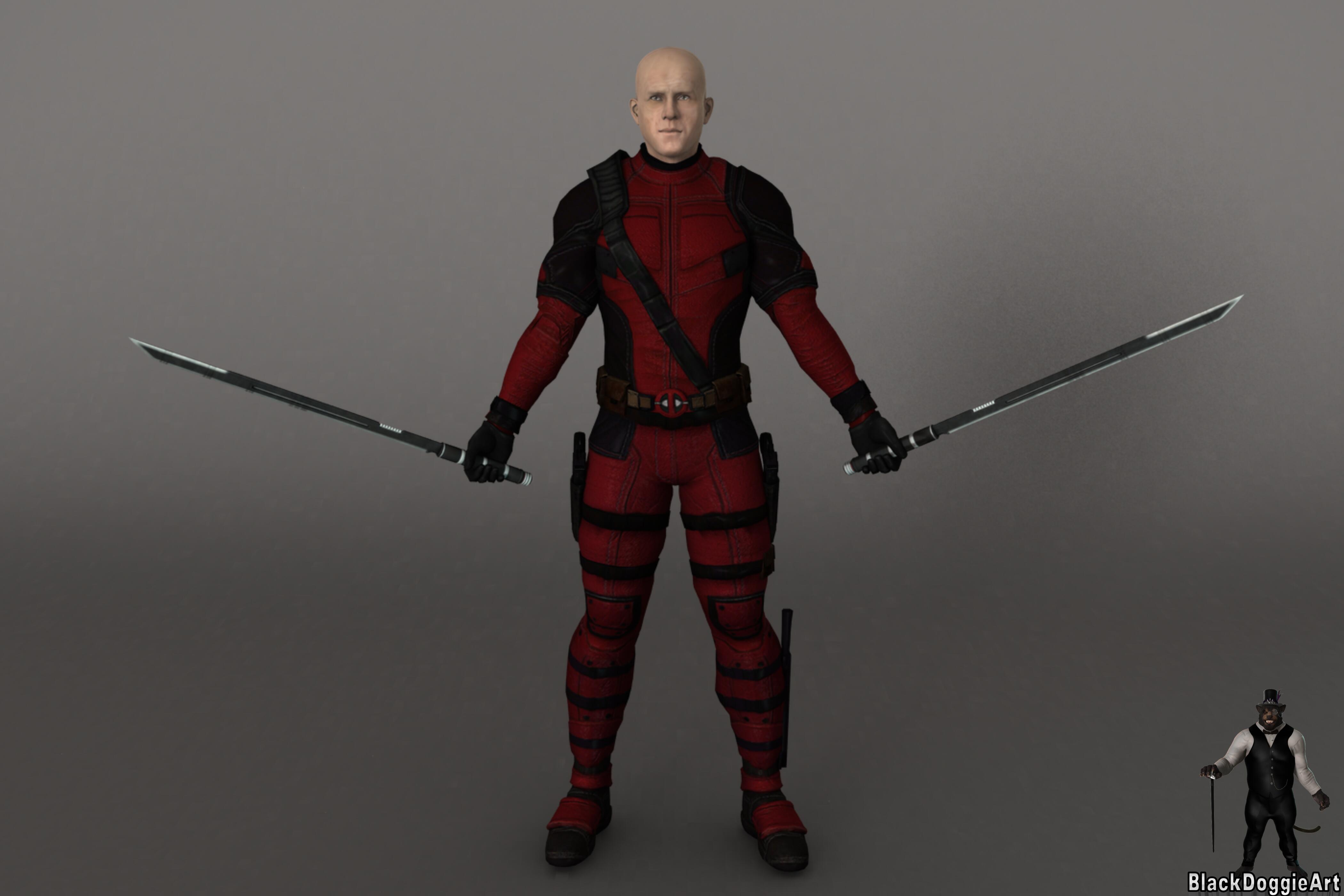
Character Morph and Texture: https://www.renderhub.com/marigold/wade-for-genesis-8-male
Costume: https://www.renderhub.com/3duk/deadpool-mcu-for-g8m
Swords: https://www.forender.com/market/outfit/product/1616-deadp-for-g3.html
Are there 2 types of strand based hair? Like a consumer version and locked version?Then what really matters in your case is Hair Generation Mode. Fortunately Moshi the Kitten's fur is generated by Target Surace rather than Root Radius. So it's easy to lengthen the fur by tweaking PR/PS hair generation settings...
'You even can "groom" the fur in external modeling software by exporting the polyline of the fur...then import as a morph, or deform the fur by using D-Formers in DS.
Genesis 9 Eye shut weirdvwrangler said:
Oh, OK. Let me be sure I understand this so I don't mess up:
There's nothing defined in the 2nd stage controllers, but there should be. So for the first case, I need to drag Azee's Head morph slider -- but NOT the eye blink facs controllers -- to the 2nd stage, and that will tell Studio to only apply when Azee's head morph is active. Is that correct?
Absolutely correct!
Genesis 9 Eye shut weirdOh, OK. Let me be sure I understand this so I don't mess up:
There's nothing defined in the 2nd stage controllers, but there should be. So for the first case, I need to drag Azee's Head morph slider -- but NOT the eye blink facs controllers -- to the 2nd stage, and that will tell Studio to only apply when Azee's head morph is active. Is that correct?
How to save a selection set?Hi! I created a new selection set to separate a morph in two parts, and I think this selection set could be useful to saparate other morphs that I could create later, so, I wonder if it would be possible to save this selection set, in order that it become "attached" to the figure and to be able to use it later easily. I searched in Save As -> Support Assset, but I don't see anything corresponding to selection sets. Could you tell me how to save it, please?
Thank you in advance!
Mechasar's Characters Catalog: Who's next? (commercial)Elor said:
Hello,
When using Natural Movements Pack for Genesis 9 (using the automatic mode), I saw a strange hole on the thumb:
Same character, same pose but without Natural Movements Pack active:
It seems to be the influence from morphs on the four other fingers because if I restore their default poses, the hole goes away:
Restoring the default thumb's pose while keeping the other fingers posed keeps the hole on the thumb:
I tried to see which finger was responsible, but from my limited tests, everyone of them is contributing to the possible problem.
I initially saw the problem with a pose I bought here, and only though about using pose control once I had done a couple of screenshots. But I checked and using the Pose Controls Fingers Grasp or Fingers Fist will trigger the same hole (this time, I removed the character morph, so it's Genesis 9 Base's hands on the following two screenshots):
Using Hand Grasp or Hand Fist will not show the same behavior:
It's less visible in Iray with a skin textures, but it's still here, it look a bit strange but I don't know if it's a bug or not.
Hi there! I noticed that issue too and I’m already on it trying to find a quick solution, but it won’t be easy this time. Anyway, it sounds weird to me that this kind of issue popped up just now rather than before. I’m saying that because I noticed the hole occurs on the thumb even just using the Pose Controls properties (like hand grasp, hand fist, etc.), and I find it hard to believe that I or one of the testers would have failed to see such a clear issue, especially when a product has been designed for details enhancement. So my conjecture is that one of the latest Genesis 9 update could have slightly modified its mesh during this time. Meanwhile, keep using the highest subdivision levels in your final renders (the pack indeed has been designed for the highest level) and the Pose Controls settings instead of using manual settings when you need to close the model's hands. Thank you for reporting the problem, stay tuned.
Diffeomorphic Import morphs not workingIn general there are limits in what diffeomorphic can import, not all the daz morphs work fine. Especially with scaling there are issues as blender doesn't support scale maps. One way to get around the issue, if we really need a specific morph which doesn't work, is to import as dbz morph.
https://bitbucket.org/Diffeomorphic/import_daz/wiki/Setup/Morphs/Import DBZ Morphs
Then I have no idea what the "shake keys" are, if you need to investigate the issue further I suggest to use bitbucket, where Thomas can give it a look. Also due to the daz rules this is not the best place to deal with genitalia geografts.
Need help!Tweaking weight maps on such auto-fitted garment is pretty cumbersome...I suggest directly go for fixing correctiver morphs, i.e. pJCMs. That'll be much easier and quicker. If you don't know sculpting software, simply export base mesh of Jacket with G8M A-Pose to OBJ file, then update corrective morphs with OBJ file by using Morph Loader Pro. Finally, save a G8 version figure asset with all the fixed pJCMs, with your Vendor Name.
Edit: There're Straps rigged as a sub-node of this Jacket, auto-fitting will make it distorted. You can fix it by: Fit Jacket on G9, dial G8M Clone on G9. Export the Strap base mesh to OBJ, then import OBJ with Morph Loader Pro to the Jacket on G8M to create a "Fix Base" morph. Then dial it.
Pointlights etc under Iray Enviro lights? Specular Rendering?barbult said:
meoghanvoce_6dbbcd9e70 said:
barbult said:
Download and try to render the attached scene. It uses DTHDR-OutdoorB-Background, G9, and one point light with much increased brightness. Does it work for you? Based on your answer, we can continue to diagnose from there.
I also attached my two renders - one without point light and one with a single point light.
Thank you.
Downloaded it. It wanted me to download Gen9 Starter Essentials, and I did.
I ran the file. It said it couldn't find /data/Daz 3D/Genesis 9/Genesis 9 Mouth/Morphs/P3Design/Rowan/P3DRowan_head_bs_Teeth.dsf
Was that environment seen in your renders supposed to be included in your scene file?
If it was, it didn't appear when I opened your file.I don't know why it is looking for that P3DRowan morph. I just loaded the base G9 character from the starter essentials. Just ignore that missing P3DRowan file message. Say OK and move past it.
The HDRI is "included" in the scene file as a link to the HDRI in the content library. Since you said you were using that product, it should show up for you in Iray Preview in the viewport or when the scene is rendered with the Iray render engine. It won't be visible in Texture Shaded draw style in the viewport. Have you tried rendering the scene? You didn't get a missing file error about the HDRI, did you?
I rendered it.
It works.
I've downloaded the screenshots you'd shared.
So far the only difference I can tell is the lumen count.
In my own efforts on my project, I had raised the lumens higher even than yours.
I will look through the settings you'd shared, and maybe I'll see something I'd missed.
Just to reiterate my original post: The forum post I'd seen before about this sort of issue said to turn off Specular Rendering.
So I was never looking to use SR; I wanted to turn it off. I just couldn't find it. It wasn't where it was supposed to be.
So if we don't figure something else in another few tries, I'd like to reconsider that angle, ask for help finding SR settings,& try that, at least to rule it out.Pointlights etc under Iray Enviro lights? Specular Rendering?meoghanvoce_6dbbcd9e70 said:
barbult said:
Download and try to render the attached scene. It uses DTHDR-OutdoorB-Background, G9, and one point light with much increased brightness. Does it work for you? Based on your answer, we can continue to diagnose from there.
I also attached my two renders - one without point light and one with a single point light.
Thank you.
Downloaded it. It wanted me to download Gen9 Starter Essentials, and I did.
I ran the file. It said it couldn't find /data/Daz 3D/Genesis 9/Genesis 9 Mouth/Morphs/P3Design/Rowan/P3DRowan_head_bs_Teeth.dsf
Was that environment seen in your renders supposed to be included in your scene file?
If it was, it didn't appear when I opened your file.I don't know why it is looking for that P3DRowan morph. I just loaded the base G9 character from the starter essentials. Just ignore that missing P3DRowan file message. Say OK and move past it.
The HDRI is "included" in the scene file as a link to the HDRI in the content library. Since you said you were using that product, it should show up for you in Iray Preview in the viewport or when the scene is rendered with the Iray render engine. It won't be visible in Texture Shaded draw style in the viewport. Have you tried rendering the scene? You didn't get a missing file error about the HDRI, did you?
Daz 3D is part of

Connect
DAZ Productions, Inc.
7533 S Center View Ct #4664
West Jordan, UT 84084Licensing Agreement | Terms of Service | Privacy Policy | EULA
© 2026 Daz Productions Inc. All Rights Reserved.