-
[Released] Bone Minion Batch Converter for Generation 4 Poses [Commercial]
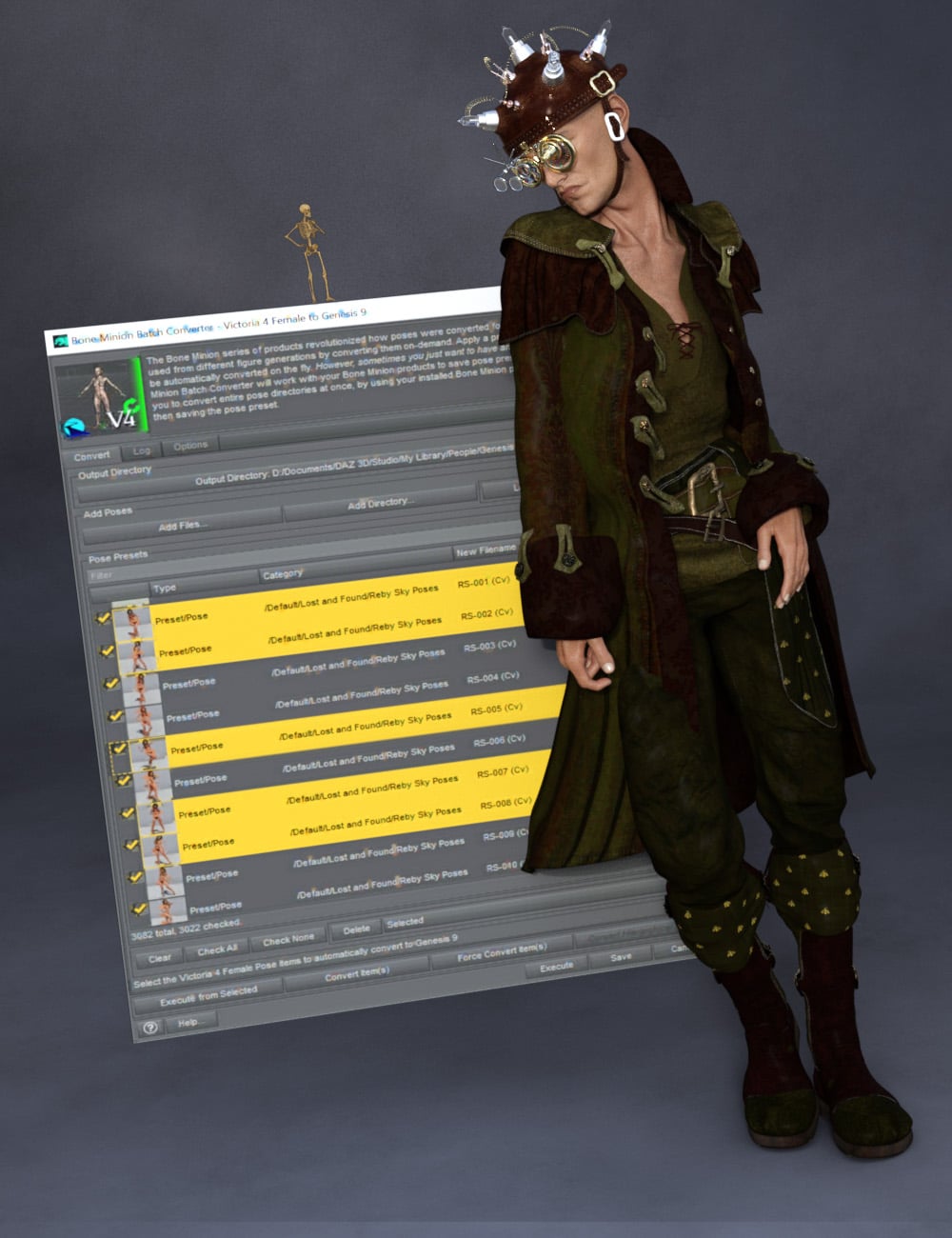 The Bone Minion series of products revolutionized how poses were converted for Daz Studio, enabling poses to be used from different figure generations by converting them on-demand. Apply a pose to the Bone Minion, and it would be automatically converted on the fly.
However, sometimes you just want to have and use a pose preset.
The Bone Minion Batch Converter Generation 4 (i.e., for Michael 4 and Victoria 4 Poses) will work with your bone minion products to save pose presets to be used later. It allows you to convert entire pose directories at once, by using your installed Bone Minion products to convert the pose, and then saving the pose preset.
Automatically convert your entire library of Generation 4 poses using the Bone Minion Batch Converter!
The Bone Minion Batch Converter Genesis script works with any installed Bone Minion for Generation 4 Poses for XXX product to provide batch execution for automatically converting your Michael 4 and Victoria 4 poses. Easily select the Poses presets in your library, select an output directory, and execute the script. Even better, icons and categories are copied from your original pose to the new pose presets.
- Convert Full Poses and Partial Poses to Pose Presets, that can be used on any machine, even ones without Bone Minion installed
- Uses any Generation 4 Bone Minion product installed (i.e., Bone Minion for Generation 4 Poses for Genesis 2, Bone Minion for Generation 4 Poses for Genesis 8, Bone Minion for Generation 4 Poses for Genesis 9, etc.), even future products (i.e., if a Bone Minion for Generation 4 Poses for Genesis 10 product comes out, the script should work with it.
- Includes Bone Minion for Generation 4 Poses for Genesis 3!
- Copies icons from Generation 4 Poses for a professional look
- Copies Smart Content Products! Converted Poses will be organized into similar products as the original items. The converted product mirrors the original items' products, organizing multiple converted items into one converted product and even using the product image from the original products.
- Converted Poses are Smart Content enabled!
- Automatically convert your entire library of poses with one operation! (except for Hierarchical Poses if there are any, which need the props loaded first, but then you can convert all poses for those props with one step
INCLUDES Bone Minion for Generation 4 Poses for Genesis 3 to provide conversion of Generation 4 (Michael 4 and Victoria 4) poses to Genesis 3.
The Bone Minion Batch Converter uses your existing Bone Minion for Generation 4 for XXX products.
Without the correct Bone Minion products installed, the script cannot convert your Genesis poses to the target figure generation.
Outlet and Quick Grab Discussionmding said:
For those who don't own it and could see themselves using it https://www.daz3d.com/dforce-fair-maiden-outfit-for-genesis-8-and-81-females
Fair warning: despite the URL, it's a Genesis 9 only outfit included in a Victoria 9 related bundle.
Edit : it's not clearly explained in the description, but the skirt from the Cozy Dreams Outfit for Genesis 9 is using dForce while the sweater is conforming only.
Genesis 2 Appreciation Threadhttps://www.daz3d.com/fwsa-tempie-hd-for-victoria-6 wearing https://www.daz3d.com/galaxy-for-genesis-2-female-s with textures from LUNA3D
 Will we ever get "The Girl 9" ?
AsuCafe said:
It's really strange that some products that could be called GIRL 9's DO products don't have that name.
https://www.daz3d.com/fpd-amari-for-genesis-9
https://www.daz3d.com/cartoon-adult-female-character-hair-and-outfit-for-genesis-9
Those both feel much more anime inspred than the Girl, who was a riff on Tex Avery's famous "Red" character from cartoons like Red Hot Riding Hood and Swing Shift CInderella, and both of these were made by established artists who already do their own toon styles. FWIW, IIRC the original The Girl (back in the days of Victoria 3) was not originally a DAZ product but one created by a PA, KGoossens, that DAZ bought. The Girl 4 was a pretty solid clone of that character, as was The Girl 5 for Genesis, but the subsequent The Girls all deviated further and further from the original design, with the Girl 8 only being vaguely similar. Given that Aiko was a much more popular character that followed a similar progression arc over the generations and that Aiko 9 ended up behind the DAZ connect paywall for Premier, my guess is that if The Girl 9 ever appears, she'll follow a similar path.
Alessia by Scorpia in the Daz Gallery-Please help identifying body chainsmrpenguin76 You are amazing! Thank you so much :)
I have searched far and wide...Daz3d, Rendo, Renderhub, Poser Content and plain old Google :)
I do that before I EVER ask a question.
I actually install everything manually. I have all of my body jewelry under Genesis/Accessories/Jewelry/Body Jewelry
I have started a large picture project. Just pictures of what I own. If one outfit has earrings, shoes, sleeves, I have separate folders for those things. I have purchased things that were so alike :(
This project is taking forever because I even have it for Victoria 4 LOL
I hope you have art in the gallery! I am going to try to find your work!!
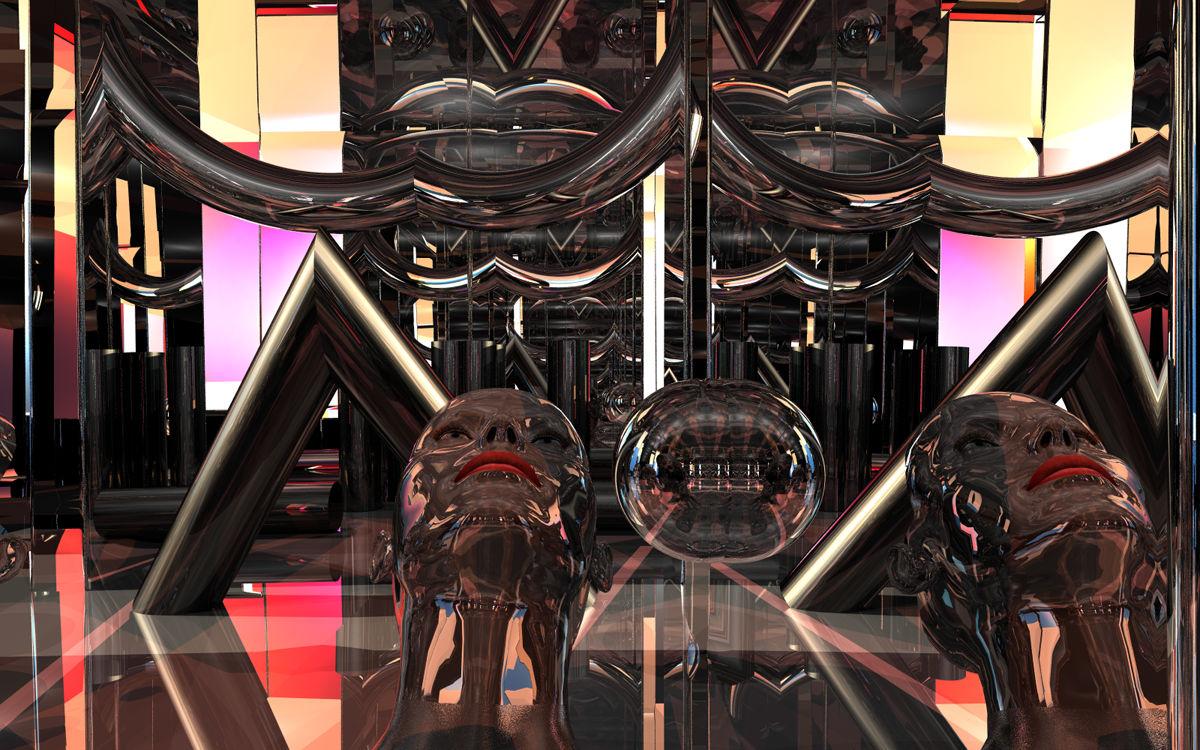
Show Us Your Bryce Renders Part 14The mirrored head is from Victoria 3 RR LE and the room a terrain. The torus and the four cylinder are from Bryce, everything with my own materials. Background and ambient light by an HDRI from Hyper Textures Base, additional light by 9 radials and the sun.
 * CLOSED * RRRR - It was a great idea, but... Render Contest
A new years and a new round of RRRR.
The theme for this round is It was a great idea, but...
Just image all those great ideas with a less then great outcome, all those Hold by beer moments, or anything imaginable that someone imagines, does that clearly shows why everyone else dropped the idea before.
Check the entries only thread, first post, for an example on how to post an entry.RRRR stands for Random Runtime Roulette Renders, and it's a contest that has been running for over twelve years now, on and off. We invite anyone to enter, specially all those new users who have shown up the past years. This is not the usual make a very nice render contest but more like tell a really great story, often fun, with your render!
How does it work?
Make your pull of 4 items, and if your any Lucky Bastards, you pull one extra item per LB.Who can play?
Anyone can play!How do you prepare yourself for play?
The rules are very simple, but first you need to have all your items in some kind of order in a text file, dumped from the itemized history into a text file or a spread sheet. Remove things like software, gift certs, and special plugins from the list and items that wil not work with the software you work with. For example if you have items for Poser, Bryce or Carrara, and want to use DAZ Studio, remove those other items from your list. If you have loads of older figures, M3, M4, a ton of non Iray stuff and you only want to use Studio with Iray, remove all the junk from you list.Then you use a randomizer to randomly pick items from your list (your Runtime/My Library) for your start pull . You can use items from any store. Now build a scene with those 4 items plus any other items you want to add to make a fun scene. For newcomers I heartly recommend looking at the previous contests below to get ideas how you can do this.
Working randomizer:: https://www.random.org/integers
There are some situations where you allowed to redraw, these are:
- You pulled something that doesn’t work, broken thing, only works in a version / software not used etc etc, or you forgot to remove that item from you list even though you knew it wont work, or figure that out later.
- You pulled a software or add-on to a software or anything you should have filtered out from the list.
- You pulled only huge environment props and will not be able to render a scene without crashing.
- You pulled an item you already have been using in two RRRR renders in this content and that was picked randomly. Three is a curse - rule!Lucky Bastard Rule!
I say this again: If you have Lucky Bastards, you pull one extra item for each LB you have, simple as that.
Explaination of Lucky Bastards.
Lucky Bastards, or LBs, are a form of handicap system which makes the contest a little more difficult for those who have won.Current Lucky Bastards Standings
Name LBs Totte 2 acb 2 Luci45 1 aprilshowers2065 1
How to play?
You pull, you compose and you Render. You post your images and pulls in this thread (Don't miss that, entries without pulls and posts in this thread will be disqualified!!).
Then the entry should also be posted in the Entries only thread.Bundles
If you pull a bundle, use two or three complete items from it, or more if you like, but you do not need to use all, but only picking a hairpin from Victoria 8 Pro Bundle is “too little”. Clarification: A bundle still counts as only one pulled item.Poses, Expressions and textures/colors
If you pull a pose pack, an expression pack or a texture/color pack, you only need to use one of them, not all. For example if you pull 500 expressions for Genesis 8 Female, use one, if you pull 128 colors for Frappe Hair, use one.
Accidenty breaking the TOS
If your entry is removed by the forum mods because it accidentally, not deliberate, broke the TOS, you do not have to redo that entry but can move on and make a new pull.The rules of madness!
Now you have successfully and randomly picked your items, make a scene, you can add other items as well but the one you picked should be prominent or cleverly used. Render it, post it and make us all laugh! Remember though that the renders must follow the TOS of the forum. As we have a theme on the contest, the render should in some way touch that theme.The contest categories!
There are two categories Best and Funniest. Every image will compete in both categories.Contest duration!
It starts now at Wednesday January 14 - 2026, and will go on until Sunday March 15, 2026 at 23:59:59 local DAZ time.This months sponsors so far:
Totte (Code 66) is sponsoring with two items from his store
Luci45 sponsors with a $40 Daz GC,
Elliandra is sponsoring with two items from her store
3Diva is sponsoring with two items from thier store
Dartanbeck is sponsoring with items from his storeWe want more sponsors!
Do you want to sponsor the RRRR?
Please chip in a gift card sponsorship, sponsors can play, they should play, they are even extra encouraged to play, as sponsors always plays for keeps.Maximum number of entries?
For this round it will be a maximum of 12 entries per player.So, good luck and start your render engines!
Looking for a pose in particular (again) -slow dancing?https://www.daz3d.com/la-shall-we-dance-poses-for-genesis-8-and-9
https://www.daz3d.com/lovers-poses-and-props-for-victoria-9-and-michael-9 - the standing poses can sort of look like slow dancing. :)
https://www.daz3d.com/z-inseparable-couple-poses-for-genesis-9-and-8 - some of these look like dancing
I would search for "couple poses" in the shop. There are a lot of them and some of them might have a few poses you can use.
Off Topic Thread #2Currently in half of Victoria!
to put in perspective the fire area in Victoria is larger than several European countries
Today at my place is around 40c ( 110F ) which should cool off around 5pm this arvo.Limited Time Freebies Discussion ThreadIt's a truly excellent mix of products, and this time I didn't have any of them. Thanks DAZ.
Here's the complete list.
daz biweekly freebies 9-1-2025
Clothing Breast Fixes For Genesis 2 Female
Lilith 6 HD Add-On
Eisa for Victoria 6
Selena Hair for Genesis 3 Female(s)
Underwater Bathysphere
Additional Blood Layers for Genesis 3 Female(s)
P3D Brita for Tween Julie 7
Medieval Prince Outfit for Genesis 3 Male(s)
i13 Trendy Coffee Shop Barista Outfit for the Genesis 3 Female(s)
Aliza Hair for Genesis 3 Female(s)
Innovative Living Room
Z Sweetie Pie - Poses & Expressions for Sakura 8 and Genesis 8 FemaleGenesis 2 Appreciation ThreadI was curious today about the phrase 'Cutie Pie' that was being quried in Product Suggestions and found an adult/child's dress for G2F that I missed when it was in the Outlet Store but what caught me totally was the poses use to show it off. The are all from the base poses included with G2F, Victoria 6, Teen Josie 6, and Stephanie 6 and just need the use of Growing Up for G2F for the children. Aave Nainen did a wonderful job on the dress and showing realistic poses for not only the little girls but the adult women. I have that dress on my wishlist for now.
Edit to add: I haven't been able to find a PA store for Aave Nainen. But the dress is being sold under DAZ Originals Aave Nainen. No idea if she has left, changed her name or what.
Questions about working with the Riversoft G2F to G8F Character ConverterDrunkMonkeyProductions said:
Elor said:
DrunkMonkeyProductions said:
AFaik, Restore only works if either something has been Memorized(manual action) or the default value is 0. Let me know if i've missed something that allows restore to work.
That latter one is the biggest issue i have with it. Too many presets alter default value from 0 that Restore becomes useless.
Thankfully i have scripts that allow me to zero and not get that stupid popup.
I don't know what need to be used with Riversoft character tool, but Restore always work, the same way Zero always work: they are just each doing something different, explained by the pop-up you don't want to read.
Restore will restore a character to its default pose and/or shape, zero will zero everything (including things that should not be set at zero, a famous example being Genesis 9 Base Joint Correctives).
Let's say I loaded a character (ex: Victoria 9) using a character preset and that I then spend sometime dialing various morphs to make her taller, stronger, smaller, whatever (let's calling that state Victoria 9 Mod).
- If I'm using Restore shape on Victoria 9 Mod, the end result is Victoria 9 with all the various morphs and controlers in the same exact state as if I just loader one of her Character preset.
- If I'm using Zero shape on Victoria 9 Mod, the end result is Genesis 9 Base with everything set to zero but the figure will retain that, as example, the default value of the Victoria 9 dial is 100% (and will do the same for any G9 dial whose default is not zero). Let's call that state Victoria 9 Zeroed.
- If I'm using Restore shape on Victoria 9 Zeroad, the end result is Victoria 9 again.
The issue isn't whether they work, it's the popup when you chose Zero.
You do bring up an interesitng quandry that i hadn't delved into.
Why does g9 need the Base joint correctives, control slider, to load in a non-zero state?
Because things look bad when posed if it is off (zero) - it is a switch for the equivalent of JCMs, and people were complaining about Genesis 9 posing without realising that the issue was the property having been zeroed (there are other cases in which zeroing may have undesirable side-effects, which is why users are encouraged to use restore)
It's user facing, not hidden, so we're meant to futz with it.
Guess i need to start playing with G9 some more and break some stuff.
Questions about working with the Riversoft G2F to G8F Character ConverterElor said:
DrunkMonkeyProductions said:
AFaik, Restore only works if either something has been Memorized(manual action) or the default value is 0. Let me know if i've missed something that allows restore to work.
That latter one is the biggest issue i have with it. Too many presets alter default value from 0 that Restore becomes useless.
Thankfully i have scripts that allow me to zero and not get that stupid popup.
I don't know what need to be used with Riversoft character tool, but Restore always work, the same way Zero always work: they are just each doing something different, explained by the pop-up you don't want to read.
Restore will restore a character to its default pose and/or shape, zero will zero everything (including things that should not be set at zero, a famous example being Genesis 9 Base Joint Correctives).
Let's say I loaded a character (ex: Victoria 9) using a character preset and that I then spend sometime dialing various morphs to make her taller, stronger, smaller, whatever (let's calling that state Victoria 9 Mod).
- If I'm using Restore shape on Victoria 9 Mod, the end result is Victoria 9 with all the various morphs and controlers in the same exact state as if I just loader one of her Character preset.
- If I'm using Zero shape on Victoria 9 Mod, the end result is Genesis 9 Base with everything set to zero but the figure will retain that, as example, the default value of the Victoria 9 dial is 100% (and will do the same for any G9 dial whose default is not zero). Let's call that state Victoria 9 Zeroed.
- If I'm using Restore shape on Victoria 9 Zeroad, the end result is Victoria 9 again.
The issue isn't whether they work, it's the popup when you chose Zero.
You do bring up an interesitng quandry that i hadn't delved into.
Why does g9 need the Base joint correctives, control slider, to load in a non-zero state?
It's user facing, not hidden, so we're meant to futz with it.
Guess i need to start playing with G9 some more and break some stuff.
Questions about working with the Riversoft G2F to G8F Character ConverterDrunkMonkeyProductions said:
AFaik, Restore only works if either something has been Memorized(manual action) or the default value is 0. Let me know if i've missed something that allows restore to work.
That latter one is the biggest issue i have with it. Too many presets alter default value from 0 that Restore becomes useless.
Thankfully i have scripts that allow me to zero and not get that stupid popup.
I don't know what need to be used with Riversoft character tool, but Restore always work, the same way Zero always work: they are just each doing something different, explained by the pop-up you don't want to read.
Restore will restore a character to its default pose and/or shape, zero will zero everything (including things that should not be set at zero, a famous example being Genesis 9 Base Joint Correctives).
Let's say I loaded a character (ex: Victoria 9) using a character preset and that I then spend sometime dialing various morphs to make her taller, stronger, smaller, whatever (let's calling that state Victoria 9 Mod).
- If I'm using Restore shape on Victoria 9 Mod, the end result is Victoria 9 with all the various morphs and controlers in the same exact state as if I just loader one of her Character preset.
- If I'm using Zero shape on Victoria 9 Mod, the end result is Genesis 9 Base with everything set to zero but the figure will retain that, as example, the default value of the Victoria 9 dial is 100% (and will do the same for any G9 dial whose default is not zero). Let's call that state Victoria 9 Zeroed.
- If I'm using Restore shape on Victoria 9 Zeroad, the end result is Victoria 9 again.
[Solved for G9] Strandbased Very Short Pixie hair not following the head of some charactersI have the same problem with Genesis 8 with character who are shorter than Genesis 8, some who are using scaling as part of the shortening process, other, like the first one I tested, who simply have a morph of a character smaller than Genesis 8, and I don't understand why: 'Very Short Pixie Style Hair Strands G8' doesn't fit as it should while 'Very Short Pixie Style Cap G8' fit perfectly
Here an example with Sarah by CGSerpent (which was free a couple of months ago), sold on Renderhub (no link because they are NSFW user renders on it visible by default):
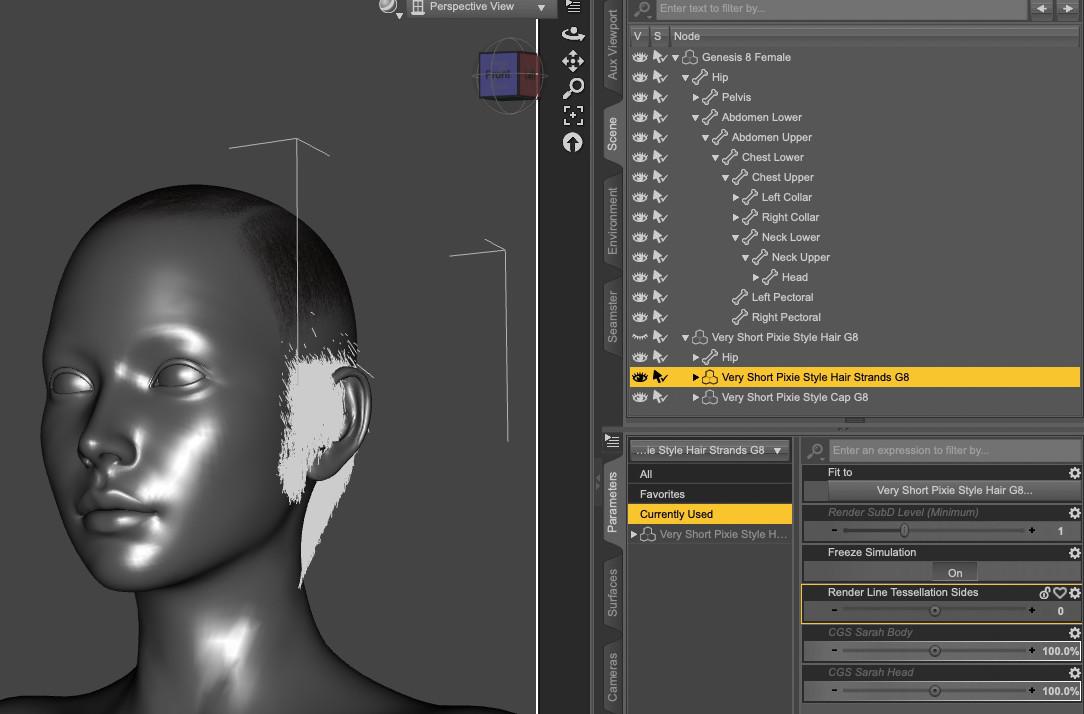
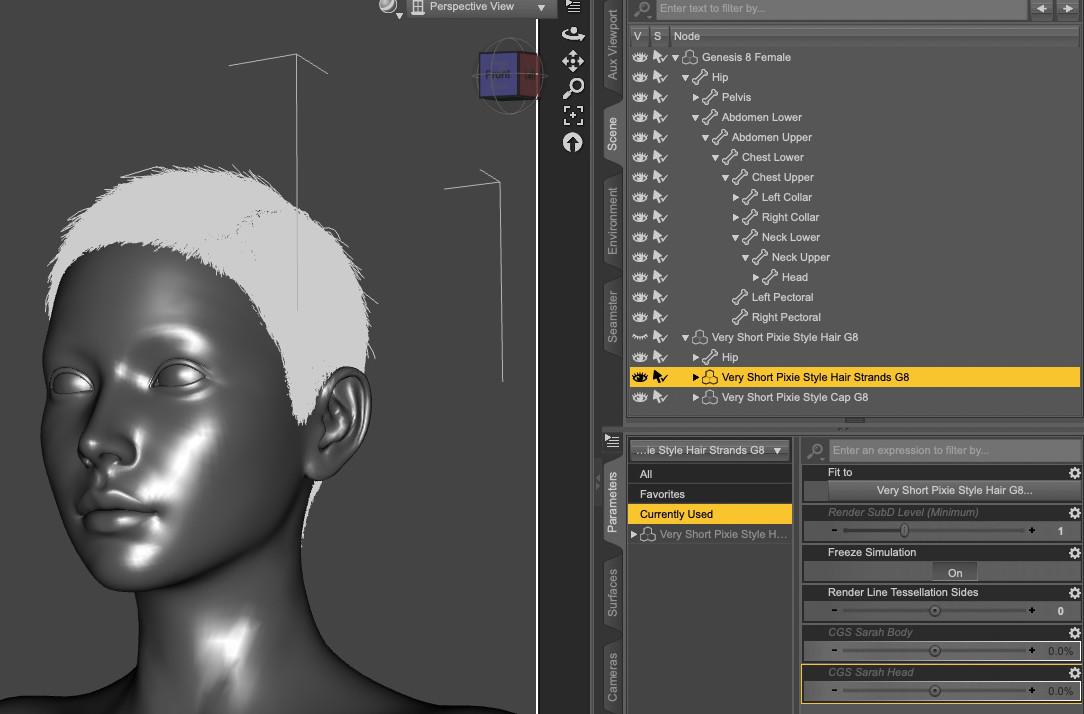
Removing the auto-generated morph on 'Very Short Pixie Style Hair Strands G8' seems to solve the problem:
I tested with other characters, including Daz Originals like Victoria 8.1 or characters sold here to remove the possibility that CGSperpent did something wrong while creating the CGS Sarah Head and CGS Sarah Body dials, and the problem does happen with pretty much all of them to some extend.
The same problem doesn't seem to happen to another strand based hair by Out of touch:
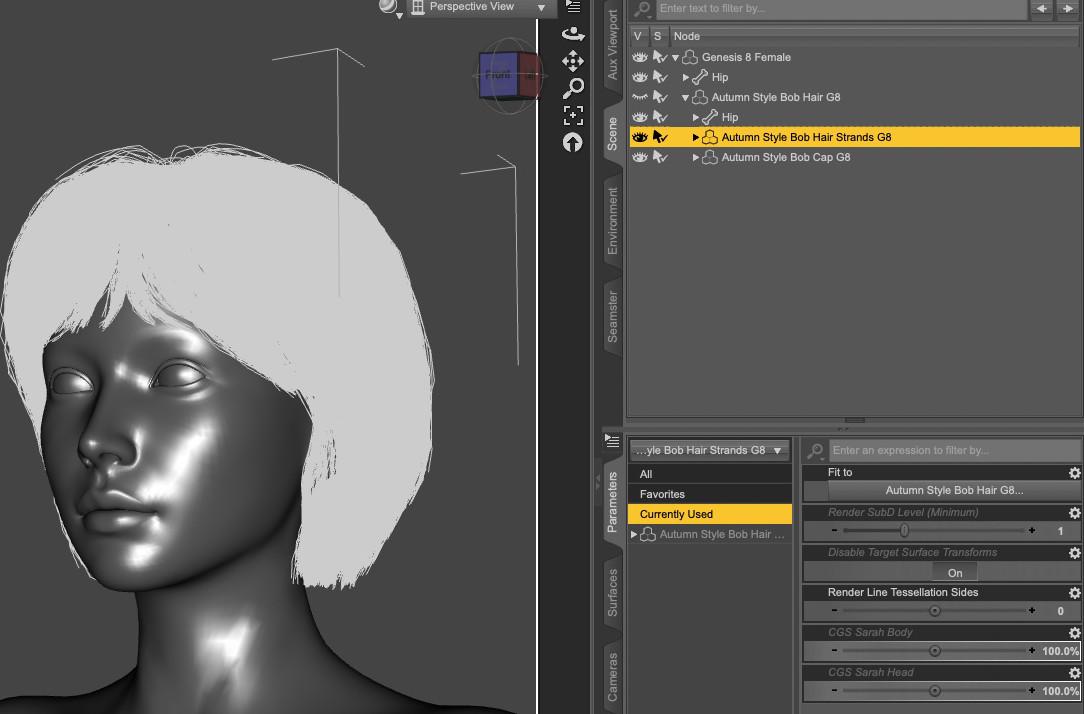
Does someone know how to solve it ?
[SOLVED] Need help to make it workHi, the Unity Bridge is not transfering any model for me.
Please can someone help?
I'm using latest version of daz 4.24
saved the sceen with Victoria 8
File -> Send to Unity
Unity version opened 2022.3.62f3, HighDefinition template
No errors just one warning
The figure is not being imported
Please can someone help me?
[SOLVED]
I did not set properly Unity Assets Folder to my own project leaving the default value which was wrongDaz to Unity Update 4.0Hi, the Unity Bridge is not transfering any model for me.
Please can someone help?
I'm using latest version of daz 4.24
saved the sceen with Victoria 8
File -> Send to Unity
Unity version opened 2022.3.62f3, HighDefinition template
No errors just one warning
The figure is not being imported
Import Error Code:(4)
Message: Build asset version error: assets/daz3d/scripts/editor/daz3ddtuimporter.cs in SourceAssetDB has modification time of '2022-07-09T06:02:39Z' while content on disk has modification time of '2026-01-05T10:41:39.674778Z'
Please can someone help me?
Aeon Soul's Genesis 8 and Genesis 9 Free clothing for Daz Studio - new Aug '26 releaseAngel_X said:
Thanks for the gift.
I love all your creations, starting from the ones for Victoria 4-Alice. <3Thanks lots for the continued interest and support, we want to make 2026 a very creative, Aeon Soul year :D
Aeon Soul's Genesis 8 and Genesis 9 Free clothing for Daz Studio - new Aug '26 releaseThanks for the gift.
I love all your creations, starting from the ones for Victoria 4-Alice. <3How to keep track of which scenes are connected to which renders?omvendt said:
Thanks, all. I found a script called Wardrobe Helper (WH). It is brilliant and helps with part of my problem. It scans a figure and stores all clothes, the gens (also GP), the hair, ... Then, to restore the actor in a scene, you load the figure, e.g. Victoria, and use the WH to quicly load everything. That way, you just need to connect the render to a scene name and use the same name in the WH file system. Sonja, you might use this to get rid of some paper.
Incidentally, if you purchase WH and get frustrated that WH isn't seeing the hair of the model, you have to go to Filter and uncheck "Use Word". I'll post this separately also.
Happy New Year!
Thanks! I'll have to check it out. Happy New Year!
Daz 3D is part of

Connect
DAZ Productions, Inc.
7533 S Center View Ct #4664
West Jordan, UT 84084Licensing Agreement | Terms of Service | Privacy Policy | EULA
© 2026 Daz Productions Inc. All Rights Reserved.