-
AIUTO...CHI CONOSCE L’ITALIANO? PARTE QUATTORDICI
Crios, ho visto il tuo post sul thread dell'Alpha riguardo 3Delight... Rassegnati come mi sono rassegnato io, ragazzo.
Hanno deciso che dobbiamo usare Filament (incompleto), IRay (scassato) oppure Octane (poco pratico).

Però io mi tengo il mio bel 4.12 e come i calabroni che non sanno che non possono volare, io renderizzo su 3Delight anche loro non vogliono.

La mia speranza è che con le nuove librerie vengano fuori anche nuovi motori di render, anche in tempo reale (non sarebbe male mettere le mani su un bel Eevee)
Universal tool not working in Daz3D 4.24Universal tool is for selecting and moving objects in the viewport.
For changing view in viewport, you will typically use your mouse. I think orbit default is middle mouse button. You can see the default ways (or change them) in Windows > Workspace > Customize in the bottom.
If you want to see the Filament draw options click the 'General' in the Draw options pane. You can expand a topic, by clicking on the little triangle to the left of it.
Universal tool not working in Daz3D 4.24Hey Guys!
I'm in urgent need of an expert help from you regarding an issue I'm having in Daz3D. For some reasons I'm not able to move the view in Viewport, even though I have the "Universal Tool" selected. I understand that when "UT" is active, on the right side in "Scene", I should have a so called "Filament Draw Option" activated, but I don't have that. I've tried several things already to fix this, like updating the GPU driver, reinstalling Daz and other "minor" stuff I found online but none of these worked.
Has anyone any idea what might be the cause of this issue and how to resolve it?
The only thing working is the "Scene Navigator Tool" but that's not exactly what I want to use.
Any inputs are highly appreciated!
Cheers
NVidia 5090Darknote said:
nonesuch00 said:
Darknote said:
So I finally got the 5090 (+Ryzen 7800X3D + 64GB RAM) rig, and installed Daz Studio Public Build 2025 (6.25), and renders take from 11 minutes to 3:40 minutes now, to complete! Yay!
But, I have a big issue, iRay/Texture/Filament preview is unbelievably slow. I've disabled CPU fallback in render settings (first thing I did :D ), but it still doesn't help? I've also switched in Texture Resources to Performance mode, in Preferences -> Interface. Does anyone have any idea why this is? Moving around in iRay preview mode (Or Texture/Filament mode even) is incredibly slow, but once I stop moving, it instantly renders the scene, so something is working at least...
(I'm also on the Nvidia Studio Driver 576.02).
Thanks for any advice!
Do you mind stating what the 11 minute render video card is?
RTX 4070TI Super!
oh wow, awesome speed up then! thanks
Easy FilaToon [Commercial]memcneil70 said:
@barbult, love what you did and appreciate that you showed how you set up the shot. Since I have also been able to download my Filament and Filatoon products onto my MacMini Pro M4 I have tried one render but nothing like anyone else here has done.
Everyone's renders are so fun, fascinating, and inspiring. Thank you for posting.
Mary
+1
NVidia 5090nonesuch00 said:
Darknote said:
So I finally got the 5090 (+Ryzen 7800X3D + 64GB RAM) rig, and installed Daz Studio Public Build 2025 (6.25), and renders take from 11 minutes to 3:40 minutes now, to complete! Yay!
But, I have a big issue, iRay/Texture/Filament preview is unbelievably slow. I've disabled CPU fallback in render settings (first thing I did :D ), but it still doesn't help? I've also switched in Texture Resources to Performance mode, in Preferences -> Interface. Does anyone have any idea why this is? Moving around in iRay preview mode (Or Texture/Filament mode even) is incredibly slow, but once I stop moving, it instantly renders the scene, so something is working at least...
(I'm also on the Nvidia Studio Driver 576.02).
Thanks for any advice!
Do you mind stating what the 11 minute render video card is?
RTX 4070TI Super!
3D-Printing from DAZ Figures ?My filament printer is the Creality Ender 3 Pro. It came with a Creality-doctored version of Cura slicing software.
The slicing software accurately shows where printing flaws will occur - such as a clothing item with no thickness being unprintable.
The workflow I have arrived at (so far) will not give the highly polished result you are probably looking for, given that you mention resin printing. It involves an export first to and then from Hexagon followed by an import to (in my case 3d Coat) for conversion to Voxels. I don't know whether Blender sculpting includes voxel sculpting. I have another, phenomenally-powerful, sculpting software called Nomad Sculpt installed on an Android tablet and which only cost a few dollars. That will probably work - but I have not checked.
Here goes anyway. The figure with clothing can be exported to Hexagon as OBJ. In Hexagon, in polygon editing mode, the polygons for eyelashes and for any hair-cap can be selected and deleted. (Just select a few and grow selection (I think it's SHIFT + PLUS key in Windows) If the mouth is closed forget the teeth - eyes also - just leave them. Any hair from DAZ will give problems so I leave the figure bald.
Export as OBJ from Hexagon and import to 3d Coat. In Voxel sclulpting mode sculpt your own hair. Yes, a big ask but it gets to be fun after a few tries squiggling away. The hair will be part of the head. If desired build support structures for extended limbs, pigtails or whaterver - easily made from tubes. Add a base from a flattened cylinder or cube if you wish.
The voxel sculpture can be exported from 3d Coat or whatever as a one-piece object to slice and print.
Alternatively, 3d Coat can split the figure into parts with 'studs' and holes - see image.
This workflow is probably much more suited to my own aim which is to make simple 'biblical age' clothing of my own fitted to my own figures (sculpted from the simple figures which come with 3d Coat perhaps.)
I have much better images of results I could show than the ones I'm attaching but I'd need to go searching through external hard drives. The hair in these images is very poor but much better can be achieved.
I suspect that this won't be of much use but the general point is that Voxels can turn a multiple piece clothed figure into into one.object for slicing. My images show a self-made clothing mesh fitted to a posed figure after being processed in Hexagon and then after it was made into voxels and split up into separate pieces.
Easy FilaToon [Commercial]@barbult, love what you did and appreciate that you showed how you set up the shot. Since I have also been able to download my Filament and Filatoon products onto my MacMini Pro M4 I have tried one render but nothing like anyone else here has done.
Everyone's renders are so fun, fascinating, and inspiring. Thank you for posting.
Mary
3D-Printing from DAZ Figures ?I have printed V3 characters using the Anycubic Photon SLA printer. It was a matter of posing the character in DS, export as obj, convert to STL and scale in the slicer software. Much of the clothing didn't need thickening to solidify it. In many ways the best thing is to do it, and experience the problems and solve them rather than anticipate problems.
The figure below was 90mm high.
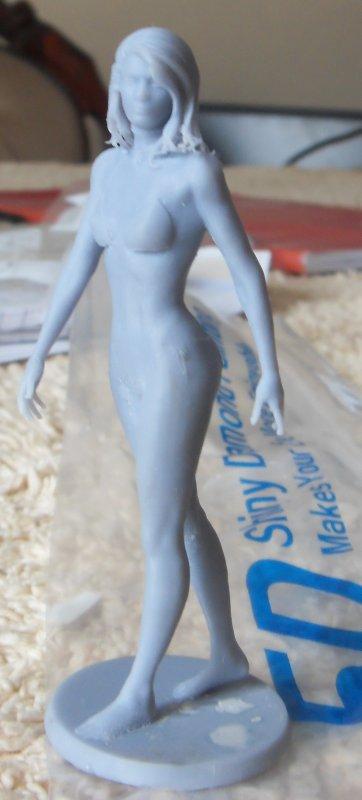
(sorry about image quality, my camera refused to focus on the model)
The precision of SLA is much closer than a filament printer, the finish is better, but the down sides are very unpleasant resins, need washing after in unpleasant chemicals, post UV cure (maybe in the sun) is advisable, potential for allergic reactions & they are slow.
Regards,
Richard.
NVidia 5090Darknote said:
So I finally got the 5090 (+Ryzen 7800X3D + 64GB RAM) rig, and installed Daz Studio Public Build 2025 (6.25), and renders take from 11 minutes to 3:40 minutes now, to complete! Yay!
But, I have a big issue, iRay/Texture/Filament preview is unbelievably slow. I've disabled CPU fallback in render settings (first thing I did :D ), but it still doesn't help? I've also switched in Texture Resources to Performance mode, in Preferences -> Interface. Does anyone have any idea why this is? Moving around in iRay preview mode (Or Texture/Filament mode even) is incredibly slow, but once I stop moving, it instantly renders the scene, so something is working at least...
(I'm also on the Nvidia Studio Driver 576.02).
Thanks for any advice!
Do you mind stating what the 11 minute render video card is?
The "Animators Assemble!" thread for Daz animation WIPs, clips, and tipswsterdan said:
SapphireBlue said:
I finished my first full animation experiment/project in FilaToon. My 3080 is able to render this (~3200 frames) in about 3 hours (I wasn't keeping track too closely, because it was fast!). Since FilaToon is so versatile and fast, and toon styles more forgiving, this really opens up animation possibilities in DS that I wouldn't have considered before.
FilaToon was a bit glitchy in this project but that kinda worked for this more stylized moody video. 3Diva gave me some tips on that, so hopefully I won't have those issues for a more regular story animation. A thank you to Emanuela1. Her theme "Dreams" for the Nov 2024 freebie challenge inspired this project, both the song and the scene that formed the basis for the music video.


Okay, I thought it was pretty good, until I found out you did the music and singing too, then it blew me away. How did you do the lip sync?
Looking forward to much more...wsterdan Thanks heaps!
 This was so much fun to make thanks to FilaToon and the fast rendering with Filament, and thanks to Face Mojo for G9 which is what I used for the face movement and lip sync. I've got to put that last one to use more and test things out more.
 Thanks for sharing your animation tests with FilaToon and Willow - they're looking good! I'm glad to know it's fun and a relatively fast process for you - I agree!
Daz Studio 4.23 or 4.24 and nVidia driver versionLeana said:
WendyLuvsCatz said:
barbult said:
WendyLuvsCatz said:
vwrangler said:
OK, but what IS the minimum/maximum driver version. I think the last I heard, the maximum driver version was 566.36, which also has some security issues, I believe. Anything above that, and I believe that Studio 4.23/24 Iray doesn't render at all.
it was rendering still images but animations ramp up VRAM and grind to a halt
but now I am using 572.60 on my Win10 with a 2080Ti and it seems OK
the latest ones will crash my card as they ignore my MSI undervolting settings and my PSU inadequate
that said D|S 2025 won't render but I don't care enough to investigate why
I'm using driver 572.70 and rendering OK in DS 2025, so your issue must be something other than driver version. (I know you don't want to investigate now.)
if I find a need to use 2025 I will, I only installed it because it popped up in DIM so was mildly curious
It doesn't add any functionality other than 5xxx compatibility and Mac Filament AFAIK, neither pertinent to me
These are the main new features so far, though there are other improvements like reducing figure loading time, new viewport draw styles, changes to strand based hair editor...
And the big downside is that many scripts and "all" plugins don't work yet.
Daz Studio 4.23 or 4.24 and nVidia driver versionWendyLuvsCatz said:
barbult said:
WendyLuvsCatz said:
vwrangler said:
OK, but what IS the minimum/maximum driver version. I think the last I heard, the maximum driver version was 566.36, which also has some security issues, I believe. Anything above that, and I believe that Studio 4.23/24 Iray doesn't render at all.
it was rendering still images but animations ramp up VRAM and grind to a halt
but now I am using 572.60 on my Win10 with a 2080Ti and it seems OK
the latest ones will crash my card as they ignore my MSI undervolting settings and my PSU inadequate
that said D|S 2025 won't render but I don't care enough to investigate why
I'm using driver 572.70 and rendering OK in DS 2025, so your issue must be something other than driver version. (I know you don't want to investigate now.)
if I find a need to use 2025 I will, I only installed it because it popped up in DIM so was mildly curious
It doesn't add any functionality other than 5xxx compatibility and Mac Filament AFAIK, neither pertinent to me
These are the main new features so far, though there are other improvements like reducing figure loading time, new viewport draw styles, changes to strand based hair editor...
Daz Studio 4.24[.0.x], General Release!Well, I can't say I notice any difference between 4.23 and 4.24 If anything there seems to be a little bit laggier viewport in 4.24 so I reverted to 4.23. Also the Filament issue with emissives is still present in 4.24. I mentioned it here for reference. I hope that will get fixed before 4.x is abandoned and all effort is in DS 2025.
Daz Studio 4.23 or 4.24 and nVidia driver versionbarbult said:
WendyLuvsCatz said:
vwrangler said:
OK, but what IS the minimum/maximum driver version. I think the last I heard, the maximum driver version was 566.36, which also has some security issues, I believe. Anything above that, and I believe that Studio 4.23/24 Iray doesn't render at all.
it was rendering still images but animations ramp up VRAM and grind to a halt
but now I am using 572.60 on my Win10 with a 2080Ti and it seems OK
the latest ones will crash my card as they ignore my MSI undervolting settings and my PSU inadequate
that said D|S 2025 won't render but I don't care enough to investigate why
I'm using driver 572.70 and rendering OK in DS 2025, so your issue must be something other than driver version. (I know you don't want to investigate now.)
if I find a need to use 2025 I will, I only installed it because it popped up in DIM so was mildly curious
It doesn't add any functionality other than 5xxx compatibility and Mac Filament AFAIK, neither pertinent to me
NVidia 5090So I finally got the 5090 (+Ryzen 7800X3D + 64GB RAM) rig, and installed Daz Studio Public Build 2025 (6.25), and renders take from 11 minutes to 4 minutes now, to complete! Yay!
But, I have a big issue, iRay/Texture/Filament preview is unbelievably slow. I've disabled CPU fallback in render settings (first thing I did :D ), but it still doesn't help? I've also switched in Texture Resources to Performance mode, in Preferences -> Interface. Does anyone have any idea why this is? Moving around in iRay preview mode (Or Texture/Filament mode even) is incredibly slow, but once I stop moving, it instantly renders the scene, so something is working at least...
(I'm also on the Nvidia Studio Driver 576.02).
Thanks for any advice!
Some FilaToon QuestionsNo, Rim is not the outline, The outlines are created by using a Geoshell. There are render settings for filament. Shadows can be adjusted in the Filament Render Settings node, but are sometimes difficult to control. There are several threads in the forum dedicated to FilaToon. Please take a look at those, so we don't have to repeat everything here. Also, Jay Versluis has a video. Daz3D has a video tutorial. There are a couple useful product in the store for converting objects with Iray shaders to Filatoon. V3D FilaToon Converter, Manager and Tools and Easy FilaToon. Each of those products has a forum thread to help uses with it, too.
Some FilaToon QuestionsBelieve it or not I tried FilaToon for the first time today. I've gotten my head around the shader for the most part, but the Rim controls don't appear to do anything, and I'm assuming those are how you control the black inking lines. I also have no idea how to change the thickness of the main outline.
One final thing is the render settings. I don't see any render settings for Filament, so I'm wondering how to increase the resolution of the shadows.
Any help much appreciated.
Daz Studio 2026 Beta - version 6.25.2026.6423! (Updated March 09, 2026)I worked in DS 2025 this morning, creating a scene, with three characters and Stonemason's newest set. I was mostly in texture shaded and used the default camera. As I needed to adjust clothing, poses, hair, I found the lack of light deficult to work in. I did add an HDRI. Only one outfit was able to simulate so I had to close off two characters and the scene. There was a lag when closing the eye and I found that if I then clicked on the item the eye closed. I was able to close the scene file at the upper level, but not the two characters.
On the character with clothing and hair to simulate, I found it difficult to see where the layered fabric might mesh against each other. Trying to raise the shawl off of the pants or top was difficult, there seemed to be no reaction from the available parameters. I have used the outfit before and have not run into this.
I kept thinking that if the lighting issue continues we might need a way to easily do a temporarily color fabrics on an outfit so the contrast with one another so they can be seen in low light. And then select the desired materials. This set came with materials that were in a tonal range that was very close together. I did try looking at the scene in Filament but switching back and forth from it to Iray can stress my computers sometimes and it crashes. So, unless I totally work in Filament, but want to render in Iray, I am stuck. The render did finish on the MacMini M4 in 1 hr 36 min for 100%.
This is mostly about the light and eye closing lag. Sorry about the rambling.
Mary
Daz Studio 2026 Beta - version 6.25.2026.6423! (Updated March 09, 2026)Animation playback FPS using Filament is nearly half in 2025 vs 4.23. Posing lag is also worse. Switching to Texture Shaded does improve it (and looks way better than it looks in 4.23, butt darker than Filament).
With regards to the comments about DAZ being not great for animation - yes, its not a swiss army knife with all the bells and whistles like a Maya or Blender... it won't create production quality sharp animations. However, for certain situations, it is MUCH faster to prototype and produce a decent animation in DAZ without all the fancy IK rigs, etc. It has a different approach and I appreciate that. It is just another tool in the toolbox.
DAZ animation has some very interesting tools/implementations like Auto IK with its posing tools (Universal + ActivePose with pins), Puppeteer, and Animate2.. along with paid plugins/tools like Spring Dynamics, LimbStick, and various others. Other than the plugins, the main tools are not seen in any other 3D app and it is a class of its own. I dare say way ahead of its time. I just wish DAZ had continued to foster further development and improvements on these tools like Puppeteer.
As for the timeline... it needs a complete rework, honestly. However, sadly animation is just a "side thing" for DAZ. They really should open source many of these tools so the community can help here.
Filament can do a lot more, I hope DAZ continues to plumb it all together so that it will be a render engine of choice rather than just a preview option.
Daz 3D is part of

Connect
DAZ Productions, Inc.
7533 S Center View Ct #4664
West Jordan, UT 84084Licensing Agreement | Terms of Service | Privacy Policy | EULA
© 2026 Daz Productions Inc. All Rights Reserved.