-
All my G8F Characters faces have changed.
so a new product can ruin all your saved work?
didnt know that could happen. how do you prevent such a thing?
how does that happen, unless an existing morph was changed?
a new jcm mebbe being triggered?
The saved files haven't been changed, it's just a new morph loading on top of the existing characters when the scene is loaded. Once that morph is discovered and nuked, then the characters will load up correctly again.
All my G8F Characters faces have changed.It happens a lot these days.its a morph which has been improperly saved. Most likely a new character Check your recent installs and uninstall them if you have only a few. Otherwise you can show hidden and view morphs which are activated on the character.
All my G8F Characters faces have changed.so a new product can ruin all your saved work?
didnt know that could happen. how do you prevent such a thing?
how does that happen, unless an existing morph was changed?
a new jcm mebbe being triggered?
All my G8F Characters faces have changed.Have you set the Parameters section options to Show Hidden before conducting the search? If it's a morph you can't find, there's a fair chance that's where it is,
Morphs from G3 to G8It's the little things that drive you mad.
If anyone has an idea about how to make DazScript recursively delete folders, I'm all ears. I'm tired of thinking about that.
Anyway, here's a prototype.
The use of this script is different than the old, but it's not massively so. All the old warnings apply. This could break your stuff, use at your own risk, etc. The point is to help develop it so that it is very unlikely to break your stuff.
What's the same?
You still need to load the figure you want to transfer from.
You still need to select a favorite morph to tell the script what to transfer.
It will still transfer ALL the morphs in the same product as the targeted morph.What's changed?
You now need to load the Target figure.
Both figures need to be selected when the script is run.
The selection order is important. First select the source figure, then select the target.
The number of favorites is no longer important. The script should transfer all products associated with all favorites.
No more progress bar. No real point. The script moves so fast, there's not a lot of need for it.
The script is part of a system of files, and probably won't work if not installed correctly. It's not hard to install, but it has to be in the primary library (EDIT: Studio and you may disagree about the definition primary. For Studio this is the first library in your list libraries in Content Driectory Manager under DAZ Studio Formats). It depends on that to be able to find all the other bits it uses. nIt's already packaged. Just extract the contents of the content folder into your primary library and all will be well.
It should work with Connect, however, it will not save to the connect library.
EDIT: You must reload the target figure to see the changes. Some morphs will show immediately, but the will not be correctly configured. ATM I can't do that on a loaded figure.
Use it responsibly. Use it in peace.
Am I blind? I do not find the script.
All my G8F Characters faces have changed.from the picture, i dont think its just the head that is being affected.
given that reset shape fixes it, and re applying the morphs results in a correct shape, maybe there is a morph that is loading in dialled to greater than 100%, or the limit applied to that morph not working.
try a test with g8 base, it will narrow down the amount of morphs that may be the issue. Also try to re-save the character after you have fixed it using the reset shape method, and load it in again from the re-saved character
All my G8F Characters faces have changed.Hello, I had an issue like this previously where I had installed a product which was bugged and it changed all of my characters because that newly installed character automatically set itself to 100% morph for all of my characters. This was discovered through the Currently Used section and I deleted the product and it fine. Now, there seems to be another morph that I cannot seem to find and it affects all of my characters. No matter what I change on the currently used it cannot fix it.
The only way I have fixed it is to Reset Shape on the character and reapply everything to the exact same morphs then I will get it back to the image on the left. The image on the right is the messed up one. There seems to be some sort of invisible morph that is affecting all aspects of the head. How can I attempt to figure out which product is messing with all of my G8F characters?
XTransfer Module 1- Genesis 3 to Genesis 8 Morph Converter (Commercial)So, if I wanted to XTransfer EJ Head Morphs & Details to Genesis 3, I could just select them all, and the script would set them up for Genesis 3? Or would I have to go single morph by single morph?
XTransfer Module 1- Genesis 3 to Genesis 8 Morph Converter (Commercial)No..Only way that is possible is if the HD tools are distributed which is not allowed. If we find a way around it we will do it.
A shame DAZ does not create a limited version of the tools that can be called by the script API that only allow for transfer of existing HD morphs and not creating whole new HD morphs. This would allow DAZ to continue to maintain their monopoly while allowing users to move their favorite HD characters to the newest generation.
+1
+2
Saving DForce morphs on Genesis 8Thanks, will look at it. I just came back to say the problem has been solved with a post I lucked into at the commons. I found a script a user posted that saved the morph obj and allowed it to load. again thank you, L'Adair, and TheKD
XTransfer Module 1- Genesis 3 to Genesis 8 Morph Converter (Commercial)No..Only way that is possible is if the HD tools are distributed which is not allowed. If we find a way around it we will do it.
A shame DAZ does not create a limited version of the tools that can be called by the script API that only allow for transfer of existing HD morphs and not creating whole new HD morphs. This would allow DAZ to continue to maintain their monopoly while allowing users to move their favorite HD characters to the newest generation.
+1
Saving DForce morphs on Genesis 8I don't know if this will work for G8, but here's a mini-tut on creating morphs from dForce simulations: Turning Your Perfect Simulation Into A Morph
Maybe it will clue you in to something you missed…
Casual Outfits for Genesis 8 Male(s) texture questionThey haven't made any yet. I agree it is a bit different, but quite honeslty, I'm surprised there aren't more armored sets that are made like this. Conforming stuff doesn't make nearly as much sense, as making one morph with detailed textures for really complex pieces of armor.
Novica & Forum Members Tips & Product Reviews Pt 12@dawnblade Glad you found it! I was in the middle of working on Mila last night but was going to check the jacket today. You'd think it wouldn't have to go less than zero. I take it you had to undo the parameters then? (For folks who don't know, you click the cog at the top of the slider then uncheck the parameters option)
Limits are on when this morph is applied to Sakura 8 (and you must apply it first to Sakura 8 to access it on the jacket), and I set it to 100%.
Limits are off when it is applied to the jacket, and I set it at -239.71%.
XTransfer Module 1- Genesis 3 to Genesis 8 Morph Converter (Commercial)No..Only way that is possible is if the HD tools are distributed which is not allowed. If we find a way around it we will do it.
A shame DAZ does not create a limited version of the tools that can be called by the script API that only allow for transfer of existing HD morphs and not creating whole new HD morphs. This would allow DAZ to continue to maintain their monopoly while allowing users to move their favorite HD characters to the newest generation.
XTransfer Module 1- Genesis 3 to Genesis 8 Morph Converter (Commercial)Is transfer of HD morphs supported?
[Released] Character Converter from Genesis 3 Female to Genesis 8 Female(Now Conv JCMs) [Commercial]I am looking forward to this coming out I have a few characters in mind to transfer already. This tool sounds like it will save me a lot of time instead of transferring them manually.
That is very good to hear! Please post pics when you do.
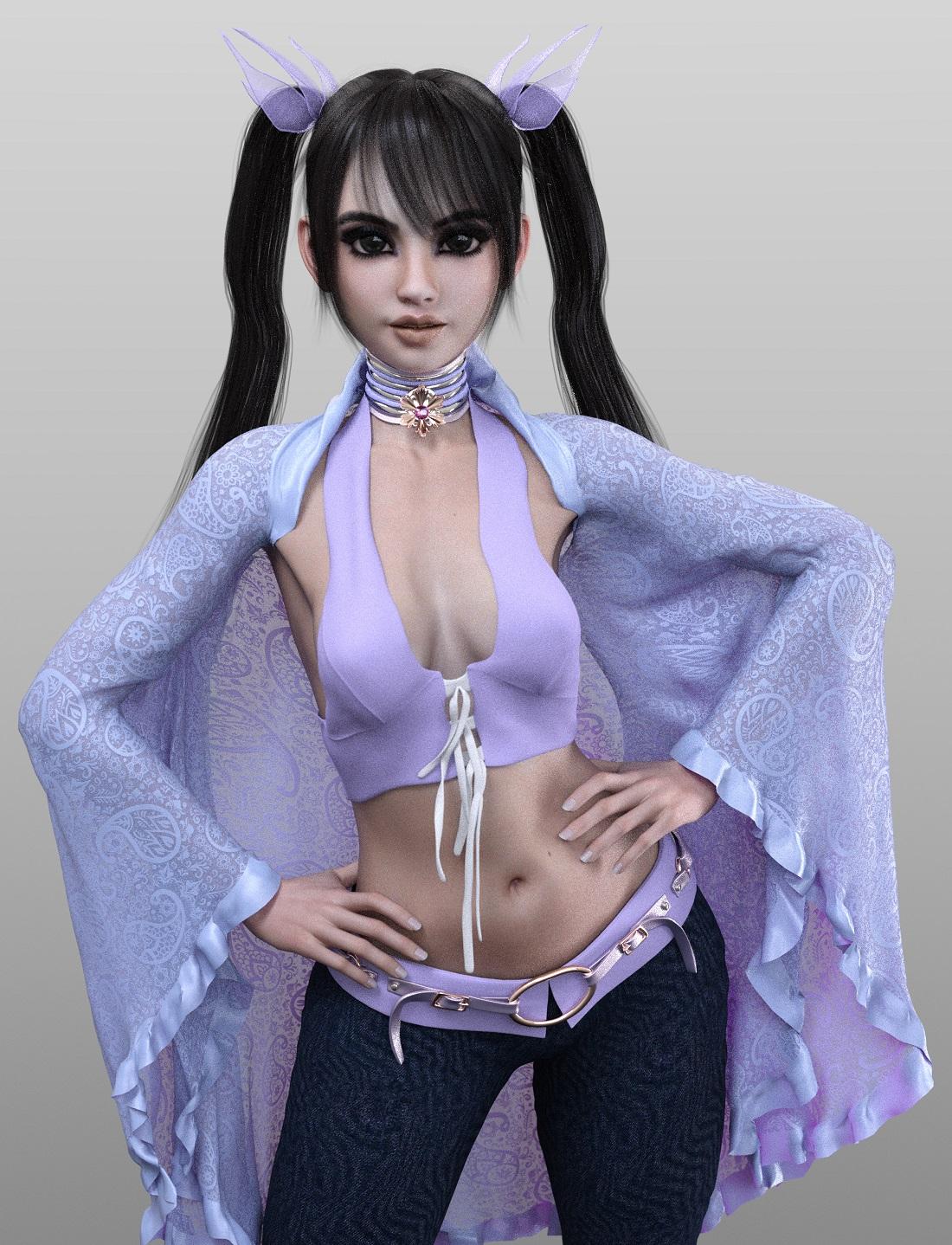
MimicMolly's Renders & WIPsThese are two characters I made using Cinder's morph at 100%.
The first one, is the Kanade Hair lilac girl. I actually re-did this render because I didn't like how the bangs got crumpled when I shortened them, so I left them alone and it looks much better. The tails also deformed, and adding the smoothing modifier didn't help much.
The second character uses Cinder's skin too. But she is a mix of 75% Teen Josie 8 and 55% Aiko 8. I used a similar curly hair by AprilYSH, because the product promo had a hair like that.
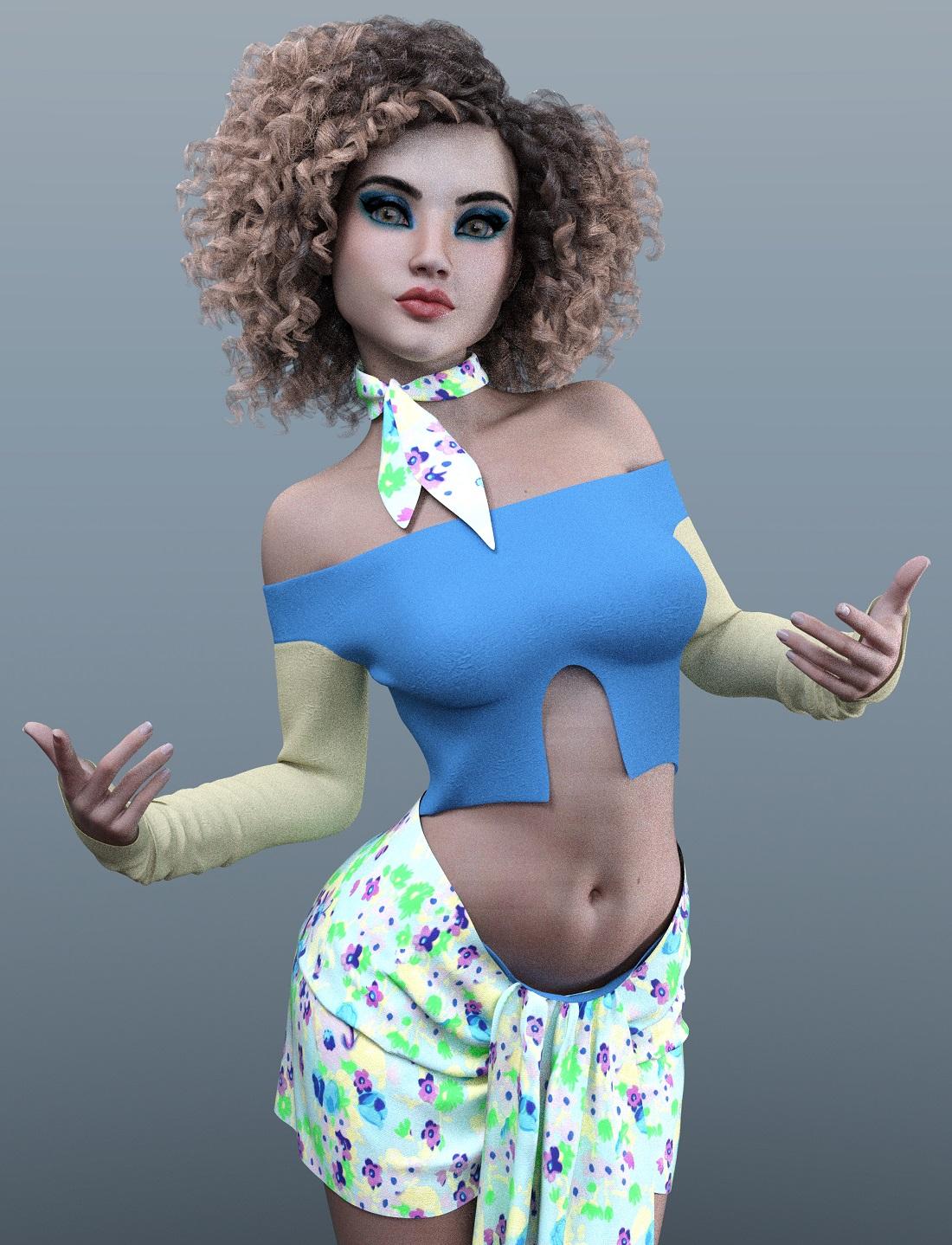
It was with this render that I discovered that the rectangular artifacts were caused by too many shadows. In the thread where the OP was asking how Cinder looked like without Kanade, all the other formers seemed to have experienced this same problem but me. However, they were using more "dramatic" lighting with dark shadows. (I guess they were all really trying to make their Cinder mixes be goth girls, as was advertised, except me. But I'm a rebel like that. :P)
Saving DForce morphs on Genesis 8Still not loading the morph. Is there another tutorial?
Correct me if I am wrong,
But you have your morph, set to base if not on base, save as obj export, I have everything unchecked on the advanced options in export. Load new Gen8, morph loader pro add morphed obj.
I even tried this from the zero posed position as a test to see if that had something to do with it since the morph needed the pose to be accurate. Still it didn't load.
Feet HD Detail (Or Lack Thereof)Siciliano1969! Those soles are fantastic and so realistic! Do you intend to make this morph available???
Daz 3D is part of

Connect
DAZ Productions, Inc.
7533 S Center View Ct #4664
West Jordan, UT 84084Licensing Agreement | Terms of Service | Privacy Policy | EULA
© 2026 Daz Productions Inc. All Rights Reserved.