-
Daz Studio 4.14 Pro, General Release!
It was mentioned somewhere that one reason for moving them was that they couldn't be animated in their former location
Thank you for the explanation. I guess animating the tone mapping can be useful for flash effects such as when we move from dark to light and eyes take time to adapt. Animating the environment takes more imagination can't think of anything right now, apart spinning the sky may be ?
In fact the properties unique to these nodes are not animatable (at the moment) - and the fact that the trasnfdorms, which don't really have any function, are aniamtable is a bug; they should be hidden.
----------------------------------------
I have posted Rob's explanation of why the new nodes are sensible before, but heer it is as a reminder:
The singleton nodes are the embodiment of scene level options moved (not copied) to nodes in the scene in order to provide access to those settings outside of the limited context there were previously provided under. Because it is now possible to have a viewport set to the Filament (PBR) DrawStyle, and also have the active renderer set to NVIDIA Iray, both of which have similar settings, it was not intuitive to have to go to Render Settings for the NVIDIA Iray renderer in order to adjust a setting that affected the Filament (PBR) DrawStyle. Similarly, it would not be intuitive to have to set the DrawStyle for the active viewport (of which there can be several) to Filament (PBR) and then access the Draw Setting pane in order adjust setting that affect the NVIDIA Iray renderer. It made more sense to expose the common settings using a familiar paradigm (a node in the scene), introduce the concept of singletons, and present the properties on those nodes in the appropriate panes w hen/where applicable.
---------------------------------------
Creating the nodes explicitly through the Create menu is one option, but if you don't they will be created automatically when needed (use of Iray render or DrawStyle, Filament Drawstyle)
Updated to 4.14.0.8 but Filament does not appear in the menuDetails on Filament are in the highlights post https://www.daz3d.com/forums/discussion/comment/6200861/#Comment_6200861
New DS Filament Render EngineWhen I first saw the announcement for the Filament Render Engine as part of the 4.14 upgrade, I was like "meh—that maybe somewhat useful to somebody? Me, I need more realism in my renders...."
I now deeply and sincerely apologize to the development team for my initial attitude.
First, I need to explain a few things:
My DAZ database has become so massive, it's verging on a total collapse into a black hole. Literally.
There are over 1.55TB, with more than 3 million files in over half a million folders on just ONE hard drive (yes, I estimate between 97-99% of it are DAZ products, so don't worry about me advertising anyone else here, like the Renderos ;) )…
…AND ALL LOADED INTO THE ACTIVE PROGRAM WHEN IT'S RUNNING…
…and that's NOT counting 300+GB of stuff from other vendors waiting to be put in when I get around to them!
TBH, I have NO idea how to sort any of that stuff into some sort of inactive database to where I can find what I need in order to put less of a load on my system—and it's a beefy system: it's got a 2TB HD for the OS, 2 10TB and 2 8TB for programs and data files, 12 Intel Core i7-8700K CPUs @ 3.7GHz, 64GB RAM with a 10GB Page file, and yes, I am utilizing some good software management systems to keep my machine in optimum condition.
Yet, with all of that, it's no wonder that DS gets a little glitchy (a big and annoying current issue is that I lose the mouse pointer whenever I make a major change to any scene I'm working on, like importing a figure, prop, or scenery—so that navigation has to be done entirely by feel and where the console highlights up when the invisible mouse has moved over it). And the only way to recover the mouse pointer is to save the work, shut it down, wait a few minutes, the restart DS, reload the file I was working on, and hope to remember what my next adjustments needed to be. Needless to say, it's starting to affect my frustration level just a tad bit. And this was before 4.14 came along
So, when I started a new project today that had a number of objects hidden in the working viewport, but was showing up in all of my renders, and they were obscuring the active figures I wanted to prominently display in my scene, and my ONLY way of discovering those issues was to wait several minutes for IRAY or 3DDelight to reveal them—you can imagine how my frustration was quickly beginning to ramp up to 12 on the 10-scale dial.
Fortunately, the 4.14 version was released just prior this latest foray into DAZ, and not a moment too soon!! I had played with it when I downloaded the upgrade, and I have to express a BIG THANK YOU to the development team to including this feature! Instead of the minimum of two or three hours to chase down and hide the all the obscuring foliage in the pre-loaded forest scene that relying on the older render engines (even OpenGL engine would have taken at least a full hour to give me the info I needed), I was able to find and hide all the problems in a matter of a few minutes!
Now, I'm back down to just a 3-4 on the frustration meter because of the mouse pointer issue, which is something I can live with--OTOH, I'm VERY happy with the resulting render I got from this!!


So this was where I was seeing the obscuring foliage...and believe me, it was a far worse mess when rendered in IRAY, in addition to the time it took for me to realize it was there....

But with the DS Filament Render Engine, I was able to locate and hide ALL the obcuring trees and stuff in just minutes!
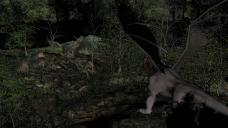
Likewise, the new render engine was an immense help in arranging the additional background forest sets, AND it clearly shows the seams between them. Unfortunately, the seams were going to cause problems for the beauty image, but it still took a bit of time for IRAY to reveal that problem.

But once more, DS Filament Render to the rescue! It made it easy for me to see that hiding the seams behind the manticore's wing was a workable solution...
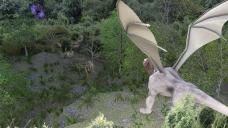
And here's the final beauty shot! NICE!!
Again, a HUGE THANK YOU to the development team!
Products used: Stonemason's Through The Woods & Fern Lake; Herschel Hoffmeyer's Dakotaraptor; Valandar's Manticore; Jepe's ElementZ.
Edit: After taking another look, I realized something. The manticore is a featured guest star in this scene, but I'm paying him too much money to just stand around looking so stiff! Here's a better "final" beauty shot:
 [Released] ROG Red Crow Inn [Commercial]
Since I installed the new daz-studio version, with the filament preview mode.... I'm having lots of problems in the tavern
Preview is way too bright, renders are extremely dark.
smoke items don¡t look well in preview, but is not a big deal.
I worked to separate different parts of the inn in different groups to hide in an easier (for me) way. I don't know if the problem is my file, or anyone using this product out of the box is experimenting any problem too...
thanks!
filament is not an iray preview mode, if that helps.
MEC4D's celebration ( with freebies ) [commercial]Not cheap indeed, when you go for a card and the budget allow, make sure you get as much of VRAM you can afford .
There are also second hand cards for less that have more cudas and VRAM , don't expect emitters to working in Filament , for that Filament will need to have global illumination and become another iray level engine that will need a very good graphic card to run it . Maybe not Nvidia card but any other good card. That's not the reason DAZ installed Filament in DS, the purpose is to have a light weight engine and not another iray
I'm still debating what card to get for the new computer when the time comes. The Nvidia cards are so expensive, even the previous one's, compared to other cards. Since what I want to do is animation more like the 2D anime and the toons styles I see, Iray isn't really necessary. The only advantage I see in using it is emmissions for light and if Filament or Octane can give me that, without slowing me down, I will most likely not get Nvidia.
Also...not having to deal with a denoiser is a bonus lol
[Released] ROG Red Crow Inn [Commercial]Since I installed the new daz-studio version, with the filament preview mode.... I'm having lots of problems in the tavern
Preview is way too bright, renders are extremely dark.
smoke items don¡t look well in preview, but is not a big deal.
I worked to separate different parts of the inn in different groups to hide in an easier (for me) way. I don't know if the problem is my file, or anyone using this product out of the box is experimenting any problem too...
thanks!
Not your average Filament threadHere's what I have
Put some clothes on the character, switched to Filament and got this.
Updated to 4.14.0.8 but Filament does not appear in the menuFilament is not in the macOS version of DAZStudio yet.
Would have been an especially nice thing to have included for Mac users, since Nvidia GPU-enabled iRay is not an option either for most Mac users. Though, your 2013 Mac Pro is one of the few that can work with Nvidia as you probably know (via an e-gpu box? was possible in 10.13 days anyway.)
Tough days to be a Daz user on the Mac, with the Big Sur incompatibility as well. I expect most Mac users (like myself) also have a Windows box for other stuff including Daz.
MEC4D's celebration ( with freebies ) [commercial]I'm still debating what card to get for the new computer when the time comes. The Nvidia cards are so expensive, even the previous one's, compared to other cards. Since what I want to do is animation more like the 2D anime and the toons styles I see, Iray isn't really necessary. The only advantage I see in using it is emmissions for light and if Filament or Octane can give me that, without slowing me down, I will most likely not get Nvidia.
Also...not having to deal with a denoiser is a bonus lol
Updated to 4.14.0.8 but Filament does not appear in the menuI updated to 4.14.0.8 to try the new Filament render engine but the option to select Physically Based Rendering PBR from the Viewport mode is not there. What am I missng? I am running DAZ on a 2013 Mac Pro.
Filament tutorials/shaders/lights?To tell the truth I have to edit most all products shaders I own .
Just don't get the idea that perfect PBR shader settings will work the same way in iray and Filament, as that is not always the case as many functions that work perfect in iray will not work in Filament at this moment .
Specular/Glossiness shaders have higher range of details and possibilities in settings in iray than Metallicity/Roughness base shaders that are more simple , for the same reason Metallicity based shaders works better in Filament than Specular/Glossiness shaders as not all functions will be used in Filament .
So if you come across a surface that renders bad in Filament not meaning it is always bad settings , but there are some things that are completely out of this earth and totally wrong .
That why I was very happy about Filament , as that is the kind of engine that most people use to work with when creating PBR shaders for Iray or game engines , it is a good guide for the people that doing things out of their imaginations , you don't need to have a training for that, just follow the simple PBR rules.
- No object surfaces can be lighter than light source in the scene , this mean not above RGB 240 ( under Color Base ), since the light value is RGB 255 ( pure white color)
- No objects surfaces should be darker than RGB 444 ( Red: 4 Green: 4 Blue: 4 ) unless you create a black hole or the darkest paint on earth.
- No object surfaces that are non metals should have Glossy/Reflectivity setting bellow 0.1789 or above 0.50 ( unless you create a gemstones that start at 0.50 and ends at 1.0 value )
- For all Metal surfaces the Specular color should be not darker than RGB 170 ( under Color Base ) unless there is need for a special effect like oxidation or weathered effect but that will turn the metal into non metal dielectric surface like for example a rusted metal what lands under Non metal category and the settings should be used for non metal surfaces in this case
And that is all about the training for base PBR Metallicity/Roughness base shader .. not hard to follow basics that will works great in Filament and Iray
Thanks. That was very helpful partial summary. I always assume the PAs are trained in PBR standards that make the DO models but now I realized they are probably just copying prior DOs settings. I wish they were trained because I am not & that is a partial reason why I buy professional products.
New DS Filament Render EngineI don't currently do animation and I'll likely stick with Iray, but I think Filament is wonderful for animators that don't want to wait forever and a day to make a 60 second animation. It's about time Daz did something for their animation customers or animators-to-be. Also good for folks that 1, don't care about photorealism so much and 2, can't afford the hardware it takes to render in Iray. I don't think development should stop at all and don't understand those who think it should. Just my two cents ;).
Laurie
New DS Filament Render EngineAfter working with Filament for three days, I'm going to add my plugged nickel's worth of commentary.
First, my Iray machine melted down about three days before Filament was released. So, I'm currently working on an eight year old laptop, with a Haswell CPU, 16G RAM, and an archaic GTX-940 GPU. It's my old Reality machine. Don't even say the word "Iray" to it or it will have a stroke. The fact that I can render on it using Filament is just pure joy.
Second, I do two types of renders: highly detailed fantasy scenes, and superhero comics. It's always griped me that a panel for a comic takes as long as a detailed standalone action scene. Add to it the fact that a comic page needs four to nine panels and it becomes frustrating. With Filament, I can render faster than I can pose the characters. Meaning, I can make more than one comic page per week. Nice!
Third, for said comics, Filament is good enough. More than good enough, really. Iray looked too darn good! I'm used to comics being hand drawn, with high end pieces either in watercolor, like Alex Ross, or airbrushed, as in Heavy Metal. So, Filament is a major boon in many ways.
Finally, I have been playing with Filament for detailed fantasy images. So far, so good. Yeah, in that type of art, its limitations show. Iray is the better engine for that type of scene. However, I'm getting better results than I did with 3delight (granted, I did not know what I was doing back then ... I didn't even know we had cameras). The transition from Iray to Filament is not near as daunting as 3DL to Reality or Reality to Iray. Sure there's a learning curve, but there was for 3DL, Reality, Iray, and DAZ in general. I'm still learning about Iray for that matter. So, what else is new?
It does have a few missing pieces. The lack of SSS/Translucency leads to flattish looking skin. Ground shadows need to be greatly improved. The mouth of figures looks plastic. Hair is wonky. Learning new lighting techniques takes time because mesh lights don't work. Most of those issues will be resolved either through spending more time with Filament (which I am doing now), and the fact that it's open source and 200 to 300 of us geeks just fell in love with it. It would not surprise me to see Filament develop and improve faster than Iray considering it/we don't have a major corporation that ignores us to contend with (i.e., Nvidia).
Many here are complaining that DAZ "wasted time and resources" on Filament but I say "Good job!" It's another tool in our box of tools we can use for different projects and applications. And really, we can't have enough.
Yeah, DAZ... Please don't cease development on Filament!
Iray has been a no-go from day one for my older PC. I WAS in the process of building a barebones system specifically for Iray (not Octane), but with the scalping of all NVidia branded video cards on the market that are 8GB and up - Those rendering engines are still another year away from the looks of things. It doesn't matter anyway. I create toon comics, so most of my work is done using stylized shaders in 3Delight for the characters themselves.
I would love Iray for those mountainous backgrounds and Dreamlight lights.
Anyhoo, I fell in love with Filament from the start. The toon type shaders in Iray actually give me that Dreamworks character look. It's really amazing. And my characters come alive before my eyes with the instant render view.
Filament tutorials/shaders/lights?We have a lot of conversations about Cutout Opacity 5 years ago and a lot of explanations why not using it the way many do.
You can use it to cut out the geometry and that's what it is for , with a dress you can create beautiful maps to cut out the threads and make it work like half transparent and still be accurate and proper and render quick .
Same with the hair , many hair I have on my library use glossy values for diamond for no reason , the reflectance of the hair in the iray is not greater than 0.5 unless you go for shiny synthetic wig style .
That includes characters as well with maps that are plugged in for no reason and glossy values beyond this earth, mixed values for both specular and metallicity basic shaders in one shader even if not working together , total chaos ! Specular/glossiness base mix shaders have greater control over the surface than metallicity/roughness in iray and that is a fact so sometimes things in Filament may not look as good as they look in iray. Filament works best at this moment with Metallicity/roughness base mix shader , as that is a very simple shader for a simple render engine like Filament , and less chances of making errors or mistakes .
But when you see Metallicity/roughness shader with a glossy color set up for non reason is wrong , that tells me the creator has no clue what they are doing.
I can go here with a long list of stuff ..but let's stay on the positive side and do better next time !
It is this way since 5 years in DS and iray ... Cutout Opacity , is not transparency .. it is alpha channel 2 colors ..
As you say, we have been told this since the beginning of Iray, but PAs contrinue to deliver products using grayscale maps in Cutout Opacity, especially for hair and fabrics.
Ah, so the secret of why so many products I can't get to work how I expect if they use cutout opacity.
Thanks. That was very helpful partial summary. I always assume the PAs are trained in PBR standards that make the DO models but now I realized they are probably just copying prior DOs settings. I wish they were trained because I am not & that is a partial reason why I buy professional products.
DAZ vs BLENDER... Help me understandGreetings folks... please be gentle as I am struggling to get my brain wrapped around all this...
So I've been dabbling around with Daz for maybe 18 months now. I have a pretty decent set of assets, plugins etc etc, and just enough skill to make me dangerous to myself.…
But it seem like, whether it is the new Filament render thing, Spring Dynamics, or folks just looking to get a new non-Nvidia GPU, somebody always chimes in with some sort of, “I do all my rendering in Blender”, “That feature has been around for like, 8 years in Blender”, or “Blender is just so much more versatile than Daz”.
Ok…
I’ve bitten on the hype, and downloaded Blender and have gotten maybe halfway through making that freakin’ donut 4 or 5 times…
But I am not getting it. Hear me out, and correct me (gently) if I am wrong but here is how I see it.
DAZ is like a big toy store.
I get the GI Joe with the Kung-Fu Grip (G8M) just for walking in the store. Then I skip over to the stuff/Theme Aisle and pick up “Mission to Spy Island Bundle” which has a cool inflatable boat, black spy outfit, Silenced P-38 etc. Then I stroll over to the Scene area and pick up the Cave Island. I hit the register, run home and dump it all out on my floor. I assemble the pieces I want where I want them and take a picture (Render).
BLENDER
When I open up blender…
It seems like, “Here is a lump of sculpty clay, a pair of scissors, and a handful of pipe cleaners… you can make some really cool stuff with this that is even better than what you can find at Toy Store, but you gotta make a donut first to be worthy."
Yes, I’d love to make a medieval inspired backpack that is friendly to being opened and closed, and I would love to have animations with smoky fires etc etc… but how the heck is that happening? Do I have to spend thousands more in another store? Just poking around, I see I can get a Horse Pro Model for only $249. And, at least the toilet seats are cheaper than government ones… they're are only about $30 just for a toilet (not an entire bathroom scene, just the toilet).
Now I see there is a DAZ to Blender Bridge… but what does that even mean? Does it just import Characters like G8Fs or can I import any of my $1000s of Props/Scenes/Materials too?
Do I set up my scene as my GI Joe Example above in Daz and then hit a button and it magically goes into Blender were I hit another button to Render it or ????
Any guidance would be greatly appreciated.Start small.
Just import a figure, no hair, clothes, no pose. If it imports, things are looking good. (Do NOT click in the 3d space.) A to select all, with mouse pointer in 3d space. In the DAZ Importer tab there will be something to Merge Rigs. It's the Corrections dropdown, and get used to doing that IMO.
Select the rig (bone thingies), and change to pose mode (will probably be in Object Mode), once a bone is select try G (grab) or R (rotate), then move the mouse a little; the figure should deform with the skeleton; i then right click to cancel. (That might be left click by default as I have Right click set as select, which is how Blender used to be - and is how I prefer so changed it from default. Blender asks you iirc which you want.)
I do similar to the above every time I install a new version of Diffeo - just to be sure installation went ok.
I don't export whole scenes, if i want to use props, (be it a lamp or a whole room), I export those seperately and save in a seperate .blend file; they can then be appended to my current project.
I export figures, depending on what clothes I'm using may depend on if they are naked or partially/wholly clothed.
I have hair files set up; just with a hair in them, which have been converted to Blender's particle system. I use whichever I want, or find anther to export.
Make sure hair has a scalp, if not create one from G8 (or whetever G you're using), or borrow one from another hair.
There is some upfront work getting a prop/selection-of-props ready, but regardless of when it is done, it still needs doing.
Off topic but can anyone help me?I think your computer is fine. New versions of DAZ Studio will seize up your computer via being I/O bound when you render quite often, including switching the viewport to Filament or IRay Preview. Once, DAZ Studio seized my computer so badly that even control-alt-delete would not work & I had to pull power to the PC.
Not your average Filament threadI've followed the tutorial, did a clean driver install for my GPU, double checked that Windows and my other drivers were up to date, uninstalled and reinstalled DAZ, unplugged it and plugged it back in, and then some. Filament won't display at all. Viewport appears empty. I created nodes and added distant and spotlights. So far, I haven't been able to find any other post regarding my situation. Any constructive advice is most appreciated. Please don't give me a stock answer. I've already tried the basics. Thank you.
New DS Filament Render EngineSo, i tested a lot and had a good reason for it! I found some nice solutions for some "flaws". But i have to think about them. The first one for you is Light:
#1 Spot lights and point lights should become your besties here! You can do a lot with them, slightly and heavy stuff. Sometimes there are problems, so i would recommend to set the
Louminous Flux (Lumen) in Parameters -> Light to a crazy high value of like 1.500.000 - 3.000.000 and use the intensity and Color to match things up. Don't forget Shadow Type! ;)#2 You want to go to the Filament Draw Options -> Generate Texture Mipmaps -> OFF to solve the "skin problem" with the seams! (...if you not already know it)
#3 You want mist?! Take a primitive (Sphere or Cylinder works best) setup some mist/fog textures, scale down the opacity to your needs or liking (...these elements reflect light and throw also shadows!!! Can be useful and also be an annoyence)
#4 You want better hair?! No problem... BUT, jeah there is a but... You have to use Hair that has Resolution Level - High Resolution ... some Hairs have it but not turned on under:
Parameters -> Hair -> General (-> Mesh Resolution) -> Resolution Level - High Resolution
(....most better hairs that have it can look pretty great!)
#5 A better environment, nice walls, concrete stuff, and everything with a lot more depth to it?! No Problem... BUT... jeah again... You have to include normal maps and have to create them most of the time on your own. Not many items have them but if they do, Filament winks at you with a smile. Here a link to a totally free website where you can create them:
http://cpetry.github.io/NormalMap-Online/(i would recommend to use batch compiling and create general maps for all Base textures you want to use, since this thing is a lot more accurate than most of the created normals/AO/Disps/Specs i've seen so far in Daz... don't ask me why)
Since you have them, put them to use! If you change to Iray, these maps will also help you to not tweak "to much" back again. Besides it looks overall nicer, but is also havier to render. Keep it in mind.
The settings i use in general to start from are:
Base Bump: 1.5
Normal Map: .75
Displacement Strength: 0.21
Min Disp: -0.20
Max Disp: 0.20
SubD Level: 2Most of the time i don't even change them. Except i do fancy stuff like reptile skin like displacements. By the way, i saw a lot of baaaaaad normal maps on "painted" or "worked" man made materials. Like on a park bench, a trash bin and so on. DON'T use the regular stuff, try something new! Use a high quality bark texture for example, batch compile maps from it to get a normal map and to pimp up the realisim from clean polished to older, bumpy, used paint, wood, metal or whatever else. The bark texture gives you scratches, bumping, cracks and more. Just try it... you will like it a lot better.
#6 Use Glossy Reflectivity and Roughness Maps, because they give you a little more accurate shine where it should be. Then adjust it to your needs or liking. (first one can also use spec/ao images second one disp/bump) Sometimes it's pretty nice to experiment. Btw. look here also: https://www.daz3d.com/forums/discussion/445567/filament-tutorials-shaders-lights/p4 about it. There i found: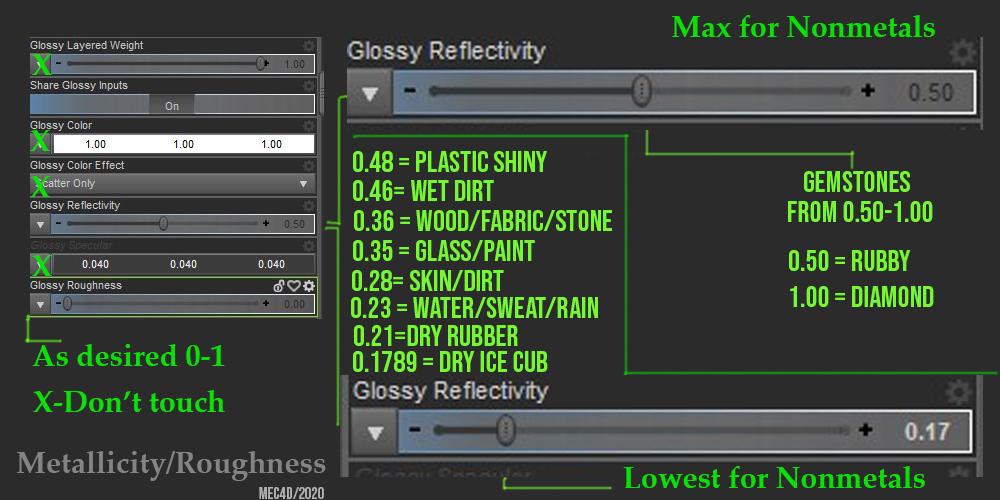
I have to thank MEC4D because this was very helpful to get a better outcome. It works well but the numbers vary with the textures you use. They show you also if textures that have to do with gloss and roughness are off/to low/bad. That's a good thing!

#7 Use Diffuse Overlay Weight above 0, Diffuse Overlay Weight Squared (MAYBE if needet) and Diffuse overlay Color with a color/brightness to reuse materials, dye textures a little, change skins or whatever else... (like a rusty grey iron, with some yellowish darker tone to make it an old, dirty gold look)
And then you will get to this: #1 Filament - #2 Iray - #3 Best of both worlds combined
#1
#2
#3
I did not change a lot, except the brightness and i had to slightly change her "skintone" and put in some more direct light on her. I would have loved it a little darker though...
I would say save shaders for everything you create new. Wood, metalls, hairs, stones need some variation in the shading. So it's a good thing to have them with one click (without image changing).Is Iray working in DS 4.14 ?I installed DS 4.14 yesterday and I have been playing around with filament, but now I can't render in Iray if I switch out of filament. I have GPU selected under advanced settings. Anybody know what could cause this?
"There's Always Another Sale™" Sales thread: Report Issues HereI just now recieved an email announcment of Studio 4.14 with Filament. I've been using it for over a week...
That's fine, though. A lot of people don't visit the site daily.
Daz 3D is part of

Connect
DAZ Productions, Inc.
7533 S Center View Ct #4664
West Jordan, UT 84084Licensing Agreement | Terms of Service | Privacy Policy | EULA
© 2026 Daz Productions Inc. All Rights Reserved.