-
[Released] Character Converter from Genesis 3 Female to Genesis 8 Female(Now Conv JCMs) [Commercial]
I started doing another Victoria 4 -GenX-> Genesis 3 -This product-> Genesis 8 conversion from scratch yesterday to test.
On the "GenX needs replacement" front, this time the head and body looked just fine, but the default pose was getting messed up in some way. Oh well.
I did hit another snag with the conversion this time. The default utility still didn't like GenX morphs, so I switched to the scene transfer utility. This time it hit me with an error message, telling me to check the log, but the log was empty. I had to hit the sack at this point, so it's probably another user related problem, but it does look like handling GenX conversions is an issue.
For those wondering about purchasing this, though, I've been very successful with everything else. :)
Hmmm. There was nothing in the Daz log?
Nope. Last updates there were from me messing up in the eventually successful Brenda conversion from the day before. :)
[Released] Character Converter from Genesis 3 Female to Genesis 8 Female(Now Conv JCMs) [Commercial]I can get this converter to work with the G3 to G8 scene method but the batch convert option does not work for me at all. It says no character files selected even though there are. Any ideas or hints would be appreciated ???
The same for me. I'm happy with the product but I can get it work only with the scene method, but that's ok.
I can't get the batch convertor method to work either but then I don't find the instructions particularly clear.
I am sorry you two cannot get the main script to work.
Also and this is a problem for me, I can not autofit clothing from genesis 2 or 3 (didn't try the original) when trying the box pops up but the ''What Type of Item It Is'' box is greyed out - is this expected behaviour?Does autofit work properly when you use the base G8F? Since this product creates G8F characters the actual figure is still G8F, so autofit should be working as it does on any G8F figure...
Yes I would have thought autofit should work but I'm not able to use it on a converted character. If this is a limitation of the product then I will have to return it as for me it makes it rather useless.
This is NOT a limitation of the product. That is very strange that it is not working for you. What is the Scene Identification of the character when you load it? It should look like this
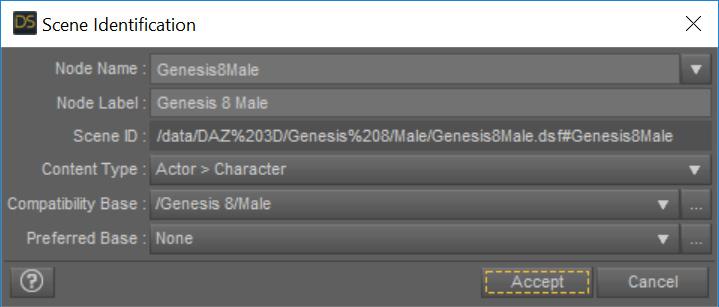
It looked the same except for it was a female
(LOL. Whoops, I was testing a male at the time.)
Ok. If you load a vanilla G8F, can you autofit?
Yes.
OK. Now, after loading a vanilla G8F, if you dial in a normal G8F morph (not one that was from conversion), can you auto-fit? After loading a vanilla G8F, if you dial in a converted G8F morph (undial the normal G8F morph), can you auto-fit?
[Released] Character Converter from Genesis 3 Female to Genesis 8 Female(Now Conv JCMs) [Commercial]I started doing another Victoria 4 -GenX-> Genesis 3 -This product-> Genesis 8 conversion from scratch yesterday to test.
On the "GenX needs replacement" front, this time the head and body looked just fine, but the default pose was getting messed up in some way. Oh well.
I did hit another snag with the conversion this time. The default utility still didn't like GenX morphs, so I switched to the scene transfer utility. This time it hit me with an error message, telling me to check the log, but the log was empty. I had to hit the sack at this point, so it's probably another user related problem, but it does look like handling GenX conversions is an issue.
For those wondering about purchasing this, though, I've been very successful with everything else. :)
Hmmm. There was nothing in the Daz log?
Issue with making a morph in BlenderCan you clarify, please. As you refer to using Morph Loader Pro, I assume (though you do not say) that the model was first exported from Daz Studio as an OBJ and you imported that OBJ into Blender? You then exported the OBJ from Blender as you say - with no modifications made in Blender? Finally, you have 'imported' it back into DS using Morph Loader Pro - so, to be clear, you are creating a morph rather than importing an OBJ file as a new object?
In that case, can you please provide screenshots of the OBJ export settings in DS, the OBJ import setting in Blender, the OBJ export settings in Blender, and finally the settings in Morph Loader Pro?
One suggestion would be to repeat the process starting with a primitive cone in DS, rotated on the Y axis so it points to the left or right and we can more clearly see any problems in orientation. I don't have the model you are using so cannot test with that.
Issue with making a morph in BlenderIt's a model that I bought from the DAZ store: https://www.daz3d.com/giant-fantasy-snake
The origin point is in the main body, closer to the head than not. It branches from there toward the head and the tail.
The morphs I'm looking to make are certain distortions in the body. For example, I'd like for it to have a bit of a ridge along the back to indicate its spine. Or if it's eaten something cube-shaped, I'd like to be able to make it look like it's got a cube in its gut.
Re-importing the snake to Blender, it looks the same as when I exported it. Opening the exported-from-Blender OBJ file in the Windows viewer looks the same as it does in Blender. It's only once I apply the morph in DAZ that the lower jaw clips through the top of the head.
mcjTeleBlender:Daz Studio scenes/animations w/Blender's Cycles Enginenot totally sure the material transfer would work, since the obj and mtl files produced by animate would need to have the same material and node names as the ones that mcjteleblender sees/modifies ...well there's all sorts of workarounds, for example loading the scene using teleblender, then importing your animate .obj, then copy/pasting the materials that suffered during the importmy script doesnt build the mdd file, so you need to build it from the sequence of obj files using ... i forgot what. once it's done you can delete all obj files except the first one. mcjteleblender works best when the shader is the DzDefault shader. but it works ok with the Uber/iray shader since about 2016. The other shaders ( ex:water, metal, carpet ) may cause problems because, my script uses the services of the Daz Studio obj exporter which will export no material definition for those materials. So in general its better to stick with uber and the default one. If you dont have the DzDefault shader in your library, you could create a primitive plane and export its shader as a duf file..Thanks ... things are a little clearer now. I do have the default DAZ 3Delight shader so no problem there - I just hoped that I didn't need to go through the conversion step as my scenes are all set up for IRay.
As for MDD, I guess I was asking because I have Animate 2 which can export MDD. Could I use that in conjunction with your TeleBlender?
Thanks again. I will have to experiment when I get home from my trip abroad.
Issue with making a morph in BlenderOk, so let's get some more info. This is a custom model you made, yes? In Blender? If in Blender, where is the origin point on your model?
Now, the morphs. What kind of morphs are you trying to make? Movement? Shaping?
If you re-import your morph to Blender, does it look correct?
[Released] Character Converter from Genesis 3 Female to Genesis 8 Female(Now Conv JCMs) [Commercial]I started doing another Victoria 4 -GenX-> Genesis 3 -This product-> Genesis 8 conversion from scratch yesterday to test.
On the "GenX needs replacement" front, this time the head and body looked just fine, but the default pose was getting messed up in some way. Oh well.
I did hit another snag with the conversion this time. The default utility still didn't like GenX morphs, so I switched to the scene transfer utility. This time it hit me with an error message, telling me to check the log, but the log was empty. I had to hit the sack at this point, so it's probably another user related problem, but it does look like handling GenX conversions is an issue.
For those wondering about purchasing this, though, I've been very successful with everything else. :)
mcjTeleBlender:Daz Studio scenes/animations w/Blender's Cycles Enginenot totally sure the material transfer would work, since the obj and mtl files produced by animate would need to have the same material and node names as the ones that mcjteleblender sees/modifies ...well there's all sorts of workarounds, for example loading the scene using teleblender, then importing your animate .obj, then copy/pasting the materials that suffered during the importmy script doesnt build the mdd file, so you need to build it from the sequence of obj files using ... i forgot what. once it's done you can delete all obj files except the first one. mcjteleblender works best when the shader is the DzDefault shader. but it works ok with the Uber/iray shader since about 2016. The other shaders ( ex:water, metal, carpet ) may cause problems because, my script uses the services of the Daz Studio obj exporter which will export no material definition for those materials. So in general its better to stick with uber and the default one. If you dont have the DzDefault shader in your library, you could create a primitive plane and export its shader as a duf file..Thanks ... things are a little clearer now. I do have the default DAZ 3Delight shader so no problem there - I just hoped that I didn't need to go through the conversion step as my scenes are all set up for IRay.
As for MDD, I guess I was asking because I have Animate 2 which can export MDD. Could I use that in conjunction with your TeleBlender?
Issue with making a morph in BlenderSet to yes and see if that helps. Yes, Morph Loader Pro is MLP.
Hexagon to DAZ, why Morph Loader Pro is not loaded?I want to create a morph. I selected "File -> Send to Daz Studio" in Hexagon.
And some light version of morph import window is displayed in DAZ: https://imgur.com/yIbeS86
But when I followed video tutorial - there were more advanced import window: https://imgur.com/uPxX39M
I need Reverse Deformations option in that advanced window...
I am using Daz Studio 4.11 Pro Beta
In video I think a previous version of Daz
Issue with making a morph in BlenderCome to think of it, are you using reverse deformation?
You mean in Morph Loader Pro?
Whenever I import a morph from Blender that way, I always have the "Reverse Deformation" option set to "No."
That's all I know about them though.
Issue with making a morph in BlenderThe title pretty much says it. I have a model that I exported from Blender. I checked that file and it's oriented correctly (see first attached), but then when I import it to DAZ through the Morph Loader Pro, it's flipped in the x-axis when the morph is applied (see second picture).
What am I doing wrong?
Also: I've tried checking the box in Morph Loader Pro that says "Invert Positive Direction" for X, but that doesn't fix it either.
Something else to note: My DAZ 4.11 also exports OBJ files with the same error unless I click the "Invert Positive Direction" for X option. If I do that, it exports it correctly.
Issue with making a morph in BlenderThe reason I like shape keys is it stores all your morphs (also called blendshapes) in one place with sliders so you can test them and even mix them.
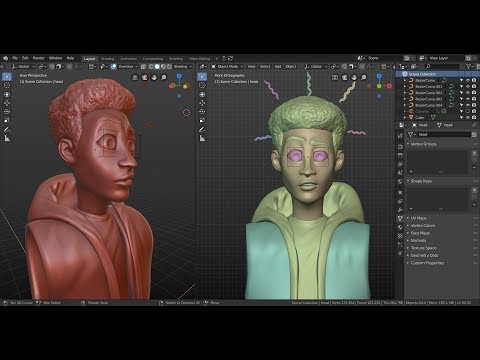
Edit: One thing I noticed he didn't mention. When you get ready to start working on your morph, set the shape key value to 1.
If you use sculpting, you can then drag the value between 0 and 1 to see how it morphs.
If you do editing in edit mode, go back to object mode to slide the value slider.
DO NOT MESS with the BASIS (the first one you create; it is your base mesh).
When you go ont to do a second morph, set any other morphs you created to 0 (zero). You can, as I mentioned, create morphs from a mixture. In that video, he shows how to separate into left and right eyes.
To export, select the morph you want to export (all others zeroed), in Export OBJ options, use Selected only and also checkmark "Polygroups", "Keep vertex order" and "Apply Modifiers". Use MLP to import.
What are the best face, body morph, and expression packs for Genesis?I'd recommend the 200 Plus morph packs from Zev0 over those, because it gives you a lot more control over the individual details rather than just giving you some preset faces to choose from (although it does also have some faces).
I don't see anything called "200 Plus" in Zev0's store. All the body morph packs are there, unless that's what you meant?
Character Converter from Genesis 8 to Genesis 3First off, I'm glad to see the release of Riversoft's Character Converter from Genesis 3 Female to Genesis 8 Female. Being able to transfer various characters/morphs/etc would really go a long way to encouraging me to use G8F more. That being said, there are resources for Genesis 3 that I would like to combine with Genesis 8 characters and morphs, such as the succubus and centaur assets. So I'm hoping that Riversoft will release a script that does the opposite and allows for conversion from Genesis 8 to Genesis 3.
Cooking show – face capture, motion capture, character morph, and lip syncSo my wife is 7 months pregnant with our 4th child. This far along means that sleep is quite difficult for her and by extension me. Because of the sleep deprivation and impending deadline of not being able to work on projects at my leisure, I foolheartedly claimed that I could do a demonstration of 3D animation for the local filmmaker group that I am a member of – Nebraska Independent Film Projects (NIFP).
In my sleepless haze, I thought to myself wouldn’t it be fun to live stream this crazy idea as if it were a cooking show and have the audience choose the character the actor would morph into as the “secret ingredient”? Why not!!? After all, I have 90 minutes of meeting time to fill!
I have managed to convince a few other deranged individuals to go along with this crazy plan and now we are going to live stream this on our NIFP Facebook page on Aug 15th 2019 starting at 6:30pm Central Time.
Please join us through our Facebook page https://www.facebook.com/nifp.org/ to see if it ends in triumph or tears! I for one am hoping for both!
- Use FaceGen Artist Pro to create a 3D digital stunt double
- Capture motions using a Kinect 2 and Brekel Pro Body v2
- Convert .BVH file from Brekel Pro Body 2 to aniblock for Genesis 3 figure
- Capture a sentence or two of dialogue
- Apply lip sync to the animation using AniLip 2
- Apply the chosen secret ingredient morph the character
- Add an appropriate background to the scene
- Decide what if any “extra” details (proper Iray lights, blinking and eye movement, and emotional expressions) can be added in the final minutes
- Begin the render in Daz Studio to have a completed animation within 24 hours
Issue with making a morph in BlenderSo you have a shapekey in Blender where the base key is unmorphed?
I'm not really sure what that means. Here's what I did:
I exported the snake from DAZ as an OBJ
I imported it into Blender
I selected the snake and changed from object to edit mode.
I enabled proportional editing
I selected one vertex, moved it and the ones around it outward, then went back to object mode.
I then exported the new morph from Blender, and imported it into DAZ. Then I used the Morph Loader Pro to enact the morph.I pretty much followed the tutorial in the link to a "t". As far as I can tell I did everything she did and all the settings were exactly the same.
Expression Splitter?And for morph based expressions, Shape Splitter (formerly called X-morphs) can break down the face to even smaller sections https://www.daz3d.com/shape-splitter ;
Issue with making a morph in BlenderUpdate: I thought it may have been the Blender export settings when it was exported as an .obj after modifying it, so I looked at the .obj generated thinking it would have the mouth error, but it's good coming out of Blender. So I'm thinking it has to be an issue with the Morph Loader in DAZ.
Daz 3D is part of

Connect
DAZ Productions, Inc.
7533 S Center View Ct #4664
West Jordan, UT 84084Licensing Agreement | Terms of Service | Privacy Policy | EULA
© 2026 Daz Productions Inc. All Rights Reserved.









