-
Lara Croft face morph for G3F/G8F?
Name and likeness together might be enough to cause a copyright claim, though. PedroFurtadoArts' morph is pretty spot on to the game, so just the likeness may cause a copyright claim.
there are 20 miliion versions of the acfual mesh from the games ripped and floating on the internet and I have yet to see the studio crack down on anyone, so he should be be ok with his likeness
Transferring Saved File Presets?How do I transfer saved file presets (poses, characters, materials) to another computer with Daz?
Copy Pasting the files to the Daz Presets folder wasn’t working.
Lara Croft face morph for G3F/G8F?Name and likeness together might be enough to cause a copyright claim, though. PedroFurtadoArts' morph is pretty spot on to the game, so just the likeness may cause a copyright claim.
Not to mention the fact that it was put in writing that she was purposefully designed to look like her 8 posts back lol
- Greg
Lara Croft face morph for G3F/G8F?Name and likeness together might be enough to cause a copyright claim, though. PedroFurtadoArts' morph is pretty spot on to the game, so just the likeness may cause a copyright claim.
I have no choice but to make my own HD morphs, so how do I do it? I have zbrush.Displacement is often the better choice but it’s also dependent on maps being available or made using the HD mesh, I have rehashed this argument endlessly with PA’s who insist including those maps which they can export anyway creating the HD mesh is too big a download for them to add to their product and too much work.
If they added them we could edit the maps for needs such as removing displacement where not wanted which you cannot do with a HD full body morph.
It is also better for those FBX exporting stuff to other programs like iClone as FBX only does base mesh.
I can accept DAZ keeping the HD technology for PA’s but wish at least they could then supply the displacement maps for the characters as well as creating them myself has not gone well.
While displaement/normals are a good approximation theya re limited (without a custom shader) to moving in/out along the normal direction, while an HD moprh can move the mesh in any direction
Creatures I get it but pores and wrinkles?
I love the few vascularity, wrinkly, muscly and porey maps I do have and mix them with other figures
We can at least now use a HD obj export to displace the mesh in Carrara thanks to Philemo but iClone I still rely on maps on a tessellated mesh
I have no choice but to make my own HD morphs, so how do I do it? I have zbrush.Displacement is often the better choice but it’s also dependent on maps being available or made using the HD mesh, I have rehashed this argument endlessly with PA’s who insist including those maps which they can export anyway creating the HD mesh is too big a download for them to add to their product and too much work.
If they added them we could edit the maps for needs such as removing displacement where not wanted which you cannot do with a HD full body morph.
It is also better for those FBX exporting stuff to other programs like iClone as FBX only does base mesh.
I can accept DAZ keeping the HD technology for PA’s but wish at least they could then supply the displacement maps for the characters as well as creating them myself has not gone well.
While displaement/normals are a good approximation theya re limited (without a custom shader) to moving in/out along the normal direction, while an HD moprh can move the mesh in any direction
I have no choice but to make my own HD morphs, so how do I do it? I have zbrush.Displacement is often the better choice but it’s also dependent on maps being available or made using the HD mesh, I have rehashed this argument endlessly with PA’s who insist including those maps which they can export anyway creating the HD mesh is too big a download for them to add to their product and too much work.
If they added them we could edit the maps for needs such as removing displacement where not wanted which you cannot do with a HD full body morph.
It is also better for those FBX exporting stuff to other programs like iClone as FBX only does base mesh.
I can accept DAZ keeping the HD technology for PA’s but wish at least they could then supply the displacement maps for the characters as well as creating them myself has not gone well.
Mesh design for dForce?Those could well be useful, although it may be a challenge to use some of them without either considerably upping the mesh density or sacrificing important face loops, both of which would be big compromises on the simulation.
What I'm currently trying to work on is an underwear set that uses dForce to get elasticated edges and straps to taughtly fit the contours of the character - and preferably as wide a range of characters as possible, without requiring a new corrective morph for every extreme fantasy morph out there. (As I do a lot of contemporary fantasy). That means I don't really want edges cutting across these loops, so there's only certain places I can reasonably add or remove geometry.
I'm making progress though.
Teen Jane 8..so about Sarah, do you need Teen Jane or will she work with just G8F. She has a much more "mid teens" look and I love those freckles particularly with ginger hair.
Both of the images I posted above (links down below) are Sara without the Teen Jane morphs loaded in because I didn't buy Teen Jane yet. You can definitely use her without Teen Jane. Just realize she isn't going to look exactly like she would if she had the Teen Jane added in which @dkgoose said was dialed in at 100% when he answered my question. I still think she's rather cute and teen-looking without Teen Jane.
https://www.daz3d.com/forums/discussion/comment/4719431/#Comment_4719431
https://www.daz3d.com/forums/discussion/comment/4720461/#Comment_4720461
...I do have the Growing Up morphs.
I think you would need those morphs on Jane anyway, she does not look like a teenager. And with Growing Up morphs, you can make pretty much any character look like a teen.
Personally, I would recommend Jane to people who like a generic character that they can tweak and make their own. I don’t think she even adds much to the gene pool, but she’s really easy to morph into whatever you want her to be. Rendering Aleena now (addon) and she’s very pretty but in no way looks like a teen!
..yeah I see your point. I have been creating teen and even tween characters since the Gen4 days when we had none without specialised utilities such as the Growing Up Morphs. Used to be a lot of work back in the day. With Growing Up and the plethora of teen characters since the introduction of Genesis, I feel like i'm cheating.
Not to hijack the thread but here is the latest rebuild of my signature character (post hard drive crash) Using G3F, a mix of Molly, Tween Julie, and Zahara (the latter via GenX) with the Growing up Morphs and skin created in SBP3. This would have taken weeks in the Gen4 days as opposed to a couple evenings today.
She is super cute! Love the simple but elegant scene. 2 questions--what dress is that, and what is SBP3?
I can't see where your second question is answered, but SBP3 is this:
I have no choice but to make my own HD morphs, so how do I do it? I have zbrush.Here's another question. If displacement maps are so much better, then why doesn't DAZ use displacement maps instead of releasing HD addons?Nobody said they were better. They're more of a sideways step than a forwards one; they do much the same job, but they do it in a different way.
As far as Zbrush, I don't know. I certainly know that Blender can be used to calculate displacements between the low-poly and high-poly meshes, so you could actually start with an HD morph as a base and then project your version back onto the base mesh, but most of what I know about Zbrush can be summarised as that "it's very different in purpose and function to Blender".
The term you probably need to Google for is "Displacement baking" to find out if you can transfer back to the low-poly mesh, but not knowing much about the functionality within Zbrush, I'm not very qualified to give feedback on which guides would work.
(A fallback solution would be to export an OBJ to Blender and bake there, which is a pretty easy process once you get around the general awkwardness of every one of these programs having different interfacing. Jumping back and forth between Daz and Blender is certainly a headache, as they've got completely different viewport controls).
Lara Croft face morph for G3F/G8F?I really wanted to ask if anyone skilled or experienced could take the time to have a go at sculpting a Lara Croft face morph when they have some free time which is NOT the Angelina Jolie version but the older version from Lara's games exactly in the picture shown with this post (I asked the same request years ago too for V4) only this time I am wanting it for G3F/G8F I mean G8F mainly but for both would be greatly appreciated. I had a go myself but I am not much good at it generally speaking :( I found it hard to get the way I wanted it to.
Hi , I'm working on a Lara Croft character, That looks like what you want, head and body, but she is going to be Called Laura for Copyright reasons obviously, she is going to be out maybe next month


Lara is a name of Greek origin used throughout the Mediterranean. As long as it is not accompanied by the surname Croft, I see no reason not to use the name Lara. An alternative may be Larisa or Larissa, not always Laura.
Where are the highly detailed, muscular HD-Addons for Genesis 8 female? Like Ophelia 7's HD-Addon?If that's the look you're going for you don't even really have to have HD.
Here's Gia 8 (non-HD) with Bump setting increased to 2.07 and Normal setting increased to 2.55 and "Body Tone" and "Body Builder Details" from the Genesis 8 Female body morph set added:
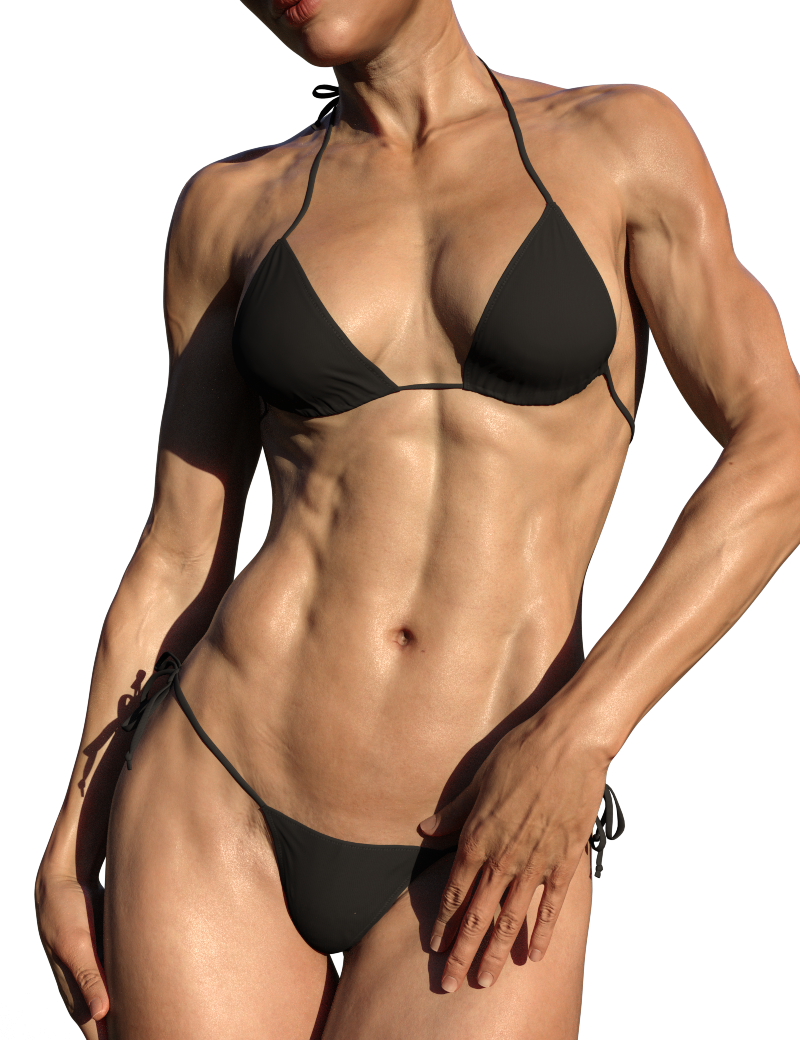
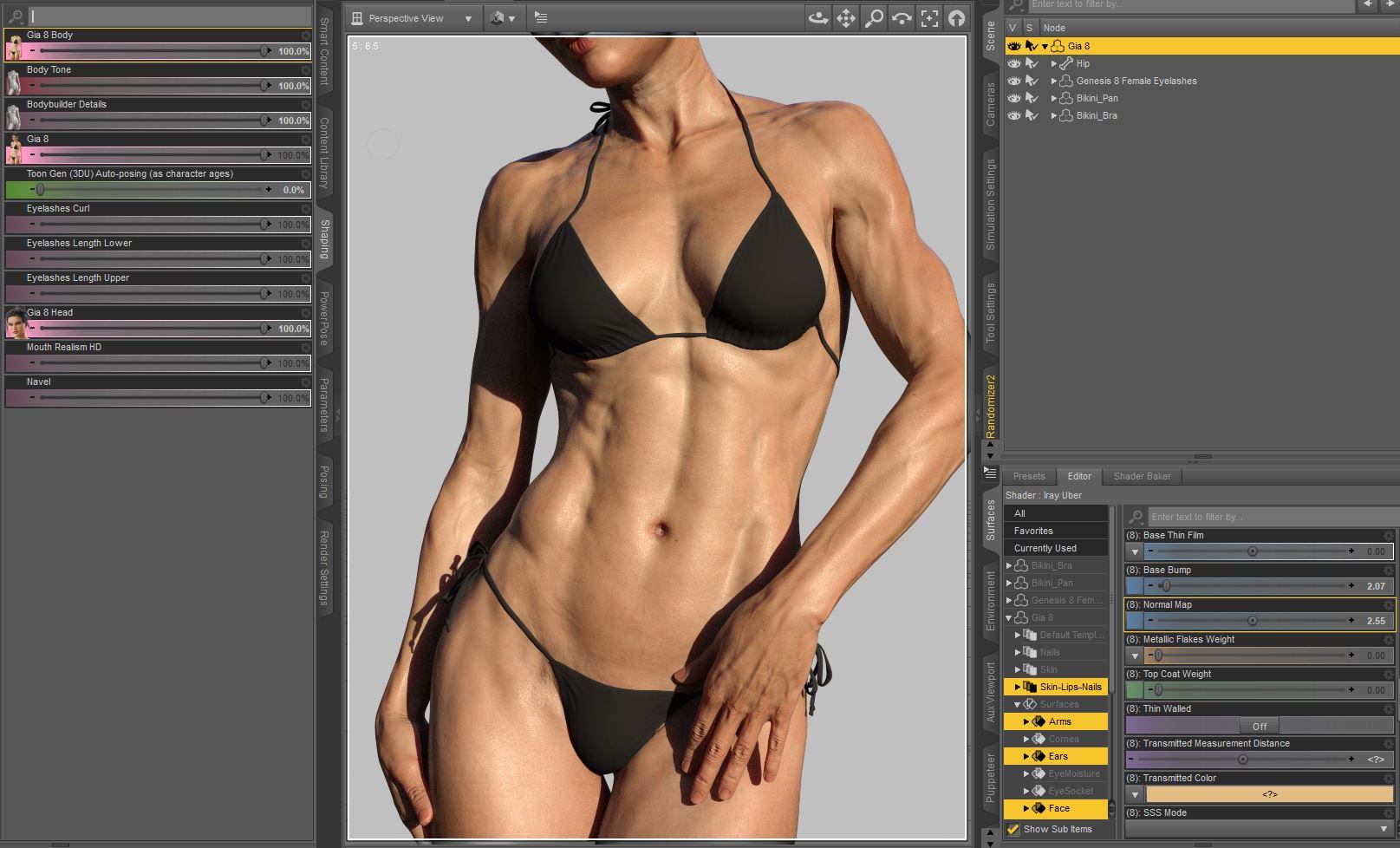
You know how to make good promo renders, thank you for this.
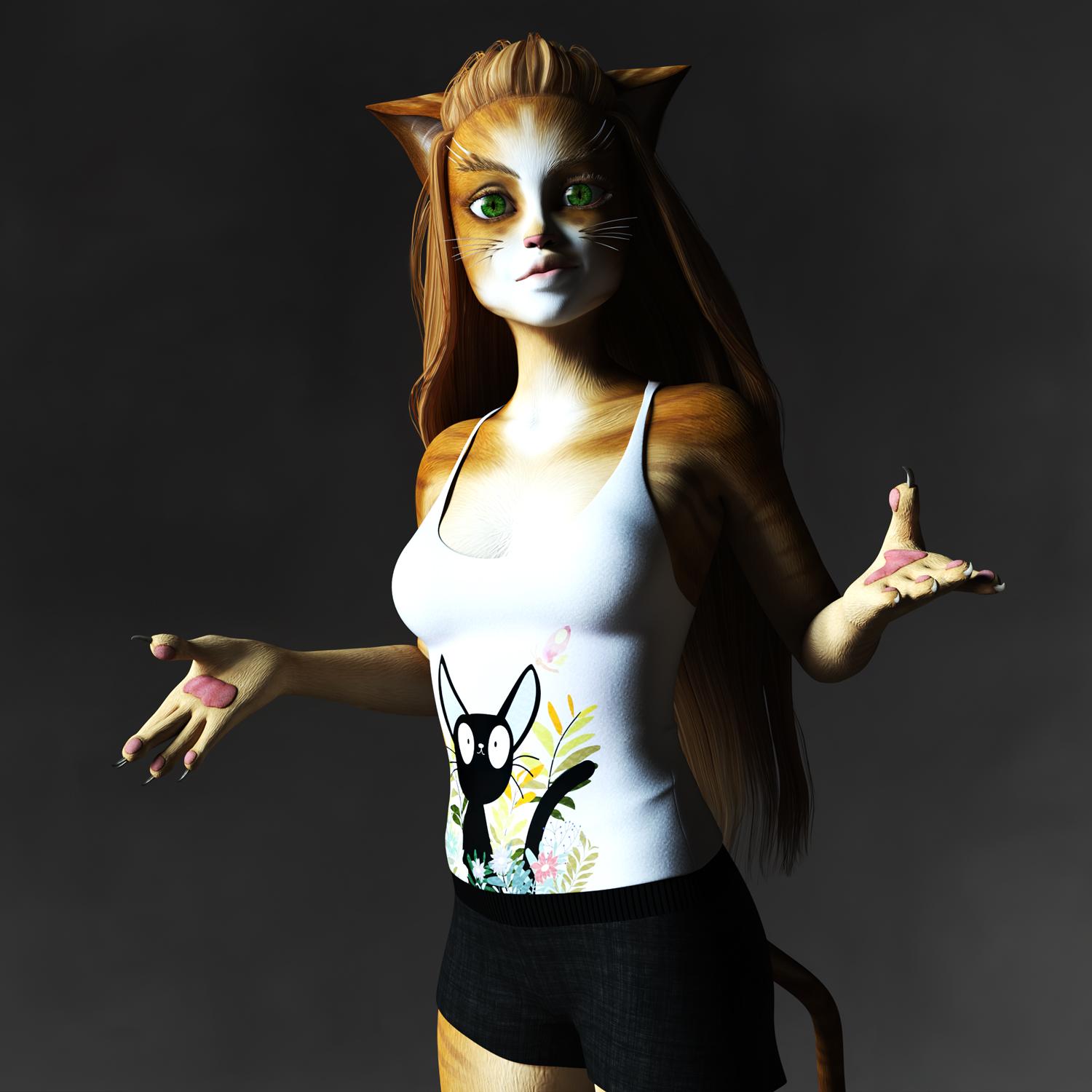
If she looks good without an HD addon, just imagine how much better she'd look with the HD addon that was properly made.Mollytabby's Art WorkshopCatgirl Tabby
This Catgirl has The Girl 8 as the base figure with face shape changes using Rarestone's Face Morph Collection for The Girl 8
 Replacing a Character
A shaping preset saves all the morphs currently used. Well if you want to, you can select which morphs to save, but the default is every morph. That shaping preset can be applied to any character using the same base figure. Maybe in this case the easiest method would be: Open the file with the old character you want to update, select it, go to file/save as/pose preset. That will save the location and pose of your old character. Delete the character from the scene. Merge your updated character into the scene, apply the pose preset. If your old character has hair clothes etc that you have posed, and want to keep, unfit them and unparent them before you delete the character. After loading your new character, fit them to the new character.
Where are the highly detailed, muscular HD-Addons for Genesis 8 female? Like Ophelia 7's HD-Addon?If that's the look you're going for you don't even really have to have HD.
Here's Gia 8 (non-HD) with Bump setting increased to 2.07 and Normal setting increased to 2.55 and "Body Tone" and "Body Builder Details" from the Genesis 8 Female body morph set added:
[Released] RSSY Hair Converter from Victoria 4 to Genesis 8 Female [Commercial]Do you have show hidden properties checked?
Thanks carrie58 ! That did the trick. At least for 2 out of 3 hair files I have tested.
It seems like not all morphs are transferred. I also think they shouldn't be in the "hidden" section at all.. My old eyes hate reading grey on grey.
The authorship information is alright.
It's a pity as I am a big fan of the RSSY converters and I was really waiting for this one... sigh...
The script is telling the Transfer Utility to transfer ALL morphs so I am unsure what I can do about this one.
Don't know if it is related but I was using M4 Midnight Hunter the other night and I found I had to turn off limits and really yank up the numbers before seeing any movement in the back flap of the trench coat - or any of the transfered morphs. Maybe the morphs need to be x10 or x100 strength to see the movement that the original has? And maybe the morphs are there but only appear to be not working. (Don't like the Grey on Grey either but nothig you can do about that)
I don't know.
 @zzspriest, which item are you not seeing the morphs?
It is the Christine Hair, a DAZ Original.
Darn, I don't have that one. I have wishlisted it to get it when it is on sale and test it.
Did some research. Looks like whether the morphs are converted properly or not depends on where they are placed in the original file.
For example :
- Laurel hair or Reby hair : Morphs are located under "head" - this converts perfect, the morphs are visible under "head" in the converted file. And work great.
- Christine hair, Melody hair : Morphs are located under "neck". They appear in the converted file as "hidden property"..
- any hr2 hair : No original morphs are transferred at all. Only the converter morphs are there.
I have not checked my whole library but for the ones I tried followed the above.
Interesting. This is definitely not the behavior I am seeing (though I don't have Christine or Melody hair). For those hairs, if you change the path to under head, does that help?
Can DAZ please make more muscular Genesis 8F HD addons, similar to Rune & Ophelia?Granted, it wasn't a HD morph... don't know if that makes a difference.
Only PAs have access to the tools needed to create HD morphs, we can't transfer them to another figure.
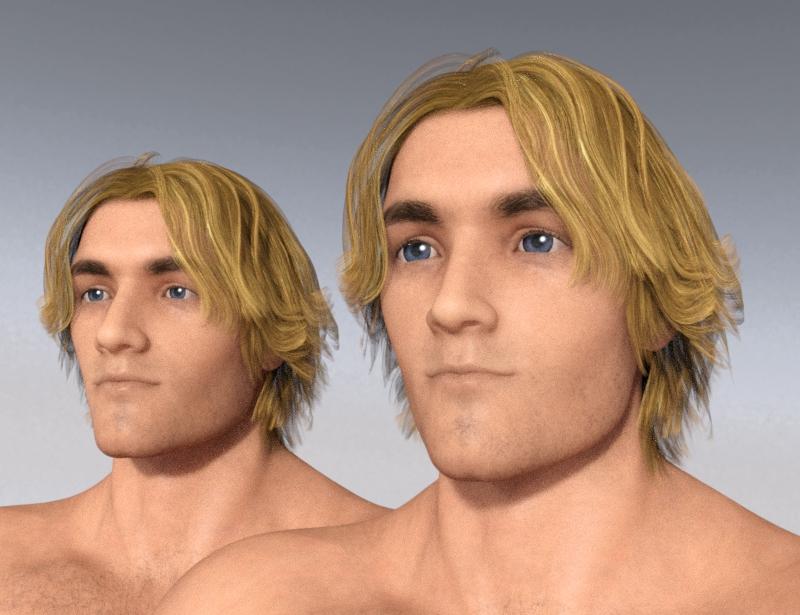
Genetics as morphs? (Morphs as genetics??)It's possible to transfer morphs across gender, I just recently did it for the first time and it was quite easy!
On the left is a dial-spun G8M character. On the right the same character with some Aiko 8 dialled in. My intent was to find a way to "animefy" male characters, but I suppose the character on the right could be the son of Aiko 8 and the character on the left.
 Can DAZ please make more muscular Genesis 8F HD addons, similar to Rune & Ophelia?
I recently transferred a G3 morph to G8, it was surprisingly easy! (Granted, it wasn't a HD morph... don't know if that makes a difference.)
https://www.deviantart.com/sickleyield/journal/Tutorial-Transferring-Character-Morphs-G1G2G3G8-409437916And here's a freebie that you might like:
https://www.renderosity.com/mod/freestuff/fantasy-amazon-bundle-for-g8f---100-free/79046Thanks Fisty & Darc! Amazing Morphing Pumps & Boots G8F - more footwear like this please!they are really nice boots

I may have failed at editing the texture maps on the arms, something to do with that being an HD morph instead of a texture map, I tried. So much for berserker armor arms.
it can some times be difficult to find a D-force outfit that doesn't end up hiding at least one of the boots for some poses. Oh well. I do like the boots.Daz 3D is part of

Connect
DAZ Productions, Inc.
7533 S Center View Ct #4664
West Jordan, UT 84084Licensing Agreement | Terms of Service | Privacy Policy | EULA
© 2026 Daz Productions Inc. All Rights Reserved.