-
[Released] Character Converter from Genesis 3 Male to Genesis 8 Male (Now Conv JCMs) [Commercial]
Ok, that is encouraging. We are getting close. You are right that it sounds like they are part of the CTRL property. I am wondering if the Fitness Details, etc are from the first time you converted? Were they at 0 or not exactly? The script considers anything not equal to 0 to being used. Let's try again. I would delete the morphs and control property. They will be in data/DAZ 3D/Genesis 8/Male/Morphs/VENDOR/PRODUCT under the first directory listed in your Content Directory Manager (F2, Content Tab, Content Directory Manager button, and then in the window that appears, Content Sets->Daz Studio Formats). You will know they are gone if you restart DS and load a G8M and the morphs and CTRL property are not listed.
I've gone ahead and deleted the morphs as indicated, and there is no longer a dial for them associated with G8M. All of the mystery dials that spawned into earlier reloaded G8M converted figures were set at full 0 in the G3M source, I manually typed the value just to be sure after the first misadventure. The only morphs listed under the Currently Used section of my G3M source were the facial morphs that also displayed in a freshly converted G8M figure.
...
Happy news, deleting the old version seems to have fixed whatever the problem was! I've closed and reopened the latest conversion several times and things seem to be behaving themselves. I still don't know why those morphs went all screwy in the first place, since everything was set to a full 0 value in the source and the problems only cropped up when the file was cycled through the program. But hey, I'll take it, and just make sure to manually delete any further failed attempts before trying again.
Thanks so much for all the help! When it works, it really works well! Definitely worth the purchase, I'll go ahead and start running through my character library. Very excited to get everyone brought up to the latest and greatest now that things are running smoothly.

(Re: your suggestion based on the pictures I showed another user, I went to check the body dial issue but a search for the character's name is just turning up a complete character dial, not separate body and head dials. Maybe it's because the only morphs that should have loaded were head morphs, so if things went right there should have been no body data to transfer over? Either way, it looks like things are loading properly and all the previous attempts that saved out with the deformed figures are now reading the newest, intact morph and displaying properly.)
virtual nickel 4 yor carrara thoughts: the next levelCorrect way to install your G8F for Carrara character?
For some reason, blended items are nt morphing with your G8F character in my setup. I saved the blended items as support assets so I know its not that. The items morph correctly with G8F in Daz Studio.
Could you explain what the file folder structure should be? I have a new fantasy / scifi freebie in the works to go with the barbarian dude G8M. Working on the top. Here is the current top WIP in Studio morphed to V8.
[Released] Character Converter from Genesis 3 Male to Genesis 8 Male (Now Conv JCMs) [Commercial]I bought this immediately, but things aren't going well. I saved a G3M character that I created as a character preset, and tried to convert it using the standard Character Converter script. It "converted," but does nothing except delete the default G8M material settings, leaving me with an unmorphed blank G8M. The original G3M preset applies just fine to G3M figures.
I assume it's my fault somewhere along the line and decide to try using the Convert Scene Character script instead with the intent of saving a subscene after. Both figures loaded nude, without hair/clothing/gens, in their respective zero poses, at origin. This works great, the G8M version of my characer is perfect, he poses beautifully, right up until I have to close and reopen the file. Then it turns into an absolute nightmare. The face turns out fine, but the body is a mess. Pretty much nothing ends up where/how it's supposed to be, even in the A-pose. It's not pretty, and posing the character just makes it worse.
So, in order for things to work, I have to convert the character (but only between characters in scene because the regular script doesn't work on the files I'm trying to use), tweak the character as needed, dress and pose the character, add everything else in the scene, and render the entire thing without ever closing Studio, or having it crash (ha ha ha), or deciding after the fact that I want to change something, every single time because things go haywire as soon as the program tries to load a scene with a converted G8M. It's one shot and done, I have to restart from zero.
Any help to resolve this would be much appreciated. The potential is amazing and I want to love it, but it's just not working for me and I can't figure out what's gone wrong.
Left side of the attachment is the character right out of the Scene Conversion script plus textures, the right side is what happens after I close the scene and then open it again. Modesty pants added after the fact.
The one on the right has a little more sculptured body.
I wish that were the problem. The shoulders and arms are an absolute wreck, and even the legs aren't quite right. If it were just a little more defined that would be fine, but the whole area has shifted out of place (note how the collarbones, the shoulders, everything is distorted, too low down and not remotely anatomically accurate anymore). It's almost like the flesh doesn't adhere to the bone. It twists and warps when the body is positioned. There's also the matter of the problem only manifesting after the scene has been closed and then re-opened.
Here are some screenshots of what happens when I pose things, with the converted character on the right and a blank G8M on the left showing what the pose is supposed to look like. The bodies should be identical because while I had head morphs dialed in, I had no body morphs dialed in. The body should look exactly like the blank G8M body on the left, just with a head morph applied.
No, something has loaded wrong. There should be 3 sliders for your character: body, head, and complete character (e.g., if your character name is Mark, you would have 3 sliders: "Mark Head", "Mark Body", and "Mark). If you dial to 0 the complete character slider and then dial up the body (e.g., "Mark Body"), does it have the distortion? If not, it is some other slider being dialed up by the complete character slider. I recommend looking at "Currently Used", seeing what the complete character dials up and down and then trying each one of those individually.
[Released] Character Converter from Genesis 3 Male to Genesis 8 Male (Now Conv JCMs) [Commercial]Yeah, no, that is not the way you want to use this
Lef's see what is happening. If you check which morphs are being "currently used" after the conversion, and after you load it again, what has changed? How are you saving after the conversion?
I went ahead and did another conversion, and the "currently used" list contains the G3M face morph and an assortment of other tweaking morphs for the features that I decided I wanted after creating it. There are no body morphs.
After loading the scene again, those morphs are all still present, but for some reason three body morphs have also shown up: Fitness Details, Fitness Size, and Lithe. These were originally part of the shaping I wanted my character to have, but I set all of them to zero in my original G3M figure after the first deformation just in case having body morphs was causing a problem, figuring I'd just recreate the effect on G8M. So, none of them should be present.
I did eventually find a dial for the character under the Parameters tab that looks like it was created using one of the scripts (I was looking in the wrong place, apparently, I'm still relatively new to Studio and nothing ends up where I expect it to be), and the deformations are baked into it. When the dial is set to 100, the character's face and the body deformations are both present. When set to 0, the default G8M face and shape return, and the deformations go away.
I've tried saving as a scene, a subscene after adding textures and so on, and as a character preset (which didn't do anything). Unfortunately, because the dial has the issues baked into it, there's no method of saving that doesn't also carry those along for the ride.
Ok, that is encouraging. We are getting close. You are right that it sounds like they are part of the CTRL property. I am wondering if the Fitness Details, etc are from the first time you converted? Were they at 0 or not exactly? The script considers anything not equal to 0 to being used. Let's try again. I would delete the morphs and control property. They will be in data/DAZ 3D/Genesis 8/Male/Morphs/VENDOR/PRODUCT under the first directory listed in your Content Directory Manager (F2, Content Tab, Content Directory Manager button, and then in the window that appears, Content Sets->Daz Studio Formats). You will know they are gone if you restart DS and load a G8M and the morphs and CTRL property are not listed.
[Released] Character Converter from Genesis 3 Male to Genesis 8 Male (Now Conv JCMs) [Commercial]I bought this immediately, but things aren't going well. I saved a G3M character that I created as a character preset, and tried to convert it using the standard Character Converter script. It "converted," but does nothing except delete the default G8M material settings, leaving me with an unmorphed blank G8M. The original G3M preset applies just fine to G3M figures.
I assume it's my fault somewhere along the line and decide to try using the Convert Scene Character script instead with the intent of saving a subscene after. Both figures loaded nude, without hair/clothing/gens, in their respective zero poses, at origin. This works great, the G8M version of my characer is perfect, he poses beautifully, right up until I have to close and reopen the file. Then it turns into an absolute nightmare. The face turns out fine, but the body is a mess. Pretty much nothing ends up where/how it's supposed to be, even in the A-pose. It's not pretty, and posing the character just makes it worse.
So, in order for things to work, I have to convert the character (but only between characters in scene because the regular script doesn't work on the files I'm trying to use), tweak the character as needed, dress and pose the character, add everything else in the scene, and render the entire thing without ever closing Studio, or having it crash (ha ha ha), or deciding after the fact that I want to change something, every single time because things go haywire as soon as the program tries to load a scene with a converted G8M. It's one shot and done, I have to restart from zero.
Any help to resolve this would be much appreciated. The potential is amazing and I want to love it, but it's just not working for me and I can't figure out what's gone wrong.
Left side of the attachment is the character right out of the Scene Conversion script plus textures, the right side is what happens after I close the scene and then open it again. Modesty pants added after the fact.
The one on the right has a little more sculptured body.
I wish that were the problem. The shoulders and arms are an absolute wreck, and even the legs aren't quite right. If it were just a little more defined that would be fine, but the whole area has shifted out of place (note how the collarbones, the shoulders, everything is distorted, too low down and not remotely anatomically accurate anymore). It's almost like the flesh doesn't adhere to the bone. It twists and warps when the body is positioned. There's also the matter of the problem only manifesting after the scene has been closed and then re-opened.
Here are some screenshots of what happens when I pose things, with the converted character on the right and a blank G8M on the left showing what the pose is supposed to look like. The bodies should be identical because while I had head morphs dialed in, I had no body morphs dialed in. The body should look exactly like the blank G8M body on the left, just with a head morph applied.
[Released] Character Converter from Genesis 3 Male to Genesis 8 Male (Now Conv JCMs) [Commercial]Yeah, no, that is not the way you want to use this
Lef's see what is happening. If you check which morphs are being "currently used" after the conversion, and after you load it again, what has changed? How are you saving after the conversion?
I went ahead and did another conversion, and the "currently used" list contains the G3M face morph and an assortment of other tweaking morphs for the features that I decided I wanted after creating it. There are no body morphs.
After loading the scene again, those morphs are all still present, but for some reason three body morphs have also shown up: Fitness Details, Fitness Size, and Lithe. These were originally part of the shaping I wanted my character to have, but I set all of them to zero in my original G3M figure after the first deformation just in case having body morphs was causing a problem, figuring I'd just recreate the effect on G8M. So, none of them should be present.
I did eventually find a dial for the character under the Parameters tab that looks like it was created using one of the scripts (I was looking in the wrong place, apparently, I'm still relatively new to Studio and nothing ends up where I expect it to be), and the deformations are baked into it. When the dial is set to 100, the character's face and the body deformations are both present. When set to 0, the default G8M face and shape return, and the deformations go away.
I've tried saving as a scene, a subscene after adding textures and so on, and as a character preset (which didn't do anything). Unfortunately, because the dial has the issues baked into it, there's no method of saving that doesn't also carry those along for the ride.
Who is this modelThe reason im interested in the body is her breast. Its one of the few examples where she has a decent size breast that also looks realistic. (smaller breast can even be harder)
Use the Breasts Natural morph; even in clothes, I often adjust them at least a little, depending on the clothing type.
Baking Morphs to a new Zero State?In 4.12, when I updated the existing geometry after Goz'ing it back and forth. It worked, so I saved my daz scene and the next day, the scene didn't retain my updated Goz'ed geometry and reverted back to before the changes.
What happened?
Do I have to freeze a state or something?
How intuitive is that? I lost one day of work.Is this a morph that had been saved as an asset (or was suplied as an asset)?
And, now, if I try to save my work by exporting the obj from the zbrush project (which saves the changes, it), import the morph using morph loader pro, daz units, I get weird morphing, not the changes I made at all.
Did you have Reverse Deformations on in Morph Loader pro, and was the figure in the state it was in when you initially sent it to ZBrush?
Any help is appreciated.
Thank you in advance.
More Non-photorealisitic Renders (NPR II)Converted the Virgin hair to PWToon in the style I've gotten very happy with. Worked fine! (Originally I was using opacity to shorten the hair more, but I forgot how much 3dl just grinds to a halt with opacity maps overlapped. Seriously, like it was taking 20x as long or worse. So I ended up going 'nuts to this' and using the regular hair mostly as is with Shorten morph maxed.)
To make the hair more toony, I reduced the hairs per guide hair by about 1/5, and changed line width. The baby hairs, linewidth 1. The other hairs, linewidth 5.
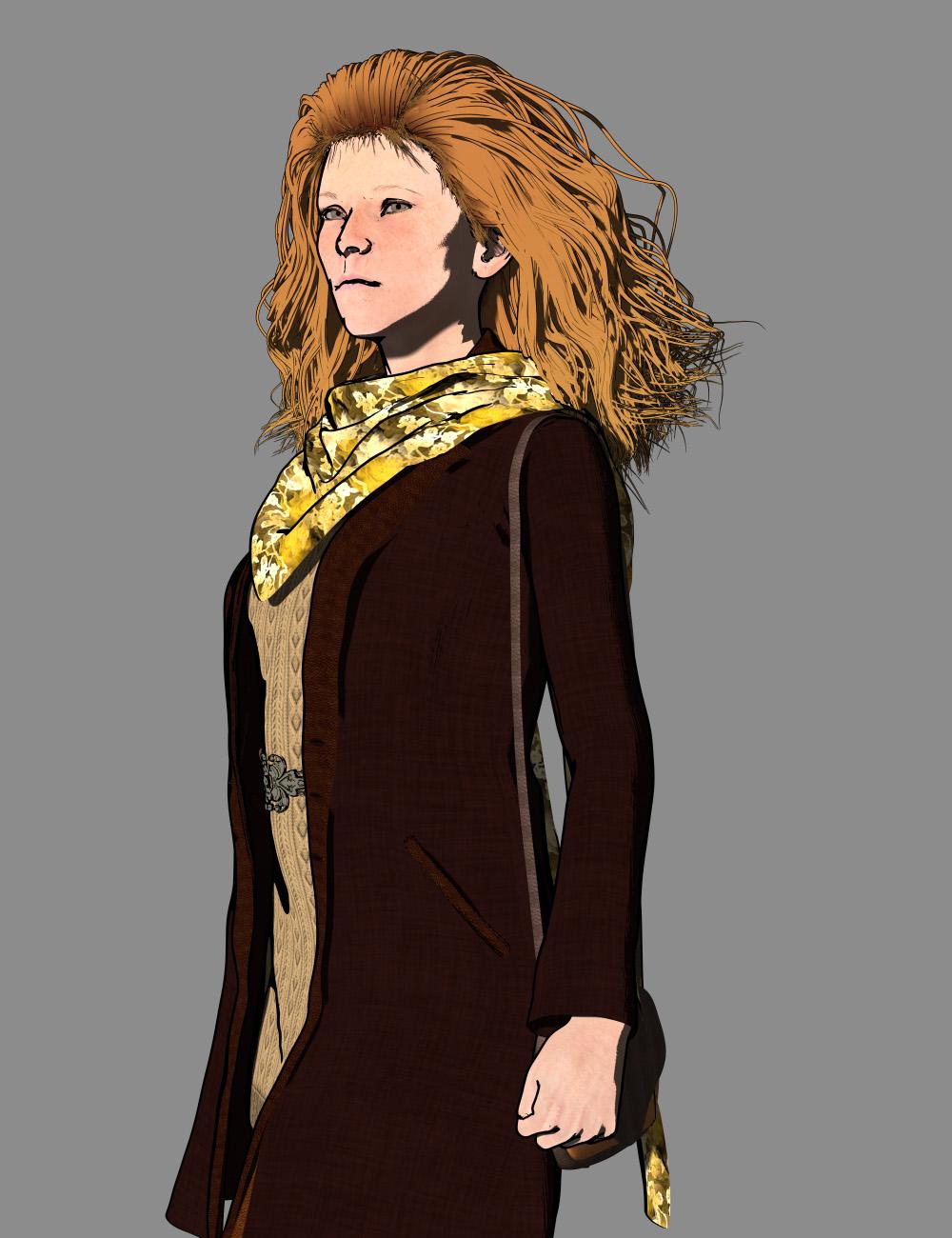
Your attention to detail on the hair paid off. It looks hand drawn. And as someone who messes around with a lot of hair models, I'm VERY impressed with your results. The rest of the outfit looks good, too. Although my preference is to use slightly lighter tones so that the arms don't blend in the way they do here. Or perhaps just a brighter tan for the purse? The color story is pleasing, though, and perfect for the transition to Fall weather (which, for us in Texas, is still probably two months away). Well done.
Converting to G1, G2, G3, G8 & G9I was looking around, including in Kattey's thread. There doesn't appear to exist any similar utility for convert G2>G3? I guess that's because of the poly reduction?
GenX2 convert Millennium 3 (addon), 4, Genesis 1 and 2 (addon) characters to Genesis 3 (addon) then Character Converter will be able to do the conversion from G3 to G8.
Note: GenX2 doesn't transfer the skin maps, only the morphs are converted.
Roger. So both Genesis Generation X2 and GenX2 AddOn for Genesis 3 are required to complete this?
You need the G2 add-on too, it’s a requirement for the G3 add-on.
AIUTO...CHI CONOSCE L’ITALIANO? PARTE DODICI(ಠ_ಠ) Che senso avrebbe fare il triplo della fatica?
Riuscire a farlo!
Ho la maschera, la maschera ha tutti i morph, devo solo ricordare (o trovare qualcuno che già lo ricorda) come collegarli al personaggio.
Quando riesci a fare qualcosa di complicato che non fai spesso, facci un tutorial, così quando ti servirà 2 anni dopo lo troverai in un attimo!
Baking Morphs to a new Zero State?In 4.12, when I updated the existing geometry after Goz'ing it back and forth. It worked, so I saved my daz scene and the next day, the scene didn't retain my updated Goz'ed geometry and reverted back to before the changes.
What happened?
Do I have to freeze a state or something?
How intuitive is that? I lost one day of work.And, now, if I try to save my work by exporting the obj from the zbrush project (which saves the changes, it), import the morph using morph loader pro, daz units, I get weird morphing, not the changes I made at all.
Any help is appreciated.
Thank you in advance.
Face morphs from promo picsThe promo girl for the Sultry Bun Hair is a mix of Zoe and Charlotte explained by Hellboy here: https://www.daz3d.com/forums/discussion/comment/4499946/#Comment_4499946
I think promo girl for Nina Hair is probably Cathy: https://www.daz3d.com/cathy-hd-for-victoria-7 with Danny's textures: https://www.daz3d.com/p3d-danny-for-genesis-3-and-8-female (that Nina hair girl had been discussed on the forum before and I'm pretty sure that was the popular "consensus" was Cathy's morph with Danny's mats, if I remember correctly).
I think the promo girl for Giliel Hair might be Karyssa: https://www.daz3d.com/karyssa-8
And as Quixotry said, the Fallow Hair girl is probably the one discussed here: https://www.daz3d.com/forums/discussion/328541/who-is-the-beautiful-girl-used-by-goldtassel-in-promo-pics-that-looks-like-felicity-jones/p1
mcjTeleBlender:Daz Studio scenes/animations w/Blender's Cycles Engineas you may know, exporting from daz studio to blender is better than it was before but the poses and animations are scaryly tranfered, but just now i was able to make a daz script that creates a blender python script that transfers poses correctly !! so in the next mcjTeleBlender 4 Beta release i'll add an fbx transfer option
for the record, the daz code targeting Gabrielle was
var skel = Scene.findNodeByLabel("Gabrielle"); var bones = skel.getAllBones(); var n = bones.length; debug( "import bpy" ); for( i = 0; i < n; i++ ) { bone = bones[i]; debug( "bpy.data.objects[\"blAiko3_72712\"].pose.bones[\""+bone.name+"\"].rotation_mode = 'QUATERNION'" ); r = bone.getLocalRot(); x = r.x; //bone.getXRotControl().getValue(); y = r.y; //bone.getYRotControl().getValue(); z = r.z; //bone.getZRotControl().getValue(); w = r.w; debug( "bpy.data.objects[\"blAiko3_72712\"].pose.bones[\""+bone.name+"\"].rotation_quaternion = ["+(-w)+","+x+","+y+","+(z)+"]" ) }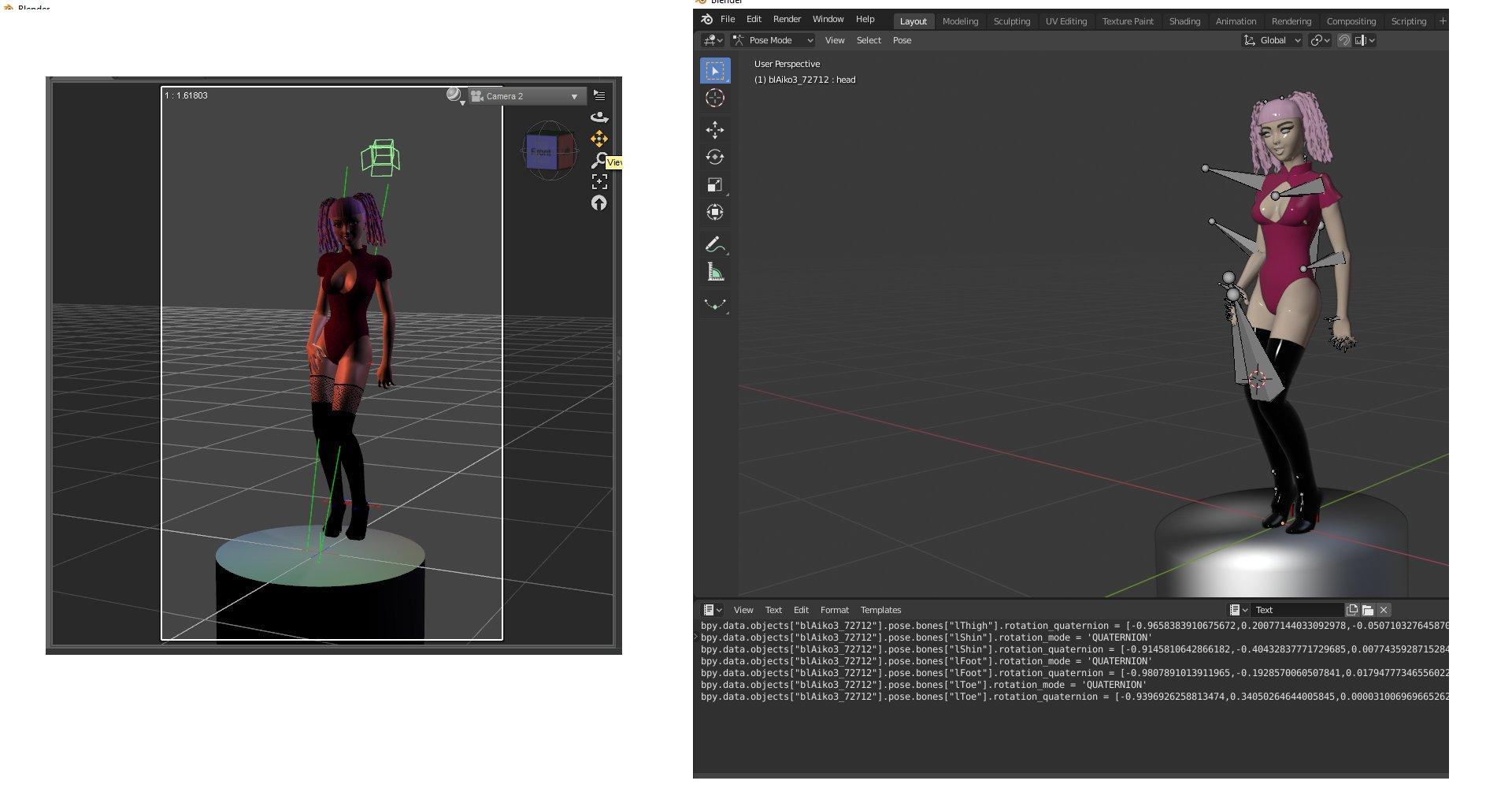 Converting to G1, G2, G3, G8 & G9
I was looking around, including in Kattey's thread. There doesn't appear to exist any similar utility for convert G2>G3? I guess that's because of the poly reduction?
GenX2 convert Millennium 3 (addon), 4, Genesis 1 and 2 (addon) characters to Genesis 3 (addon) then Character Converter will be able to do the conversion from G3 to G8.
Note: GenX2 doesn't transfer the skin maps, only the morphs are converted.
Roger. So both Genesis Generation X2 and GenX2 AddOn for Genesis 3 are required to complete this?
3D Art Freebie Challenge-August 2019-"Best Friends Forever" -Main Thread OnlyYour Move 2 -NAE
I did this image just before my hard drive crashed in 2016. Kind of fits the theme.

Freebies
InaneGlory's Simple Soft Lighting - http://inaneglory.deviantart.com/art/Simple-Soft-Lighting-Freebie-193115008
Andi3d Rocks - http://www.mortemvetus.com/freestuff_dl.php?file_id=50
V3RR Sci Classics Second Skins - http://www.sharecg.com/v/52117/gallery/21/DAZ-Studio/V3RR-Sci-Classics-Second-Skins
Cyber Boots for Victoria - http://www.renderosity.com/mod/freestuff/details.php?item_id=10222
Starry Night for SkyDome - http://www.sharecg.com/v/12914/browse/11/Poser/Starry-Night-for-SkyDome
25+ poses for Antares' & Virus' Alien Drone by en. - https://web.archive.org/web/20070127092424/http://www.planit3d.com/source/poser/aad_poses.zip (direct link)
Alien Drone - https://web.archive.org/web/20070121112025/http://www.planit3d.com/source/poser/aliendrone.zip (direct link)
Salashin Environments - https://web.archive.org/web/20120418133923/http://blackraven3d.com/ (Click on the Full set if you want all of it)
Sky Fern for DS - http://www.sharecg.com/v/61211/browse/21/DAZ-Studio/Sky-Fern-for-DS
Paid fors and no longer available:
This render used Victoria 3 and her morph packs, head and body.
I used Easy Environments Top of the World - http://www.daz3d.com/easy-environments-top-of-the-world for the ground.
Some of the freebies, jewelry, plants are from Dreampaint, who's site is now gone. V3's morph and texture are from Cin-Designs and I used their SciFi Princess for V3. Chess Set By Fisty - was a 2009 Christmas gift from the PA.
[Released] RSSY Hair Converter from Victoria 4 to Genesis 8 Female [Commercial]There is an update live in the store. Here are the list of changes:
- Added morph to move the hair up the head when it loads too low on G8
- Added option to apply smoothing modifier or not
- Added Do not add duplicates option
- Added Directory Limit option (to keep the dialog from loading too many items and crashing DS)
- Fixed label of converted hair to use the original hair label
- Fixed conversion to convert props to figure
- Added convert hair props to figure hints and text to dialog
BTW, @missuskisses and @zzspriest, the converting props to figure item fixes the missing morphs issue on my system.
Remember, "There's Always Another Sale™" (Report sales errors here.)I know it put a pretty big dent in my store credit. And I was trying to save that for the upcoming event sales!
I am interested to experience those most hyped upcoming two sales out of three (March madness). Which is best for a new user who don't have lot of assets? PA sales or PC+? If I want to collect enough assets and if the budget is equal for both sales. Though I already own some essential items along with figure and expression morph for all of the Genesis 1 to Genesis 8. Though I can now create almost any kind of renders with my assets library but the more the merrier.
Based on my own past experience, I would say that the PC+ sale gives a better buck for the money for people with few items so far. However, that's the second sale that's coming up, so I'm pretty sure you will be tempted a lot during the first, PA sale. My suggestion is to set some money aside for the PC+ sale.
+1
Based on past PA Festivals I've seen, the discounts can be quite decent, but not particularly deep. Sometimes we forget that the products we're getting 60% or better discounts on are back catalog, (at least 60 days old,) so it's easy to forget that 50%-55% for a New Release IS a good deal. If the price still doesn't fit one's budget, there's always the wishlist! (And always another sale!)
True. As well as the extra discount on new releases there will most likely be a couple of times when PA stores thar rarely get discounts are included in the sale
[Released] Character Converter from Genesis 3 Male to Genesis 8 Male (Now Conv JCMs) [Commercial]Add me to the list that hopes for a cross gender morph conversion
Ok, I will!
 GoZ to Daz3D crashes due to missing files?
oh i was talking about the version of GoZ itself not Zbrush, the actual transfer app. like as I understand it DAZ3D updated their version of the transfer app and I guess it has bugs in it. like if I somehow downgraded to an older app like the GoZ for Zbrush 2018 would it work? I know my GoZ to and from Carrara still works despite it being long out of date.
i doubt it's DAZStudio itself making the transfer app weird.Daz 3D is part of

Connect
DAZ Productions, Inc.
7533 S Center View Ct #4664
West Jordan, UT 84084Licensing Agreement | Terms of Service | Privacy Policy | EULA
© 2026 Daz Productions Inc. All Rights Reserved.















