-
Script to import Blender animations to Studio
Hi all,
I am getting back into 3D stuff after about 20 years (used Vue d'esprit and Poser then). Now I am using Daz Studio and Blender and having fun. I also want to get into scripting and tried a few from mCasual's incredible collection. One I tried is mcjObjsToMorphingProp to import animations from Blender to Studio but somehow it did not work properly, so I decided to write my own.
So I got a very simple script to work (almost by chance since there were a few shots in the dark). It is very short, there is no error checking and no user interface. The actual script is at the end of this post.
The way it works is as follow:
- Export the animation from Blender as a series of OBJ
- Import the first object in Studio
- Import all the objects as morphs using Morph Loader Pro
- Select the object and run the script.I realised that the statement objRef.getModifier(i) makes it easy the access the morphs one by one. So what the script does is loop througout the morphs and set the value of the morph to 100% if the morph's "number" is equal to the frame number, and sets it to 0% for all the other frames.
I made a quick video with 2 scenes:
One using the animated Sapling Tree add-on and one using the Ocean modifier to create a river.
Note that the script rely on the fact that the morphs seems to always be loaded in the correct sequence by Morph Loader Pro. Also the saved Studio scene can get HUGE.
Improvements are very welcome and if you know of a better way to do this please let me know.
Here's the script:
// DAZ Studio version 4.11.0.383 filetype DAZ Scriptvar playRange = Scene.getPlayRange();
print("playRange ", playRange);var Tick = Scene.getTimeStep();
var nTick = Tick.valueOf();
print("tick " , Tick, nTick);var nodex = Scene.getPrimarySelection();
var objRef = nodex.getObject( );
numMods = objRef.getNumModifiers();
print("numMods ", numMods);// main loop
// for each morph
for (i = 0 ; i < numMods ; i++)
{
curMod = objRef.getModifier(i);
print(i, curMod.getName());
if( ! curMod )
print("OK")
var prop = curMod.getValueChannel();
print(prop.valueOf());
for (fr = 0; fr < numMods ; fr++)
{
if (fr == i)
prop.setValue( fr * nTick, 1);
else
prop.setValue( fr * nTick, 0);
}
}// end of script
Manipulate a PrimitiveYou can already do alot with Daz Studio and the DFormers set to weight map influence or a Push Modifier that also can have a weight map influence. Once you have setup a DFormer or a Push Modifier like that you can use the Node Weight Map Brush tool inside Daz Studio like a sculpting brush.
For more info on how to do that here I have a few threads with tutorials:
-
[Tutorial] D-former with Node Weight Map Brush - at Deviantart
-
How to Use a Push Modifier: Creating a Blanket / Adjusting ...
And in this thread I was posting a few screenshots myself:
Morphing brush
You can also "bake" those mesh manipulations you did with DFormers, Push Modifier, Smoothing Modifier into a Morph slider. Just hide everything else in the scene then export an OBJ of your primitive and load it back into the scene, as a new object or a Morph for the primitive with Morph Loader Pro. While using Morph Loader Pro you also have the option to apply the morph just for some area on the primitive mesh painted as Weightmap Influence of another DFormer. The setting in Morph Loader Pro is called Attenuate By I was posting about that in this thread:
Is there a way to make smoothing modifiers more detailed
The Official aweSurface Test TrackI'm probably missing something, but when selecting the figure and the surface and doubleclick the Uber to Awe script I get an error message, and nothing else happens. Copied from the log file:
<anonymous>()@/Users/Shared/My DAZ 3D Library/Shader Presets/wowie/AWE ShadingKit/Utility Presets & Scripts/AWE Transfer Uber.dsa:25
2019-46-25 15:46:54.057 Error in script execution: /Users/Shared/My DAZ 3D Library/Shader Presets/wowie/AWE ShadingKit/Utility Presets & Scripts/AWE Transfer Uber.dsaAre you trying to run the script with the iray uber shader applied or after you've applied AWE Surface? The script should be run after applying AWE Surface.
Ah, yes I tried with IRay Uber, I'll have another go, tks:)
Looking for Miku Miku Dance enthusiasts that like using DAZ as an MMD platformThis does not only apply to MMD VMD transfers - it's applicable to DS in general, all animation, all motions ,all sources , mixamo, carnigie hall, unity, unreal etc... To illustrate the issue better, here is an animated gif (motion not from a MMD transfer, but you can see this with a VMD transfer too and in your BVH). Notice the hands/arms are roughly correct position, but slightly off. Also notice the ugly skin deformations. In DS, that's what the twist bones are for - weight mapping
It's a known issue that G3 G8 don't work fine with mocap because of twist bones, you have to fix them manually. G1 G2 work fine.
G3G8 can work fine with mocap and twist bones; it just needs to be retargetted correctlyThat was about weight mapping and deformations of G3G8 in DS and the additional "off slightly" - beyond what you would expect. The reason is 3DX is pasting the x-rotation values into the shoulder bend , not the shoulder twist. It's not retargeted correctly. eg. Mobu does it correctly if it is setup properly (look at the gif) .
That's the underlying reason why people unlock nodes before applying data - it's a workaround but with issues. Without unlocking the hidden x-rotation channel in the shoulder bend, all the x-rotation values would be discarded. Then you would have arms flapping, massive issues . It's the same for the thigh twist and bend, "off" issues with foot sliding, floor penetration, floation. But pasting into the wrong channel gives you closer to the desired motion, but results in those ugly mesh distortions from the weight mapping
But VMD transfers are even more off besides those (beyond the regular mocap, or skeletal difference issues) because the VMD keys are typically not specified every frame (not baked to every frame). The interpolation curves are different between MMD and PMX2FBX . You can see the result of the same model, same motion is different in MMD and the converted FBX is different in the other post with the foot through the floor.
My freebiesi thought the "default" in the settings of the created morph was just for the morph. now i know its for the default G8. i had put it at 100 instead leaving it at zero. now i know better :). G8 a pain in the neck for me. i might go back to G3
ok there is a minor issue where Bunny
Cutshape loads unto the default G8 when loading G8. a simply wrong notation casuing all this mess...ugh! simply turn Bunny shape to zero in parameters/shape tab... can't believe this woman giving me such hassle to make *laughs*
Do you mean that any time we load the default/basic Genesis 8 female character we have to turn the 'Bunny shape' to zero? Isn't that what @music2u4u was complaining about in the first place? That installing 'Bunny' affects the default/basic Genesis 8 female character? Which ofcourse is an unwanted situation. I was hoping that you had fixed that issue because I really like this 'Bunny' character a lot, she's badass!
The default is just that - the value applied to a property when nothing is, directly or via a link, modifying it. If the morph is saved as an asset it wil apply to every version of the base figure loaded that doesn't have a different value explicitly set.
ah ok.. thanks.guess i was thinkin soemthing diffrent :)
My freebiesi thought the "default" in the settings of the created morph was just for the morph. now i know its for the default G8. i had put it at 100 instead leaving it at zero. now i know better :). G8 a pain in the neck for me. i might go back to G3
ok there is a minor issue where Bunny
Cutshape loads unto the default G8 when loading G8. a simply wrong notation casuing all this mess...ugh! simply turn Bunny shape to zero in parameters/shape tab... can't believe this woman giving me such hassle to make *laughs*
Do you mean that any time we load the default/basic Genesis 8 female character we have to turn the 'Bunny shape' to zero? Isn't that what @music2u4u was complaining about in the first place? That installing 'Bunny' affects the default/basic Genesis 8 female character? Which ofcourse is an unwanted situation. I was hoping that you had fixed that issue because I really like this 'Bunny' character a lot, she's badass!
The default is just that - the value applied to a property when nothing is, directly or via a link, modifying it. If the morph is saved as an asset it wil apply to every version of the base figure loaded that doesn't have a different value explicitly set.
The Official aweSurface Test TrackI'm probably missing something, but when selecting the figure and the surface and doubleclick the Uber to Awe script I get an error message, and nothing else happens. Copied from the log file:
<anonymous>()@/Users/Shared/My DAZ 3D Library/Shader Presets/wowie/AWE ShadingKit/Utility Presets & Scripts/AWE Transfer Uber.dsa:25
2019-46-25 15:46:54.057 Error in script execution: /Users/Shared/My DAZ 3D Library/Shader Presets/wowie/AWE ShadingKit/Utility Presets & Scripts/AWE Transfer Uber.dsaAre you trying to run the script with the iray uber shader applied or after you've applied AWE Surface? The script should be run after applying AWE Surface.
The Official aweSurface Test TrackHow is the IRay to aweSurface conversion script coming along?
You mean the one with previous store update? As far as I see, there's no more to do in that regard.
I'm probably missing something, but when selecting the figure and the surface and doubleclick the Uber to Awe script I get an error message, and nothing else happens. Copied from the log file:
<anonymous>()@/Users/Shared/My DAZ 3D Library/Shader Presets/wowie/AWE ShadingKit/Utility Presets & Scripts/AWE Transfer Uber.dsa:25
2019-46-25 15:46:54.057 Error in script execution: /Users/Shared/My DAZ 3D Library/Shader Presets/wowie/AWE ShadingKit/Utility Presets & Scripts/AWE Transfer Uber.dsaDarwins' Schtuff Pt DeuxSo here is a peek of his base skin with the starting idea of the scarring (texture-wise). Testing out how it looked without the HD morph so far, to see if I matched the tonal range of a burn on such fair skin:
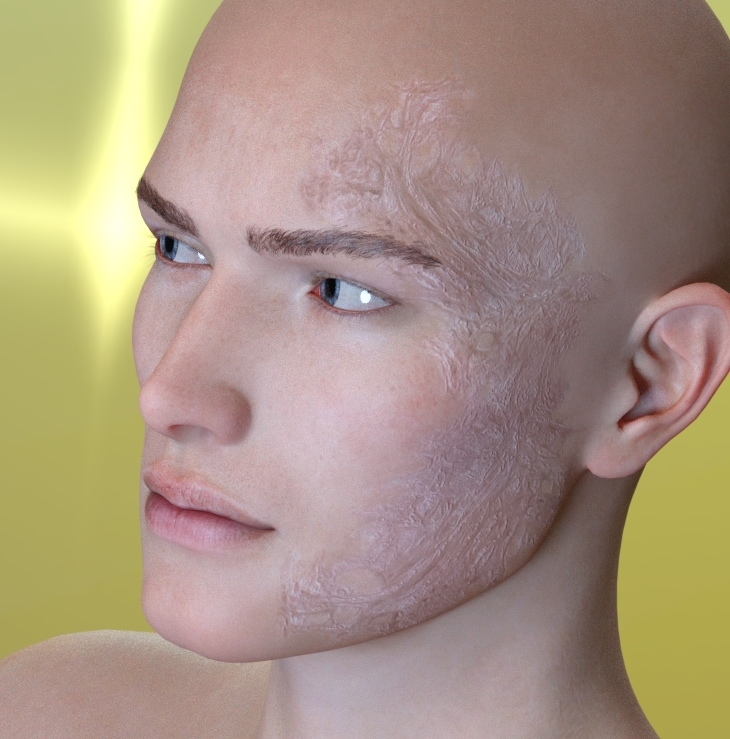
One texture note: with scarring that heavy, the end of the eyebrow would most likely be gone.
Yes you make a very good point there @vwrangler!
Darwins' Schtuff Pt DeuxSo here is a peek of his base skin with the starting idea of the scarring (texture-wise). Testing out how it looked without the HD morph so far, to see if I matched the tonal range of a burn on such fair skin:
One texture note: with scarring that heavy, the end of the eyebrow would most likely be gone.
Manipulate a PrimitiveThere’s this great script from mcasual here. It creates a morph based on a grayscale image.
https://sites.google.com/site/mcasualsdazscripts/mcjelevate
another option would be to use dforce and drape the plane over some other primitives to create some kind of terrain...
Or simply use multiple primitives in case you’re not wanting an organic look.
This was the best idea yet - I took a Rock and seized it long and high as a stream then i took my DForce Duvet
and simulated over the rock - then i turned the duvet around and got the perfect bump!
This is how it looks!Who said Blender was hard?As for textures, I'm not sure how that would even happen, as OBJs only support diffuse maps.
Interestingly or perhaps not, if we are to believe the internet (always risky), the OBJ format - or more specifically the MTL format - theoretically supports a number of other types of maps. PBR materials like those for Iray do seem to be a bridge too far, but if you use 3delight it may work better. That depends on how good the Daz Studio OBJ exporter is at writing the .mtl file, and obviously how good the Blender importer is at creating materials from the data provided.
At least I can get the OBJ transfer to produce a very basic material for each Daz Studio surface in Blender. (With FBX transfer, I have never yet got any materials at all, ever, or vertex groups, so dumped it.) Which is why, when I need more than a mesh transferred, I use the 'Import Daz' plugin or mcjTeleBlender mentioned previously.
Looking for Miku Miku Dance enthusiasts that like using DAZ as an MMD platformThis does not only apply to MMD VMD transfers - it's applicable to DS in general, all animation, all motions ,all sources , mixamo, carnigie hall, unity, unreal etc... To illustrate the issue better, here is an animated gif (motion not from a MMD transfer, but you can see this with a VMD transfer too and in your BVH). Notice the hands/arms are roughly correct position, but slightly off. Also notice the ugly skin deformations. In DS, that's what the twist bones are for - weight mapping
It's a known issue that G3 G8 don't work fine with mocap because of twist bones, you have to fix them manually. G1 G2 work fine.
The Outlander HDNot sure what happened there. Working fine here on my side.
The easy way to fix this problem is to open up the main morph in a text editor, which can be found in the data folder, and change the value from 1 to 0 and save it. Then dial up the morph and resave the character preset. If you want to keep the original thumbnail, make sure you copy it out then replace it once your character preset is saved.
I prefer Notepad++ to do this.
Hope that helps,
Josh
Diego 8Christian's maps and HD morph are just about perfect for making an older and/or more weathered Diego ;).
Laurie
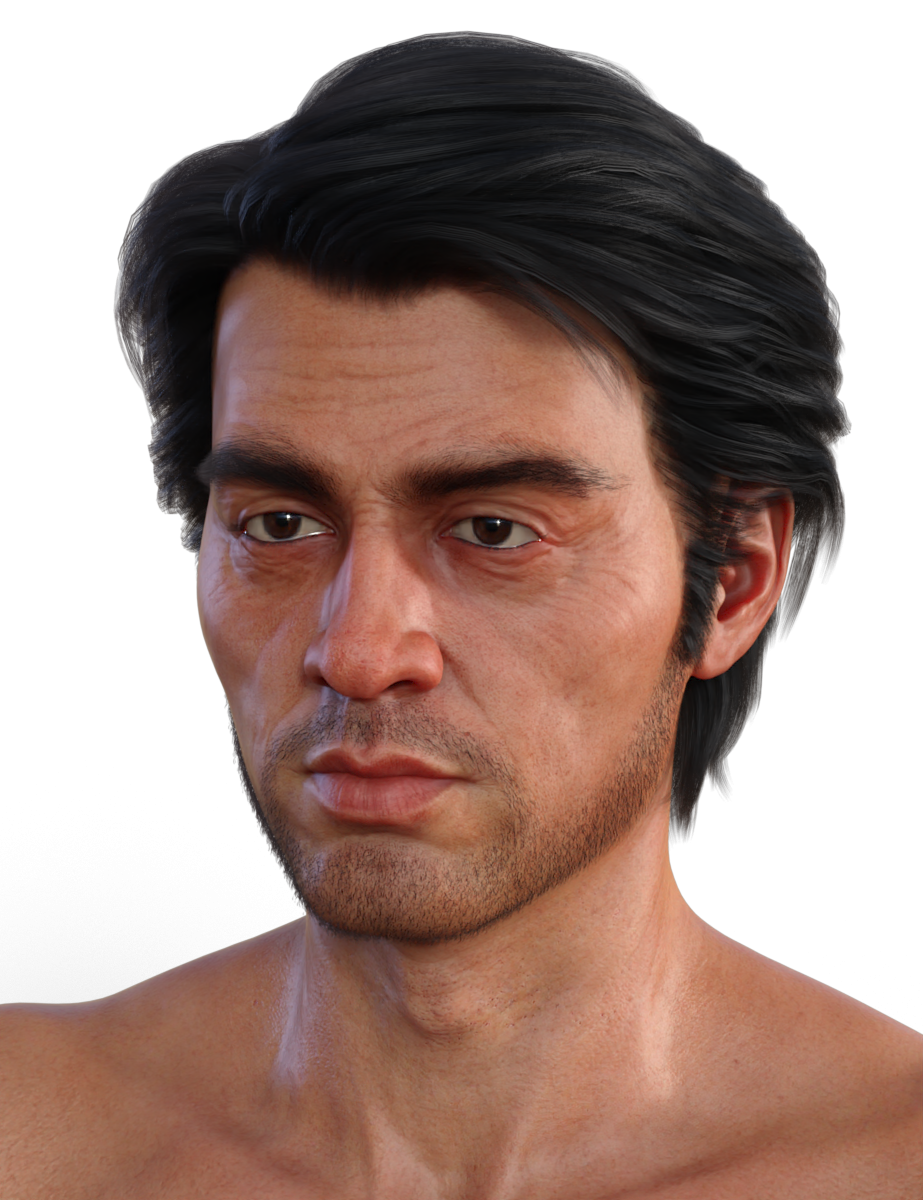
¡Si!
Darwins' Schtuff Pt DeuxIf you want my honest opinion I think the HD morph is going a little off the scaring.
Is there anyway to bring it down some?
Diego 8Christian's maps and HD morph are just about perfect for making an older and/or more weathered Diego ;).
Laurie
render Daz Studio animations in Blender Script that fixes FBX Animation problemsrender Daz Studio anims in Blender FBX Animation
https://sites.google.com/site/mcasualsdazscripts9/mcjexportfigureanimtoblender
For each figure in the scene
For each frame of the playRange
Export the figure pose-animation as Blender-Python-Script code
The resulting Blender Python Script can be used after manually importing
the FBX scene that was manually exported from Daz Studio
Note that this functionality will be added to mcjTeleBlender 4 Beta
mcjTeleBlender can also create blender-python scripts to fix the materials produced by the FBX transfer
https://sites.google.com/site/mcasualsdazscripts9/mcjteleblender4temprelease
 Darwins' Schtuff Pt Deux
So here is a peek of his base skin with the starting idea of the scarring (texture-wise). Testing out how it looked without the HD morph so far, to see if I matched the tonal range of a burn on such fair skin:
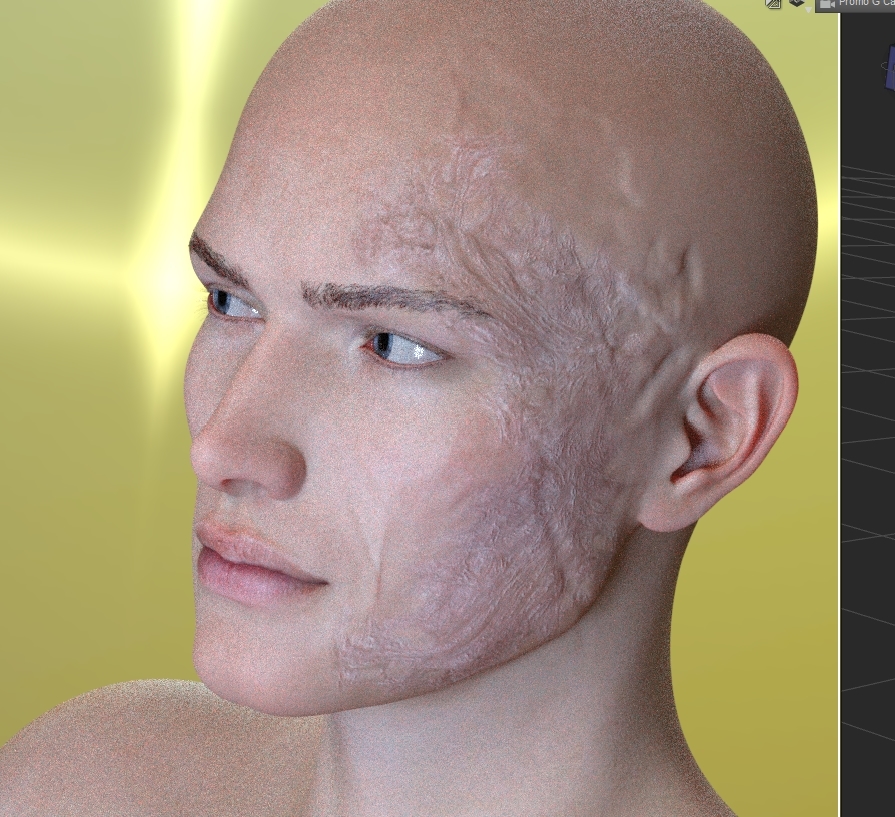
This is with the HD Morph added (SubD 3); The bottom needs shifted, and more added and I need to shift it away from the scarring going down the cheek, jaw and to the area where the jaw meets the neckline. The top- not bad. Need to add more to the top areas of the HD morph and along the side of his head/ear but it's getting there.
 dog 8 dog 8 woof woof we finally have a dog 8
lol ... I mean wider than what the morphs are allowing me to do unless I'm missing something... I don't mean exactly like an elephant...just more floppy/real looking, like in the picture
Have you tried disabling the limits on the morph, or just manually scaling the bones?
Daz 3D is part of

Connect
DAZ Productions, Inc.
7533 S Center View Ct #4664
West Jordan, UT 84084Licensing Agreement | Terms of Service | Privacy Policy | EULA
© 2026 Daz Productions Inc. All Rights Reserved.