-
Revisiting Big George's serious lack of Wardrobe
I set George into a "T" pose & saved out an OBJ. When I import that into MD, it imports but I get a message that the Arrangement Points were not fitted to the avatar as it must be in a T- or A-pose. Visually he is but what's needed to exactly satisfy MD for a T-Pose then? The A-pose version of him imports fine but don't know if there's a way to transfer those. I might have to manually set them but hoping to avoid that.
Anyone?
Shape Rigger Plus(Commercial)Hi. Can I see a screenshot? Also how many morphs are being saved? Saving a morph should take no longer than saving through studio. The script uses the same logic.
Shape Rigger Plus(Commercial)Hi ;)
I wanted to know if it was normal for the "save selected morph" to take so long ? it's been 20 minutes and it's still at 50%.
thank you
Does iray use sRGB?The video by blenderguru does some confusion .. srgb isn't bad at all, it is just the color space used by the monitor. Then the filmic transfer function is better at simulating the human eye perception, but it transfers anyway from linear to srgb.
Except that the monitors that it was mainly designed for was CRTs and not ideal for rendering.
There are some professional monitors that can dislpay adobe srgb or rec 2020 if this is what you mean, but most monitors work in srgb once you calibrate them correctly. That's not ideal for rendering is true for every device around since it doesn't exist a device that can display the whole linear space, so you have always to transfer to a narrow gamut, and that's where the transfer functions come along.
The only time any of this matters is in print work. for images not ever being printed sRGB is perfectly fine since the overwhelming majority of monitors display only the sRGB color gamut, assuming the monitor is calibrated.
Does iray use sRGB?The video by blenderguru does some confusion .. srgb isn't bad at all, it is just the color space used by the monitor. Then the filmic transfer function is better at simulating the human eye perception, but it transfers anyway from linear to srgb.
Except that the monitors that it was mainly designed for was CRTs and not ideal for rendering.
There are some professional monitors that can dislpay adobe srgb or rec 2020 if this is what you mean, but most monitors work in srgb once you calibrate them correctly. That's not ideal for rendering is true for every device around since it doesn't exist a device that can display the whole linear space, so you have always to transfer to a narrow gamut, and that's where the transfer functions come along.
Separate feet morph from FBMAre the morphs HD or regular? Would it be OK to just remove the morph, or would you need a gradual transition to avoid an obvious change? If it's an SD moprh and only an immediate off is needed then you can do it with the Geometry Editor tool
- In the parametrs pane make sure there are currently no Favourited properties for the figure - if there are, remove them by clicking the heart icon on their sliders.
- Make the morph(s) you want to split Favourites by clicking the heart icon on the slider.
- Activate the Geometry Editor tool from the Tools menu, show the Tool Settings pane
- Select the areas you wish to remove - with luck you can do it by clicking the + icons next to the bone names in Tool Settings
- (From memory) right-click in the Viewport>Geometry Selection>Convert Selection>Convert to Vertex Selection
- (From memory) right-click in the Viewport>Morph Editing>Remove Selected Deltas from Favourites
Looking for Miku Miku Dance enthusiasts that like using DAZ as an MMD platformThis is exactly why I've been looking at Blender and Eevee but that's a whole new learning curve in itself. Judging by the variety of software being discussed in this thread, yet again I fear I am running out of years. So much to learn!
IMHO The best way to learn is to start an actual project using one or two of the new programs/options you wish to incorporate into your creative pipeline.
Chasing down every new shiney program or breast jiggles option, posted in the forums, will only distract you from ever actually creating anything as you will be spending all of your time in theoretical framework disussions instead of actually using any of the many non Daz studio options we have available.
If you want to use blender as an external rendering option then send a daz scene over with whatever transfer method you prefer, and start some test stills/ animation renders to get familiar with what is actually involved and go from there.
Does iray use sRGB?The video by blenderguru does some confusion .. srgb isn't bad at all, it is just the color space used by the monitor. Then the filmic transfer function is better at simulating the human eye perception, but it transfers anyway from linear to srgb.
Except that the monitors that it was mainly designed for was CRTs and not ideal for rendering.
If you've a LOT of spare time & REALLY want to understand this stuff, you might want to visit here:
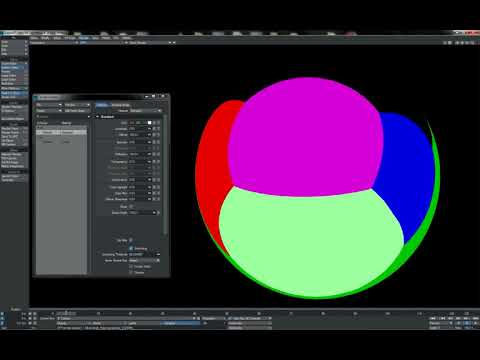
This was done for Ligthwave, but the principles apply to ALL CG apps using Iray, PBR, Cycles, etc.
Craig, aka RebelHill is a highly respected guru in a number of CG circles. You can't go wrong bookmarking this info.
Thanks for this, subbed!
Feet HD Detail (Or Lack Thereof)I purchased Necriseye's morphs. They're easy to use and they certainly improve the vanilla version.
Thank you so much for the patronage, did you grab all the expansions I made for it as well?
Is the G3F version available?
It will be very soon, while you wait though I would check out this tutorial:
https://www.daz3d.com/forums/discussion/177246/basic-tutorial-for-transferring-genesis3-female-morphs-to-genesis8-female
I haven't tested it yet but, perhaps doing this you could just convert my morph over to gen 3. Don't quote me on this though, last time I tried to convert anything foot
related it didn't turn out very well. Should be some time next month I release the gen 3 version if you can wait. Sorry for the delays.AIUTO...CHI CONOSCE L’ITALIANO? PARTE DODICI(ಠ_ಠ)
Sappi che oltre che animatore sono anche idraulico, elettricista, tecnico software e hardware PC, autotrasportatore, perito commerciale... Devo aggiungere il resto, lol?


Grande, non lo sapevo! :D
Anche io non volevo offendere, non ci vedo nulla di male a fare l'animatore a tempo pieno, posso immaginare il lavoro che ci sia dietro anche là!
La tua interfaccia mostra correttamente ogni fotogramma durante il rendering? Se apri una finestra o perdi il focus su DAZ diventa tutta bianca o viene "timbrata" dalla finestra aperta dopo?
Non faccio animazioni solitamente! Comunque no, nessun problema.
In questo periodo poi sto usando sempre Render Queue, ottimo prodotto.
EDIT: comunque il team marketing della Daz è fantastico. Erano riusciti a farmi sembrare quasi interessanti i vergognosi saldi di oggi. Prendi le gift card (certo, col 5% di sconto, mah) per questa fantastica promozione...e poi sconti del 40% su prodotti nella media, mah.
Quindi la tua interfaccia non impazzisce? Che versione dei driver video hai? Build di Windows? Credo sia dovuto ad un aggioramento software, dato che ho provato tre diverse schede video e ottengo lo stesso risultato con tutte... E continuo a sospettare che sia colpa di DAZ in qualche modo.
Quanto ai saldi, ho l'impressione che siano tutti dedicati ai nuovi utenti, poca roba per gente "navigata" come noi.
E hanno rilasciato un altro ometto nella media che puoi ottenere con i Face Morph base di Genesis8 e un pochino di pazienza con lo Skin Builder, nessuna vera novità.
Spero che Genesis9 (se lo faranno) porti qualche innovazione decente... E, giusto per far arrabbiare il nostro Muscleman, il flettere i muscoli quando muovi un arto non è innovazione ma un morph automatico.Ora che ci penso, avrò qualche driver vecchissimo in realtà, di aprile o giù di lì!
Come OS Windows 10 normale. Uso Daz 4.12.Lo sai che se usi Geforce Experience per i driver, puoi selezionare "Nvidia Studio" anziché per gaming, e ti aggiornerà i driver solo se specificamente testati fra applicazioni per creator, fra cui è incluso Daz Studio?
Per fortuna ho smesso di spendere tonnellate di soldi adesso! Più o meno mi sento di avere già tutto. Anzi ho poco spazio sull'ssd e mi viene quasi da cancellare qualche pacco di shader.
Per noi che possiamo sopravvivere senza determinati prodotti intanto, penso che la soluzione migliore sia sempre aspettare quei saldi veri che ci sono 2/3 volte l'anno e svuotare un po' la wishlist.C'è la figlia di i13, quella coppia là di cui parlavamo, che ha davvero grandi potenzialità secondo me! Recentemente ha fatto quel prodotto di squish morph, per quando un modello è seduto, ha le gambe accavallate ecc.
Skin Builder mi piace molto, però mi ha insegnato un ragazzo (che lo fa di lavoro da 3 anni e guadagna una barca di soldi) che tante volte è meglio usare direttamente elementi ricollegabili a prodotti dello store, perché così se usi un altro PC, formatti o perdi alcuni dati, puoi recuperare tutto in un battito di ciglia. Infatti ci sono alcuni materiali che ho dovuto rifare identici 4 volte perché li perdevo sempre (alcuni personaggi fondanti il mio universo narrativo). Adesso ho imparato ad avere diversi backup, e non cambio più troppo la modalità con cui costruisco i personaggi, ma è sempre più comodo se si caricano in un click!
Per esempio, il personaggio del mio avatar è così carico di morph e materiali che ci mette sempre tipo 5 minuti a caricarsi xDHo investito tanti soldi su Genesis 8, preferisco continuino a lavorare su quello (a meno che non abbiano rivoluzioni in tasca). Se RiverSoftArt fa quel programma poi non mi stacco più da G8.
Infatti tutti i miei colleghi usano ancora Genesis 3, perché è disponibile GenX o come si chiama.Poi vedo molti utenti ancora usare Genesis 2 o addirittura V4/M4. Frammentare troppo l'userbase non conviene. A volte, se possibile, bisogna fare un po' come Windows, e regalare il 10 a tutti per far sì che tu non debba sviluppare i programmi in 1000 modi diversi.
Hair poke through situation. (solved)Its the hairs skull cap poking through, You need to use the Hairs Adj Morph - Head Size to get it to fit correctly
Does iray use sRGB?The video by blenderguru does some confusion .. srgb isn't bad at all, it is just the color space used by the monitor. Then the filmic transfer function is better at simulating the human eye perception, but it transfers anyway from linear to srgb.
Separate feet morph from FBMMuch like some creators separate the head and body from a FBM it would be nice if the feet could be separated also. That way shoes particularly high heeled shoes (any rigid shoe really) would fit without deforming. I'm not sure if it's possible, or if it's a limitation of the software. But it's annoying when a supposedly stiff shoe conforms around the foot like a sock.
AIUTO...CHI CONOSCE L’ITALIANO? PARTE DODICI(ಠ_ಠ)
Sappi che oltre che animatore sono anche idraulico, elettricista, tecnico software e hardware PC, autotrasportatore, perito commerciale... Devo aggiungere il resto, lol?
Grande, non lo sapevo! :D
Anche io non volevo offendere, non ci vedo nulla di male a fare l'animatore a tempo pieno, posso immaginare il lavoro che ci sia dietro anche là!
La tua interfaccia mostra correttamente ogni fotogramma durante il rendering? Se apri una finestra o perdi il focus su DAZ diventa tutta bianca o viene "timbrata" dalla finestra aperta dopo?
Non faccio animazioni solitamente! Comunque no, nessun problema.
In questo periodo poi sto usando sempre Render Queue, ottimo prodotto.
EDIT: comunque il team marketing della Daz è fantastico. Erano riusciti a farmi sembrare quasi interessanti i vergognosi saldi di oggi. Prendi le gift card (certo, col 5% di sconto, mah) per questa fantastica promozione...e poi sconti del 40% su prodotti nella media, mah.
Quindi la tua interfaccia non impazzisce? Che versione dei driver video hai? Build di Windows? Credo sia dovuto ad un aggioramento software, dato che ho provato tre diverse schede video e ottengo lo stesso risultato con tutte... E continuo a sospettare che sia colpa di DAZ in qualche modo.
Quanto ai saldi, ho l'impressione che siano tutti dedicati ai nuovi utenti, poca roba per gente "navigata" come noi.
E hanno rilasciato un altro ometto nella media che puoi ottenere con i Face Morph base di Genesis8 e un pochino di pazienza con lo Skin Builder, nessuna vera novità.
Spero che Genesis9 (se lo faranno) porti qualche innovazione decente... E, giusto per far arrabbiare il nostro Muscleman, il flettere i muscoli quando muovi un arto non è innovazione ma un morph automatico.Looking for a RiverbankIf you have TerraDome 3 and Terrain-Morphs-Vol2, there is a morph called Rib Shank Valley, the middle scene in the main promo. Add some water, and with the right scale, it could pass for a riverbank. Here's a quick render with Rib Shank Valley at 35% (The ground shader I used is included with TerraDome 3). The sides get higher and more curved as you dial it in more.
Genesis 9 delayed until at least 2020. Will you be buying it?I wouldn't call the skipping of G9 in 2019 'good news' per se, rather, info that everyone will have to wait longer.
Totally agree!
Like L'Adair said, why just cycle through the same content repeatedly and not really do anything exciting or create character bases that the buyers might be looking for.I agree to a point. I would love to see a Gen 9 this year (not going to happen) if we see significant improvements such as much better facial expressions. See below:

To me this is mandatory in the next figure. Keep in mind that Snappers Systems in not a huge company like Disney, and the rigging was done in Maya. I love their blue dot manipulaton system directly over the mesh (not off to the side on a seperate representation of the figure) It was rendered in Unreal Engine 4.
Other things such as advanced and completely accurate HD morphs to the body based upon something like being done at https://texturing.xyz is crucial for those of us desiring realism. The HD morphs I have purchased look pretty good to me so this might already be being done in all fairness, and can be done for Gen 8 without the need for a new figure. I would love to see a bit more rigging for the toes, and a re-work of the balls of the feet. Because of increased tessellation for the toes there is a transition from bigger quads to smaller ones which means splitting tri's to make quads. In SubD this causes unrealistic ripples in the balls of the feet because the quads are so close together. All I can do is go into Zbrush and try to spread the geometry a bit to relax those ripples.
I have almost 80 figures now for Gen 8 female and probably 10 for Gen 8 male plus all the content I need for these figures, I'm kind of done buying for a bit unless something really grabs me.
Things such as more realistic hair, better soft body dynamics, better more efficient collision detection with multiple objects, much faster DForce (Marvelous Designer comes to mind) that is greatly expanded in capabilities, and applying a brush to control the amount of HD morph in certain body areas vs HD morph for only the whole body are some improvements that come to mind. This is more applicable to the application (DAZ Studio) versus a new figure so I think DAZ is on the right course for delaying a new figure release and concentrating on Studio updates this year.
I am super excited and can't wait to see a new Gen 9 male and female figure line, but as long as it is a big leap forward.
Wow. Great video! I would love to see this ability come to daz.
Auto Face Enhancer is a first attempt at this kind of thing. I've played with it a bit. The first thing it seems to do is add 5-10 years to your character.
Genesis 9 delayed until at least 2020. Will you be buying it?I wouldn't call the skipping of G9 in 2019 'good news' per se, rather, info that everyone will have to wait longer.
Totally agree!
Like L'Adair said, why just cycle through the same content repeatedly and not really do anything exciting or create character bases that the buyers might be looking for.I agree to a point. I would love to see a Gen 9 this year (not going to happen) if we see significant improvements such as much better facial expressions. See below:
To me this is mandatory in the next figure. Keep in mind that Snappers Systems in not a huge company like Disney, and the rigging was done in Maya. I love their blue dot manipulaton system directly over the mesh (not off to the side on a seperate representation of the figure) It was rendered in Unreal Engine 4.
Other things such as advanced and completely accurate HD morphs to the body based upon something like being done at https://texturing.xyz is crucial for those of us desiring realism. The HD morphs I have purchased look pretty good to me so this might already be being done in all fairness, and can be done for Gen 8 without the need for a new figure. I would love to see a bit more rigging for the toes, and a re-work of the balls of the feet. Because of increased tessellation for the toes there is a transition from bigger quads to smaller ones which means splitting tri's to make quads. In SubD this causes unrealistic ripples in the balls of the feet because the quads are so close together. All I can do is go into Zbrush and try to spread the geometry a bit to relax those ripples.
I have almost 80 figures now for Gen 8 female and probably 10 for Gen 8 male plus all the content I need for these figures, I'm kind of done buying for a bit unless something really grabs me.
Things such as more realistic hair, better soft body dynamics, better more efficient collision detection with multiple objects, much faster DForce (Marvelous Designer comes to mind) that is greatly expanded in capabilities, and applying a brush to control the amount of HD morph in certain body areas vs HD morph for only the whole body are some improvements that come to mind. This is more applicable to the application (DAZ Studio) versus a new figure so I think DAZ is on the right course for delaying a new figure release and concentrating on Studio updates this year.
I am super excited and can't wait to see a new Gen 9 male and female figure line, but as long as it is a big leap forward.
Wow. Great video! I would love to see this ability come to daz.
This does look really great, but it strikes me funny that with as far as we've come with CG, eyes still look deader than a doornail and it's immediately apparent to me ;).
Laurie
Humanized Dinosaurs?Most of the pictures I render are dinosaur pictures. I don't generally want non-realistic animals of any sort, but every once in a while, I just want my Deinonychus to wear a football jersey, or fire a rifle.
What I'm hoping to find is a G8M morph package, so that I can stick clothes on something more or less dinosaurian. I'm going for the Dinosaurs for Hire vibe. Something like an upright T.rex or Diplodocus with human-proportioned arms and hands. And definitely a tail, though that will likely have to be an attachment.
G8 Monopod/Sciapod Character and moreI'd love to see a monopod/skiapod character. Ideally, one for both male and female, but I'd be happy with one or the other, especially if it was made with a morph rather than a geograft, so it could be transferred from one to the other.
Additionally, I'd be very interested in seeing morphs or geografts to make Genesis 8 into other legendary tribes described by the ancient Greeks and Romans, such as panotti or astomi. Some others would also be cool, like blemmyes, and a couple like arimaspians and cynocephali are achievable with existing products, but I'm most interested in seeing monopods, panotti, and astomi.
EDIT: Upon further reflection, while I'm not sure how hard it would be to make a monopod/sciapod or panotti character as a morph rather than a geograft - my gut instinct says probably harder for the latter than the former, but I'm not even sure about that - it would probably be impossible or at least nearly so to morph away the mouth for an astomi character. On the other hand, it seems like it would be a very simple thing to do with a geograft. Enough that I might even try putting my limited Hexagon experience to use to try following one of the geografting tutorials to make that sort of thing.
What is the beautiful hair used in this promo on Daz3d today?I've had good results with this product: https://www.daz3d.com/hair-converter-from-genesis-3-female-to-genesis-8-female
But you're right, if I use DAZ's built in "converter" it doesn't work as I lose a lot of the morph functionality. With the above product, though, I've found that it retains most morphs (even with ponytails and pigtails).
Anything from either of those PAs, Riversoft Art or Sickleyield, is always top notch. However, if you only need to convert one or two hair between G3 and G8, either direction, you can change the Scene Identification and the hair will load fine with morphs intact. It's a bit more work. The converter is definitely more convenient. But doing it manually on the fly will work.
- load the hair without fitting it to the character. (for example, G3F hair, G8F character.)
- select the hair.
- using the menu for the scene tab, select Edit > Scene Identification.
- a dialog will open, with several fields. At the bottom of the dialog is a drop-down with a very small button to the right. "…"
- click on that button, and another dialog window will open, with the Genesis 3 > Female selected.
- scroll down to Genesis 8 and expand.
- select Female. (Genesis 8 > Female)
- click on Accept. The window will close and you'll be back to the first window.
- click on Accept again.
- right-click on the hair.
- select Fit to and fit the hair to the G8F.
This trick works to fit G3 hair to G8 hair and vice-versa, but not cross-gender.
Daz 3D is part of

Connect
DAZ Productions, Inc.
7533 S Center View Ct #4664
West Jordan, UT 84084Licensing Agreement | Terms of Service | Privacy Policy | EULA
© 2026 Daz Productions Inc. All Rights Reserved.