-
Asian Face for G3F
Hello,
Sorry for the delay in replying. I was too busy last week.
I did tried to search for some asian faces in the web but i couldnt find same face from different angles. So i attach here several faces i used for reference.
Also i did try to a new asian face based on the images i post but also tried to make it younger looking.
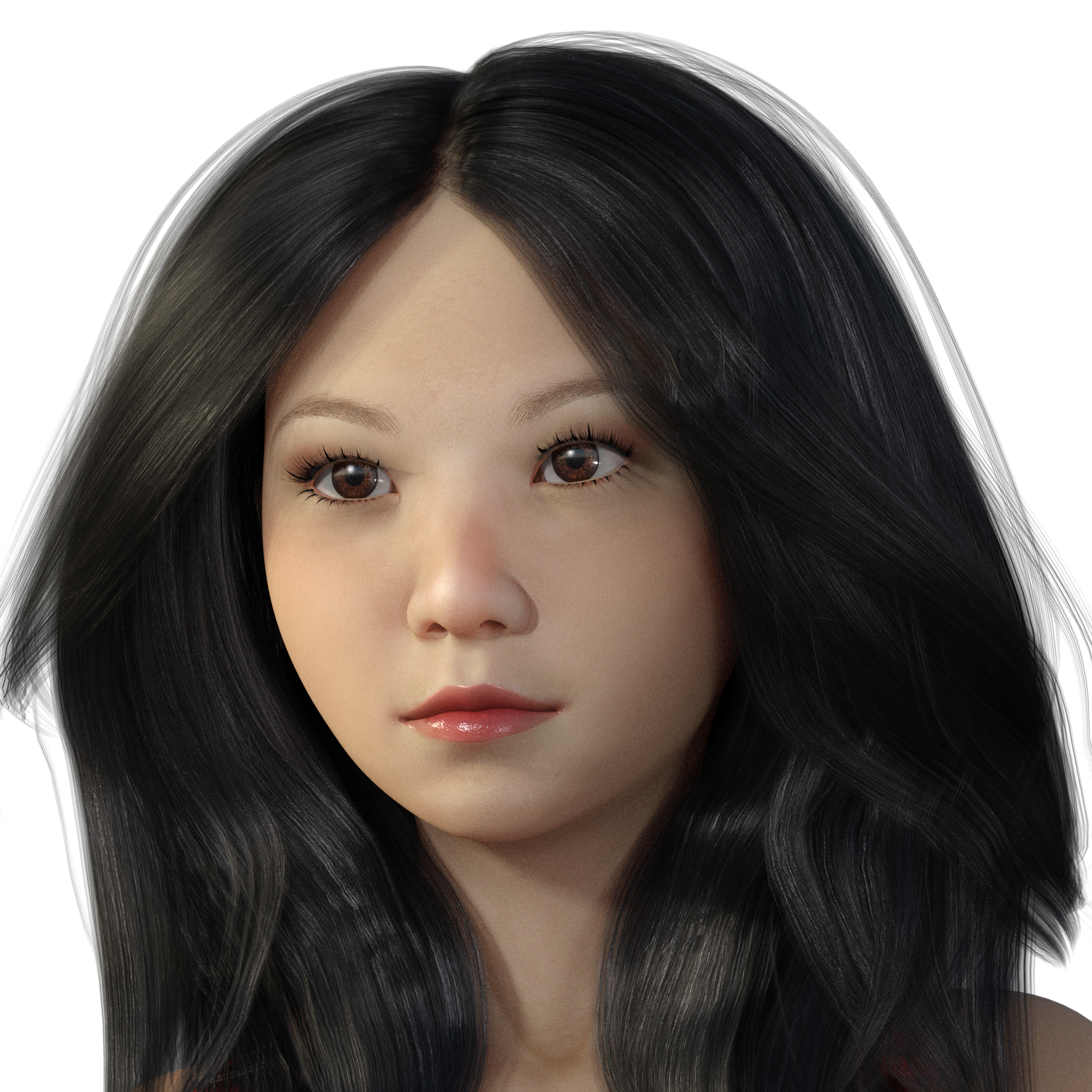
Since i cant afford to have ZBrush for morphing i use some G3F morph packs, deformers and Blender for some custom morphs. However morphing with Blender is too dificult it seems. So if you can recommend me some other tool i will appretiate it. (as you can see the base figure is Genesis 3 Female)
It does take a little getting used to, but I prefer Blender to Hexagon now I've got used to transfering the items; there is a 30 day trial on Zbrush - I didn't like it, but 30 days, is not enough imo.
She is believable; and she does look youngish, but that is a caucasian looking at her; I feel their are subtleties that we misinterpret. They eyebrow colour looks wrong btw; my understanding is their hair is invariable dark?
Hello. Thank you for your oppinion. However about hair color i must disagree. Not all asians have raven dark hair. However you are right about eyebrow color it is lighter than the hair. But the colors of hair parts of the character are variable since girls can color them ;)
Also about the caucasian look well it depends to which part of the asia you want the face to look like. If you want chinese face... i agree this one doesnt look like it. However if you want east asian face like Korean or Japanese they look like more caucasian than chinese for example. So it depends what you want from it. Doesnt you agree with me about this?
Yeah i am aware of 30 day trial of ZBrush... however as you stated 30 days are not enough for develop a face morph since sculpting process is generaly long. Thats why i was searching for alternatives. Since i am new to Blender it look way too dificult to do morphs there. I cant understand how to do smothened morph and to see the result in the moment i am morphing it (something similar to Poser morphing tool and Hexagon morphing tool). If you can point me on some tutorial for this i will appretiate it.
Eye brows are a pain to get them looking the way I want them to. I'm hoping later on down the road Daz implements some kind of morphable/moveable base mesh for this part of the face where you can set the hair density(i.e. 2x, 5x, 10x hairs per "arbitrary unit" of the morphable base mesh), thickness, length, tapering option/direction, color, etc. Currently all of the brows I've seen are either painted on or various fibermeshes with set shapes.
What features would you like to see appear in dazstudio 5?I would like to have the possibility to use GoZ with several instances of DS. Presently the bridge is linked only with the first instance you open. If you send a figure of the 2nd instance to ZBrush and morph it you cannot reimport the morph in DS.
Linked a bridge to each instance of DS would be useful to make a morph in an instance while rendering in the other for example.
Asian Face for G3FIf I want to change the position of the eye (on the face) which dial do I use for Genesis 3 characters? If, for example, I think that the eyes are too wide apart, how do I move them closer together?
If you have, for example, the Genesis 3 Female Morph Pack, click on the Genesis 3 Female in the Scene tab pane, then below that in the Edit tab pane, click on the Shaping tab to the left of it and select the Eyes. You might have to expand it from Genesis 3 Female --> Face --> Eyes. In there you should be able to find the morph called Eyes Width. Other morph packs might call it Eyes Separation.
Asian Face for G3FHello,
Before several months i did post another thread regarding mixed asian face that i morphed for G3F.
Currently i know there is MeiLin7 for G3F and some shapes based on her.
However i do think the majority of the Asian faces available for G3F look not so realistic and sometimes even like alien or not exactly asian. Only MeiLin has some sort of reality in the shape.
What do you think people?
Also since i had some free time recently i did another try to make asian shaped face. However i also do think that it looks like a bit not realistic...What do you think?

Just as any other ethnic group, Asian faces can vary greatly, not to mention the fact that the same face's appearance can look a bit different from one photo to the next where the lighting is different. I've included 2 renders I did of a character and one of the reference photos I used of Fan Bingbing(Chinese actor). I started with the G8 female base and only used morphs to shape the character(i.e. no character injections or other character morph mixtures) in Daz. For the skin, I used Hinako for Mei Lin 8; and for the eyes, I used Juniper for G8F. It took me about 2 weeks spending a couple of hours per day shaping & test rendering.
Its too bad there's no way for me to shape this kind of stuff with integral calculus.
 Reversing a morph
You can also export the morph at -100, re-import it as delta's only to update the existing morph slider (make sure name is the same), and then resave it. You might need to update rigging as well if there is any changes to that.
Reversing a morphIt seems an unnecessary effort, but you could put the parameters pane in Edit Mode, via right-click, then right-click in the desired group to create a new property, set that to 100%, set the one you want to reverse to -100%, right-cllck on the new proeprty and select ERC Freeze, and (making sure only the morph you want to reverse is selected in the list of Sub-Components, click Accept. Optioanlly you could then go to the proeprty-to-be-reversed, click the gear icon on the slider>Parameter Settings and check hidden so that you see only your new property (assuming you don't have Show Hidden Properties enabled).
Released! Ascelin for Genesis 8 Female (Commercial)Ascelin is a character set for the Genesis 8 Female. With a willowy frame and a sweet face, she can be contemporary, modern, or fantasy/sci-fi with a change of an outfit!
With facial features, nails, and navel sculpted in Zbrush and Hexagon with help from various merchant resources and her body morph is made up from Hexagon and merchant resources, there is no need for additional morph packs for use.
Various make ups (LIE and Diffuse Overlay Presets), glitter materials for the eyeliner and eye shadow materials (although be aware you can only use one at a time with the set up provided), tattoos, nail polishes and skin settings create a versatile pack for your Genesis 8 Females.
She has the traditional transmapped eyelashes, as well as fibermesh eyebrows and eyelashes with several colors that match the transmapped versions, along with two glitter material presets for the transmapped set.
Anatomic Element materials are included.
Materials are Iray only.
Speaking of outfits!
The Mosaic Outfit was built with versatility in mind. The individual pieces can be used as interchangeable modules. They will fit into fashion renders, fantasy and even contemporary scenes. This product also comes with a variety of utility poses which allow for easy customization. With their eight different texture sets it covers a wide variety of looks and styles. If you want even more mix and match options, be sure to take a look at our addon for this outfit!
The product is made for dForce but works well in most poses as conforming.
 Reversing a morphSometimes the negative part of a morph will do the job but rather than have to dial the morph backwards which seems counter intuitive
Morphs are just vertex (and sometimes bone) vectors, and there's nothing unusual about applying vectors in reverse.
Is there any practical issue you're having other than a dislike of moving the slider to the left rather than the right?
Reversing a morphHi,
is it possible to reverse the action of a morph. That is change the positive direction to a negative? Sometimes the negative part of a morph will do the job but, rather than have to dial the morph backwards which, seems counter intuitive, can it the slider action be reversed? All I can find is Reverse Deformation which is something else.
Thanks
[Released] RSSY Clothing Converter from Genesis 2 Female to Genesis 8 Female [Commercial]Ok, for the Add Directorty, what is tripping you up is the Does Daz Version Exist check:
2019-09-05 22:45:25.842 DEBUG: Looking to see if Daz File "G:/DAZ 3D/Studio3/content/People/Genesis 8 Female/Clothing/SI Fantasy Cloth Wrap/Thigh Wrap.duf" exists: true
2019-09-05 22:45:25.842 DEBUG: SKIPPING, Daz Version already exists: G:/DAZ 3D/Studio3/content/People/Genesis 2 Female/Clothing/SI Fantasy Cloth Wrap/Thigh Wrap.dufThe script thinks the input file is in the Daz managed directories. So it replaces the "Genesis 2 Female" part with "Genesis 8 Female" and looks to see if the file exists, which it does. This is one reason why it is HIGHLY RECOMMENDED to not mix your input directories (that Daz installs) and your OUTPUT directories (where the script creates new content). On my system, Daz content is in "D:\Documents\My DAZ 3D Library\People\Genesis 2 Female\Clothing" and my content that I create or have scripts create is in "D:\Documents\DAZ 3D\Studio\My Library\People\Genesis 8 Female\Clothing"
This mixing of the directories is also probably why you have had issues. Something was unintentionally overwritten.
First, I did discover what's going on with the wraps, although it's nothing I can do anything about. I reinstalled the G2F version to make sure that everything was where Studio expected it to be, deleted everything the script had made before, and redid the transfer. For the body wrap, there are a bunch of custom bones hanging off the Right Thigh and Left Collar bones on the G2F original, the Movement group. For whatever reason, instead of preserving those bones when the transfer is made, the script is simply stripping them right out of the item -- it's effectively acting like Autofit. The Movement morphs are designed to act on those custom bones, so without them, the wrap goes dead. Is there any reason you know that it would do that?
There are some other morphs that don't depend on the custom bones -- the Style group. Those survive the process just fine. I hadn't looked at them before because it was the motion morphs I was most wanting to use.
As far as the Add Directory thing goes ... OK, I'm very confused. The input file necessarily HAS to be in the Daz managed directories. Where else would it come from?
That said: if I'm understanding things correctly, it's refusing to allow the input directory to be added for a second try at the conversion because the output directory -- which the script itself created -- already exists. Is that correct? If so, then it absolutely doesn't matter where the output directory is; as long as it already exists, the script will prevent the user from using Add Directory to do a replace/overwrite, deliberate or otherwise.
THAT said, if I'm understanding what you said correctly, it seems like the script is doing the following process:
1) check to see if destination directory exists
2) destination directory exists; refuse to overwrite ... but without clearly telling the user exactly why the operation fails at the point/time of failure
-- It's probably a bit late, but for this sort of thing in the future, since this seems to be intentional, it would probably be good to have a script explicitly signal that for an Add Directory operation, if the destination directory already exists, the script cannot proceed; pick a new directory or delete the currently selected destination and restart the script. As it stands, the user explicitly tells the script "Ignore that anything to do with this exists, and do it over", and the script is basically saying "Nope!" ... but without telling the user why, and showing the user an error message that it should not show under those circumstances. The Daz log file message as it stands is uninformative for the user. You know what it means because you wrote the script; the user can only look at it and say, "OK, so the source G2F file exists. Why is that an issue?"Am I completely misunderstanding what you were saying about that?
The input directory is not the problem. The output directory, that you set the first time you ran the script, is. The first time you ran the script, you clicked the output directory button and set it. (It is not set by the script. It just remembers your selection) As the manual states:
Click Set Clothing Output Directory... button to define the output directory where the converted clothing items will be saved. This should be the top-level directory, such as /People/Genesis 3/Female/Clothing (for G2F to G3F) or /People/Genesis 3/Male/Clothing (for G2M to G3M). It is HIGHLY RECOMMENDED that you select the DAZ 3D/Studio/My Library and create a Genesis 3/Female/Clothing or Genesis 3/Male/Clothing folder. You could use the My DAZ 3D Library path; however, the clothing converter could overwrite vendor created content.
The script should not try and change the directory as it could put stuff where you wouldn't find it.
Extremely long figure load times - ways to fix?I might refresh this thread as my G8F load times are now even worse then ever. OK, I have all Pro Bundles, zillions of figures and most morph products available so that might be the reason. Also I transferred already over quite some G3-morphs. Any ideas to optimize the situation? And no, connect is no option. I install everything from DAZ via DIM and from other stores manually.
Regarding my runtime I have one which DIM takes care for and a second one for manual installs. Both are on an external HDD connected via USB 3 directly.
Question on a new Windows laptopSo far I've only been using daz with Macbook and this will be my first Windows machine.Welcome to the Dark Side.
 1. Should Daz content be fine on a Hard drive (SSD is only 250gb compared to 1TB of 7200 rpm on hard drive) or should I get an external SSD?
Should be fine on the SSD, but 250Gb is awfully small, so eventually you'll want to migrate to a larger drive. Might as well do it up front and skip the pain later. Personally, I've got my library on an 5400 rpm external HD, and I don't find the transfer speed to be an issue. YMMV.
3. Do I have to update the NVIDIA drivers (I read somewhere people encountered issues after updating and had to downgrade, a process I am not familiar with at all)?Try it with the installed driver first. If it works, consider leaving it. If you DO decide to update the driver, create a restore point first in case the update borks something. (I upgraded the driver and ran into an issue that DAZ tech support is still trying to help sort out.) NVIDIA builds a clean install capability into their driver installers, so it's easy to downgrade if you do run into a problem with an update, though.
4. Is it okay if I continue using Daz and the content on my old Macbook (the TOS are not specific about that but I thought it's worth checking)? Thanks a lot, I appreciate any advice or any of the questions above.Without taking the time to check the EULA, you'll probably be OK, provided that you're only running one device (Macbook or Windoze) at a time.
Thanks! I'm so excited about getting started on all the windows-only cool stuff. I managed to put the storage on the hard drive and while G1 and G2 load fast, newer generations take a while. But it's still loading faster than the SSD on my Mac so I have no issues with that so far. The GPU is still not being used despite me checking the GPU box in the advanced tab. I guess I will have to update but first I must figure out how to create a restore point (I remember doing that long time ago). Thanks a lot for the tips, and sorry to hear about your issue with the drivers. That's unfortunate.
mcjTeleBlender:Daz Studio scenes/animations w/Blender's Cycles EngineNo new version but but progress report concerning transfer of scenes via FBX progress ... the daz fbx exporter or the blender fbx importer messes the location of rotated props, and i was able to write code that writes scripts that fix this issue Though the hat prop and the hair prop when parented to the Aiko figure were mis-located so there's still work https://www.daz3d.com/forums/uploads/FileUpload/5b/550c426eeede350c918cb524af4de1.jpgDeleting unused morphs to speed things upthere is a "trcik" to do that, instead to delete/remove
- install extra characters morph in separate library,,
when you want to "remove" extra "data/morph" use the "Content Directory Manager" to disable library with extra morphanother way is to ""move"" manualy some data/morph in a specified library and again play with "content directory manager" to enable disable morphs
[Released] RSSY Clothing Converter from Genesis 2 Female to Genesis 8 Female [Commercial]Ok, for the Add Directorty, what is tripping you up is the Does Daz Version Exist check:
2019-09-05 22:45:25.842 DEBUG: Looking to see if Daz File "G:/DAZ 3D/Studio3/content/People/Genesis 8 Female/Clothing/SI Fantasy Cloth Wrap/Thigh Wrap.duf" exists: true
2019-09-05 22:45:25.842 DEBUG: SKIPPING, Daz Version already exists: G:/DAZ 3D/Studio3/content/People/Genesis 2 Female/Clothing/SI Fantasy Cloth Wrap/Thigh Wrap.dufThe script thinks the input file is in the Daz managed directories. So it replaces the "Genesis 2 Female" part with "Genesis 8 Female" and looks to see if the file exists, which it does. This is one reason why it is HIGHLY RECOMMENDED to not mix your input directories (that Daz installs) and your OUTPUT directories (where the script creates new content). On my system, Daz content is in "D:\Documents\My DAZ 3D Library\People\Genesis 2 Female\Clothing" and my content that I create or have scripts create is in "D:\Documents\DAZ 3D\Studio\My Library\People\Genesis 8 Female\Clothing"
This mixing of the directories is also probably why you have had issues. Something was unintentionally overwritten.
First, I did discover what's going on with the wraps, although it's nothing I can do anything about. I reinstalled the G2F version to make sure that everything was where Studio expected it to be, deleted everything the script had made before, and redid the transfer. For the body wrap, there are a bunch of custom bones hanging off the Right Thigh and Left Collar bones on the G2F original, the Movement group. For whatever reason, instead of preserving those bones when the transfer is made, the script is simply stripping them right out of the item -- it's effectively acting like Autofit. The Movement morphs are designed to act on those custom bones, so without them, the wrap goes dead. Is there any reason you know that it would do that?
There are some other morphs that don't depend on the custom bones -- the Style group. Those survive the process just fine. I hadn't looked at them before because it was the motion morphs I was most wanting to use.
As far as the Add Directory thing goes ... OK, I'm very confused. The input file necessarily HAS to be in the Daz managed directories. Where else would it come from?
That said: if I'm understanding things correctly, it's refusing to allow the input directory to be added for a second try at the conversion because the output directory -- which the script itself created -- already exists. Is that correct? If so, then it absolutely doesn't matter where the output directory is; as long as it already exists, the script will prevent the user from using Add Directory to do a replace/overwrite, deliberate or otherwise.
THAT said, if I'm understanding what you said correctly, it seems like the script is doing the following process:
1) check to see if destination directory exists
2) destination directory exists; refuse to overwrite ... but without clearly telling the user exactly why the operation fails at the point/time of failure
-- It's probably a bit late, but for this sort of thing in the future, since this seems to be intentional, it would probably be good to have a script explicitly signal that for an Add Directory operation, if the destination directory already exists, the script cannot proceed; pick a new directory or delete the currently selected destination and restart the script. As it stands, the user explicitly tells the script "Ignore that anything to do with this exists, and do it over", and the script is basically saying "Nope!" ... but without telling the user why, and showing the user an error message that it should not show under those circumstances. The Daz log file message as it stands is uninformative for the user. You know what it means because you wrote the script; the user can only look at it and say, "OK, so the source G2F file exists. Why is that an issue?"Am I completely misunderstanding what you were saying about that?
Matt Castle does some stuff... and, naturally, shortly after doing it, I find that there's a hoof morph in the HFS Morph package, which I already have.
However, I'm nonetheless happy. It wasn't an especially difficult project, it's taught me quite a lot about geografts, and there are some benefits to doing it with geografts rather than morphs - primarily that it doesn't distort the shape of the clothing around the top of the foot.
Either way, I mean to keep refining it, as I've already established these comparatively short hooves as canonical for incubi/succubi (collectively "cubi") in my contemporary fantasy setting, and it's potentially something I'll consider releasing in some form once any kinks are ironed out.
Opinions on Marvelous Designer Video Tutorial?The next tutorial is finished with the following chapters...
- Design Considerations
- Retopology in MD and ZBrush, ZBrush Projections
- MD Exporting, Morphs, ZBrush Normal Map Creation
- MD Morphs, Rigging Daz JCM's, MD Morph Targets
- Daz Rigid Follow Nodes, MD Draping, Creating Character Fittings
Maybe a week or two for video editing and "stuff"

Sorry, but the emphasis on ZBrush takes it out of reach for me. MD was a big hit for my budget, ZBrush is impossible.
Marble, I show you how to do it all inside of MD without going to ZBrush...working inside of ZBrush is an option/choice not a necessity.

Now that is encouraging. Retopology has apparently improved with MD8 and they do have some basic sculpting tools included now. I'm looking at opting for the discount granted to MD8 users and getting MD9 when it is released (hopefully with further discounts like the big special offers they had last winter). MD9 will include GPU simulation which looks orders of magnitude faster than CPU although MD simulation using CPU is still many times faster than dForce in DAZ Studio.
Any hints on creating Normal Maps in Blender 2.8 rather than (or as well as) ZBrush would be welcome too.
Just to be clear, are we discussing the Marvelous Designer Video Tutorial you have in the store right now or is this one you intend to release soon? Either way, I'll need to wishlist for a while until I have saved some pennies (I've just checked my wishlist and I already have two more of your courses listed).
Pixeluna cyborg skins helpThe product description says it uses the Base Male UV maps.
If Fauvist is like me, the question I had was how much of the channels and panels on the body were from the morph and how much were the texture files.
Do you think it would be possible to somehow use only the Channels, but with a different characters skin? I’d like to make a whole race of cyborgs, but it won’t work if they all look too much alike.
No, they're painted onto the texture. if you just want cyborg type lines on any texture, I'd recommend this: https://www.deviantart.com/mysticartdesign/art/MysticArtDesign-Android-Male-759721929 or for females https://www.deviantart.com/mysticartdesign/art/MysticArtDesign-Android-759619113. Those are driven by displacement maps and can be used on any texture you want. They do only show in the render though. Also they're free.
Pixeluna cyborg skins helpThe product description says it uses the Base Male UV maps.
If Fauvist is like me, the question I had was how much of the channels and panels on the body were from the morph and how much were the texture files.
Do you think it would be possible to somehow use only the Channels, but with a different characters skin? I’d like to make a whole race of cyborgs, but it won’t work if they all look too much alike.
Pixeluna cyborg skins helpThe product description says it uses the Base Male UV maps.
If Fauvist is like me, the question I had was how much of the channels and panels on the body were from the morph and how much were the texture files.
Thanks for the image! So it looks like the channnels and panels are in the texture?
Daz 3D is part of

Connect
DAZ Productions, Inc.
7533 S Center View Ct #4664
West Jordan, UT 84084Licensing Agreement | Terms of Service | Privacy Policy | EULA
© 2026 Daz Productions Inc. All Rights Reserved.