-
[Released] RSSY Hair Converter from Genesis 2 Male to Genesis 8 Male [Commercial]
Does the convertor rely on a clone of G2 or G8 in my system that may NOT have been updated when I reinstalled?
No, it doesn't (or at least I don't think so). The script loads in the conformer and engages its morph to pull the hair to where it thinks it should be. I will refer this question again to Sickleyield to see if she has any more ideas. (Edit: at least I will once I get email back.
 It has been 24 hours now)Daz Studio Pro BETA - version 4.12.2.60! (*UPDATED*)
these vary a lot with the photo
this selfie today of me gave this which has too wide and smooth a face

They are pretty good but take the texture away and replace it with a similar texture from the DAZ Store and much of the likeness goes away because a lot of geometry gets shaved off. It happens in FaceGen too but not to the same degree and that's why they recommend to use a frontal and a profile picture.
It's like you said the face becomes too wide and too smooth. It's more noticeable when you look at the Face Transfer in profile in the viewport and then feel the bulb of your nose, under your lower lip, you chin and so on which your finger tip and compare with the viewport. You can see and feel that the Face Transfer needs more information, this is only the 1st beta test of it though so I reckon it's get better.
is there a Face Transfer threadI feel the Genesis 1 looks the most like you but because the Face Transfer test you ran is using the picture you used to do the Face Transfer as a texture it looks as geometrically accurate as the FaceGen morphs you did but I know from the accuracy control tests I did with my own pictures with Face Transfer and FaceGen that it isn't as accurate geometrically as FaceGen. It's only the 1st beta though.
As convenient as it'd been to have Face Transfer built into DAZ Studio I can't justify buying Face Transfer unless it's substantially better than Face Gen and it's not. Heck, I bought FaceGen with the ideal of testing it for inclusion in mobile games for instant player avatars (and have since realized that's that runs into all sorts of privacy laws particularly if the player is 13 years old or less so I scrapped that ideal).
Morphs from G3 to G8Is there a tutorial on how to transfer a G8 female character morph to G3 female?
Who said Blender was hard?Most of my morph work has been in ZBrush, so I haven't seen these variances. Does this only occur in Blender?
I think it would occur in any application, Daz Studio included. It's just that the artist who made the model is a Daz Studio artist ensures that the base rez model, once subdivided, looks more "correct" in Daz Studio; If you think the base rez looks correct, then the subdivided model will look shrunk around conves curves. If you think the subdivided model looks correct, then the base rez model will looks bloated around the same regions. The model can't be correct for both because meshes and subd cages are just two different things but Daz only provides one for both purposes. I searched through the SDK for several days for this thing called a "subd cage" until I came to the conclusion that there wasn't one.
Thanks for the explanation.
Who said Blender was hard?Most of my morph work has been in ZBrush, so I haven't seen these variances. Does this only occur in Blender?
I think it would occur in any application, Daz Studio included. It's just that the artist who made the model is a Daz Studio artist ensures that the base rez model, once subdivided, looks more "correct" in Daz Studio; If you think the base rez looks correct, then the subdivided model will look shrunk around conves curves. If you think the subdivided model looks correct, then the base rez model will looks bloated around the same regions. The model can't be correct for both because meshes and subd cages are just two different things but Daz only provides one for both purposes. I searched through the SDK for several days for this thing called a "subd cage" until I came to the conclusion that there wasn't one.
is there a Face Transfer threadAfter realising the plugin exists I only had one hour to "play" with it yesterday. I only had some not so well lit images to play with. My first impression is, it has ... Potential The face textures created are IMHO better than the ones I get from the other 2 face\head plugins. (using same images) I think it reads the eye color from the image. But the head\face shape ..... Nice, but there is room for improvement. With the front AND side image approach the other plugin uses you get better shapes. The lips and mouth region is IMHO just flat with this face transfer.Who said Blender was hard?Most of my morph work has been in ZBrush, so I haven't seen these variances. Does this only occur in Blender?
The amounts were also meant to inform Snow Sultan because he wasn't sure if HiRes in Studio would be two levels of subd in Blender.
Who said Blender was hard?Base Resolution is 16368 polys.
High Resolution at default is 1 subdivision which is 65472 polys.
Lowering the resolution to zero, while set to Hi Res, takes it to 16368 polys.
If you create a morph on the hires and try to mlp it onto the base back in Studio, you will get a warning about the geometry and fail.
If you create a morph with hires set to zero and mlp it onto the base back in Studio, it will succeed.
I believe that Dynamic Smoothing doesn't give a completely identical result to what you will see in Studio. The same may be in Blender. I don't know if I can agree that the vertices are not the same. Perhaps I don't understand. Thevert order is obviously maintained or the morph wouldn't work.
Donald is talking about the vertex positions, not the vertex count
For the HR model , poly and vertex count is the same in DS and blender after subd . But the subd operation is applied differently - so the vertex positions are not the same - it's not vertex exact
Minor differences here and there, but sometimes important ones too. Fastest/easiest way to see is look at the normal looking teeth in DS , and the gapped teeth in blender
For the morph itself, it depends on what was actually done. There are always going to be differences, and sometimes they are significant
is there a Face Transfer threadthe new Face Transfer in the beta
I don't want to clog the beta thread with my renders so was wondering
anyway
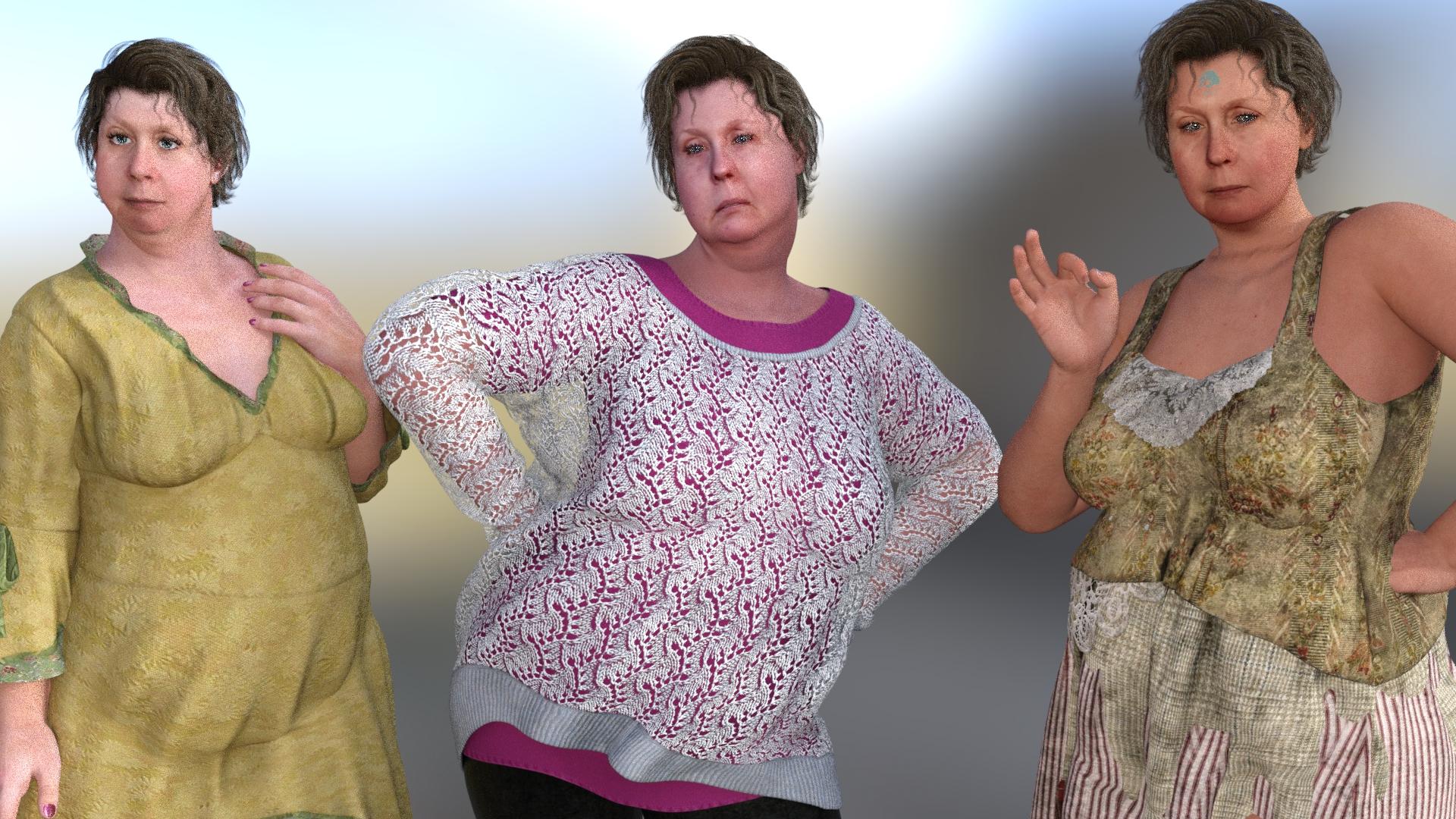
the facegen plugin I bought from Singiular Inversions on Genesis 1 on the left and two Genesis 8 with my face using two different photos ( last 2 below) and the new FaceTransfer beta on right
it seems the photo makes quite a difference
 Who said Blender was hard?Do you know if setting the subdivision to 2 in Blender displays the figure at the same resolution as viewing the figure at "High Resolution" in DAZ Studio (so you can check how your morphs will really look when rendered back there)?
I believe "high resolution" in Daz just turns subdivision on. You still have to choose the level, even if it is zero (which isn't, even as the name might suggest, the same as base resolution).
Unfortunately, there are two problems.
First, the algorithms are different. The model as it is exported will look ever-so-slightly different from the model as it is imported. But it's barely noticeable, even on close inspection.
The second problem is the biggie: With models meant to be used at base resolution with no subdivision at all, the vertices describe the points that the faces should actually pass through. So the artist models with that in mind. But models intended to be subdivided, the vertices describe the points that INFLUENCE the faces, but the faces rarely ever actually pass through these points. This vertices are called the "SubD Cage". So the artist instead models with that in mind.
The problem is that Daz doesn't actually have proper subd cages. They just reuse the base resolution model as the subd cage. So, you can't have it both ways: the model is going to look "wrong" either at base resolution, or when it is subdivided. For example, convex regions of high curvature tend to shrink into the cage mesh, and can be quite pronounced around the ears, nose, and especially the lips and teeth.
Things are simply never going to be vertex exact. That's kind of why I've resolved myself to 60 gigabyte Alembic files, and thank god that Alembic is so efficient.
Base Resolution is 16368 polys.
High Resolution at default is 1 subdivision which is 65472 polys.
Lowering the resolution to zero, while set to Hi Res, takes it to 16368 polys.
If you create a morph on the hires and try to mlp it onto the base back in Studio, you will get a warning about the geometry and fail.
If you create a morph with hires set to zero and mlp it onto the base back in Studio, it will succeed.
I believe that Dynamic Smoothing doesn't give a completely identical result to what you will see in Studio. The same may be in Blender. I don't know if I can agree that the vertices are not the same. Perhaps I don't understand. Thevert order is obviously maintained or the morph wouldn't work.
I'll probably be slapping my head after thisOr right click Scene Tab --> Assets --> Transfer Utility
Mechtropolus Series [Commercial]Suits like this really need mechanical-looking geografted joints at the elbows, knees, hips, etcetera.
Yes I agree it doesn't have robotic joints, it's more Bio skin. The drawback with the joints that you can't really get all the morph shapes to work unless you do a lot of work with JCMs to fix the bends.
From a commercial point of view the more shapes that can be used with this the more it sells. This one is all automatic and is future proof so all shape will fit, you can't do that with mechanical joints.
But point taken !
I'll probably be slapping my head after thisBut where the heck is the transfer utility hidden??
My phone will not charge complaint threadNon-complaint: Yay! My new smart phone does have better antenna or receiving circuits and is able to (just barely) make phone connections from my house without me having to stand on a chair upstairs leaning against the top of the window.

Complaint: Getting it to work though, was a bitch. Straight out of the box it looked like it was going to work but it refused to complete activation. I spent the first day trying all sorts of things to get it transfer my phone number to the new phone but no deal.
Then today I spent 2 hours on the phone with TracFone helpdesk having them try several of the things I tried myself yesterday. We were turning on and off all sorts of options and pulling the SIM card to double check ID numbers and configuration values. Finally, I heard someone in the background at the helpdesk yell out, "try updating the Android OS itself". Which meant that we had to put everything back together and re-enable WiFi access but when the new OS was installed it all just worked. Yay! 
Non-Complaint: Now that my new phone is working and is much faster and less frustrating than my old phone I've finally succeeded in installing the Uber app and my pharmacy app which was my whole purpose in buying a new phone to begin with.
 I even figured out how to transfer my old contacts list to the new phone. Yay!a product to inject face rigging to Michael 4. or transfer face rigging from g3/g8 to Mike 4
a product to inject face rigging to Michael 4. or transfer face rigging from g3/g8 to Mike 4
Middle eastern male characters ?If you just need morph dials, the North African characters from here might help you:
https://www.daz3d.com/people-of-earth-faces-of-africa-genesis-8-male
https://www.daz3d.com/people-of-earth-faces-of-africa-genesis-8-female
For skins, anyone who can pass as North Mediterranean (Gianni 7, Diego 8, etc) can also probably be used for South Mediterranean/Middle Eastern/many but not all North Africans, which I believe was part of the point Noah was making.
Which G3M character is used for the promo-pictures?Lead promo and last full color promo are Christian 8, second promo is almost certainly Lee 8, near-profile is either Michael 8 or Michael 7, not 100% sure which. The only one I can't place is the one with the reddish blonde hair and yellow eyes; my guess is a mix of different characters with a G8M base.
Hair is one of the relatively easier things to transfer back and forth between G3 and G8, so it's possible the PA decided to include a G3 fit but did not do promo art that featured G3 characters.
G8F Skin on G3F, possible?Save the material settings, load the material settings.
load both copy settings in material tab, paste onto other figure
Personall I prefer to load both and just copy across; i can do them all, or just some, or mess about transfering eyes from another figure.
I mostly just load the textures and use Agenesis 2 for G3 Female, works fine on G8 too btw (I rarely transfer from G8 to 3).
Daz 4.11 with Goz crashI feel your pain; it seems to me that issues relating to GoZ have low priority. Some bugs reported years ago have still not been solved because there are other higher priority issues. I know the devs are busy solving all sorts of bugs, but I feel that GoZ issues often end up at the bottom of the pile. I suppose we just have to be patient

GoZ seems to be the whip that Daz uses to keep people in line--if you're a vendor, you can transfer HD morphs. If you're not, you're stuck with base resolution morphs. I don't think that much has changed from 4.10 to 4.11 but all of a sudden one can't transfer from Zbrush (although it works the other way) and I wonder if this is intentional. I've reinstalled, force reinstalled, made sure the paths were sorrect and GoZ just throws an error every time--Pixologic is a great company but if a third-party isn't going to make the effort, they don't have to bother. They own the market. Daz makes its money from vendor sales so of course they want every one to become a vendor. I'd be willing to pay for an HD transfer plugin from Zbrush but there doesn't seem to be any way around the strictures. In some ways, I think DS continues to position itself as an amateur solution--I can't knock their success, but if they continue to focus on hobbyists, they'll always be branded as the porn software and never be recognized as a valid 3D option. Strand-based hair is nice, but it doesn't make up for decent interchange with other programs, and I don't think most professionals want to give up modelling and animation toolsets to work solely in DS. It's a shame because it has the potential to be a great starting point for figure modelling, if it would play nice with others.
Daz 3D is part of

Connect
DAZ Productions, Inc.
7533 S Center View Ct #4664
West Jordan, UT 84084Licensing Agreement | Terms of Service | Privacy Policy | EULA
© 2026 Daz Productions Inc. All Rights Reserved.