-
what happens to auto follow when a clothes has a support morph?
it doesn't look like the eyebrows or eye lashes has any support morphs.
That probably means that auto follow works well enough not to need a custom morph.
what happens to auto follow when a clothes has a support morph?when i buy a Genesis 8 character, like Vladimir 8, does he bring in support morphs for the anatomicals, like the eyebrows, and the other anatomicals?
It depends on the character and whether or not it would require a custom support morph.
when creating a support morph for Victoria 8, do you include the scaling in the morph deltas?
or do you add the scaling separate? if so, how do you copy scaling to the skirt?As a rule it’s better not to include scaling in a morph. If the original character uses a combination of scaling and morph then the support morph needs to be created for the unscaled version.
duplicate formulars found in filesThe could not find messages mean just that - there's a link, in this case to Victoria 8, from the Smoother V8 20L ansd Smoother V8 20R morphs which cannot be resolved as you don't have Victoria 8 installed. Since it's a correction morph that is needed only when Victoria 8 is installed and applied that is harmless.
The messages have nothing to do with the Duplicate Formulas alert, you should be able to find log entries for those too.
what happens to auto follow when a clothes has a support morph?what happens to auto follow when a clothes has a support morph?
does ds detect it and cancel the following?
for example if a skirt has an Aiko 8 support morph, then autofollow knows not to kick in?
or is it up to the creator to cancel autofollow in the skirt for aiko 8?
If the support morph has been saved with the same internal name as the autofollow morph then it replaces it, and will be applied automatically instead of the autogenerated one.
If it has been saved with a completely different morph name then it will be considered as an independant morph, so autofollow will create an autogenerated morph too.
what happens to auto follow when a clothes has a support morph?when creating a support morph for Victoria 8, do you include the scaling in the morph deltas?
or do you add the scaling separate? if so, how do you copy scaling to the skirt?what happens to auto follow when a clothes has a support morph?what happens to auto follow when a clothes has a support morph?
does ds detect it and cancel the following?
for example if a skirt has an Aiko 8 support morph, then autofollow knows not to kick in?
or is it up to the creator to cancel autofollow in the skirt for aiko 8?
AIUTO...CHI CONOSCE L’ITALIANO? PARTE DODICIPer contattare i PA ci sono i thread appositi per ogni prodotto sostanzialmente, di solito rispondono anche subito!
Però sì, mi piacerebbe poter lasciare un "voto" al prodotto, e qualche commento giù. Tante volte non si capisce di cosa parlano e bisogna spulciarsi i thread col link (Daz Deals).
A me piacerebbe rivedere quelle vecchie presentazioni a 360° del prodotto (quanto mi piaceva far roteare The Girl 4 quando stavo iniziando!
 ) o qualcosa tipo SketchFab dove c'è la possibilità di vedere il prodotto in 3D, poterlo roteare in ogni direzione, applicare vari effetti e zoomare. E magari poter usare un paio dei morph inclusi!
  Sarebbe perfetto secondo me per evitare un acquisto errato.
Quanto ai plugin e script, ci vorrebbero molti più video esplicativi all'interno dello store stesso e non semplici link che rimandano a Youtube o Vimeo. E dico ESPLICATIVI, con qualcosa che spieghi in concreto cosa fa.
I voti lasciano il tempo che trovano. Quando acquisto su quegli store con le valutazioni a stelline o a punteggio, io lo ignoro del tutto.
Mai vista quella funzione, ma sembra figa!
Che i video siano su YouTube o sul sito stesso mi cambia poco, basta che ce ne siano anche di introduttivi veloci, perché se sono curioso riguardo a un prodotto non vuol dire che sia disposto a sorbirmi 20 minuti di chiacchierata non editata!
Io leggo sempre le recensioni, sono utili.
Sarebbe interessante anche vedere il numero di prodotti venduti, magari non proprio il numero ma un ordine "i più venduti".
Sia in un senso che nell'altro. Potrei volere un plugin universalmente stimato, o evitare il solito appartamento che hanno tutti e farà sembrare il mio render ripetitivo!My phone will not charge complaint threadTuesday has been my happy day for the last several years. It's the day when my local grocery gives 5% off for seniors. It's one of the two days that I regularly would dust off the automobile and go for a mini-adventure to neighboring towns or even the nearest city. Tuesday was one of the three days that the local garbage transfer station (i.e. dump) was open for business. Tuesday was the day that I anchored my life around.
 Now, without an automobile it has lost its significance except for the 5% grocery discount but since I can't carry more than a couple bags per trip, it doesn't help. Blah Tuesday.
  Baking Morphs
Just export your character at base level resolution as an *.obj file, then load it as a morph target to your default G8Female figure. Use Shape Rigger Plus to adjust the rigging to your character.
Can daz studio import V4 morphs without injecting it into V4 first?You will have to load V4's CR2, add her morphs, zero the figure, dial up one morph and export as OBJ using the Studio preset, zero morph, dial up another, export it as OBJ, rinse and repeat for every single morph you own for her.
Head into the data folder and find where you saved your converted V4, find her morphs folder and delete everything inside it, it's all broken junk that isn't fit for keeping.
Load your converted V4, use MLP to load each and every OBJ you just made into V4, make sure the morph name matches V4's and that the dial "label" also matches the ones in V4, set up the pathways for each morph, and lets not forget "adjust rig to shape" and "ERC freeze" for the morphs that need it, then save them as Morph Assets.
If you get the morph names wrong then most of your PZ2 MOR pose files won't work, lets take G4 as an example, her body morph is labeled "The Girl 4 (Body)", but the morphs actual name is "FBMG4TheGirlBODY".
Basically one hell of a lot of work, and that's just the morphs for the figure, you have her magnet based JCMs to fix as well, in DS4 the mesh and skeleton are separate items, so you need to figure out how to "move" the magnets from the bones to the Root node so they can access the mesh again.
Lets not forget the converted WM rigging, problem with this is that Poser Parametric rigging converts into garbage DS WM rigging, so that will need to be replaced if you want her to bend even remotely like she used to.
Are you going to build Projection Templates for her, I ask because you are going to have to convert all of her content as well, as every single outfit or figure hair you try to "fit to" her will trigger autofit.
I'm not trying to be funny here, I did all of this with Aiko 3 back in DS4.0 and 4.5, so I've been there, done that, and still have the mental scars to prove it.
I used converting A3 as a teaching aid, most can learn from tutorials or watching videos, I can't, I can really only learn by doing, so I push buttons just to see what happens.
After using "Convert Figure to WM" on her I quickly learned that what I had was a pile of junk, all that was worth keeping was the mesh and skeleton, everything else got wiped so I could start over with a clean figure.
By the time I stopped working on her she was fully Tri-Ax, her JCMs had been rebuilt, all her morphs had been redone, even fixed the ones that mess up the nape of her neck, she had regions built into her to work better with the shaping tab, I even had clones of V3 and SP3.
It was thinking about all of her content that made me "mothball" her, I realized that converting and fixing the figure was just the tip of the iceberg, I still had years of work ahead of me if I wanted to get all that content working with her.
This is why I keep telling people not to use that "Convert to WM" feature, all it gives you is garbage that needs a lot of work to fix.
AIUTO...CHI CONOSCE L’ITALIANO? PARTE DODICIPer contattare i PA ci sono i thread appositi per ogni prodotto sostanzialmente, di solito rispondono anche subito!
Però sì, mi piacerebbe poter lasciare un "voto" al prodotto, e qualche commento giù. Tante volte non si capisce di cosa parlano e bisogna spulciarsi i thread col link (Daz Deals).
A me piacerebbe rivedere quelle vecchie presentazioni a 360° del prodotto (quanto mi piaceva far roteare The Girl 4 quando stavo iniziando!
) o qualcosa tipo SketchFab dove c'è la possibilità di vedere il prodotto in 3D, poterlo roteare in ogni direzione, applicare vari effetti e zoomare. E magari poter usare un paio dei morph inclusi! Sarebbe perfetto secondo me per evitare un acquisto errato.
Quanto ai plugin e script, ci vorrebbero molti più video esplicativi all'interno dello store stesso e non semplici link che rimandano a Youtube o Vimeo. E dico ESPLICATIVI, con qualcosa che spieghi in concreto cosa fa.I voti lasciano il tempo che trovano. Quando acquisto su quegli store con le valutazioni a stelline o a punteggio, io lo ignoro del tutto.
Novica & Forum Members Tips & Product Reviews Pt 12I have 41. I still like G2.
Will I use G9? No idea, I just hope I'll be able to transfer materials, morphs, clothes to it.
Celebrity Look-a-Likes for 3D figures Part 2There are two Evangeline Lilly characters that I know of. Both are for Victoria 4 though.
1) Catherine by Ariah81 is free - https://www.sharecg.com/v/25277/gallery/11/Poser/Catherine-morph-(POSER)
2) There is a character by Mihrelle at Renderosity called MRL Ariana.
The only Hugo Weaving I have is for Michael 3. It is free if you want to check it out - https://www.renderosity.com/mod/freestuff/?item_id=71371
Thanks for the links!
Adventures of Lorenzo & LoRez Figures in CarraraBunyip - fan of all your images. Curious about the alien. Is that a morph that comes with Lorenzo, or did you have to do that yourself? Awesome.
Thanks !!!
Lorenzo comes with a lot of morphs, I dialed in the Alien, Creature, Elf, & Goblin morphs till I got a mix that I liked, Stezza has done a number of morphs for him. https://www.daz3d.com/lorenzo-lorez
Edit : I did adjust the Goblin skin for Lorenzo in Paint.net to get the blue skin.
Shape Morphs for Making rounder 'anime' breasts and butts?Yeah, there's like a hundred shape sets just for those body parts around here and other sites. I would consider many to be cartoonish in proportion. Just look around at promo pics to try to find what you are looking for.
I forget if it is included with the base or not, but there is a "breast implant" morph that makes the breast round. It might be in the Genesis 8 Female Body Shapes, one or the other. Like magog said, you probably want to start with toon like shape first. It just depends on what you consider to be anime style, since that could mean all sorts of things.
If you are feeling frisky, you can create your own morphs in Hexagon. I promise it is not that hard. Since you just want to make certain areas rounder, this is pretty easy, and you can make them exactly like you want. You can use the Genesis 8 Dev Model which is included with the G8F Starter Essentials pack. You want this because it is easier for exporting and has no textures. The Daz to Hexagon bridge takes care of the export/import process for you. Load up the dev model, apply the morphs you want, then send to Hexagon. In Hexagon, you click the Genesis 8 name to highlight her, then click "Symmetry X" so that everything you do on side is duplicated on the other. There are only a few tools you need, all are in the UV & Paint section. The rather self explanatory "Inflate" and "Soften" tools are all you really need for this task. Click inflate and make the radius of the tool larger, about the size of the breast. Then just do your thing and do some plastic 3D surgery. The soften tool can clean up the mess and round out hard edges. You can also hold the shift key to make Inflate go in reverse. Do not change the subD or add or remove polygons or vertices. Just use the paint tools.
When satisfied, send this back to Daz. Back in Daz, a box pops up. Give this morph a name, a unique one so it doesn't conflict with others and that you can find. You can right click on the path and select actor>chest, make sure reverse deformations is turned on, and click ok. Now in parameters do a search for the morph you created, and apply it. Boom. If you like it, you can save this as a support asset>morph asset. Click the arrow boxes to open the file path you gave it, so if you did go actor>chest, then that is where it will be. Click the box by its name, use your Daz name as vendor name (this doesn't make you a vendor). If all goes well you just made your own morph, and it will be available like any other morph you buy for all your G8 figures.
Baking MorphsI thought you can do this using the Spawn Morph feature? It creates a dial for the morph you made but by default it's set to zero. I don't have DAZ where I am now, but did you try going to Windows > Tabs > Dform after applying the d-former? After you apply this, you can set it to 1.0 and then continue morphing further.
Not sure if this was the type of morph you're asking about, though.
XTransfer Module 1- Genesis 3 to Genesis 8 Morph Converter (Commercial)Hi. There will be no need for Shape Rigger. It preserves morph rigging after transfer, so Shape Rigger won't be needed.
Wow, alrighty then, that's quite brilliant then, I cannot wait!
3D Art Freebie Challenge-September 2019-"Turning a New Leaf" -Main Thread Only3D Art Freebie Challenge September 2019 "Turning a New Leaf"
Here's my first entry for this month, I've got a couple more ideas but I think there's not enough time to turn them into images...
[Best watched at full size for details.]
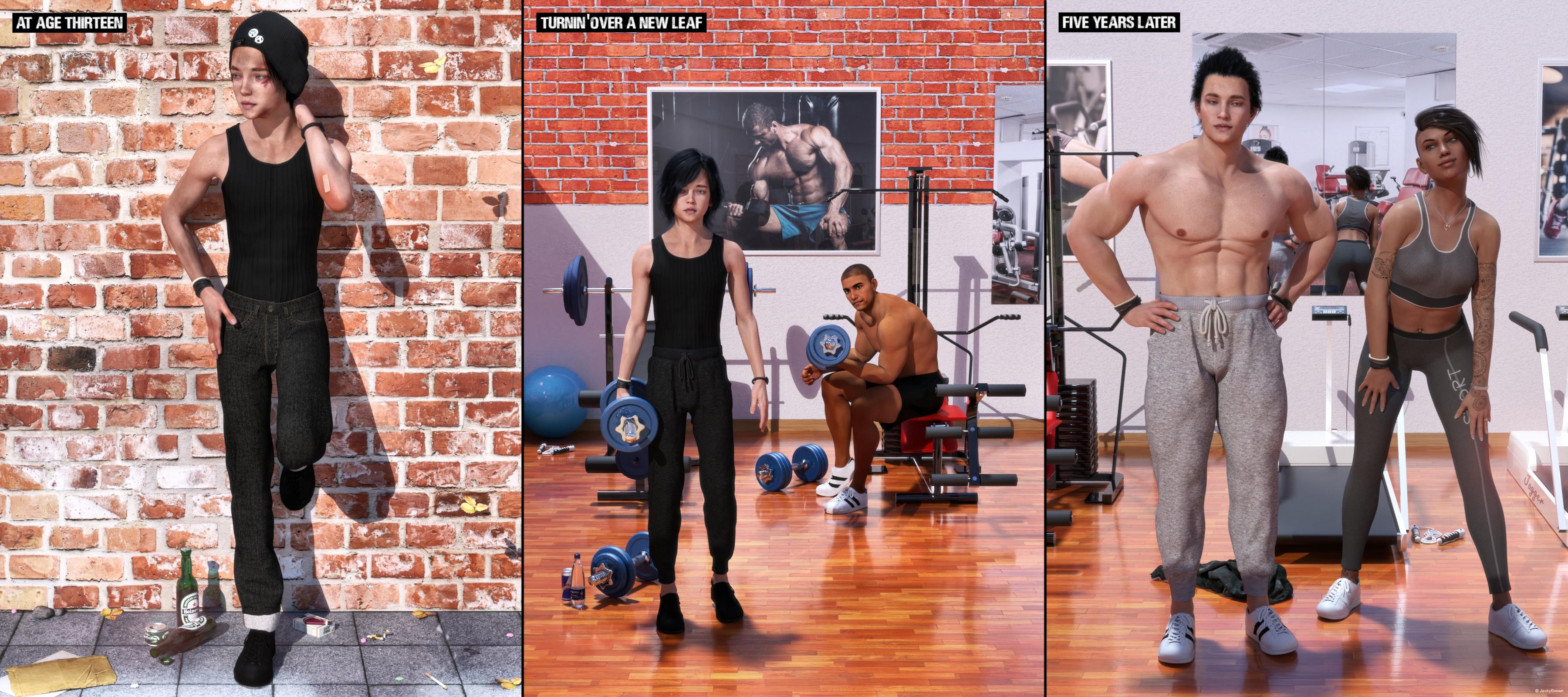
"The Change"
Starring: Adriana, Barack and Walther
The tale (a trilogy):AT AGE THIRTEEN
At age thirteen Walther was a tall skinny boy, always in trouble, fighting, skipping school every day, and even worse already smoking and drinking beer and he hardly ate. He was trying to hide it but it was obvious to see that he was on the wrong track...TURNIN' OVER A NEW LEAF
And while listening to 'Purple Haze' by Jimi Hendrix who was singing "Just can't go on like this..." he decided to make a big change, stop smoking and drinking alcohol and start to work out...FIVE YEARS LATER
"Ahh, come on take off your shirt, show me that sixpack again please please please!" Adriana his girlfriend is whining a little, but she knows that Walther doesn't mind because he himself is also quite proud of his 'new' body!
Soundtrack:South Park Bigger, Longer & Uncut 10 - I Can Change (© 1999)
https://www.youtube.com/watch?v=40wh9cxloqw
COUNTABLE FREEBIES: (Alphabetic order)#01! 100yen Lighter by Laboratory108
http://lab108.x0.com/lab108/personal.html (item 10)#02! Adhesive Bandage Prop for DAZ Studio by Mythic 3D
https://sharecg.com/v/87725/gallery/21/DAZ-Studio/Adhesive-Bandage-Prop-for-DAZ-Studio **#03! Adriana for Genesis 8 Female by Zia3d
https://www.renderosity.com/mod/freestuff/adriana-for-genesis-8-female/82827 **#04! Barack for G3M by dumbuser
https://www.sharecg.com/v/88699/gallery/21/DAZ-Studio/Barack-for-G3M **#05! Black Circles Tattoos by MysticArtDesign
https://sharecg.com/v/93735/browse/21/DAZ-Studio/MysticArtDesign-Black-Circles **#06! Beer Bottle for Daz Studio by forged3DX
https://www.deviantart.com/forged3dx/art/Beer-Bottle-for-Daz-Studio-608260601#07! Braid Bracelets for G3M, G3F, G8M, and G8F by Fisty
https://www.sharecg.com/v/92874/gallery/21/DAZ-Studio/Braid-Bracelets-for-G3M-G3F-G8M-and-G8F **#08! Bubbling's Navel Piercing by Fabiana
https://www.renderosity.com/mod/freestuff/bubblings-navel-piercing/69231 **#09! Channing's Button Prop re-posted by Seacanyon
https://www.sharecg.com/v/56691/related/21/DAZ-Studio/Channings-Button-Prop **#10! Cigarette for V4 by 3-d-c
https://www.sharecg.com/v/33769/gallery/11/Poser/Smoking-V4-Cigarette-SmartProp **#11! Cool Dude G8M Poses by seeker
https://www.renderosity.com/mod/freestuff/cool-dude-g8m-poses/83165 **#12! Crushable Beer Can by TrekkieGrrrl
https://www.sharecg.com/v/18196/gallery/11/Poser/Crushable-beer-can **#13! Delsin Beanie and Hair for G8M by InTheFlesh
https://sharecg.com/v/92677/browse/21/DAZ-Studio/FINAL-Delsin-Beanie-and-Hair-for-G8M **#14! dForce Tshirt & Pants for G3M&G8M by cabcab
https://www.renderosity.com/mod/freestuff/dforce-tshirt-amp-pants-for-g3m-amp-g8m/78865 **
[Jersey Pants]#15! Dirt & Abrasions by MysticArtDesign
https://sharecg.com/v/93837/gallery/21/DAZ-Studio/%F0%9F%93%8CDirt-Abrasions%F0%9F%93%8C **#16! Drinks by klausdbg
https://www.sharecg.com/v/74240/gallery/5/3D-Model/Summer-IV-Drinks **#17! Dumbbell set by Laboratory108
http://lab108.x0.com/lab108/sports.html (1st item)#18! EA Sidecut Hair for Genesis 3 & 8 Female(s) by EichhornArt
https://www.renderosity.com/mod/freestuff/ea-sidecut-hait-for-genesis-3-amp-8-femela-s-/82972 **
[Also used on Barack (G8M)]#19! Ellie Cosplay set for G2F by Beat578
https://www.sharecg.com/v/83479/gallery/21/DAZ-Studio/G2_Ellie_Cosplay **
[Longsleeves t-shirt used]#20! Everyday Outfit Genesis 8 by Teknology3D
https://www.renderosity.com/mod/freestuff/everyday-outfit-genesis-8/83138 **#21! Flo Makeup For Genesis 8 Females by AprilYSH
http://shop.aprilsvanity.com/flo-makeup-for-genesis-8-females.html#22! Frame DIN-A by klausdbg
https://www.sharecg.com/v/66868/gallery/5/3D-Model/Frame-DIN-A **#23! Gym Equipment (.3ds) by Arqam
https://www.sharecg.com/v/2894/browse/5/3D-Model/GYM-EQUIPMENT **#24! Gym Equipment 2 (.3ds) by Arqam
https://www.sharecg.com/v/2895/gallery/5/3D-Model/GYM-EQUIPMENT2 **#25! Gym Equipment 3 (.3ds) by Arqam
https://sharecg.com/v/2896/gallery/5/3D-Model/GYM-EQUIPMENT3 **#26! Huge Hoop Earrings for Genesis 3 Female by Fisty
https://sharecg.com/v/87043/gallery/21/DAZ-Studio/Huge-Hoop-Earrings-for-Genesis-3-Female **#27! Iray car related shader presets 'megapack' by Tom2099
https://www.deviantart.com/tom2099/art/Iray-car-related-shader-presets-megapack-539622361#28! Jumping Rope (.obj) by CGAxis
https://free.cgaxis.com/product/3d-jumping-rope/ *1#29! K-POP Extra Poses for Kanade 8 & Genesis 8 Female by LeoLee
https://www.renderosity.com/mod/freestuff/k-pop-extra-poses-for-kanade-8-amp-genesis-8-female/82823 **#30! Kawaii Buttons by MysticArtDesign
https://sharecg.com/v/94355/browse/21/DAZ-Studio/Kawaii-Buttons **#31! Koelle Alaaf! by klausdbg
https://www.sharecg.com/v/79631/gallery/5/3D-Model/Koelle-Alaaf%21 **
[Crowncork used, customized texture]#32! Koff cigarette pack and cigarette with morphs by TrekkieGrrrl
https://www.sharecg.com/v/18207/poser/Cigarettes **#33! LOUD AND CLEAR font by Billy Argel
https://www.dafont.com/loud-and-clear-2.font#34! M4 Jewelry Pack 5 by Cool Tuna Studio
http://www.cooltuna.com/poser/poser-freebies.html (item 10)
[Rubber bracelet used]#35! Morphing Chewing Gum by TrekkieGrrrl
https://www.sharecg.com/v/18199/poser/Morphing-chewinggum **#36! Morphing Garden Style Stone by Mapps Graphics
http://www.freewebs.com/mapps/downloads4.htm (last item)#37! Morphing Leaf by Adam Thwaites (Most Digital Creations)
https://www.most-digital-creations.com/free_poser_poses_textures_morphs_props_50.htm (item 5)#38! My Heart Necklace for Genesis 8 Female by amyaimei
https://www.deviantart.com/amyaimei/art/My-Heart-Necklace-for-Genesis-8-Female-729010047#39! Newspaper with morphs by TrekkieGrrrl
https://www.sharecg.com/v/18198/gallery/11/Poser/Morphing-Newspaper **
[Custom texture]#40! Pd-Soft Leather Daz Studio Shaders for Iray by Parrotdolphin (Janet)
https://sharecg.com/v/80223/gallery/7/Material-and-Shader/Pd-Soft-Leather-Daz-Studio-Shaders-for-Iray **#41! Red Brick Wall PBR Texture by CGAxis
https://free.cgaxis.com/product/red-brick-wall-free-pbr-texture/ *1#42! Red Brick Wall 2 PBR Texture by CGAxis
https://free.cgaxis.com/product/red-brick-wall-free-pbr-texture-2/ *1#43! Shiny Wood Tiles Free PBR Texture by CGAxis
https://free.cgaxis.com/product/shiny-wood-tiles-free-pbr-texture/ *1#44! Simple Smoke by Ladymist95
https://www.sharecg.com/v/76297/browse/21/DAZ-Studio/Simple-Smoke **#45! Simple Used Ashtray by 3-d-c
https://www.sharecg.com/v/38258/gallery/11/Poser/Simple-Used-Ashtray **
[Cigarette buds used]#46! "STRONG" for G8M Character Morph & Pose by Mar3D
https://www.renderosity.com/mod/freestuff/strong-for-g8m-character-morph-amp-pose/82833 **#47! Texture Pack 02 by Spacebones
https://sharecg.com/v/63522/gallery/6/Texture/Texture-Pack-02 **
[Paving used]#48! V Devil May Cry 5 Hair Prop for G8M by InTheFlesh
https://sharecg.com/v/93558/gallery/21/DAZ-Studio/UPDATE-V-Devil-May-Cry-5-Hair-Prop-for-G8M **#49! Vergil Devil May Cry 5 Hair for G8M by InTheFlesh
https://sharecg.com/v/93892/view/21/DAZ-Studio/Vergil-Devil-May-Cry-5-Hair-for-G8M **#50! Walther for G8M by Ruslanomar
https://sharecg.com/v/92848/browse/21/DAZ-Studio/G8M-Walther **
NO-COUNT ITEMS:--- AllenArt Iray Jewelry Shaders by AllenArt
++ Basic Wear for Genesis 8 Female by Daz Originals
++ Basic Wear for Genesis 8 Male by Daz Originals
--- Bezel Cut Ring for Genesis 3 Female by AllenArt
--- Casual Outfit for G3F by Tab [Pants used]
--- CasualOutfit2 for G3M by Tab [Bracelet used]
++ DAZ Studio Iray HDR Outdoor Environments by Daz Originals, DimensionTheory [Maui used]
--- Free Iray Outdoor Lights by Dreamlight
--- Nose Ring 01 for G2F, G3F and/or G8F by AllenArt
--- Safety Pin by AllenArt
--- Sneakers for G3F by Tab
PURCHASED/PAID FOR ITEMS: None 100% Freebies
*1 E-mail address required
** Registration required
#x! Countable Items (Bold ones are used by me for the first time I think.)
--- No longer available freebies
++ Free with DAZ Studio (or the Essentials)
$x. Purchased/Paid For Item
Rendered with DAZ Studio 4.10.0.123 (nVidia Iray)Other free software used: GIMP v2.10.8, Irfanview 4.52 and PoseRay 3.19.29
.3DS converted to .OBJ with PoseRay
Postwork: used the AltaLux Image Enhancement Filter (Effect) by Stefano Tommesani that comes with Irfanview and some filters (oa) that come with GIMP. Also used mcjDenoise by mcasual. (https://sites.google.com/site/mcasualsdazscripts9/mcjdenoise)
"The Change"
Clothing Converter from Gen 8 Female to Gen 8 MaleYou can try to replace the "Preferred Base" by "Genesis 8/Male" in the Scene Identification
And export the OBJ of the outfit after applying to male morph to the female figure, then import it as a morph to the outfit weared by the male figure.
Easy Environments: Wuxia Mountains (Daz Studio) [Commercial]Thank you flip mode. lol. I added the god-rays and the sun lens flare with my free panes http://www.sharecg.com/v/92902/gallery/21/DAZ-Studio/Ivys-Magic-Pane-prop to make the scene more dramatic. it was a good effect for this render and a time saver not having to do them in Photoshop in post work , I like to do things outside the box .. that s why i though this would be a good scene for a huge panoramic scene.
i love the morph dials on the trees that going to be a nice feature when it comes time to use them in animation. the hdr is as beautiful as your other set;'s sky domes. & I really appreciate you making the 3dl version for this set . like i mentioned before I will get lots of use form th set you never disappoint

I just downloaded your prop, Ivy. I hope it comes with usage instructions because that looks amazing ... especially since I'm a 3DL person and find it harder and harder to get good 3L tools.
Daz 3D is part of

Connect
DAZ Productions, Inc.
7533 S Center View Ct #4664
West Jordan, UT 84084Licensing Agreement | Terms of Service | Privacy Policy | EULA
© 2026 Daz Productions Inc. All Rights Reserved.