-
Mesh Grabber: Saved Morphs - Transfer or Delete?
crosswind said:
JP said:
Hi,
I purchased the Mesh Grabber Bundle. I have modified the mesh of a G8 Figure and created a morph so I can animate the setting. I am finding that a clothing item does not follow the morph because the Mesh Grabber morph that was saved with the G8 figure is missing on the clothing item - I checked for hidden parameters. Adding the clothing item after the mesh grabber morph has been applied to the G8 figure also does not add the morph. Even if I save the scene, close Daz and reload the saved scene.
Is there a way to copy the Mesh Grabber morph over to the clothing item so it matches the G8 figure, including when the morph is animated? I tried to transfer the morph via the Transfer Utility. It did not work.
No, there isn't because G8 and the clothing are different figures with different geometry. You want to make that partial body morph Auto Follow: in Parameter Settings of the saved morph made with MG on G8 figure, check Auto Follow. Save it as Morph Asset (Modifier Asset in DS 4.23+). Reload your scene.
Is it possible to delete a Mesh Grabber morph from the figure in case I decide to get rid of it and start over with a new morph? I know I can zero out the morph, but I would like to have a clean figure without orphaned Mesh Grabber morphs.
Yes, certainly. But if you ever saved it as a Morph / Modifier Asset, you also have to delete its DSF file in data folder.
I did not save the morph as an asset. It's just live in the scene where I applied the Mesh Grabber morph. How do I delete the morph from the figure completely? And is there a way to copy that morph to a clothing item?
Mesh Grabber: Saved Morphs - Transfer or Delete?JP said:
Hi,
I purchased the Mesh Grabber Bundle. I have modified the mesh of a G8 Figure and created a morph so I can animate the setting. I am finding that a clothing item does not follow the morph because the Mesh Grabber morph that was saved with the G8 figure is missing on the clothing item - I checked for hidden parameters. Adding the clothing item after the mesh grabber morph has been applied to the G8 figure also does not add the morph. Even if I save the scene, close Daz and reload the saved scene.
Is there a way to copy the Mesh Grabber morph over to the clothing item so it matches the G8 figure, including when the morph is animated? I tried to transfer the morph via the Transfer Utility. It did not work.
No, there isn't because G8 and the clothing are different figures with different geometry. You want to make that partial body morph Auto Follow: in Parameter Settings of the saved morph made with MG on G8 figure, check Auto Follow. Save it as Morph Asset (Modifier Asset in DS 4.23+). Reload your scene.
Is it possible to delete a Mesh Grabber morph from the figure in case I decide to get rid of it and start over with a new morph? I know I can zero out the morph, but I would like to have a clean figure without orphaned Mesh Grabber morphs.
Yes, certainly. But if you ever saved it as a Morph / Modifier Asset, you also have to delete its DSF file in data folder.
Render your buys! Use buys from the current month and the previous month of sales"Evening Rendezvous"
Had a little time this holiday weekend to test some new stuff. I might have gone with a smidge less over-the-top presentation of the dress, but it appears the poses with this set pose the figure and the garment, and aside from deleting and re-loading the dress (which I'd already textured with Lully's Colors - definitely becoming a go-to favorite) it wasn't obvious to me how to un-pose the dress.
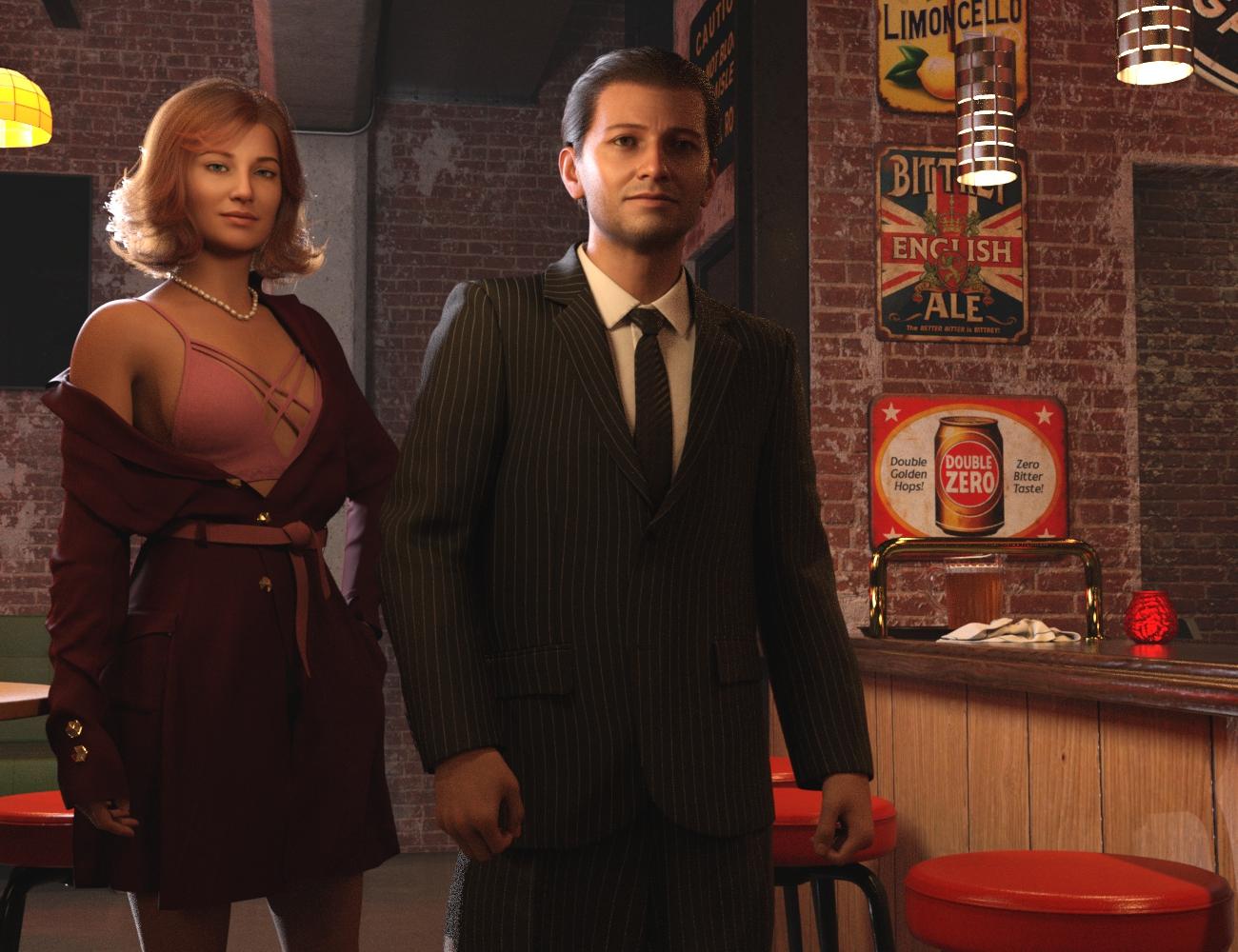
https://www.daz3d.com/murts-place
https://www.daz3d.com/ak-mature-hair-for-genesis-9
https://www.daz3d.com/dforce-hnc24-basic-suit-outfits-for-genesis-9
https://www.daz3d.com/dforce-fe-strand-based-short-curly-hair-for-genesis-9
https://www.daz3d.com/dforce-brz-belted-dress-and-poses-for-genesis-9
https://www.daz3d.com/alo-kymatia-hair-for-genesis-9-8-and-81-female
(the necklace)
https://www.daz3d.com/mdd-madelyn-for-genesis-9
(for skin, underlying the Face Transfer 2-derived textures)Lully's Colors ... again. Freebie, no longer available. Also used the earrings from the FK dfForce Charmed Soul set, but in this last version, I switched to a hair that covers her ears.
Mesh Grabber: Saved Morphs - Transfer or Delete?Hi,
I purchased the Mesh Grabber Bundle. I have modified the mesh of a G8 Figure and created a morph so I can animate the setting. I am finding that a clothing item does not follow the morph because the Mesh Grabber morph that was saved with the G8 figure is missing on the clothing item - I checked for hidden parameters. Adding the clothing item after the mesh grabber morph has been applied to the G8 figure also does not add the morph. Even if I save the scene, close Daz and reload the saved scene.
Is there a way to copy the Mesh Grabber morph over to the clothing item so it matches the G8 figure, including when the morph is animated? I tried to transfer the morph via the Transfer Utility. It did not work.
Is it possible to delete a Mesh Grabber morph from the figure in case I decide to get rid of it and start over with a new morph? I know I can zero out the morph, but I would like to have a clean figure without orphaned Mesh Grabber morphs.
Quads vs Triangles (or other n-gons)Mada said:
1. You get better subdivision results with quad mesh. Triangles can cause irregularities, pinching, or distortion when subdivided, leading to artifacts in the mesh.
2. Quads deform more predictably when rigged and animated.
3. Quads provide a clearer, more logical flow of edge loops - essential for modeling and making adjustments to the mesh.
So the question would be - are you planning to morph the item or create JCMs? Use subdivision on it? If not - triangles should work fine
Thanks, that helps. The item works as is, but I want to add some geometry to cover specific areas of my character. I'll play around on my day off and see what happens.
help wantedbluto said:
yes we have but there is something funky that happent to the underarm and crotch areas something to do with joint motion controls we cant figure out
You may be running into the fact that because the base poses are different, G3 and G8 don't have the same corrective morphs for these areas.
Even though the base shape and the figure's posing range are similar, the different starting pose means the JCMs are named differently (G3's arm only bends up 35 degrees from its base pose to its upper limit, so has pJCMShldrUp_35_L, whereas G8's arm has to bend up 90 degrees and its equivalent but non-identical JCM is pJCMShldrUp_90_L) and G3 JCMs therefore aren't automatically driven by G8's JCM controllers, as it doesn't see them as the same morph.
So if you need JCMs for these areas (and you generally do), then they'll need replacing.
What model is this?I'm sure I have seen the skin texture, but since it seems to be part of a comic the creator might have made a custom morph and added a skin from a different character, I do that all the time. Best chance is to ask the creato themselves
What model is this?It's not a default character. It's Victoria 9's skin, but not her morph, so it's a mix and thus probably unidentifiable.Quads vs Triangles (or other n-gons)1. You get better subdivision results with quad mesh. Triangles can cause irregularities, pinching, or distortion when subdivided, leading to artifacts in the mesh.
2. Quads deform more predictably when rigged and animated.
3. Quads provide a clearer, more logical flow of edge loops - essential for modeling and making adjustments to the mesh.
So the question would be - are you planning to morph the item or create JCMs? Use subdivision on it? If not - triangles should work fine
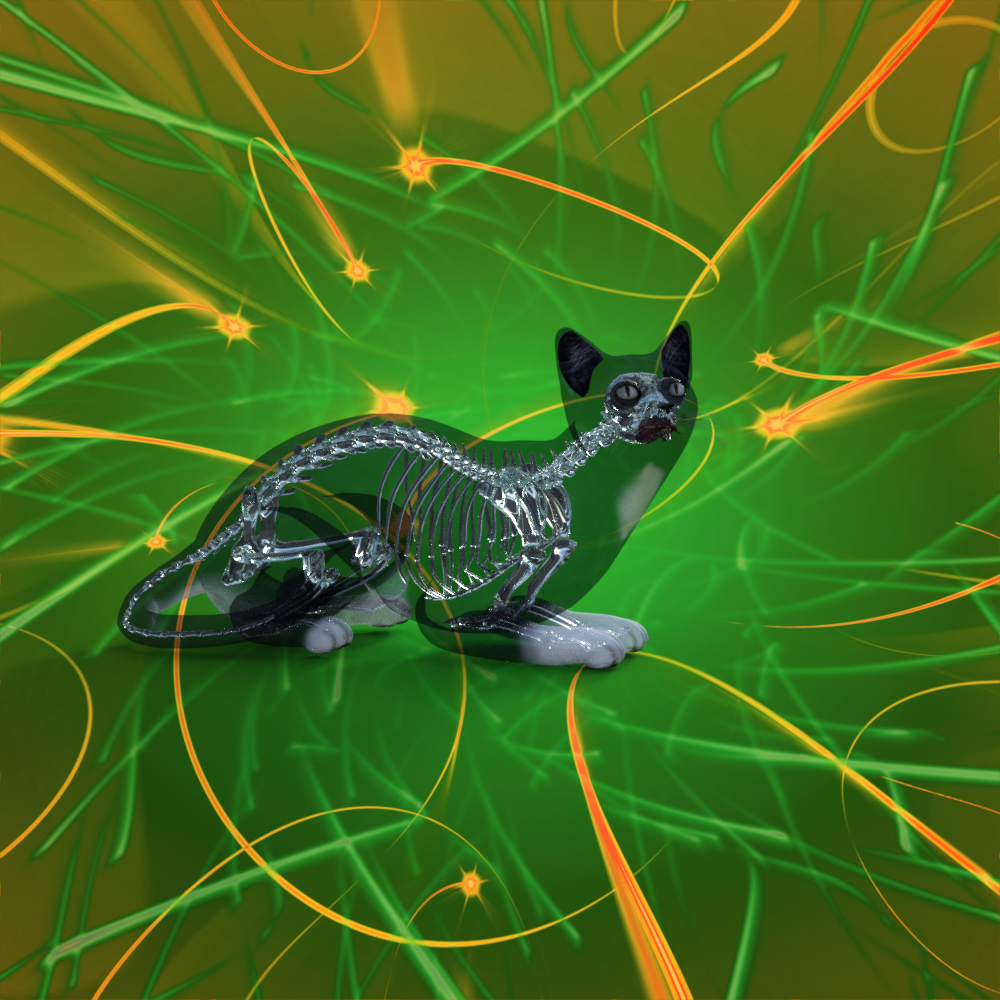
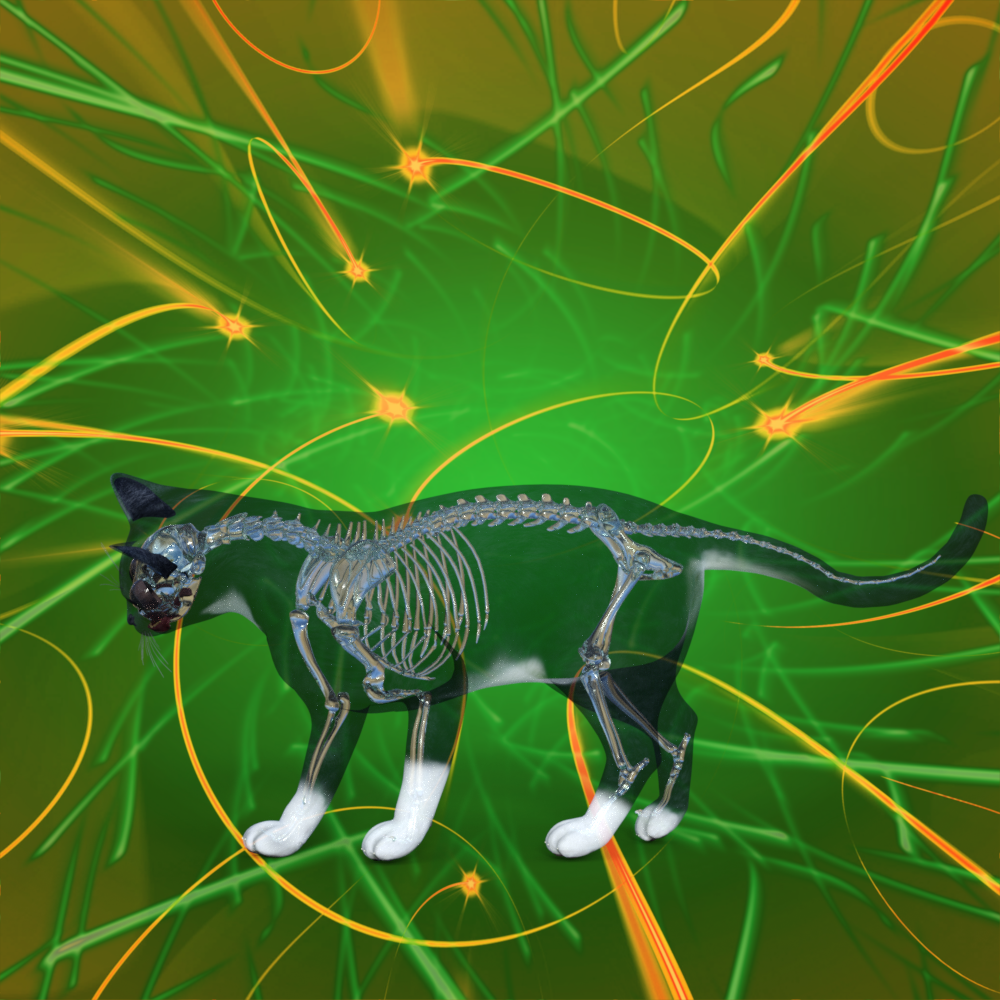
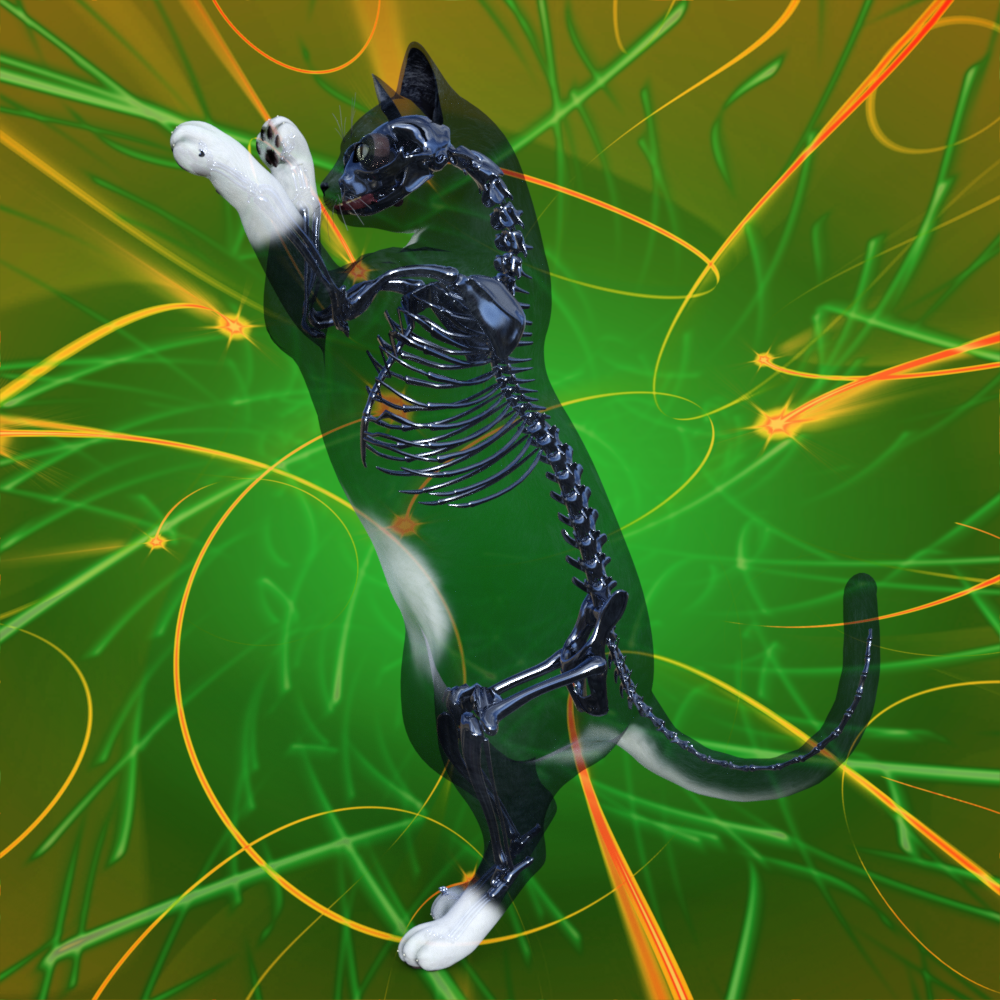
2025 - New Freebies from CEFTo start off this year's new treasures whatever they all might be, here is a very basic pose for the beautiful cat skeleton. I used it to test out the concept of making it into a skeleton to fit inside the Daz House Cat, turning the skeleton into a clothing piece and thusly enabling it to pose along with the Daz House Cat. The transparency of the house cat was turned down to enable seeing the skeleton inside the cat.
Required products:
https://www.daz3d.com/cat-skeleton-mr-rattlepaws
https://www.daz3d.com/daz-house-cat-with-dforce-hair
Required program: Daz Studio
Some knowledge to get an .obj file out of and back into D/S. I use Hexagon.Step1: Apply Pose to Skeleton, somehow get the .obj out of D/S.
Delete skeleton from scene.
Somehow get .obj back into D/S.
Load into the scene the Daz House Cat.
Unselect everything. Use the Transfer Utility to turn the skeleton obj into a clothing figure. For bones I tried the Actor:Follower which seems to work just fine. Use whichever option you find works for you.
Yes to "remove the prop" IF your edition of D/S has that.When done, BEFORE messing around with the cat, select the skeleton clothing and save it to your own 'private' folders. {one cannot share such derivative products}
Providing that one has not renamed the surfaces etc, the original mats can be used on your skeleton clothing.
The pose attached to this post is very basic. You can tweak it as desired BEFORE exporting out the .obj file.
n.b. The importance of deleting the skeleton from the scene after export, is to prevent the incoming .obj file having "(2)" added to the name and surface areas ;-)
 Morph Master
matew said:
Regarding the bug where Morph Master doesn't work in older versions of DAZ:
Thank you, everyone! It seems you were right. One of my customers also reached this conclusion. He kindly agreed to help me identify the issue, as I was unable to reproduce it on my PC. He encrypted my unencrypted script on his own system, and it didn’t work. However, once he replaced the first comment from:
// DAZ Studio version 4.22.0.16 filetype DAZ Scriptto
// DAZ Studio version 4.9.0.0 filetype DAZ Scriptit started working! It's extremely strange that a comment string could cause so much trouble. One customer already initiated a refund, most likely due to this issue. I'm at a loss for words. :(
Now, the solution:
- The easiest solution is to update DAZ Studio.
- If you don't want to update DAZ Studio, please wait a bit. I've contacted the support team, and they have escalated the issue to the tech team. I'm waiting for confirmation from the person helping me to ensure 100% that this fix works before notifying the tech team and reuploading the scripts.
- If you don't want to update DAZ Studio and don't want to wait, please PM me with proof of purchase, and I'll provide you with a link. However, I still need to be completely sure the solution works before proceeding.
Thank you for your patience and understanding!
Cool. I'm glad efforts are in for making Morph Master work on older DS versions. I see this other user goes back to 4.9. If they can make it work on 4.9, then I'll likely have some luck with my 4.11.
I just purchased Morph Master today, but I likely won't get a chance to try it for many months. And maybe by then, the procedure for getting Morph Master to work on older DS version will be settled and documented.
Legacy UV plus different UV material?Directly... ? Nope ~ because UV Sets have to be ALL set as G8F on G9 and its Legacy surfaces. For instance, if you want to use G9 LIE tattoos with Legacy UVs, You need to convert G9 texture maps to G8F, with Map Transfer (depending on the tattoo positions...). Then assign the converted maps in LIE.
Help looking for a skin/ModelThe base seems Teen Josie 7 / Teen Josie 8, and / or Josie's alt. characters plus some tweaking / blending with the head morphs.... but not Josie 9. Skin textures can also be easily modified / retouched. An example : https://www.daz3d.com/paisley-for-teen-josie-8
Texture maps / UVs made for G3F, V7, G8F can be set and/or exchanged from one another, or simply convert by using Map Transfer in DS.
Dforce clothing going through modelscrosswind said:
aadarsh.satpute said:
Okay i tried the figure with base g8f. It seems to workng well no issues. Is there any way to fix my old figure so i dont need to recreate and adjust every morph again?
As I mentioned above, you save a Shaping Preset (or a Property Preset incl. both shaping and materials...) with your old character. Apply the preset to G8F Base figure, simulate to see if it works.
If the issue persists, refer to this tutorialhttps://youtu.be/mZ1TOAqIzeU?si=L6j7Tm-1k3nuYQs9 to create single dials of head / body morphs. Then try Simulation again.
Thank you Crosswind the above image i shared is a body morph and head morph i applied. But I thaught of maybe get the whole model working again as I have added a lot of morphs on it so I dont have to rework to make the character again. but I have never done morphing on g8 base which seems much better idea. Thank you for it.
Every character I have loads with unwanted extra morphs by defaulttravaler125 said:
"Don't use Save Modified Assets, use Save Morph Asset." I have the same issue but the option for saving morf assets is greyed out and list it as "depreciated". The infecting morf isn't even showing up in the paramaters tab so I can not figure out what morf is causiong the problem. I had this happen to a G8F figure and had to delete the morf compleetly but it still tries to load with every save file that was saved before the problem started. I do not want to go threw tyhe mess of opening and resaving nhundreds of files just to get risd of a morf target the program refuses to set to zero.
Since you're using DS 4.23+, still suggest you use Save Modified Assets as long as the default values of culprit morph properties are zeroed out by using PerttiA's process. In the list of modified asset, you just need to check the culprit morphs, then Accept.
This function was enhanced which is better than older DS version in which the listed morph properties cannot be checked ~~
Recreating Viconia DeVir from BG2 as G8F based on a 2D portraitI agree they dropped the ball on the BG3 version. Jaheira and Minsc I recognised at first glance (granted, Minsc's tattoo makes that easy); Viconia could have been any generic drow matriarch.
For your goal - there are two things you need. One is the morph; the other is the texture.
For the morph, it's not just the cheekbones but also the angle of the eyes that's different from the Zdenka picture. The lips are also a little different. The nose and chin appear the same to me.
For the texture, I'm afraid I'm not sure. You'd need a base greyish skin with makeup options for the blush, lips, and an overall reddish-purple (?) sheen.
Good luck with your endeavour - would love to see your results :)
Odd request... convert clothes from Gen3 back to V4?I use the V4 clone shapes or Autofit it to a figure which has one then convert the clothing to a prop or just export an obj
then use Poser if I am keen otherwise temporarily convert V4 rigging to weighmapping and autofit it, don't save V4 just the clothing as a support asset, it will conform to a fresh legacy rigged V4 and autofollow any injected morphs without needing to run the transfer active morph projection dialogue
Can't change hair color of Soft Curls Ponytail for Genesis 9crosswind said:
SpaceCoyote said:
Thanks for your reply, @crosswind. By 'can't change' I mean that the default hair is a brownish-red colour but I can't make it any other color using the method you describe. This method works just fine with any other hair I've tested (and used to work for me with Soft Curls Ponytail). Thanks for checking on your end - at least it's not a problem for everyone else. I've tried deleting this hair from the Install Manager and redownloading/reinstalling but unfortunately the hair is always the default brownish-red. :(
Can you check in your Viewport, which DrawStyle are you using ? And can you find any warning / error message in DS Log ?
I normally use Texture Shaded in the viewport but I tried a number of display styles, including Iray, and they all show the same red hair after I try a different material. The Log might give some clues as to what's wrong. It shows a bunch of warnings and references to items missing:
2025-01-16 10:55:03.550 [INFO] :: Prepare asset load (open): /People/Genesis 9/Hair/Daz Originals/OOT Soft Curls Ponytail/Soft Curls Ponytail Genesis 9 B.duf
2025-01-16 10:55:03.550 [INFO] :: Locking viewport redraw...
2025-01-16 10:55:03.551 [INFO] :: Viewport redraw locked.
2025-01-16 10:55:03.612 [VERBOSE] :: Native format content directories: 2
2025-01-16 10:55:03.612 [VERBOSE] :: Poser format content directories: 2
2025-01-16 10:55:03.612 [VERBOSE] :: Other import format content directories: 0
2025-01-16 10:55:03.612 [INFO] :: Begin asset load (open): /People/Genesis 9/Hair/Daz Originals/OOT Soft Curls Ponytail/Soft Curls Ponytail Genesis 9 B.duf
2025-01-16 10:55:03.615 [INFO] :: Clearing the scene...
2025-01-16 10:55:03.624 [INFO] :: *** Scene Cleared ***
2025-01-16 10:55:03.627 [INFO] :: Determining missing assets...
2025-01-16 10:55:04.065 [INFO] :: Setting textures...
2025-01-16 10:55:04.066 [WARNING] :: \src\sdksource\fileinput\dzassetdaz.cpp(6476): Node parent not found.
2025-01-16 10:55:04.071 [INFO] :: Scanning for addons...
2025-01-16 10:55:04.086 [INFO] :: Creating node geometry...
2025-01-16 10:55:04.090 [INFO] :: Creating UV sets...
2025-01-16 10:55:04.090 [INFO] :: Creating materials...
2025-01-16 10:55:05.237 [INFO] :: Resolving legacy figures...
2025-01-16 10:55:05.238 [INFO] :: Preparing modifiers...
2025-01-16 10:55:05.238 [INFO] :: Creating modifiers...
2025-01-16 10:55:05.247 [INFO] :: Resolving 202 formulas...
2025-01-16 10:55:05.247 [INFO] :: Finding formula properties...
2025-01-16 10:55:05.247 [WARNING] :: \src\sdksource\fileinput\dzassetdaz.cpp(570): Node for formula property not found:
URI: Genesis9/spine4:/data/DAZ%203D/Genesis%209/Base/Genesis9.dsf#spine4?rotation/y
2025-01-16 10:55:05.247 [WARNING] :: \src\sdksource\fileinput\dzassetdaz.cpp(570): Node for formula property not found:
URI: Genesis9/neck2:/data/DAZ%203D/Genesis%209/Base/Genesis9.dsf#neck2?rotation/z
2025-01-16 10:55:05.247 [WARNING] :: \src\sdksource\fileinput\dzassetdaz.cpp(645): Formula target property not found:
File: /data/outoftouch/Soft Curls Ponytail/Soft Curls Ponytail Genesis 9 B/Morphs/outoftouch/Base/Fix-Spine4Twist-10.dsf
URI: Genesis9/spine4:/data/DAZ%203D/Genesis%209/Base/Genesis9.dsf#spine4?rotation/y
2025-01-16 10:55:05.247 [WARNING] :: \src\sdksource\fileinput\dzassetdaz.cpp(645): Formula target property not found:
File: /data/outoftouch/Soft Curls Ponytail/Soft Curls Ponytail Genesis 9 B/Morphs/outoftouch/Base/Fix-Neck2Side+10.dsf
URI: Genesis9/neck2:/data/DAZ%203D/Genesis%209/Base/Genesis9.dsf#neck2?rotation/z
2025-01-16 10:55:05.247 [WARNING] :: \src\sdksource\fileinput\dzassetdaz.cpp(570): Node for formula property not found:
URI: Genesis9/spine4:/data/DAZ%203D/Genesis%209/Base/Genesis9.dsf#spine4?rotation/y
2025-01-16 10:55:05.247 [WARNING] :: \src\sdksource\fileinput\dzassetdaz.cpp(645): Formula target property not found:
File: /data/outoftouch/Soft Curls Ponytail/Soft Curls Ponytail Genesis 9 B/Morphs/outoftouch/Base/Fix-Spine4Twist+10.dsf
URI: Genesis9/spine4:/data/DAZ%203D/Genesis%209/Base/Genesis9.dsf#spine4?rotation/y
2025-01-16 10:55:05.247 [WARNING] :: \src\sdksource\fileinput\dzassetdaz.cpp(570): Node for formula property not found:
URI: Genesis9/neck2:/data/DAZ%203D/Genesis%209/Base/Genesis9.dsf#neck2?rotation/x
2025-01-16 10:55:05.247 [WARNING] :: \src\sdksource\fileinput\dzassetdaz.cpp(570): Node for formula property not found:
URI: Genesis9/spine4:/data/DAZ%203D/Genesis%209/Base/Genesis9.dsf#spine4?rotation/z
2025-01-16 10:55:05.247 [WARNING] :: \src\sdksource\fileinput\dzassetdaz.cpp(645): Formula target property not found:
File: /data/outoftouch/Soft Curls Ponytail/Soft Curls Ponytail Genesis 9 B/Morphs/outoftouch/Base/Fix-Spine4Side-10.dsf
URI: Genesis9/spine4:/data/DAZ%203D/Genesis%209/Base/Genesis9.dsf#spine4?rotation/z
2025-01-16 10:55:05.247 [WARNING] :: \src\sdksource\fileinput\dzassetdaz.cpp(645): Formula target property not found:
File: /data/outoftouch/Soft Curls Ponytail/Soft Curls Ponytail Genesis 9 B/Morphs/outoftouch/Base/Fix-Neck2Bend-27.dsf
URI: Genesis9/neck2:/data/DAZ%203D/Genesis%209/Base/Genesis9.dsf#neck2?rotation/x
2025-01-16 10:55:05.248 [WARNING] :: \src\sdksource\fileinput\dzassetdaz.cpp(570): Node for formula property not found:
URI: Genesis9/spine4:/data/DAZ%203D/Genesis%209/Base/Genesis9.dsf#spine4?rotation/z
2025-01-16 10:55:05.248 [WARNING] :: \src\sdksource\fileinput\dzassetdaz.cpp(645): Formula target property not found:
File: /data/outoftouch/Soft Curls Ponytail/Soft Curls Ponytail Genesis 9 B/Morphs/outoftouch/Base/Fix-Spine4Side+10.dsf
URI: Genesis9/spine4:/data/DAZ%203D/Genesis%209/Base/Genesis9.dsf#spine4?rotation/z
2025-01-16 10:55:05.248 [WARNING] :: \src\sdksource\fileinput\dzassetdaz.cpp(570): Node for formula property not found:
URI: Genesis9/neck2:/data/DAZ%203D/Genesis%209/Base/Genesis9.dsf#neck2?rotation/x
2025-01-16 10:55:05.248 [WARNING] :: \src\sdksource\fileinput\dzassetdaz.cpp(570): Node for formula property not found:
URI: Genesis9/spine4:/data/DAZ%203D/Genesis%209/Base/Genesis9.dsf#spine4?rotation/x
2025-01-16 10:55:05.248 [WARNING] :: \src\sdksource\fileinput\dzassetdaz.cpp(645): Formula target property not found:
File: /data/outoftouch/Soft Curls Ponytail/Soft Curls Ponytail Genesis 9 B/Morphs/outoftouch/Base/Fix-Neck2Bend+24.dsf
URI: Genesis9/neck2:/data/DAZ%203D/Genesis%209/Base/Genesis9.dsf#neck2?rotation/x
2025-01-16 10:55:05.248 [WARNING] :: \src\sdksource\fileinput\dzassetdaz.cpp(645): Formula target property not found:
File: /data/outoftouch/Soft Curls Ponytail/Soft Curls Ponytail Genesis 9 B/Morphs/outoftouch/Base/Fix-Spine4Bend-15.dsf
URI: Genesis9/spine4:/data/DAZ%203D/Genesis%209/Base/Genesis9.dsf#spine4?rotation/x
2025-01-16 10:55:05.248 [WARNING] :: \src\sdksource\fileinput\dzassetdaz.cpp(570): Node for formula property not found:
URI: Genesis9/spine4:/data/DAZ%203D/Genesis%209/Base/Genesis9.dsf#spine4?rotation/x
2025-01-16 10:55:05.248 [WARNING] :: \src\sdksource\fileinput\dzassetdaz.cpp(570): Node for formula property not found:
URI: Genesis9/neck1:/data/DAZ%203D/Genesis%209/Base/Genesis9.dsf#neck1?rotation/y
2025-01-16 10:55:05.248 [WARNING] :: \src\sdksource\fileinput\dzassetdaz.cpp(645): Formula target property not found:
File: /data/outoftouch/Soft Curls Ponytail/Soft Curls Ponytail Genesis 9 B/Morphs/outoftouch/Base/Fix-Spine4Bend+15.dsf
URI: Genesis9/spine4:/data/DAZ%203D/Genesis%209/Base/Genesis9.dsf#spine4?rotation/x
2025-01-16 10:55:05.248 [WARNING] :: \src\sdksource\fileinput\dzassetdaz.cpp(645): Formula target property not found:
File: /data/outoftouch/Soft Curls Ponytail/Soft Curls Ponytail Genesis 9 B/Morphs/outoftouch/Base/Fix-Neck1Twist-22.dsf
URI: Genesis9/neck1:/data/DAZ%203D/Genesis%209/Base/Genesis9.dsf#neck1?rotation/y
2025-01-16 10:55:05.248 [WARNING] :: \src\sdksource\fileinput\dzassetdaz.cpp(570): Node for formula property not found:
URI: Genesis9/neck1:/data/DAZ%203D/Genesis%209/Base/Genesis9.dsf#neck1?rotation/y
2025-01-16 10:55:05.248 [WARNING] :: \src\sdksource\fileinput\dzassetdaz.cpp(570): Node for formula property not found:
URI: Genesis9/neck2:/data/DAZ%203D/Genesis%209/Base/Genesis9.dsf#neck2?rotation/y
2025-01-16 10:55:05.248 [WARNING] :: \src\sdksource\fileinput\dzassetdaz.cpp(645): Formula target property not found:
File: /data/outoftouch/Soft Curls Ponytail/Soft Curls Ponytail Genesis 9 B/Morphs/outoftouch/Base/Fix-Neck1Twist+22.dsf
URI: Genesis9/neck1:/data/DAZ%203D/Genesis%209/Base/Genesis9.dsf#neck1?rotation/y
2025-01-16 10:55:05.248 [WARNING] :: \src\sdksource\fileinput\dzassetdaz.cpp(645): Formula target property not found:
File: /data/outoftouch/Soft Curls Ponytail/Soft Curls Ponytail Genesis 9 B/Morphs/outoftouch/Base/Fix-Neck2Twist-22.dsf
URI: Genesis9/neck2:/data/DAZ%203D/Genesis%209/Base/Genesis9.dsf#neck2?rotation/y
2025-01-16 10:55:05.248 [WARNING] :: \src\sdksource\fileinput\dzassetdaz.cpp(570): Node for formula property not found:
URI: Genesis9/neck2:/data/DAZ%203D/Genesis%209/Base/Genesis9.dsf#neck2?rotation/y
2025-01-16 10:55:05.248 [WARNING] :: \src\sdksource\fileinput\dzassetdaz.cpp(570): Node for formula property not found:
URI: Genesis9/neck1:/data/DAZ%203D/Genesis%209/Base/Genesis9.dsf#neck1?rotation/z
2025-01-16 10:55:05.248 [WARNING] :: \src\sdksource\fileinput\dzassetdaz.cpp(645): Formula target property not found:
File: /data/outoftouch/Soft Curls Ponytail/Soft Curls Ponytail Genesis 9 B/Morphs/outoftouch/Base/Fix-Neck2Twist+22.dsf
URI: Genesis9/neck2:/data/DAZ%203D/Genesis%209/Base/Genesis9.dsf#neck2?rotation/y
2025-01-16 10:55:05.249 [WARNING] :: \src\sdksource\fileinput\dzassetdaz.cpp(645): Formula target property not found:
File: /data/outoftouch/Soft Curls Ponytail/Soft Curls Ponytail Genesis 9 B/Morphs/outoftouch/Base/Fix-Neck1Side-25.dsf
URI: Genesis9/neck1:/data/DAZ%203D/Genesis%209/Base/Genesis9.dsf#neck1?rotation/z
2025-01-16 10:55:05.249 [WARNING] :: \src\sdksource\fileinput\dzassetdaz.cpp(570): Node for formula property not found:
URI: Genesis9/neck2:/data/DAZ%203D/Genesis%209/Base/Genesis9.dsf#neck2?rotation/z
2025-01-16 10:55:05.249 [WARNING] :: \src\sdksource\fileinput\dzassetdaz.cpp(570): Node for formula property not found:
URI: Genesis9/neck1:/data/DAZ%203D/Genesis%209/Base/Genesis9.dsf#neck1?rotation/z
2025-01-16 10:55:05.249 [WARNING] :: \src\sdksource\fileinput\dzassetdaz.cpp(645): Formula target property not found:
File: /data/outoftouch/Soft Curls Ponytail/Soft Curls Ponytail Genesis 9 B/Morphs/outoftouch/Base/Fix-Neck1Side+25.dsf
URI: Genesis9/neck1:/data/DAZ%203D/Genesis%209/Base/Genesis9.dsf#neck1?rotation/z
2025-01-16 10:55:05.249 [WARNING] :: \src\sdksource\fileinput\dzassetdaz.cpp(645): Formula target property not found:
File: /data/outoftouch/Soft Curls Ponytail/Soft Curls Ponytail Genesis 9 B/Morphs/outoftouch/Base/Fix-Neck2Side-10.dsf
URI: Genesis9/neck2:/data/DAZ%203D/Genesis%209/Base/Genesis9.dsf#neck2?rotation/z
2025-01-16 10:55:05.249 [WARNING] :: \src\sdksource\fileinput\dzassetdaz.cpp(570): Node for formula property not found:
URI: Genesis9/neck1:/data/DAZ%203D/Genesis%209/Base/Genesis9.dsf#neck1?rotation/x
2025-01-16 10:55:05.249 [WARNING] :: \src\sdksource\fileinput\dzassetdaz.cpp(645): Formula target property not found:
File: /data/outoftouch/Soft Curls Ponytail/Soft Curls Ponytail Genesis 9 B/Morphs/outoftouch/Base/Fix-Neck1Bend-25.dsf
URI: Genesis9/neck1:/data/DAZ%203D/Genesis%209/Base/Genesis9.dsf#neck1?rotation/x
2025-01-16 10:55:05.249 [WARNING] :: \src\sdksource\fileinput\dzassetdaz.cpp(570): Node for formula property not found:
URI: Genesis9/neck1:/data/DAZ%203D/Genesis%209/Base/Genesis9.dsf#neck1?rotation/x
2025-01-16 10:55:05.249 [WARNING] :: \src\sdksource\fileinput\dzassetdaz.cpp(645): Formula target property not found:
File: /data/outoftouch/Soft Curls Ponytail/Soft Curls Ponytail Genesis 9 B/Morphs/outoftouch/Base/Fix-Neck1Bend+25.dsf
URI: Genesis9/neck1:/data/DAZ%203D/Genesis%209/Base/Genesis9.dsf#neck1?rotation/x
2025-01-16 10:55:05.249 [WARNING] :: \src\sdksource\fileinput\dzassetdaz.cpp(570): Node for formula property not found:
URI: Genesis9/head:/data/DAZ%203D/Genesis%209/Base/Genesis9.dsf#head?rotation/y
2025-01-16 10:55:05.249 [WARNING] :: \src\sdksource\fileinput\dzassetdaz.cpp(645): Formula target property not found:
File: /data/outoftouch/Soft Curls Ponytail/Soft Curls Ponytail Genesis 9 B/Morphs/outoftouch/Base/Fix-HeadTwist-22.dsf
URI: Genesis9/head:/data/DAZ%203D/Genesis%209/Base/Genesis9.dsf#head?rotation/y
2025-01-16 10:55:05.249 [WARNING] :: \src\sdksource\fileinput\dzassetdaz.cpp(570): Node for formula property not found:
URI: Genesis9/head:/data/DAZ%203D/Genesis%209/Base/Genesis9.dsf#head?rotation/y
2025-01-16 10:55:05.249 [WARNING] :: \src\sdksource\fileinput\dzassetdaz.cpp(645): Formula target property not found:
File: /data/outoftouch/Soft Curls Ponytail/Soft Curls Ponytail Genesis 9 B/Morphs/outoftouch/Base/Fix-HeadTwist+22.dsf
URI: Genesis9/head:/data/DAZ%203D/Genesis%209/Base/Genesis9.dsf#head?rotation/y
2025-01-16 10:55:05.249 [WARNING] :: \src\sdksource\fileinput\dzassetdaz.cpp(570): Node for formula property not found:
URI: Genesis9/head:/data/DAZ%203D/Genesis%209/Base/Genesis9.dsf#head?rotation/z
2025-01-16 10:55:05.249 [WARNING] :: \src\sdksource\fileinput\dzassetdaz.cpp(645): Formula target property not found:
File: /data/outoftouch/Soft Curls Ponytail/Soft Curls Ponytail Genesis 9 B/Morphs/outoftouch/Base/Fix-HeadSide-20.dsf
URI: Genesis9/head:/data/DAZ%203D/Genesis%209/Base/Genesis9.dsf#head?rotation/z
2025-01-16 10:55:05.249 [WARNING] :: \src\sdksource\fileinput\dzassetdaz.cpp(570): Node for formula property not found:
URI: Genesis9/head:/data/DAZ%203D/Genesis%209/Base/Genesis9.dsf#head?rotation/z
2025-01-16 10:55:05.249 [WARNING] :: \src\sdksource\fileinput\dzassetdaz.cpp(645): Formula target property not found:
File: /data/outoftouch/Soft Curls Ponytail/Soft Curls Ponytail Genesis 9 B/Morphs/outoftouch/Base/Fix-HeadSide+20.dsf
URI: Genesis9/head:/data/DAZ%203D/Genesis%209/Base/Genesis9.dsf#head?rotation/z
2025-01-16 10:55:05.249 [WARNING] :: \src\sdksource\fileinput\dzassetdaz.cpp(570): Node for formula property not found:
URI: Genesis9/head:/data/DAZ%203D/Genesis%209/Base/Genesis9.dsf#head?rotation/x
2025-01-16 10:55:05.249 [WARNING] :: \src\sdksource\fileinput\dzassetdaz.cpp(645): Formula target property not found:
File: /data/outoftouch/Soft Curls Ponytail/Soft Curls Ponytail Genesis 9 B/Morphs/outoftouch/Base/Fix-HeadBend-30.dsf
URI: Genesis9/head:/data/DAZ%203D/Genesis%209/Base/Genesis9.dsf#head?rotation/x
2025-01-16 10:55:05.250 [WARNING] :: \src\sdksource\fileinput\dzassetdaz.cpp(570): Node for formula property not found:
URI: Genesis9/head:/data/DAZ%203D/Genesis%209/Base/Genesis9.dsf#head?rotation/x
2025-01-16 10:55:05.250 [WARNING] :: \src\sdksource\fileinput\dzassetdaz.cpp(645): Formula target property not found:
File: /data/outoftouch/Soft Curls Ponytail/Soft Curls Ponytail Genesis 9 B/Morphs/outoftouch/Base/Fix-HeadBend+25.dsf
URI: Genesis9/head:/data/DAZ%203D/Genesis%209/Base/Genesis9.dsf#head?rotation/x
2025-01-16 10:55:05.250 [INFO] :: Sorting formula properties...
2025-01-16 10:55:05.250 [INFO] :: Creating ERC Links...
2025-01-16 10:55:05.250 [INFO] :: Finished resolving formulas.
2025-01-16 10:55:05.250 [INFO] :: Finalizing modifiers...
2025-01-16 10:55:05.250 [INFO] :: Finalizing channels...
2025-01-16 10:55:05.250 [INFO] :: Finalizing materials...
2025-01-16 10:55:05.250 [INFO] :: Sorting property groups...
2025-01-16 10:55:05.250 [INFO] :: Setting up follow targets...
2025-01-16 10:55:05.250 [WARNING] :: \src\sdksource\fileinput\dzassetdaz.cpp(2823): Failed to follow node.
2025-01-16 10:55:05.251 [INFO] :: Finished asset load (open): 0m 1.639s - /People/Genesis 9/Hair/Daz Originals/OOT Soft Curls Ponytail/Soft Curls Ponytail Genesis 9 B.duf
2025-01-16 10:55:05.310 [INFO] :: Unlocking viewport redraw...
2025-01-16 10:55:05.310 [INFO] :: Viewport redraw unlocked.
2025-01-16 10:55:05.362 [INFO] :: Loaded morph deltas: 0m 0.20s - /data/outoftouch/Soft Curls Ponytail/Soft Curls Ponytail Genesis 9 B/Morphs/outoftouch/Base/Fix.dsf
2025-01-16 10:55:05.961 [INFO] :: Loaded image: 132OOTSoftCurlsPonytailBase.jpg
2025-01-16 10:55:06.061 [INFO] :: Loaded image: OOTSoftCurlsPonytailHairT.png
2025-01-16 10:55:06.073 [INFO] :: Loaded image: 132OOTSoftCurlsPonytailBaseC.jpg
2025-01-16 10:55:06.159 [INFO] :: Loaded image: OOTSoftCurlsPonytailHairCapT.jpg
2025-01-16 10:55:12.448 [INFO] :: Prepare asset load (merge): /People/Genesis 9/Hair/Daz Originals/OOT Soft Curls Ponytail/MATS/Hairblending Colors/Soft Curls Ponytail Hairblending Color 030 Green.duf
2025-01-16 10:55:12.448 [INFO] :: Locking viewport redraw...
2025-01-16 10:55:12.448 [INFO] :: Viewport redraw locked.
2025-01-16 10:55:12.503 [VERBOSE] :: Native format content directories: 2
2025-01-16 10:55:12.503 [VERBOSE] :: Poser format content directories: 2
2025-01-16 10:55:12.503 [VERBOSE] :: Other import format content directories: 0
2025-01-16 10:55:12.503 [INFO] :: Begin asset load (merge): /People/Genesis 9/Hair/Daz Originals/OOT Soft Curls Ponytail/MATS/Hairblending Colors/Soft Curls Ponytail Hairblending Color 030 Green.duf
2025-01-16 10:55:12.504 [INFO] :: Determining missing assets...
2025-01-16 10:55:12.516 [INFO] :: Setting textures...
2025-01-16 10:55:12.517 [INFO] :: Applying animations...
2025-01-16 10:55:12.530 [INFO] :: Finished asset load (merge): 0m 0.25s - /People/Genesis 9/Hair/Daz Originals/OOT Soft Curls Ponytail/MATS/Hairblending Colors/Soft Curls Ponytail Hairblending Color 030 Green.duf
2025-01-16 10:55:12.569 [INFO] :: Unlocking viewport redraw...
2025-01-16 10:55:12.569 [INFO] :: Viewport redraw unlocked.
Every character I have loads with unwanted extra morphs by default"Don't use Save Modified Assets, use Save Morph Asset." I have the same issue but the option for saving morf assets is greyed out and list it as "depreciated". The infecting morf isn't even showing up in the paramaters tab so I can not figure out what morf is causiong the problem. I had this happen to a G8F figure and had to delete the morf compleetly but it still tries to load with every save file that was saved before the problem started. I do not want to go threw tyhe mess of opening and resaving nhundreds of files just to get risd of a morf target the program refuses to set to zero.
How accurate is Measure Metrics?Back in my G8 days when I last used Measure Metrics with my characters (I haven't gotten that far in character creation in a very long time), I swear I remember a morph - I think one that affected height - that was not reflected by Measure Metrics. I started getting some weird results when comparing characters next to each other. But that was a long time ago.
Daz 3D is part of

Connect
DAZ Productions, Inc.
7533 S Center View Ct #4664
West Jordan, UT 84084Licensing Agreement | Terms of Service | Privacy Policy | EULA
© 2026 Daz Productions Inc. All Rights Reserved.