-
Hexagon - DAZ 3D clothes morphs
Well it looks like the same problem appears even when I apply the morph on zero clothes...
When I send clothes to hexagon and do nothing with the clothes and then send it back to DAZ this morph (where is no morph change) deforme the clothes as well.
[Released] Character Converter from Genesis 3 Female to Genesis 8 Female(Now Conv JCMs) [Commercial]Purchased! This has been so useful. But does anyone know a way to convert a slider morph from G3 to G8? There are some individual face sliders I use frequently on my G3M characters that I would like to convert over.
XTransfer Module 1- Genesis 3 to Genesis 8 Morph Converter (Commercial)Awesome ... its getting closer!!!
Question ... once you have transfered morphs over to G8 from G3 can you delete the G3 figure, and any other morphs you have transfered up from V4 through to G8 using GenX and now Xtransfer? I am sure if I transfer all my older character morphs etc to G8 I will run out of disk space
Hair ID.Yeah, it's pretty poofy. But you can go poofier!
This is out of the box

And this is 2 with one using the "Restyle" morph. There's not an option for poofing per se that I could find.

I'm not sure that it's this hair, though.
Silas 8 is here !Does not have "anatomical elements hair" just like any other DOs originals. So...
Whose PA's characters come with "anatomical elements hair"? *baffled*
I mean, I bought a lot of characters in my time here, i.e. male ones, but I never noticed that feature with any of them, be it PA or DAZ Originals (which are generally just PA character bought up by DAZ)...
ChangelingChick has 7 characters with "anatomical elements hair". They understand the needs of some customers like me for instance (even with fibermesh hairs = I'm happy). It is kinda hard to find a complete hair set for a male character (facial hair, eyebrows, armpits, chest hair, arms, legs, anatomical elements) in one package, which DO does not provide. Some DO G8 male has fibermesh eyebrows or facial hairs but that is not enough for me, it's incomplete. Most often, I have an EXPENSIVE bearded male character with no hairs in arms, chest, armpits, anatomical elements, and legs! I can only render it with clothes on.
I see, though I don't understand why you not just cross-use the hair. I man, unless you ONLY use your males out of the box, every time you dial in a morph that's not part of their morph package, your hairs would become useless.
I cross use hairs between male characters of the same generation. It looks the same for all of them (somewhat boring). Hair colors needs to be the same for all types of hairs used in different parts of the body. Playing with surfaces tab can be hardwork just to match each type of hair (black is the easiest). Anatomical elements hair needs to be somewhat curly, and arms and legs needs to be a little bit swayed. There isn't an easy way to morph them. I am leaning towards purchasing from other sources and looking for freebies outside Daz.
Silas 8 is here !Does not have "anatomical elements hair" just like any other DOs originals. So...
Whose PA's characters come with "anatomical elements hair"? *baffled*
I mean, I bought a lot of characters in my time here, i.e. male ones, but I never noticed that feature with any of them, be it PA or DAZ Originals (which are generally just PA character bought up by DAZ)...
ChangelingChick has 7 characters with "anatomical elements hair". They understand the needs of some customers like me for instance (even with fibermesh hairs = I'm happy). It is kinda hard to find a complete hair set for a male character (facial hair, eyebrows, armpits, chest hair, arms, legs, anatomical elements) in one package, which DO does not provide. Some DO G8 male has fibermesh eyebrows or facial hairs but that is not enough for me, it's incomplete. Most often, I have an EXPENSIVE bearded male character with no hairs in arms, chest, armpits, anatomical elements, and legs! I can only render it with clothes on.
I see, though I don't understand why you not just cross-use the hair. I man, unless you ONLY use your males out of the box, every time you dial in a morph that's not part of their morph package, your hairs would become useless.
3D Art Freebie Challenge-September 2019-"Turning a New Leaf" -Entries Thread Only3D Art Freebie Challenge September 2019 "Turning a New Leaf"
Here's my first entry for this month, I've got a couple more ideas but I think there's not enough time to turn them into images...
[Best watched at full size for details.]
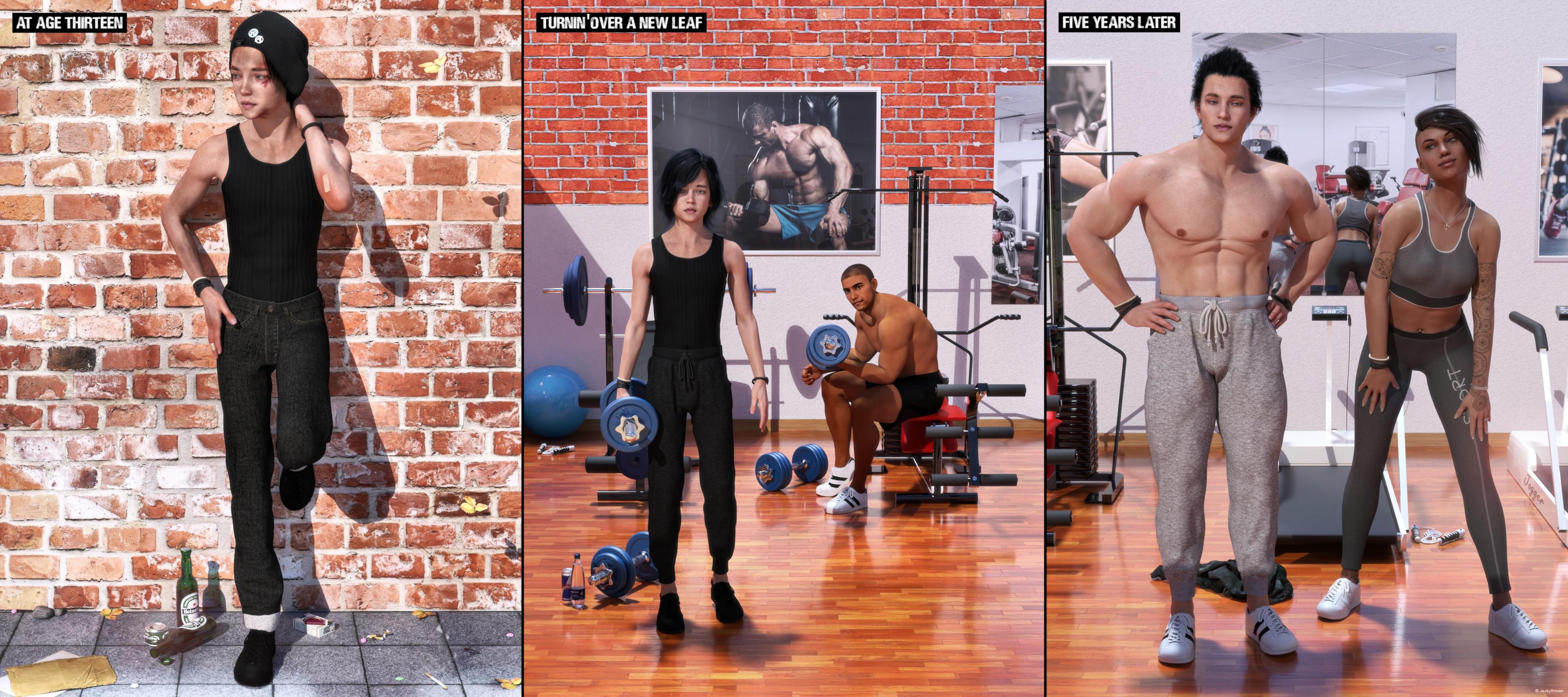
"The Change"
Starring: Adriana, Barack and Walther
The tale (a trilogy):AT AGE THIRTEEN
At age thirteen Walther was a tall skinny boy, always in trouble, fighting, skipping school every day, and even worse already smoking and drinking beer and he hardly ate. He was trying to hide it but it was obvious to see that he was on the wrong track...TURNIN' OVER A NEW LEAF
And while listening to 'Purple Haze' by Jimi Hendrix who was singing "Just can't go on like this..." he decided to make a big change, stop smoking and drinking alcohol and start to work out...FIVE YEARS LATER
"Ahh, come on take off your shirt, show me that sixpack again please please please!" Adriana his girlfriend is whining a little, but she knows that Walther doesn't mind because he himself is also quite proud of his 'new' body!
Soundtrack:South Park Bigger, Longer & Uncut 10 - I Can Change (© 1999)
https://www.youtube.com/watch?v=40wh9cxloqw
COUNTABLE FREEBIES: (Alphabetic order)#01! 100yen Lighter by Laboratory108
http://lab108.x0.com/lab108/personal.html (item 10)#02! Adhesive Bandage Prop for DAZ Studio by Mythic 3D
https://sharecg.com/v/87725/gallery/21/DAZ-Studio/Adhesive-Bandage-Prop-for-DAZ-Studio **#03! Adriana for Genesis 8 Female by Zia3d
https://www.renderosity.com/mod/freestuff/adriana-for-genesis-8-female/82827 **#04! Barack for G3M by dumbuser
https://www.sharecg.com/v/88699/gallery/21/DAZ-Studio/Barack-for-G3M **#05! Black Circles Tattoos by MysticArtDesign
https://sharecg.com/v/93735/browse/21/DAZ-Studio/MysticArtDesign-Black-Circles **#06! Beer Bottle for Daz Studio by forged3DX
https://www.deviantart.com/forged3dx/art/Beer-Bottle-for-Daz-Studio-608260601#07! Braid Bracelets for G3M, G3F, G8M, and G8F by Fisty
https://www.sharecg.com/v/92874/gallery/21/DAZ-Studio/Braid-Bracelets-for-G3M-G3F-G8M-and-G8F **#08! Bubbling's Navel Piercing by Fabiana
https://www.renderosity.com/mod/freestuff/bubblings-navel-piercing/69231 **#09! Channing's Button Prop re-posted by Seacanyon
https://www.sharecg.com/v/56691/related/21/DAZ-Studio/Channings-Button-Prop **#10! Cigarette for V4 by 3-d-c
https://www.sharecg.com/v/33769/gallery/11/Poser/Smoking-V4-Cigarette-SmartProp **#11! Cool Dude G8M Poses by seeker
https://www.renderosity.com/mod/freestuff/cool-dude-g8m-poses/83165 **#12! Crushable Beer Can by TrekkieGrrrl
https://www.sharecg.com/v/18196/gallery/11/Poser/Crushable-beer-can **#13! Delsin Beanie and Hair for G8M by InTheFlesh
https://sharecg.com/v/92677/browse/21/DAZ-Studio/FINAL-Delsin-Beanie-and-Hair-for-G8M **#14! dForce Tshirt & Pants for G3M&G8M by cabcab
https://www.renderosity.com/mod/freestuff/dforce-tshirt-amp-pants-for-g3m-amp-g8m/78865 **
[Jersey Pants]#15! Dirt & Abrasions by MysticArtDesign
https://sharecg.com/v/93837/gallery/21/DAZ-Studio/%F0%9F%93%8CDirt-Abrasions%F0%9F%93%8C **#16! Drinks by klausdbg
https://www.sharecg.com/v/74240/gallery/5/3D-Model/Summer-IV-Drinks **#17! Dumbbell set by Laboratory108
http://lab108.x0.com/lab108/sports.html (1st item)#18! EA Sidecut Hair for Genesis 3 & 8 Female(s) by EichhornArt
https://www.renderosity.com/mod/freestuff/ea-sidecut-hait-for-genesis-3-amp-8-femela-s-/82972 **
[Also used on Barack (G8M)]#19! Ellie Cosplay set for G2F by Beat578
https://www.sharecg.com/v/83479/gallery/21/DAZ-Studio/G2_Ellie_Cosplay **
[Longsleeves t-shirt used]#20! Everyday Outfit Genesis 8 by Teknology3D
https://www.renderosity.com/mod/freestuff/everyday-outfit-genesis-8/83138 **#21! Flo Makeup For Genesis 8 Females by AprilYSH
http://shop.aprilsvanity.com/flo-makeup-for-genesis-8-females.html#22! Frame DIN-A by klausdbg
https://www.sharecg.com/v/66868/gallery/5/3D-Model/Frame-DIN-A **#23! Gym Equipment (.3ds) by Arqam
https://www.sharecg.com/v/2894/browse/5/3D-Model/GYM-EQUIPMENT **#24! Gym Equipment 2 (.3ds) by Arqam
https://www.sharecg.com/v/2895/gallery/5/3D-Model/GYM-EQUIPMENT2 **#25! Gym Equipment 3 (.3ds) by Arqam
https://sharecg.com/v/2896/gallery/5/3D-Model/GYM-EQUIPMENT3 **#26! Huge Hoop Earrings for Genesis 3 Female by Fisty
https://sharecg.com/v/87043/gallery/21/DAZ-Studio/Huge-Hoop-Earrings-for-Genesis-3-Female **#27! Iray car related shader presets 'megapack' by Tom2099
https://www.deviantart.com/tom2099/art/Iray-car-related-shader-presets-megapack-539622361#28! Jumping Rope (.obj) by CGAxis
https://free.cgaxis.com/product/3d-jumping-rope/ *1#29! K-POP Extra Poses for Kanade 8 & Genesis 8 Female by LeoLee
https://www.renderosity.com/mod/freestuff/k-pop-extra-poses-for-kanade-8-amp-genesis-8-female/82823 **#30! Kawaii Buttons by MysticArtDesign
https://sharecg.com/v/94355/browse/21/DAZ-Studio/Kawaii-Buttons **#31! Koelle Alaaf! by klausdbg
https://www.sharecg.com/v/79631/gallery/5/3D-Model/Koelle-Alaaf%21 **
[Crowncork used, customized texture]#32! Koff cigarette pack and cigarette with morphs by TrekkieGrrrl
https://www.sharecg.com/v/18207/poser/Cigarettes **#33! LOUD AND CLEAR font by Billy Argel
https://www.dafont.com/loud-and-clear-2.font#34! M4 Jewelry Pack 5 by Cool Tuna Studio
http://www.cooltuna.com/poser/poser-freebies.html (item 10)
[Rubber bracelet used]#35! Morphing Chewing Gum by TrekkieGrrrl
https://www.sharecg.com/v/18199/poser/Morphing-chewinggum **#36! Morphing Garden Style Stone by Mapps Graphics
http://www.freewebs.com/mapps/downloads4.htm (last item)#37! Morphing Leaf by Adam Thwaites (Most Digital Creations)
https://www.most-digital-creations.com/free_poser_poses_textures_morphs_props_50.htm (item 5)#38! My Heart Necklace for Genesis 8 Female by amyaimei
https://www.deviantart.com/amyaimei/art/My-Heart-Necklace-for-Genesis-8-Female-729010047#39! Newspaper with morphs by TrekkieGrrrl
https://www.sharecg.com/v/18198/gallery/11/Poser/Morphing-Newspaper **
[Custom texture]#40! Pd-Soft Leather Daz Studio Shaders for Iray by Parrotdolphin (Janet)
https://sharecg.com/v/80223/gallery/7/Material-and-Shader/Pd-Soft-Leather-Daz-Studio-Shaders-for-Iray **#41! Red Brick Wall PBR Texture by CGAxis
https://free.cgaxis.com/product/red-brick-wall-free-pbr-texture/ *1#42! Red Brick Wall 2 PBR Texture by CGAxis
https://free.cgaxis.com/product/red-brick-wall-free-pbr-texture-2/ *1#43! Shiny Wood Tiles Free PBR Texture by CGAxis
https://free.cgaxis.com/product/shiny-wood-tiles-free-pbr-texture/ *1#44! Simple Smoke by Ladymist95
https://www.sharecg.com/v/76297/browse/21/DAZ-Studio/Simple-Smoke **#45! Simple Used Ashtray by 3-d-c
https://www.sharecg.com/v/38258/gallery/11/Poser/Simple-Used-Ashtray **
[Cigarette buds used]#46! "STRONG" for G8M Character Morph & Pose by Mar3D
https://www.renderosity.com/mod/freestuff/strong-for-g8m-character-morph-amp-pose/82833 **#47! Texture Pack 02 by Spacebones
https://sharecg.com/v/63522/gallery/6/Texture/Texture-Pack-02 **
[Paving used]#48! V Devil May Cry 5 Hair Prop for G8M by InTheFlesh
https://sharecg.com/v/93558/gallery/21/DAZ-Studio/UPDATE-V-Devil-May-Cry-5-Hair-Prop-for-G8M **#49! Vergil Devil May Cry 5 Hair for G8M by InTheFlesh
https://sharecg.com/v/93892/view/21/DAZ-Studio/Vergil-Devil-May-Cry-5-Hair-for-G8M **#50! Walther for G8M by Ruslanomar
https://sharecg.com/v/92848/browse/21/DAZ-Studio/G8M-Walther **
NO-COUNT ITEMS:--- AllenArt Iray Jewelry Shaders by AllenArt
++ Basic Wear for Genesis 8 Female by Daz Originals
++ Basic Wear for Genesis 8 Male by Daz Originals
--- Bezel Cut Ring for Genesis 3 Female by AllenArt
--- Casual Outfit for G3F by Tab [Pants used]
--- CasualOutfit2 for G3M by Tab [Bracelet used]
++ DAZ Studio Iray HDR Outdoor Environments by Daz Originals, DimensionTheory [Maui used]
--- Free Iray Outdoor Lights by Dreamlight
--- Nose Ring 01 for G2F, G3F and/or G8F by AllenArt
--- Safety Pin by AllenArt
--- Sneakers for G3F by Tab
PURCHASED/PAID FOR ITEMS: None 100% Freebies
*1 E-mail address required
** Registration required
#x! Countable Items (Bold ones are used by me for the first time I think.)
--- No longer available freebies
++ Free with DAZ Studio (or the Essentials)
$x. Purchased/Paid For Item
Rendered with DAZ Studio 4.10.0.123 (nVidia Iray)Other free software used: GIMP v2.10.8, Irfanview 4.52 and PoseRay 3.19.29
.3DS converted to .OBJ with PoseRay
Postwork: used the AltaLux Image Enhancement Filter (Effect) by Stefano Tommesani that comes with Irfanview and some filters (oa) that come with GIMP. Also used mcjDenoise by mcasual. (https://sites.google.com/site/mcasualsdazscripts9/mcjdenoise)
"The Change"
Remember, "There's Always Another Sale™" (Report sales errors here.)I've noticed a significant number of the RDNA transfers are turning up in this particular sale combination, and quite a few of them are still in Poser format with .pmd external morph files. Since these things don't work in DAZ|Studio, how much of an effort would it be to resave them as morph-embedded .cr2 files, if not full D|S conversions? And why hasn't it been done before now? I'd do it myself, but I never reinstalled Poser 7 when I upgraded to my current computer.
[Released] Clothing Converter from Genesis 3 Female to Genesis 8 Female [Commercial]As a suggestion for improving this, is it possible to add an option that will strip out the figure morphs for the DO base figures?
The FBMVictoria7.dsf morphs and the like that persist after conversion cause conflicts with things like the "Victoria 7 for Victoria 8" products; the latter uses exactly the same name for a morph that's very differently shaped, given it's now shaped as a derivative of the Genesis 8 base figure, so the clothing ends up the wrong shape*, meaning that it's better to just rely on auto-follow to do the job (unless you can contrive a better fix).
* Mendoman posted a picture example of the problem here, although he converted the item manually: https://www.daz3d.com/forums/discussion/352506/victoria7-for-victoria8-morph-problems-with-g3-items
I also discover from having gone through and deleted all of said G7 FBM morphs from my converted clothing that they were using up a good couple of gigabytes - given these are shapes that either won't be activated or are likely to cause problems when activated, being able to not convert them would be something of a boon to disk space.
Are you talking about the clothing converters or the character converters? The only morphs that should be transferred with clothing are the clothing morphs. Could you explain more please?
A lot of clothing has a FBMVictoria7 morph (or similar - FBMOlympia7, FBMEva7, etc) intended to improve the fit and reduce distortion when those base figures are dialled in (as compared to just relying on auto-follow). These exist as morph files for the clothing, and can be seen (as hidden morphs) on the clothing even when it is not fitted to these characters.
As they're morphs that belong to the clothing, they're getting transferred, leading to two main problems:
- these morphs don't match the identically named morphs used by the Gen 8 conversions of those characters (for example, Victoria 7 for Victoria 8). The G8 version of Victoria 7 now works as a derivative character of Victoria 8, so the actual shape of the morph called FBMVictoria7 is very different for G8F and G3F, so the clothing's original corrective morph now results in completely the wrong fit.
- Other than for the G7 for G8 characters (where it causes glitches), these morphs probably won't be activated anyway. Only those people who have converted the characters to G8F will use a corrective clothing morph such as FBMRune7 or the like. That makes quite a lot of difference to the disk space used by the conversions, as many clothes have these corrective morphs for several DO base shapes.
Basically, what I'm suggesting is an option the user can check to have the converter remove morphs called FBMVictoria7, FBMMika7, FBMOphelia7, etc, as it's processing. Presumably this would be done using some kind of "blacklist" of morph names (potentially even editable by the user, should they wish/need to add anything else?).
Obviously the ideal would be to find a way to "correct" these morphs to still have them retain the correct fit on their updated G8F versions, but removing these morphs and letting DS default to autofollow is better than transferring them verbatim.
Ah, I see. That makes sense. Ok, I will look into it. Thanks for the suggestion.
XTransfer Module 1- Genesis 3 to Genesis 8 Morph Converter (Commercial)Agreed, there are a number I fancy transferring and want to get the helper morphs too, but can wait, not patiently, but...
I have a ton of custom ZBrushed morphs done on my V5>V6>V7 which I transfered via Genx2 that I want to transfer over to V8 and not done so, due to most methods not supporting JCMs!
Zero Morph's partThat's fairly simple then:
- make your morph a favourite by clicking the heart icon on its slider, and remove any other favourite morphs
- activate the Geometry Editor tool and make sure the Tool Settings pane is open
- in the Tool Settings pane click the + buttons to select the face groups that make up the head - if desired press ctrl + to grow the selection down the neck a bit
- right-click in the Viewport>Geometry Selection>Convert Selection>Vertex Selection
- right-click in the Viewport>Morph Editing>Remove Selected deltas from Favourites
(from memory, sonme commands may not be quite right but you should eb able to translate)
That worked!! Thank you sooooo much!!!!
Super Natural BrowsSorry you’re having difficulties. How have you tried to contact me? I’m generally very responsive, but I haven’t had any message from you.
I suggest the following workflow -
Apply the brows to your character and use the morphs/presets to get your desired shape.
Zero your character and export the brows as an obj. Naming them for your character eg. Mycharacter_eyebrows
Import the obj brows and use the transfer utility with Genesis 8 default as the source and the brows as the target.
You can copy/paste the shader preset from the supernatural brows but remove any texture maps and use a similar solid colour or your own texture map in their place.
Save the new brows as a figure/prop asset.
Occasionally with more extreme G8 brow shapes, you might want to bring the brows into a modeler of choice and make adjustments to get exactly what you want.
I hope this helps.
Super Natural BrowsCan someone PLEASE point me to a tutorial on how to use this as a merchant resource?
There are no instructions and the creator isn't answering. So I'm kinda stuck here...The sale page says:
You may export your morphed brows as an obj and use the transfer utility to create wearable brows for your characters.And that's the extent of the instructions---except not to use settings and maps.
I'm in need of some instructions...
THANK YOU!!!!!
LauraHas anyone successfully transferred V4 morphs to Gen3?Get them. GenX is worth it especially if you love V4. One of my favorites at Rendo had a clearance sale and I bought everything and converted to G3.
How accurate is conversion? I remember looking at comparisons, and some details in face etc. were often slightly incorrect (or i misremembering).
Genesis figures have less polygons than V4, so yes, some details may be off after transfer.
Pretty upset right now *Daz Sale*GenX is a fairly fast way to take an earlier generation and move it to a later one. Yes, definitely worth having. The vendor passed away before making one for this generation.
Here's one of my posts that has a list of those type products. It's from April 2017 so there's others that aren't on the list.
And here's specifically how to use GenX2. I did a tutorial. Be sure to read the post after that, it's how to do the materials once you do the morphs.
What are those genx addons I passed these items because I am not sure which kind of items these are. I don't want morph transfer because I already have all the morph and expression for all genesis generation.
FINALLY did it ..bought a new system
there isn't a thermal limit, 95c is just the operating temperature, which is past onto the heatsink, while heat transfer and cooling level is classed as TDP if you are into physic's silicon will break down around 1000c which is why probes can orbit the sun while most carbon and graphite in the space tech and military world can go upto 5500c and used in hypersonic planes, which goes under the name carbon carbonsplash out on a thermaltake 280mm cooler if your case can handle it my ryzen 2600 overclocked to 4.2 with 64 gb 3200mhz ram, runs at 120c on the silicon during a render but still, i don't care to much for it, im buying a 3950x when it hits the shops120C? LOL. Ryzen thermal limit is 95C
that is where water cooling comes in, the thermaltake 280mm, will be dead silent when the CPU isn't under load, unlike all the corsair all in one cooler's. the external CPU temp what most people will see is 60c, while CPU (Tctl/Tdie) will be 120c
the sensor's probably have a bug in anyway, when the CPU is 0c the CPU (Tctl/Tdie) will be -92c https://postimg.cc/ppj7cg6w
Or you could be making stuff up. The thermal limit on Ryzen is 95C at Tdie. Exceed that by even 0.1C and the CPU will throttle down until it is well under 95.
The minimum reported on that image is not at all unusual. You get all kinds of weird readings from motherboard sensors when the system is just starting up, as that clearly was.
it is all in the image from HWInfo which is at https://postimg.cc/ppj7cg6w
silicon can handle 1000c given enough cooling, the 95c thermal limit is the TDP for the included air heatsink, while a 280mm water cooled all in one heatsink has a TDP of around 150c or so the big youtube channel's like to say
No. 95C will always cause the CPU to down clock. Always. AMD builds it right into the Ryzen chips and supporting chipsets. You're confusing the maximum wattage the included cooler can handle which is 95W with the CPU's thermal limit which is 95C. You can find copious documentation of each.
processors work fine above the standard operating temperature overclocking world records are set using liquid nitrogen with old 4 core processors on 16 nm die could hit 10Ghz while the latest world record for cinebench is set using a 3950x at 5.7GhzNo. The LN keeps the CPU's operating temp below the thermal limit. It doesn't change the thermal limit.
In order to increase the speed of a chip you have to supply more power to the chip, since the amperage is fixed that means increasing the voltage. Since the amount of heat released is directly related to the amount of power consumed and W=VA that means if you can remove that heat more quickly, by having a much higher gradient between the temperature of the coolant and the CPU, you can supply even more voltage while staying under the thermal limit.
Zero Morph's partThat's fairly simple then:
- make your morph a favourite by clicking the heart icon on its slider, and remove any other favourite morphs
- activate the Geometry Editor tool and make sure the Tool Settings pane is open
- in the Tool Settings pane click the + buttons to select the face groups that make up the head - if desired press ctrl + to grow the selection down the neck a bit
- right-click in the Viewport>Geometry Selection>Convert Selection>Vertex Selection
- right-click in the Viewport>Morph Editing>Remove Selected deltas from Favourites
(from memory, sonme commands may not be quite right but you should eb able to translate)
Hexagon - DAZ 3D clothes morphsWas the pose still applied to the figure when you sent the morph back?
why no new breeds for dog 8?it sounds like theres space for a dog morph pack too .. since I'm pretty sure DAZ doesnt want 100 dog breeds running wild in the store ;) And that would give you guys the chance to spin up your particular pooch or breed. Had to go look up Pharoah hound dogs ... pretty!
This is something we'd seriously need. Especially more tail/body/legs morphs.
As for the suits that hint of the possible breeds;
Creating a Genesis 8 character from a custom mesh?Thanks for the replies!!! Are there any tutorials out there on projection in zBrush? I do not like to use FaceGen or headshop: I have seen how they work and "just" two pictures is far to little to get a true likness in 3D. I really want the shape to match. If I can get the process to work, I would also like to use it to address a couple of other region of the genesis mesh this way: hands and feet are two areas that are still largely overlooked if it comes to getting them to look real in my opinion... As there is no "HandGen" or "FeetGen" program, I would like a different approach that would allow me to learn one technique that is applicable for the entire mesh.
Thanks a lot,
Me
Facegen produces a more accurate obj file but you need a slightly different product from Singular Conversions to export it, essentially FaceGen for exporting objs rather than DAZ morphs. I think they actually have more detail than the DAZ morph exports because no reduction of polygons for details were needed so that the topology matches G8M/G8F.
I think it would actually be helpful with starting with a G8M/G8F with Facegen morph and then to retopo sculpt that was the morphed G8M/G8F to better match the 3D scan you have. Since you are interested in zbrush projection and shrink wrapping that tells me you're not actually that interested in learning to be a good 3D sculptor/3D modeler anyway.
Daz 3D is part of

Connect
DAZ Productions, Inc.
7533 S Center View Ct #4664
West Jordan, UT 84084Licensing Agreement | Terms of Service | Privacy Policy | EULA
© 2026 Daz Productions Inc. All Rights Reserved.