-
Male Below the Waist Elements with Which Figures.
The male morphs usually include at least one bulge option, and of course there are always dForms.
This, when it is just about the bulge - why making it that complicated ?
https://www.daz3d.com/genesis-8-male-body-morphs e.g., you'll find a "Genital Bulge" morph in the "Hip" category
And yes this bulge is projected into/ on the guys pants, you can even set the limits off :)
Daz crashing when translating ( Moving ) objectsThanks Richard for the reply. I cleaned up some morph errors appearing in the log file - So when i load the scene the log shows Zero conflicting morphs, ect. This didn't help the perodic crashing when moving a figure. I am stumped, but, it is very frustrating trying to work like this. Recently when I clicked the chain icon you referred to above it instantly crashed . ( Thanks for the explanation just the same ) on top of that problem I am testing my new RTX2080Ti ( 3 days In ) I read the impression's others have with the speed increase from Rel 11 to Rel 12 but a typical sample scene I used for comparision gave me this : Release 12: 51minutes, 36sec VS Release 11: 1 hour 13min - So I am not that impressed with the speed increase in IRay, BUT, it is as advertised a 15-25% increase - I'll take that.. I was just wishing for more....and that same scene was also within 10 minutes of what my previous GTX1080 performed. But I have discovered that the VRay Next4.o release is BLAZING fast within 3DS Max ( a render that took 26 minutes on my previous GTX1080 is finished in just 12 minutes on the RTX2080Ti. ) So, I am very, very happy with that. The VRay interactive viewport in Realtime will render and not even blip while constantly updating the progressive render while spinning the entire scene in the viewport . Quite impressive. Anyway, not to get off subject to far. If you or anyone have any idea why this Translating is causing a crash I'd sure like to know. I used Rel10 Daz3d and even Rel11 forever without this sort of conflicts. Puzzeling for sure.
DAZ Studio 4.12 ... Face creation abilities????The facegen G2 I made of the same character that I tried with Face transfer earlier is 100 times better out of the box..
Genesis 3 face morphs do not show in v4.12Did you check your Content Directory Management settings? That's starting to look more and more suspicious to me — if you can load your G3F but it doesn't have the new morphs, then it looks like D|S isn't looking at the content location where your morph data ought to be.
Remember that there should be two content locations; one in your personal account's Documents folder, used by DIM to install DAZ content, and one in your computer's general account Documents folder, recommended by DAZ for freebies and other non-DAZ content.
Face Transfer Free not loadingI just upgraded to Daz 4.12 and egarly looked for this new plugin and its free trial, but Window>Pane>Facetranfer is missing.
Looked in the installed Plugins window and it is there, but it says it failed to load/
Any help?
DAZ Studio 4.12 ... Face creation abilities????Mmmm. It's called Face Transfer. And that appears to be what it does. Only had a quick play with it so far, Doesn't attempt to create a face morph, just applies a texture to a something similar kind of morph ???? All the face morph settings are at 0. Interesting...
Face Transfer for the texture ?
Facegen for the morph ?The textures do seem a bit dark, anybody any good with Photoshop...
S.Just been having a play with FaceGen, haven't touched it in ages, the textures are better than I remember, except for the eyes.
I think Face Transfer must use some base morphs of its own. While FaceGen did a good job of the profile, except for the nose (I used 3 photos), Face Transfer made a better job of the nose even though the rest of the profile was pretty poor.
I suppose the next thing to try is the Face Transfer texture with the FaceGen morph.
S.DAZ Studio 4.12 ... Face creation abilities????Mmmm. It's called Face Transfer. And that appears to be what it does. Only had a quick play with it so far, Doesn't attempt to create a face morph, just applies a texture to a something similar kind of morph ???? All the face morph settings are at 0. Interesting...
Face Transfer for the texture ?
Facegen for the morph ?The textures do seem a bit dark, anybody any good with Photoshop...
S.Although all the morph sliders stay at 0, the thing does make changes to the mesh. Supposedly, it can also save the mesh changes as a morph, but I just haven't had an acceptable result yet to hit that save button.
If you look in parameters under Head, you will find a slider for Face Transfer so you can dial it down or out. It's a separate morph.
DAZ Studio 4.12 ... Face creation abilities????Mmmm. It's called Face Transfer. And that appears to be what it does. Only had a quick play with it so far, Doesn't attempt to create a face morph, just applies a texture to a something similar kind of morph ???? All the face morph settings are at 0. Interesting...
Face Transfer for the texture ?
Facegen for the morph ?The textures do seem a bit dark, anybody any good with Photoshop...
S.Although all the morph sliders stay at 0, the thing does make changes to the mesh. Supposedly, it can also save the mesh changes as a morph, but I just haven't had an acceptable result yet to hit that save button.
What's up with Carrara 8.5?Thanks, Diomede. I came late to Daz Studio, so about all I own are Genesis 8. Is it possible to create a figure in Daz and transfer it to Carrara? I used Carrara for years (ever since "5"), but have never experienced this problem all the way through "7".
Thanks again.You are trying to do something that is somewhat difficult. Carrara was not designed for V7 and V8.
The correct Carrara version to download is this one. If you don't already have earlier character content, that is no problem, as it comes loaded with V5 and M5 pro bundles.
It generally works great right out of the gate.
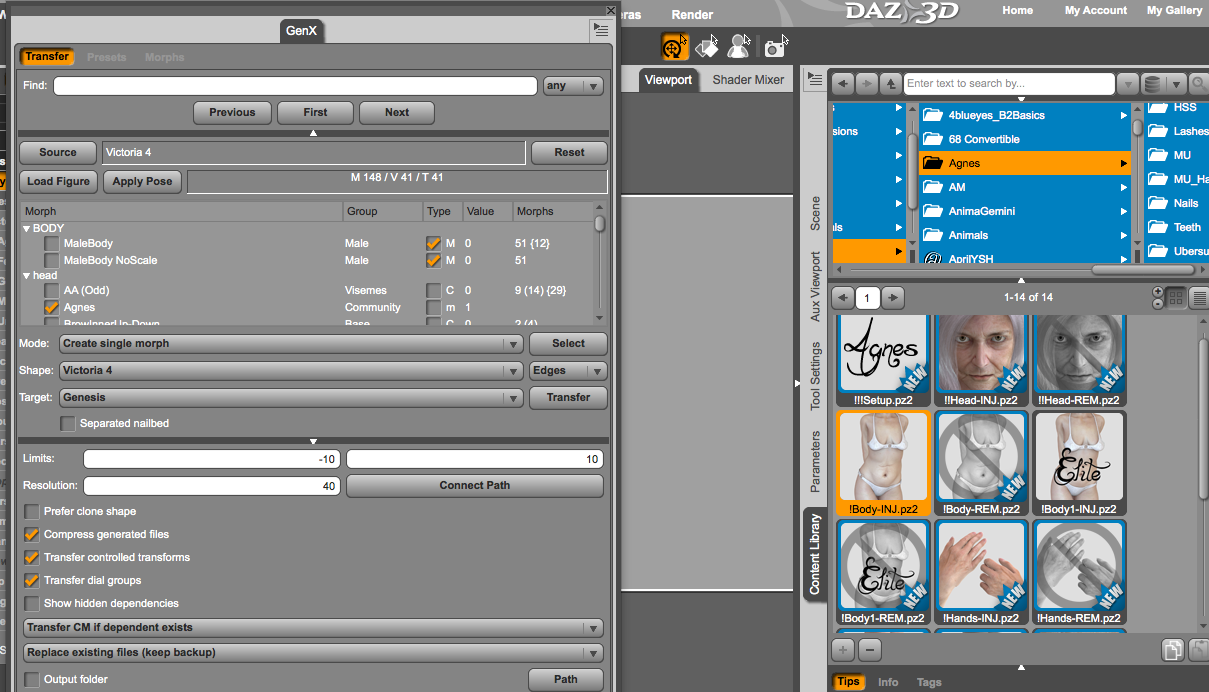
Is GenX worth it?Need a bit of advice here...I've successfully managed to transfer a number of M4 and V4 characters to Genesis, but a great number of body inject morphs are ignored by GenX. I've tried dropping the inject morphs on the GenX pane, tried using the load button and browsing to the pose folder and selecting the body morph, tried injecting the morphs into V4 base character and using the select from character in scene, and the result is always the same. (See screen shot) The head inject morph works, but the body morph is ignored. Any idea what I am doing wrong?
 DAZ Studio 4.12 ... Face creation abilities????
Mmmm. It's called Face Transfer. And that appears to be what it does. Only had a quick play with it so far, Doesn't attempt to create a face morph, just applies a texture to a something similar kind of morph ???? All the face morph settings are at 0. Interesting...
Face Transfer for the texture ?
Facegen for the morph ?The textures do seem a bit dark, anybody any good with Photoshop...
S.Been a while...You were probably gone before my time (I've only been around for about 3 years) but I wanted to say anyway: Welcome Back! I'm glad you're having fun with Daz Studio and it's new fun stuff like dForce, Iray, and Genesis 8. There is also Strand-Based Hair (which is tons of fun, imo), and the new "Face Transfer".
I hope you have a lot of fun with all the new stuff that Daz Studio has and if you have any questions don't hesitate to ask - the community is almost always quick to answer questions and lend some help. :)
Male Below the Waist Elements with Which Figures.What I want isn’t the anatomical element for nude renders, but just to make pants and bathing suits look normal.
Have you ever created morphs using Blender? There are a bunch of tutorials out there on how to do this.
It would be pretty trivial to add a simple crotch bulge morph to a male character if all you want is some geometry under the clothing to fill it out.
About saving morphs? - Solved.Are you sure you hadn't already saved it? Is it still working?
No I hadn't already saved it, I had just made it and assigned it to Actors/People [where for some reason the PAs have been putting heads] ... and it simply was not on the option list of files to save. So I went back and changed its position on the Parameters Tab back to my own folder under Morphs/Catherine3678a ... and then the option appeared and I could save it. Am wondering if there was a different 'type' of morph that it needed to be called in order to be under People/etc?
I tried to replicate what happened ... aaahhhh ... I figured it out, going blind here with all this tiny type ... misfiled it! Thank you.
.... and I discovered how to set the screen resolution lower so now D/S's sliders are easier to see :-)
DAZ Studio 4.12 ... Face creation abilities????Well, this went REALLY wrong lol... I guess you can't have a photo with long hair.
GaaAAaaH! Yes, yes it did!

Can we get more renders without/replace the horrible "texture" so we can see the actual morphs? I'm only here for the morphs and the wretched 1024x1024 photo superimposed on the models doesn't show off the morphs at all...
Nevermind, I used it on a figure and it just smooths out the face, I'll try another photo though, just to be sure...
UPDATE: I'm doing a morph for someone, and I thought I'd use this as a base to start, yet it doesn't even resemble her, so it looks like it's the dials/ZBrush for me until this tech matures!
That honestly looks like someone used the smooth brush in Zbrush on the whole face. Details are gone. I can only guess that the idea was to let the texture provide all the detail and not let the geometry get in the way.
Yep, it's pretty much the same with most of these programs, yet I do not doubt that once this tech matures, then we will be able to see that actual morphs are matched from the pictures, so yeah, I cannot wait until they quit relying on projecting pictures and concentrate on the actual morphs... just using projected pictures is just lazy I applaud the effort though, it just needs more work.
DAZ Studio 4.12 ... Face creation abilities????I really like the morphs created by Face Transfer, especially with the materials from the other figures.
I have started with Genesis 8 Male and applied Diego 8 - https://www.daz3d.com/diego-8

and Dylan - https://www.daz3d.com/dylan-for-michael-8 - materials to the character created by Face Transfer.

The wrinkles on the forehead & around the eyes on that second fellow are completely misplaced,
What's up with Carrara 8.5?Thanks, Diomede. I came late to Daz Studio, so about all I own are Genesis 8. Is it possible to create a figure in Daz and transfer it to Carrara? I used Carrara for years (ever since "5"), but have never experienced this problem all the way through "7".
Thanks again.DAZ Studio 4.12 ... Face creation abilities????I've noticed with the few portrait images I have that there seems to be a weakness against making ladies with square jaws ... so I tried something and it worked better [made for a thicker neck though], I used a man's photo on the lady [female setting - you want the right starter textures] to get the morph and then applied a texture for a woman.
Face Transfer error?Hi all,
I'm experimenting with the free version of the new Face Transfer utility in DS 4.12. When I load the base figure, load a face photo and hit 'Generate', I get the following error:

The transfer appears to complete however it doesn't appear to calculate the face shape properly, and the quality is a little poor (although it does say this will happen in the error window shown above!)
I have the full version sitting in my cart waiting to be purchased, but I want to make sure everything works properly before I go ahead and buy it!
Anyone have any clue as to what this error is saying - why shouldn't it be able to find the base textures? The model is textured and loaded without error.
Any help much appreciated!
DAZ Studio 4.12 ... Face creation abilities????I really like the morphs created by Face Transfer, especially with the materials from the other figures.
I have started with Genesis 8 Male and applied Diego 8 - https://www.daz3d.com/diego-8
and Dylan - https://www.daz3d.com/dylan-for-michael-8 - materials to the character created by Face Transfer.
Daz 3D is part of

Connect
DAZ Productions, Inc.
7533 S Center View Ct #4664
West Jordan, UT 84084Licensing Agreement | Terms of Service | Privacy Policy | EULA
© 2026 Daz Productions Inc. All Rights Reserved.