-
Updates will not update
DKrieger said:
Hey Richard! Since this has been brought up, let me ask: When I first started with Daz Studio a few years ago (having come from using Poser for a decade) I installed everything through Connect - thought it was an awesome, cool feature - of course I soon learned not everything installed nicely.
So, I created a path for DIM and now Central uses that same path...(which I have on an internal drive in a directory named "Daz_3D_Content".)
Anyway, I noticed that the default Connect path organizes everything under "Users/ (blah blah blah) /My Daz Connect Library/data/cloud..." and then into individual numbered folders - incredibly different from the old everything dumped into "runtime" method of the past.
But, my stuff that comes in through DIM or Central seems to be organized in the old "runtime" method...
My question is: Would the preferred path for DIM/Central have been to use the same path as Connect? Would this avoid issues like our orignal poster had? It seems unlikely since it still puts this in Runtime instead of numbered data folders. Just curious if there is a "best method" that I missed somewhere.
They should both use the same path if they overlap, but that is the path that ends with the folder holding the Data folder - the /data/cloud/1_SKU/ folders are within the content directory, the content directory path does not include them. The system amalgamates all those individual product folders into one, presented in the Content Library as the Daz Connect top-level container (this means that the folders under that contain are not single locations on disc - e.g. Daz Studio Formats>Daz Connect>People>Genesis 8 female>Characters is probably showing the content of one folder for every character installed; this is, in part, why you can't save to those "folders", they are not necessarily unique locations.
DIM Log In not workingToday, my DIM decided it did not like my account information any more. I can log into DAZ3D and Daz Studio just fine, but DIM says invalid user or password. I filed a ticket and it said 5 to 10 days (I get it, COVID).... I tried reinstalling DIM, and that did not help. So I thought I would make the jump from DIM to Daz Central. I installed Daz Central, and when I log into it, it wants me to Install Daz Studio. I have Daz Studio set up the way I like and I am not resintalling it. Is there a way to get into Daz Central without installing Daz Studio?
Updates will not updateHey Richard! Since this has been brought up, let me ask: When I first started with Daz Studio a few years ago (having come from using Poser for a decade) I installed everything through Connect - thought it was an awesome, cool feature - of course I soon learned not everything installed nicely.
So, I created a path for DIM and now Central uses that same path...(which I have on an internal drive in a directory named "Daz_3D_Content".)
Anyway, I noticed that the default Connect path organizes everything under "Users/ (blah blah blah) /My Daz Connect Library/data/cloud..." and then into individual numbered folders - incredibly different from the old everything dumped into "runtime" method of the past.
But, my stuff that comes in through DIM or Central seems to be organized in the old "runtime" method...
My question is: Would the preferred path for DIM/Central have been to use the same path as Connect? Would this avoid issues like our orignal poster had? It seems unlikely since it still puts this in Runtime instead of numbered data folders. Just curious if there is a "best method" that I missed somewhere.
DIM Log In not workingWell I installed Daz Central and the log in credential work there. ??? However I can not use Daz Central becasue it is forcing me to do a Daz Studio install. I would think the installer could check the registry and see that Daz is installed. I am not going down that path. I have my Daz Studio set up way I like and it i working great. (not installing over top of it). There is no way around installing to get Daz Central to work.
Think I will back up my DIM download folders, database and manifest. Then Uninstall DIM and reinstall. This is a royal pain. I am in Daz everyday and it works great. This DIM think is unexpected.
DIM Log In not workingI submitted a ticket. It said it could take 5 to 10 business days to resolve. Wow. I am not waiting that long to download the long list of products I bought this morning. ( I will do it manually before I wait that long. )
I tried reinstalling DIM but it gets the same error ( user name or passpowrd not valid). Maybe a good time to try out Daz Central for content management. I just don't wnt to have to install over 1000 products to get the inventory to reflect what is installed and not installed. Hopefully it won't be like that. I had the whole day off. I bought all those items that I had been adding to my cart for the last week, and planned to get some rendering done... and I have spent most of it trying to get DIM to work.
Issue with CMS database after reinstallConnect reads files individually, DIM/Daz Central download the complete zip. Genione updates should be faster through Connect, I find it is usually a bit slower than DIM at downloading but that's not carefully timed.
Duplicate formulas found issues main issue with embedded questions (long)Hello, I'm hoping someone can help me and explain an little better what causes duplicate formula errors on loading scenes / characters and how to fix it. I've read a few posts on the forums, tried some of the suggestions, in one case it got rid of the files that were in the log giving it issues, but when i saved and reloaded the scene, it caused a whole lot more. Some of which weren't in the log the first time.
I have characters saved as scenes, so that i can merge whichever character, or grouping may appear in a given scene, I've spent literally weeks manually moving the directories inside of DAZ, for organization and finding things when making scenes (i did this before figuring getting a little better with custom categories on the bottom of the menu tree) then testing them to make sure the products work, and that materials still load from the new locations. While it is mostly consistent, there is still some pretty random placement. Accessories, being installed in clothing, or Anatomy, so i moved them around. Organized Characters under Letters, since some vendors put them under the character name, others under an artist name, others nested under both. I was getting so many characters installed, that i had to hunt under different menus trying to find where it was, in what category.
I noticed, after getting a good deal of it done, that moving the items didn't always copy over the listing on the icons, of whether it was an actor, shape, prop, accessory, etc. Which was only a minor annoyance to be honest, and one i was willing to deal with for the efficiency of having them organized.
It takes literally minutes to load a single G8 female into the scene. And some of the scenes i have saved (just the characters, no other props, clothing, environments, or anything else) take a lot longer. I loaded one that was 4 characters and timed it at 29m 38s. Restoring the figure to a zero pose takes a lot longer as well. I've thought about removing uneeded morphs from the characters, but i am not certain how to do this efficiently. This was actually what i did with the first one, It was trying to load morphs from a character i have installed, but have never used, and didn't use the sliders at all when i was building the character.
I've spent literally weeks, putting things into categories, moving them around, but it's in the main library of daz, before i figured custom categories out. I really, really don't want to have to reinstall everything. While there are items I have installed i don't need, and have no problems reinstalling. I've spent a bit of time tweaking custom characters and i'm not sure how to save them as a preset I can use on a different machine (if it can even be done having moved everythign around) I have 2 Titan X cards in my desktop, so rendering is very quick, or relatively quick (though i'm still experimenting with what slows it down, caustics, hair, reflections type things) and i'd like to be able to set up scenes on my laptop while the desktop renders. Perhaps a central installation library? But again, I'm that dangerous creature known as a dabbler. Trying to learn solid skills.
For example If i have the same character installed on both machines, and i've designed and tweak a character on the desktop, and i save the .duf files. Be it as scene, scene subset, character preset, i've used all of them, still not certain if any are quicker than others. Can i save that onto a usb drive and load it onto the laptop, will DAZ be able to load the character i've created, if the all of the character packages used, are installed, but in the default location for example.
I'd appreciate any help,
Thanks in advance,
Tim
Do I Need to Reinstall ALL This?draine761_c7a1098aa1 said:
Thanks, MelanieL. Regarding the CMS database cluster,I don't believe I made changes or did anything to the C: drive. Truth be told, I'm not even sure what it is.
I have installed content with DIM and Central.
I moved everything from the C: drive to the F: drive (I was just flat outta space on C:)
Regarding the nested issue, F:\My DAZ 3D Library contains everything content-wise, including Runtime, Data, People, etc. It's all in there. So should I be removing all the listed directories in the Content Directory Manager except for F:\My DAZ 3D Library?
Thanks again, helpful citizens!
No, don't keep that one, you should remove that and leave the one DIM is installing to. Unless you mean that Runtime, Data, People etc are literally right there directly inside F:\My DAZ3D Library (e.g. F:\My DAZ 3D Library\People - in which case I'd have to ask how did they get there?)
Updates will not updateProducts not showing as isntalled at all sounds like a communication issue - DS is not seeing the isntalaltion from Central (which would also potentially affect installing with Install Manager). Either the database is not being updated by the isntaller (might happen if, for example, you close DS and immediately start the installer) or the database is simply not updating properly (write access problem with the fiels or folders; corrupt database). If you do install through DS then that will override the Central isntall, and so of course if there's an update there it won't affect what is shown in DS - you may was well uninstall one of them as you are just stroing duplicate files.
Some products (I have a godd half-dozen) are not isntalling correctly through Daz Connect, and they indeed continue to show an update as being available - I have reproted the ones I've encountered.
It's a little tricky to sort out what is what from your post - some specific examples may help.
Do I Need to Reinstall ALL This?Thanks, MelanieL. Regarding the CMS database cluster,I don't believe I made changes or did anything to the C: drive. Truth be told, I'm not even sure what it is.
I have installed content with DIM and Central.
I moved everything from the C: drive to the F: drive (I was just flat outta space on C:)
Regarding the nested issue, F:\My DAZ 3D Library contains everything content-wise, including Runtime, Data, People, etc. It's all in there. So should I be removing all the listed directories in the Content Directory Manager except for F:\My DAZ 3D Library?
Thanks again, helpful citizens!
Do I Need to Reinstall ALL This?A couple of questions:
Your screenshot shows your CMS database cluster on your F:\ drive. Was it always there, or did you move it from your C:\ drive?
And if so, did you actually copy the current database cluster files from your C:\ to your F:\ drive?How did you originally install your content? (DIM, Central, Connect or manually?)
Do you still have some content installed on your C:\ drive, or did you move it all to F:\ ?
And as jestmart noted, you want to remove that nested library reference - probably the first one (F:/My DAZ 3D Library)
Do I Need to Reinstall ALL This?Central installs to the most idiotic place imaginable so don't use it, DIM is still available. You have nested libraries, F:/My DAZ 3D Library and F:/My DAZ 3D Library/Applications/Data/DAZ 3D/My DAZ 3D Library.
mexican buildings?mwokee said:
These two products I list are actually very good examples of what you will see in Central America. But as stated, you need to be specific, they are not run-down adobe structures if that's what you're looking for.
Yeah, I try to avoid anything to do with Adobe, except maybe PDFs.
Anyway, this is another case where reference pictures are essential. I mean, they have Costcos in Mexico, and a Costco building in Mexico looks a lot like a Costco building in the States.
mexican buildings?These two products I list are actually very good examples of what you will see in Central America. But as stated, you need to be specific, they are not run-down adobe structures if that's what you're looking for.
Updates will not updateIt is so frustrating in the studio, after some of my purchased products being installed through Central I go into the Studio app and some of these products still say they need to be installed; some even have an update install. A lot of them I click and they seem to do something, but still have the circle on them to install or install the update. They never get installed. Why? I have several of these and of course, you can't use them because supposedly they are not installed in Studio. Also, while I am ranting, why the heck is DAZ Connect so slow?? It takes days for it to work and sometimes it just sets there stalled...for days!!
Do I Need to Reinstall ALL This?I've added F:/My Daz 3D Library in the Content Directory Manager (to Daz Studio Formats), but the situation is the same. All the content icons are visible, but all are grayed out and waiting to be installed.
By the way, should I change the Base Path Location in Daz Central to F:/My Daz 3D Library, as well, if that's where I'd like new content to be sent?
I have a bad feeling about whether or not I'm going to spend a loooong time individually installing all this content. =(
Thanks again for any advice.
PostgreSQL problemI checked my firewall settings and I couldn't find anything in the list of allowed apps that look like DIM, DAZ, DAZ studio, or PostgreSQL or anything along those lines that was allowed. I couldn't even find them as listed apps that were being refused. I tried to create an exception for PostgreSQL but I'm not sure if I did it properly. I don't see a screenshot btw. I should also mention that the only thing I changed was switching the link of where it's installing stuff back to where DIM installs instead of Central. Following the suggestion of the link I found above I tried changing the CMS Settings port but when I found the port that DIM is using in it's settings I reset it to that.
OT - [Uh-oh], next year is the year of Soylent GreenQuote, "Tuesday is Soylent Green day." A lot of people think with the pandemic the year 2020 was hell. People in the central Uunited States believe 2021 was the year hell froze over. But next year is the year of Soylent Green. At least, according to this chart of science fiction movies.
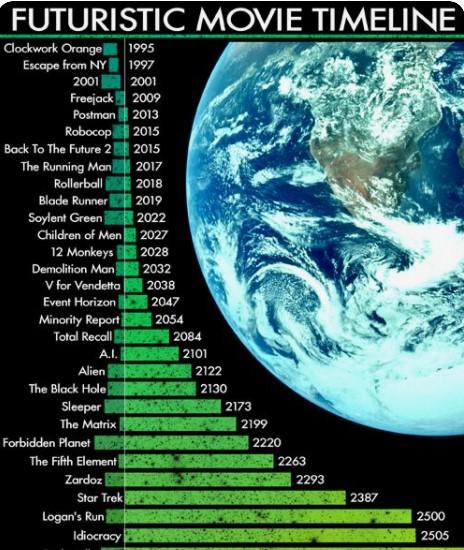
Title edited for profanity
Issue with CMS database after reinstallRichard Haseltine said:
NorthOf45 said:
Setup looks good, but it also looks like you are using Connect, which will cause you problems. Logging into your DAZ account from Studio will force it to use Connect, and since it now knows what products you own, it will try to install them when you use them. Log out and set your Studio preferences to not log in automatically. Uninstall everything that has been re-installed by Connect. You already have everything installed with DIM, so you shouldn't have any more problems.
DS will not reinstall items that it knows are installed through DIM/Daz Central, or manually and the emtadata imported, even if it is on line. It won't install anything without being told to.
Well, it sounded like Studio was installing something after prompting the user to install the missing parts. There were references to Connect-style folders in those log files, so I assumed it was through Connect. I have read many threads about the various, um, adventures of using Connect, but have never tried to use it myself, so maybe I should just back away. Sorry to have muddied the waters.
Issue with CMS database after reinstallNorthOf45 said:
Setup looks good, but it also looks like you are using Connect, which will cause you problems. Logging into your DAZ account from Studio will force it to use Connect, and since it now knows what products you own, it will try to install them when you use them. Log out and set your Studio preferences to not log in automatically. Uninstall everything that has been re-installed by Connect. You already have everything installed with DIM, so you shouldn't have any more problems.
DS will not reinstall items that it knows are installed through DIM/Daz Central, or manually and the emtadata imported, even if it is on line. It won't install anything without being told to.
Daz 3D is part of

Connect
DAZ Productions, Inc.
7533 S Center View Ct #4664
West Jordan, UT 84084Licensing Agreement | Terms of Service | Privacy Policy | EULA
© 2026 Daz Productions Inc. All Rights Reserved.