-
My G9 characters' heights are all WRONG - what content is making G9 bigger?
garrett_3d said:
I appreciate I'm a dinosaur, but to me logic dictates that if every G9 character is affected, then your base files may be at fault. Do you think it may be worth uninstalling and reinstalling the Essentials packages?
Even loading the default G9 loads in all the channels and formulae from the other G9 packages installed in the data folder. I think it's more likely one of those has messed up ERC formulae, so I've narrowed it to 9 and am going to check the relevant formulae in those morph data files for anything that produces a value when that morph is at zero. The affected Genssis 9 proportion and scale channels work and are not showing messed up defaults or anything, so I can't see it could be them, so a re-install of the base package won't do anything. It's some input from outside the Gensis 9 base package channels, so it has to be a fault in one of the other G9 morph packages triggering those base proportion and scale morphs when it shouldn't.
My G9 characters' heights are all WRONG - what content is making G9 bigger?I HAVE measured a pure G9, as in the original Genesis 9 actor file in People/Genesis 9. Did that yesterday. And with nothiing applied by me after loading it is similarly over sized at about 5' 11 1/2". (Again, oddly what teh default height of the earlier generation default females was).
My problem is that, looking at Currently Used I can see there are a number of relevant parameters at non-zero or non-100% values (depending on the paarameter), like the Proportion Height, Proportion Larger, Proportion Hand Size, Proportion Leg Size and Scale. But they all show a Raw value of 0% or 100%, not the boosted actual Value, they are clearly not at the increased values because of changed defaults, and all the values have a LOT of Controllers, but I can't find any controller that's actually at a value to account for these values in those parameters. I mean, for example, Proportion Height has about 50 controllers, but not one of those 50 controllers appears to be dialled at all to account for Proportion Height showing a value of 10% when the raw value is 0%. I think there has to be a faulty modifier channel formula in ... some G9 morph, but I can't find a way to identify it, and it is affecting EVERY G9 figure I load.
Once upon a time a long time agoi knew how to enter a value in a DSON file so that it altered the value by that amount instead of setting the value to that amount. If I could remember how, I could create a shaping preset that just corrected for whatever this is. But it would be much better if I could just find and fix or delete the faulty data file, but i'm stuck how to locate it.
Bastian 9SilverGirl said:
Cross-posted from the new releases thread, as I belatedly saw this thread and maybe more folk will see it here:
Can anyone who got https://www.daz3d.com/dforce-longfall-mystic-hair-for-genesis-9 let me know if it's possible to make those front drape-over-the-shoulder parts go behind the shoulders (so all the hair is down the back)?
TIA.
I can't find a morph that will easily allow for the front locks to move to the back. You can lengthen/shorten them or spread them to the side but that is about it, same as the back hair. The hairline can be pulled back to show a balding effect. The side bangs can move towards the face and away and can be lengthened/shortened. The ponytail also has a left-right and up-down morph only. But it is dforce, strand-based and with Omni shaders. Sorry, I am not sure if using Mesh Grabber would help or not.
If I am not mistaken, it is very like what someone was asking for in Product Suggestions a bit ago.
I bought both character bundles and texture sets and the weapons. No clue how much they match up to the LOTR franchise but my renders will be for my own use.
My G9 characters' heights are all WRONG - what content is making G9 bigger?DavidGB said:
So, if those G9 characters have been designed right for the expected heights, and the .dufs downloaded and installed by DIM are what they should be, WHY ON EARTH are both my DS 4.24 and DS 6 modiying the scales to make the G9 characters significantly taller - and not a G8F?
Because your library might have a morph that is misfiring. That's what the poster above asked you to check for. And that's why they asked you to measure a pure G9 figure with nothing applied.
Possibly Distributing My Anthro Work If Interested Via The Daz Shop (Applying To Be A PA... Maybe)I got so excited to discover this thread, and groaned out loud when I saw the last talk of publishing models was back in 2024.
imo Daz is still largely uncharted territory as far as furry/anthro creatures go, and I feel furry content is under-represented on the store despite having occasional offerings. I encourage anybody who feels inspired to try making anthro stuff! Pretty certain I'll buy any creations that reach the store (morphs, characters, grafts). :) Someday when I'm not working 2+ jobs, I plan to create my own too.
RawArt and Feng, and Oso3D/Willbear offsite, are some of the PAs I know of who are recently/actively making animal characters for Genesis 9. Sickleyield and a few others do some useful creature morphs for individual body parts. Oso3D's older models are still my go-to for lots of things. Littlefox, Redspark, RuntimeDNA, Capsces Digital Ink very old product lines still have lots of utility, though limited by figure era and content compatibility. Genesis 9 seems the logical choice for new rigs/sculpts as much as I love Genesis 8.
For me, I find it more appealing when artists push the real-animal shape language, anatomy, big ears, wings, tails, etc. Really leaning into the animal qualities rather than gently stylizing a human base, or making grafts feel intentional and not tacked-on. So, things like digitigrade legs and species-specific sculpted paws are preferred.
One of my biggest wishes is for more control of anthro characters' ears, from shaping to sizing to posing. Animal ears are an incredibly powerful expressive and storytelling device that human characters lack. A snarling face with ears up says something completely different than with ears pinned back. Side-splayed ears say everything about a character's rank and confidence even if their smile is neutral. Ears with dings and dents vs soft domesticated ears tell a rich story about where a character has been. Tails and even cheek fluff similarly complement this extra expressive factor, but it still feels largely untapped in the Daz world.
I also like to see extra attention given to paws. Whether it's enormous rabbit feet kicked back by a cozy fire or a wolf guard's open palm stopping you from crossing a bridge, it affects the immersion to have too much of a human design for anthro extremities unless the art of your world is already built around it. Claws too, like really scary slashers clasped around the hilt of a shiny sword (or swordless, paw flexed for attack), are great ingredients for a compelling render.
Anthro body diversity could easily be its own study. Chibis, human-like proportions, slinky zootopia characterizations, the list goes on. For now there are a few scattered product offerings (especially morph packs) to cobble design elements together.
Transferring Morphs from V3 and V4 to GenesisI have some utilities to transfer character morphs from various versions of Genesis to other versions (G3 to G8 etc). Is there any way to get V3 and V4 morphs into Genesis (preferably g8 or g9 but g3 would work)? I'm not wirried about the textures just the morphs.
My characters look like aliensIf a morph is saved with a non-zero value it will auto-apply, you don't need to do anything. Sometimes properties need to start with a non-zero value (e.g. if they are going to have something else subtracted from them to make an inverter) but general character shapes should not be saved like that. It is most likely a product bug and should be reported to Daz (for content purchased here) or the artist.
My characters look like aliensMost likely something you have added recently was saved with a non-zero value for one or more morphs. If it was a character morph that needed zeroing that probably tells you the culprit.
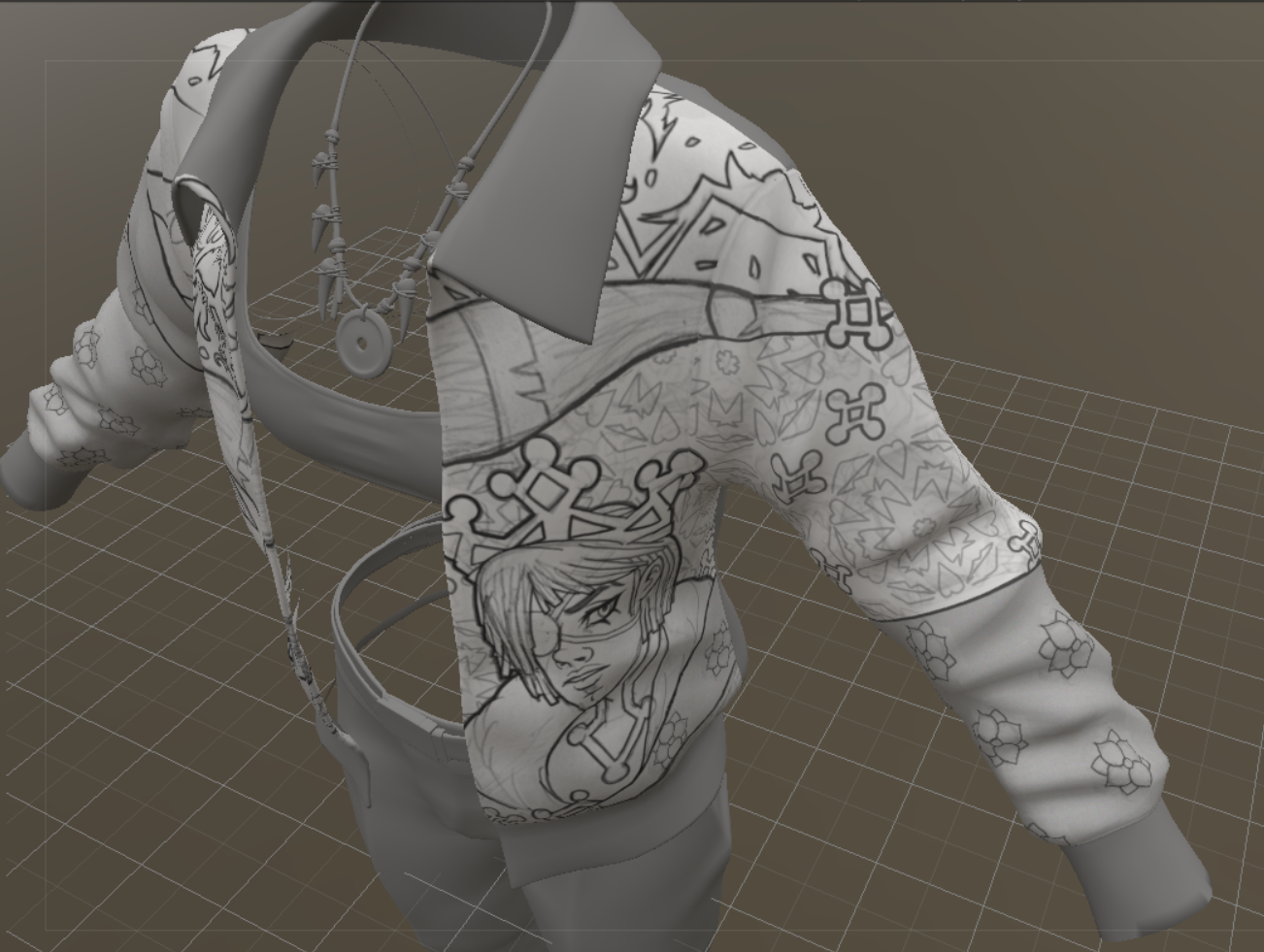
MimicMolly's Renders & WIPsHere is the completed design of Ernie, Gina's brother, and the sleeve. My intention is for the design to look like it's continously printed along the jacket, except for a top panel.
The bottom that I have "rectangled" is where I must make up a random pattern that merges Gina's birds with Ernie's...whatever is going on with him.
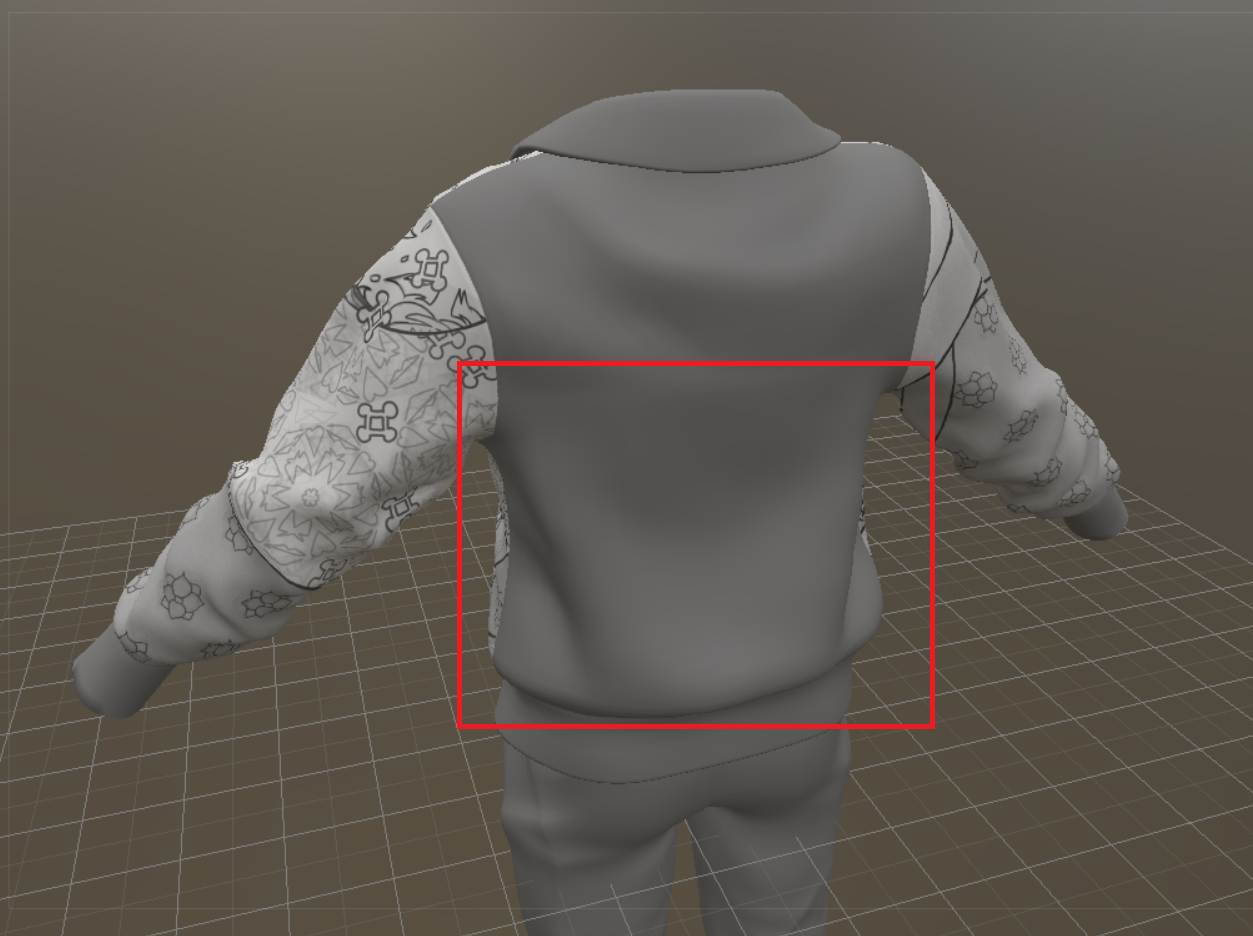
I have not decided what to do with the pants. Ernie's default color palette for his clothes is based off of Mickey Mouse, meaning that his pants must be red and his shoes must be mostly yellow. Gina doesn't strictly stick to a color palette because she's poor, so I can do whatever with her. But, she loves black, so I will have to incorporate this with the red.
I will add on here, because I only want to "bump" my thread when I have relevant art project pics (the WIPs), but I don't think we can post art in the DAZ Galleries anymore. I need to look through what I have there and see if it somehow made it to my DAZ renders DeviantART. As always, DeviantART has proven itself to be the most reliable art site to archive my work and I'm thankful that the good strangers of Yahoo! Answers [RIP] told me about it.
Good news, DAZ Studio 6 can do the Map Transfer again! But it's quite laggy, so I'll stick to DS 4, for the time being.
I have some older Merchant Resource Make-Ups that I go back and forth with, with other UVs that are not G9. I did this a lot with G8F and an old V4 set. It's easier for me to convert a test skin than to manually convert all the images in the .PSD layers that have these makeups. ^^;
Products inspired by existing franchisesRichard Haseltine said:
when people submit products to daz theya re required to state that they own the rights (much like kpr's comment on commisioners and the artists they hire) so saying "This is from X" is accusing them of misrepresenting the product, and we do not allow accusations in general.
A PA might earnestly believe they own the rights to their product, but that doesn't necessarily mean they're correct. If a PA creates a morph that is their own original work but is based on an existing person or character, where does that lie? They legitimately created the morph themself, and would own the right to their creation, but whether they actually have the right to distribute it is a little trickier.
MimicMolly's Renders & WIPsMost of my June and July art projects involved hand drawing or writing, so nothing I'd consider DAZ-related.
In fact, yesterday I finally downloaded DAZ Studio 6 because I'm curious about the Map Transfer feature. In DS 4.24, it is irreparably broken because it may've been tied to 3Delight to generate maps. (It stopped working after the 3Delight render engine was retired/removed.) When I tried it, it just gave me back a black image. I do have an older version of DS 4 that works as intended. Unfortunately, I haven't had time to check if this was "resolved" in DS 6. I don’t think it has because most people don't edit their textures like I do. The "proper" texture artists stick to their specialized apps, and everyone else...they're DAZ artists because they want to make illustrations without having to draw or paint by hand.
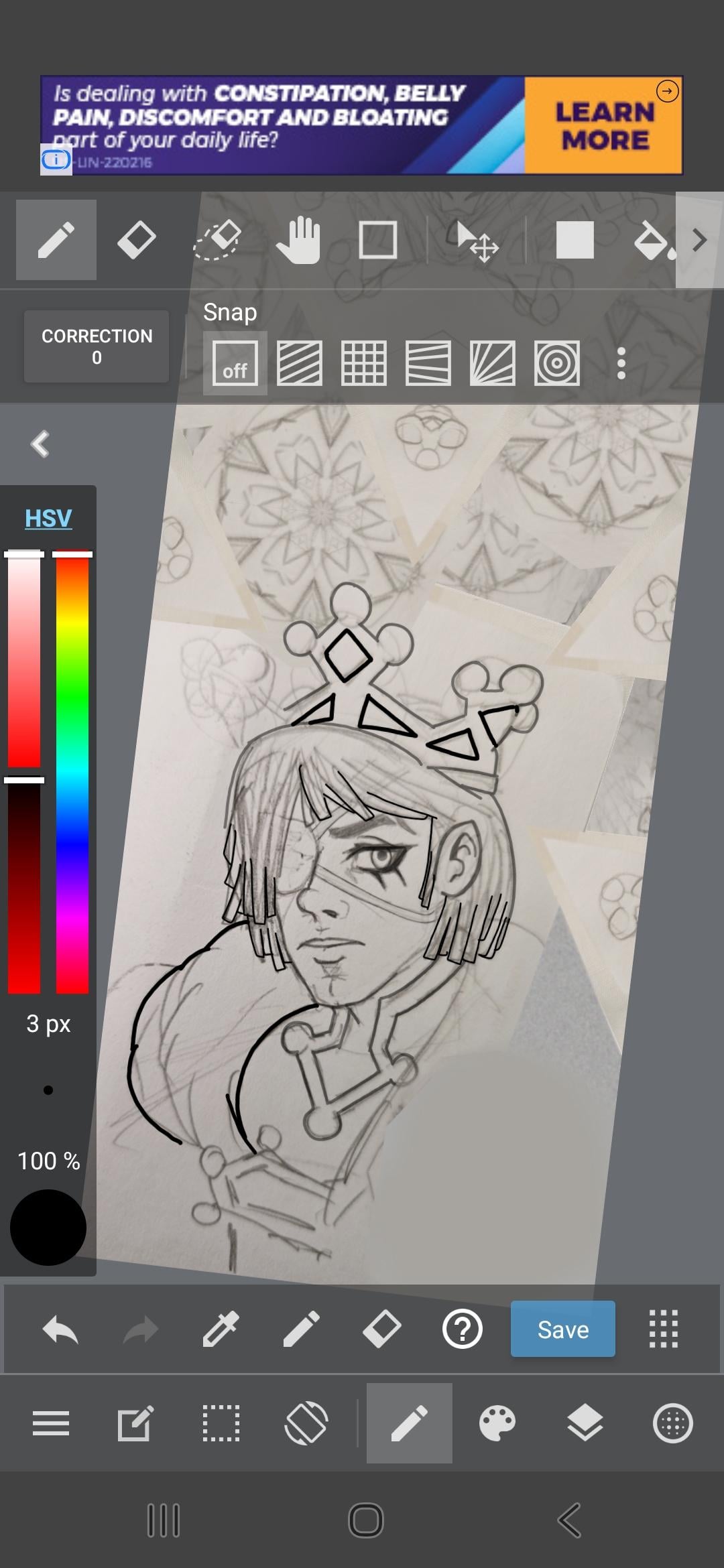
Right now, I'm still working on my jacket texture that has my OCs featured in it. I have sketched Gina's brother on paper, and now digitally lining the art. I did do some "mixed media" in making the kaleidoscope effect as the background, since the jacket design is supposed to be abstract/random. I did want to draw Gina’s cousin instead but I do not have any drawings of the brother wearing his crown. He is usually wearing a beret or other soft hats. (The character is weakened by his psychic powers, which allow him to have extremely accurate visions of things that will happen, and perfect/flawless aim, so he is extremely dangerous with guns or bows or darts, etc.)
Also, the store has been updated like...2 weeks ago? It's very laggy on my phone, so I don't really window shop here anymore or visit the forums much. Before, I just wishlisted the items that caught my attention, then logged into my laptop to look into them further. I also liked RenderHub a lot, because it's a competitor site, I shouldn't speak of it much here. But due to a sudden policy change, that didn't affect me but affected many vendors I liked, it was finally enough for me to register to another competitor site. (I will just buy the last items from vendors I can't find anywhere else, and download everything.)
I will not name, names, but this competitor site I joined feels so...hostile and unwelcoming, that I'm not even sure if I should buy anything from them. Some RH vendors I like are on there and not Renderosity. There are other vendors that I've been wanting to buy stuff from but they seem to be only on this unwelcoming site.
Speaking of hostility, the updated Product Library...it finally has advanced search options...but the search options are...not good. Last week, there were several freebies by the vendor, Censored. So when I search "Censored" or "DAZ Originals," in the Artists section (the freebies had both listed as their creators), nothing comes up. I must type "CIJ" in order to find these freebies. So even that is annoying enough for me not to stop by often. -_-
Older version of DAZ StudioI can't help you with obtaining Daz Studio 4.12 (I don't think anyone legally can share it with you aside from Daz themselves)... But are you sure you can't save a custom G1 character as a morph asset?
Using Daz3D version 4.24.3... I've just loaded a Genesis 1 female character into the scene... Changed her Resolution Level to Base, then exported to Obj, imported her into Blender (keeping vert order) and morphed her nose to be more like pinnokio as a test, then exported her to obj (keeping vert order in tact). Then used Morph Loader Pro to import her (with Reverse Deformations: YES, since the G1 female is already an active morph, but if you just use the base G1 model then you might not need that)... Then I went to: "File -> Save As -> Support Asset -> Modifier Asset", checked the morph I had just imported with Morph Loader pro and saved it.
Starting a new scene and loading the G1 female model, makes the morph available (I hadn't changed anything so it was under "Morphs -> Morph Loader"), and when I open GenX and select the Genesis figure the morph is visible under the "(geometry) geometry" group and I can check it...
I'll admit I haven't actually tested a conversion to Genesis 3... But GenX at least sees the morph and Daz3D also let's me dial the morph in. So the morph seems to be working inside of Daz3D at the very least.
Older version of DAZ StudioHi, does anyone have access to a download for DAZ Studio 4.12? I need to install this version because subsequent versions do not allow you to save custom Genesis 1 characters as Morph Assets, without which Genx2 cannot convert them to later models such as Genesis 3. The custom characters were only saved as scene files.
Regards
Abe
Freaky Fingers?Daz Studio 4 Scene Tools 4 - Morph Tools makes the process of selecting and removing unwanted vertices from a morph, pretty easy. Of course it costs money, and the task can be done with a little more effort, with the built in tools (as Richard described), for free.
Freaky Fingers?barbult said:
Are finger nails rigged? I thought the problem might be body morph deltas incorrectly included on the head morph.
Could be, I was reading it as misplaced joint centres but you are right that it seems limit in effect. Assuming it is a non-Daz, and therefore non-HD morph then you can work around unwanted deltas fairly easily - from memory:
- make the morph a favourite (click the ehart icon on the slider) and make sure no other morphs are favourited.
- Tools>Geometry Editor
- In the Tool settings pane switch to Vertex mode, and marquee selection
- Drag around to select the problem vertices (in this case getting extras won't hurt).
- Right-click>Morph Editing>Remove Selected Deltas from Favourites
You can use File>Save As>Support Assets>Save Modified Assets to save just the problem morph (make sure nothing else is checked, and make sure the morph iss et to 0 before doing so) if this works.
Freaky Fingers?Are finger nails rigged? I thought the problem might be body morph deltas incorrectly included on the head morph.Golden Palace G9 Bonus MorphIf you go to Meipe's Golden Palace Bonus Morph on the Rotica forums you can get one he just re-uploaded.
How do I fix this??It looks like some type of corrective morph is firing before it should.
Select your figure, go to the parameters tab and from the hamburger menu in the corner, under preferences, turn on show hidden properties. Filter by currently used. Now you will have to go through the active properties and zero them to see which one is causing the problem. I'd suggest start with any that have "cbs_" as a starting label.
Need Help Fine-Tuning a Custom Genesis 9 Morph...I'm pretty happy with the result in the neutral pose, but that's where the good news ends.
Yeah, the figure in default A-Pose also looks fine to me but it merely means that you successfully got the job done in Faceform Wrap, i.e. you got the correct head / body shapes on G9 by having wrapped the source character. Then you need to do follow a key workflow in terms of morphing:
1) Check and fix Auto Follow Head morphs on the anatomical attachments on G9, e.g: Eyes, Mouth, Tears, Eyelashes, Brows...as they're separate wearables. This is the primary step before doing adjust rigging, fix corrective morphs, etc...
For Eyes and Tears, make sure they well fit in eyesockets, with no obvious distortion on irises, pupils.... For Mouth, make sure they well fit in mouth cavity, with no obvious distortion on gums & teeth.
lilweep showed you the key steps above, just a trick: Export OBJ (no matter from DS or Blender) by using the Name of Auto Follow head morph...so that you can more easily updating Deltas by using Morph Loader Pro.
Do the same check as well as fix on Tears / Eyelashes / Mouth nodes ~
2) Adjust Rigging to Shape and ERC Freeze on character's Head / Body morphs
3) Check and make necessary joint corrective morphs ( _body_cbs_ ) for the key bones (e.g. spines, head, necks, shoulders, upperarms, thighs and shins ) and set up ERC links
4) Check and make necessary facial corrective morphs ( _facs_cbs_ ) for key FACS properties (e.g Jaw, Mouth, Lips, Eyes, Eyelids... related... ) and setup ERC linksIf each key FACS property works well, most of the expressional Pose Control properties should be able to work well. A trick, when dialing or mixing expressional Pose Control properties, don't dial the values to 100% ~ Dialing or mixing with high values might make you character looks ugly or weird, or a bit "Frankenstein " lol ~
If some Pose Controls don't work well, you have to make dedicated corrective morph(s) (i.e. eJCMs / MCMs) to the existing ones.
As for using Faceform Wrap, I couldn't tell more as you didn't share the graph of nodes that you used but as per my experience of the workflow in Wrap, the below graph that I've been using works pretty well in most of the cases.
Besides, personally I don't think the above issues you mentioned came from wrapping process ~~ most likely you just need to adjust rigging and make some corrective morphs.
Edit: No worry ~ even the officially well-made Victoria 9 cannot 100% well handle all expressional properties lol ~~ Any more issues, just feel free to let us know.
Character Splitter@stefan.hums, I'll patch v3 to fix skeleton pruning (in case of split neck, only the upper one was included, not the root) and fix the region display in the Shaping pane.
I am currently developing a script to allow morphs transfer between any figures (one version optimized for characters, and one for targeted morphs, such as ears, nose...), so I don't have time available to make v4 backward compatible (and I have removed my Studio 4 installation).
To fix your issues with v3 without waiting for the patch :
- put some '//' at the beginning of lines 391 & 392 :
//	if (step >= 0)
//		adjuster.setExcludedBones(GetBonesToExclude(step));
- replace line 568 by :
		prop.setLabel(mLabel);
		helper.setPropertyPath(prop, mPath.text); // Set path & region - Note: must be called once property has been added to oNode
		prop.setIsClamped(true); // Use Limits
Daz 3D is part of

Connect
DAZ Productions, Inc.
7533 S Center View Ct #4664
West Jordan, UT 84084Licensing Agreement | Terms of Service | Privacy Policy | EULA
© 2026 Daz Productions Inc. All Rights Reserved.