-
New Year, New Sales Thread: Report Issues Here 3 "Reporting Only"
Togire said:
Elor said:
mding said:
In case this hasn't been reported yet: Several core figures lost their "Product Add-ons" sections:
Victoria 4.2 Base, Michael 4 Base, Stephanie 4 Elite Base, Aiko 4 Base, Hiro 4 Base
Genesis: Michael 5, Victoria 5,
Genesis 2: Victoria 6, Michael 6, Josie 6, Stephanie 6, Gianni 6, Mei Lin 6, Aiko 6, Lilith 6
Genesis 3: Michael 7, Aiko 7, Victoria 7
Genesis 8: Here I only checked and found: Victoria 8, Michael 8, didn't look any further.
Could that be please reported, please, as I find these sections are very helpful?
Daz Dog 8 also lost the product add-ons section:
https://www.daz3d.com/daz-dog-8
If it's mainly for figures with a lot of add-ons, maybe it's a performance saving change? But I hope they'll revert back to the previous situation or offer a way to browse add-on for a figure.
Actually, they also suppressed the add-on section of Genesis 9 Starter Essentials, but this is a *very very very good* thing.
Making any G9 figure/outfit an addon of Genesis 9 Starter Essentials was extremely stupid. First, loading the G9 starter essential page with its addon section composed of 20k+ elements was (how can I say) ... an interesting experience... If you have tried recently, you know what I mean. But, this is now fixed
But, if any G9 item is already an addon, it completely breaks the search of real dependencies. For instance, with "daz deals" you can find in a big list of assets which ones are addons of items that you already own. Very useful, indeed. But if all G9 items are already addons of G9 essentials, this is a useless information that masks real addon dependencies as all G9 assets will appear in the list. And this problem is not fixed...
This prompted me to look and confirm that this feature is also lost for Daz Horse 2 and 3, the original Ultrascenery, and likely many other comparable products. That, IMHO, is a bad thing that needs to be fixed. I own pretty much all of the add-ons for items like these, but when I was building my Daz collection, I made a lot of use of picking up add-ons when on sale. As a newbie, I wouldn't even have known about all the cool add-ons that were available for some things without this feature.
New Year, New Sales Thread: Report Issues Here 3 "Reporting Only"Elor said:
mding said:
In case this hasn't been reported yet: Several core figures lost their "Product Add-ons" sections:
Victoria 4.2 Base, Michael 4 Base, Stephanie 4 Elite Base, Aiko 4 Base, Hiro 4 Base
Genesis: Michael 5, Victoria 5,
Genesis 2: Victoria 6, Michael 6, Josie 6, Stephanie 6, Gianni 6, Mei Lin 6, Aiko 6, Lilith 6
Genesis 3: Michael 7, Aiko 7, Victoria 7
Genesis 8: Here I only checked and found: Victoria 8, Michael 8, didn't look any further.
Could that be please reported, please, as I find these sections are very helpful?
Daz Dog 8 also lost the product add-ons section:
https://www.daz3d.com/daz-dog-8
If it's mainly for figures with a lot of add-ons, maybe it's a performance saving change? But I hope they'll revert back to the previous situation or offer a way to browse add-on for a figure.
Actually, they also suppressed the add-on section of Genesis 9 Starter Essentials, but this is a *very very very good* thing.
Making any G9 figure/outfit an addon of Genesis 9 Starter Essentials was extremely stupid. First, loading the G9 starter essential page with its addon section composed of 20k+ elements was (how can I say) ... an interesting experience... If you have tried recently, you know what I mean. But, this is now fixed
But, if any G9 item is already an addon, it completely breaks the search of real dependencies. For instance, with "daz deals" you can find in a big list of assets which ones are addons of items that you already own. Very useful, indeed. But if all G9 items are already addons of G9 essentials, this is a useless information that masks real addon dependencies as all G9 assets will appear in the list. And this problem is not fixed...
New Year, New Sales Thread: Report Issues Here 3 "Reporting Only"mding said:
In case this hasn't been reported yet: Several core figures lost their "Product Add-ons" sections:
Victoria 4.2 Base, Michael 4 Base, Stephanie 4 Elite Base, Aiko 4 Base, Hiro 4 Base
Genesis: Michael 5, Victoria 5,
Genesis 2: Victoria 6, Michael 6, Josie 6, Stephanie 6, Gianni 6, Mei Lin 6, Aiko 6, Lilith 6
Genesis 3: Michael 7, Aiko 7, Victoria 7
Genesis 8: Here I only checked and found: Victoria 8, Michael 8, didn't look any further.
Could that be please reported, please, as I find these sections are very helpful?
Daz Dog 8 also lost the product add-ons section:
https://www.daz3d.com/daz-dog-8
If it's mainly for figures with a lot of add-ons, maybe it's a performance saving change? But I hope they'll revert back to the previous situation or offer a way to browse add-on for a figure.
New Year, New Sales Thread: Report Issues Here 3 "Reporting Only"Richard Haseltine said:
mding said:
In case this hasn't been reported yet: Several core figures lost their "Product Add-ons" sections:
Victoria 4.2 Base, Michael 4 Base, Stephanie 4 Elite Base, Aiko 4 Base, Hiro 4 Base
Genesis: Michael 5, Victoria 5,
Genesis 2: Victoria 6, Michael 6, Josie 6, Stephanie 6, Gianni 6, Mei Lin 6, Aiko 6, Lilith 6
Genesis 3: Michael 7, Aiko 7, Victoria 7
Genesis 8: Here I only checked and found: Victoria 8, Michael 8, didn't look any further.
Could that be please reported, please, as I find these sections are very helpful?
Where is this?
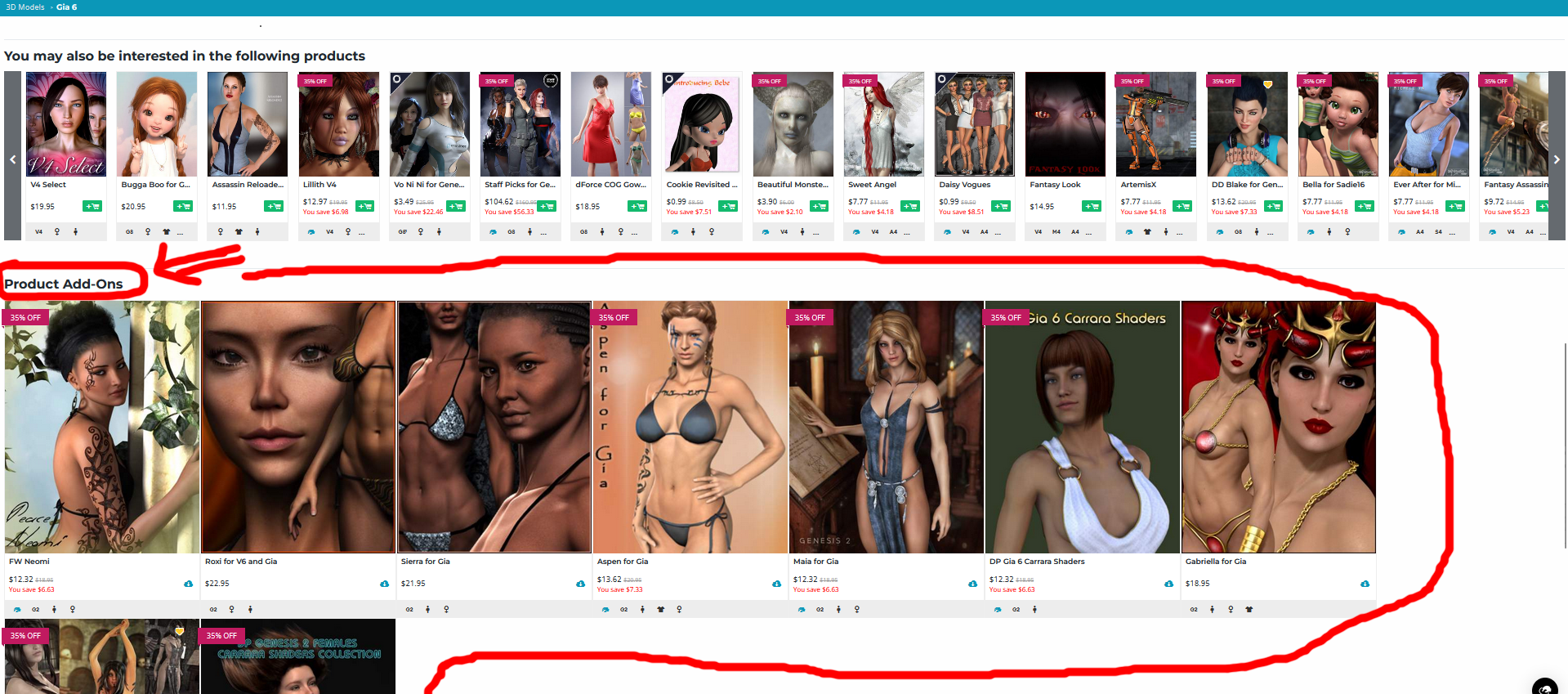
Sorry Richard, just now saw your question. Please compare for example https://www.daz3d.com/gia-6 at the bottom of the page with https://www.daz3d.com/victoria-6. Although the Product Add-on section at the bottom of Victoria 6 is actually much larger, it misses altogether, while Gia 6 still has it. This is quite new, as I used it already often during March madness.
 New Year, New Sales Thread: Report Issues Here 3 "Reporting Only"
mding said:
In case this hasn't been reported yet: Several core figures lost their "Product Add-ons" sections:
Victoria 4.2 Base, Michael 4 Base, Stephanie 4 Elite Base, Aiko 4 Base, Hiro 4 Base
Genesis: Michael 5, Victoria 5,
Genesis 2: Victoria 6, Michael 6, Josie 6, Stephanie 6, Gianni 6, Mei Lin 6, Aiko 6, Lilith 6
Genesis 3: Michael 7, Aiko 7, Victoria 7
Genesis 8: Here I only checked and found: Victoria 8, Michael 8, didn't look any further.
Could that be please reported, please, as I find these sections are very helpful?
Where is this?
New Year, New Sales Thread: Report Issues Here 3 "Reporting Only"In case this hasn't been reported yet: Several core figures lost their "Product Add-ons" sections:
Victoria 4.2 Base, Michael 4 Base, Stephanie 4 Elite Base, Aiko 4 Base, Hiro 4 Base
Genesis: Michael 5, Victoria 5,
Genesis 2: Victoria 6, Michael 6, Josie 6, Stephanie 6, Gianni 6, Mei Lin 6, Aiko 6, Lilith 6
Genesis 3: Michael 7, Aiko 7, Victoria 7
Genesis 8: Here I only checked and found: Victoria 8, Michael 8, didn't look any further.
Could that be please reported, please, as I find these sections are very helpful?
What is causing this how do I fix it?Does the re-opened model include the geografts? And if so, have the UVs of the geografts been set to "Michael 4"?
EDIT: If you saved the figure as a Character preset it will not include the geografts. However if you save it as a Persona preset it appears it will include the geografts, complete with all material settings.
What is causing this how do I fix it?This is a M4 conversion to a G3 model, using the GenX addon. (GenX2 and GenX3) I also used the Legacy UVs for Genesis 3: Michael 4 to map the skin.
I saved a material preset of the M4 model skin, mapped tothe M4 model, to have a map to apply during the process.
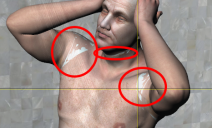
I followed the Manual to add the GeoCrafts fot the UV stuff and got the result i wanted, but after saving and re-opening the model, I am getting the GeoCraft stuff bleeding through.See image.
I would happily use another skin for a G3 model but I really need the face for the character.
Any help on how to fix this would be appreicated.
Thanks.
 Did anyone do a Clothing Converter from V3,V4,M3,M4 to Genesis 3,8,9 M&F
Hylas said:
myotherworld said:
that really works
Are you not happy with the Riversoft/Sickleyield ones?
https://www.daz3d.com/rssy-clothing-converter-from-victoria-4-to-genesis-8-female
https://www.daz3d.com/rssy-clothing-converter-from-michael-4-to-genesis-8-male
I own them but admittedly I don't think I've had the time to try them.
These two converters are practically useless for me. I always have to force the conversion because "Convert Files" does absolutely nothing, and the result is almost always distorted, resembling the Michelin Man.
It's a mystery to me why these products are still being sold in the shop.
Do Victoria 4 and Michael 4 Not Work In The Alpha VersionNeither [Victoria 4 nor Michael 4] will load into the [Alpha Version] scene at all. I've tried double clicking, merging into scene etc. Re installed. Not working. Weirdly, Aiko 3 works just fine
[Released] Bone Minion Batch Converter for Generation 4 Poses [Commercial]Eboshijaana said:
RiverSoft Art said:
There may be an issue where an old version of the Bone Minion - Create Heavyweight Bone Minion script was included with this release. On executing Bone Minion - Create Heavyweight Bone Minion and selecting Michael 4 or Victoria 4.2, you should receive a dialog like this:
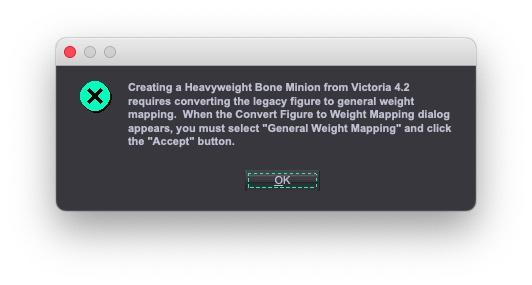
If you do not see this message (and then the following dialog), the script is the old create heavy bone minion script and will not create the V4/M4 Heavyweight Bone Minion correctly. Please try the attached script and see if it works instead.
The attached script worked well!
Excellent! It sounds like I need to do an update.
 [Released] Bone Minion Batch Converter for Generation 4 Poses [Commercial]
RiverSoft Art said:
There may be an issue where an old version of the Bone Minion - Create Heavyweight Bone Minion script was included with this release. On executing Bone Minion - Create Heavyweight Bone Minion and selecting Michael 4 or Victoria 4.2, you should receive a dialog like this:
If you do not see this message (and then the following dialog), the script is the old create heavy bone minion script and will not create the V4/M4 Heavyweight Bone Minion correctly. Please try the attached script and see if it works instead.
The attached script worked well!
[Released] Bone Minion Batch Converter for Generation 4 Poses [Commercial]There may be an issue where an old version of the Bone Minion - Create Heavyweight Bone Minion script was included with this release. On executing Bone Minion - Create Heavyweight Bone Minion and selecting Michael 4 or Victoria 4.2, you should receive a dialog like this:
If you do not see this message (and then the following dialog), the script is the old create heavy bone minion script and will not create the V4/M4 Heavyweight Bone Minion correctly. Please try the attached script and see if it works instead.
[Released] Bone Minion Batch Converter for Generation 4 Poses [Commercial]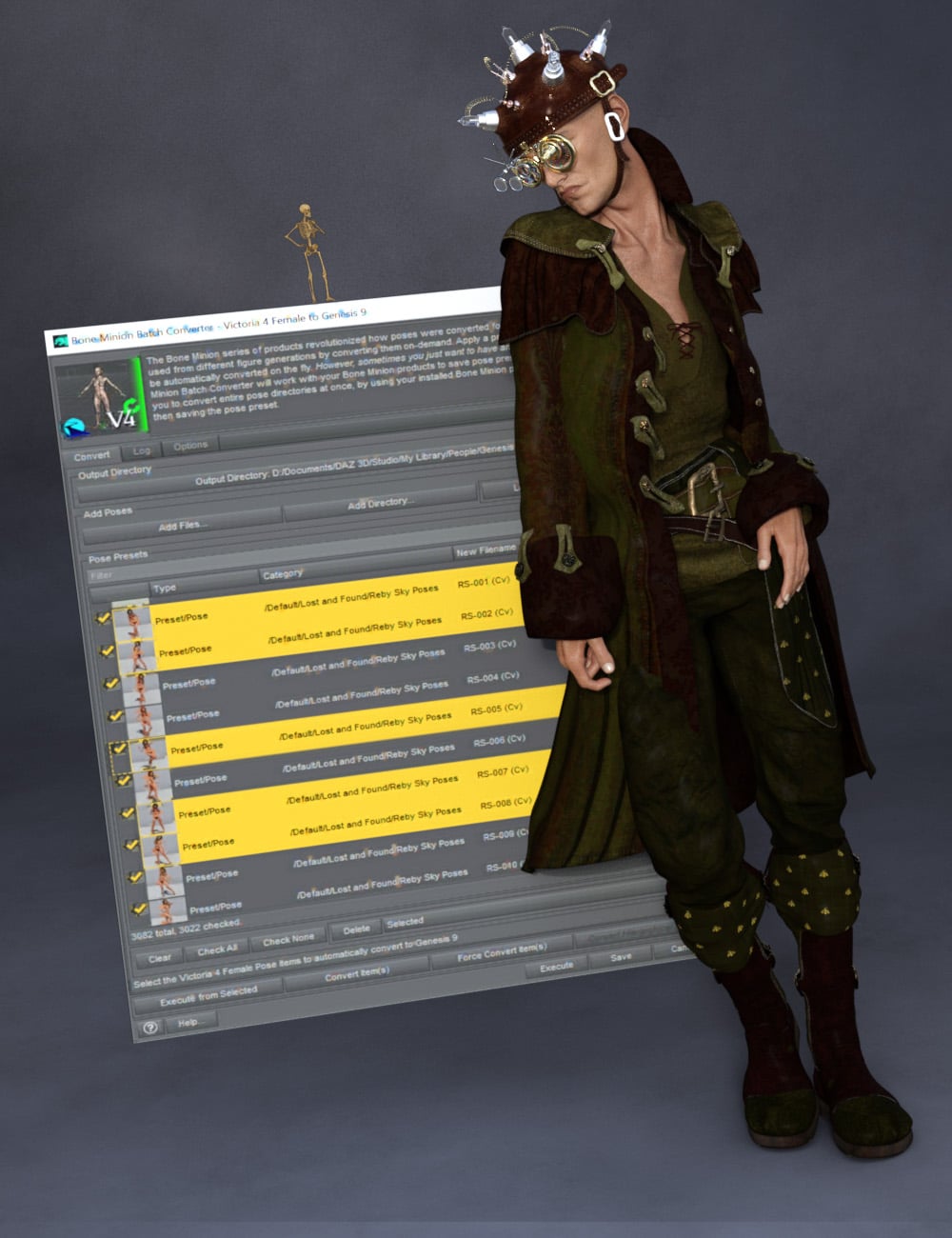 The Bone Minion series of products revolutionized how poses were converted for Daz Studio, enabling poses to be used from different figure generations by converting them on-demand. Apply a pose to the Bone Minion, and it would be automatically converted on the fly.
However, sometimes you just want to have and use a pose preset.
The Bone Minion Batch Converter Generation 4 (i.e., for Michael 4 and Victoria 4 Poses) will work with your bone minion products to save pose presets to be used later. It allows you to convert entire pose directories at once, by using your installed Bone Minion products to convert the pose, and then saving the pose preset.
Automatically convert your entire library of Generation 4 poses using the Bone Minion Batch Converter!
The Bone Minion Batch Converter Genesis script works with any installed Bone Minion for Generation 4 Poses for XXX product to provide batch execution for automatically converting your Michael 4 and Victoria 4 poses. Easily select the Poses presets in your library, select an output directory, and execute the script. Even better, icons and categories are copied from your original pose to the new pose presets.
- Convert Full Poses and Partial Poses to Pose Presets, that can be used on any machine, even ones without Bone Minion installed
- Uses any Generation 4 Bone Minion product installed (i.e., Bone Minion for Generation 4 Poses for Genesis 2, Bone Minion for Generation 4 Poses for Genesis 8, Bone Minion for Generation 4 Poses for Genesis 9, etc.), even future products (i.e., if a Bone Minion for Generation 4 Poses for Genesis 10 product comes out, the script should work with it.
- Includes Bone Minion for Generation 4 Poses for Genesis 3!
- Copies icons from Generation 4 Poses for a professional look
- Copies Smart Content Products! Converted Poses will be organized into similar products as the original items. The converted product mirrors the original items' products, organizing multiple converted items into one converted product and even using the product image from the original products.
- Converted Poses are Smart Content enabled!
- Automatically convert your entire library of poses with one operation! (except for Hierarchical Poses if there are any, which need the props loaded first, but then you can convert all poses for those props with one step
INCLUDES Bone Minion for Generation 4 Poses for Genesis 3 to provide conversion of Generation 4 (Michael 4 and Victoria 4) poses to Genesis 3.
The Bone Minion Batch Converter uses your existing Bone Minion for Generation 4 for XXX products.
Without the correct Bone Minion products installed, the script cannot convert your Genesis poses to the target figure generation.
Applying a custom morph to V4.2 Creature Creator TailRight ~ V4.x has no general weight mapping, it can neither detect morph deltas nor rig objects with Transfer Utility. You can firstly convert it to General Weight mapping before creating morphs with MLP or rigging with TU... however, converting to general weight will destroy V4.x to certain extent ~~
So, one of my alternatives was to convert V4.x figure into G8F.... by using V4 Clone (https://www.daz3d.com/sy-victoria-4-and-michael-4-clones-for-genesis-8). Then making things on the converted ones.
Carrara Community Art Gallery - Show us your Renders!!!Thank you Steve :-)
Yes, great novel indeed!Oh, I forgot to mention that the Xmas Tree with Tinsel Carrara Format is by our Diomede.
Better, I'll post the list of the stuff that got into the image:
3D models:
Michael 4, Mon Chevalier Hair, Millennium Beard M3, Santa Suit M4 (Mortem Vetus)
Victoria 4, Mitsu Hair, Morphing Fantasy Dress MFD, Mage M4 (hat), Stylish Shoes Anklewrap Pumps, Moon Broom
Victoria 3, Fairie Dress Wings Wand, Updo Hair 2
Anardhaus, Chocolate cup (apcgraphicos freebie Rendo Holiday 2014), Holiday accessories (gifts stocking wreath), Xmas Tree with Tinsel (for Carrara by Diomede)Carrara browser: Pitcher2 (category >> Home)
Chocorabbits and Chocobars made by me.
M4 glasses used on G8M, how ?Hello
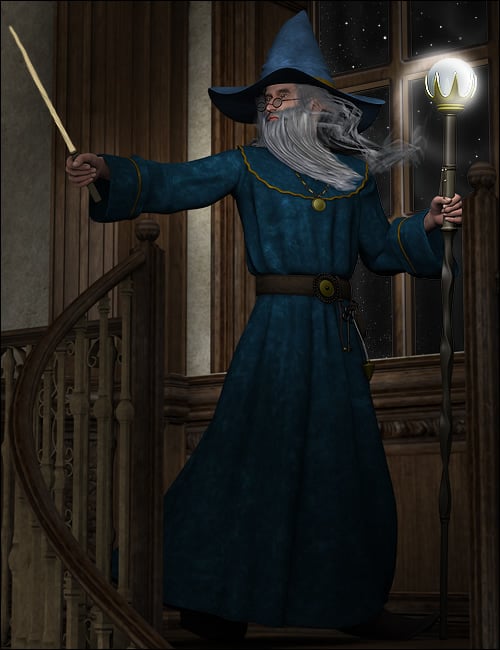
My husband really liked those glasses for his character when he was done with Michael 4, now we've been on Gen8 for a while and I wonder, what would be the best way to convert them for G8M ? Maybe there are similar "medieval fantasy" spectacles somewhere for G8M but I never found them.
Anyway, all help and advices are appreciated !(Picture from the product : )
 Is your wishlist ready for Christmas?
Knowing how this works, I started filling my Wishlist with DO after last Christmas to be ready for this one. I have around 90 DO ranging from Genesis 9 to Genesis 2 (43 Genesis 8 to Genesis 2, about 15 environments or props released during Genesis 8 to Genesis 3 time). Yet so far, I'm mostly being offered items not on my wishlist and some of those items are ancient (Michael 4). Guess I'll try dropping a few more items in my wishlist tonight.
Celebrity Look-a-Likes for 3D figures Part 4tista1993 said:
nDelphi said:
One of the most beautiful Evangeline Lilly lookalikes was MRL Ariana for V4.2. She came with two body types, beautiful body types, too.
I had converted her to Genesis 2 and Genesis 3. Some of you might have her in your collection.
Here is a promo of her as Tauriel (she came with her own morphable elf ears).
Oh wow, loved that V4 model. Loved all of the MRL ones, i had the Jennifer Lawrence lookalike as my fav and it was so good. Wish someone ported her and others to Genesis 3 too.
This DAZ Studio plug-in and its associated add-on will allow you to tranfer your Victoria 4 and Michael 4 morphs to Genesis 3 Female and/or Genesis 3 Male:
https://www.daz3d.com/genesis-generation-x2
https://www.daz3d.com/genx2-addon-for-genesis-3
This utility will allow using Victoria 4 textures on Genesis 3 Female:
https://www.renderosity.com/marketplace/products/113767/legacy-uvs-for-genesis-3-v4
This utility will allow using Michael 4 textures on Genesis 3 Male:
https://www.daz3d.com/legacy-uvs-for-genesis-3-michael-4
Installing Michael4 in Poser on Mac?How did you install? Using Instal manager is best, then make sure you seelct the same folder for isntallation as you have selected as an external library folder in Poser (that is, the folder that holds the "Runtime" folder).
In order to use Michael 4 correctly you need to make a list of all the morph files that Poser will read on loading the base figure, that requires running the /Runtime/Libraries/!DAZ/DzCreateExPFiles-m4 command script - which will at least require making sure that gatekeeper etc. allow the base DzCraeteExPFiles.app executable.
Daz 3D is part of

Connect
DAZ Productions, Inc.
7533 S Center View Ct #4664
West Jordan, UT 84084Licensing Agreement | Terms of Service | Privacy Policy | EULA
© 2026 Daz Productions Inc. All Rights Reserved.