-
Best and easiest to use NAS for storing Daz content in 2024
info_bb35bc4c said:
I use a TERRAMASTER F5-422 10Gbe, can't say I recommend it, the model is a bit outdated. From the disadvantages - when reading from disks, when starting the synchronization server - you can always hear HDDs working (creaking). But it is the disks themselves, HDD for NAS always heard during operation, in any NAS. Therefore, I will choose to replace ALL FLASH models, for example QNAP TBS-h574TX-i5-16G although I consider its cost overpriced, and 8Tb SSD in general cost is not adequate. TERRAMASTER recently released a line of 2 new NAS ALL FLASH, but they have only 10 gigabit port (max 1024Mb/s) but at a very affordable price. The QNAP model has a 10 gigabit port and 2x Thunderbolt4. 2 of my 3 computers have these ports and the transfer speeds on them will be 20Gbe. Compared to my current NAS 2 HDDs in RAID1 give a speed of 300-430Mb/s (although in advertisements write that up to 650Mb/s), in the QNAP advertisement promises a read speed of up to 2876 MB/s. I can't recommend you anything, this is my upgrade plan, this is the maximum read speed I could find. But I have gigantic scenes, I have an employee and hopefully the number will increase, well I work at 3 computers at the same time. I use Daz Studio to create content that pays off, so I can and am interested in increasing speeds and simplifying processes. Well and my current NAS will remain, 5 disks up to 100Tb. I will make copies of operating systems and Daz content from ALL FLASH NAS on it.

Will check out thunderbolt for sure, thanks for the info
Lost and Found growing! Is that right?Richard Haseltine said:
geekydad123 said:
I just purchased a product that went straight to Lost and Found. It's got over 300+ files associated with it (it's a complex environment), I really don't want to have to sort that myself. Hopefully a support ticket will get things straightened out.
If it is part of a bulk transfer from Renderosity then it probably won't get official metadata - but if someone, using the default install locations, created metadata for it that could be shared.
Users are probably not eager to do Daz's work for them for free. Even packaging up the metadata for sharing after creating it takes time. That is followed by the requests for help because people don't know how to install it, or they don't know how to import it, or they don't have their product installed in the same hierarchy, or... I volunteer you, if you are interested.
 RRRR - Weird Holiday Traditions Render Contest *CLOSED*
And here they go again...
Pull#1:
- Undead Creature Creator HD Morph Pack for Genesis 3 Male #34857
- 8bit Retro V2 #58873
- Cb Clementine Corset And Choker For Genesis 8 And 8.1 Females #85649
- Dforce Liberty Grace Outfit For Genesis 8 Female #54203
- LB: Spr Ob Suit Jacket For Genesis 8.1 Female #85996
- LB: Dforce Flirty Bow Dress For Genesis 8 Female(s) #53187
- LB: dForce Succubus Armor Outfit for Genesis 9 #93499
70% clothes. I can work with that.
 really like the look of the bangs in the promo for dForce Strand-Based Autumn Style Bob Hair for Gen
crosswind said:
barbult said:
@crosswind I made my morphs on the Autumn Style Bob Hair Strands object. The other morphs for the product appear on the Autumn Style Bob Hair (parent) object. How would I make my morphs appear with the others? Do I have to create an alias or something?
Yea, you can create an Alias on its Parent but has to be on a sub-Node ~~ Better create a Control morph on Bob Hair with ERC linked to the morph on Strands, then hide the morph on Strands, just like what OOT did ~
Great! Thanks for the help.
really like the look of the bangs in the promo for dForce Strand-Based Autumn Style Bob Hair for Genbarbult said:
@crosswind I made my morphs on the Autumn Style Bob Hair Strands object. The other morphs for the product appear on the Autumn Style Bob Hair (parent) object. How would I make my morphs appear with the others? Do I have to create an alias or something?
Yea, you can create an Alias on its Parent but has to be on a sub-Node ~~ Better create a Control morph on Bob Hair with ERC linked to the morph on Strands, then hide the morph on Strands, just like what OOT did ~
Anyone else having trouble with the new Pug?I too am having trouble with the pug. Not only are the eyes wonky, but no respectable pug would have a straight tale. The default pose for this dog should have the correct standard curly pug tail. I see no reason why the purchaser should spend time correcting the errors--Alessandro_AM should be the one to make the corrections since the pug morph is his creation.
Morphs Removal after effectsHello just had a quick query on gen 9??
if my gen has lots of unused morph in the figure then will it affect my render time??
Also if i remove the unused morph then how will that effect my render time??
Trying to match character in imagesSame lips, same blue eyes, same eyebrows. Not the same skin, but maybe the underlining morph is from a celebrity.
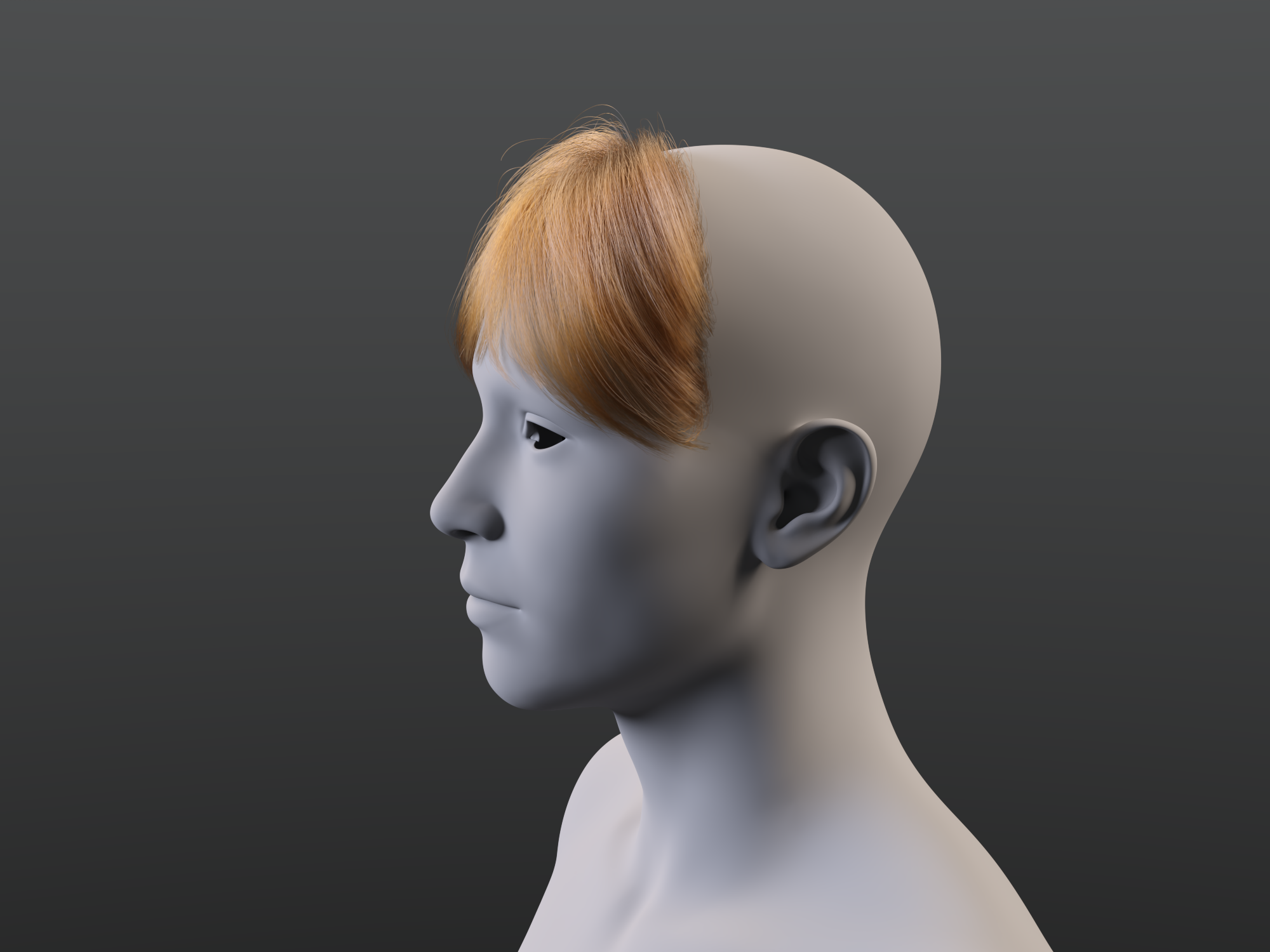
really like the look of the bangs in the promo for dForce Strand-Based Autumn Style Bob Hair for GenIt is not difficult to morph a dForce root radius hair. I made this quick morph to scale the back of the hair down and move it inside the G9 head, as an example. I wrote up these instructions a couple years ago and posted in some forum thread. These reference G8, but the technique still worked today in DS 4.23.0.4 with G9 and the Autumn Style Bob hair strands.
I don't know if all these settings are critical or not, but this is what works for me:
- Load G8F
- Select G8F and a load dForce hair (I'm using dForce Neroli Hair).
- In the Scene pane, select dForce hair object (not the cap).
- In Parameters pane, make sure Generate PS Hairs, Generate PR Hairs and Preview PR Hairs are On. Make sure Line Tessellation is >0? It is 3 on the hair I am using.
- Zero out any morphs in the dForce hair that are set when the hair is loaded.
- Select the Geometry Editor Tool.
- Hide everything except dForce hair object in the Scene pane.
- Export to OBJ.
- Import OBJ to modeler (Blender, etc.) modify and export modified OBJ.
- Back in DS with dForce hair object still selected and Geometry Editor tool still selected, run Morph Loader Pro.
- In Morph Loader Pro, load the modified hair OBJ and create the morph.
- Save the morph as a morph asset.
Instead of editing an OBJ in a modeler, you can drape the hair with dForce and export that as an OBJ. Clear the simulation, and import the OBJ with Morph Loader Pro. Save the morph as a morph asset.
Remember to select a tool other than Geometry Editor or Mesh Grabber before rendering.
 Lost and Found growing! Is that right?
geekydad123 said:
I just purchased a product that went straight to Lost and Found. It's got over 300+ files associated with it (it's a complex environment), I really don't want to have to sort that myself. Hopefully a support ticket will get things straightened out.
If it is part of a bulk transfer from Renderosity then it probably won't get official metadata - but if someone, using the default install locations, created metadata for it that could be shared.
How to import animations from Daz to Blender using Diffeomorphic?For the missing FACS, I also clicked that box when I imported my characted with easy importer so I'm not sure why they wouldnt be working.
Another Issue... some morphs just arent working that ARE imported, for example the custom morph BC 3 Depth Adjust is listed and has a value of 1 but does nothing and changing that value does nothing.
Need help with G9 hair.Silas3D said:
@crosswind you're right, though I have since instances of auto fitted hair that don't have custom bones, where the included morphs also stop working!
Okay, probably... though I personally haven't met such a case so far.
Normally there're two types of "hair shapes", one type is true morph made with hair geometry, which should always work no matter with or without auto-fit; another type is Pose Control whic is ERC linked to Bones or Custom Bones, so if the Custom Bones are gone, they'll stop working ~ The latter case can be frequently seen, in which folks would rather go for direct parenting.
[Released] Turbo Loader for Genesis 9 [Commercial]johnjohn808 said:
RiverSoft Art said:
johnjohn808 said:
RiverSoft Art said:
johnjohn808 said:
HI
After Turbo Loader disables the morphs, I click on the character thumbnail to load the character and I get the message "The files listed below could not be found" which is expected.
But If I type in the name of the same character in Parameters, that character`s morph sliders show up and are enabled.
In previous versions, the character`s morph sliders down even show up when disabled by Turbo Loader.
Are the morphs actually disabled and Is there a fix for this?
Thank you
I am unable to reproduce this behavior. Are you sure the morphs are truly disabled. Did you perhaps disable the morphs AFTER the character has been loaded into the scene? (In that case, the morphs stick around until a new scene is loaded)
Thank you for your reply.
It does not seem like the morphs are disabled since I can still access working sliders. It just seems like it only disabled access to the morphs when clicking on the thumbnails in the content library. (I don`t use smart content)
When I disabled the morphs through Turbo Loader, I had no characters loaded.
I went through the process of disabling the morphs three times
I am using DS 4.22 on Windows 11, 8GB Ram, Nvidia RTX 3090
There would be no sliders if the morphs are disabled. You can try using the parameters on the slider to find where the morph it controls is located.
I just ended up reinstalling and it seems to be working fine now.
Thank you again for your replies
Well, I am glad you got it working.
Need help with G9 hair.Auto-Fitting does not remove morphs on the hair, however, it'll remove custom Bones... unless one make a Bone Mapping before auto-fitting.
I helped with resolving some hair fitting issue of G9 > G8 for other folks recently and found out that the trick to make auto-fitting G9 hairs really work on G8 while keeping dForce still functional is to: after fitting, further make a Fix Base morph on the root node of the hair by using G8 clone on G9... no matter the hairs are polygonal or SBHs. Then save a Figure Asset.
But still, if the hair has custom bones, do not auto-fit, direct parent it to head node instead. Bone Mapping is too cumbersome ~
It's said that Daz will release enhanced updates for auto-fitting funtion, we're keeping eyes on that ~
Need help with G9 hair.What @felis said - unless there are no morphs on the hair then autofitting isn't a good idea anyway because all the morphs would be lost. Given that most hairs come with a scalp surface, I usually hide all other surfaces after parenting the hair to the head, which I then use as a guideline to scale/morph the hair to fit as close to the unsupported figure as possible. I usually apply the smoothing modifier after this as well.
IIRC correctly there isn't currently a G9 to G8 hair converter available in the store.
Anyone else having trouble with the new Pug?The Pug's shape was made based on Dog 8... the issue seems to be a wrong sculpting on its shape or wrong morph importing ~~
If you remove delta vertices from selected eyes, the eyeballs will "jump out" as Dog 8 has a different body shape / size... (if with partially selected vertices...it might be distorted in another way...) So, with the "jumped out" eyeballs, you have to "re-rig" them to the Pug by changing their Transforms in DS or directly in external software, e.g. Blender , export the Pug to OBJ and import it back to update Pug morph with deltas. Or, wait for the fix from the vendor ~~
[Released] Turbo Loader for Genesis 9 [Commercial]RiverSoft Art said:
johnjohn808 said:
RiverSoft Art said:
johnjohn808 said:
HI
After Turbo Loader disables the morphs, I click on the character thumbnail to load the character and I get the message "The files listed below could not be found" which is expected.
But If I type in the name of the same character in Parameters, that character`s morph sliders show up and are enabled.
In previous versions, the character`s morph sliders down even show up when disabled by Turbo Loader.
Are the morphs actually disabled and Is there a fix for this?
Thank you
I am unable to reproduce this behavior. Are you sure the morphs are truly disabled. Did you perhaps disable the morphs AFTER the character has been loaded into the scene? (In that case, the morphs stick around until a new scene is loaded)
Thank you for your reply.
It does not seem like the morphs are disabled since I can still access working sliders. It just seems like it only disabled access to the morphs when clicking on the thumbnails in the content library. (I don`t use smart content)
When I disabled the morphs through Turbo Loader, I had no characters loaded.
I went through the process of disabling the morphs three times
I am using DS 4.22 on Windows 11, 8GB Ram, Nvidia RTX 3090
There would be no sliders if the morphs are disabled. You can try using the parameters on the slider to find where the morph it controls is located.
I just ended up reinstalling and it seems to be working fine now.
Thank you again for your replies
if I open an old duf where does Daz look to find the source of the items?yes, I'm split between two computers now and have tried to build matching HD with the same path letter on each machine.
But sometimes it's hard to keep track of thousands of files.
---
even if daz uses a relative bath ... in order not to fine these files it has to look in drive letter X or Y.
Where it looked makes it easy to figure out what is missing, what didn't transfer etc.
---
It's a program it has to get the letter somewhere and then use the letter to look for the item so all that's need is
I looked in E/ 25 fantasy/Runtime/Textures/DAZ/Characters/GenesisBodysuit/Chainmail2_DiffuseBlue.jpg and it wasn't there.
that lets me figure out where it needs to be or is corrupted etc and also tells me if that data is not in E it could have been on G when I created the scene.
/Runtime/Textures/esha/ForestScout/blaze hood_Belt1.jpg
/Runtime/Textures/RD/Defiant/BlazeBootsTx.jpg
/Runtime/Textures/RD/Defiant/blazeBracersTx.jpg
this first image of the cats is from the older computer (just loaded) the second from this one (just loaded) so all I have to do if I locate the files missing is fix them
The alternative is copying 62 gigs between to machines again.
Fixed... but how in the heck did a half dozen content manager folders get changed from G to E when the folders are on G.
Fairly simple fix once I knew where daz was looking at where they were.
And "GenesisBodySuit" is not the product name, argh.Anyone else having trouble with the new Pug?Richard Haseltine said:
Check that the JCM isn't affecting the eye geometry - if you use the Geometry Editor in Vertex mode and have the Parameters pane in Edit mode a right-click on the slider will let you seelct the affected vertices. As long as it isn't an HD morph you can make the morph a favourite (click the heart icon, and mke sure notning else is favourited) then deselect the body vertice and right-click in the Viewport>Morph Editing>Remove Deltas from Favourites.
I forgot to mention that I checked those, since cleaning up morphing errors is something I do with my own figures.
Anyone else having trouble with the new Pug?Check that the JCM isn't affecting the eye geometry - if you use the Geometry Editor in Vertex mode and have the Parameters pane in Edit mode a right-click on the slider will let you seelct the affected vertices. As long as it isn't an HD morph you can make the morph a favourite (click the heart icon, and mke sure notning else is favourited) then deselect the body vertice and right-click in the Viewport>Morph Editing>Remove Deltas from Favourites.
Daz 3D is part of

Connect
DAZ Productions, Inc.
7533 S Center View Ct #4664
West Jordan, UT 84084Licensing Agreement | Terms of Service | Privacy Policy | EULA
© 2026 Daz Productions Inc. All Rights Reserved.