-
Progress with Running Track Freebie (Hurdles + G8F Hurdles Poses)
Right, I have fired up my modelling machine & got some images off it.
The first is the whole stadium with its 98+ separate bodies.

Now the central grass body.
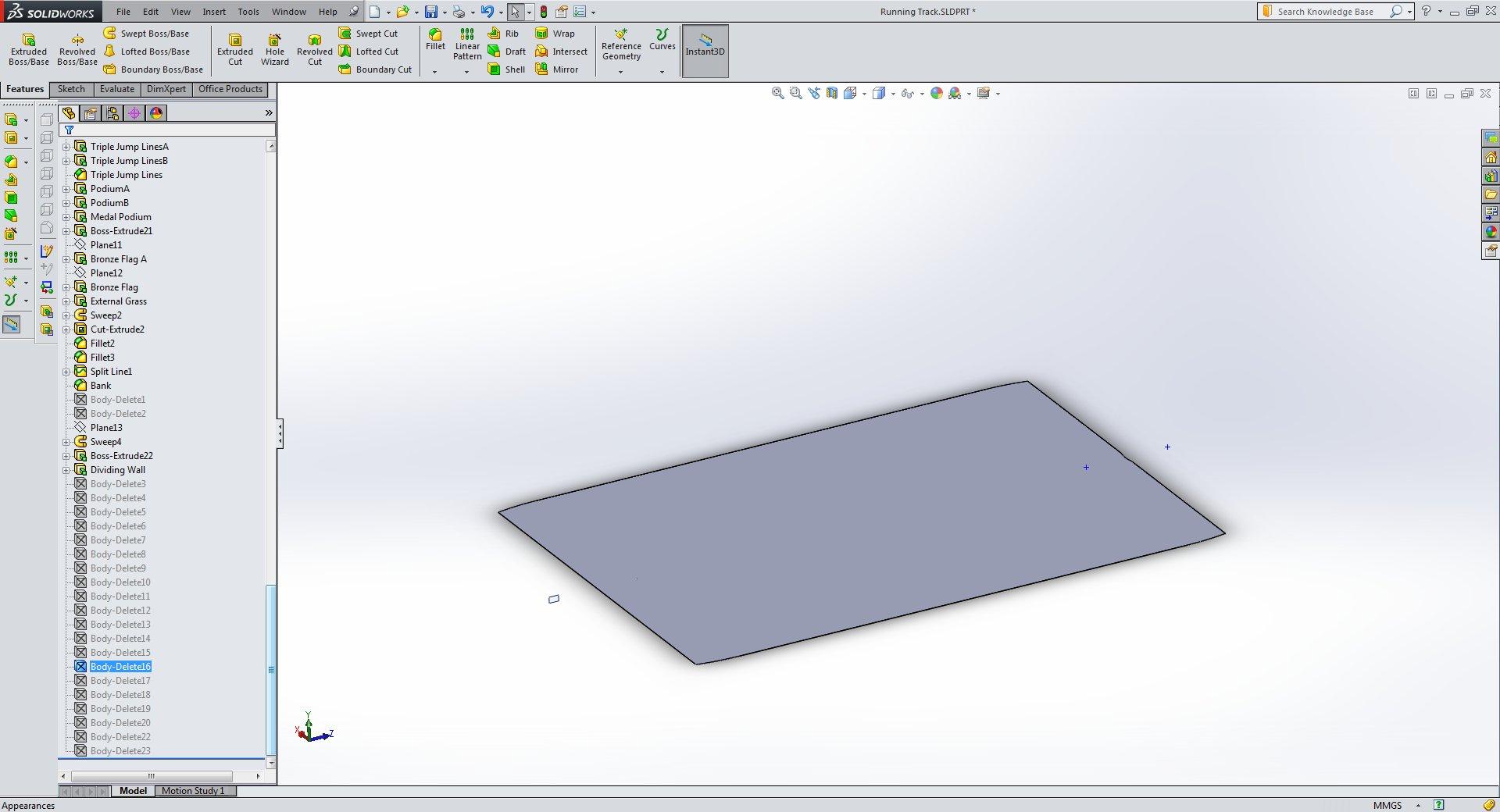
Imported into my modeller showing the triangles needed to match the curves on the corners of the track. Diagonally top right in the first image is up/down in my modeller, just to get the orientation clear. It cannot go under the track surface as on a model this size, sometimes iRay displays the grass above the track surface & sometimes below even when the top of the grass is nominally 2.5cm below track level.

Now re-modelled using the original vertices & whatever new ones needed for the new quads. The cyan arrows showing normals on the edging facets that seem to be needed to prevent a gap being visible where the grass stops. I'm sure a lot of this is only needed because iRay/DS only use floats for vertex position. If it used doubles, it'd be OK. This seems mostly OK, but I have had an inkling that the slenderness ratio of some of the facets may cause problems (around 400:1) & I'll need to re-mesh some of the patches I created. Certainly, if it was FE analysis (which is what I aimed my modeller at when I started programming it in 2004), the model would be catastrophically bad.

Regards,
Richard.
Daz to Unreal Update 4.0Currently DIM and Daz Central can only have one version able to be installed. You will be able to use the automatic install for 4.26 only right now. Until that is changed if you wish to get the older version's plugin you can find it here.
Just download the zip-labeled builds and in there you will find the plugin for 4.25.
The link David shared will be if you wish to get the backlog of old versions as well.
https://github.com/daz3d/DazToRuntime/releases/tag/4.1.0-unreal
Every release moving forward will be found on our GitHub as well.New computer, new install - DIM not seeing my already installed?Content is not scattered everywhere. Content is installed where the install method, DIM, Central or Connect are told to install it.
Fluidos II IssueHey everyone,
Just picked up this plugin and found the tutorial to start the learning progress. I'm not sure what I have done wrong but many options seem to be missing. I purchased from the Daz store and installed using Daz Central. I see that I have a serial key but not sure if or where I need to put that so it can be activated, if it isn't activated already that is. I have not gotten a notification or anything about activating it.
After everything was installed from Daz central I created a new scene and went to add the domain, except, there is not an option for a Fludios Domain under the create menu anywehre. So I went ahead and loaded an already created scene so I could mess with that. It says that some items are missing and need installed, so I do that and the scene loads. The weird thing with that is, it says that everytime I load the premade scene. After I install what is needed, this premade scene has a Fludios Domain in the scene tab but when I click on it, it does not have any parameters other than the default ones you get with any object / item. It is confusing me unfortunately lol.
I attached an image of the error it gives me when I try to load any premade scene. What is needed installed fine it seems just I can't get anything to work it seems.
Any help in the matter is much appriciated.
Regards, and thank you in advance.
About find Face and Hair and some ERROR I get when I try to put STAGE have pictureRichard Haseltine said:
Moved to Daz Studio Discussion as it is not a scripting question.
One the first, it looks as if the file did not decrypt properly after installation - try unisntalling (right-click on the main priduct thumbnail>Uninstall)and reinstalling, if that doesn't work then uninstall from within Daz Studio and install with Daz Central/Install Manager.
For the otherplease post to Product Suggestions v - it will make life easier if you attach your images to the post, or link to the original image when it isn't your own.
Hey thanks for comment me and helping ,
About the first one I will try to do it when I will be in my PC :")
About the Hair and Face and eyes I upload the picture . BTW How can I change skin tone like her to?About find Face and Hair and some ERROR I get when I try to put STAGE have pictureMoved to Daz Studio Discussion as it is not a scripting question.
One the first, it looks as if the file did not decrypt properly after installation - try unisntalling (right-click on the main priduct thumbnail>Uninstall)and reinstalling, if that doesn't work then uninstall from within Daz Studio and install with Daz Central/Install Manager.
For the otherplease post to Product Suggestions v - it will make life easier if you attach your images to the post, or link to the original image when it isn't your own.
Progress with Running Track Freebie (Hurdles + G8F Hurdles Poses)I've made the central grass area separate from the track, track lines, javelin lines, shot-put lines and discus/hammer lines - makes it easier to texture map the right facets and apply surface groups easily. But due to the shape, and the fact it's come from SolidWorks via STL, it's all pointy triangles going any which way. I'm going to have to replace them with quads where possible.
I have learnt my lesson from the bank model, cover over all joints where possible and extend faces through others to avoid gaps, even after vertices have been welded. It is a disconcertingly imprecise method of designing things.
Regards,
Richard.
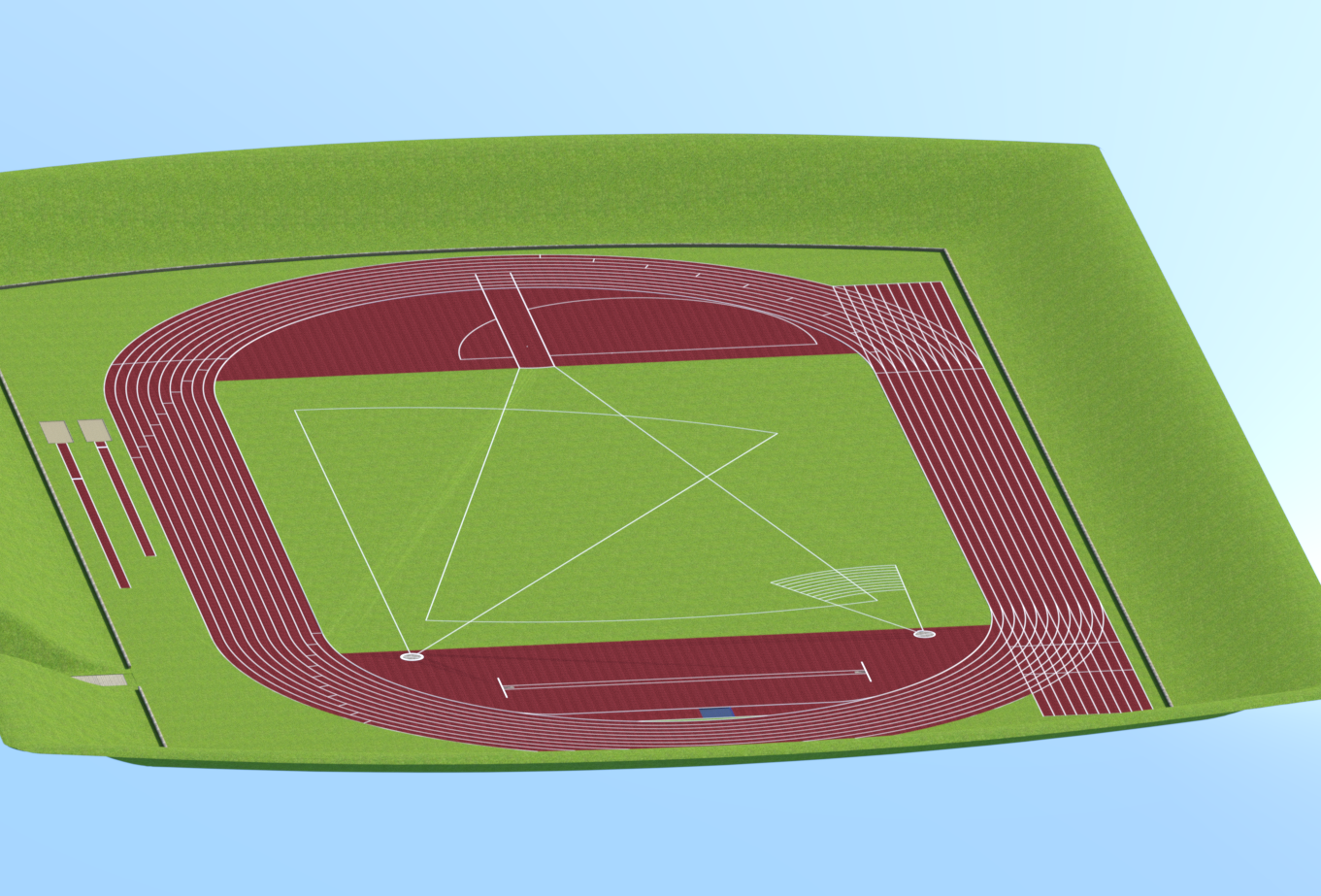
Progress with Running Track Freebie (Hurdles + G8F Hurdles Poses)Did a bit more towards getting the model into DS. It seems I'm going to have to re-model the central grass in my modeller because in the third render, you can see sharp triangle artefacts marking the grass going from the end of the Javelin Runway to the corner by the 200m start in the bottom left of the image. Irritating as it's a fairly complex shape with those clipped corners due to the running track and the 800cm radius at the end of the Javelin thowing runway. Going to take a fair bit to correctly model that again.
I've got the water in the steeplechase water jump, and need to create a tartan cover for it. The pole vault, shot and discus/hammer features are there along with most lines needed. There are 8000+ facets in each of the sand pits for long & triple jumps (5cm square) ready to apply impact morphs. Getting there, but still a bit of work to do. I have an idea for the sand morphs - pose a figure and animate an impact with the sand with dForce dynamic surface for the sand and no gravity. Then save as an obj & re-import as a morph. Do it with several poses & that should give a reasonable range of dialable morphs.
Plan view:

From the 100m start at competitor eye level:

From a 300m altitude:
Regards,
Richard
The completely gratuitous complaint threadLeatherGryphon said:
I once chased a family of mouse squatters out of a research PC computer kept in a weather research shed in the middle of a field in the hills of central Virginia. That's when I learned the value of reinstalling all the slot covers at the back of the computer when you leave it for a few months whether in a shed in a field or in your closet.

Apparently the big roomy shed wasn't good enough for them, they needed warmer, more cozy accomodations.
Oh no. I have two old PCs that I put in storage more than a year ago (then the pandemic hit). I hate to think what I am going to discover when I can finally return to that city and fetch my stuff.
 The completely gratuitous complaint thread
LeatherGryphon said:
I once chased a family of mouse squatters out of a research PC computer kept in a weather research shed in the middle of a field in the hills of central Virginia. That's when I learned the value of reinstalling all the slot covers at the back of the computer when you leave it for a few months whether in a shed in a field or in your closet.
Apparently the big roomy shed wasn't good enough for them, they needed warmer, more cozy accomodations.
I can imagine what mice would do to the inside of a computer... gah... I have seen what roaches do, which is almost as bad... a while back I did some IT work helping a medical testing lab move to a larger facility... in a separate building on the grounds where there were just offices, there were some of the grossest desks I've seen... most of personal spaces in the place were just fine, some had a lot of food crumbs everywhere but there was this extra special set of cubicles from roach hell that was unbelievably dirty.
You could literally tell how far the cleaning people were willing to go by the encrusted food crumbs under the desk.
I removed three roachie computers from the area and set them aside... when the head if IT came around he looked at them and asked how bad they were, so I picked one up and shook it hard and a dozen or more roaches started crawling out... he was like "just throw them out, they are old anyway".Not the worse roach related story I have, and I have quite a few... but from what I gather, a lot of people find the image of seething masses of roaches emanating from something rather nightmarish and it makes their skin crawl.
The completely gratuitous complaint threadI once chased a family of mouse squatters out of a research PC computer kept in a weather research shed in the middle of a field in the hills of central Virginia. That's when I learned the value of reinstalling all the slot covers at the back of the computer when you leave it for a few months whether in a shed in a field or in your closet.
Apparently the big roomy shed wasn't good enough for them, they needed warmer, more cozy accomodations.
Genesis 8.1 / Victoria 8.1jbowler said:
s_j_gregory said:
Sorry but could you dumb this down for me. Are you creating runtimes for each character? You must have a lot if that is the case. And then as you build a scene you add more runtimes to your content library to access additional characters/content? Do you do the same thing for pose and/or expression sets? Somewhere a while back I read that there was no theoretical limit to the number of runtimes you could have in your content library but that the practiccal limit was about ten. I am not exactly clear what that would be in reference to but have you experienced any issues with the number of runtimes or any considerations from a hardware perspective and where you have your runtimes? (I have runtimes on HDs and SSDs and have not noticed any measureable difference. I typically have about six active in my content library at any given time.) Are you successful in adding a runtime with expressions say and them being available without restarting? I thought that was the central issue? And sorry for my ignorance - what is the DSON cache - you could point me somewhere if this is too pedestrian. (I might not know or I might not know I know.) Finally, how does one save a CMS configuration. It sounds perhaps you are under the hood well beyond my comfort zone and my earlier line of questions could reflect a complete misappreciation of your strategy. If this is tinkering with the DB, I guess i'm out because I have had some disquieting experiences with what must have been operator error. Thanks in advance.
I'm installing my content to specific content directory roots in DIM:
So you can see my G8 content is separated out into different directories by, basically, product type (though as I will show when I post my numbers the number of different product types can be reduced for the same speed benefit). In the DAZStudio CMS I am selecting the directories I need. To date I have just stuck with a single selection which includes non-actor G8 products; I'll change this after today's experiments but this is my setup as it has been for the past couple of weeks:
You can see that I have a working set of G8 figures, "Genesis 8/Figures in use". If I load a scene with a figure that isn't in that set I get the warning from DAZStudio that the product needs installing. To date what I have been doing is to immediately go to DIM, without dismissing the dialog, uninstalling the product and then re-installing it in "Genesis 8/Figures in use" (for a character product) or "Genesis 8/Core" for some of the morphs. I only recently added the "Genesis 8/Morphs" directory to my default set; it didn't cost too much time on load but it turns out to be the biggest single hit in my normal directory set so I will probably drop it again.
What I am now considering doing is to eliminate "Figures in use" and put each character product into a separate directory; it doesn't seem to have any effect on DAZStudio however many directories there are and I wouldn't expect it to. This will allow me to mix'n'match characters for the current scene; I can just add them in the Content Directory Manager as I need. I'll probably list them in my "Everything" content set but nowhere else; they are easy to find using the "Directory: Add..." button on the content manager pane.
Saving a content directory manger set is trivial; it's just "Content Set: Copy..." on the "Current Directories" set. This is what I have recommended elsewhere for backup (hence my "Backup..." sets!)
The one problem I've encountered is that the CMS directories have to be manipulated from a non-instance DAZStudio; using -instanceName on the command line results in a scenario where DAZStudio does not write the ContentDirectoryManager.dsx file at all! That is actually a big problem with the scene specific approach I'm describing so I'll have to try and find a work-round.
Thanks for taking the time to provide all of this info. In your message below above you mention moving this discussion to the load time thread - is this the 'How long does it take to load G8F' thread. Please advise which it is as I would like to continue this exchange - but in the right place. Thanks again.
Dial Fusion for Genesis 2 to 8.1 (Commercial)zszabo2000_015a88f8bf said:
I am unable to execute the script (see error messages from log copied at the bottom). So far I've tried:
- Uninstalling/installing from DS 4.15.0.2.
- Uninstalling/installing from Install Manager.
- Uninstalling from Inst. Mgr., then installing from Daz Central.
- Restarting DS.
I've also tried various other things like selecting a character, selecting nothing, or first clearing the scene before launching the script. The result is always the same. Please help!
BTW here are the checksums of the installed script on my system:
-
sha256: a9f7f137b6c4262d66251832ffd0b1afe1199214d820e6ba87d99e0fb2f52528 *dial fusion.dse.enc
md5: bf78b1e32289448a42a17b8a689e9f5c *dial fusion.dse.enc
2021-03-05 18:09:47.187 Loading script: J:/DAZ 3D/Studio/My Daz Connect Library/data/cloud/1_80593/scripts/dial fusion/dial fusion.dse.enc
2021-03-05 18:09:47.188 Failed to load script: J:/DAZ 3D/Studio/My Daz Connect Library/data/cloud/1_80593/scripts/dial fusion/dial fusion.dse.enc
The fiel has not installed correctly, it is still encrypted - but in any event, a lot of scripts do not execute correctly when installed through Daz Studio itself so you would probably be ebst off uninstalling that (right-click on the product icon) and installing through Install manager or Daz Central.
Dial Fusion for Genesis 2 to 8.1 (Commercial)I am unable to execute the script (see error messages from log copied at the bottom). So far I've tried:
- Uninstalling/installing from DS 4.15.0.2.
- Uninstalling/installing from Install Manager.
- Uninstalling from Inst. Mgr., then installing from Daz Central.
- Restarting DS.
I've also tried various other things like selecting a character, selecting nothing, or first clearing the scene before launching the script. The result is always the same. Please help!
BTW here are the checksums of the installed script on my system:
-
sha256: a9f7f137b6c4262d66251832ffd0b1afe1199214d820e6ba87d99e0fb2f52528 *dial fusion.dse.enc
md5: bf78b1e32289448a42a17b8a689e9f5c *dial fusion.dse.enc
2021-03-05 18:09:47.187 Loading script: J:/DAZ 3D/Studio/My Daz Connect Library/data/cloud/1_80593/scripts/dial fusion/dial fusion.dse.enc
2021-03-05 18:09:47.188 Failed to load script: J:/DAZ 3D/Studio/My Daz Connect Library/data/cloud/1_80593/scripts/dial fusion/dial fusion.dse.enc
Genesis 8.1 / Victoria 8.1s_j_gregory said:
Sorry but could you dumb this down for me. Are you creating runtimes for each character? You must have a lot if that is the case. And then as you build a scene you add more runtimes to your content library to access additional characters/content? Do you do the same thing for pose and/or expression sets? Somewhere a while back I read that there was no theoretical limit to the number of runtimes you could have in your content library but that the practiccal limit was about ten. I am not exactly clear what that would be in reference to but have you experienced any issues with the number of runtimes or any considerations from a hardware perspective and where you have your runtimes? (I have runtimes on HDs and SSDs and have not noticed any measureable difference. I typically have about six active in my content library at any given time.) Are you successful in adding a runtime with expressions say and them being available without restarting? I thought that was the central issue? And sorry for my ignorance - what is the DSON cache - you could point me somewhere if this is too pedestrian. (I might not know or I might not know I know.) Finally, how does one save a CMS configuration. It sounds perhaps you are under the hood well beyond my comfort zone and my earlier line of questions could reflect a complete misappreciation of your strategy. If this is tinkering with the DB, I guess i'm out because I have had some disquieting experiences with what must have been operator error. Thanks in advance.
I'm installing my content to specific content directory roots in DIM:
So you can see my G8 content is separated out into different directories by, basically, product type (though as I will show when I post my numbers the number of different product types can be reduced for the same speed benefit). In the DAZStudio CMS I am selecting the directories I need. To date I have just stuck with a single selection which includes non-actor G8 products; I'll change this after today's experiments but this is my setup as it has been for the past couple of weeks:
You can see that I have a working set of G8 figures, "Genesis 8/Figures in use". If I load a scene with a figure that isn't in that set I get the warning from DAZStudio that the product needs installing. To date what I have been doing is to immediately go to DIM, without dismissing the dialog, uninstalling the product and then re-installing it in "Genesis 8/Figures in use" (for a character product) or "Genesis 8/Core" for some of the morphs. I only recently added the "Genesis 8/Morphs" directory to my default set; it didn't cost too much time on load but it turns out to be the biggest single hit in my normal directory set so I will probably drop it again.
What I am now considering doing is to eliminate "Figures in use" and put each character product into a separate directory; it doesn't seem to have any effect on DAZStudio however many directories there are and I wouldn't expect it to. This will allow me to mix'n'match characters for the current scene; I can just add them in the Content Directory Manager as I need. I'll probably list them in my "Everything" content set but nowhere else; they are easy to find using the "Directory: Add..." button on the content manager pane.
Saving a content directory manger set is trivial; it's just "Content Set: Copy..." on the "Current Directories" set. This is what I have recommended elsewhere for backup (hence my "Backup..." sets!)
The one problem I've encountered is that the CMS directories have to be manipulated from a non-instance DAZStudio; using -instanceName on the command line results in a scenario where DAZStudio does not write the ContentDirectoryManager.dsx file at all! That is actually a big problem with the scene specific approach I'm describing so I'll have to try and find a work-round.
Genesis 8.1 / Victoria 8.1jbowler said:
PerttiA said:
Bejaymac said:
Probably going to get cursed by some for this post, but what the hell, I have a thick skin

The two attached images were taken within seconds of each other, in the first you will notice I have the figure on the right selected, that's G8F, loaded using her DUF file. Notice the Shaping tab on the left doesn't show my user name anywhere, and the first morph is "Monique 8 Body".
Now look at the second image, in it I have the second figure selected, this is also G8F also loaded from her DUF file a few seconds after the first. With this one I added one of my character presets to it, now check the Shaping tab, suddenly my user name is there, and the first morph is now my character Samay.That morph DSF file isn't in the Morphs folder, as a result G8F has no idea it's there and never loads it when she's loading, the only way to get my character to load, is with a preset that knows where to find the DSF file.
IMHO this is how we should have been dealing with morphs since DS4.0, only the assets from the starter essentials and the head/body/expression morph packs should be loaded as a Genesis series figure is loaded, everything else should only be loaded using presets.
That last part will cause some of the cursing I mentioned, however the next part is probably going to cause even more

The problem with what I've done here is that you can't do this directly inside DS, it will always save the morph asset inside the figures Morphs folder. So you have to manually move files and do a spot of very minor editing of said files, in this case two pathways in the DSF file and one pathway in the DUF file.
Hmm... Going further with the idea... One could do the ultimate crime and save all the 'custom' assets (morphs/textures/expressions...) of the character in one and the same folder together with the character file and the 'custom' morphs would only be visible on that character...
If I do that it speeds up my load time for "Genesis 8 Basic Female" by a factor of 35; I go from 93.827 seconds to load the character with all my DAZ Productions content visible to 2.652s with just what I term "core" content, stuff for the environment but nothing actor-specific and just the G8 starter essentials (male and female).
I'm just using fully supported DAZStudio features to do this; I'm not hacking files or moving them around. All I'm doing is selecting which content installation directories the CMS sees. I get the same relative speed-up with and without the DSON cache but the cache itself speeds my load times in both scenarios by a factor of 1.58. Of course the DSON cache is more stable as well; the CMS does not have to update it every time I buy a new character :-)
I believe I can get this to work dynamically as well; i.e. I can start with no characters and, while building the scene, add characters one-by-one to the CMS until I have a CMS configuration specific to that particular scene (which I can save of course). I've yet to test this in practice but it seems like a logical extension of what I have already done.
Sorry but could you dumb this down for me. Are you creating runtimes for each character? You must have a lot if that is the case. And then as you build a scene you add more runtimes to your content library to access additional characters/content? Do you do the same thing for pose and/or expression sets? Somewhere a while back I read that there was no theoretical limit to the number of runtimes you could have in your content library but that the practiccal limit was about ten. I am not exactly clear what that would be in reference to but have you experienced any issues with the number of runtimes or any considerations from a hardware perspective and where you have your runtimes? (I have runtimes on HDs and SSDs and have not noticed any measureable difference. I typically have about six active in my content library at any given time.) Are you successful in adding a runtime with expressions say and them being available without restarting? I thought that was the central issue? And sorry for my ignorance - what is the DSON cache - you could point me somewhere if this is too pedestrian. (I might not know or I might not know I know.) Finally, how does one save a CMS configuration. It sounds perhaps you are under the hood well beyond my comfort zone and my earlier line of questions could reflect a complete misappreciation of your strategy. If this is tinkering with the DB, I guess i'm out because I have had some disquieting experiences with what must have been operator error. Thanks in advance.
A Li'l Side Render Fun #2022 - Tuesday is Soylent Green Day editionSciFiFunk - Curtains came out nicely. Great WIP for the Soylent Green scene. Thanks for the tip about the Luminance Lighting Pack. I had forgotten that I own the product. I need to revisit it. Lighting is one of my weak points. Can't wait to see the central character and finished scene.
Bunyip - Great job on Stop! Identify yourself! I agree with SciFi Funk. I'm also partial to the ruin in the background of In Trouble - someone is having a bad day.
New Desktop- Downloaded Daz Studio 4.15 Pro-No productsNo! I am not using the database copied over from my old machine. This is a completely new computer. I was down loading from Daz Central-did not work. uploaded DIM manager with the PostgreSQL CMS as a separate download. Installed just this download. It brought all me Products into the new Daz 4.15. When I clicked on a product to install it my screen froze. I'm sorry I have been working on this issue for 6 hours. Is their some way I can go back to Daz 4.12? This is what I have on my laptop I have been using. I was not even aware of 4.15 until today.
Genesis 8.1 / Victoria 8.1Mart1n71 said:
Having glanced through this post since the introduction of G8.1 i'm curious as to what I've done differently to everyone else as I have both G8 and G8.1 expressions visible and working right out the box. All visemes are also available and working. I have a quite extensive library of G8F expressions and as of yet have not found a single expression that does not work as expected on 8.1, including expresions from other sites where I know the artist is working hard to update their expression products to work with 8.1. There are some sight differences on a few expressions, but nothing noticable without doing a mesh to mesh overlay comaparison. All the files that people are pormpting to remove in the G8_1 folder are all still intact.
The new G8 essentials were installed in the same way I install all updates to anything that directly effects studio and/or base resources. That method is to ensure everything related to Daz is shut down on my PC with a windows restart. I used DIM to uninstall starter essentials (I never use Daz Central or Connect, only DIM or manual inatall), clear it from the install tab and download and install again via DIM. Another windows rertart, open Daz (4.15 beta and/or 4.15 general) and all expressions working as expected.
So, what am I doing that others aren't?
I suspect there is some caching issue going on somewhere. First verify that you have the "dummy" files, they are installed by Genesis 8 (Male|Female) Starter Essentials so you can find the paths from DIM by right clicking the product(s) in the Installed tab (type "Starter" into the search bar) and selecting "Show Installed Files...". This contains the installed files which should be in blue and underlined, look for one of the files in grey below (it should not be in grey in your installation; it should be blue):
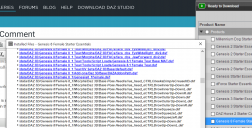
Now click on the blue link, e.g. for:
/data/DAZ 3D/Genesis 8/Female 8_1/Morphs/Daz 3D/Base Pose Head/alias_head_CTRLCheeksDimpleCreaseHD.dsfThis will take you to the directory. Double click on the file to open it in Notepad. It should be pretty much empty, just a few lines of XML:
{
"file_version": "0.6.0.0",
"asset_info": {
"id": "/data/DAZ%203D/Genesis%208/Female/Morphs/DAZ%203D/Base%20Pose%20Head/alias_head_CTRLCheeksDimpleCreaseHD.dsf",
"type": "modifier",
"contributor": {
"author": "Daz 3D",
"email": "",
"website": "http://www.daz3d.com";
},
"revision": "1.0",
"modified": "2017-03-28T16:13:18Z"
}
}This will verify that your installation is correct.
Now, from File Explorer, find the full path of the file and remove the bit DIM gives you. E.g. on my system the directory in bold here:
G:\DAZ 3D\Studio\Genesis 8\Core\data\DAZ 3D\Genesis 8\Female 8_1\Morphs\Daz 3D\BPH+Expressions.zip\Base Pose HeadIn a running version of DAZStudio right click on the "Content Library" tab and open the "Content Directory Manager...". In the Content Sets pane open the first "DAZ Studio Formats" node and make sure that the directory in bold matches one of the listed directories exactly:
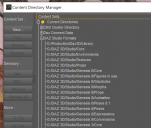
If it does check every other directory in that list (particularly the ones at the top) to see if they contain a duplicate of the file:
/data/DAZ 3D/Genesis 8/Female 8_1/Morphs/Daz 3D/Base Pose Head/alias_head_CTRLCheeksDimpleCreaseHD.dsfThere should be no duplicates. You don't need to check the other "Content Sets...", only "Current Directories" matters.
Remember that the dummy files only hide the expressions on new characters; to test you have to load a new character into the scene then check for missing expression support. It's best to load a new instance of DAZStudio.
If all the above seems correct yet you still have the expressions try deleting the DSON cache (in Parameters..., General Tab) and restarting DAZStudio. It would be very useful to know if that makes a change... If it doesn't you can consider Content Directory Maintenance... operations or, perhaps less destructive, simply de-install and re-install the relevant Starter Essentials packages. I have to admit I don't have the faintest idea why that would work if all the above is correct, but it might...
Genesis 8.1 / Victoria 8.1Having glanced through this post since the introduction of G8.1 i'm curious as to what I've done differently to everyone else as I have both G8 and G8.1 expressions visible and working right out the box. All visemes are also available and working. I have a quite extensive library of G8F expressions and as of yet have not found a single expression that does not work as expected on 8.1, including expresions from other sites where I know the artist is working hard to update their expression products to work with 8.1. There are some sight differences on a few expressions, but nothing noticable without doing a mesh to mesh overlay comaparison. All the files that people are pormpting to remove in the G8_1 folder are all still intact.
The new G8 essentials were installed in the same way I install all updates to anything that directly effects studio and/or base resources. That method is to ensure everything related to Daz is shut down on my PC with a windows restart. I used DIM to uninstall starter essentials (I never use Daz Central or Connect, only DIM or manual inatall), clear it from the install tab and download and install again via DIM. Another windows rertart, open Daz (4.15 beta and/or 4.15 general) and all expressions working as expected.
So, what am I doing that others aren't?
Daz 3D is part of

Connect
DAZ Productions, Inc.
7533 S Center View Ct #4664
West Jordan, UT 84084Licensing Agreement | Terms of Service | Privacy Policy | EULA
© 2026 Daz Productions Inc. All Rights Reserved.