-
Strange knees / elbows deformation after posing - Resolved
Richard Haseltine said:
I am having trouble sorting out what the image shows, but it could well be a corrective morph kicking in when it isn't needed - in a way the opposite of not adjusting rigging to shape.
What appears to be happening from a "form" point of view is that, as the knees bend, it almost looks like the calves are pressing up on the underside of the thighs, but not touching them; it's as if their "boundary" is several inches beyond where it would appear to be based on the figure's "flesh."
[FIXED] Pointed elbowApply the least posing you can get away with trigger the issue (probably just bend the elvbow on an othrwise zeroed figure), in the Parameters pane option menu (the lined/hamburger buton in the top corner) enable Preferences>Show Hidden Properties, and with the figure selected look in Currently Used - with luck one of those is the issue, if you find one that clears the problem when zeroed then click the gear icon on the slider and open Parameter Settings, then look at the asset details to see what is responsble. I wouldexpect it is a corrective morph for a character or shape that should be triggered only when the shape is, but it instead applying at all times.
Question on sleeve sponge prop on left hand (have image)crosswind said:
Ah, spongy ... Okay, I made it more spongy and this is the updated G8F version (ss1). There're a couple of morphs there... if you need it more spongy or sth., just dial the morph property accordingly. (ss2)
https://mega.nz/file/WCJ3HJQL#0wC2sTeDY56Hs0VmXvS9BJiv5Y82K08i3-hzwZe3wLM
There're 3 types of Material Presets, LIE, Diffuse Overlay and Baked maps, you can try them. You can find PSD templates in runtime\texture folder if you want to make various logos on the band. I make them for free in here: https://www.textstudio.com/logo/lakers-font-1754
Edit: There's also a Band for right arm, just in case you need it... but you have to flip the texture maps because I just simply made it by using Geometry Mirror. Have fun !
Thank you so much!!! Now I have to both hands! hehehe , You made a great job! I'm sure going to use it a lot in my art! THANK YOU! Also may I ask if you do commissions? also you see my right band? can I move it to the left hand as well? I bought it from DAZ Store and make my own texture on it hehe
Thanks again your the best!Blender characters into Daz StudioIf you look at PAs in the DAZ Store RawArt, 3DU, and so on: they create new characters as a morph of a Genesis original. 3DU (3D Universe) used to make their own rigs in DAZ Studio but have mostly stopped.
You can however make your own orginal rigs, example, the DAZ Originals Dog 8, a doberman pinscher, is one such product, but most further dogs, wolves, and other furry animal products since DAZ Dog 8 have been morphs of DAZ Dog 8.
Loading Full Body Morph to Genesis 9?I don't quite understand the problem you have. You don't have to worry about the sub parts... they'll just Auto Follow the imported Full Head Morph that you dial.
You only need to split the single OBJ into Full Head Morph and Full Body Morph. Check this tutorial:https://youtu.be/nEFI6keXU2c?si=Ijx6F-ehCntDTxz2
Question on sleeve sponge prop on left hand (have image)Ah, spongy ... Okay, I made it more spongy and this is the updated G8F version (ss1). There're a couple of morphs there... if you need it more spongy or sth., just dial the morph property accordingly. (ss2)
https://mega.nz/file/WCJ3HJQL#0wC2sTeDY56Hs0VmXvS9BJiv5Y82K08i3-hzwZe3wLM
There're 3 types of Material Presets, LIE, Diffuse Overlay and Baked maps, you can try them. You can find PSD templates in runtime\texture folder if you want to make various logos on the band. I make them for free in here: https://www.textstudio.com/logo/lakers-font-1754
Edit: There's also a Band for right arm, just in case you need it... but you have to flip the texture maps because I just simply made it by using Geometry Mirror. Have fun !
Strange knees / elbows deformation after posing - ResolvedI am having trouble sorting out what the image shows, but it could well be a corrective morph kicking in when it isn't needed - in a way the opposite of not adjusting rigging to shape.
Loading Full Body Morph to Genesis 9?I'm normally a clothing creator so this is a first for me to try to create a G9 character morph. I've done a search but haven't found anything that covers loading a single OBJ full body morph to Genesis 9.
The part that is throwing me off is that Genesis 9 has several subfolders for eyes, lashes, brows, etc. I haven't found a tutorial that covers either loading the single OBJ as a full body morph that affects all the parts, or how to split the OBJ apart and morph each of the sub parts individually.
Can anyone point me to a tutorial that might cover this, or give me a brief how to? Thanks in advance.
[Released] Bone Minion for Genesis 9 Poses Bundle [Commercial]barbult said:
Can Bone Minion transfer V4 hand poses (.hd2) to Genesis 9? I can't get it to work.
I unlocked all bones on G9 first. I used Prop Minion successfully to copy the prop to G9's hand. I applied the hand pose to the V4.2 bone minion. Nothing changed on G9's hand. I tried the regular bone minion and then I tried the heavyweight bone minion. Before I struggle more, I thought I'd better ask whether it is supposed to work or not.
Edited to add: The bone minion hand did pose, but G9 hand did not.
Did you then click the Apply Changes script? If it is just a hand pose, the Bone Minion script cannot detect that a pose was applied. Only if a pose touches the hip does the script get a bone changed event.
[Released] Bone Minion for Genesis 9 Poses Bundle [Commercial]Can Bone Minion transfer V4 hand poses (.hd2) to Genesis 9? I can't get it to work.
I unlocked all bones on G9 first. I used Prop Minion successfully to copy the prop to G9's hand. I applied the hand pose to the V4.2 bone minion. Nothing changed on G9's hand. I tried the regular bone minion and then I tried the heavyweight bone minion. Before I struggle more, I thought I'd better ask whether it is supposed to work or not.
Edited to add: The bone minion hand did pose, but G9 hand did not.
The Doctor Appreciation threadThe Matt Smith one. Unless someone has both Joequicks Extraordinary men for G2 male, That has a "Smith" Morph. And RiversoftArts's G2 to G8M Character converter, but can't get it to convert and RiversoftArt tried to help, but doesn't have the Extraordinary men product so can't trouble shoot correctly.
If soemone has both these products, have you been able to convert Ex Smith to G8M?
Anybody recognize this character (Girl from Rita Hair)I gave a shot to create her and I think it came out okay. Not perfect, but it this version didn't take a lot of time. This one is a combination of Artemis and CJ's Mercia. She has Artemis's skin. In case you're curious, the morph percentages: 62% Base Feminine and Artemis and 38.6% Mercia. I didn't realize until I checked that changing the slider for Artemis also did the Base Feminine, so when I just changed Base Feminine to 100%, the lips became larger, but face a little smaller, so this result was the better of the two.
Sadly I don't have the hair, but this one is FeSoul's Alysa Hair. Funny enough, FeSoul almost always uses the G9 Daz Original models for the promo images. Never a question about who they are! In that one, it's Victoria and then an unmorphed G9 female.
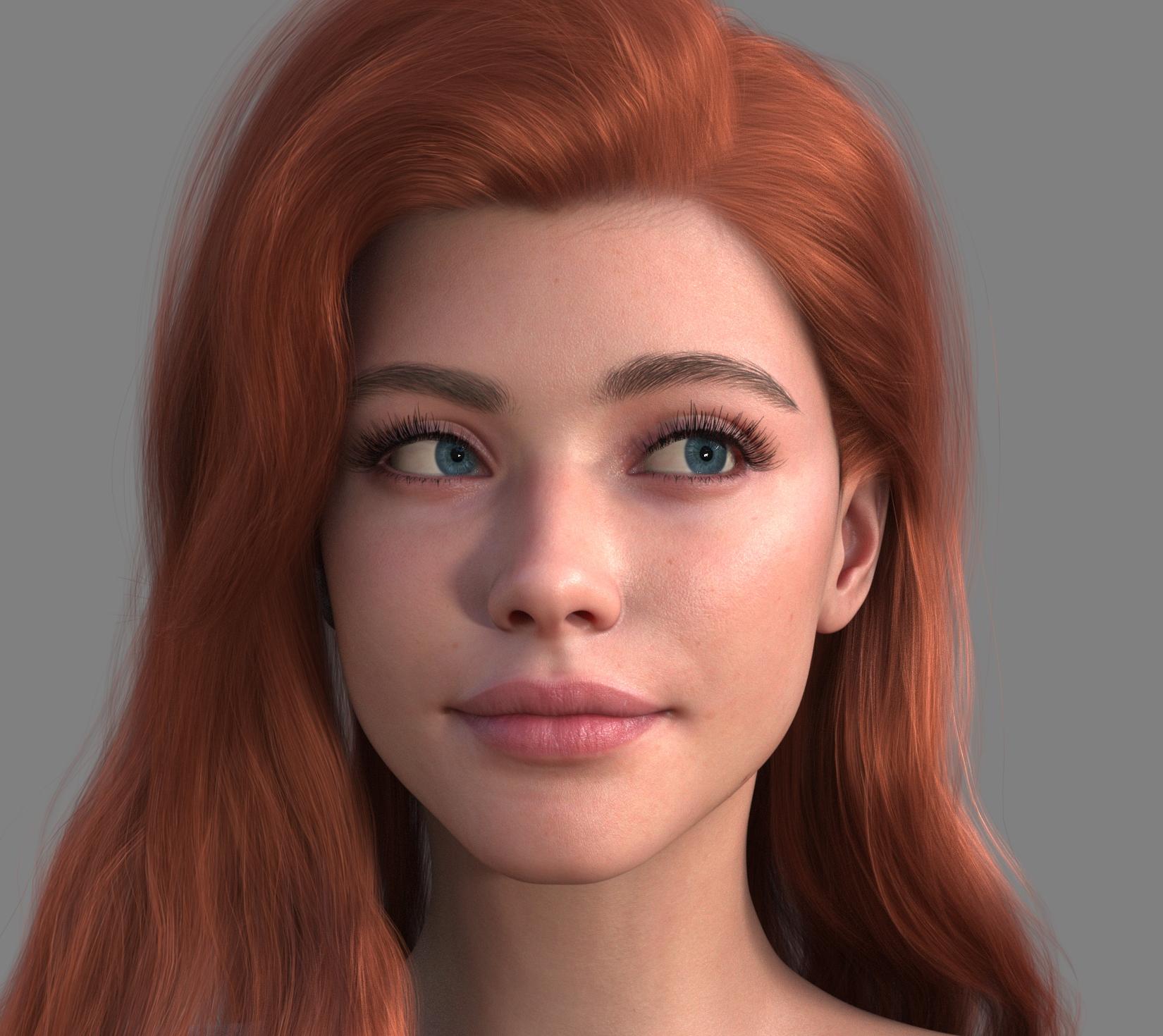 got this character morphed...
Which figure is it, and which morph sets do you have?
Paying for a Daz modeler to make a G8F morphI am in great need of a morph of a roach woman with the roach abdomen and roach wings, and antennae. I need the morph for Genesis 8 Female (definitely NOT G9). I need the head morph slider separate from the body, so I can use it for different characters from my adult/erotic horror games I make. However, I would not mind the head broken into two morphs, one for the top of the head with the big compound eyes and the lower have looking like a roach mouth or off to mimic whatever G8F character morph I have on. Ideally, I would prefer you also make the materials. Please let me know if you are interested and the cost. I am professional and will pay you. See picture below for what I would like you to use as inspiration or a guide.
Example of G8F model that is similiar (but not a roach)
https://www.daz3d.com/wasp-queen-for-genesis-8-femaleA and B and C walk into a scene.Turned off by turning the Visible property off, I assume, not making them transparent.
The scene still has to be loaded in full into DS, so that is going to consume some system memory - perhaps it is failing during the prepartion stage, before ti even tries to transfer to Iray for rendering. Again, what does the log say?
Aiko 3 of 9Every new model it takes me a while to get into it because to move my characters up I have go through a lot of motions. I had toyed with moving the guys up from Genesis and 8 to 9 a few times, but I get busy. I'm sleep depped right now, so hahaha... write??!?! WHAT??!?! Do... aRT?!?!? WHHAAATT?? Study Abenaki?!?! Nuuuuuuuuuuuuuuu I shall waste time by redoing step one of the moving process!
Bringing in Aiko 3... and later Hiro 3... okay I might have already moved Sakura 8 over.
Also bringing in Capsces Kioki and Hitioro.
What? You ask. You have those old morphs on your Genesis models????
Yes. And no, I don't remember how I did it. Something to do with GenX.
I use Kioki and Hitoro's morphs for just about everything. Anyway, I saw a post where someone was looking for better shapes of eyes and it got me thinking. The truth is I WAS working on my own anime model system for Genesis 9 but I was doing it alone, so it was slow going... and now DAZ rolled theirs out, so. Eh. I'll go back to telling badly told stories if it's all the same to you.
Anyhoo.
I upgraded to Premier and tried to move the Legacy shape of Aiko over using shape transfer - which btw was a pain to even get to be in my system at all. Definitely a bug DAZ could address Anyhoo. Unless you're a fan of Hellraiser, I don't recommend you do it.
I had to move her over the old way. Thankfully the geometry tools with Premiere let me avoid using Blender.
Duplicate formulasMore likely it is two specific characters that use the same names, so any links (between a full morph and head/body morphs, or between morphs and joint centres) will have the same name at both ends of the link - which is what the error message means by duplicate formula.
Diffeo - Morphs for eyelashes no longer working after import?You don't have to import Custom Morphs... importing with Daz Favoites always work, neat and quick. But because default Eyelashes Length properties (default value 1.0) on G8 trigger Eyelashes Length morphs (with geometry data...) by AutoFollow on the G8 Eyelashes attachment in DS, you need to:
1) Zero Eyelashes properties on G8 to avoid morph baking. Favorite Eyelashes properties on G8 Eyelahses attachement. (ss 1 ~ 2)
2) Import the scene with Diffeo by checking Daz Favorites option. Then dial the morph properties in Blender (ss3)Be noted, if working with G8.1 / G9, you need to firstly dial the eyelash properties on G8.1 / G9 so as to trigger Auto Follow, then favorite the morphs on Eyelahses attachement ~~
Edit: If you want to import Custom Morphs, select Eyelashes mesh, import from the folder: data\DAZ 3D\Genesis 8\Male Eyelashes\Morphs\DAZ 3D\Head\ (ss4) (What you've imported are just control properties on G8 with no geometry data...)
Daz After DeathI wish you the very best in your fight with your cancer. Please remember to not withdraw from others which is a natural reaction with difficult and uncertain news. If people say I don't know what to say then tell them you are thankful for their acknowledgement and that acknowledgement is enough.
As for your transfer of licence upon your death, unfortunately you do not own your content. You own a licence to use your content. To quote the standard licence agreement:
"User shall not give, sell, rent, lease, sublicense, or otherwise transfer or distribute any Content on a temporary or permanent basis without the prior written consent of DAZ."
https://www.daz3d.com/eula#general_license
You will probably also have to indicate who you will be the transfer recipient of the licences, including their contact information. If you get written consent then make sure to print it out with a copy of the current EULA and have a copy of it stored with your will and other legal documents. Upon completion of your bequest, DAZ will need to be notified in writing of the completion of the transfer of licences. The notice of transfer and the DAZ acknowledgement should also be printed and kept for future legal reference.
I hope this explanation helps.
 Daz After Death
@valkan I'm so sorry to hear about your health concerns. Know that no matter what the doctors might say, God has the final say. You are in His hands.
As for your library, I think what others have said is correct - I recommend contacting Daz3D and explaining the situation. I don't know what the policy is when it comes to this type of situation. I don't think they generally allow an account transfer but hopefully they can make an exception in this circumstance.
May the Lord God bless you with healing and strength. I'm sending mental hugs and prayers your way. Please keep us posted. ❤️
Daz 3D is part of

Connect
DAZ Productions, Inc.
7533 S Center View Ct #4664
West Jordan, UT 84084Licensing Agreement | Terms of Service | Privacy Policy | EULA
© 2026 Daz Productions Inc. All Rights Reserved.