-
Camera Magic (Commercial)
Zev0 said:
"I dial a hair morph either in Perspective View"
This needs to be done on the desired camera...perspective view will not hold any data.
If you have Plus you dont need to use the standard Camera Magic anymore. The visibility/enable options are there in Plus. I don't know why it is not working for you. Send me a log file please. Under script settings/options there is a get log function.
Sorry that I replied so late to this, as I decided to temporarily stop using this product only until recently. Recap - Camera Magic doesn't save any morphs dialed into my hair products. I dial a morph for a hair that I use in either Perspective View or any Camera that has Camera Magic enabled, but the moment I switch to another camera, the dialed morph is lost. You requested me to get a log, but when I click on the get log option in Camera Magic, it says "Unable to find Script Runs in log."
Monster Rat creature with Dforce Hair and iray materialsI think this would be great as a morph for Daz Dog, basically a more rodentine Varg.
[Released] ManFriday’s Figure Converter for Genesis 9 [Commercial]I don't own this product but found this thread when doing my own manual conversions with G3 to G8/9, and was looking for an answer to the hand stretching problem. This thread has expanded a bit since then, and I see you've posted a workaround, which is awesome lol so I'm a bit late to the party but I puzzled the entire issue out and fixed it, at least for my manual conversions. The problem with G3 is the T pose, the stock clones do not attempt to align with it at all and remain in the A pose. Just putting G3 into the A pose wasn't enough to outright solve the issue though, I'm speculating because of the differences in the way the shoulders work. It fixes some of it, but then other parts of the resulting conversion will be warped like the arms.
The way I solved it was by creating my own clone from scratch and using Blender's shrinkwrap modifier wrapped G9 to G3's T-pose including the weird shoulder geometry.
Anyway, it's simple to make with a little patience and positioning as long as you're not afraid to mangle G9 a bit in Blender lol. Essentially it's just adding a shrinkwrap modifier to G9 and then stretching it until you can ensure that when you apply the modifier all of the bodyparts go where they're supposed to, stretching and mangling upper G9 torso is definitely required lol.
I hope this post can bring about a fix for you guys.

Also I don't mind providing my clones for download, I don't need or want anything for them, I never made them available because I'm not sure if they would violate Daz's copyright since they're essentially still in their original forms, just shrinkwrapped to other Genesis versions and origin poses.
Edit to add, if you attempt to do this make sure that before you export your final product in Daz Studio (for example, if converting G3 to G9, your final product would be the G9 morphed into whatever character you've converted), make sure you return it to the proper A pose for G9 using the arm bends 45 and -45, and the leg positioning, etc. Same applies if you're exporting our a G8 morph except the leg bends are a little different then.
AIUTO...CHI CONOSCE L’ITALIANO? PARTE QUATTORDICICrios said:
Quando dico che uso un modello, è perchè magari lo metto a confronto, non che lo includo nel mio morph!
Devo essermi spiegato male... Non dicevo di includere un altro morph nel tuo ma di usarlo come base per crearlo.

Hai presente i vari Giangiacomo per Francescalberto per Giovanaldo per G8.1? Una cosa così. Prendi un altro morph come base e ci modelli il tuo sopra.
FilaToon / Cell shaded rendering with FilamentMoogee said:
GRFK DSGN Unlimited said:
What was the name of the Toonify product? I tried searching for it and came up empty.
I think the product you're thinking of is Cartoonized for both G8 & G9. The down side with it is, if you mix it with the Base Anime shape, you can only dial in the morph so far before the eyes start to pop out. 1 Click Anime seems to address that particulate issue. It'd be nice if there was a G8 version if this.
It's definitely Cartoonized. 1-Click Anime is my preffered product, but if you need it for Genesis 8, then Cartoonized would be a better option. Problem being there's a separate version for male and female, while the G9 version works for both. I did a showcase of how 1-Click Anime works and it's a great product, here in the Let's appreciate/discuss today's new releases thread.
AIUTO...CHI CONOSCE L’ITALIANO? PARTE QUATTORDICIAllora, io non ho incluso proprio un bel niente, semplicemente ho caricato il mio morph a destra, e Teen Josie a sinistra, e ho visto com'era fatta. Per i morph Merchant Resource, ne ho diversi, sia free che a pagamento. Non ho bisogno di sotterfugi per creare i miei morph, sono al 100% originali.
Quando dico che uso un modello, è perchè magari lo metto a confronto, non che lo includo nel mio morph!
FilaToon / Cell shaded rendering with FilamentGRFK DSGN Unlimited said:
What was the name of the Toonify product? I tried searching for it and came up empty.
I think the product you're thinking of is Cartoonized for both G8 & G9. The down side with it is, if you mix it with the Base Anime shape, you can only dial in the morph so far before the eyes start to pop out. 1 Click Anime seems to address that particulate issue. It'd be nice if there was a G8 version if this.
Let's appreciate/discuss today's new releases - more ongoinger threadPretty good product. I like anime stuff so it was an no brainer for me. It works very quickly and works okay with morphs. I set them all at 50%. The only issue, which isn't so much as an issue but as a logical conclusion, is that any preset expression you use won't look as great when used on a non-anime morph. Here I have Sylvia 9 with one of Vicky's expressions, and the eyes closed perfectly. I applied the makeup after activating the anime morph and it was flawless.
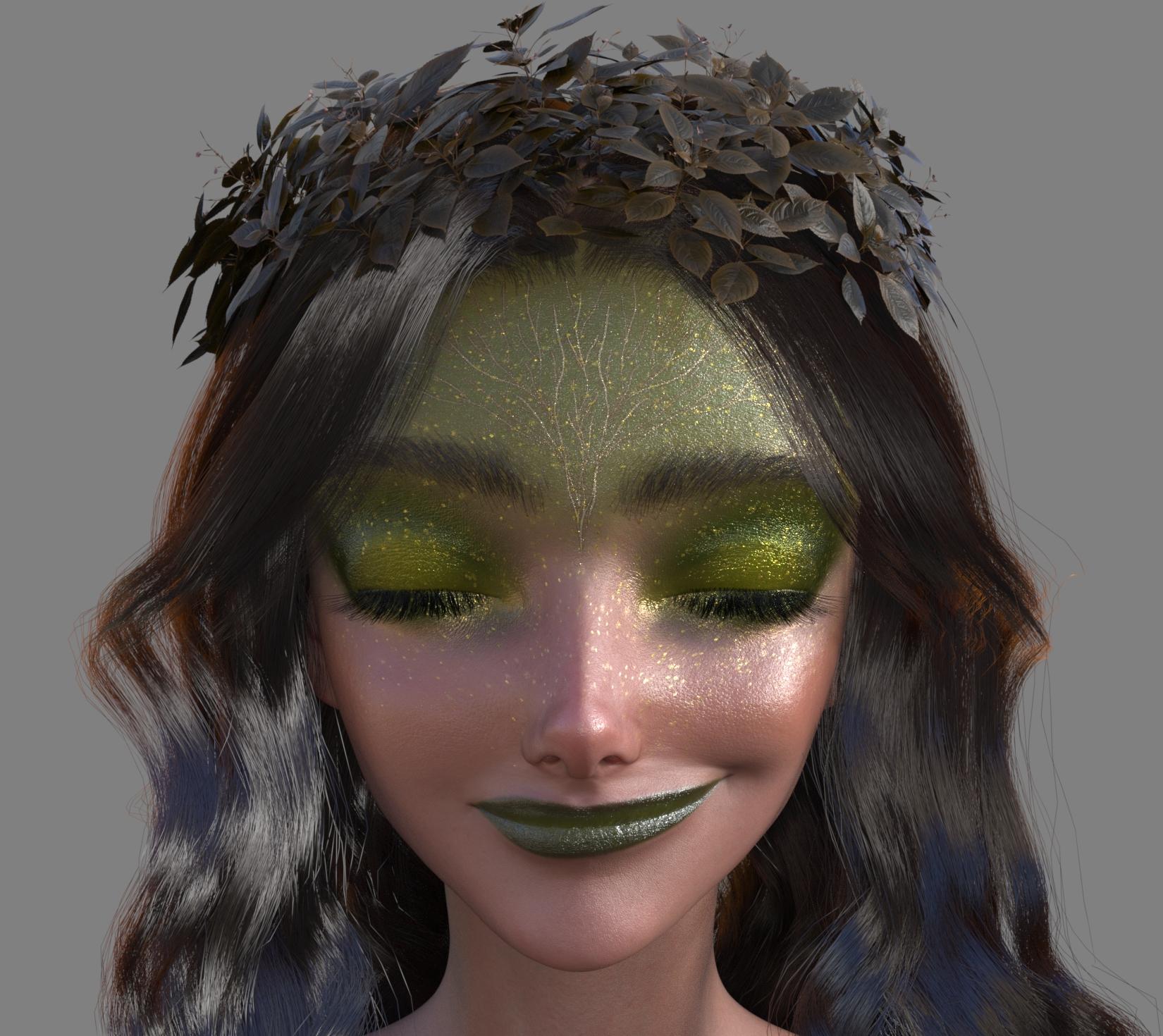
Wagner Demon anime morph here looks good, but the Wagner expression looks a bit off. With one of Mikey's expressions, it looks much better. This is a testament to how good the anime morph actually is-I wouldn't expect those preset expressions to look great on these heads.
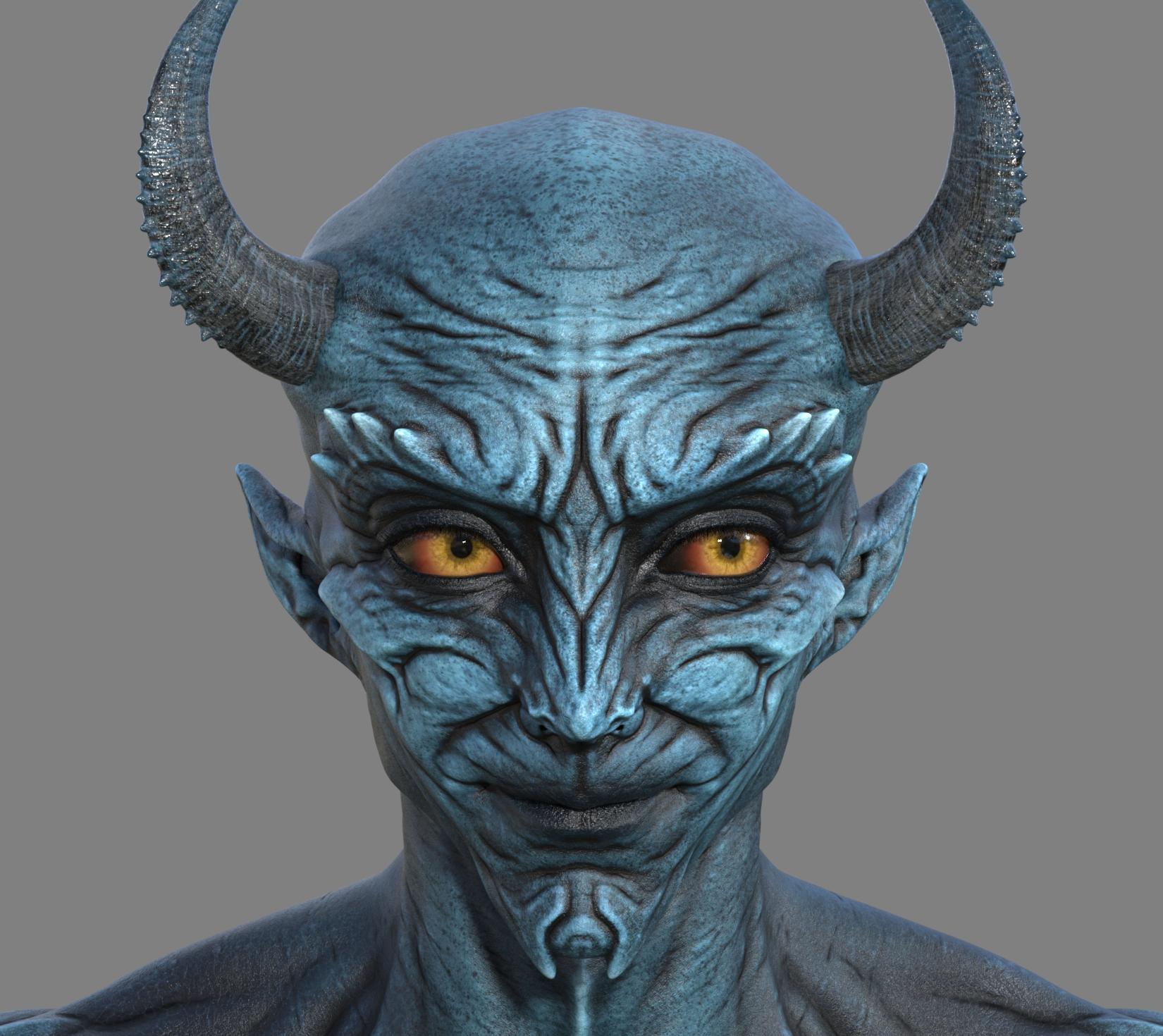

Next was Lycan 9. It didn't do much to him, mostly increasing the size of the eyes, but there's a noticable difference.

Mercilus was the only one that had a slight issue with his preset expression, with some of the fangs hanging outside. I like the look though.
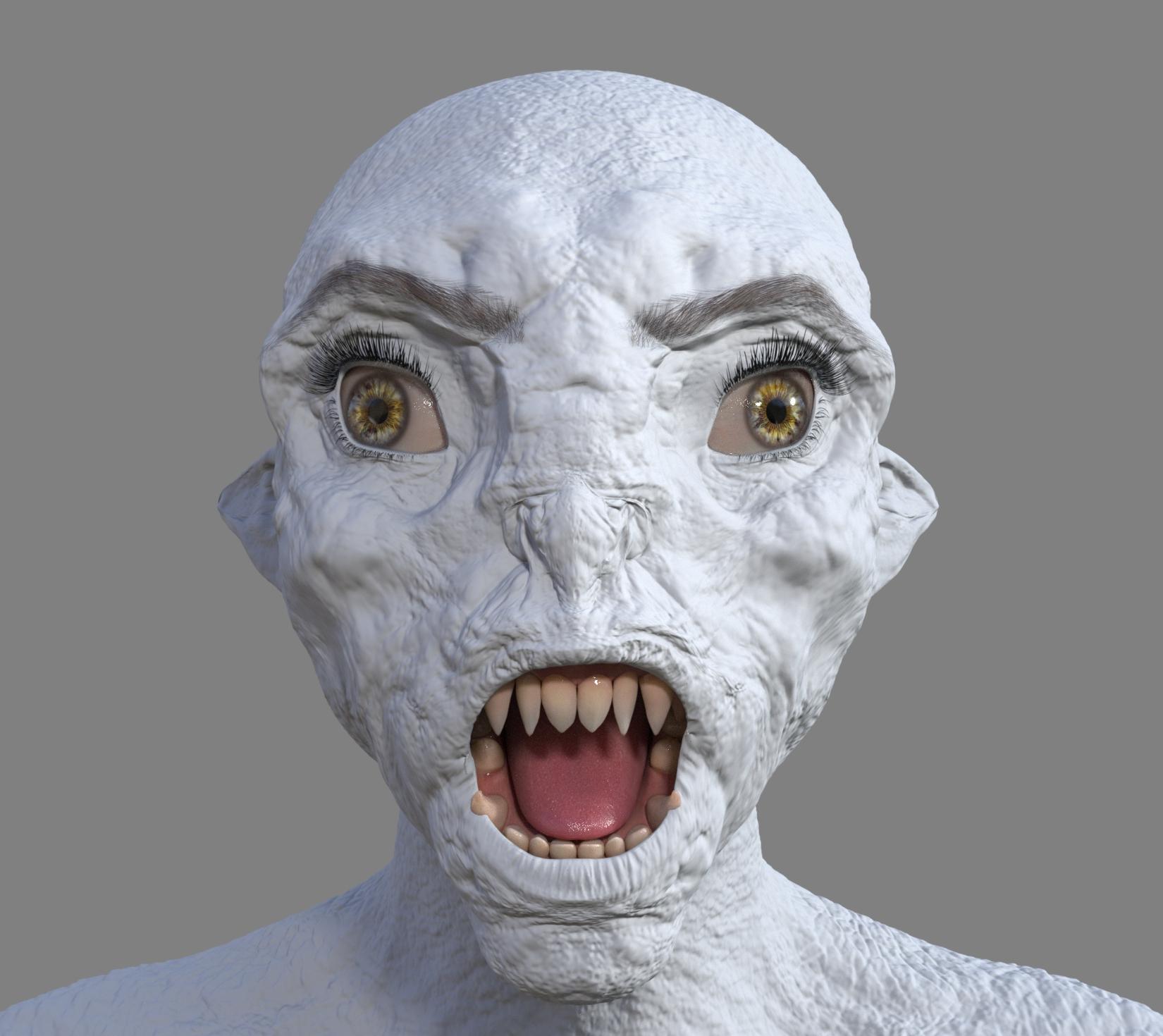
How about an elf? Lianna 9's elvish features morphed pretty well.
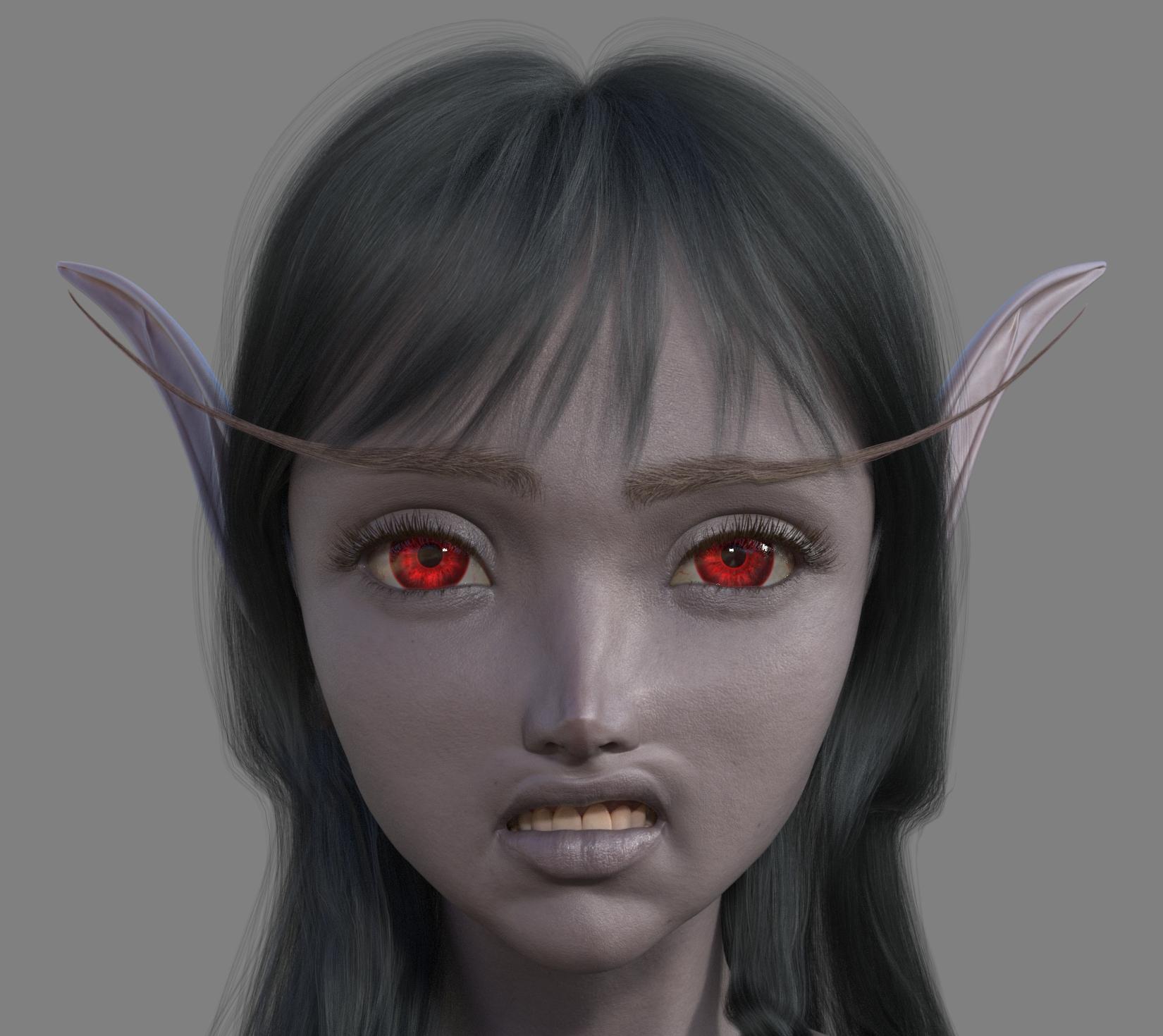
Last but not least, last year's incredible February character, Tara. I had to do an evil expression with her-with one of Victoria 9's. It actually came out well.

As a bonus, here's a Zahara morph with a Filatoon skin. Also took FeSoul's Teddy Hair and added a toon shader, too. It works!
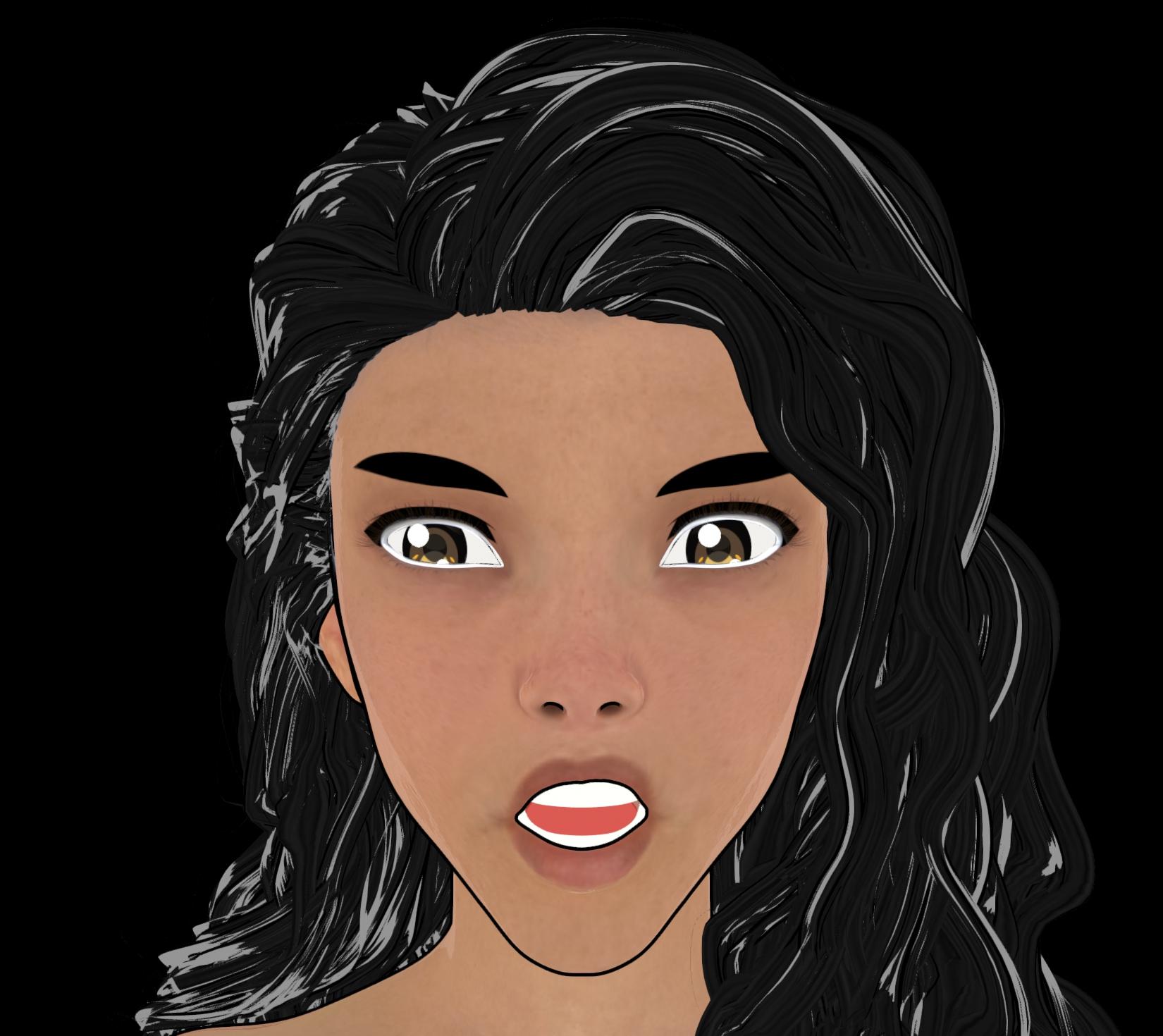 Let's appreciate/discuss today's new releases - more ongoinger thread
barbult said:
Artini said:
There is a new https://www.daz3d.com/1-click-anime
Just wonder, how it manages the eyes with different expressions and poses of the body.
Oh, that's a good question, @Artini. Do the eyes close properly? How well do they work with different head morphs? What about dilate and other eye morphs?
Here's an example of Victoria 9 with 50% Base Anime Feminine and adjusted eyes applied through the script, then Eye Blink slider set to 100%.
Obviously it is impossible to support every head morph, pose, expression etc without some manual adjustments required. As per the description on the store page:
Depending on the morphs or poses used, some manual adjustment may still be necessary - there will be mixed results with characters that are already stylized and/or have exaggerated facial features, because the eye sockets tend to be less spherical and the eyes won't fit properly.
Was there a particular dilate morph you had in mind? Pupil dilation should have no effect as it won't change the size of the eye itself.
EDIT: also just to add that body poses shouldn't cause any problems unless they make changes to the eye bones, which of course they shouldn't. Expressions that affect the eye position/where they're looking may need tweaking because the increased size of the eyeball required (so that there are no unrealistic gaps on the inner and outer corners), means that the eye bones X position has to be adjusted slightly to centrally align the eyeballs in the eye sockets.
I usually select the eyeballs and use the pose tool sphere (located in the top-left corner of the viewport) to change where the eyes are looking, even before I created this product so it doesn't just apply to this product only.
If you do notice any pokethrough when using certain morphs, poses or expressions, you can run the relevant anime script again to reposition the eyes, just in case the eye bones are adjusted again as part of the applied content.
AIUTO...CHI CONOSCE L’ITALIANO? PARTE QUATTORDICICrios said:
Primo non ho Teen Josie 8, ho i teen di Genesis 2, e ora sto virando da una pre-adolescente a una teen, e devo dire che va meglio.
Ragazzo, ci sono un bel pò di morph gratuiti in giro per G1/2/3/8/9 di giovinotti imberbi e innocenti fanciulle che puoi usare come base. Non c'è bisogno di comprare nulla, solo che per il copyright devi evitare di includerli nel tuo morph.
Posing Transfers G8 -> G8.1I'll try to keep this succinct: Guy I follow on Patreon released a model for a character I've been waiting FOREVER for someone to port, but they made it G8.1. Main reason I'm not super down for 8.1 is they removed some pose sliders for the face that I use the heck out of on G8, so I was wondering if there was a way to transfer said pose sliders from G8 to G8.1? Specifically the Eye Relax sliders, Lip Part Center slider, and the Lip Part slider, if it matters.
Edit: Or, easier, if there's a product out there I can pick up that already ports them...up, I suppose?Celebrity Look-a-Likes for 3D figures Part 4xavier.le.corre_51f6fcc1c9 said:
HID Ramsey She reminded me a little of Paulina Gaitan.
Using different skin textures and some minor morph adjustments, Ramsey could be used as Paulina Gaitan.
Question on sleeve sponge prop on left hand (have image)crosswind said:
foxyfoxfurries said:
crosswind said:
foxyfoxfurries said:
crosswind said:
That's great ! And the logos look nice ! You can freely adjust the logos position in image editor as needed.
As for the Ghostblde Elbow Strap, you can follow the steps below to make one for using on the left arm.
1) Export it to OBJ file ( File > Export... ) by using the settings in (ss1). Import OBJ file into the scene ( File > Import... ).
2) Rig the OBJ to G8F figure ( Edit > Object > Transfer Utility...) by using the settings in (ss2).
3) Select the strap on the right, go to Surfaces pane to select its Surface, right-click menu > Copy Selected Surfaces(s)... Then select the strap on the left, Paste to Selected Surface(s). (ss 3 ~ 4)
4) Then you need to Horizontally Flip the partial logos, in Image Editor, on the texture maps of Base Color, Glossy Roughness and Normal Map slots. Save them as new maps and assign them to the strap on the left accordingly. (ss 5 ~ 6)Finally save it as a Wearable Preset. Done ~
This product : https://www.daz3d.com/mirror-geometry can automate the above steps but you still have to tweak texture maps...
You are really awesome! You write it so well step by step BUT I STILL MISSED something! xD hehehe look what it made to me.. I pretty sure missed something in the start?
Also if you have time for commissions as well let me know, You didn't say nothing so pretty sure you can't but in case you miss that hehe , all good if you can't as well by the way! your help me a lot! ^^Ah, pls carefully check my screenshot related to the settings of Export... When you Export / Import OBJ files, make sure you set 100% in Scale. In your screenshot, it is 1%.
Right ~ , I'm not able to have dedicated time to do commissions for the time being... but maybe in Q2. Pls feel free to let me know what you want exactly by DM me. However, be noted that commission may cost you more... than buying existing products.

I will be happy to work with you! About the DM where I can see it in DAZ3D site? hehehe , you have Discord maybe?
And about the item you write it step by step thank you for that! But it still stuck , I don't know what I missing , look at the image for example . Sorry for all this problems heheheYea, replied, check your Inbox.
So it was stuck when using Transfer Utility? Did it ever work for you before?
Never tryed it before hehehe but I sent you my discord! thank you!
Question on sleeve sponge prop on left hand (have image)foxyfoxfurries said:
crosswind said:
foxyfoxfurries said:
crosswind said:
That's great ! And the logos look nice ! You can freely adjust the logos position in image editor as needed.
As for the Ghostblde Elbow Strap, you can follow the steps below to make one for using on the left arm.
1) Export it to OBJ file ( File > Export... ) by using the settings in (ss1). Import OBJ file into the scene ( File > Import... ).
2) Rig the OBJ to G8F figure ( Edit > Object > Transfer Utility...) by using the settings in (ss2).
3) Select the strap on the right, go to Surfaces pane to select its Surface, right-click menu > Copy Selected Surfaces(s)... Then select the strap on the left, Paste to Selected Surface(s). (ss 3 ~ 4)
4) Then you need to Horizontally Flip the partial logos, in Image Editor, on the texture maps of Base Color, Glossy Roughness and Normal Map slots. Save them as new maps and assign them to the strap on the left accordingly. (ss 5 ~ 6)Finally save it as a Wearable Preset. Done ~
This product : https://www.daz3d.com/mirror-geometry can automate the above steps but you still have to tweak texture maps...
You are really awesome! You write it so well step by step BUT I STILL MISSED something! xD hehehe look what it made to me.. I pretty sure missed something in the start?
Also if you have time for commissions as well let me know, You didn't say nothing so pretty sure you can't but in case you miss that hehe , all good if you can't as well by the way! your help me a lot! ^^Ah, pls carefully check my screenshot related to the settings of Export... When you Export / Import OBJ files, make sure you set 100% in Scale. In your screenshot, it is 1%.
Right ~ , I'm not able to have dedicated time to do commissions for the time being... but maybe in Q2. Pls feel free to let me know what you want exactly by DM me. However, be noted that commission may cost you more... than buying existing products.
I will be happy to work with you! About the DM where I can see it in DAZ3D site? hehehe , you have Discord maybe?
And about the item you write it step by step thank you for that! But it still stuck , I don't know what I missing , look at the image for example . Sorry for all this problems heheheYea, replied, check your Inbox.
So it was stuck when using Transfer Utility? Did it ever work for you before?
Question on sleeve sponge prop on left hand (have image)crosswind said:
foxyfoxfurries said:
crosswind said:
That's great ! And the logos look nice ! You can freely adjust the logos position in image editor as needed.
As for the Ghostblde Elbow Strap, you can follow the steps below to make one for using on the left arm.
1) Export it to OBJ file ( File > Export... ) by using the settings in (ss1). Import OBJ file into the scene ( File > Import... ).
2) Rig the OBJ to G8F figure ( Edit > Object > Transfer Utility...) by using the settings in (ss2).
3) Select the strap on the right, go to Surfaces pane to select its Surface, right-click menu > Copy Selected Surfaces(s)... Then select the strap on the left, Paste to Selected Surface(s). (ss 3 ~ 4)
4) Then you need to Horizontally Flip the partial logos, in Image Editor, on the texture maps of Base Color, Glossy Roughness and Normal Map slots. Save them as new maps and assign them to the strap on the left accordingly. (ss 5 ~ 6)Finally save it as a Wearable Preset. Done ~
This product : https://www.daz3d.com/mirror-geometry can automate the above steps but you still have to tweak texture maps...
You are really awesome! You write it so well step by step BUT I STILL MISSED something! xD hehehe look what it made to me.. I pretty sure missed something in the start?
Also if you have time for commissions as well let me know, You didn't say nothing so pretty sure you can't but in case you miss that hehe , all good if you can't as well by the way! your help me a lot! ^^Ah, pls carefully check my screenshot related to the settings of Export... When you Export / Import OBJ files, make sure you set 100% in Scale. In your screenshot, it is 1%.
Right ~ , I'm not able to have dedicated time to do commissions for the time being... but maybe in Q2. Pls feel free to let me know what you want exactly by DM me. However, be noted that commission may cost you more... than buying existing products.
I will be happy to work with you! About the DM where I can see it in DAZ3D site? hehehe , you have Discord maybe?
And about the item you write it step by step thank you for that! But it still stuck , I don't know what I missing , look at the image for example . Sorry for all this problems hehehe(Released) - dForce Rina Hair for Genesis 9 [Commercial]JeffG said:
Do you mind if I ask who the figure is?
Hello, I think the skin textures are Snow Queen 9 and the head morph is a mix of many different head shapes I have in my library, not a particular character.
Strange knees / elbows deformation after posing - Resolvedawdz said:
Richard Haseltine said:
Thoswe look like product bugs - probably the link between the bend and the morph should be multiplied by the value of the shapes themselves and isn't. If they are from here report them to support, if from another store report to the artist or store (depending on how they handle it). If you want you can apply a fix (assuming I am right) - right-click on the Parameters pane and enable Edit Mode (if it isn't already), right-click on the problem slider and seelct Show in Property Hierarchy, then expand to show its attributes>Controllers>and you want to see "nd stage (1st stage should already have the knee bend), then find the body slider (for the first, something like EM3DAlinaBody) in Parameters and drag it across into Controlers>2nd Stage for the corrective morph.
The editing you suggested worked, thank you! However, it doesn't appear to last; if I restart Daz Studio, the issue is back (and now instead of ~86% applied, those two modifiers are at 100%). I'll report to the Daz tech support.
Edit: not when I restart Daz; any time I load in a new figure. Still, that will hopefully fix it for that figure. I can work around that for now.
After setting the correct Controllers at 2nd Stage of the corrective morphs, you need to Save Modified Assets, via: File > Save As > Support Asset > Save Modified Assets... Choose the morphs that you corrected, Accept.
Question on sleeve sponge prop on left hand (have image)foxyfoxfurries said:
crosswind said:
That's great ! And the logos look nice ! You can freely adjust the logos position in image editor as needed.
As for the Ghostblde Elbow Strap, you can follow the steps below to make one for using on the left arm.
1) Export it to OBJ file ( File > Export... ) by using the settings in (ss1). Import OBJ file into the scene ( File > Import... ).
2) Rig the OBJ to G8F figure ( Edit > Object > Transfer Utility...) by using the settings in (ss2).
3) Select the strap on the right, go to Surfaces pane to select its Surface, right-click menu > Copy Selected Surfaces(s)... Then select the strap on the left, Paste to Selected Surface(s). (ss 3 ~ 4)
4) Then you need to Horizontally Flip the partial logos, in Image Editor, on the texture maps of Base Color, Glossy Roughness and Normal Map slots. Save them as new maps and assign them to the strap on the left accordingly. (ss 5 ~ 6)Finally save it as a Wearable Preset. Done ~
This product : https://www.daz3d.com/mirror-geometry can automate the above steps but you still have to tweak texture maps...
You are really awesome! You write it so well step by step BUT I STILL MISSED something! xD hehehe look what it made to me.. I pretty sure missed something in the start?
Also if you have time for commissions as well let me know, You didn't say nothing so pretty sure you can't but in case you miss that hehe , all good if you can't as well by the way! your help me a lot! ^^Ah, pls carefully check my screenshot related to the settings of Export... When you Export / Import OBJ files, make sure you set 100% in Scale. In your screenshot, it is 1%.
Right ~ , I'm not able to have dedicated time to do commissions for the time being... but maybe in Q2. Pls feel free to let me know what you want exactly by DM me. However, be noted that commission may cost you more... than buying existing products.
Removing d-formerIs it still a dFormer? If so just select its parts and delete them. If you spawned a morph and didn't save it as ana sset, just right-click on the Paramaters pane to put it in Edit mode, then right-click on the slider to remove it. If you did save it as a morph/modifier asset you will need to find the .dsf file and delete that (e.g. go to /data/daz 3d/Genesis 9/base/morphs/name you entered for publisher/name you entered for product/ and delete the .dsf file named for the morph).
Strange knees / elbows deformation after posing - ResolvedRichard Haseltine said:
Thoswe look like product bugs - probably the link between the bend and the morph should be multiplied by the value of the shapes themselves and isn't. If they are from here report them to support, if from another store report to the artist or store (depending on how they handle it). If you want you can apply a fix (assuming I am right) - right-click on the Parameters pane and enable Edit Mode (if it isn't already), right-click on the problem slider and seelct Show in Property Hierarchy, then expand to show its attributes>Controllers>and you want to see "nd stage (1st stage should already have the knee bend), then find the body slider (for the first, something like EM3DAlinaBody) in Parameters and drag it across into Controlers>2nd Stage for the corrective morph.
The editing you suggested worked, thank you! However, it doesn't appear to last; if I restart Daz Studio, the issue is back (and now instead of ~86% applied, those two modifiers are at 100%). I'll report to the Daz tech support.
Edit: not when I restart Daz; any time I load in a new figure. Still, that will hopefully fix it for that figure. I can work around that for now.
Daz 3D is part of

Connect
DAZ Productions, Inc.
7533 S Center View Ct #4664
West Jordan, UT 84084Licensing Agreement | Terms of Service | Privacy Policy | EULA
© 2026 Daz Productions Inc. All Rights Reserved.