-
Need a little help with my corrective morphs
Hiya!
I've recently started creating some of my own corrective morphs to improve the fit of some of the clothing I've converted from G3 to G8. I'm really pleased with the results so far, and I've kinda got the basic principles of using ERC Freeze to link my corrective morphs to the correct body rotation, but I've come unstuck.
I'm trying to create a corrective morph like the ones you find in the shoulders and elbows, where the morph won't 'kick in' until a certain parameter is reached (like the shoulder up 90 corrective morph that stays at 0% until the shoulder rotation reaches 35 and hits 100% at 90).
Unfortunately all I've figured out how to create so far ar corrective morphs that work from a zero parameter value to whatever value I used ERC Freeze at.
If anyone can help it'd be much appreciated, though as I write this I realise I have no idea if "corrective morphs" is an actual thing, or I'm making up my own terminologies again... (I confess I don't even know what ERC stands for!) :)
G8 feet fixing ?you can apply the foot morphs of bluejaunte's characters to any genesis 8 female. you just have to finesse one of the included parameters a little bit.
one of these days a PA with access to the HD tool and some anatomy chops is going to create a good HD foot morph package. i'm just hoping that happens before we're all using genesis X figures.
j
How do you apply the bluejaunte footmorph to other G8F characters? As far as i can see in only find a seperate neutralizer morph.
The Marvelous Designer ThreadHere's a question for those familiar with MD. I have bought dForce garments which come with built-in morphs. You can drape and then apply the morph to flare a skirt out to the right or left or to lift a gown from ankle to knee. I'm just musing on how best to do this with imported MD garments. Would it be best to create the required effect in MD before export (using pins and/or wind, for example) or to import the OBJ and create a morph in Blender or Hexagon?
G8F's teeth became rounded somehow...I have this problem all the time especially in Blender. Usually, it's from Subdivision. I've also found that sometimes using a Character's Full Body Morph + Any Other Smoothing or Head Morph can amplify the problem. Unfortunately, I don't know a DAZ solution, but those are the conditions I've noticed. In Blender, I can mask the smoothing in a way. One other adjustment is to use the Teeth Morph to reduce the gap since that makes it less noticeable.... slightly...
Is there any way to copy ERC and aliases between models?EDIT: There was another comment here to which this was supposed to be a response, but that's now gone missing...?
I haven't tried loading with V4 in the scene recently, because I want to use the snakes on G3 and G8 figures (I would argue it's still one of best sets of gorgon snakes, given its's dense and hugely posable. In any case, while I have now got RawArt's G8F Medusa Maker, those snakes are not similar enough in appearance that I can use it as a replacement for existing characters).And until it became clear that it was this specific model crashing DS if it was scanned by a script, I was using the CR2 version - parented to the head of G3 or G8. Everything regarding converting it to weightmaps and saving it in DS format have been purely about trying to rule out whether it's something about the poser format causing the crash. (However, as it is, the conversion to weightmapping does not show any signs of having introduced problems of its own. Although there are a lot of bones on the model, they do not have particularly complex vertex assignments. Even if it did have problems, I've got enough experience weight-painting for other programs that I can fix most such things - I can even manage pretty respectable weight painting for the Source engine, which has a notoriously tight limit of three weights per vertex).
But, for the sake of completeness, I've just tested: if I load V4's CR2, then the snakes' CR2, parent them to V4's head, and then run Scene Optimiser, then DS does still crash when the Optimiser window is closed.
It crashes even if the snakes' CR2 is the only thing in the scene, it crashes if it's in DUF format, it crashes with Poser Materials, it crashes with Iray materials... the only version I have yet found that does not crash Daz when a script scans it in this way is if I export and reimport it as OBJ (at least ruling out that it's some inherent flaw in the geometry... or at least not one that survives export to OBJ); if I then rig the OBJ version, either manually or by using the transfer utility, it remains stable.Which probably means there's a good chance that it is something to do with the hair's huge number of posing links, but actually being able to prove that by transferring them would be useful. (And, for the record, this is not the only reason I'm asking about transferring links; there are many times that being able to do so would be a considerable time saver, it just happens that with this hair having over 8000 of these links, this is a time where it's really not feasible to just grit my teeth and set up the links by hand).
G8 feet fixing ?For the foot shape I mix between bluejaunte's characters and other morph packages I have. For the soles I took to making my own displacement maps which I offer on Patreon (sig has links). I generally feel that G3 females had a better base shape than G8 but with all the morphs available I am usually able to make something I am happy with in the end.
[Released] Character Converter from Genesis 3 Female to Genesis 8 Female(Now Conv JCMs) [Commercial]they are sort of saved already as indicated in the tutorial vid for this thing, there dials in the parameters tab.
https://www.youtube.com/watch?v=hugxqRo2gJA
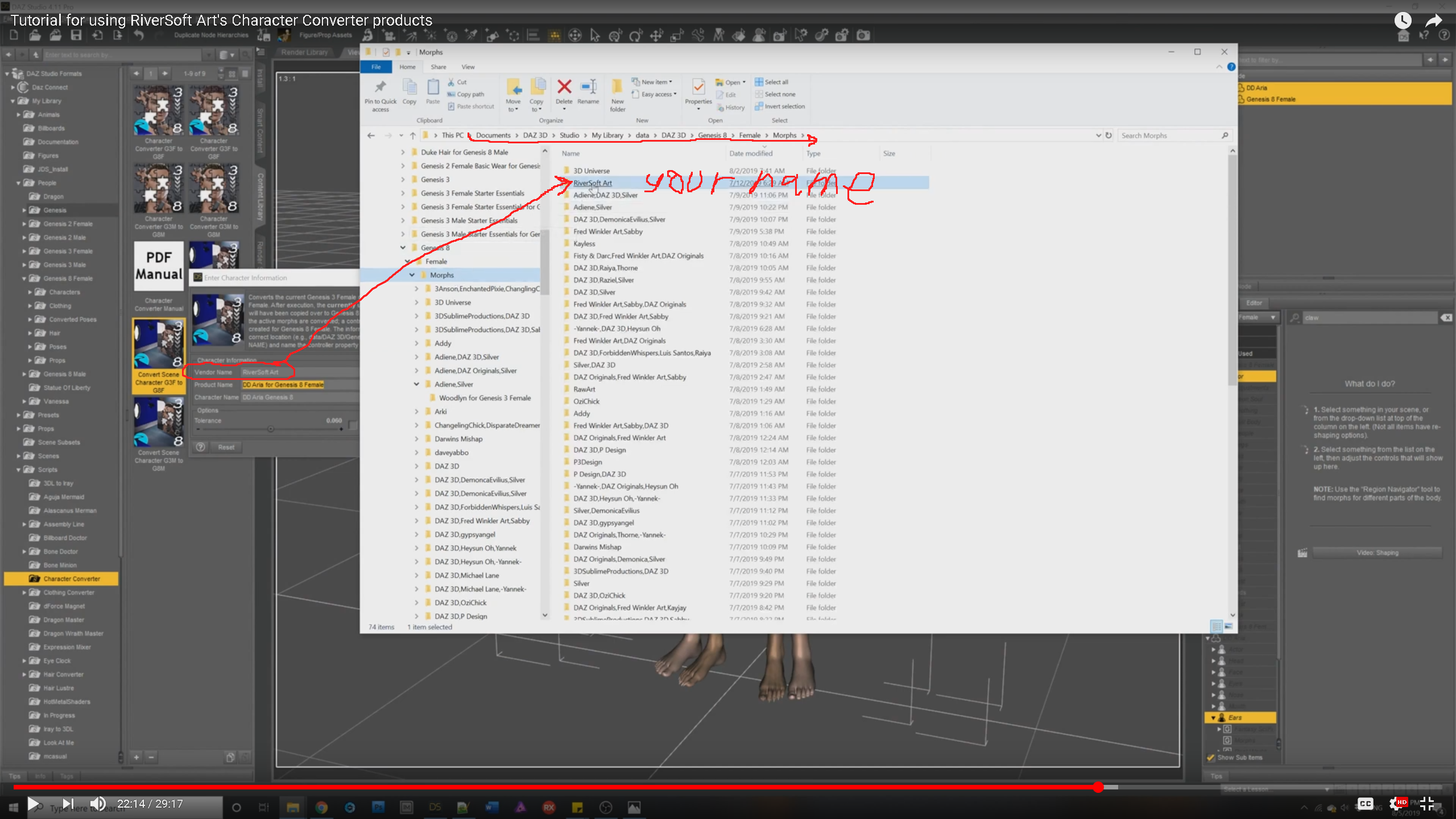
if you're talking about a "character preset" DUF file and not saving the dial again, sure that was covered in the beginning of the vid, think, or was it over on SY's transfer thing, hmmm.

sorry, my brain is still sort of melted from overwork trying to figure out how I made a controler dial for a dial spun body, my comp has crashed 3 times now from having too many tabs open, and Grammerly has completely stopped working, lol.
- dial in your figure you want to save, then...
10. Navigate to the People--Genesis 2 Female--Characters folder in your Content Library (corection, gen 8 Female). Right-click and choose Create Subfolder. Name it after your character.
11. In this folder, click the little plus sign at the bottom of the Content Library screen. Choose Shaping Preset. Click Accept. (corection, name it, then click accept)
As for saving the dials, well, if you 'must' save it again (I doubt this is what your asking for)...
1, write down the 'name' and where the dial is (actor -> People - ...)
the script appears to dump it's controller dial in just 'people' however all the mesh-shape dials can be just about anywhere, best to use that search box to help find them by typing in letters and clicking through path-names below till it appears in one branch and not a lower one. search will make the tree names that have similar dial-name be brighter than the others to help as well. And write it all down before opening that save dial thing, once it's open you can't go back to find something (without starting over).
Make sure the dials you are saving are set to zero, otherwise genesis will load with it dialed in every time you load a new genesis figure.
'File > Save > Morph asset'

when the window pops up, you'll need to enter the somewhat confusing info up top including what content path (Daz store or personal, your drive letters&path will be dif from my screencaps, and your names) to save it. the triangles below under G8F should be an Actor etc as the path you noted in step 1. if you don't see it, maybe there are some letters before the dial name like 'FHM' or 'FBM' etc.
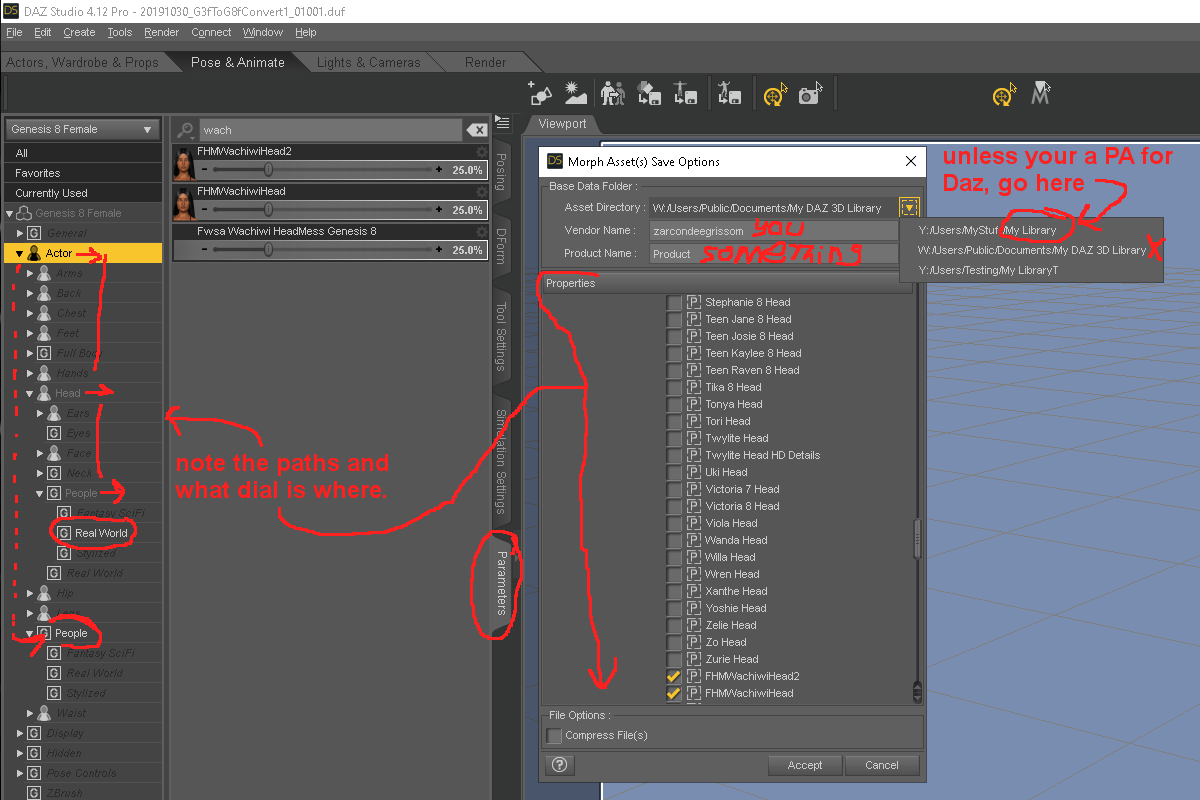
I'm sorry if I know nothing more, I blindly click what Sickleyield tutorials said click and pray it goes someplace I can find it to back it up and works.
*note1, because the script already saves the dials, ye may likely end up with duplicates if you don't go in and remover the dials on the drive that the script made after 'saving' them elsewhere. it's a bit of a sticky mess. it's easier to leave it be, dial in your character and apply the mats of choice, then just save that as a scene subset, alleviates a lot of hard drive hunting grief.
(PS, don't get excited about the name of the head dials in my screencaps. that was a fail shape conversion at the Gen6 to Gen7 boundary, for 'many' reasons. cheekbones do somersaults, eyes spin like propeller props, pupils shaped like Ultima Thule, the eyes go up behind the eyebrows, the jaw pokes through the chin, some dial replacements don't go negative like Androgynous post gen6, 4k or 8k G8F-UV'ed maps have yet to see the light of day, I don't have a 3D paint app to remake the maps from scratch, etc. sobbing on desk exclaiming "Fred can you pleas pleas..." lol)
Oh, that odd leg shape, maybe a dial being dialed in twice, aka 2x strength. I had seen that fluke before, the fix was to convert it another way fewer dials spun per convert and converting each figure area separately (dial-in only the head, convert that. then clear it all, dial in the body only, then convert that.). *and keep the elf/cat ear dials independent of anything else, or they will break hair with the auto-follow thing.
Character presets are not saved with the "Convert Scene Character script". There will be a dial in your character's name though to dial up all the morphs that make up your character.
For the warping, check out which morphs are being used. You might, as @ZarconDeeGrissom mentioned, have converted more than once or something and extra morphs are being engaged. Check out your My Library (first directory in Content Directory Manager for Daz format files)/Data/DAZ 3D/Genesis 8/Females. This is where all the converted morphs are going. You can delete the morphs used for Lilith and then try the script again.
Thank you for the help, both of you. I deleted all of the morphs and started over. So far, I've converted one of my own characters, Arabella 7, and Lilith 7. I haven't done any renders though (I've had other things going on). Thanks again :)
Good luck! And let us know how it is going!
Morph loader...ugh! How annoying!
That would be nice ;-). I think I finally got my morphs to work with this tutorial, but it was a little confusing due to the missing options that are in the 6 years newer versions, lol. . By delete the eyelashes, he means select them in the scene window, unparent them then right click and delete them. I find this is a nice clean way of doing it, and it's always easy enough to port in a new G8M, or to port some new lashes into the old one. Some character packs even come with custom eyelashes. One more thing should be added. It doesn't appear to be a super common issue, but apparently some, either character packs or morph packs come with custom HD morphs that will do the same thing as the Navel morph apparently does/did. I've never had to turn off the navel thing, it's always been off by default. But I had the biggest headache with custom morphs until recently. Whatever I did I'd always end up with this neck morph applying itself to any morph I made. I found out only later that it was some custom HD morph that's been applying itself that way. Now I just gotta find the thing..One thing has changed, for Genesis 8 models only. Before you export the base model, you must delete the eyelashes. Eyelashes are a separate mesh, and they will mess up your morph if you don't delete it.
So, you might end up doing a lot of work for nothing if you don't get rid of them.Not sure what you mean by delete, but all you need to do is hide the lashes when you export and make sure you import everything back in the same way you exported.
I'll have to look more closely, but I think what you need is still there. I don't know if the OP of the tutorial is still at the forums. If I get time, I'll try to update at some point.
Send to Daz Studio/Reverse DeformationsIs there a way to reverse deformations when exporting an edited figure in Hexagon back to Daz with the Send to Daz Studio button to make a morph? I recently tried making a new morph based on another morph, but could not find a reverse deformations option with that function, so it all ended up tied together in a way I didn't want. How do you handle this with Hexagon?
What kind of clothing are you sorely missing?Judges robes.
Uniforms (Fire fighter for example, mail carrier, doctor even, maid, maintenance worker, construction workers...granted some of these exist.).
More suits (though I've recently found a couple options) for men.
I don't mind a smutty version of whatever but it'd be nice if that same thing had a morph for SFW options that don't look like a crumpled mess. I'm looking at you Work Day shirt. You vex me.
Layered clothing so that i can have a tshirt under a normal shirt without fighting poke through forever.
Shredded clothes like a zombie might choose from Zombie Gap.
Clothes for the 80's, 70's, 60's, 50's etc. for period renders.
Bluejaunte's AmalaI bought her, but I also agree that having a human headshape option (even if it's only a morph - there are plenty of normal human textures) might have helped somewhat.
A quick tip - Things like dialing out or altering the part of the morph for the top of the head morph and so on is actually easy to do without taking it into an outside modeling programing. You just need Shape Splitter - https://www.daz3d.com/shape-splitter (formerly called x-morphs), an invaluable DS add-on that's pretty much become my go-to solution these days when I want to make minor changes or mix and match extreme morphs from multiple commercial figures.
I have Shape Splitter but the few times I used it it did not work as I expected. I know nothing is wrong with the program, and I just have to learn it, but I just haven't put in the time to. I also thought it couldn't deal with HD morphs?
There's a workaround with the HD morphs.
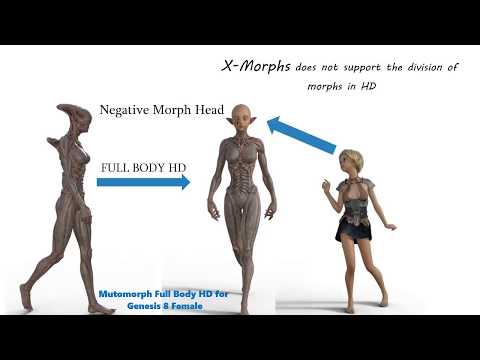
Basically, it can't actually divide them them, but you can create a NEGATIVE normal morph to cancel the HD morph out.
I totally forgot about X-Morphs. But honestly what I did was just as easy and nearly as fast thanks to the Daz to Hexagon Bridge.
And yes, Amala has a very interesting shape and makes a very good human. She is tall and thin, almost boyish in shape (yet still very feminine), which is extremely rare for Daz females. Most of the thin models in the store are just skinny Vicky's or intended to be very young. And even though she has that boyish look, she could also pass as fashion model with those long legs and uniquely pretty face.
Maybe if we keep talking about her she'll make a comeback in sales, LOL. I think a human add on would be really cool, and could be sold as a bundle option with her. Or maybe just an update to her existing product if its not too time consuming.
G8F's teeth became rounded somehow...Do you get any error notices? Maybe check your help log file for any issues. Duplicate morphs, that sort of thing. Something you have done, either by install or saving a morph, has thrown this off. Are you sure the teeth are the only thing effected? Like are the fingers or toes slightly thinner?Cosy Christmas living RoomHi, So this time I'm making a Cosy Christmas living Room, but I'm not sure if it looks Cosy enough. Any help or sugestions are always welcome.
Thanks so much.
Currently, I have a room with 2 couches, a christmas tree with presents.
a rug
a coffie table with a cup of milk and a plate of cookies,
Inside the room is a fire place. the fire is an auctal 3d object that has a morph to make it smaller.
fireplace has christmas decorations. and christmas cards on top with candels.
also there is a bookshelf and indiviual pictures on the walls.
Also by the christmas tree is a toy electric train the track and all the train pieces are seperate objects so you can animate it.
Outside a pine tree prop comes with the set so you can make your outside scene more life like. plus a 3d modeled snow folling prop
[Released] Character Converter from Genesis 3 Female to Genesis 8 Female(Now Conv JCMs) [Commercial]they are sort of saved already as indicated in the tutorial vid for this thing, there dials in the parameters tab.
https://www.youtube.com/watch?v=hugxqRo2gJA
if you're talking about a "character preset" DUF file and not saving the dial again, sure that was covered in the beginning of the vid, think, or was it over on SY's transfer thing, hmmm.
sorry, my brain is still sort of melted from overwork trying to figure out how I made a controler dial for a dial spun body, my comp has crashed 3 times now from having too many tabs open, and Grammerly has completely stopped working, lol.
- dial in your figure you want to save, then...
10. Navigate to the People--Genesis 2 Female--Characters folder in your Content Library (corection, gen 8 Female). Right-click and choose Create Subfolder. Name it after your character.
11. In this folder, click the little plus sign at the bottom of the Content Library screen. Choose Shaping Preset. Click Accept. (corection, name it, then click accept)
As for saving the dials, well, if you 'must' save it again (I doubt this is what your asking for)...
1, write down the 'name' and where the dial is (actor -> People - ...)
the script appears to dump it's controller dial in just 'people' however all the mesh-shape dials can be just about anywhere, best to use that search box to help find them by typing in letters and clicking through path-names below till it appears in one branch and not a lower one. search will make the tree names that have similar dial-name be brighter than the others to help as well. And write it all down before opening that save dial thing, once it's open you can't go back to find something (without starting over).
Make sure the dials you are saving are set to zero, otherwise genesis will load with it dialed in every time you load a new genesis figure.
'File > Save > Morph asset'
when the window pops up, you'll need to enter the somewhat confusing info up top including what content path (Daz store or personal, your drive letters&path will be dif from my screencaps, and your names) to save it. the triangles below under G8F should be an Actor etc as the path you noted in step 1. if you don't see it, maybe there are some letters before the dial name like 'FHM' or 'FBM' etc.
I'm sorry if I know nothing more, I blindly click what Sickleyield tutorials said click and pray it goes someplace I can find it to back it up and works.
*note1, because the script already saves the dials, ye may likely end up with duplicates if you don't go in and remover the dials on the drive that the script made after 'saving' them elsewhere. it's a bit of a sticky mess. it's easier to leave it be, dial in your character and apply the mats of choice, then just save that as a scene subset, alleviates a lot of hard drive hunting grief.
(PS, don't get excited about the name of the head dials in my screencaps. that was a fail shape conversion at the Gen6 to Gen7 boundary, for 'many' reasons. cheekbones do somersaults, eyes spin like propeller props, pupils shaped like Ultima Thule, the eyes go up behind the eyebrows, the jaw pokes through the chin, some dial replacements don't go negative like Androgynous post gen6, 4k or 8k G8F-UV'ed maps have yet to see the light of day, I don't have a 3D paint app to remake the maps from scratch, etc. sobbing on desk exclaiming "Fred can you pleas pleas..." lol)
Oh, that odd leg shape, maybe a dial being dialed in twice, aka 2x strength. I had seen that fluke before, the fix was to convert it another way fewer dials spun per convert and converting each figure area separately (dial-in only the head, convert that. then clear it all, dial in the body only, then convert that.). *and keep the elf/cat ear dials independent of anything else, or they will break hair with the auto-follow thing.
Character presets are not saved with the "Convert Scene Character script". There will be a dial in your character's name though to dial up all the morphs that make up your character.
For the warping, check out which morphs are being used. You might, as @ZarconDeeGrissom mentioned, have converted more than once or something and extra morphs are being engaged. Check out your My Library (first directory in Content Directory Manager for Daz format files)/Data/DAZ 3D/Genesis 8/Females. This is where all the converted morphs are going. You can delete the morphs used for Lilith and then try the script again.
Thank you for the help, both of you. I deleted all of the morphs and started over. So far, I've converted one of my own characters, Arabella 7, and Lilith 7. I haven't done any renders though (I've had other things going on). Thanks again :)
G8F's teeth became rounded somehow...I'd go through all my face shape and pose morphs to see if they are zeroed.
Do you have Mouth Realism HD morph turned on? It seems to round the teeth a little bit
Hi Kibarreto, good jobIt does look like a StarFleet vessel got "jiggy" with Queen AmaIt was an instant buy for me as well, even if the engine nacelles have a bit too much of a trekkie-feel to me. I like Star Trek, but would usually not want to give people the impression of a render being from the Star trek universe (though sometimes I might..). But, maybe I can make myself a morph some time to move those engines a bit inward and closer to the hull. That would be more complicated than any personal tweak I've cooked up so far, but well, to go where no one has gone before?
It does kinda' look like a StarFleet vessel got "jiggy" with Queen Amadalek's "Phantom Menace" transport and had a "baby".

Sincerely,
Bill
DAZ Studio 4.12 ... Face creation abilities????An attempt at the face transfer and the love child programming. I also used the fix -- the face transfer shapes.
Genesis 8 Female face messed up?Richard Haseltine said:
You almost certainly have a character isntalled which has a non-zero default value for its morph (or one of them). If you look in the Currently Used group of the Parameters pane with a freshly loaded base figure selected the cuplrit should be fairly obvious.
I've already tried that, this is all there is.
The "fit to" gives a clue. Those are the eyelashes. Needed to select the main figure.
The eyelashes are parented to the G8 figure so when you select the figure, it also selects the eyelashes. You can clearly see in my screenshot that there are two selections, the figure and the lashes. I've solved the problem, anyway. Set the default for those morphs in my previous comment to 0 and then saved the modified assets. G8F now loads fine.
Bluejaunte's AmalaI bought her, but I also agree that having a human headshape option (even if it's only a morph - there are plenty of normal human textures) might have helped somewhat.
A quick tip - Things like dialing out or altering the part of the morph for the top of the head morph and so on is actually easy to do without taking it into an outside modeling programing. You just need Shape Splitter - https://www.daz3d.com/shape-splitter (formerly called x-morphs), an invaluable DS add-on that's pretty much become my go-to solution these days when I want to make minor changes or mix and match extreme morphs from multiple commercial figures.
I have Shape Splitter but the few times I used it it did not work as I expected. I know nothing is wrong with the program, and I just have to learn it, but I just haven't put in the time to. I also thought it couldn't deal with HD morphs?
There's a workaround with the HD morphs.
Basically, it can't actually divide them them, but you can create a NEGATIVE normal morph to cancel the HD morph out.
Genesis 8 Female face messed up?Richard Haseltine said:
You almost certainly have a character isntalled which has a non-zero default value for its morph (or one of them). If you look in the Currently Used group of the Parameters pane with a freshly loaded base figure selected the cuplrit should be fairly obvious.
I've already tried that, this is all there is.
The "fit to" gives a clue. Those are the eyelashes. Needed to select the main figure.
Daz 3D is part of

Connect
DAZ Productions, Inc.
7533 S Center View Ct #4664
West Jordan, UT 84084Licensing Agreement | Terms of Service | Privacy Policy | EULA
© 2026 Daz Productions Inc. All Rights Reserved.