-
Can you only apply Aureska's head and body, and not her face?
Hell Princess is a full body, single slider morph. I don't have Aureska, but as she's by the same PA and has similar notes in her description, I presume she's the same. And RawArt's figures are also always full body (or, if there are any, they're an exception to the rule).
It is however possible to create an inverse morph (in something like Blender) that can negate the SD portion of the morph, but some of the HD detail will remain.
Still, it works quite well; I've done it for things like RawArt's centaurs so that I can keep the body shape, but use a different head morph. It won't absolutely resemble the replacement head, but as with a lot of these figures you're largely committed to using the original textures to keep the overall effect, they were never going to be perfect dopplegangers.
Does anyone know what character this is?Who the hell is Lydia 7? There was a PA character named Lydia for Victoria 7, is that the one you mean?
Flortale has indeed lamented to us on several occasions that nothing in G8 has matched the beauty of Lydia for Victoria 7.
Given that this now (finally) gives us a second data point to give a bit more idea what it actually is about Lydia that is so captivating, my answer would be that there are plenty of morphs that can define/plump up the lips and give a sturdy jaw to pretty much whichever character. It's not my thing, but it's not particularly difficult to morph other characters to have that look.
Lydia for Victoria 7 is the goddess. She's the Queen and has yet to be dethroned, but the character in the OP is pretty amazing and rivals Lydia IMO.
We need a Genesis 8 female that is so beautiful, that it defies what's even possible in real life. A level of human beauty that no one can aspire to.“We” need this? Because you seem to be the only person who feels so strongly about Lydia.
In a certain industry, Lydia dominates, as does Lililth 7 and Ophelia 7.
Does anyone know what character this is?Who the hell is Lydia 7? There was a PA character named Lydia for Victoria 7, is that the one you mean?
Flortale has indeed lamented to us on several occasions that nothing in G8 has matched the beauty of Lydia for Victoria 7.
Given that this now (finally) gives us a second data point to give a bit more idea what it actually is about Lydia that is so captivating, my answer would be that there are plenty of morphs that can define/plump up the lips and give a sturdy jaw to pretty much whichever character. It's not my thing, but it's not particularly difficult to morph other characters to have that look.
Lydia for Victoria 7 is the goddess. She's the Queen and has yet to be dethroned, but the character in the OP is pretty amazing and rivals Lydia IMO.
We need a Genesis 8 female that is so beautiful, that it defies what's even possible in real life. A level of human beauty that no one can aspire to.“We” need this? Because you seem to be the only person who feels so strongly about Lydia.
Can you only apply Aureska's head and body, and not her face?Is it possible to not apply her face morph, but apply everything else; body and head?
https://www.daz3d.com/aureska-hol-hd-for-zelara-8

Same thing with this model, can you not apply her face?
https://www.daz3d.com/hell-princess-hd-for-genesis-8-female

https://www.daz3d.com/gargoyle-for-genesis-8-male - Same with this Gargoyle, can I leave out his head/face morph, to keep him looking human?
 Does anyone know what character this is?
Who the hell is Lydia 7? There was a PA character named Lydia for Victoria 7, is that the one you mean?
Flortale has indeed lamented to us on several occasions that nothing in G8 has matched the beauty of Lydia for Victoria 7.
Given that this now (finally) gives us a second data point to give a bit more idea what it actually is about Lydia that is so captivating, my answer would be that there are plenty of morphs that can define/plump up the lips and give a sturdy jaw to pretty much whichever character. It's not my thing, but it's not particularly difficult to morph other characters to have that look.
Lydia for Victoria 7 is the goddess. She's the Queen and has yet to be dethroned, but the character in the OP is pretty amazing and rivals Lydia IMO.
We need a Genesis 8 female that is so beautiful, that it defies what's even possible in real life. A level of human beauty that no one can aspire to.DAZ Studio 4.12 ... Face creation abilities????Thanks and yes, I am enjoying it a lot.
Below is another character created from the photo using https://www.daz3d.com/face-transfer-unlimited
and applied the preset FTS Apply Fix 100% from https://www.daz3d.com/face-transfer-shapes-for-genesis-8
Rendered with iray maps from https://www.daz3d.com/babina-8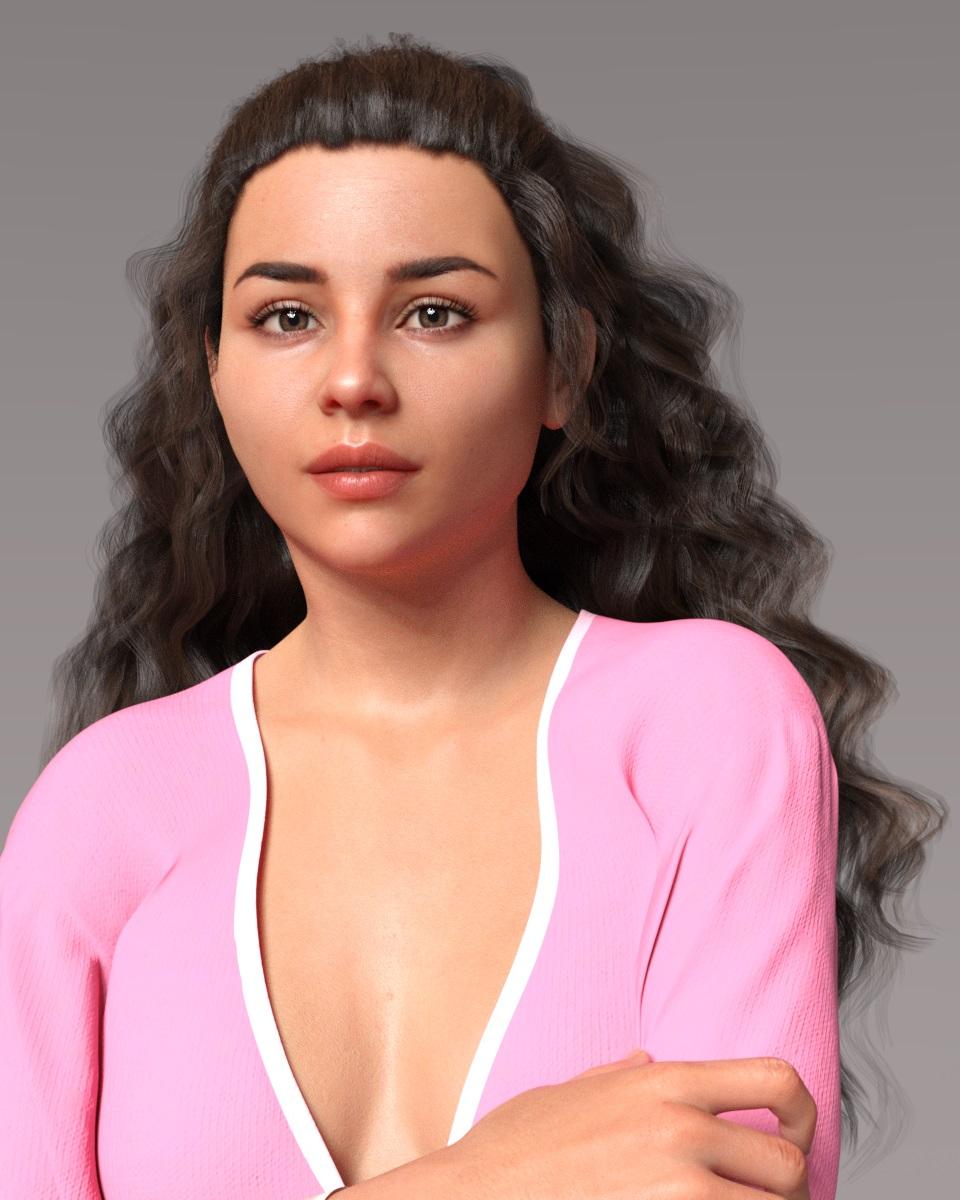 Face Transfer
Where can I find the Free version of Face Transfer? Thanks
Does anyone know what character this is?Who the hell is Lydia 7? There was a PA character named Lydia for Victoria 7, is that the one you mean?
Flortale has indeed lamented to us on several occasions that nothing in G8 has matched the beauty of Lydia for Victoria 7.
Given that this now (finally) gives us a second data point to give a bit more idea what it actually is about Lydia that is so captivating, my answer would be that there are plenty of morphs that can define/plump up the lips and give a sturdy jaw to pretty much whichever character. It's not my thing, but it's not particularly difficult to morph other characters to have that look.
More Non-photorealisitic Renders (NPR II)I've been working on the next iteration of the book cover. I just sent this to the editor to get his reaction on this one.
This is based on two treatments I created in Topaz Studio 1. These are the filters/settings I used:
- Tarnished Air (0.80 strength)
- Photo Painting I (0.50 strength), and the in Photoshop I set the layer opacity to 52% (normal blending mode)
It's okay, but I think the background aliens are too cheesy. And I'm not sure the sky is the right color (which one do you like better: lighter sky or darker?). And then the sand needs editing, as does the horizon (needs some blur). And then we have the tall alien's face, which is NOT working at all for me.
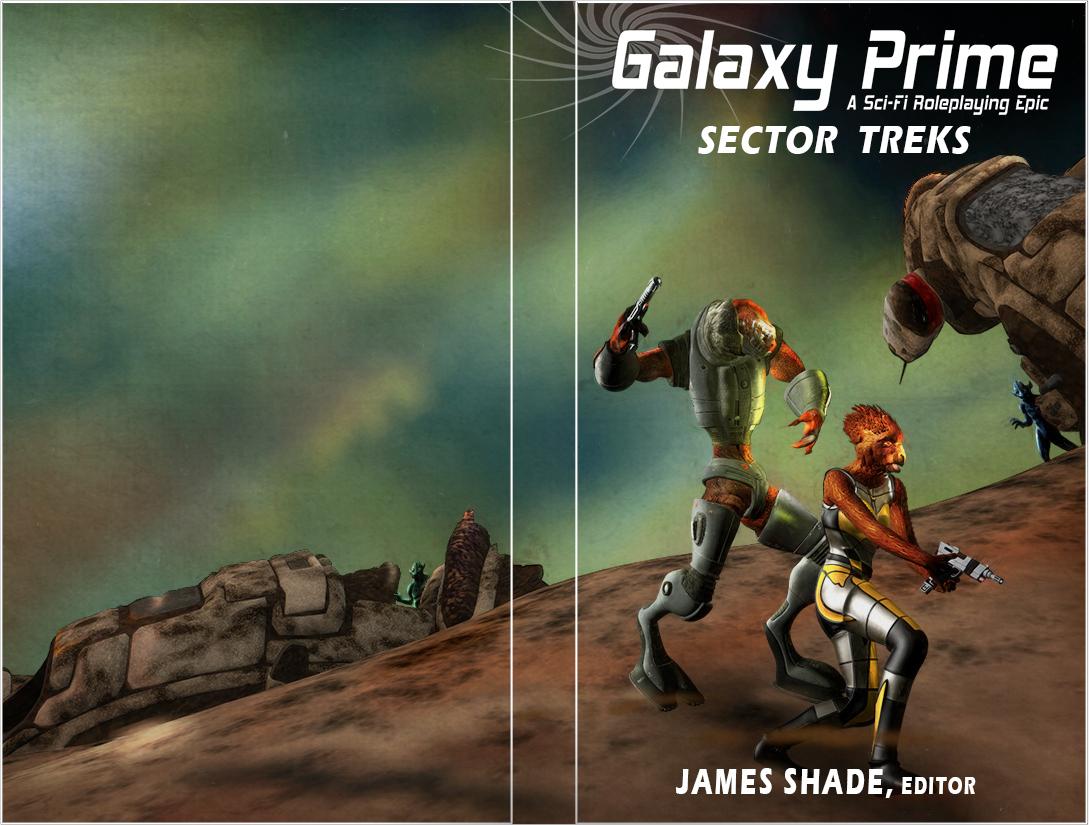
I think both skys are good. I think the background aliens are fine. The tall alien's face bothers me as well, I should've said something about that before. You could try a different expression (maybe mouth open) or modify the morph you are using.
I think, logistically, the darker sky will work better because I can darken it a little more and put white type over it. I'm not 100% sure the tall alien has an open mouth morph. If not, I will have to fix it in post work.
I also think that little "antenna/rod" sticking off the wreck needs to go (or bend it). We'll see what the editor thinks.
Daz Studio Pro BETA - version 4.12.2.60! (*UPDATED*)Why am I still getting this error?
face transfer failed to generate try a different source image.
Problem with Eye Collection on Genesis 8 MaleYou didn't use a face transfer, so this isn't a valid test. As for the second suggestion, with the render settings I use as suggested before, it too about 21/2 hour to render. I'm not wasting that much time again to test this product. Either I get help from someone who has used these eyes on on a face transfer and can give me precice settings, or I ask for my money back.
G8 feet fixing ?you can apply the foot morphs of bluejaunte's characters to any genesis 8 female. you just have to finesse one of the included parameters a little bit.
one of these days a PA with access to the HD tool and some anatomy chops is going to create a good HD foot morph package. i'm just hoping that happens before we're all using genesis X figures.
j
How do you apply the bluejaunte footmorph to other G8F characters? As far as i can see in only find a seperate neutralizer morph.
Have the G8F character in the scene that you wish to apply the morph to selected and then under the "Parameters>YOUR CHARACTER>Actor>Feet" select from one of the "BJ" neutralize options (in green) and click on the cog next to the heart/favorite icon and uncheck the "Use Limits" and hit "Accept". After this you can now move the slider below 0 so anywhere between 0-100 will allow you to dial in the foot shape with -100% being full foot shape.
That's a great hint. Thank you!
It works best with the basic foot shape. So if your figure already has a custom foot morph, you might mess things up. Also make sure you dial in the "wrong" direction, as it's a removal dial you need to go -100% instead of +100%Think I'll get some more BJ models when my purse filled up again.
Thanks to @bluejaunte for custom foot morphs. Very appreciated.
More Non-photorealisitic Renders (NPR II)I've been working on the next iteration of the book cover. I just sent this to the editor to get his reaction on this one.
This is based on two treatments I created in Topaz Studio 1. These are the filters/settings I used:
- Tarnished Air (0.80 strength)
- Photo Painting I (0.50 strength), and the in Photoshop I set the layer opacity to 52% (normal blending mode)
It's okay, but I think the background aliens are too cheesy. And I'm not sure the sky is the right color (which one do you like better: lighter sky or darker?). And then the sand needs editing, as does the horizon (needs some blur). And then we have the tall alien's face, which is NOT working at all for me.
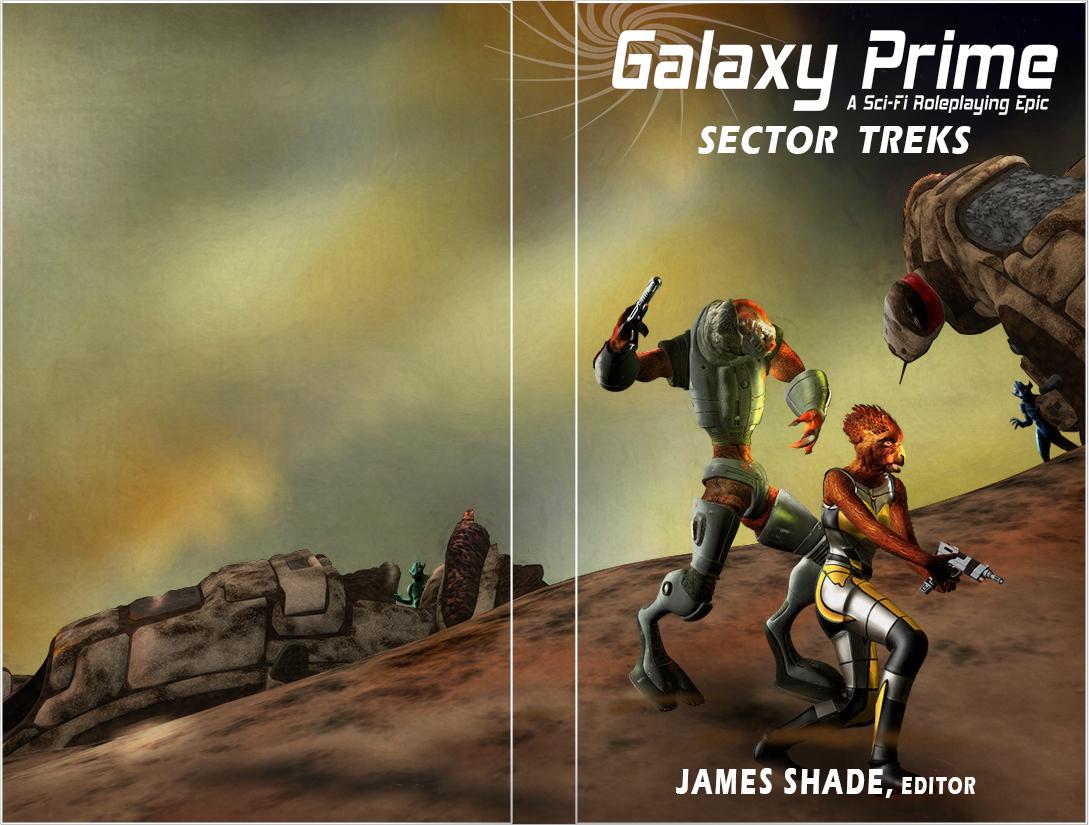
I think both skys are good. I think the background aliens are fine. The tall alien's face bothers me as well, I should've said something about that before. You could try a different expression (maybe mouth open) or modify the morph you are using.
How do you transfer like-materials from Blender to Daz3D along with the model?I made a simple model in Blender of a picture frame with a picture. Naturally one of the materials for this model is made of an image texture. While I can seem to export-import the model itself from Blender to Daz3D just fine, I don't know how to recreate the materials in Daz3D that I made in Blender. How do you do this?
All I know to have done:
- Everything is UV unwrapped like it should be; the model looks just fine in Blender.
- My image texture is in the same directory as my .obj/.dae/.fbx (I tried them all), .blend, and .duf files.
Spoiled threadMost of the tutorial creators here are really selling examples of their workflow, and they've found that Zbrush and (my pet peeve) Photo Shop work best for them a long time ago.
Yeah well, I ended up buying into the Adobe subscription plan because so many (other) products support their MOST RECENT release(s).
I still use CS5 and also other free plugs, but that's a thing.
I think that's why we consider all these other programs alternatives.
I also noted how many products seem to mention being a custom Zbrush sculpt and not a simple morph dial set.
So I would guess that's a thing for the content creators too.
Spoiled threadDon't break your own thread with jokes. We can stay on target, here.
This is your first statement:
producers of those tutorials to assume that their target audience has access to the same tools that they have.
This is your assumption about their reasoning for making tutorials centered on high end or expensive software. I gave you another angle or idea to consider.
-- That's it's not based on what you use, but what kind of content you'd be willing to pay for.
Which is illustrated in your second paragraph:
Otherwise, I use low cost or free applications. I have Blender 2.8 installed. I have Hexagon which was also free. I have Affinity Photo which, for me, is a good and cheap alternative to Photoshop but I only paid for that because I never got along with Gimp. When I see something in the DAZ store that I might find useful, I wishlist it until it comes up in a big-discount sale (they always do - eventually).
Which suggests ...what?
Nothing that ANYONE with an interest in Commercial products wants to hear.
I don't see what's hard to follow about that.
By the way, I love you avatar.
You are making no sense to me at all. I'm not asking for tutorials on ZBrush or Blender. I'm saying that when they make tutorials about anything to do with DAZ Studio content they might consider that, when they include sections on how to modify or morph things, many of the users here just don't have ZBrush but anyone can download Blender for free. So it would make more sense to me if they made exactly the same tutorial but took account of the fact that everyone has access to Blender (or Hexagon). They aren't targeting ZBrush users, they are targeting DAZ Studio users. Professionals might well have ZBrush but, being professionals, they probably don't need the tutorial.
Anyhow, this has gone off the rails now so I'm not arguing with you any more.
Things I'm Playing with ........Another play with Face Transfer
 Daz Studio Pro BETA - version 4.12.2.60! (*UPDATED*)
Since the Face Transfer that is included in DS does not have all the bells and whistles of the original retail version, it would be nice if the restriction on how many you can save would be lifted. :)
Some of us can't afford to retail set but might make more products so we could afford it if that restriction were gone.There are only two differences between the free and purchased license - number of saves and the watermark.
Auto Face Enhancer [Commercial]Is this last morph DMaster has done, just on a regular genesis8 male?
Daz Studio Pro BETA - version 4.12.2.60! (*UPDATED*)Since the Face Transfer that is included in DS does not have all the bells and whistles of the original retail version, it would be nice if the restriction on how many you can save would be lifted. :)
Some of us can't afford to retail set but might make more products so we could afford it if that restriction were gone.Daz 3D is part of

Connect
DAZ Productions, Inc.
7533 S Center View Ct #4664
West Jordan, UT 84084Licensing Agreement | Terms of Service | Privacy Policy | EULA
© 2026 Daz Productions Inc. All Rights Reserved.