-
breastacular color not matching
Hi there.
I recently installed a breast morph (breastacular) into my studio and i can't seem to make the breast color completely match everything else!
It comes with a 'material copy' function and that worked mostly, but the tone remains slightly but noticably off.
I've tried fiddling with many things but admittedly i'm not entirely sure what i'm doing as I am completely new to all this.
Any help would greatly appreciated.Wacky Modelling ~ In Carrara ~a wacky ring pull can of tuna ~ with a lid pulling morph
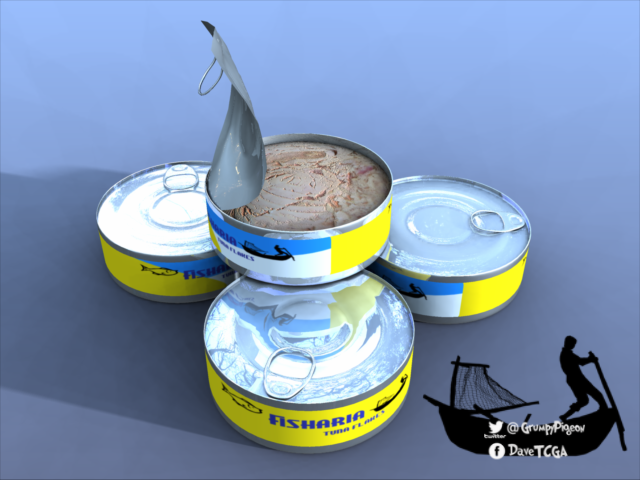
Does it come in Sweet Chilli flavour ?
XTransfer Module 1- Genesis 3 to Genesis 8 Morph Converter (Commercial)The fact that it can transfer such extreme morphs so perfectly without any distortions makes this an insta-buy for sure! Awesome work, Zev0 and DiscoBob!
Sci-Fi Assault Armor + Wise Wizard hooded cloakThe solution suggested is for general purposes.
A completely different solution, is to export the cloak to a modelling program, like blender, adjust the cloak in there, and reimport the adjustment as a morph. But that workflow includes a number of other elements which might be challenging if you have never tried it. Sickleyield has a tutorial for that:
XTransfer Module 1- Genesis 3 to Genesis 8 Morph Converter (Commercial)It will transfer over just fine. All depends on how well V4 morph looks and works on G3 (based on whatever method you used to get her there). The Xtransfer script will transfer that result 1 to 1 accurately onto G8.
Thats great! I use GenX2 to transfer morphs to Gen 3 . Looking forward to the release!
Wacky Modelling ~ In Carrara ~a wacky ring pull can of tuna ~ with a lid pulling morph
I often wonder if the person who thought it was a good idea to put those pull rings on tins stopped and thought about how it would go down with those people who have arthritis in their hands.
XTransfer Module 1- Genesis 3 to Genesis 8 Morph Converter (Commercial)It will transfer over just fine. All depends on how well V4 morph looks and works on G3 (based on whatever method you used to get her there). The Xtransfer script will transfer that result 1 to 1 accurately onto G8.
XTransfer Module 1- Genesis 3 to Genesis 8 Morph Converter (Commercial)Hi Zev0 .. this looks amazing I am impatiently waiting for it's release. Have you done any transfers from V4 to G3 and then to G8? Wondering how they would transfer over.
Gap between the eyeball and the eyelidIt might be some morph that was installed and is loading with the default genesis 8 female. It can happen when someone saves a morph that was loaded with a character in the scene, instead of loading on the default figure and dialed up. Maybe check in Parameters > Actor the eyes shapes and see if anythere is loaded at 100%? It won't show in Currently Used though cause if that's the case it's being considered "default". If you find it, navigate to the data folder where it's installed and delete it.
Wacky Modelling ~ In Carrara ~a wacky ring pull can of tuna ~ with a lid pulling morph
Very nice. I'm big on realism, and that is very realistic, more so than many commercial models.
How to install/use Stephanie 4 (S4)I'm having a devil of a time getting S4 to work properly and I'd love some help. I think I got her working yesterday, but today I can't figure out how I did it. Here's my (failed) workflow:
Open Poser 9 -> open "Figures" menu -> double-click "Stephanie 4" to load figure into the scene. The figure ("Victoria 4") loads with her feet sticking through the ground plane. I go to the Victoria 4 -> Parameters menu and try the morph dials under "Other." I move the dials back and forth, including seemingly appropriate ones like "Stephanie (Body)", but none of them have any effect. I think it's safe to say that this doesn't work.
Seeing morph injections in the pose menu... Load Victoria 4 -> open Poses menu -> INJ Stephanie 4. No new morphs appear. So this also doesn't work, apparently.
What do I do? V4 and Morphs++ seem to work fine, but Stephanie (which apparently requires direct use of V4) does not.
Satyr with dForce hair - by RawArt@rawart, would you consider updating this product with the morphs separated out? A leg morph to make it easier to use the legs with a different figure, a body and/or head morph to use the character without the legs, and the ridges on the head strictly optional?
Short answer..."no"
Long answer is that a set that could be universally used with different characters would be a completely different product, not an update. Those types of sets are triple the workload (at least) and require a totally different approach as to how it would be built than a regular character.
I should add that the hooves and tail are geografts, so they can be used without the character morphs...they just wont be quite as cool.
Wacky Modelling ~ In Carrara ~a wacky ring pull can of tuna ~ with a lid pulling morph
So cool!
Dana
Wacky Modelling ~ In Carrara ~a wacky ring pull can of tuna ~ with a lid pulling morph
Satyr with dForce hair - by RawArt@rawart, would you consider updating this product with the morphs separated out? A leg morph to make it easier to use the legs with a different figure, a body and/or head morph to use the character without the legs, and the ridges on the head strictly optional?
Convert Environment to Iray?If you want the non-iray skydome environment to look good, and act like an HDR, in a way...
You can just select the skydome texture and apply the "Emissive" shader to it, or the "!Iray Uber Base", and turn on emissive value.
It will make the sky itself become a textured light, if you place the texture in the emissive light color area. Just be suer to set the color temprature to something neutral like 7200-7800. Increasing the light, will make it act like an HDR, as the lighting will cast onto the scene, based on the colors from the image, as does an HDR environment.
The "!Iray Uber Base" can be used on every texture, but it does have a high rendering-tax, as it is kind-of a non-specific "catch-all" shader that just turns everything on and used a "close enough" conversion process to do the conversion. You will gain every possible shader value, for control, including areas which the textures/materials may not even use. Some things may not transfer-over in the conversion, as they have no "known" or "managed" conversions. (I see that a lot in skydomes.) But the materials from the original shaders should still be there, to select, from the list of known materials in the sceene.
NOTE: Your textures may also gain some "unwanted glossyness", as the default settings are on the high side of "glossy", after the material conversion.
Select the material-surface that you want to convert and then go into the "Presets" tab at the top of the page, in the "Surfaces" tab. Search for "Iray uber base", with the quotes, or "Emissive"... (Emissive will be a yellowish-orange glowing ball thing. That should ONLY apply the emissive shader value and the base values.)
Can you only apply Aureska's head and body, and not her face?You could try this product https://www.daz3d.com/shape-splitter
i have used it a few times on products with just a full body morph and it worked fine.
Thanks, looks good!
[Released] Character Converter from Genesis 3 Male to Genesis 8 Male (Now Conv JCMs) [Commercial]Did the procedure from the manual not help?
When Genesis 8 loads, there are “Duplicate Formulas” errors. This error can occur when you have converted the same character twice (or more), and have unchecked the Overwrite Existing Morphs checkbox without deleting the morphs. The best thing to do is delete all morphs and the controller property from the data/DAZ 3D/Genesis 3/(Fe)male/Morphs/VENDOR NAME/PRODUCT NAME folder and reconverting the character. Alternatively, you can try a solution from the forums (https://www.daz3d.com/forums/discussion/22220/duplicate-formulas-error-solved-thank-you-bejaymac):
- load Genesis 3 into an empty scene, you'll get the error message, just click it to carry on.
- Find the offending morph(s) in the Parameters tab, in this case it Actor/Universal/Fantasy SciFi and it's the HFS_Shapes_Head01 morph.
- Dial the morph to make sure it works and then zero it again.
- At one end of the dial you'll see a little "cog", click on it and in the little menu that opens click on Parameter settings.
- In the new window that has just opened you will see a Color A & a Color B, click on Color B to open the color picker.
- Set the color to 254, 254, 254 and click OK.
- Click "Accept" at the bottom of the Parameter Settings window.
- After that window closes go "File > Save As > Support Asset > Save Modified Assets".
DS will do a quick scan of the figure and open a small window that should only have the one file listed, accept it and DS will replace the old file with a new updated one.
Does anyone know what character this is?
Hilarious!!!Who the hell is Lydia 7? There was a PA character named Lydia for Victoria 7, is that the one you mean?
Flortale has indeed lamented to us on several occasions that nothing in G8 has matched the beauty of Lydia for Victoria 7.
Given that this now (finally) gives us a second data point to give a bit more idea what it actually is about Lydia that is so captivating, my answer would be that there are plenty of morphs that can define/plump up the lips and give a sturdy jaw to pretty much whichever character. It's not my thing, but it's not particularly difficult to morph other characters to have that look.
Lydia for Victoria 7 is the goddess. She's the Queen and has yet to be dethroned, but the character in the OP is pretty amazing and rivals Lydia IMO.
We need a Genesis 8 female that is so beautiful, that it defies what's even possible in real life. A level of human beauty that no one can aspire to.Can you only apply Aureska's head and body, and not her face?You could try this product https://www.daz3d.com/shape-splitter
i have used it a few times on products with just a full body morph and it worked fine.
Daz 3D is part of

Connect
DAZ Productions, Inc.
7533 S Center View Ct #4664
West Jordan, UT 84084Licensing Agreement | Terms of Service | Privacy Policy | EULA
© 2026 Daz Productions Inc. All Rights Reserved.