-
New DS Filament Render Engine
Okay so I haven't been paying much attention to this thread, so maybe this has already been mentioned, but Filament hadles instanced geometry soooooooooooooooooo much better than old textured mode
as in I can actually navigate my viewport with a hundred instances visible where its a stuttering catastrophe in textured view.
I actually wish there were the ctrl-L equivalent because then I could use it to fully replace textured view.
Filament bring out the RendersI added this to the thread in the commons but I had forgotten about this filament art thread. So I'll go ahead and post it here too. :)
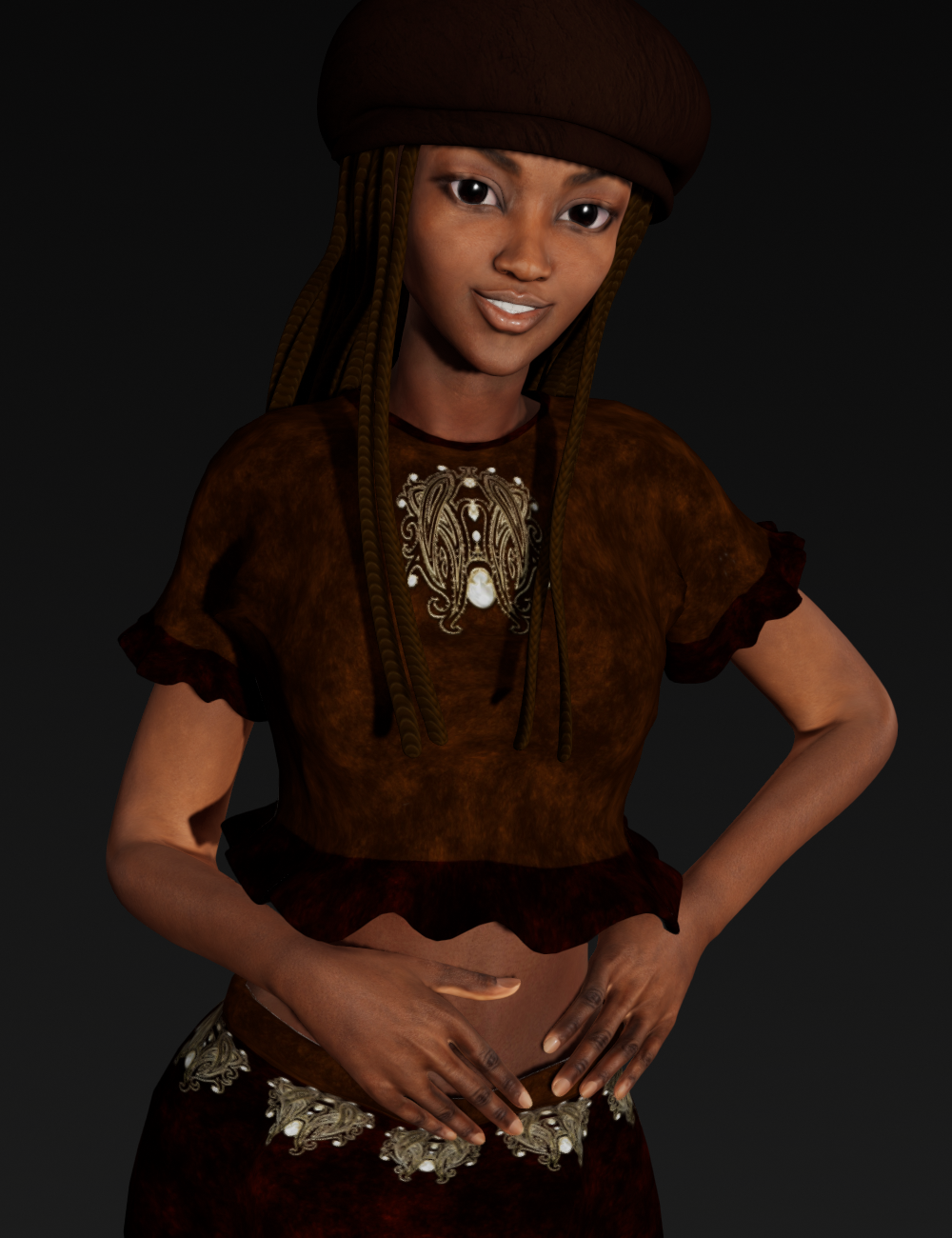
Monique 6 and Aiko 6 mix with some other morph adjustments. Rendered in Filament.
Filament bring out the Renders3 Filament clips
same clips
iray-iray denoised-iray all 20 iterations path length 10

both screen blended,
the denoised one has little effect IMO
I like the music you put with it. The smoke effect is pretty cool. I think you mentioned how you did that so I'll have to go back over the thread and see if I can find it. :)
Filament bring out the Renders
A little animation I squeezed out of Filament. With the ongoing black screen crash I can't even render a frame of this in Iray, but this was all done in less than 10 minutes, plus a little video editing.
Seems to have a lot of potential.
hahah Very cool! And good job on keeping the clipping in check. That must have been hard with her arms and hair - keeping them from intersecting. Good work!
Filament bring out the RendersA little animation I squeezed out of Filament. With the ongoing black screen crash I can't even render a frame of this in Iray, but this was all done in less than 10 minutes, plus a little video editing.
Seems to have a lot of potential.
cute
 Filament bring out the Renders
A little animation I squeezed out of Filament. With the ongoing black screen crash I can't even render a frame of this in Iray, but this was all done in less than 10 minutes, plus a little video editing.
Seems to have a lot of potential.
New DS Filament Render Engine"Quote" rel="3Diva"> "Quote" rel="OrionPax09">Filament handles some things well. For example, I made this tribute to David Prowse in Filament.

That's a beautiful and moving tribute! Well done!I totally agree, very fitting.
AIUTO...CHI CONOSCE L’ITALIANO? PARTE DODICI@Imago senti ma non capisco una cosa, Filament può usare sia gli Shader di Iray che di 3Delight?
Esatto, ma non tutti. Alcuni non vanno proprio, come quelli delle rifrazioni per 3Delight e gli emissivi IRay.
Ne ho provati un pò e qualcuno 3Dlight sembra funzionare, ma la compatibilità maggiore ce l'hai con IRay perchè è un motore puramente fisico e IBL come Filament.
In ogni caso, i materiali di bvase per 3Delight funzionano perfettamente come le bump map e le reflections.
Io feci un test veloce con un item per 3Delight (Rama Drums | 3D Models and 3D Software by Daz 3D), e devo dire che ne rimasi sinceramente sorpreso. Ma se il viewport è piccolino, come nel mio caso, non posso renderizzare in un formato più grande?
Certo, dalle impostazioni di render.
COme faccio? se non fa lìoutput in finestra esterna, lo faccio direttamente slaare con le misure che imposto?
Ogni tanto ho il dubbio che non usiate DAZ Studio ma qualche altro programma...

Esattamente come per IRay e 3Delight, vai nelle opzioni di render (Render Setting) e imposti la destinazione come New Window e le dimensioni, ricordandoti di settare su "viewport" il motore in alto (engine).
Ora quando premi su "Render" o pigi CTRL+R DAZ Studio renderizzerà con Filament in una nuova finestra, applicando tutti quegli effetti non visibili direttamente nel workspace, secondo lo shader che stai usando.
Ah, al momento lo Spot Render risponde al ultimo motore usato prima di Filament, per cui se hai usato IRay prima di Filament avrai uno spot su IRay, stessa cosa con 3Delight.
No, mi aveva confuso il fatto del viewport.
AoA Advanced Lights in 4.14Funny you ask that. I re-installed them today to see if they'd work in filament, they don't, but they worked fine in 3DL. For 3DL, they don't show up until you render. You won't see them in the viewport. They've always been like that, iirc.
New DS Filament Render EngineFilament handles some things well. For example, I made this tribute to David Prowse in Filament.
That's a beautiful and moving tribute! Well done!
AoA Advanced Lights in 4.14Does anyone have AoA Advanced Lights working in 4.14 using 3DL as the renderer? No light rendered for me, even though the scene looks lit in texture shaded and filament draw settings.
Filament bring out the Rendersthe first video has 3 camera angles
first 3 are filament
second 3 are iray
the second video has the same 3 clips (camera angles each is a separate rendered clip)
superimposed on the iray ones with a screen blending filter in Hitfilm express
Blender video editor also has a screen blending filter for layers so one can do it there too, I often do but I used Hitfilm this time
Gimp and presumably Photoshop can also screen Blend layers
the other options are add, subtract, multiply, overlay etc so I assume its a standard thing for blending images
nothing was rendered to full convergence
that would take a year and cook my card
all were only 20 iterations which is not many but still took 5 hours a clip
my point

the iray renders with only 20 iterations looked like crap
the denoised one worse than Filament IMO
but layered with Filament renders of the same clip actually look OK
Filament bring out the RendersI'm confused. It sounds like you're saying the first one is three IRAY clips with the first one rendered to full convergence, the second one relying heavily on the denoiser rather than convergence, and the third one limited to 20 iterations and path length of 10. But it also says they're three Filament clips. I thought they couldn't be both Filament and IRAY. And I just don't know what screen blended means.
New DS Filament Render EngineFilament handles some things well. For example, I made this tribute to David Prowse in Filament.
Animation Master Classes like a productYes you read right!, why not?
after seeing all the ton of Filament Animations, and the love put on them, we must realize that we are not top quality animators and some of us uses Animate blocks,
but I think many people would love to learn real animation like the Pros do, maybe not so deep but a set of classes USING Daz Studio in the series, not using external programs, only the timeline Advanced Tab for this.
in Spain there is an Academy but is focused on Maya and Blender and is costly http://www.animationgym.com/
is only a Product Suggestion and nothing else, what do you think?
The thing is that not a lot animation "masters", that is to say animation professionals, use DS in their work.
New DS Filament Render EngineG2F Monique 6 and Aiko 6 Mix with a mix of other morphs. Cookie outfit and hair transferred with XD4 CrossDresser. Rendered in Filament.
Animation Master Classes like a productYes you read right!, why not?
after seeing all the ton of Filament Animations, and the love put on them, we must realize that we are not top quality animators and some of us uses Animate blocks,
but I think many people would love to learn real animation like the Pros do, maybe not so deep but a set of classes USING Daz Studio in the series, not using external programs, only the timeline Advanced Tab for this.
in Spain there is an Academy but is focused on Maya and Blender and is costly http://www.animationgym.com/
is only a Product Suggestion and nothing else, what do you think?
DS 4.14 CrashingHappens to me all the time since 4.14 upgrade and I have not installed Octane or Filament; Windows 10; Intel i9-9940X CPU 3.30 Ghz with 128 GB Ram.
Daz Studio Iray - Rendering Hardware BenchmarkingThat was my first thought, too, but then remembered talk about "how DAZ handles bump maps has improved".
I was hoping that maybe DAZ is on a roll and revisits old code because of Filament or whatever... but nope, no improvements this time.
Auto Muscle Enhancer HD [Commercial]Terry and Sigurd, you both continue to impress with your images!
They are outstanding. I like your new Filament test, Sigurd. The warmer skin tones look great!
Lee
Thanks to everyone for the comments, they are much appreciated. Here is my latest iteration. I am looking for a light skin but the pale versions often come of as looking to blue and unreal for me. I think this one looks pretty close but let me know what you think.
Anyone have the problem that I am seeming to have with the rendered model looking a bit different than the unrendered one? It seeme to me to be more marked with Filament than it is with Iray.
I do like this version of your Filament render. Since I can't run Filament on the Mac yet, take these suggestions with a grain of salt. :)
Maybe increase the intensity of your light(s) a little.
Try adding a little yellow or orange tint to the light(s) to help negate the blue tone.
Not sure if those will help at all.
I did put your render through Photoshop starting with my typical workflow. Did some additional adjustments to see if I could warm the tone up without squashing the pale quality of the skin. I think he ended up looking a little radioactive.
Left one is a jpeg version of your render, right one is after I Photoshop enhanced (degraded??) your render.
*EDIT* I had another thought. Are you using an environment map in your scene? If it has a lot of sky or other blue tones, it's likely casting that onto the figure. Perhaps try an environment map with more neutral color tones?
Lee
Daz 3D is part of

Connect
DAZ Productions, Inc.
7533 S Center View Ct #4664
West Jordan, UT 84084Licensing Agreement | Terms of Service | Privacy Policy | EULA
© 2026 Daz Productions Inc. All Rights Reserved.