-
4-Armed Alien!
There did used to be a product availble, Four Arms For Genesis, but it doesn't appear to be availble anymore.
http://docs.daz3d.com/doku.php/public/read_me/index/14259/start
I bought it when It came out. It was fun to play with, but there was almost no support, except for a few of RawArt's figures. They don't seem to be in the store anymore either.
http://docs.daz3d.com/doku.php/public/read_me/index/14695/start
http://docs.daz3d.com/doku.php/public/read_me/index/14261/start
I realize it's impossible to support every morph that was made for Genesis, but it would have been nice to have supported the morphs from Creature Creator that affected the arms and hands. I'm sure this was a niche product.
The big problem with RawArt's 4 armed character were the UV's; you could only use the skin that came with it and there was no easy way to manually edit a texture for it since vendors of textures don't add extra arms.
3D Art Freebie Challenge-November 2019-"Playing Doctor" -Main Thread Only3D Art Freebie Challenge November 2019 "Playing Doctor"
[Best watched at full size for details.]
"Oops! Sorry!"
(Alternative/subtitle: Way too deep into it!)
Starring: Alysha and Chloe
The tale:
Chloe had not yet completed the Acupuncture training she is following but thought she had enough experience to be able to treat her best friend Alysha ...
Soundtrack:
Jackie DeShannon - Needles And Pins (© 1963)
https://www.youtube.com/watch?v=ZrhcVp1FTwk
COUNTABLE FREEBIES: (Alphabetic order)#01! Adhesive Bandage Prop for DAZ Studio by Mythic 3D
https://sharecg.com/v/87725/gallery/21/DAZ-Studio/Adhesive-Bandage-Prop-for-DAZ-Studio **#02! Alysha For G8 by EmotionalDreams
https://sharecg.com/v/94680/browse/21/DAZ-Studio/Alysha-For-G8 **#03! Amy AiMei for Genesis 8 Female (morphs only) by Amy AiMei
https://www.deviantart.com/amyaimei/art/Amy-AiMei-for-Genesis-8-Female-morphs-only-687709757
[Head morph used]#04! Blazer Uniform Set for G8F by yomiuri
https://sharecg.com/v/94694/browse/21/DAZ-Studio/Blazer-Uniform-Set-for-G8F **
[Ankle socks used]#05! Bonsai Stand by 3Zi
http://sanzisannzi.blog83.fc2.com/category6-11.html (Scroll down to '3Zi_BonsaiStand.zipDownload')#06! dForce_French Twist Hair for Genesis 8 Female(s) by zoro_d
https://www.renderosity.com/mod/freestuff/dforce-french-twist-hair-for-genesis-8-female-s-/81937#07! DOA 5 Kasumi's Head Morph for G8F by TritiumCG
https://www.deviantart.com/tritiumcg/art/DOA-5-Kasumi-s-Head-Morph-for-G8F-Daz-Studio-813503190#08! EA Sidecut Hair for Genesis 3 & 8 Female(s) by EichhornArt
https://www.renderosity.com/mod/freestuff/ea-sidecut-hait-for-genesis-3-amp-8-femela-s-/82972 **#09! Eyes Dilate for Genesis 8 Female by felldude
https://www.renderosity.com/mod/freestuff/eyes-dilate-for-genesis-8-female/82869 **#10! Eyes Scale (Anime Eyes) for G8F by felldude
https://www.renderosity.com/mod/freestuff/eyes-scale-anime-eyes-for-g8f/83573 **#11! Fabric-white-1.png and Fabric-bmp.png by RedEyeCat
https://redeyecat.wordpress.com/2014/06/07/its-a-tile-lollapalooza/ (item 5 and 6)
[Used on Massage table, Morphing Pillow, Skirt & Jacket and Vest & Shorts]#12! Frame DIN-A by klausdbg
https://www.sharecg.com/v/66868/gallery/5/3D-Model/Frame-DIN-A **#13! freeSPEX Glasses for Genesis by Slosh
https://www.sharecg.com/v/69673/browse/21/DAZ-Studio/freeSPEX-Glasses-for-Genesis-DAZ-4.6 **#14! General miscellanous prop files by BronzeDragon
https://sharecg.com/v/94436/browse/21/DAZ-Studio/General-miscellanous-prop-files **
[Yin-Yang pendant used]#15! Heavy Hitters for G8F by squarepeg3d
https://www.renderosity.com/mod/freestuff/heavy-hitters-for-g8f/82812&ca **
[Fluid prop and Blood shader used]#16! Iray car related shader presets 'megapack' by Tom2099
https://www.deviantart.com/tom2099/art/Iray-car-related-shader-presets-megapack-539622361#17! Kitchen Add-on Pack by TruForm
https://www.renderosity.com/mod/freestuff/kitchen-add-on-pack/64895 **
[Tray used]#18! Lights for Daz Studio w/ Iray by DrBoots
https://www.deviantart.com/drboots/art/Freebie-Lights-for-Daz-Studio-w-Iray-579993105#19! Liquid (OBJ) by Spacebones
https://sharecg.com/v/25522/gallery/5/3D-Model/Liquid **
[Drop3 and Fountain used]#20! mcjJapaneseStyleScreens by mCasual Jacques
https://sites.google.com/site/mcasualsdazscripts9/mcjjapanesestylescreens
[Used only the wood texture]#21! Morphing Pillow by TrekkieGrrrl
http://trekkiegrrrl.dk/mpp3.htm (Item 1)
[Retextured]#22! My Heart Necklace for Genesis 8 Female by amyaimei
https://www.deviantart.com/amyaimei/art/My-Heart-Necklace-for-Genesis-8-Female-729010047#23! Newspaper with morphs by TrekkieGrrrl
https://www.sharecg.com/v/18198/gallery/11/Poser/Morphing-Newspaper **#24! OnFleek for Genesis 3 & 8 Female(s) by AprilYSH
http://aprilsvanity.com/shop/onfleek-for-genesis-3-8-female-s.html#25! Orchid Flower in Hexagonal Pot by CGAxis
https://free.cgaxis.com/product/3d-orchid-flower-in-hexagonal-pot/ *1#26! Pointy Stuff by TrekkieGrrrl
http://trekkiegrrrl.dk/prp7.htm (item 8)
[Acupuncture needle used]#27! Relaxation Porch by inLite Studio
http://inlitestudio.com/3d/product/relaxation-porch/ **
[Massage table and Vase with Sticks used]#28! RGB HDRi Soft Lights for Daz Studio - Iray by VAlzheimer *1
https://gumroad.com/valzheimer (1st item)#29! Shiny Wood Tiles Free PBR Texture by CGAxis
https://free.cgaxis.com/product/shiny-wood-tiles-free-pbr-texture/ *1#30! Skirt & Jacket for Genesis 8 Female by Wilmap's Digital Creations
https://www.wilmapsdigitalcreations.co.uk/view_product.php?id=465 **#31! Soul Calibur 6 Seong Mina's Head Morph for G8F by TritiumCG
https://www.deviantart.com/tritiumcg/art/Soul-Calibur-6-Seong-Mina-s-Head-Morph-for-G8F-813924805#32! SY 200 Morphs for Genesis 8 Head and Body by SickleYield
https://sharecg.com/v/91888/view/21/DAZ-Studio/SY-200-Morphs-for-Genesis-8-Head-and-Body **#33! Vest and Shorts for G3F/G8F by Adam Thwaites (Most Digital Creations)
https://www.most-digital-creations.com/g8f_vest_and_shorts.php *1
NO-COUNT ITEMS:--- AllenArt Iray Jewelry Shaders by AllenArt
--- Bezel Cut Ring for Genesis 3 & 8 Female by AllenArt
--- Chloe for G8F by Musings by Moonlight
--- Dancing Loops Bangle for G8F by AllenArt
--- Fancy Candle by AllenArt
++ Stucco shader NVIDIA MDL Examples [Wall]
PURCHASED/PAID FOR ITEMS: None 100% Freebies
*1 E-mail address required
** Registration required
#x! Countable Items (Bold ones are used by me for the first time I think.)
--- No longer available freebies
++ Free with DAZ Studio (or the Essentials)
$x. Purchased/Paid For Item
Rendered with DAZ Studio 4.10.0.123 (nVidia Iray)Other free software used: GIMP v2.10.8 and Irfanview 4.52
Postwork: used the AltaLux Image Enhancement Filter (Effect) by Stefano Tommesani that comes with Irfanview and some filters (oa) that come with GIMP.
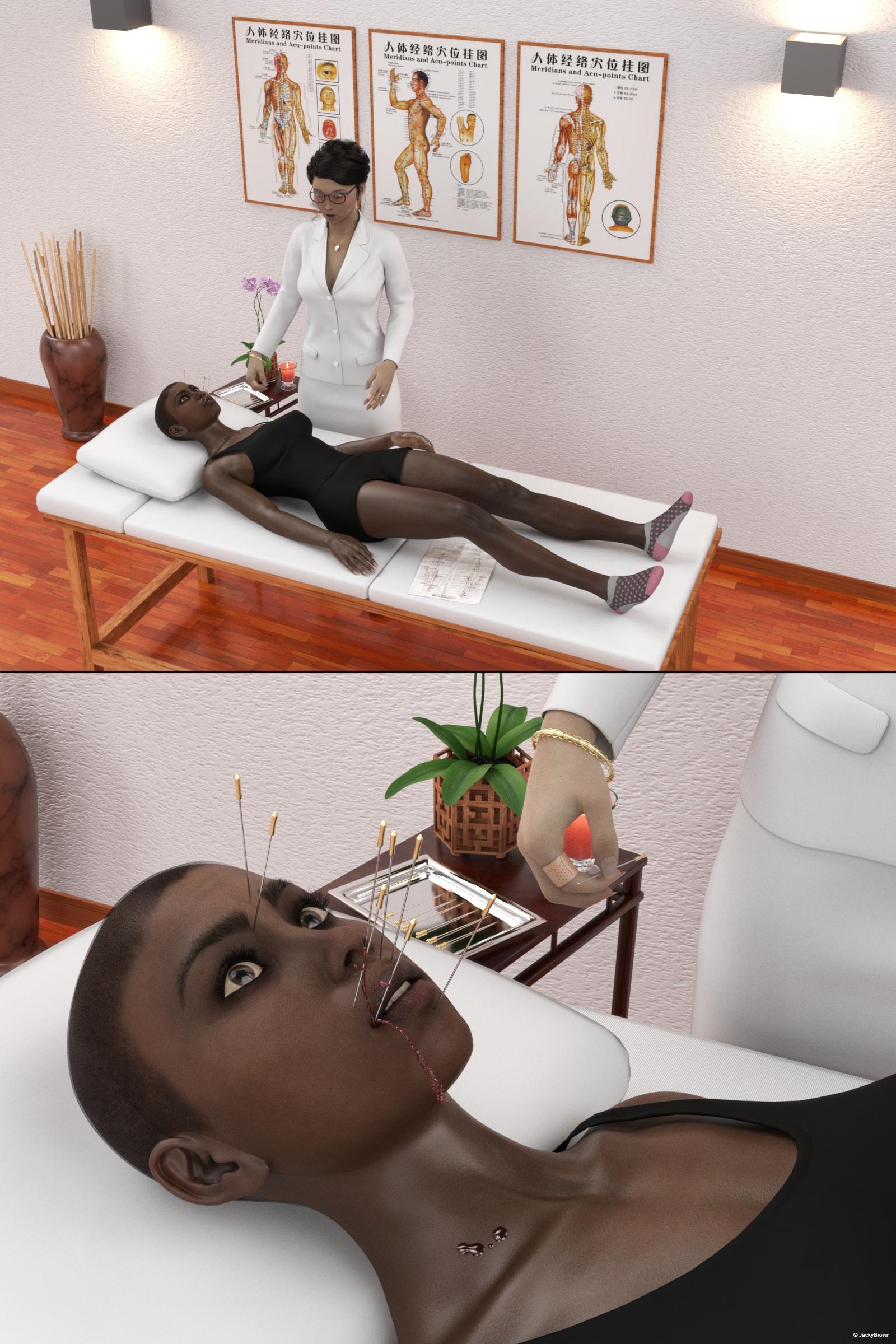
"Oops! Sorry!"
4-Armed Alien!There did used to be a product availble, Four Arms For Genesis, but it doesn't appear to be availble anymore.
http://docs.daz3d.com/doku.php/public/read_me/index/14259/start
I bought it when It came out. It was fun to play with, but there was almost no support, except for a few of RawArt's figures. They don't seem to be in the store anymore either.
http://docs.daz3d.com/doku.php/public/read_me/index/14695/start
http://docs.daz3d.com/doku.php/public/read_me/index/14261/start
I realize it's impossible to support every morph that was made for Genesis, but it would have been nice to have supported the morphs from Creature Creator that affected the arms and hands. I'm sure this was a niche product.
Gen 8 and furriesPhilosopher's Egg is back up and running, its still I believe in the process of being finished but a lot of content is availble.Riversoft has his morph convertor so you could transfer the morphs you want from 3 to 8.
This came out recently
https://www.daz3d.com/catgirl-megapack-for-genesis-8-female-s
with an add on
https://www.daz3d.com/foxy-lady-with-dforce-hair-for-genesis-8-female
Joequick has released his Duckie for G8M at rendo.
wait really? awesome! thank you for the info!
Strange Hair deformationI followed the standard tutorial to transfer the Selena hair from G3 to G8 yet when I try and apply it to a character (who is shorter than te norm), I get this.

Does anyone have any idea how to fix this mess?
Optimum disk layout for use with Daz Studio ?I don't think it matters much where you install DAZ Studio, it's more important how fast the disk where the content is installed is. Loading items can indeed be slow sometimes, it takes several minutes to load a G8 character on my system but that's mainly because I have a lot of G8 morph packages installed, without these it takes less than 30 seconds AFAIR.
Personally I'd stick to your current setup, mine is set up the same way.
Installing dedicated content hard drive from old pc (windows 8.1) into new pc (windows 10)?Your biggest problem will be if you use the smart content feature. I'm not sure there is a way to simply transfer that DB from one computer to another.
Other than that, moving the HDD is pretty simple. It has a power and data connection. So both need to be disconnected and then the matching connectors hooked up in the new system, conveniently both are SATA and are usually labeled as such. As a matter of fact you should, if at all possible, disconnect the SATA data cable from the motherboard end not from the drive so you can simply plug it into the new motherboard. Those cables are not connected without a drive attached so you'll need that cable.
Windows should just see it the next time you boot and will assign it the next lowest available drive letter.
Why does one have to be rocket scientict to make this work? Morphs on Gen 1 and Gen 2Repeat - Not a Smart Content Issue
.
The parameters tab remains empty, no matter where innthevhierarchy I click!
This leads me to believe that your problem is not Smart Content. This sounds like a problem installing or locating the morph dsf/DSON files. The base morphs should be installed with the Genesis Starter Essentials installation package. Genesis 2 figures also have starter essentials install files. I believe they get installed in the "data" file folder, which should be in the same file directory as your default Studio content. Victoria 6. etc. full body morphs are installed in folders within this data file. Morph packages also get installed in the data file.
My guess is either that the morph dsf/DSON files are not installed in the correct directory, or that for some reason the whole data file tree is not in the same content location as your people file tree.
Muscle-Based Deformation@the OP... Do you plan on making this a commercial stand alone figure and supporting it your self with Daz studio formated clothing ,hairs,Iray materials skins etc...... non genesis based competing female figures have a tough time in this market( see Poser)It is a Genesis figure technically: mine. It was rigged in DAZ therefore you can transfer any Genesis item to it using the usual tricks.
I don't plan on making it commercially avaiable because its rigging is the most advanced out there and don't want it leaked in the industry. I know it sounds like bragging but I have studied all models I could find from, Daz, Poser, Triple A games, etc but none of them were what I was looking for. The most advanced figures I discovered are the Genesis 2 ones but still had some unreconcilable limitations (mainly the lack of a translation weight map for its proprietary TriAx weight system). Thus one thing led to another and now I'm at the stage you see here.
Another thing why it might not be a good idea to sell is because it was created for a specific stylized art style and I doubt there are many people interested in it specifically.
I have to wonder whether DAZ themselves might be interested in your advances in technology. Others have worked with them to market a joint effort. It might be worth your while as it looks like you have invested a lot of time and effort into this.
Genesis 8 Female weird face lookingHi
i have a problem that been going for a while and i really need some help with it
when i load any female character for Genesis 8 or even Genesis 3
i get this weird looking face ,with every character get this lips shap and this style
it's looks like there is some kind of morph that have effect on the charather but i don't know which one beacue i have large Library.
so if any one could help me with that , i would really appreciate that
thanksTransfer utility problemI think you may need to export twice - at a guess perhaps something like:
- export the base figure, with no shaping applied
- export the shaped figure
- Rig the OBJ from 1 with Transfer utility
- Memorise the rigging (Joint Editor right-click menu)
- Import the OBJ from 2 as a morph
- Adjust Rigging to Shape
- try exporting that to Max.
Transfer utility problemI'm not sure what exactly you are trying to do. If you are trying to use the Transfer utility to rig a morphed version of the abse you can't, that isn't its purpose (and is the sort of thing a morph plus joint adjustments are designed to handle without creating a new figure).
The main task is to transfer the character from Daz to 3ds max. For this I first export the model to .obj and then import it into the scene. In this way I form a new whole object that includes the body, eyebrows, eyelashes and so on. Next, I use transfer utility to transfer the skeleton from the main model to the new model I just imported. Аfter I export the new model in fbx format and continue working in max. Everything turns out fine, but when transferring the bones, they take the position of the basic genesis 8 model. Since my model has a height lower than the base figure, the bones shift slightly higher when transferred, that is, they adjust to the standard height (the differences are visible in the picture).
Problem with hair textures appearing on skinOn many of my hair props, I'm getting a transfer of their textures onto the skin. Anybody know why this is happening?
Transfer utility problemI'm not sure what exactly you are trying to do. If you are trying to use the Transfer utility to rig a morphed version of the abse you can't, that isn't its purpose (and is the sort of thing a morph plus joint adjustments are designed to handle without creating a new figure).
Transfer utility problemHi, all.
I need to transfer the skeleton of the character to its exact copy in .obj format. The problem is that the skeleton is not transferred correctly. He repeats "ghosting bones", not the skeleton that turned out after morphing. I tried different transfer combinations, but did not get the desired result. Is it possible to transfer a completely identical skeleton?
Muscle-Based Deformation@the OP... Do you plan on making this a commercial stand alone figure and supporting it your self with Daz studio formated clothing ,hairs,Iray materials skins etc...... non genesis based competing female figures have a tough time in this market( see Poser)It is a Genesis figure technically: mine. It was rigged in DAZ therefore you can transfer any Genesis item to it using the usual tricks.
I don't plan on making it commercially avaiable because its rigging is the most advanced out there and don't want it leaked in the industry. I know it sounds like bragging but I have studied all models I could find from, Daz, Poser, Triple A games, etc but none of them were what I was looking for. The most advanced figures I discovered are the Genesis 2 ones but still had some unreconcilable limitations (mainly the lack of a translation weight map for its proprietary TriAx weight system). Thus one thing led to another and now I'm at the stage you see here.
Another thing why it might not be a good idea to sell is because it was created for a specific stylized art style and I doubt there are many people interested in it specifically.
Gen 8 and furriesWith Gen 8 being out for what...2 years now? I think? I'm surprised how limited the furry content still is. I know there is ofs/centuar/celo and a few others but with how large and varried the furries are thats still a retively small number of morphs. I could just be looking in the wrong place but I've yet to find any tails/head morphs like a wolf/horse/dragon/big cats like a leopard/rabbits or mice, and other than the ofs hoves i cant for the life of me finda morph that is non cloven. Like i said i could be looking in the wrong place but if not i'm suprised there isnt more.
I know v4/m4 had that one site that had a tun of animal morphs, everything from sharks, to dinos, and bears. really anything you could ever need as a furry but sparky(person who made all the morphs) going poof and removing all the products from his site, well kind of SOL if you didnt manage to buy everything/what you wanted before 'e went poof.Philosopher's Egg is back up and running, its still I believe in the process of being finished but a lot of content is availble.
Riversoft has his morph convertor so you could transfer the morphs you want from 3 to 8.
This came out recently
https://www.daz3d.com/catgirl-megapack-for-genesis-8-female-s
with an add on
https://www.daz3d.com/foxy-lady-with-dforce-hair-for-genesis-8-female
Joequick has released his Duckie for G8M at rendo.
Does the Genesis 8 Head/Body Morphs work on Michael 8 etc?Yes, any genesis 8 morph will work on Michael 8 - though some may work better than others.
Fitting Reby Sky hair to Genesis 3I'm trying to get Reby Sky hair (for Victoria 4) to fit correctly to Genesis 3 female.
For some reason though, the forehead is really big when i fit to the new TG3 character.
You can see what I mean on the image below. I've added a G2F character to the middle as well so you can see the difference. The forehead gets bigger the newer the base model is.
Can anyone suggest a way I could get it to fit properly (or at least have a smaller forehead/lower hairline)?
Playing with the scale size of the hair doesn't seem to help. I've also tried using the transfer utliity with no luck, unless anyone can suggest some really specific setting I haven't tried yet.
Gen 8 and furriesWith Gen 8 being out for what...2 years now? I think? I'm surprised how limited the furry content still is. I know there is ofs/centuar/celo and a few others but with how large and varried the furries are thats still a retively small number of morphs. I could just be looking in the wrong place but I've yet to find any tails/head morphs like a wolf/horse/dragon/big cats like a leopard/rabbits or mice, and other than the ofs hoves i cant for the life of me finda morph that is non cloven. Like i said i could be looking in the wrong place but if not i'm suprised there isnt more.
I know v4/m4 had that one site that had a tun of animal morphs, everything from sharks, to dinos, and bears. really anything you could ever need as a furry but sparky(person who made all the morphs) going poof and removing all the products from his site, well kind of SOL if you didnt manage to buy everything/what you wanted before 'e went poof.Daz 3D is part of

Connect
DAZ Productions, Inc.
7533 S Center View Ct #4664
West Jordan, UT 84084Licensing Agreement | Terms of Service | Privacy Policy | EULA
© 2026 Daz Productions Inc. All Rights Reserved.