-
How do I create a "head" only add, remove
Hi, and thanks for looking.
On occasion I have purchased G8 characters that don't have add and removed separately for both head and body. There is usually a slider in the "Actor" properties that can be moved from 0% to 100% but that is for the entire character. Sometimes the body shape is not too extreme and I just use it, clothing is a wonderful camouflage. Other times the vender has body shape preferences that don't match what I prefer. So in these instances I want to create a head only add and remove so I can use the head shape with G8 base body, then use the various body morph packs I have to create the body shape that suits, keeping the face/head shape that drew me to spend the money in the first instance.
The current character is Elicia for Genesis 8 Female by Inersia on another web site. I am sure I have had the same issue with characters sold here. I am just using this one as they are topical at the moment, where I live.
I have tried Character Mixer for Genesis Figures by 3D Universe but there is no morph that their product can find.
Any assistance or suggestions would be greatly appreciated.
How can I import expressions?Yes for custom expressions you can use custom morphs, that I suppose being your "phonemes" in this case. However be aware that FACS include visemes, so you usually don't need extra custom morphs for phonemes. As for converting to shapekeys there's a tool in the morphs panel.
setup > morphs > shapekeys > convert morphs to shapekeys
https://bitbucket.org/Diffeomorphic/import_daz/wiki/Features/Morph Tools/Shapekeys
Why does Geometry Sculptor only work with Vertex Selection?I've tried to scale on geometry sculptor, but everytime I try, the program crashes. I even try to update the drivers, so I've brought a driver updater from norton. I want to create a morph and put it to finish. I would try, but it feels like each time I try, the program would go dead on me again. So how do I go about that without causing any trouble?
[SOLVED] Lots of random crashes, have tried many things... Any idea?Duplicate Formula warning are figue-specific, usually indicating that two characters/morph sets use the same name. They wouldn't be causing crashing.
Using the latest nVidia driver is not always best - try rolling back to soemthing closer to the minimum required version, but note that older nVidia drivers have a potentially serious security issue so - unless you work offline in that machine - you hae a tricky balancing act.
32 GB is not a lot of system RAM, and is likely to run out before you fully use the memory of the 4090 (the rough rule of thimb is you need two to three times as much RAM as scene data on the GPU, so a 24GB card would need 48GB to 64GB while 32 GB would handle scenes up to 12 to 16 GB of data) - running out of memory could be a factor in the crashing, at least if the Viewport is using the Iray Drawstyle.
[SOLVED] Lots of random crashes, have tried many things... Any idea?Hi everyone,
So for a few weeks now Daz has been crashing a lot on my PC, to the point of making it nearly unusable. Sometimes the program throws an error message, sometimes it just disappears...
Things that can make it crash include: loading a scene, loading a figure saved as a preset, saving a scene, running a simulation, switching the viewport from textures to iray, rotating a bone on a character, dialing a morph...
So far I've tried installing the latest Daz version, uninstalling Daz and reinstalling it on a different Windows profile, running the program from different drives (one NVMe, one SATA SSD), re-installing Windows, dialing down my i9 power limits (PL1/PLC2/ICC)...
Nothing's made a difference... Can't work for long on scenes, can't render them with the render queue... You can guess it's getting extremely frustrating!
Does anyone have any idea what I could check?
The logs contain lots of warnings about formulas, but there is no error whatsever logged when Daz goes down (confirmed by support).
My configuration: Z790 Aorus Elite AX, i9 13900K, 32Gb DDR5, RTX 4090, Windows 11 and nvidia drivers both up to date (unless they changed today).
Ever since I built this PC, Daz has always been a bit buggy, in that I could get crashes when adjusting the pose of my characters, usually when working on heavy scenes and/or after a lot of work in the application.
But it's never been this crazy, now I'm happy if I can work on a scene for more than half an hour or if the render queue processes more than 2 or 3 scenes.
For what it's worth, there hasn't been any indication about hardware faults in the many other programs and games this PC also runs.
So, being kinda lost, any help would be very appreciated!
Shape/Morph not shownAre you applying the mask to a G8F character (or autofitting it to another figure)?
I've had items autofit and not transfer morphs over before. Not sure if this is going on in your situation.
Lee
Camera Magic (Commercial)RobertDy said:
Zev0 said:
"I dial a hair morph either in Perspective View"
This needs to be done on the desired camera...perspective view will not hold any data.
If you have Plus you dont need to use the standard Camera Magic anymore. The visibility/enable options are there in Plus. I don't know why it is not working for you. Send me a log file please. Under script settings/options there is a get log function.
Sorry that I replied so late to this, as I decided to temporarily stop using this product only until recently. Recap - Camera Magic doesn't save any morphs dialed into my hair products. I dial a morph for a hair that I use in either Perspective View or any Camera that has Camera Magic enabled, but the moment I switch to another camera, the dialed morph is lost. You requested me to get a log, but when I click on the get log option in Camera Magic, it says "Unable to find Script Runs in log."
I save BOTH the Pose AND the Shape settings in Camera Magic Plus for hairs (mostly using OOT & AprilYSH), and that has solved my issues.
Also, it is not enough to dial a morph, you must also save the Camera Magic Plus settings on the desired camera with the morph dialed in to retain them.
Eyes clippingActualy upon further investigation the issue was not just with my morph but an incteraction between it and "Eyes Size" morph. I have used a different eye scaling morph and the issue is gone.
AIUTO...CHI CONOSCE L’ITALIANO? PARTE QUATTORDICIKainjy said:
I capelli o hanno i joint propri (e dunque vanno posati manualmente) o sono associati alla testa.
Potresti usare Dforce per farli cadere in basso, oppure li esporti e li reimporti come pezzo a parte e poi usi il Transfer Utility per renderli "adattabili" alla figura.
Perchè usare il DForce quando basta imparentarli?

Quanto all'esportazione, sono d'accordo.
Best way to create a new character in order to morphOllo said:
crosswind said:
Create two single dials for Head morph and Body morph for your custom character : https://youtu.be/nEFI6keXU2c?si=YJQfP53MWOub0T_P
This is exactly what I was looking for—thank you so much! I only do renderings, so it’s not an issue.
For anyone searching for the same solution, the video in the link provides the perfect answer.
P.S. Apologies for the nudity—it wasn’t intentional, that’s just how the default figure appeared.
You're welcome !
Shape/Morph not shownDear Daz community!
I have a problem with this specific item: https://www.daz3d.com/vintage-scuba-gear-for-genesis-8-females that I purchased a few months ago.
For some reason the morph ''Maskup'' does not appear in the list inside Daz3d even tho it gets installed into the correct folder.
I already tried EVERYTHING like: uninstalling the addon multiple times, reinstalled DAZ and even renamed the file but nothing works out for me.
I tried to reach out to the DAZ Support but never got any response sadly. I hope that someone here can help me to solve that problem.
AIUTO...CHI CONOSCE L’ITALIANO? PARTE QUATTORDICIvangelrise said:
Ciao, ho una (ennesima) domanda.
Ho comprato eoni fa un personaggio preconfezionato, con annessi capelli appositi, ma non l'avevo mai usato.Stasera volevo provarlo un po' ma il problema è che, quando cambio la posa del personaggio, i capelli gli rimangono a fluttuare in aria, staccati dalla testa, e non seguono il personaggio.
C'è un qualche trick per risolvere la cosa?
I capelli o hanno i joint propri (e dunque vanno posati manualmente) o sono associati alla testa.
Potresti usare Dforce per farli cadere in basso, oppure li esporti e li reimporti come pezzo a parte e poi usi il Transfer Utility per renderli "adattabili" alla figura.
Fit Control for Genesis 8 (Commercial)I have tried unsuccessfully to figure out which morph(s) is causing Fit Control to crash. Hoping you can help.
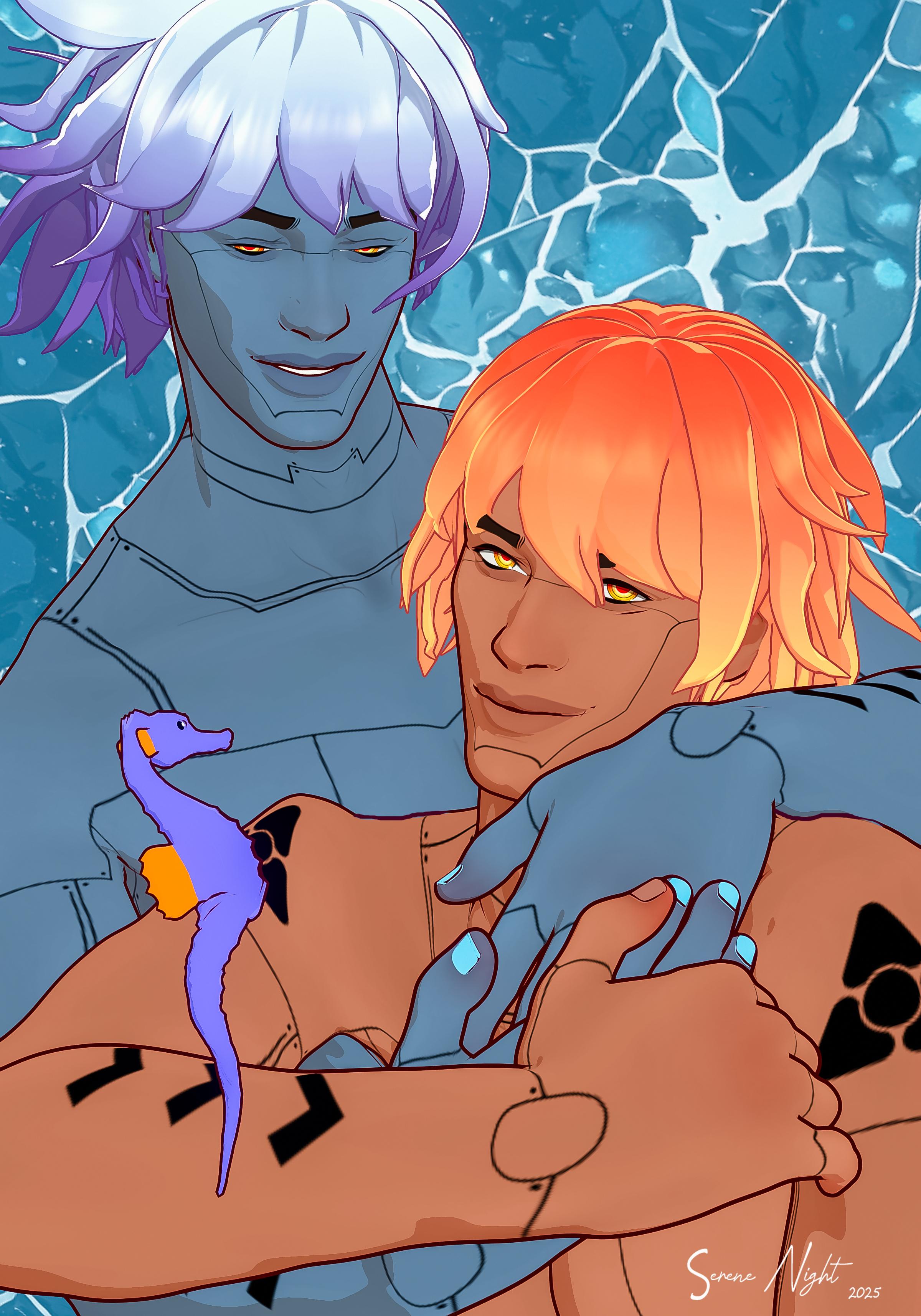
SereneNight’s Sci-Fi Fun Thread 3I'm relieved at last to have done something with DAZ Seahorse finally. This is a sad state of affairs, but I've always wanted to render it. What is cute is there is a pregnancy morph for the seahorse called 'fatherhood.' Very adorable.
 [Released] 1-Click Anime [Commercial]
Xola 9 Portly with 25% Base Anime Masculine. I think the addition of anime effeminates the males.

And without the Xola Portly morph:
 Best way to create a new character in order to morph
Ollo said:
crosswind said:
Create two single dials for Head morph and Body morph for your custom character : https://youtu.be/nEFI6keXU2c?si=YJQfP53MWOub0T_P
This is exactly what I was looking for—thank you so much! I only do renderings, so it’s not an issue.
For anyone searching for the same solution, the video in the link provides the perfect answer.
P.S. Apologies for the nudity—it wasn’t intentional, that’s just how the default figure appeared.
glad you think it works but let's hope when you pose your character it still looks as good as if you had kept corrective blendshapes intact
Best way to create a new character in order to morphcrosswind said:
Create two single dials for Head morph and Body morph for your custom character : https://youtu.be/nEFI6keXU2c?si=YJQfP53MWOub0T_P
This is exactly what I was looking for—thank you so much! I only do renderings, so it’s not an issue.
For anyone searching for the same solution, the video in the link provides the perfect answer.
P.S. Apologies for the nudity—it wasn’t intentional, that’s just how the default figure appeared.
Eyes clippingInstead of changing the eye morph, you need to make a custom adjustment to the eye closed, that applies only to your character. There are tutorials out there somewhere. I'll see if I can find a link for you.
Edit: Here is some Daz documentation on the subject of Morph Controlled Morphs. It isn't real recent. You may be able to find some Youtube videos it you search for Morph Controlled Morph or MCM. http://docs.daz3d.com/doku.php/public/software/dazstudio/4/userguide/creating_content/assembling/tutorials/creating_morph_controlled_morphs/start
Eyes clippingI have made a morph that upon inspection has a tiny amount of eyes clipping when eyelids are closed. This can be easily fixed by moving both eyes a tiny amount back on z axis.
Now I need to know how to modify the existing morph so that eye change is a part of it.
I have tried ERC Freeze but that seems to only work in current scene and completely fails when I load different scenes with the same figure.
I have also tried save as Modifier Asset, but that not only did not create a new morph, it duplicated a bunch of other morphs causing Duplicate Formula warnings. I really had no idea what I was doing here so probably ticked a wrong box somewhere.
Best way to create a new character in order to morphRichard Haseltine said:
That is a bad idea with shapes that use existing morphs as you wil lose any joint adjustments (which are usually fairly easy to redo) and corretive morphs (which are a pain to redo). Baking morph sliders to a single shape also makes it harder to adjust them, and means you cannot share the result morph with others as it incorporates data that is not your own (you can share renders, just not the file).
On the contrary I do think this is a pretty good practice that one can learn a lot while having morphs work with high performance.
I've never had big issue related to shape rigging and/or corrective morphs though I had high demand of morph quality...in case there's any, one can create pJCMS / cbs for the custom morphs ~~ only I had to make FBMs for wearables if really needed.
Sharing or selling character is a different thing, for instance, folks should sell character products by using single dials rather than PBMs/PHMs ~~
Daz 3D is part of

Connect
DAZ Productions, Inc.
7533 S Center View Ct #4664
West Jordan, UT 84084Licensing Agreement | Terms of Service | Privacy Policy | EULA
© 2026 Daz Productions Inc. All Rights Reserved.