-
New DS Filament Render Engine
Is there a switch or setting somewhere I don't see that lets you tell Filament to use BOTH CPU and GPU? I was rendering an animated pose to a movie and it seemed to be using only CPU, and while it was muuuch faster than Iray, I can't help but feel that it would be even faster using the power of all the cuda cores on my GPU....
~GenPretty sure I've read that Filament doesn't use your Cuda cores. Some people have said that it does use your graphics card and not your cpu, but then I've seen posts from people happily using it in a machine with onboard graphics and no separate GPU.
New DS Filament Render EngineIs there a switch or setting somewhere I don't see that lets you tell Filament to use BOTH CPU and GPU? I was rendering an animated pose to a movie and it seemed to be using only CPU, and while it was muuuch faster than Iray, I can't help but feel that it would be even faster using the power of all the cuda cores on my GPU....
~GenDaz Studio 4.14 Pro, General Release!Would be really awesome if;
-
DAZ would install from either DIM or DC (neither work)
-
DAZ had Filament on a mac
-
I could actually use the products I have paid for! They are all 'missing' even though DIM and DC report they are all installed.
-
If anyone from DAZ would respond to any of my technical support requests (I think 3-4 weeks is poor ar best and still no responses)
Let me make sure I understand what you're saying:
1) You can install content using DIM, but you cannot install Daz Studio using DIM? What happens when you try?
3) Can you post the content installation path from DIM (and Daz Central, if they're different), and the Content Directory Manager with all sections expanded from Daz Studio? Are they missing in Smart Content, Content Library > Products/Categories, Content Library > Daz Studio Formats/Poser Formats, or all three?
Daz Studio 4.14 Pro, General Release!Would be really awesome if;
-
DAZ would install from either DIM or DC (neither work)
-
DAZ had Filament on a mac
-
I could actually use the products I have paid for! They are all 'missing' even though DIM and DC report they are all installed.
-
If anyone from DAZ would respond to any of my technical support requests (I think 3-4 weeks is poor ar best and still no responses)
Filament vs Eevee?Can Filament do Subsurface scattering,Bloom, Ambient occlusion,screen space reflections object based motion blur during animation, volumetric lighting effects (smoke,fog etc) and depth of field???.New DS Filament Render EngineI started a new scene and everything is working ok now. Hopefully I never see this issue again! I do like filament and the option to closely check test renders before going to iray.
Filament vs Eevee?As I mentioned in the Diffeo thread, I've just tried Eevee again and, while it is much better than Filament, the materials conversion using Diffeomorphic isn't quite as faithful as we get with Cycles. For example, I exported a figure with a Meipe geograft (always my test of usability) and Cycles rendered the materials almost as well as IRay. Eevee, however, didn't quite reproduce the skin tones on the graft to the rest of the character so I would need to learn how to do that using the Blender node system.
Diffeomorphic DAZ Importer Version 1.5.1Just to say that, after a couple of months of avoiding Blender for attempting renders, I've just installed Diffeo with the latest 4.14 of DAZ Studio and exported a character over to Blender. Wow, the improvements over my previous attempts are significant. I rendered a G3M figure in Cycles in 3 minutes on my old GTX 1070 and it was comparable to an IRay render. Then I dropped the samples down to 64 and tried again - 32 seconds! OK, a little noise but fairly acceptable. I then tried with the denoiser on and the noise was gone and the image was only a little softened compared to the awful IRay denoiser in DAZ Studio which eliminates details drastically.
I also tried Eevee but, while streets ahead of Filament, it is not as consistent with IRay materials as Cycles is. I'm hoping for that to improve as I would like to render animations in Blender some day.
This is a Cycles render at 64 samples with no denoiser. It rendered in 1 min 20 sec. It is a close-up rather than the full figure mentioned above which took 32 seconds.
Filament vs Eevee?I'm of a similar opinion of Eevee and Filament.
Filament vs Eevee?I'm wondering whether anyone has done a comparison. I've tried both and have not really been impressed with either although I'm sure that there is a lot I could learn about tweaking Eevee. I'm not so sure that Filament has much scope for improvement however, especially in the restricted mode in which it is employed in DAZ Studio. On the plus side, Filament is there in DAZ Studio so no need to get involved with exporters between applications. But, once again, Filament is just not up to the job of rendering anything remotely believeable.
I should say that I'm only interested in either for animations. There are options for export and I would appreciate any comments on the preferred method of producing a rendered animation in Blender. I have not even looked at the animation timeline in Blender yet but I am increasingly aware of the limitations of the DAZ Studio timeline. For example, I'm not sure whether NLA is possible (perhaps using Animate 2) because, so far, I've only messed around with Keymate and Graphmate. I belive that Blender is more sophisticated but I have real problems posing in Blender so I'm tempted to stay with the "amateur" DAZ timeline and export the animated scene, either using Diffeomorphic or Sagan.
New DS Filament Render EngineI just started experimenting with filament and have an issue - I can't switch back and forth between filament and iray. I saw that someone had already asked a similar questions so I added mine to their thread in another forum. In case anyone here knows of a solution, I'm putting a link to my inquiry/explanation of my issue instead of repeating it here. Any help would be much appreciated. My question is at the very end of that post started by someone else.
DELETEincredible that we need to fix data from bought products when is the least thing I want to do, I've detected recent products with missing thumbnails like Skin Filament, Servant Animations for Khemsit 8 and Pharaoh Animations for Twosret 8 and they are not cheap products!!


the insert png or jpeg image does not always work, I fixed (not being my job to do) dForce Blue Nile Outfit for Genesis 8 Females with that method, the others two don't detect my thumbnails inserted (again, and not being my job fiddling to do and wasting my time looking the forums for a solution.
Is like fiddling inside System32 folder from Windows and looking something with zero knowledge but with the dream to make windows faster...gimme a break!
Do you have any other items that don't detect you adding a thumbnail image? I'm curious whether we have any products in common that do that. If so, I'd like to go have a look at them and see if I can figure out why they're misbehaving and how to make them behave, so that I know how to make things work in the future. I don't have anywhere near all of my purchased content installed and haven't finished repairing the disaster that what is installed ended up as, so I'm sure there must be something buried in there doing it.
You're right, it's absolutely ridiculous that we (as paying customers) have to do this.
I have copied in the thumbnails for any number of products! The only one that has consistently thwarted me is the dForce Tepes Outfit for G8M(s) (also in Zilvergrafix's list) - I have no idea why. I've tried several times but that one just refuses to display.
It gets so annoying after a while, doesn't it? Especially now that DAZ has forced WebP on us, which means we either need extensions to save as PNG or to spend time converting WebP images after saving them. Better for their bandwidth, so much more annoying for us when we have to clean up their constant messes.
Unfortunately I don't have the Tepes outfit. I wish I did, because I'm terribly curious now!
If you use DIM to install, just downoad the thumbnails using that - they come down as jpg - but recently they are far too big and you will need to downsize them a lot. Luckily for me I have always downloaded the thumbs in DIM so it's only my newly bought products that I need to tweak to size. I have a perfectly good thumbnail for Tepes sitting in Runtime/Support but it gets completely ignored.
Well dang, that does make it a lot simpler! I didn't even know that setting was there, about the only thing I use from that menu is the option to hide all the various PoserCF packages and the like that I don't need. But oh my god, you're not kidding about them being massive. I'm going to have to download them, move them, and then delete them from DIM's thumbnails folder because they completely push all of the information I regularly look at (product ID, file size, etc.) off my screen.
I'm tempted to buy the Tepes outfit just to see what's what. With my loyalty discount I can get it down to $4.31 and while the coat isn't my style, I do like the pants and boots. And, if I can't sort out the thumbnail issue, I can always return it -- though who knows how long that will take these days.
DELETEincredible that we need to fix data from bought products when is the least thing I want to do, I've detected recent products with missing thumbnails like Skin Filament, Servant Animations for Khemsit 8 and Pharaoh Animations for Twosret 8 and they are not cheap products!!
the insert png or jpeg image does not always work, I fixed (not being my job to do) dForce Blue Nile Outfit for Genesis 8 Females with that method, the others two don't detect my thumbnails inserted (again, and not being my job fiddling to do and wasting my time looking the forums for a solution.
Is like fiddling inside System32 folder from Windows and looking something with zero knowledge but with the dream to make windows faster...gimme a break!
Do you have any other items that don't detect you adding a thumbnail image? I'm curious whether we have any products in common that do that. If so, I'd like to go have a look at them and see if I can figure out why they're misbehaving and how to make them behave, so that I know how to make things work in the future. I don't have anywhere near all of my purchased content installed and haven't finished repairing the disaster that what is installed ended up as, so I'm sure there must be something buried in there doing it.
You're right, it's absolutely ridiculous that we (as paying customers) have to do this.
I have copied in the thumbnails for any number of products! The only one that has consistently thwarted me is the dForce Tepes Outfit for G8M(s) (also in Zilvergrafix's list) - I have no idea why. I've tried several times but that one just refuses to display.
It gets so annoying after a while, doesn't it? Especially now that DAZ has forced WebP on us, which means we either need extensions to save as PNG or to spend time converting WebP images after saving them. Better for their bandwidth, so much more annoying for us when we have to clean up their constant messes.
Unfortunately I don't have the Tepes outfit. I wish I did, because I'm terribly curious now!
If you use DIM to install, just downoad the thumbnails using that - they come down as jpg - but recently they are far too big and you will need to downsize them a lot. Luckily for me I have always downloaded the thumbs in DIM so it's only my newly bought products that I need to tweak to size. I have a perfectly good thumbnail for Tepes sitting in Runtime/Support but it gets completely ignored.
Filament did not stop working when I switch back to Iray.I have the same issue. I tried out filament and everything worked out fine. On tutorials, I see people switching back and forth between iray and filament, but that did not work for me. When I switched back to iray (both in viewport and in the render engine tab), I get a render completed in seconds but it is either blank or blocks of blue and black so it has not gone back to iray. If I set the viewport to texture shaded, I see texture shaded in viewport, but rendering still results in the weird blue/black render. The viewport will not show iray. I have not restarted Daz, but I would like to be able to switch back and forth as other do.
Below is what i see when I set viewport to iray. When I render with iray, I get a superfast blank render. If anyone has any ideas, please let me know. Thanks.
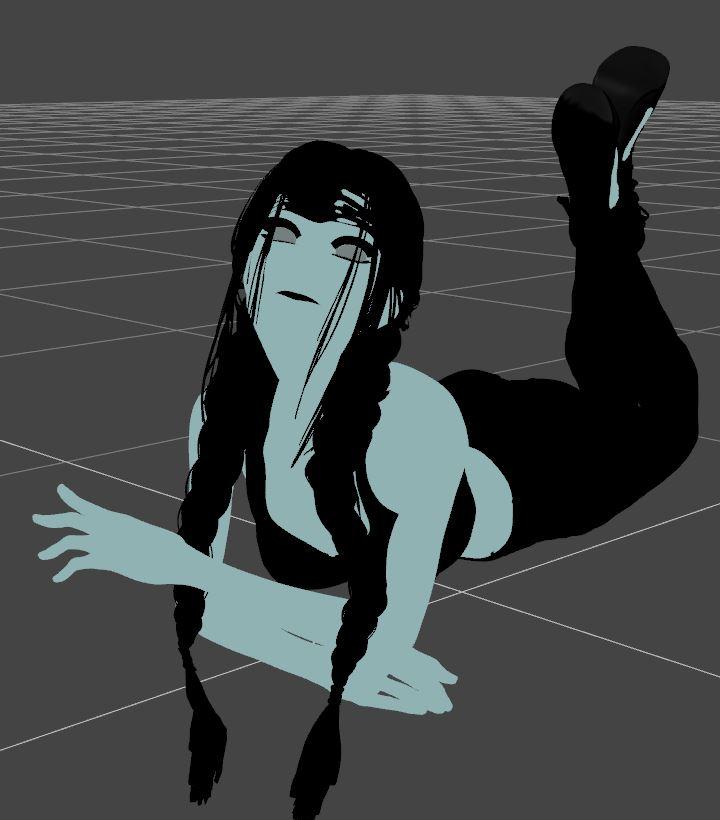
Edit to add - I saved the scene, restarted Daz, and the scene opened up with the blue/black image and still won't go back to iray.
StrangeFate's stuff: Argentheart Crowns promos.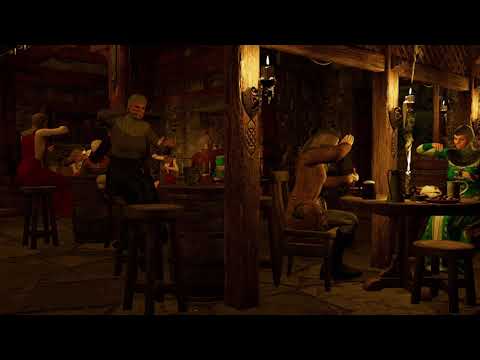
I did do a dreadfully long video using Filament of the Black Crow inn
with animated smoke!!!
TexAnim by Casual on a combiled smoke prob made using instances to objects,
exported and reimported and shading domains made one
(Carrara is so much simpler and you can animate as many surfaces as you want but sadly I just cannot get your set into Carrara as well)
Unity vs UnrealBoth use real-time render engines, so you won't get the same quality as iRay. If all you want to do is render still images (or even simple animations) there is not much point, especially given you now have the option of filament with Daz. In addition, the character fidelity will be less in either engine because the HD subdivisions are done via a proprietary method in Daz so can't be exported. If you want vfx (fire, water, particles), VR or interactivity then the time investment is more logical. In terms of which one to explore, there are many many threads on this, but my suggestion would be unreal. Whilst both can give high-quality outputs, unity's heritage as primarily 2D platformer means that the 3D aspect is not as advanced. Plus Epic have very deep pockets courtesy of fornite so have given lots away (there are lots of free assets on the epic marketplace, plus free assets each month, plus the entire megascans library can be used for free in unreal), the particle and physics systems have recently been overhauled and UE5 (due next year) looks like it will be a big step forward in terms of real-time lighting and rendering high-poly assets. On the other hand, some people think that unity is easier to pick up, and the unity marketplace is bigger than Epic's as it has been around longer.
Unity's heritage is not as a 2D Platformer as 2D Platformer framework code & 2D physics weren't added until sometime after 2012.
Unity & UE4 both can do realtime PBR rendering better than Filament but like Filament you will be doing much such up of PBR materials & lighting to acheive a nice look that you want.
To decide you should either watch Unity & UE4's official tutorials or independent tutorials on both on YouTube to see which is easier for you to use.
Unity vs UnrealBoth use real-time render engines, so you won't get the same quality as iRay. If all you want to do is render still images (or even simple animations) there is not much point, especially given you now have the option of filament with Daz. In addition, the character fidelity will be less in either engine because the HD subdivisions are done via a proprietary method in Daz so can't be exported. If you want vfx (fire, water, particles), VR or interactivity then the time investment is more logical. In terms of which one to explore, there are many many threads on this, but my suggestion would be unreal. Whilst both can give high-quality outputs, unity's heritage as primarily 2D platformer means that the 3D aspect is not as advanced. Plus Epic have very deep pockets courtesy of fornite so have given lots away (there are lots of free assets on the epic marketplace, plus free assets each month, plus the entire megascans library can be used for free in unreal), the particle and physics systems have recently been overhauled and UE5 (due next year) looks like it will be a big step forward in terms of real-time lighting and rendering high-poly assets. On the other hand, some people think that unity is easier to pick up, and the unity marketplace is bigger than Epic's as it has been around longer.
Thank you.
Filament bring out the RendersI added this to the thread in the commons but I had forgotten about this filament art thread. So I'll go ahead and post it here too. :)
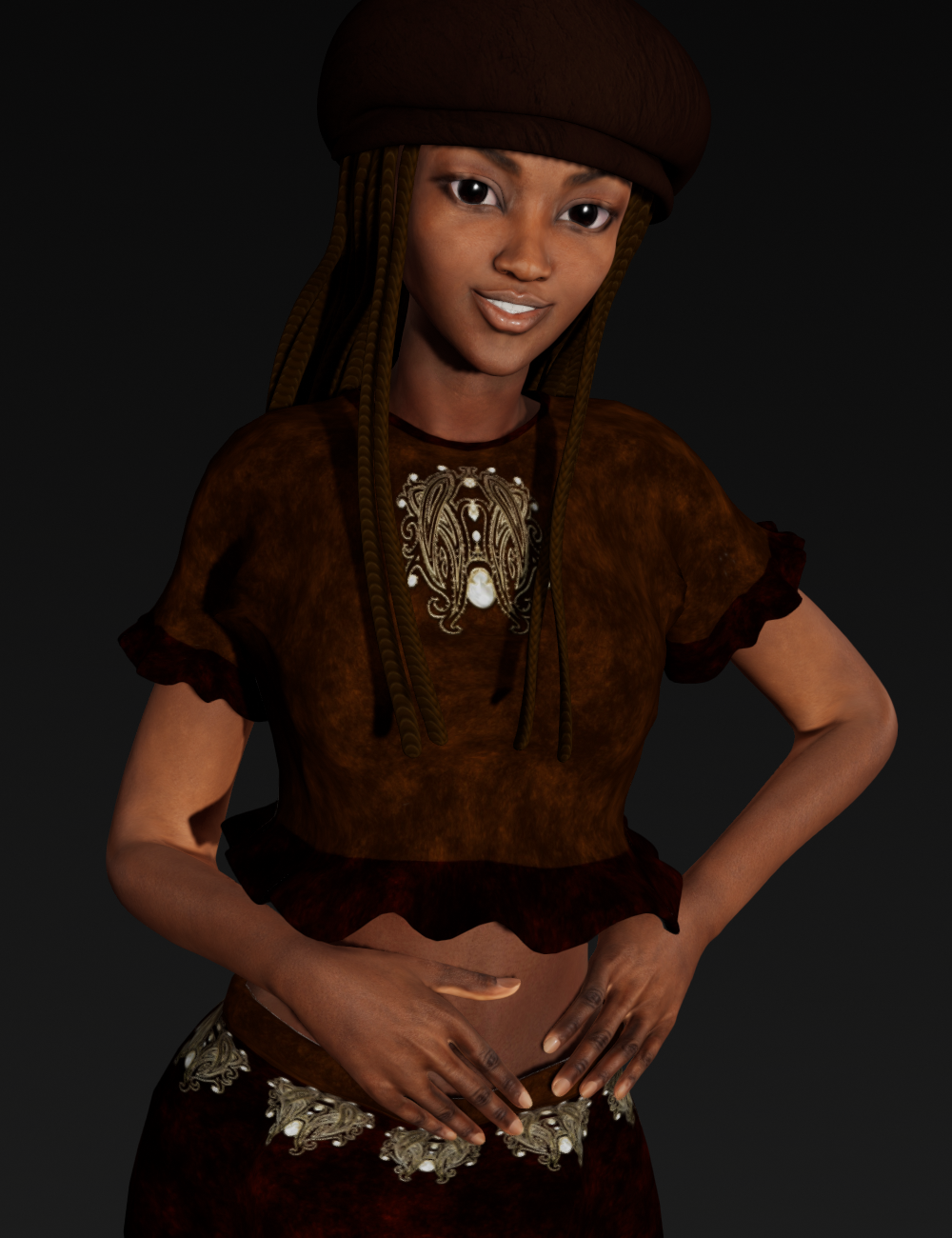
Monique 6 and Aiko 6 mix with some other morph adjustments. Rendered in Filament.
Yes, very cute. And if there were going to be a promo picture for Filament, this should probably be it.
Unity vs UnrealBoth use real-time render engines, so you won't get the same quality as iRay. If all you want to do is render still images (or even simple animations) there is not much point, especially given you now have the option of filament with Daz. In addition, the character fidelity will be less in either engine because the HD subdivisions are done via a proprietary method in Daz so can't be exported. If you want vfx (fire, water, particles), VR or interactivity then the time investment is more logical. In terms of which one to explore, there are many many threads on this, but my suggestion would be unreal. Whilst both can give high-quality outputs, unity's heritage as primarily 2D platformer means that the 3D aspect is not as advanced. Plus Epic have very deep pockets courtesy of fornite so have given lots away (there are lots of free assets on the epic marketplace, plus free assets each month, plus the entire megascans library can be used for free in unreal), the particle and physics systems have recently been overhauled and UE5 (due next year) looks like it will be a big step forward in terms of real-time lighting and rendering high-poly assets. On the other hand, some people think that unity is easier to pick up, and the unity marketplace is bigger than Epic's as it has been around longer.
Iray Preview PC Reboot?I was directed here from another thread. I have been experiencing shut downs when rendering with Iray or sometimes just in preview mode with filament.
I've had it to the repair shop, ran every command line, reformatted my whole system and bought a new video card. Still, as soon as the process started to render in the window, I would hear a small click
the screen would go black, fans off and the system would require a power down with the switch on the power supply in back. Quite often, the mouse would not power on when restarting, and I had to pull and plug it back in. I also found corrupted C++ files several times.
I tried OCCT suggested above and it made it to the test where both the cpu and gpu are under load and suddenly there was that instant black out. Hopefully I was right in ordering a 700 watt ps to replace my 8 year old 500w. Video card is new and everything from Poser to Doom runs great so I hope this fixes the problem, I've been feeling like my computer is possesed.
Looks almost identical symptoms to mine. I also heard that small click that you mention. I didn't have to press the power button because it restarted automatically but maybe that's a Bios thing. All I can say is that I think it was the PSU and I have not had the problem since I upgraded my hardware but, as you can see, I upgraded more than just the PSU. Having said that, my son has installed my old motherboard, CPU and RAM and he is not having any problems (he plays games on his PC). He did not take my old PSU (as it was what I suspected was faulty).
Daz 3D is part of

Connect
DAZ Productions, Inc.
7533 S Center View Ct #4664
West Jordan, UT 84084Licensing Agreement | Terms of Service | Privacy Policy | EULA
© 2026 Daz Productions Inc. All Rights Reserved.