-
Announcing: Daz Deals Browser Add-on II
Togire said:
Ati said:
Togire said:
Daz deals has a problem with the "product library".
When you go to visit a specific asset in the product library (for instance https://www.daz3d.com/downloader/customer/files#prod_87472 which is Victoria 9), generally, the product page is not displayed. Instead, you have the home page of the product library with the array of thumbnail of all you products.
This daz-deals behavior lasts for years. It was annoyingn but somehow manageable. Indeed, there was a simple workaround: If you refreshed the page, then the proper page appeared and could be used.
But now, it has become totally unmanageable. If you refresh the page, you do have the proper product page (sometimes), but after a few second (I measured 3-10s), the page returns to the thumbnail page.
I find this **EXTREMELY** annoying. After any purchase I browse my orders to enter the purchased items in a file with a description of the asset. And the orders only give a link to the product in the product library.
Presently, the only workaround that I found is to disable daz deals....
What heppens if you wait about a second when the thumbnails load? For me, the thumbnails appear briefly, and then the actual product page is shown. This is in Chrome.
The product page some times is never displayed, sometimes appears but always disappears after some seconds and is replaced by the thumbnails. It can be more or less long, but it always happens.
Using firefox 148.0 on linux.
Thanks for the clarification. I will ping @Overdrawn on this one.
Where can I find that vacant expression?Richard Haseltine said:
You need to master the aniamtion tools to the point that you an have a Victoria # in a skimpy dress walk past just before starting the render.
Hahaha, If my characters were sentient, oh the stories they could tell, but thanfully they are very discreet.
Thanks for the suggstions everyone.
Where can I find that vacant expression?You need to master the aniamtion tools to the point that you an have a Victoria # in a skimpy dress walk past just before starting the render.
Let's appreciate/discuss today's new releases - more ongoinger threadWendyLuvsCatz said:
could also do what I do in real life with such tops, layer another one under it
or use a geoshell camisole on the character that covers the tummy
I don't think I have a geoshell product covering such situation, but yeah, these are possible solutions of course
 (I layered something under a dress by Lilflame in a recent render and then hide every un-needed polygons with a conditionnal graft)
memcneil70 said:
Thank you @Elor. I could also try taking it into Marvelous Designer I guess. I was just trying to find something quick to fix it in Daz Studio. @WendyLuvCatz has reminded me of one my frequent fixes. I am not making much sense right now, major headache.
You're welcome and I hope your headache will show itself out sooner than later.
Cybersox said:
Or a bodysuit with the top part hidden by an opacity map. Or a stylishly wide belt. As a photographer, filmaker, and tech theater major, I've had to deal a lot of last minute costume issues, but generally, as long as it looks good to the eye, you can get away with murder.
I'm partial to conditional graft to hide all the un-needed geometry from the part supposedly sitting under another piece of clothing
In this case though, I wanted a longer blazer.
Matt_Castle said:
For a case like you're talking about though (considerably less complicated than moving fabric around many different breast shapes), it could really just be addressed by a few fairly simple fit adjustment sliders to loosen different parts of the waist... and indeed, this is what vendors tend to do instead. Or rely on smoothing to handle a bit a of clipping.
Thank you for the long explanation

I thought about doing universal morphs (and maybe distribute the result of that work), but I could not decide between doing one expanding the bottom part of the blazer or ones capable of changing its width or its depth.
The former was something I know how to do, but I'm not it would have been that universal because some characters will have wider waist or hip than other while being as slim as they are otherwise. Victoria 9 and Mira 9 provide such example: they are both slim women, but Mira as wider hip than Victoria.
The later would provide more flexibility, but I honestly wasn't sure how to create them, so in the end, I decided to use the simpler solution relative to my skill level and do a custom morph for Mira 9 and set up a controller to not have to care about it later.
Announcing: Daz Deals Browser Add-on IIAti said:
Togire said:
Daz deals has a problem with the "product library".
When you go to visit a specific asset in the product library (for instance https://www.daz3d.com/downloader/customer/files#prod_87472 which is Victoria 9), generally, the product page is not displayed. Instead, you have the home page of the product library with the array of thumbnail of all you products.
This daz-deals behavior lasts for years. It was annoyingn but somehow manageable. Indeed, there was a simple workaround: If you refreshed the page, then the proper page appeared and could be used.
But now, it has become totally unmanageable. If you refresh the page, you do have the proper product page (sometimes), but after a few second (I measured 3-10s), the page returns to the thumbnail page.
I find this **EXTREMELY** annoying. After any purchase I browse my orders to enter the purchased items in a file with a description of the asset. And the orders only give a link to the product in the product library.
Presently, the only workaround that I found is to disable daz deals....
What heppens if you wait about a second when the thumbnails load? For me, the thumbnails appear briefly, and then the actual product page is shown. This is in Chrome.
The product page some times is never displayed, sometimes appears but always disappears after some seconds and is replaced by the thumbnails. It can be more or less long, but it always happens.
Using firefox 148.0 on linux.
Announcing: Daz Deals Browser Add-on IITogire said:
Daz deals has a problem with the "product library".
When you go to visit a specific asset in the product library (for instance https://www.daz3d.com/downloader/customer/files#prod_87472 which is Victoria 9), generally, the product page is not displayed. Instead, you have the home page of the product library with the array of thumbnail of all you products.
This daz-deals behavior lasts for years. It was annoyingn but somehow manageable. Indeed, there was a simple workaround: If you refreshed the page, then the proper page appeared and could be used.
But now, it has become totally unmanageable. If you refresh the page, you do have the proper product page (sometimes), but after a few second (I measured 3-10s), the page returns to the thumbnail page.
I find this **EXTREMELY** annoying. After any purchase I browse my orders to enter the purchased items in a file with a description of the asset. And the orders only give a link to the product in the product library.
Presently, the only workaround that I found is to disable daz deals....
What heppens if you wait about a second when the thumbnails load? For me, the thumbnails appear briefly, and then the actual product page is shown. This is in Chrome.
Announcing: Daz Deals Browser Add-on IIDaz deals has a problem with the "product library".
When you go to visit a specific asset in the product library (for instance https://www.daz3d.com/downloader/customer/files#prod_87472 which is Victoria 9), generally, the product page is not displayed. Instead, you have the home page of the product library with the array of thumbnail of all you products.
This daz-deals behavior lasts for years. It was annoyingn but somehow manageable. Indeed, there was a simple workaround: If you refreshed the page, then the proper page appeared and could be used.
But now, it has become totally unmanageable. If you refresh the page, you do have the proper product page (sometimes), but after a few second (I measured 3-10s), the page returns to the thumbnail page.
I find this **EXTREMELY** annoying. After any purchase I browse my orders to enter the purchased items in a file with a description of the asset. And the orders only give a link to the product in the product library.
Presently, the only workaround that I found is to disable daz deals....
Remixing your art with AIwsterdan said:
Last example, I promise!
I took two of my characters to test for a comic page size.
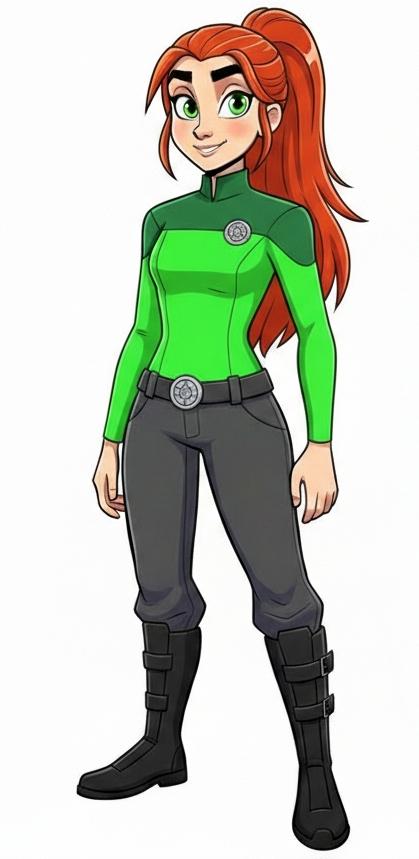
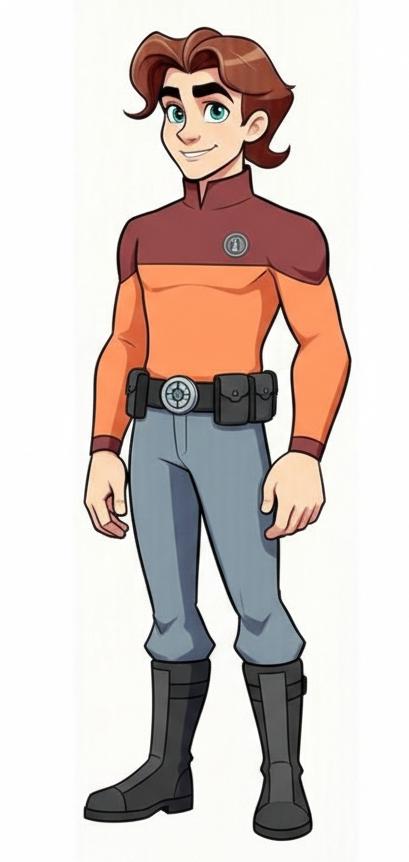
Then added one of my oldest Micheal 2 Sci Fi outfits (still availble in the store!) and fit them to the characters:
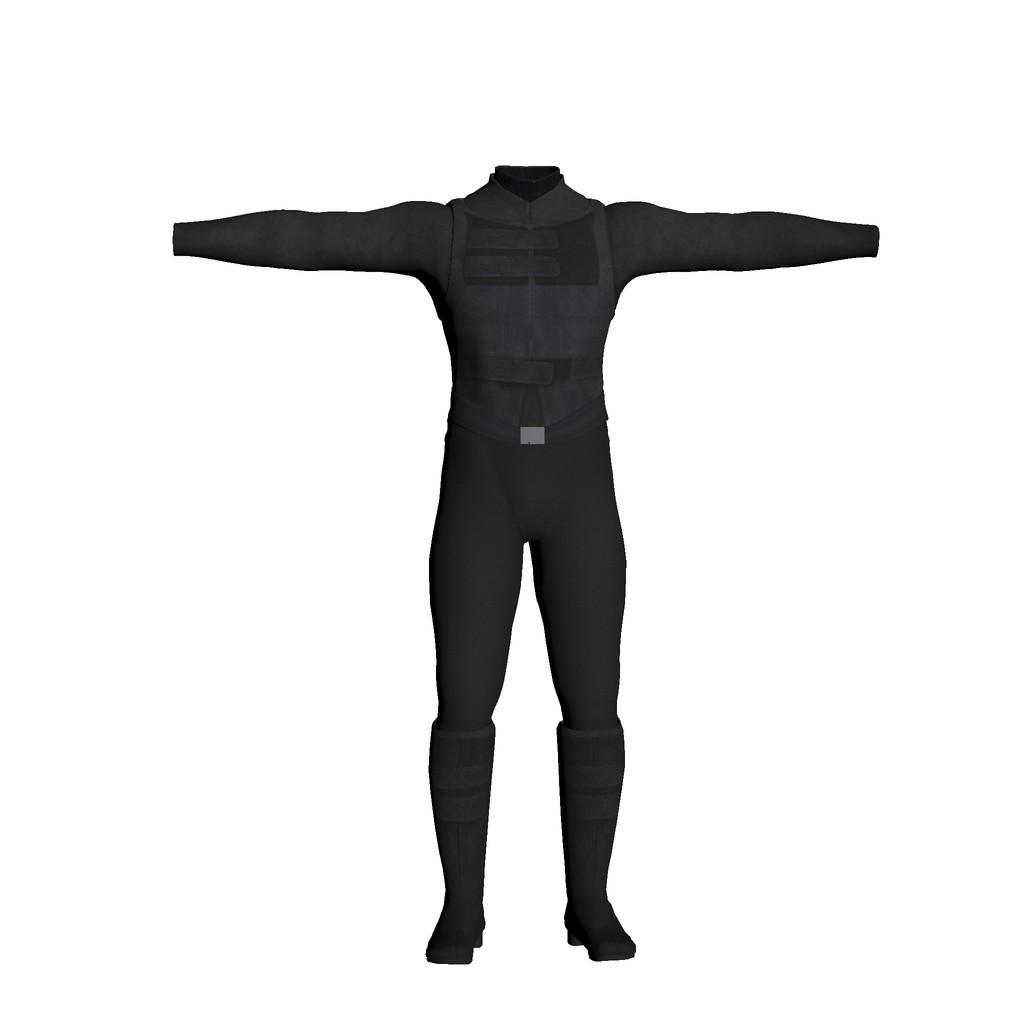
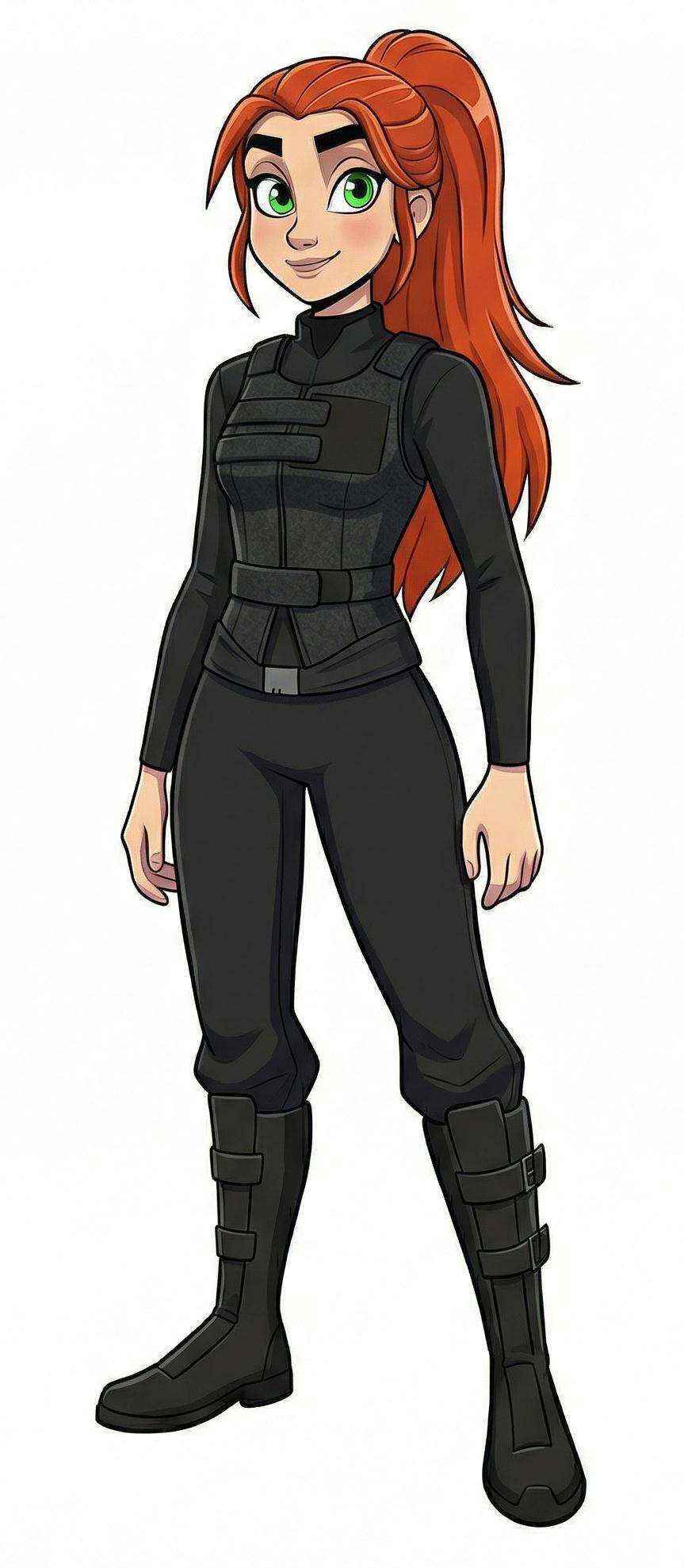
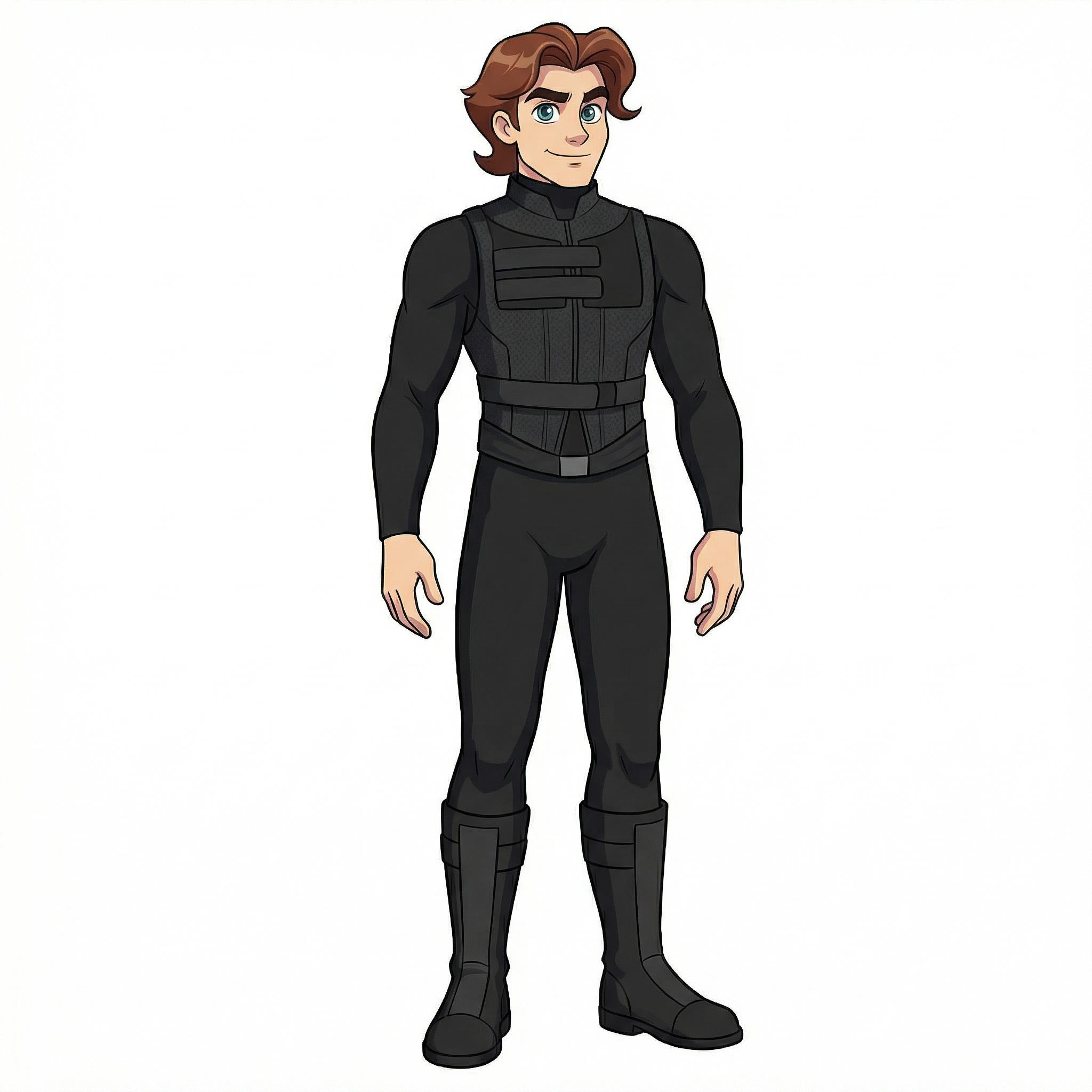
I decided that they should have different outfits, so I added the matching Victoria 2 Sci Fi outfit:
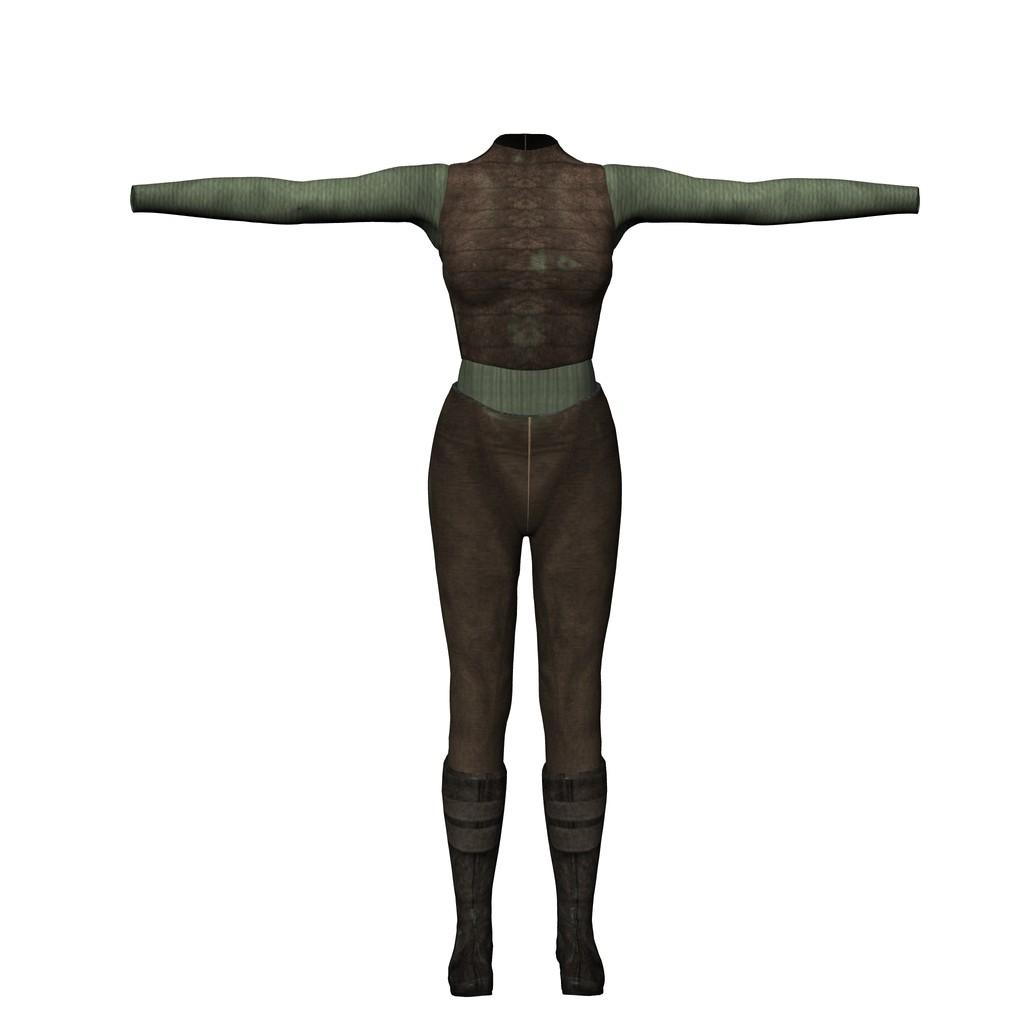
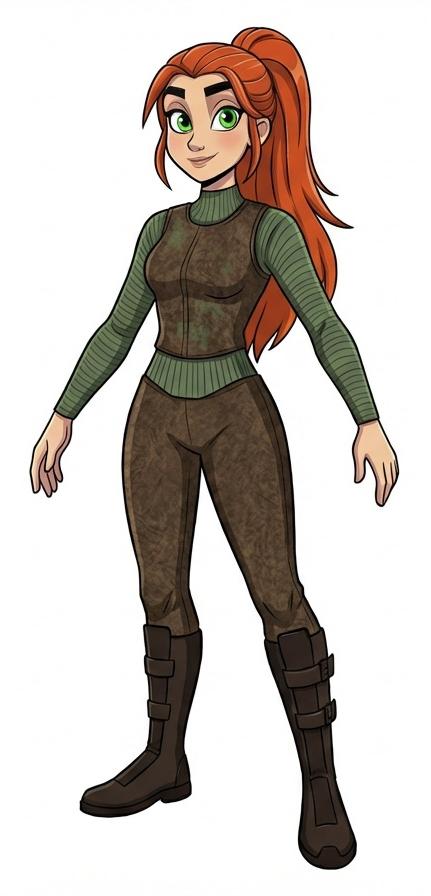
And with my two characters dressed for adventure, I generated a handful of images of them exploring an ancient alien ship that had crashed.
This is not part of an actual comic, I'm just doing a test for consistency and panel/page/text sizing, the text was written *after* I had the images. It's much better to have a story, *then* do the images and text. For the record, I like the page size, but I'm probably going to go with larger – and fewer – panels to the page with bigger word baloons and text.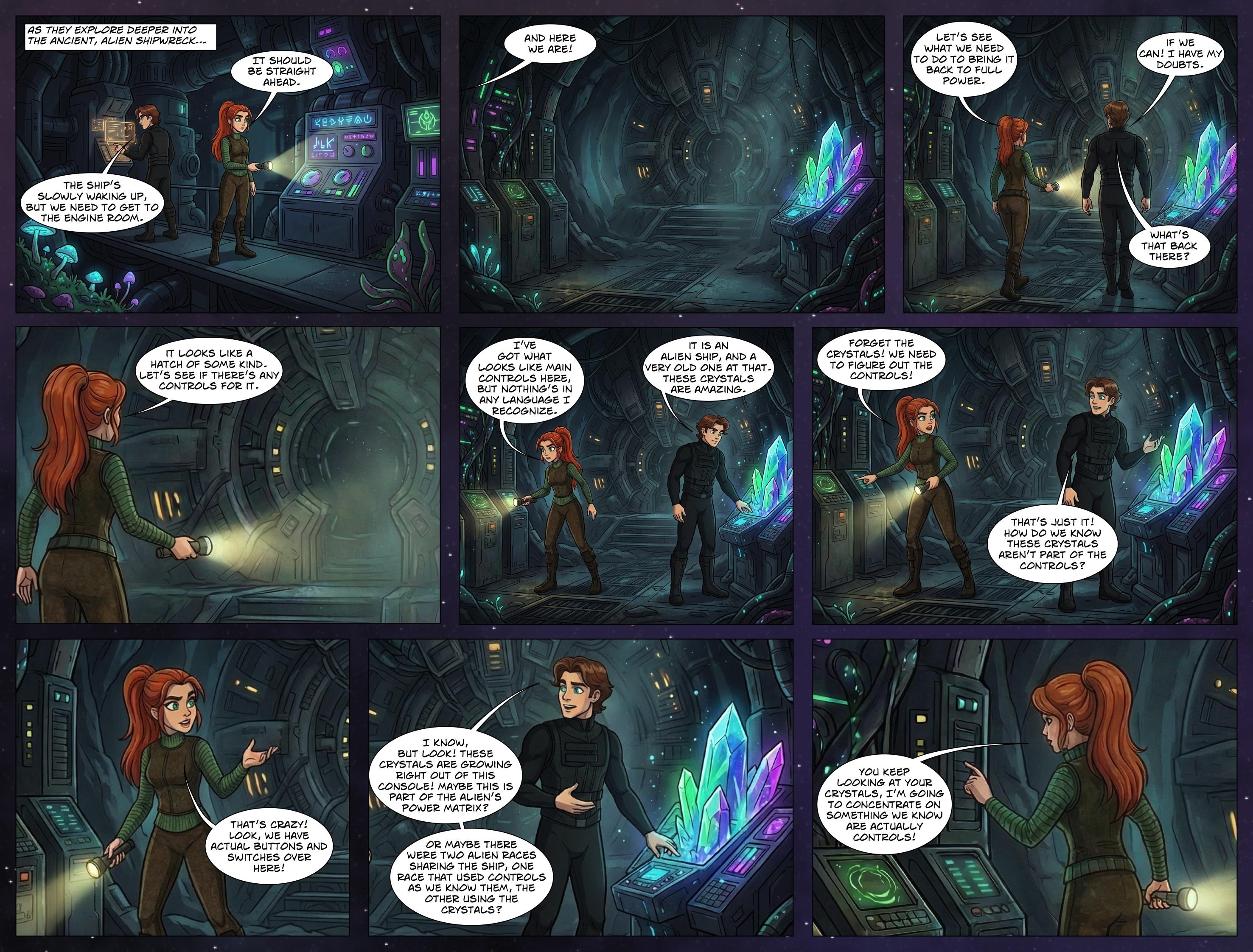
Very impressive work, thanks for sharing your workflow.
Remixing your art with AILast example, I promise!
I took two of my characters to test for a comic page size.
Then added one of my oldest Micheal 2 Sci Fi outfits (still availble in the store!) and fit them to the characters:
I decided that they should have different outfits, so I added the matching Victoria 2 Sci Fi outfit:
And with my two characters dressed for adventure, I generated a handful of images of them exploring an ancient alien ship that had crashed.
This is not part of an actual comic, I'm just doing a test for consistency and panel/page/text sizing, the text was written *after* I had the images. It's much better to have a story, *then* do the images and text. For the record, I like the page size, but I'm probably going to go with larger – and fewer – panels to the page with bigger word baloons and text.
New Year, New Sales Thread: Report Issues Here 3 "Reporting Only"jmucchiello said:
MAD-METRO has outlet items in it that cost $0.99 in outlet but $1.99 with coupon. (Actually, some of them aren't even in the outlet. They're just discounted to $0.99 before applying the coupon.)
https://www.daz3d.com/mikaela-for-victoria-7
https://www.daz3d.com/de-michelle-for-genesis-3-female
https://www.daz3d.com/tresne-for-genesis-3-female-s
https://www.daz3d.com/dt-karen-for-genesis-3-female-s
https://www.daz3d.com/nora-for-genesis-3-female-s
https://www.daz3d.com/elsa-for-genesis-3-female-s
https://www.daz3d.com/razor-cut-bob-hair-for-genesis-3-female-s
https://www.daz3d.com/desiree-for-victoria-7
https://www.daz3d.com/the-common-man-poses-for-genesis-3-male
https://www.daz3d.com/music-and-jewelry-boxes
And a bunch more. I had to dump most of my cart to get the one thing I wanted to use the coupon on to the top of the list.
It's not just Outlet items that are an issue, although the inclusion of those is beyond sloppy at this point. Since MM began, I've found that a large percentage of the items in many of the recent ancilliary sales have ended up being significantly cheaper without the coupon than with it, and it's especially common in sales that discount to a fixed price point.
New Year, New Sales Thread: Report Issues Here 3 "Reporting Only"MAD-METRO has outlet items in it that cost $0.99 in outlet but $1.99 with coupon. (Actually, some of them aren't even in the outlet. They're just discounted to $0.99 before applying the coupon.)
https://www.daz3d.com/mikaela-for-victoria-7
https://www.daz3d.com/de-michelle-for-genesis-3-female
https://www.daz3d.com/tresne-for-genesis-3-female-s
https://www.daz3d.com/dt-karen-for-genesis-3-female-s
https://www.daz3d.com/nora-for-genesis-3-female-s
https://www.daz3d.com/elsa-for-genesis-3-female-s
https://www.daz3d.com/razor-cut-bob-hair-for-genesis-3-female-s
https://www.daz3d.com/desiree-for-victoria-7
https://www.daz3d.com/the-common-man-poses-for-genesis-3-male
https://www.daz3d.com/music-and-jewelry-boxes
And a bunch more. I had to dump most of my cart to get the one thing I wanted to use the coupon on to the top of the list.
Let's appreciate/discuss today's new releases - more ongoinger threadCybersox said:
WendyLuvsCatz said:
Elor said:
memcneil70 said:
I loaded the outfit on Victoria 9 and then started switching out skirts. Except for the dForce Pulp Safari Outfit skirt, so far the skirts have the same little gap the included skirt has. So I tried using Mesh Grabber to pull the blouse down to the top of the skirt edge. I didn't try to be finiky but it worked for a rough job. That might be the best solution in this case.
Creating a morph to get a top longer is usually not too hard (at least with Blender: it's been a while since I used Mesh Grabber), but there is a caveat: as far as I can tell, a length morph will not adjust to a different body shape than the one used to create it.
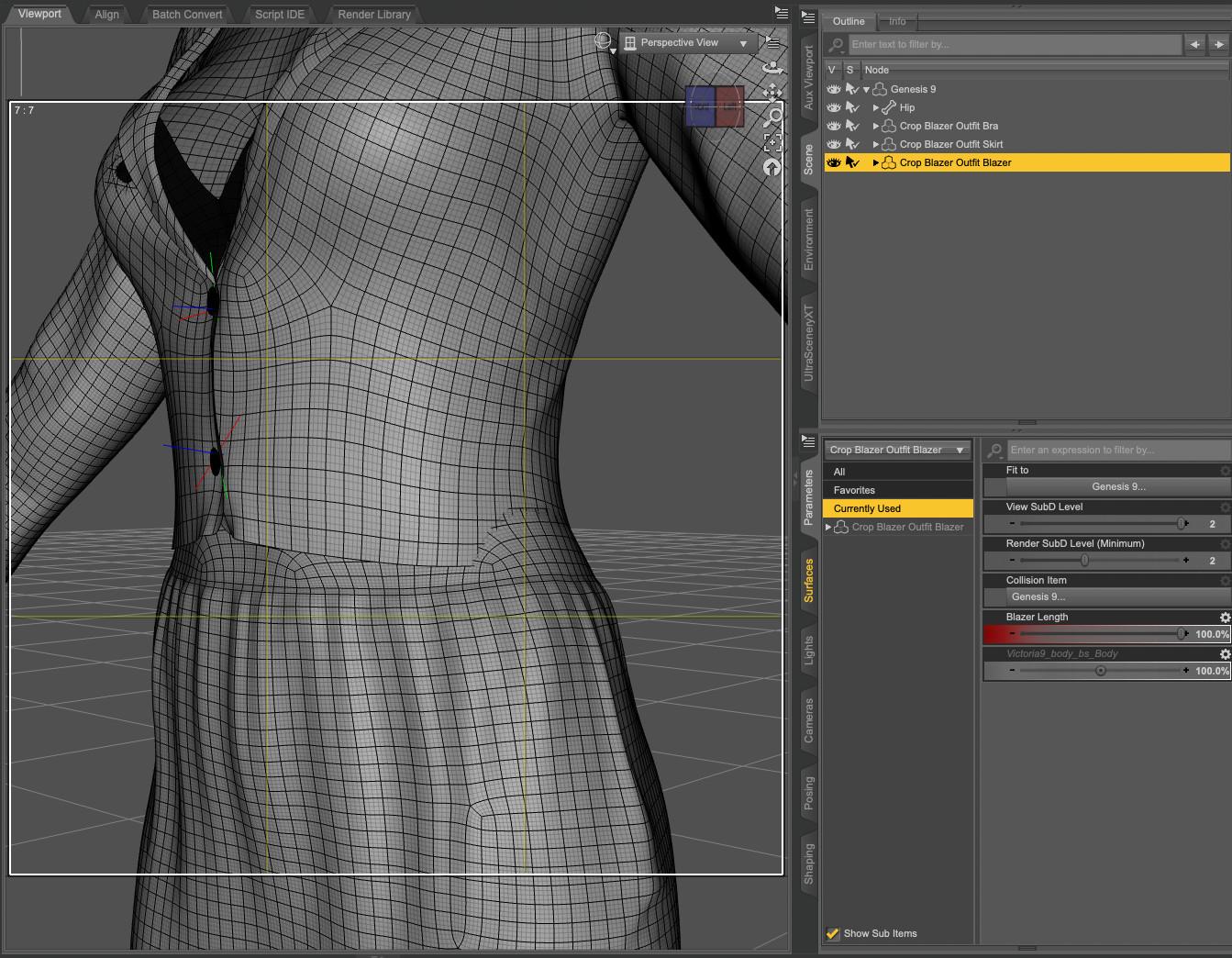
As an example, I created such morph for the blazer from 'dForce Crop Blazer Outfit Outfit for Genesis 9' and created it on Genesis 9 Base. Sadly, once I dialed another shape, let's say Victoria 9, the blazer clipped through her waist
 :
:
I didn't check if changing the smoothing modifier target to the skirt worked, and while it's likely possible to create morphs to change the width and depth of the top (I did try but wasnt successful), the solution I'm using is creating a corrective morph taking care of the difference between the base shape and the current one, with a controller property to automatically dial it when both the body morph and the lenght morph are active on the clothes. Here the result on Mira:
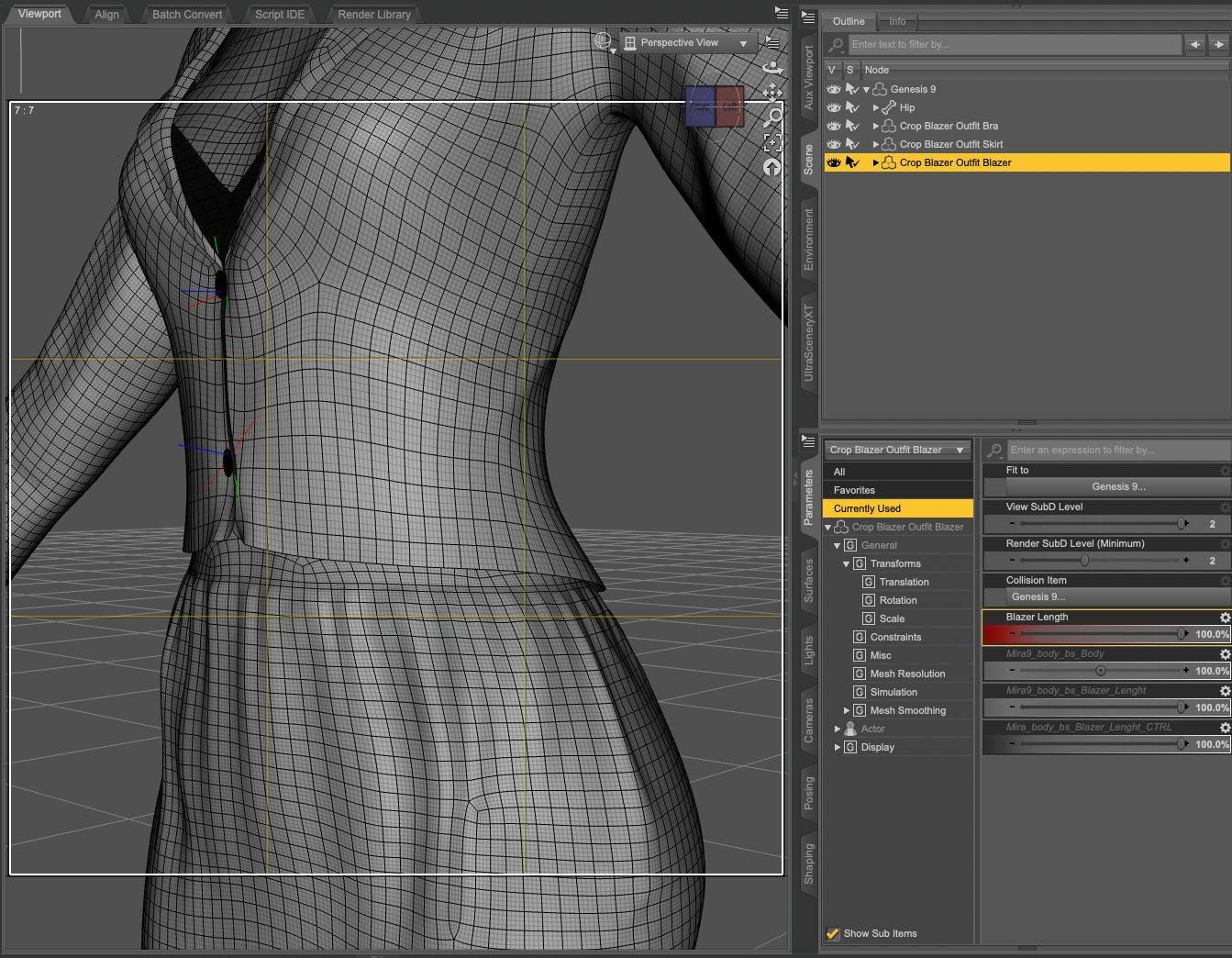
Back then, I thought it was because I did something wrong while creating the lenght morph, but the problem also happens with morphs created by PAs, so either it's a problem between a lot of chairs and keyboards, or it's not possible or hard to do. Maybe crosswind / barbult / Richard Haseltine know a super trick, but in the meantime, I'll continue to use the same approach (a controller to automatically dial the morph adjusting the lenght morph to a body shape).
The process of creating the controller property (and some of its pitfalls) is summarised, with a link to the video I watched to learn how to do it, in the wall of text of my last render: Morning stroll in New York.
could also do what I do in real life with such tops, layer another one under it
or use a geoshell camisole on the character that covers the tummy
Or a bodysuit with the top part hidden by an opacity map. Or a stylishly wide belt. As a photographer, filmaker, and tech theater major, I've had to deal a lot of last minute costume issues, but generally, as long as it looks good to the eye, you can get away with murder.
Also even more excellent suggestions! Thanks
Let's appreciate/discuss today's new releases - more ongoinger threadWendyLuvsCatz said:
Elor said:
memcneil70 said:
I loaded the outfit on Victoria 9 and then started switching out skirts. Except for the dForce Pulp Safari Outfit skirt, so far the skirts have the same little gap the included skirt has. So I tried using Mesh Grabber to pull the blouse down to the top of the skirt edge. I didn't try to be finiky but it worked for a rough job. That might be the best solution in this case.
Creating a morph to get a top longer is usually not too hard (at least with Blender: it's been a while since I used Mesh Grabber), but there is a caveat: as far as I can tell, a length morph will not adjust to a different body shape than the one used to create it.
As an example, I created such morph for the blazer from 'dForce Crop Blazer Outfit Outfit for Genesis 9' and created it on Genesis 9 Base. Sadly, once I dialed another shape, let's say Victoria 9, the blazer clipped through her waist
:I didn't check if changing the smoothing modifier target to the skirt worked, and while it's likely possible to create morphs to change the width and depth of the top (I did try but wasnt successful), the solution I'm using is creating a corrective morph taking care of the difference between the base shape and the current one, with a controller property to automatically dial it when both the body morph and the lenght morph are active on the clothes. Here the result on Mira:
Back then, I thought it was because I did something wrong while creating the lenght morph, but the problem also happens with morphs created by PAs, so either it's a problem between a lot of chairs and keyboards, or it's not possible or hard to do. Maybe crosswind / barbult / Richard Haseltine know a super trick, but in the meantime, I'll continue to use the same approach (a controller to automatically dial the morph adjusting the lenght morph to a body shape).
The process of creating the controller property (and some of its pitfalls) is summarised, with a link to the video I watched to learn how to do it, in the wall of text of my last render: Morning stroll in New York.
could also do what I do in real life with such tops, layer another one under it
or use a geoshell camisole on the character that covers the tummy
Or a bodysuit with the top part hidden by an opacity map. Or a stylishly wide belt. As a photographer, filmaker, and tech theater major, I've had to deal a lot of last minute costume issues, but generally, as long as it looks good to the eye, you can get away with murder.
Let's appreciate/discuss today's new releases - more ongoinger threadElor said:
memcneil70 said:
I loaded the outfit on Victoria 9 and then started switching out skirts. Except for the dForce Pulp Safari Outfit skirt, so far the skirts have the same little gap the included skirt has. So I tried using Mesh Grabber to pull the blouse down to the top of the skirt edge. I didn't try to be finiky but it worked for a rough job. That might be the best solution in this case.
Creating a morph to get a top longer is usually not too hard (at least with Blender: it's been a while since I used Mesh Grabber), but there is a caveat: as far as I can tell, a length morph will not adjust to a different body shape than the one used to create it.
As an example, I created such morph for the blazer from 'dForce Crop Blazer Outfit Outfit for Genesis 9' and created it on Genesis 9 Base. Sadly, once I dialed another shape, let's say Victoria 9, the blazer clipped through her waist
:I didn't check if changing the smoothing modifier target to the skirt worked, and while it's likely possible to create morphs to change the width and depth of the top (I did try but wasnt successful), the solution I'm using is creating a corrective morph taking care of the difference between the base shape and the current one, with a controller property to automatically dial it when both the body morph and the lenght morph are active on the clothes. Here the result on Mira:
Back then, I thought it was because I did something wrong while creating the lenght morph, but the problem also happens with morphs created by PAs, so either it's a problem between a lot of chairs and keyboards, or it's not possible or hard to do. Maybe crosswind / barbult / Richard Haseltine know a super trick, but in the meantime, I'll continue to use the same approach (a controller to automatically dial the morph adjusting the lenght morph to a body shape).
The process of creating the controller property (and some of its pitfalls) is summarised, with a link to the video I watched to learn how to do it, in the wall of text of my last render: Morning stroll in New York.
could also do what I do in real life with such tops, layer another one under it
or use a geoshell camisole on the character that covers the tummy
Render your buys! Use buys from the current month and the previous month of salesSapphireBlue said:
Elor Morning stroll in New York - Soft and lovely render! Sighting your Lacey and Victoria is so pleasantly familiar.
Thank you :)
SapphireBlue said:
Thank you for this breakdown. I'll definitely also be putting this to use!
Lorraine said:
Thank you so much for that info, I shall deal to them tomorrow. Just odd that only the pants are H.Mats, that's weird.
You're both welcome
SapphireBlue said:
Fabiana's Umbrelli Girls poses and prop set doing some of that work as well.
It's a great product and your video showcases it wonderfully.
Let's appreciate/discuss today's new releases - more ongoinger threadmemcneil70 said:
I loaded the outfit on Victoria 9 and then started switching out skirts. Except for the dForce Pulp Safari Outfit skirt, so far the skirts have the same little gap the included skirt has. So I tried using Mesh Grabber to pull the blouse down to the top of the skirt edge. I didn't try to be finiky but it worked for a rough job. That might be the best solution in this case.
Creating a morph to get a top longer is usually not too hard (at least with Blender: it's been a while since I used Mesh Grabber), but there is a caveat: as far as I can tell, a length morph will not adjust to a different body shape than the one used to create it.
As an example, I created such morph for the blazer from 'dForce Crop Blazer Outfit Outfit for Genesis 9' and created it on Genesis 9 Base. Sadly, once I dialed another shape, let's say Victoria 9, the blazer clipped through her waist
:I didn't check if changing the smoothing modifier target to the skirt worked, and while it's likely possible to create morphs to change the width and depth of the top (I did try but wasnt successful), the solution I'm using is creating a corrective morph taking care of the difference between the base shape and the current one, with a controller property to automatically dial it when both the body morph and the lenght morph are active on the clothes. Here the result on Mira:
Back then, I thought it was because I did something wrong while creating the lenght morph, but the problem also happens with morphs created by PAs, so either it's a problem between a lot of chairs and keyboards, or it's not possible or hard to do. Maybe crosswind / barbult / Richard Haseltine know a super trick, but in the meantime, I'll continue to use the same approach (a controller to automatically dial the morph adjusting the lenght morph to a body shape).
The process of creating the controller property (and some of its pitfalls) is summarised, with a link to the video I watched to learn how to do it, in the wall of text of my last render: Morning stroll in New York.
Let's appreciate/discuss today's new releases - more ongoinger threadmemcneil70 said:
Cybersox said:
Lorraine said:
memcneil70 said:
Richard Haseltine said:
Does anyone have https://www.daz3d.com/dforce-classy-date-outfit-for-genesis-9 ? I am wondering if the top could be used with other skirts or pants without showing the strip of skin - it looks pretty high so I fear not.
I didn't buy it because of that bare spot. At least not yet. While we are not freezing here, it is cold enough that the idea of exposing skin at that spot is 'chilling'. It is an interesting outfit though. I think I have some pants/skirts with high waistlines, but wouldn't you know I am in the middle of a backup of my content right now.
One of the reasons I like Sveva clothing is there's almost always a make longer morph on her shirts. Would so appreciate other PAs doing this.
I also appreciate that, while Sveva does make a lot of relatively skimpy outfits, they tend to be a lot more realistic in terms of design, fit, and draping than a lot of skimpwear, with most pieces having natural fabric options and looking like something that would be comfortble to wear around the house in real life as opposed to just trying to look sexy. I also really appreciate the synergy she has with her frequent collaborator Lilflame, as I'm often convinced to buy a Lilflame outfit just to use Sveva's textures, and it's normally pretty rare for that to happen with me.
Well the outfit is in my cart today. As a woman who appreciates separates that can mix-and-match with other items in my wardrobe throughout the year, I look for that in my 3D runtime too. It is one reason I buy from esha, outoftouch, and Aeon Soul to name just three of my most purchased.
I loaded the outfit on Victoria 9 and then started switching out skirts. Except for the dForce Pulp Safari Outfit skirt, so far the skirts have the same little gap the included skirt has. So I tried using Mesh Grabber to pull the blouse down to the top of the skirt edge. I didn't try to be finiky but it worked for a rough job. That might be the best solution in this case.
There was an outfit where the blouse was connected at top and bottom with a gap between in the front. That might be a solution for my issue I had with it. Nice outfit except for that.
Mary
Remixing your art with AIWhile I have a gazillion newer figures and assets, I have to admit I'm enjoying reusing things from over 20 years ago, especially things that I loved back then but couldn't use as much as I'd have liked due to software limitations.
For example, here's one of my all-time favourites, the Dragonfolk. First, a Victoria 2 Sci-Fi outfit (I paid a whopping $1.99 back then, but, you can get it for 99¢), then a combintation of G3 clothing assets by MightyMite and Sloshworks, and finally a Dragonfolk wearing each outfit in different environments.
Seeking an old ModelWendyLuvsCatz said:
it was by Roberto Melo and hosted on ShareCG which is gone
you could try sending him a site message
Thank you I will.
Let's appreciate/discuss today's new releases - more ongoinger threadmemcneil70 said:
If you buy it, there is a chance you might find you have a high waisted skirt. I checked each skirt I have against Victoria 9 and I had 14 outfits which had a waistline that might meet up with the blouse. Some of them also had a short blouse/sweater the same length shown in the promos. It surprised me how many skirts and pants had low waists dropping an estimated 1 - 2 inches below the natural waistline, some much lower.
https://www.daz3d.com/dforce-hnc25-belted-skirt-outfits-for-genesis-9
https://www.daz3d.com/dforce-hnc-basic-jacket-outfit-for-genesis-81-females
https://www.daz3d.com/dforce-hnc24-casual-jacket-outfit-for-genesis-9
https://www.daz3d.com/dforce-hnc24-shawl-collar-suit-outfit-for-genesis-9
https://www.daz3d.com/dforce-su-summer-day-clothes-for-genesis-9-81-and-8-female
https://www.daz3d.com/dforce-elegant-office-outfit-for-genesis-9
https://www.daz3d.com/lantressa-outfit-for-genesis-9
https://www.daz3d.com/dforce-pulp-safari-outfit-for-genesis-9-and-8-female
https://www.daz3d.com/dforce-50s-daisy-outfit-for-genesis-9-and-8-female
https://www.daz3d.com/frontier-grace-outfit-and-props-for-genesis-9
https://www.daz3d.com/dforce-autumn-sunny-street-outfit-for-genesis-9
https://www.daz3d.com/dforce-librariancore-outfit-for-genesis-9
https://www.daz3d.com/dforce-florence-outfit-for-genesis-9-8-and-81
https://www.daz3d.com/dforce-brz-shirt-dress-for-genesis-9
https://www.daz3d.com/dforce-8-in-1-winter-fashion-wardrobe-collection
And this is before I looked for pants by themselves.
Richard I hope this helps you decide if the blouse is potentially useful. I also looked at the morphs, and while I am not an expert at reading the Read Me, it looks like there is something there. You might want to look at that.
On a separate note, I found a few of the 'skirts' that were coded as 'footwear', 'shirts', and 'pants'. Sigh. At least I was able to fix my files.
Mary
I found a G8.1F while I was pulling my promos for G9.
Thanks, I have all but three of those so I will probably get the outfit and give it a go.
Daz 3D is part of

Connect
DAZ Productions, Inc.
7533 S Center View Ct #4664
West Jordan, UT 84084Licensing Agreement | Terms of Service | Privacy Policy | EULA
© 2026 Daz Productions Inc. All Rights Reserved.