-
Need Help Fine-Tuning a Custom Genesis 9 Morph
You may well need to adjusty the rigging to match the shape for the eyes and expression bones, which means moving the joint centres and possibly the end points and changing the alignment to match (DS does have an Adjust Rigging to Shape command, but don't expect it to be a one-click fix). You may also need additional morphs that will correct the shape when you have your morph applied and some other bone rotation or shape. Once you have all of those you will need to link them to your morph, and to the other rotation/shape in the case of corrections, which usually invovles using the property Hierarchy pane and putting the Parametrs pane in Edit mode so that you can drag-and-drop to build the basic links.
Dealing with CBS morphs, is there an easy way?Padone said:
@lilweep I'm not sure to understand your note. I supposed to use non-zero as default value is perfectly legal in DS. Why the PA should avoid it ?
non-zero as default means when it is zero it will show under "Currently Used", which is annoying if there are many vendors doing such. "Currently Used" becomes populated with pointless information.
I also gave a look at the stage one controllers for the specific morph, having -70 as default, and looks quite complex, not sure how you are suggesting to "fix it".
I never suggested anything of the sort. I said the vendor should have set it up differently so it would not show up on "Currently Used" when it is not in use
But if you wanted advice on how to fix it I would actually need to see a screenshot... properly expanded out.
EDIT: Sorry for some reason attachments werent showing when i came into this thread but now i see the attachment.
EDIT: From what I understand this morph at -70% is currently reporting as not in "currenlty used" in your screenshot because you have Aleda dialled on. But if you have Aleda dialled off, it will go down to 0% and be reported as in use?
My suggestion was that instead of the vendor forcing this to -70% by default, they should have dialled in the -70% using ERC by controlling the CBS morph with the character body morph.
I.e., in practice:
1. in Properties, change the default of the morph to 0
2. make a new ERC on 1st stage controller - the Controller will be the body morph, the type will be DeltaAdd, and the scalar will be -0.7 . That will do the same as setting it to -70% (but importantly only when the character is actually in use)
3. You cant have both the body as 2nd stage multiply and 1st stage deltaadd controller. so need to be creative about what should function as 2nd stage multiply controller in lieu of character body morphFor sure fixing by hand all the non-zero defaults in all the figures would be a nightmare. Unless this is going to really fix something we better leave it as it is, I suppose ?
Yes you should probably leave it as it is. I think the vendor should have taken a slightly different approach. I think this vendor is good, so not to suggest their product is not good, just that when you have a few products like this it convolutes the currently used tab.
Sorry for constant editing of my post. I am finished editing now!Need Help Fine-Tuning a Custom Genesis 9 MorphHi everyone!
I'm having a problem with custom Genesis 9 morphs, and after searching for over a month I still haven't found a solution—neither on the Daz forums nor anywhere else online.
Here's my workflow:
-
I created a custom morph in Blender.
-
I wrapped it to the Genesis 9 base using FaceForm Wrap.
-
I imported it into Daz Studio with Morph Loader Pro.
-
Then I made a few more adjustments in Blender and imported the updated morph back into Daz.
I'm pretty happy with the result in the neutral pose, but that's where the good news ends.
The first problem is the eyes. I created custom eye morphs as well, but when I make the character look at the camera, the gaze never feels quite right. No matter what I try, I can't get the eyes to look naturally at the camera. The result is still far from acceptable.
The second problem is facial expressions. As soon as I apply expressions, the character starts looking unnatural and ugly. My goal isn't to create a Frankenstein character—I want the morph to work well with Genesis 9 expressions.
At this point I'm not even sure what I should be learning next. Is there a proper workflow for fine-tuning custom Genesis 9 morphs so they behave correctly with eye poses and facial expressions?
There doesn't seem to be much information on this topic, or maybe I'm just searching for the wrong terms since English isn't my native language.
If anyone could point me toward tutorials, documentation, or explain the correct workflow, I'd really appreciate it.
Kristina 9 Athlete Shape Add-On@dennisgray41 and others, I've posted some athletic morph comparisons over in the Kristina 9 thread. Dialing in the athlete shape morphs does trigger Kristina shapes, so you have to dial out the Kristina shapes manually.
Dealing with CBS morphs, is there an easy way?@lilweep I'm not sure to understand your note. I supposed to use non-zero as default value is perfectly legal in DS. Why the PA should avoid it ? I also gave a look at the stage one controllers for the specific morph, having -70 as default, and looks quite complex, not sure how you are suggesting to "fix it".
For sure fixing by hand all the non-zero defaults in all the figures would be a nightmare. Unless this is going to really fix something we better leave it as it is, I suppose ?
AIUTO...CHI CONOSCE L’ITALIANO? PARTE QUATTORDICICiao Crios, conosco già i tuoi freebies, sono molto belli e liho scaricati già quasi tutti. In particolare mi sono piaciuti tanto i cani, i draghi, Nekomata, la sella per il cane (monster dog saddle) ed i morph per i Big cat. Ho inoltre di recente comprato l'Husky di Daz per poter applicare il tuo morph. Grazie per tutto il tuo lavoro che rendi disponibile! :)
There's Always Another Sale Thread -- Discussions Only Pt 6Today there is https://www.daz3d.com/golden-years-shapes-for-genesis-9 for $2.99 which is a morph pack of six older females by @Virtual_World. With the G9 Base Essentials that are free with Daz Studio non-adopters might have a product that could give them a product that could still be useful and not break the bank. And with older people, it is easy to adjust them to the other sex.
Dealing with CBS morphs, is there an easy way?surv0101 said:
I think I know what Edit mode is, but I have never used it.I cannot tell if this is a question. But if you are asking what to do, you need to go into Parameters tab and right-click then select "Edit Mode". You are now in edit mode.
2nd Stage controller? Yup, right over my head, lol.
The method for automatically controlling morphs in Daz uses the Property Heirarchy to define these controls ("Enhanced Remote Controls" <-- long-winded unnecessary name).
In the Property Heirarachy tab, for each morph you have the option to set Controls via different methods. The options are:
1) 1st Stage - here you can use Add, Subtract, Keyed logic to control morphs2) 2nd Stage - here you can use Multiply or Divide logic to control morphs
It doesn't seem too bad of a process once you know what you are doing. I am just not very experienced, and I am going to have to learn what each step is first.
Well the steps are already described by Crosswind above. So yes you would have to follow the instructions. Whether following steps requires any "learning" is debatable. The instructions all fit on one image (see the attachment)
Dealing with CBS morphs, is there an easy way?Padone said:
for characters other than Aleda the value is zero so different than the default. I don't think this is a issue though and everything works as intended. Or anyone has anything to add ?
It is not an issue if a morph value is zero without the character dialled in. The only annoying thing is that it presents itself as "currently used" when it is not.
By the way, it would not need to have a non-zero default - the vendor could have added appropriate controls instead. If the vendor wanted the value to be -70 at default, then they should bring the value to -70 under control of the character morph on stage 1 rather than changing the default.
Kristina 9 Athlete Shape Add-OnThey will technically work but likely won't look like the promo pictures at all if used with another character morph. Whether the result looks good or not is anyone's guess.
Is there anyway to get a more cartoonish/ anime like teeth for genesis 8 models?Sakura has a separate morph for anime teeth, not sure how well it works with other characters.
High Fantasy Propsnightwolf1982 said:
The only real issue I have with the Bow is that there's no draw morph, yet the main promo for the High Fantasy Clothing Bundle clearly shows the Bow drawn back. Other than that everything looks and works fine.
dFormer?
Anime Muscle & Face Sketch Lines Like DBZ.Has anyone thought of or know of a more modular way to add sketch line details within Daz. That way muscles get outlines around the creases, As well the skecth line bruises. When i look at content like FPE Scars i can't help but wonder if such an approach was used to quickly add various sketch lines all over the body and face DBZ Style.
Sketch lines that outline the eyes, and then be able to add a sketch line preset on the face to add the lines we see on Anime Characters Such as Goku, who also has various sketch lines in between his eyes, near his eyebrows, under the mouth near the chin, on the neck. I belive any anime face and anime body morphs would look more detailed if such outlines were provided.
Anime Abs, would look more defined as well any other Anime Muscle Details.
As well the anime style of bruises or clothes scuffs are different then the realistic bruises that's currently in the Daz 3D Store. The only way to achive this look is to transfer the Daz 3D Anime charachter to Blender, Z brush or another similar program and brush the lines in. Then transfer them back. I know because i already have such models in Daz. Perhaps another system such as the fpe scars could be created to add these sketch details. or some new Daz sculpting tool to achive such result without having to go outside of Daz to create anime modles like in the DBZ & Bleach images here.
Dealing with CBS morphs, is there an easy way?crosswind said:
Right ~ though it's tedious but adding character's morph as a Controller to the 2nd stage of corrective blended shapes (cbs) is the only correct way to fix the issues, if one doensn't want to uninstall the char products ~~
Anyway, each step is still simple: with Edit mode, locate the problematic cbs, right-click to Show in Property Hierarchy..., drag character's body morph to the 2nd Stage Controller of the cbs, then Save Modified Assets... It always works as long as you do it correctly.
If the issue persists, try Clear DSON Cache Files in Preferences... then load G9 to check.
If there's other better solution, I'd love to know as well.
Thank you for such a detailed explanation. I am going to give it a try, but I am going to have to put my learning cap on and do some work first. I think I know what Edit mode is, but I have never used it. 2nd Stage controller? Yup, right over my head, lol. It doesn't seem too bad of a process once you know what you are doing. I am just not very experienced, and I am going to have to learn what each step is first. But that is ok, there is nothing wrong with learning new stuff. I have some work to do it looks like. Thanks again for taking the time.
My suggestion for character promosAre you sure that your Genesis character hasn't been corrupted by a rogue morph?
High Fantasy PropsThe only real issue I have with the Bow is that there's no draw morph, yet the main promo for the High Fantasy Clothing Bundle clearly shows the Bow drawn back. Other than that everything looks and works fine.
Dealing with CBS morphs, is there an easy way?lilweep said:
crosswind said:
Right ~ though it's tedious but adding character's morph as a Controller to the 2nd stage of corrective blended shapes (cbs) is the only correct way to fix the issues, if one doensn't want to uninstall the char products ~~
Anyway, each step is still simple: with Edit mode, locate the problematic cbs, right-click to Show in Property Hierarchy..., drag character's body morph to the 2nd Stage Controller of the cbs, then Save Modified Assets... It always works as long as you do it correctly.
If the issue persists, try Clear DSON Cache Files in Preferences... then load G9 to check.
If there's other better solution, I'd love to know as well.
I agree that's the only way. And it's actually not many steps to do this for one cbs. For 50 different cbs files, it's also not that bad, albeit a little time consuming.
I think it's important to let the vendors who created these problematic files to know the annoyance they have caused. I would personally send them a condescending messge, but that's just me.
I was thinking perhaps there is a way to auomate the process with a script. Theoretically, a script could rewrite the library of dsfs and add controllers to them, since they are just text files, but unfortunately the script would need to be able to make an intelligent judgment on:
a) the name of the controller (not all vendors use the standard convention for naming head and body morph controllers, nor cbs files, and standards have changed over time)
b) which controller to use on the cbs (the body morph would control body cbs and the head morph would control head cbs etc)
Right ~ just time consuming to me as well. I used to fill tickets but nowadays I rarely buy character products loh ~
Agreed, a script that can automatically fix the issues would be much better. MikeD developed a couple of script products for diagnosing issues / setting controllers but the scripts are still not fully automatic.
Dealing with CBS morphs, is there an easy way?crosswind said:
Right ~ though it's tedious but adding character's morph as a Controller to the 2nd stage of corrective blended shapes (cbs) is the only correct way to fix the issues, if one doensn't want to uninstall the char products ~~
Anyway, each step is still simple: with Edit mode, locate the problematic cbs, right-click to Show in Property Hierarchy..., drag character's body morph to the 2nd Stage Controller of the cbs, then Save Modified Assets... It always works as long as you do it correctly.
If the issue persists, try Clear DSON Cache Files in Preferences... then load G9 to check.
If there's other better solution, I'd love to know as well.
I agree that's the only way. And it's actually not many steps to do this for one cbs. For 50 different cbs files, it's also not that bad, albeit a little time consuming.
I think it's important to let the vendors who created these problematic files to know the annoyance they have caused. I would personally send them a condescending messge, but that's just me.
I was thinking perhaps there is a way to auomate the process with a script. Theoretically, a script could rewrite the library of dsfs and add controllers to them, since they are just text files, but unfortunately the script would need to be able to make an intelligent judgment on:
a) the name of the controller (not all vendors use the standard convention for naming head and body morph controllers, nor cbs files, and standards have changed over time)
b) which controller to use on the cbs (the body morph would control body cbs and the head morph would control head cbs etc)
Asset Optimizer (Beta) Sneak Peek [DEVELOPMENT IN PROGRESS]WendyLuvsCatz said:
yes
Decimator topology tends to be rather messy,
I often find it creates holes too
I rarely use it preferring a complicated workflow of Zremeshing in Zbrush then repainting the textures to the new UV in Ultimate Unwrap 3D (which also can decimate as can Zbrush but again the holes!)
then there is the pain of rigging it to the original and not having the morphs
which was the only plus of Decimator
an easier and cleaner in DAZ studio option keeping the original UV mapping, rigging anc morphs would save a lot of kerfuffle
That is exactly the gap this plugin is intended to fill. It creates static or skeletal LODs directly inside DAZ Studio while preserving the original UVs, materials, face groups, rigging, skin weights, selected morphs, and fitted components. It also supports custom LOD chains, per-surface density controls, symmetry preservation, anatomical/curvature protection, and transactional validation—so a broken result is rolled back instead of being left in the scene. It isn’t intended to replace hand-built quad retopology for hero assets, but it should remove most of the remesh, texture-reprojection, rerigging, and morph-rebuilding kerfuffle when producing practical game-ready LODs.
The older generation: Victoria 2/3, Michael 2/3 and their children rendersSo today I decided that I would play with DAZ Studio.
This is Victoria 3 as Dreampaint and Akahastur's character Urumi. A fairy with somewhat of an attitude, a morph and texture freebie.
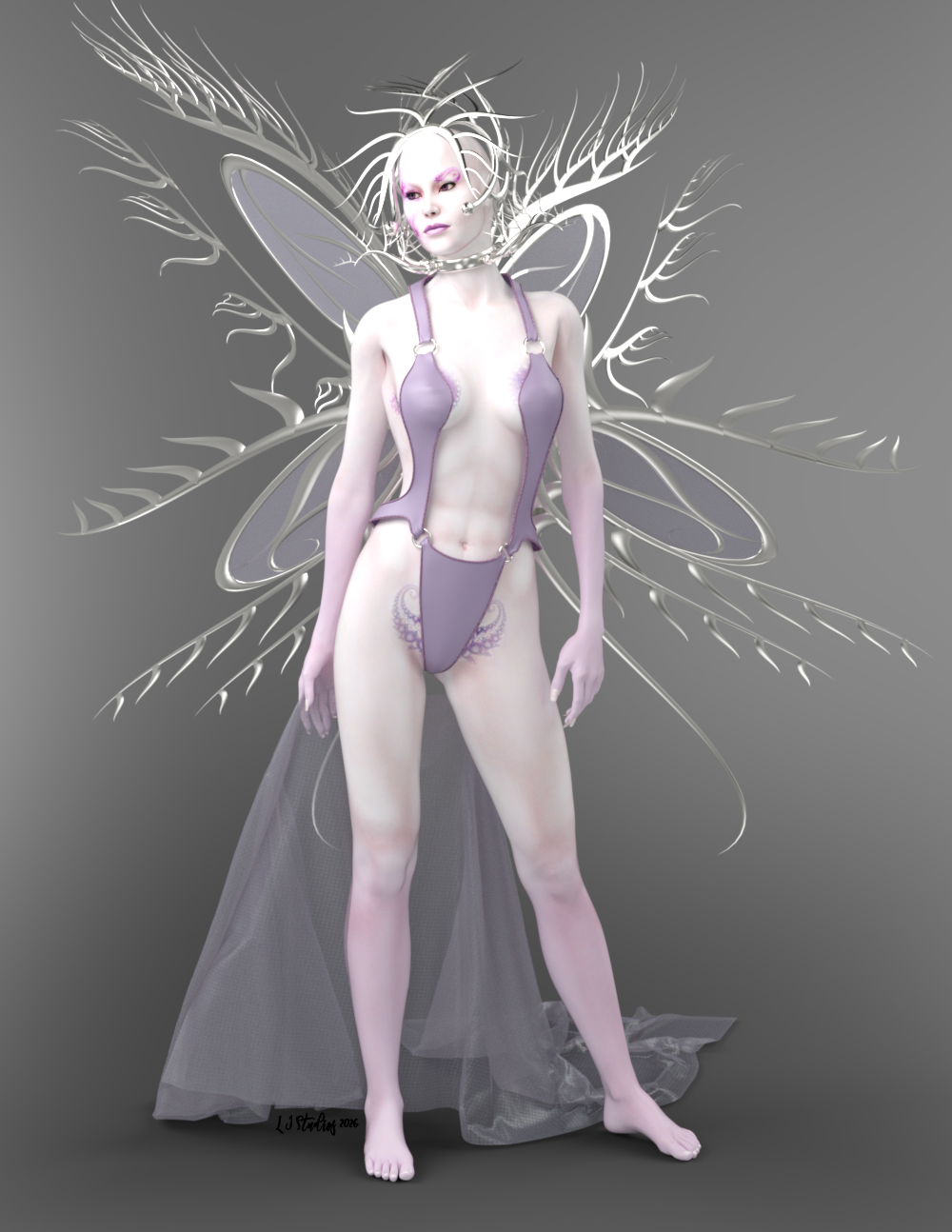
Urumi - DREAMPAINT objets 3D pour Poser page 12 includes the wings, crown and collar, along with the morph and texture.
V3 SwimSuit by Specs2 (who a long time ago was a PA for this site.) - V3 SwimSuit - Poser and Daz Studio Free Resources Wiki
V3 cloth is Jepe's Free Sample SheetZ For Victoria 4 (No longer available but the paid version for Genesis 8 is available here.)
V3 pose is Sexy Poses for Vicky3 - https://web.archive.org/web/20071215183048/http://www.sharecg.com/v/20456/poser/Sexy-Poses-for-Vicky3
All of the object materials were either converted to iray or I used iray shaders.
Daz 3D is part of

Connect
DAZ Productions, Inc.
7533 S Center View Ct #4664
West Jordan, UT 84084Licensing Agreement | Terms of Service | Privacy Policy | EULA
© 2026 Daz Productions Inc. All Rights Reserved.