-
The Mac FAQ
inquire said:
Oh, OK. Well, I found something under. I think G9 and then Toons. it has something like lights, and a Fillatune
environment. I clicked that. it set the render engine to viewport.
there was a note in there where the environment was that noted that the render engine would be set to viewport.
where is this other version of studio? I'm guessing it's a Beta.
I'm having ridiculous problems with speech to text. I have to keep going back in and changing things. Sigh!
Ah, right, sorry, I understand now. Yes, you found items that work under Filatoon, but you don't have the Filament/Filatoon rendering engine to actually use them properly.
At Totte pointed out, you have to download the Alpha (not even a Beta yet) to hvae the engine available to render the Filatoon assets. It's worth it, in my opinion, to see if Filament will give you results you like.
The Mac FAQinquire said:
Oh, OK. Well, I found something under. I think G9 and then Toons. it has something like lights, and a Fillatune
environment. I clicked that. it set the render engine to viewport.
there was a note in there where the environment was that noted that the render engine would be set to viewport.
where is this other version of studio? I'm guessing it's a Beta.
I'm having ridiculous problems with speech to text. I have to keep going back in and changing things. Sigh!
Enable DS 2025 in DIM in download filters and download it, if not just to test Filament veiewport
The Mac FAQinquire said:
So, where is Filatoon or whatever in Daz studio 4.24.0.3?
OK, I found the filatoon, and tried that. Sure didn't like it.
I'm not sure how you "found" Filatoon, as it and Filament aren't available at all in 4.24.0.3. The only became available for the first time in the DAZ Studio 2025 Alpha.
The Mac FAQSo, where is Filatoon or whatever in Daz studio 4.24.0.3?
OK, I found the filatoon, and tried that. Sure didn't like it.
And filament, or something like that, where is that?
I looked in the vendor settings and found open GL, but when I tried that on two different occasions, Daz studio just hung and would not respond and I had to force quit.
Oh one more comment: 4.24.0.3 quit far too often on Sequoia 15.4.1.
MimicMolly's Renders & WIPsThis is an example of what I want to do in DS now. The regular humans rendered in Viewport + Filament, with a colored toon outline and what looks like "drawn in" eyes and eyebrows. Mostly because I want to further edit the rendered results by hand with post work. And my more cartoony style can blend in better. (Pic shown has no hand edited parts. It is the render with an opaque, colored background.)
The character used is SOFT3D's Briana Morph for Genesis 9 at Renderhub. I think the skin is the default "Victoria 8.1" skin that G9 uses, with the Anime LIE makeup. I think these eyebrows are #7. She has 3DUniverse's Eden Hat and Hair for G9.
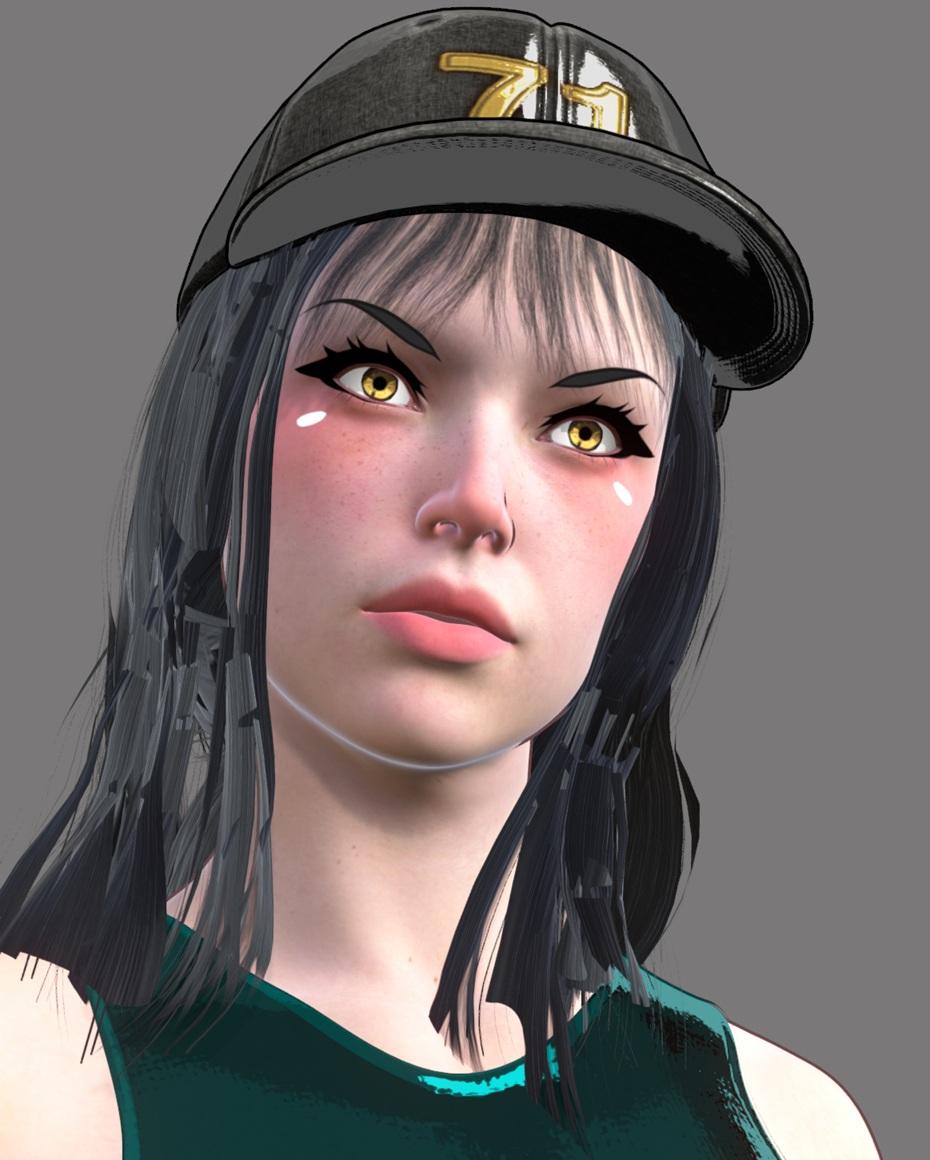
I originally made this scene with Briana to make a quick AI image edit. But I like how she looked, so now I'm trying to change it to be its own original render. I need more LIE makeups and more toon eyebrows.
MimicMolly's Renders & WIPsI think this new laptop is incapable of rendering in Iray. I was trying to simulate a cape yesterday, and after letting all that get started, DS switched to Iray without my knowledge. So when I tried to render, it didn't give me the warning to not obscure the viewport, and immediately crashed. The laptop before my previous one couldn't handle Iray and crashed similarly, but that was over 10 years ago. I then restarted DS and it was back to the default Filament rendering I've been doing. By the looks of it, I will be rendering with Filament from here on out. So no more dForce strand hairs or HD anything. (Luckily, it does seem I can use most of my mesh assets.)
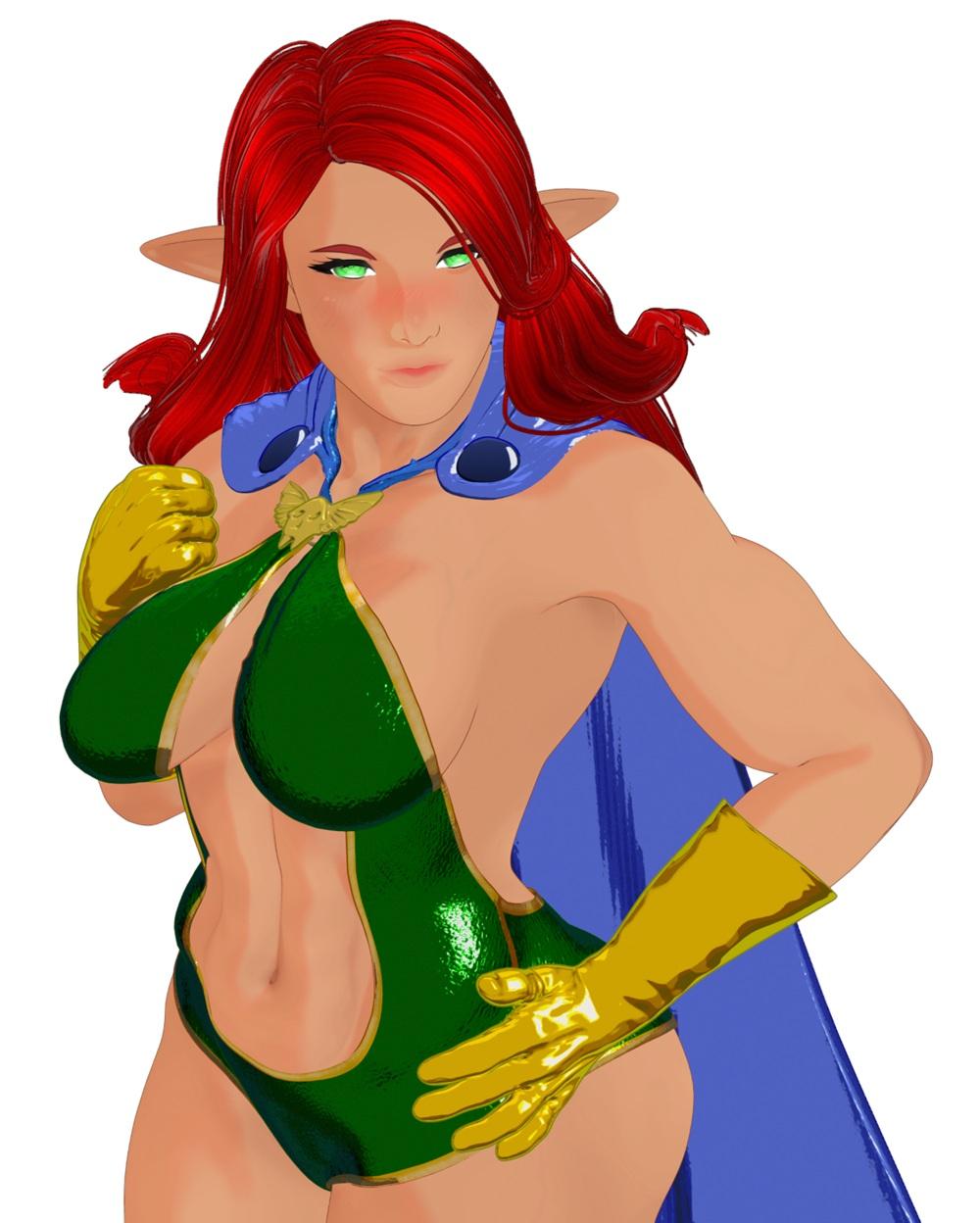
My problem, where DS decided to be Iray, happened on this specific test render. I am planning on tweaking the materials, since I need to make the gloves and brooch match the bodysuit yellow. I may also recolor the cape, but this is meant to be SquarePeg3D's Desert Champion G8F character, transferred over to G9 with a bit of Nirv Zero mixed in. (Plus, Zero's darker skin, eyelashes, and eyes.) So wanted her to have a similar color palette. I think I may have to paint over some hairs in GIMP. But I want to make more DS art that has this "rotoscoped" look. I'm still plotting to convince my friend to get into DS. XD
 I swear I fixed the Filament hair opacity issue, until it stopped working
mmdestiny I haven't done render experiments, but the inconsistency is all too familiar. While adding new items (clothing etc.) to a figure, the hair opacity focus changes! I spend lots of time trying to make the opacity somewhat stable (taking out hair caps and other layers, taking out opacity maps on overlaping layers, fitting spheres to cover parts or most of the head with added tex (no opacity) and just adding new items changes the whole look of the hair. Or, you think it's okay and then zoom in or out, and the opacity culling chooses some other focus. Saving then reloading the scene seems to be enough to change it, also. So, I'm not surprised to hear your comment. I keep checking the D/S updates and wish we would see lots of improvement to Filament in general.

 /peaceHelp Setting up Filament scenes
@dyret the immediate thing that comes to mind is that only distant lights and spotlights can generate shadows in Filament (and you have to turn Shadows on in the light settings). Area lights cannot cast shadows in Filament. The HDRI will only generate Ambient Occlusion (create Filament Draw Options node, all the SSAO settings are in the Enviromnet Section)
Help Setting up Filament scenesI\m sure I\m just dooing something stupid wrong, but I\m not able to get shadows in Filament. I would appreciate a link to a simple tutorial on this very much. Regards
G9 ToonsI wish there was more content. Yes I realize I can make my own and recolor stuff using filament shaders, however, toon shaders stuff doesn't look that great on a lot of the modern dforce wire hair when you might want a more stylized look. I cringe when I see pas selling horrible wire mesh hair that looks chunky and pixelated.
Also without more material zones the clothing doesn't look good.
I would like to see more characters, outfits and clothing for the characters and more stuff for men.
There is also a lack of quality in a lot of toon stuff. I still want hair movement. And details.
G9 Toonscnickel2000 said:
In my experience, the the type of asset lacking the most is hair (specifically made for filatoon) at the moment. You can convert iray hairs to use filament shaders, but the results are very hit or miss or require a lot of finagling. Some of the genesis 2 freebie hairs convert pretty well, but are still challenging to work with. There were some packs of textures / shaders meant to be used with filament that were released in the past couple months, but it would still be nice if there were more options.
There's a learning curve to getting things to look nice in filament - especially if you're using assets that weren't made for it. But overall it is possible to create some pretty cool stuff, even with the limited quantity of assetsI know this is of no use to anyone that isn't adept at creating their own stuff, but I've gotten some really good Daz-native results by creating SBH with a low density setting and like fairly thick width. Then just set it to a tesselation of 3 and apply the Toon Hair shader.
If you're a modeller, Toon-ready geo-based hair can be created fairly quickly with this tut too
 4.23 Filament Crashes on 0% scale (ticket submitted)
Just wanted you all to be aware of a bug I've come across in case you have scenes that suddenly start crashing.
Strangely, this scene did not crash until I loaded it for the first time in 4.23 instead of 4.22.
Here's the description I sent in my ticket.
I have discovered a bug where if an object's scale is set to 0% and Daz Studio is set to Filament, the program will crash. I have recreated this bug 100% of the time with either of the following 2 sequences of events.If already in Filament:
-create a cube
-set the cube to 0% scale
-toggle the cube visibility off, then on. Crash occurs when it is switched onIf in any other render mode:
-create a cube
-set the cube to 0% scale
-Switch to Filament. The crash occurs immediatelyThe program will also crash if a scene is loaded while in Filament mode and the scene contains an object with scale at 0%.
G9 ToonsIn my experience, the the type of asset lacking the most is hair (specifically made for filatoon) at the moment. You can convert iray hairs to use filament shaders, but the results are very hit or miss or require a lot of finagling. Some of the genesis 2 freebie hairs convert pretty well, but are still challenging to work with. There were some packs of textures / shaders meant to be used with filament that were released in the past couple months, but it would still be nice if there were more options.
There's a learning curve to getting things to look nice in filament - especially if you're using assets that weren't made for it. But overall it is possible to create some pretty cool stuff, even with the limited quantity of assetsG9 ToonsI haven't been following the G9 Toon assets in the shop. Are there a good number of them? Filament textures? I'm just curious about availability, variability, and perhaps popularity. Are there assets I should be looking at if I decide I want to jump into the filament toon offerings.
Daz Studio 4.24[.0.x], General Release!FrankTheTank said:
Well, I can't say I notice any difference between 4.23 and 4.24 If anything there seems to be a little bit laggier viewport in 4.24 so I reverted to 4.23. Also the Filament issue with emissives is still present in 4.24. I mentioned it here for reference. I hope that will get fixed before 4.x is abandoned and all effort is in DS 2025.
Any clues on how I can revert or is it enough for me to just replace the install folder from a backup?
V Tubers and DAZ usersWendyLuvsCatz said:
I have been looking at the weird world of Vtubers.
Most use Anime type programs like Vroid, MikuMikuDance and Live 2D Cubism
some make their own mesh from scratch like the one mentioned here in this video below
(which also briefly shows Shudu hence my post)

I am wondering if DAZ characters are going to take off as VTubers since they too can be live linked with Unreal Engine and Apple ARkit
and if DAZ wants to maybe wants some of that sweet Vlogging pie by incorporating it into DAZ studio itself maybe using Filament for realtime rendering overlayable on a video stream
since Mimic Live is gone maybe realtime facial capture is the future?
I love Code Miko; she's so funny. Also, I've noticed several of her outfits are from Daz.
I would love to see Daz get into VTubing stuff; I have a character I was thinking to use as an avatar, so I was just looking up ways to do that. If they had a way to streamline the process, that'd be a Godsend.
I swear I fixed the Filament hair opacity issue, until it stopped workingI know there's been a bunch of threads on this, and maybe I'm just spitting in the wind here, but I had an animation render out with opacity map hair [in Filament] and no flicker whatsoever. I rendered from 3 different angles, all good. I was excited and saved the file.
Tried it again later and the flicker was back.
I can't even wrap my head around this lol. It's been 4 years and we're still going through this.
MimicMolly's Renders & WIPsI'm finally not as busy anymore. Since then, I've had to buy a new laptop but due to my own budget restraints I couldn't get one with a NVDIA graphics card. This new laptop feels like an inferior version (that somehow runs faster) than my previous device.
Anyway, I've attempted to do a fresh install of DAZ Studio on it with DIM. And as of May 2025, DIM insists on installing the latest version of DS + all the recently "manually added" G9 freebies snd the G9 Starter Essentials. I wanted G9 and the rest to be in my SSD, but I guess I'll have to do things manually.
And yes, the first thing I did after finishing the fresh install was to close the Smart Content panel and the AUX Viewport.
I was also surprised that Filament was the default view. But I don't mind, since I'm planning on just keeping G9 + Filatoon on this new laptop. But I'm going to reinstall G8 and everyone else to that SSD.
I actually had some difficulty in trying to get DIM on the new laptop to recognize the files I have saved to the SSD. I really did want everything on the SSD, since this was pretty much meant to be a clean start.
A couple months later, this is the real review of my experience.
Easy FilaToon [Commercial]wsterdan said:
itinerant said:
EDIT: By the way, the scripts do not work in the Mac 2025 Alpha build, but they do work in the Windows 2025 Alpha build. The shader presets work in both, but the full conversion scripts do not.
I think the only thing that doesn't work is generating the geoshell Toon Outline shell for Filatoon. You get the message. below when that happens
For loading the presets, the Mac OS operating system uses "/" instead of a PC's "\"; for example, if you check the log report, it can't find "\Shader Presets\ Filatoon\Presets" because on a Mac it should be "/Shader Presets/FilaToon".
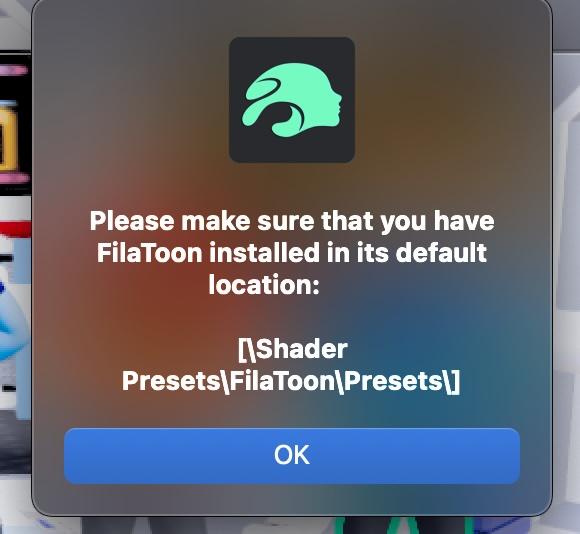
You can do this manually by going to the Shader Presets folder in the Filatoon Presets; everything else that I've tried in Easy Filatoon works fine, as far as I can tell.
You can file a ticket with support to help out; I already did one and was told that since DAZ doesn't yet fully support Filament on the Mac, I had to file a "feature request".
LIke you, I love the product, it's made it so much easier and so much fun to finally get into Filatoon on the Mac
Thanks for the information. It is always good to know why something is happening. Hopefully, as the Mac version of Filament is better supported, this product will automagically work.
Easy FilaToon [Commercial]itinerant said:
EDIT: By the way, the scripts do not work in the Mac 2025 Alpha build, but they do work in the Windows 2025 Alpha build. The shader presets work in both, but the full conversion scripts do not.
I think the only thing that doesn't work is generating the geoshell Toon Outline shell for Filatoon. You get the message. below when that happens
For loading the presets, the Mac OS operating system uses "/" instead of a PC's "\"; for example, if you check the log report, it can't find "\Shader Presets\ Filatoon\Presets" because on a Mac it should be "/Shader Presets/FilaToon".
You can do this manually by going to the Shader Presets folder in the Filatoon Presets; everything else that I've tried in Easy Filatoon works fine, as far as I can tell.
You can file a ticket with support to help out; I already did one and was told that since DAZ doesn't yet fully support Filament on the Mac, I had to file a "feature request".
LIke you, I love the product, it's made it so much easier and so much fun to finally get into Filatoon on the Mac
Daz 3D is part of

Connect
DAZ Productions, Inc.
7533 S Center View Ct #4664
West Jordan, UT 84084Licensing Agreement | Terms of Service | Privacy Policy | EULA
© 2026 Daz Productions Inc. All Rights Reserved.