-
Adding Dual Quaternion support to UnrealEngine4 (Images inside)
i sended a pm for you
I responded to your PM.
Ellessarr said:
here a video about how to add corrective morphs:
https://www.youtube.com/watch?v=tvBpanNO5SM&list=FLnpaZFMQAwPP4z267hGDXPQ&index=2&t=
The video above doesn't go into a lot of detail how this is set up. Here's a bit more information.
First create an Animation Blueprint. Name it something like Post_Process_Anim
(See Head_FWD.png below)
Start with an Input Pose node. This will look at whatever pose your character is making.
Create a Bone Driven Controller node and apply these settings.
Source Bone = The bone you want to check the rotation of to drive the morph
Source Component = Which axis of that bone do you want to check the rotation of to drive the morph
Remap Source Checked
Source Range = What range of motion will drive the morph. Example - if the bone's x rotation moves from 0 to -27 then the morph be applied from 0 (no influence) to 1 (full influence)
Destination Mode = Morph Target
Parameter Name = Paste the name of the morph you will be driving.
Connecting the Bone Driven Controller node to the Input Pose node should automatically generate the Local to Component node.
(See Head_BCK.png below)
You will likely need to have one node for forward rotations and one node for backward rotations.
Do this for each bone axis you need a morph target for.
(See End.png below)
Connecting the last Bone Driven Controller node to the Output Pose node will generate the Component To Local node for you.
(See Enable_Post_Processing.png below)
Once this is set up go to your mesh's Asset Details panel. Under Skeletal Mesh - Post Process Anim Blueprint select the animation blueprint you just created.
You may have to enable it on the right or from the yellow bar at the bottom.
The end result should be that as you animate you character these morph targets will be automatically applied to you mesh.
Edit: Tried to be more clear
thanks!!!!
Sent you a PM
Easy way to move clothes up/down ?This is generally a thing that's hard to do with DAZ. There's no easy fix here.
Zevo's Fit Control offers some such morphs and it's overall a product I'd recommend, but it too has its limits (and of course costs money)
https://www.daz3d.com/fit-control-bundle-for-genesis-8-females-and-males
wow nice! That is what i need :D
But I am confused:
https://www.daz3d.com/fit-control-bundle-for-genesis-8-females-and-males
https://www.daz3d.com/fit-control-add-on-for-genesis-3-and-8-bundle
The 3+8 contains bundles for Male+Female for ALL.... and is cheaper... so whats the difference to the G8 F/M only?
Edit: Okay its an addon, but... iam confused now :(.... WHAT producs to I now need if I wanna dress/undress G8/3 what will make the addons?
You need both the main product and the add-on since the add-on has the extra "undress" morphs. Once you've purchased the items, then you dress your figure, go to the product and you'll find a script. Run the script and it will add a lot of morphs to the garment you select.
Yeah I grabbed all, Awesome stuff... I am soo happy that Hylas did tell it me! I am too stupid to understand how to use hexagon -_-...
Above is only important if you're making garments for sale. As long as you're just rendering you can ignore it.
Ohhhh okay :D And... how can I save the slider to that clothes? I made the clothes which have Tarzan :D with pulling up/down (which was really much work even with sliders...) how can I save it so I can use it again?
And... are I am allowed to share this morphs ? if I link the used product and say here is a morph for it? I don't know it... and dont know how to share a morph, because... I never saw morphs in stores ...
Okay the Everyday2 have morphs :D
Maybe..
https://www.renderosity.com/mod/bcs/taking-it-off-for-greybros-g8-jeans-and-tee-male-edition/136188/
This is ONLY the morph sliders or?... so he/she just shared sliders?
Novica & Forum Members Tips & Product Reviews Pt 12A weird thing happens for me with the morph fast grab items. Zev0 and DiscoBob's Skin Folds & Creases appears in the carousel, then when I go to view all the items, it shows briefly and then disappears along with all the items I own, even though I don't own that particular item. I've tested it in my cart, and it discounts just like it should.
That sounds like the behavior of products that have been hidden using the Daz Deals plugin…
Interesting. Does the plugin randomly hide items? I definitely wouldn't have hidden that deliberately.
You'd have to click on the big blue button on the product page to hide it. When you do, the button changes to an Unhide button without reloading the page, so it is conceivable one might click on it unintentionally and not realize it. I know I've had pages shift on me when there was a purple banner. I don't think I've hidden any products I didn't want to hide, but I know I've opened the wrong product page from a listing when it jumped the same time I clicked.
Blender OBJ to G8 Wearable?No, don't weight map it in Blender. Instead, make sure that the collar lines up with the zeroed Genesis 8 on load (without aplying any adjusments to either), then go to Edit>Figure>Transfer Utility, set the Genesis 8 figure as the Source and your object as the Target, and click Apply - see how that goes.
Okay, I'll try that, thank you.
This is a high level overview of the process: First export the unmorphed unposed G8 character to Obj from Daz Studio. Then import that Obj into Blender to act as a fitting mannequin. Model the collar in Blender to fit on the unmorphed unposed Genesis 8 character. Export your collar as Obj. In Daz Studio, import the collar Obj and use the Transfer Utility to rig it to G8. Transfer Utility will create a basic weight map that you can edit in Daz Studio if necessary. No Blender weight mapping is needed. After rigging with the Transfer Utility, save it as a Figure/Prop Asset in your Content Library.If Richard's method doesn't work, I'll try this, thank you very much for the walkthrough.
CLOSED!Sculpting a face morph for Genesis 8As a "regular" user, the only morphs you can create are morphs made from the base mesh. You can use the higher res sculpt to create normal or displacement maps to use in combination to your morph, but that's all.
Creating HD morphs based on a subdivided version of the mesh to get a more detailed version is possible for Daz PAs which have access to additional tools not available to the general public.
CLOSED!Sculpting a face morph for Genesis 8Hello all,
I've seen a lot of characters where the description says scultped in Zbrush or something similar.
My question: does the sculping process work on the low poly base mesh of Genesis 8 or is there a technique that allows you to use dynamic topology and somehow revert to the base mesh at the end?
I'm asking because for me the base mesh doesn't always seem like enough to give the face form that I want, especially if some of the bigger polys (like in the cheeks) don't line up with what I want. I am afraid to grab and move the polys freely as I do not know what that will to do the posing of the face afterwards, even if it looks the way that I want.
Any help or tips are appreciated.
Thanks
The "Powered by Hot Pockets" Complaint ThreadComplaint: (*Sigh*) Microsoft has been trying to rid itself of "WIndows Live Mail" (WLM) for years, but has kept a version around that sort of works. But it's come to the point where I was getting frustrated and I either needed to switch to full featured "Outlook" ($$$) or go with another email client. For the last couple of days I've been switching over to "Thunderbird". It seems to have all that I need and the price is right ($0). But it seems to be difficult to transfer over my archive of "WLM" messages (20+ years of email archives converted from earlier versions of whatever email app was available for free with various versions of Windows over the decades). It may be possible but it looks like a lot of work and I NEVER seem to need to go back and read email from 19 years ago. (go figure) so I think I'll bite the bullet and leave it all behind in the current version of WLM that still works in Win10 and cross the bridge of transfering that archive to yet another more modern email app if I ever actually need to. Sometimes, hoarding just isn't worth it.
 transferring Rig
This is how they were alligned. Would this cause that much distoration in the transfer?
transferring RigFollowing these instructions is the closest i've ever gotten to making a rig work in daz. In layman terms, ( seriously, dumb it down.) could someone tell me what i'm doing wrong? attached is how my figure moves after following the steps.Thanks for your help.
Thomas Windar said:
Load your Source Figure into the Scene. (This will be our donor for the rig).
- Load your Target Figure into the Scene. Make sure both figures are in their Zero states.
- Go to Edit -> Figure -> Transfer Utility.
- In it, select your Source and Target figures.
- In advanced options, de-select "Fit to Source Figure".
- You can delete the Source Figure from the scene now.
- The Target should now have the Rig of the Source figure and its Groups, surface, weight maps, etc.
2020 "There's Always Another Sale™" (Report sales errors here.)Not really a complaint but something PA's and Daz my think about in the future, is when they do something like the Morph Fast Grab is to offer the seperate items in the bundles because I did not buy several things because I already own half the bundle. Whereas if the seperate items had been offered I would have bought them.
Theoretically, there's no reason they couldn't do that, or, better yet, deduct the percentage of the sale price of the items that you already have from the total bundle. ONe of DAZ's competitors, CG Bytes, does exactly that and it's all done automatically via their store software.
Genesis 8 female what's going on?Just in case someone is still having problems with this issue, I have found the exact culprit. It is for sure the BGM morph. But when I uninstalled it the issue remained. For some reason uninstalling it does not remove all the sliders.
That sounds as if there were two installations, possibly one via Install Manager and one via Connect. How did you install and uninstall?
In the Parameters tab, make sure "show hidden properties" is checked. Then go to the drop down menu on the left and select the menu labeled "Hidden". Within that you should see the "Correctives" dropdown menu. And within that one is the "Base" menu, which contains BGM. The specific slider is pjcmbgmglutesmooththighsbend90, but sliding all tabs to 0 removes the leg and hip deformities also.
Genesis 8 female what's going on?Just in case someone is still having problems with this issue, I have found the exact culprit. It is for sure the BGM morph. But when I uninstalled it the issue remained. For some reason uninstalling it does not remove all the sliders.
In the Parameters tab, make sure "show hidden properties" is checked. Then go to the drop down menu on the left and select the menu labeled "Hidden". Within that you should see the "Correctives" dropdown menu. And within that one is the "Base" menu, which contains BGM. The specific slider is pjcmbgmglutesmooththighsbend90, but sliding all tabs to 0 removes the leg and hip deformities also.
Transferring a donor rig to another item...i moved my question to Technical Help.
I don't have a Video for this, but perhaps a Written Process would be enough? Also - you WILL use Transfer Utility with this anyway. It's just a lot of clean up, regardless.
Let's try it at least:
- Load your Source Figure into the Scene. (This will be our donor for the rig).
- Load your Target Figure into the Scene. Make sure both figures are in their Zero states.
- Go to Edit -> Figure -> Transfer Utility.
- In it, select your Source and Target figures.
- In advanced options, de-select "Fit to Source Figure".
- You can delete the Source Figure from the scene now.
- The Target should now have the Rig of the Source figure and its Groups, surface, weight maps, etc.
Following your instructions is the closest i've ever gotten to making a rig work in daz. In layman terms, ( seriously, dumb it down.) could you tell me what i'm doing wrong? attached is what my figure looks like after following your steps.Thanks for your help.
2020 "There's Always Another Sale™" (Report sales errors here.)Not really a complaint but something PA's and Daz my think about in the future, is when they do something like the Morph Fast Grab is to offer the seperate items in the bundles because I did not buy several things because I already own half the bundle. Whereas if the seperate items had been offered I would have bought them.
Novica & Forum Members Tips & Product Reviews Pt 12A weird thing happens for me with the morph fast grab items. Zev0 and DiscoBob's Skin Folds & Creases appears in the carousel, then when I go to view all the items, it shows briefly and then disappears along with all the items I own, even though I don't own that particular item. I've tested it in my cart, and it discounts just like it should.
That sounds like the behavior of products that have been hidden using the Daz Deals plugin…
Interesting. Does the plugin randomly hide items? I definitely wouldn't have hidden that deliberately.
Face Transfer for old genesisI have been working to try to create more male characters, and thought is I started with Genesis 8 in design and worked to transfer the morphs as far back as I could and retain the look of the character, that to make that character available in one pack to multiple generations would increase the likelyhood of more sales. Now since I am new to this, I have just gotten close to finishing the Genesis 8 version. I will try to convert it then to 3 and if successful add to the character pack and go as far as I can before trying to release the first pack.Black Is Beautiful II
Freebie credits:
Morph by RenderGuyNY: https://sharecg.com/v/90309/gallery/21/DAZ-Studio/Genesis-8-Female-Faces
Rose by bazsa: https://free3d.com/3d-model/rose-31675.html
Petals by Sannzi: http://sanzisannzi.web.fc2.com/sub3.html
Pose Converter by MCphylyss: https://www.sharecg.com/v/89846/browse/8/Script/Daz3d-Pose-Converter-Standalone@ZamuelNow: I'm sorry to hear about your health problems, I hope all is well...
Hylas' cornerAnother hand-spun big girl morph. Let me know whether you think her body is plausible and/or how you think I can improve her.
Freebie credits:
Morph by RenderGuyNY: https://sharecg.com/v/90309/gallery/21/DAZ-Studio/Genesis-8-Female-Faces
Rose by bazsa: https://free3d.com/3d-model/rose-31675.html
Petals by Sannzi: http://sanzisannzi.web.fc2.com/sub3.html
Pose Converter by MCphylyss: https://www.sharecg.com/v/89846/browse/8/Script/Daz3d-Pose-Converter-StandaloneMimicMolly's Renders & WIPsLove RawArt's Sphinx for G8F but also, made me realize that I had two other G8F cat girls already. (Thistle and MAB/Will Dupre Catgirl Megapack).So yes, now I'm interested in retexturing the Sphinx wings for them to match these other ones. I love versatility, it's one reason I don't usually like to buy "characters". These usually don't go with my creativity since they have their own definite style. But this one's shape is a good base and I have the HFS morphs to make other paw-legged anthro-ish girls. The Catgirl textures, for the feet's paw pads don't line up well with Sphinx. I might render an example later, since I have to go out and run errands.
Here she is with the Catgirl stuff. Now it needs some tweaking, but it fits her well too. I might also have to line her up with a blank G8F and dialspin an approximation, so I could have a fully "human" version of her shape too. I'm glad I got her, she suits my needs. XD
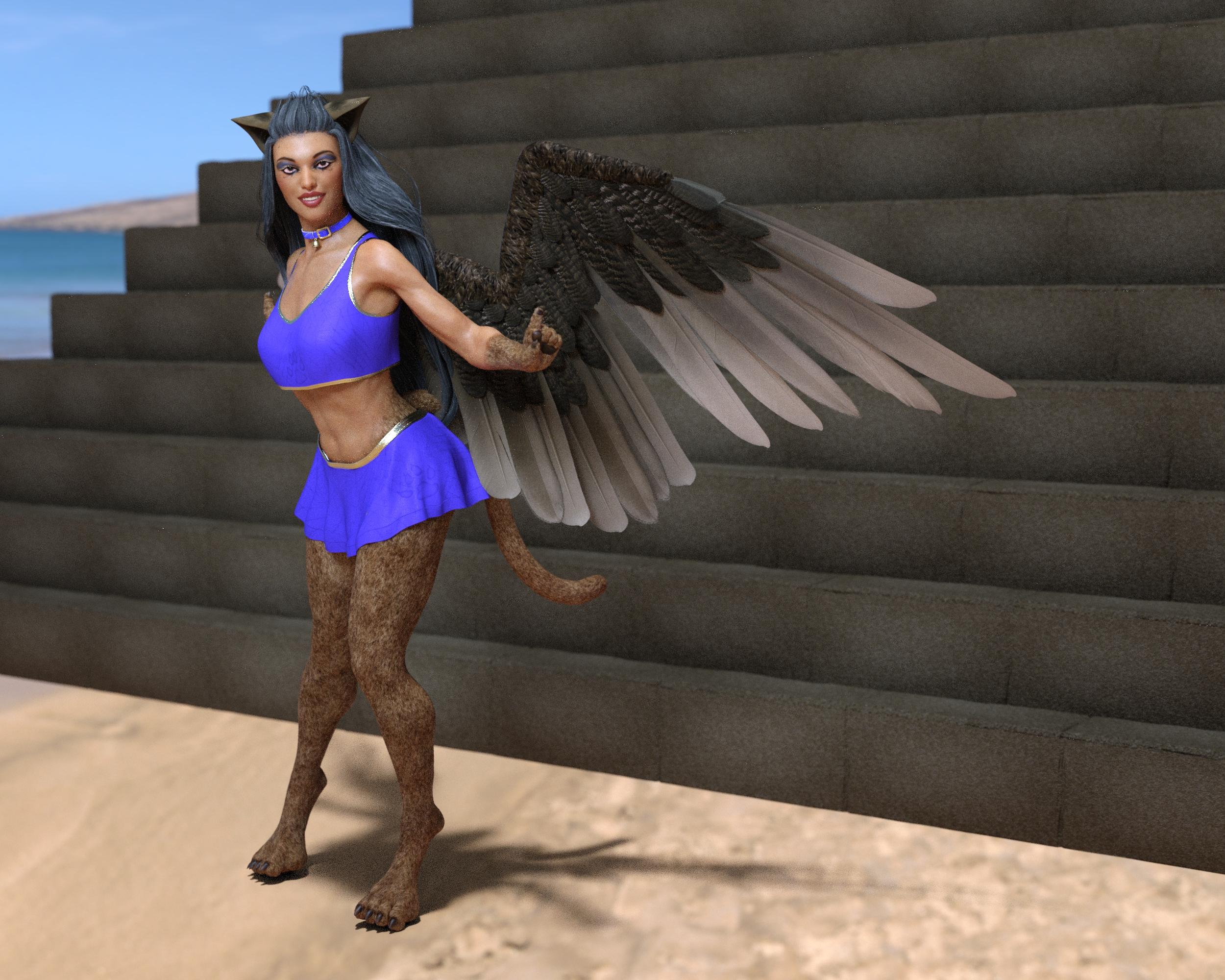
I was curious about the Sphinx' included pyramid. It is rendered in the back but it's huge.
I have the Morning Star(?) wings too (I think I got them very cheap or for free a while back) but the reason I've not downloaded them is because I don't like their shape. Sphinx's wings are pretty and I also need to see if I can use them (with retexturing) to make some angel girls. The wings was mostly why I got her, but I like just about everything else too, except no separate paw/foot/legs morph or head morph. But I could probably figure out how to split her apart on my own.
Snow Beast..ROOAARRR!!! [commercial]Any chance of a Female morph/version?
Probably not...sorry
Well...crud. :(
Daz 3D is part of

Connect
DAZ Productions, Inc.
7533 S Center View Ct #4664
West Jordan, UT 84084Licensing Agreement | Terms of Service | Privacy Policy | EULA
© 2026 Daz Productions Inc. All Rights Reserved.