-
Is there a better way to prevent cling with dforce objects?
You can try this, it SOMETIMES works for me. Pose your figure on the timeline, then on the first frame with figure in the default pose, load the clothing item into the scene. Dont autofit it or parent it just do a default load. Then, while still on the first frame, use the clothings adjustment morphs to "fit" the item to the approximate shape and position of the figure. Once you are satisfied, run the simulation using the animated timeline duration and you MAY get a really nice drape. Often times though, wether or not this will work depends on how good the clothing item is with its morphs.
I feel your pain. I hate autofit with a passion and I really hope it is abandoned as dforce gets better at fitting. Sure it makes sense for some clothing items, but it is still an excercise in futility when trying to get good drapes on larger bodies. some people can do it really well. I cant.
Auto fit is used to fit clothes made for one figure eg: G3F, onto another figure eg: G8F, so I am not sure if that is what you dislike. Do you mean auto follow? This is what makes clothing fit when the clothing item is missing a fit morph for one or more of the morphs applied to the figure.
Whatever it is that shrink wraps the clothes. Thats what I dont like. Thats autofollow?
Autofollow does not set out to shrinkwrap, indeed some clothing items seem to be in such a state to start with, however I guess it could have that effect in certain circumstances.
However I should add that I very much value autofollow, indeed it is one of the things that persuaded me that DS was superior to Poser, since relying soley on the morphs built into the clothing by the PA that made it was pretty restricting in the morphs one could apply to the body, and autofollow meant we did not need to do that any longer.
Sure, ill give you that. It needs to be replaced by a better technology though. Not sure what that'll be, but the tech has to improve.
Is there a better way to prevent cling with dforce objects?You can try this, it SOMETIMES works for me. Pose your figure on the timeline, then on the first frame with figure in the default pose, load the clothing item into the scene. Dont autofit it or parent it just do a default load. Then, while still on the first frame, use the clothings adjustment morphs to "fit" the item to the approximate shape and position of the figure. Once you are satisfied, run the simulation using the animated timeline duration and you MAY get a really nice drape. Often times though, wether or not this will work depends on how good the clothing item is with its morphs.
I feel your pain. I hate autofit with a passion and I really hope it is abandoned as dforce gets better at fitting. Sure it makes sense for some clothing items, but it is still an excercise in futility when trying to get good drapes on larger bodies. some people can do it really well. I cant.
Auto fit is used to fit clothes made for one figure eg: G3F, onto another figure eg: G8F, so I am not sure if that is what you dislike. Do you mean auto follow? This is what makes clothing fit when the clothing item is missing a fit morph for one or more of the morphs applied to the figure.
Whatever it is that shrink wraps the clothes. Thats what I dont like. Thats autofollow?
Autofollow does not set out to shrinkwrap, indeed some clothing items seem to be in such a state to start with, however I guess it could have that effect in certain circumstances.
However I should add that I very much value autofollow, indeed it is one of the things that persuaded me that DS was superior to Poser, since relying soley on the morphs built into the clothing by the PA that made it was pretty restricting in the morphs one could apply to the body, and autofollow meant we did not need to do that any longer.
Is there a better way to prevent cling with dforce objects?You can try this, it SOMETIMES works for me. Pose your figure on the timeline, then on the first frame with figure in the default pose, load the clothing item into the scene. Dont autofit it or parent it just do a default load. Then, while still on the first frame, use the clothings adjustment morphs to "fit" the item to the approximate shape and position of the figure. Once you are satisfied, run the simulation using the animated timeline duration and you MAY get a really nice drape. Often times though, wether or not this will work depends on how good the clothing item is with its morphs.
I feel your pain. I hate autofit with a passion and I really hope it is abandoned as dforce gets better at fitting. Sure it makes sense for some clothing items, but it is still an excercise in futility when trying to get good drapes on larger bodies. some people can do it really well. I cant.
Auto fit is used to fit clothes made for one figure eg: G3F, onto another figure eg: G8F, so I am not sure if that is what you dislike. Do you mean auto follow? This is what makes clothing fit when the clothing item is missing a fit morph for one or more of the morphs applied to the figure.
Whatever it is that shrink wraps the clothes. Thats what I dont like. Thats autofollow?
AutoFollow is the transfer of unsupported morphs to fitted items - it can produce a shrink wrap effect.
Is there a better way to prevent cling with dforce objects?You can try this, it SOMETIMES works for me. Pose your figure on the timeline, then on the first frame with figure in the default pose, load the clothing item into the scene. Dont autofit it or parent it just do a default load. Then, while still on the first frame, use the clothings adjustment morphs to "fit" the item to the approximate shape and position of the figure. Once you are satisfied, run the simulation using the animated timeline duration and you MAY get a really nice drape. Often times though, wether or not this will work depends on how good the clothing item is with its morphs.
I feel your pain. I hate autofit with a passion and I really hope it is abandoned as dforce gets better at fitting. Sure it makes sense for some clothing items, but it is still an excercise in futility when trying to get good drapes on larger bodies. some people can do it really well. I cant.
Auto fit is used to fit clothes made for one figure eg: G3F, onto another figure eg: G8F, so I am not sure if that is what you dislike. Do you mean auto follow? This is what makes clothing fit when the clothing item is missing a fit morph for one or more of the morphs applied to the figure.
Whatever it is that shrink wraps the clothes. Thats what I dont like. Thats autofollow?
Is there a better way to prevent cling with dforce objects?You can try this, it SOMETIMES works for me. Pose your figure on the timeline, then on the first frame with figure in the default pose, load the clothing item into the scene. Dont autofit it or parent it just do a default load. Then, while still on the first frame, use the clothings adjustment morphs to "fit" the item to the approximate shape and position of the figure. Once you are satisfied, run the simulation using the animated timeline duration and you MAY get a really nice drape. Often times though, wether or not this will work depends on how good the clothing item is with its morphs.
I feel your pain. I hate autofit with a passion and I really hope it is abandoned as dforce gets better at fitting. Sure it makes sense for some clothing items, but it is still an excercise in futility when trying to get good drapes on larger bodies. some people can do it really well. I cant.
Auto fit is used to fit clothes made for one figure eg: G3F, onto another figure eg: G8F, so I am not sure if that is what you dislike. Do you mean auto follow? This is what makes clothing fit when the clothing item is missing a fit morph for one or more of the morphs applied to the figure.
Is there a better way to prevent cling with dforce objects?I was very excited when dforce came out because I was convinced I would finally be able to say goodbye to plastic wrapped shirts. Nope.
For whatever reason, if a dforce piece of clothing is fit to a figure when I run dforce it clings. Specifically obvious on fat or busty people.
My solution is to NOT parent it on them, make it too big and then manually pose it over them then drape. The issue there is that it's baggy. To make it worse, if it has morph controls from the figure ( sure as breast shapes ) the cloth is expanded in that area which results is stupid saggy areas.
Another option is to plankify every figure and the add curves over a timeline but the timeline is at best a klugey mess and half the time it goes nuts.Without JeansI have encountered the problem with the shoes. Is there a way to get the missing parts to show up again after I remove the shoes?
the shoes usually come with a remove morph, might check the shoe folder options
Making a Kitten Morph for Daz housecat - any cat experts out there?What the absolute hell. I thought I remembered having a kitten morph, but I just looked and couldn't find it at Renderosity or ShareCG. How is it labeled?
Making a Kitten Morph for Daz housecat - any cat experts out there?There is a preset for the Millenium cat available as a freebie, that I believe should work with Daz House Cat, as it is the same mesh, and has the same bones. I confess I have not tested it.
Note this is a preset, that applies the base morphs plus some scaling, it is not a kitten morph.
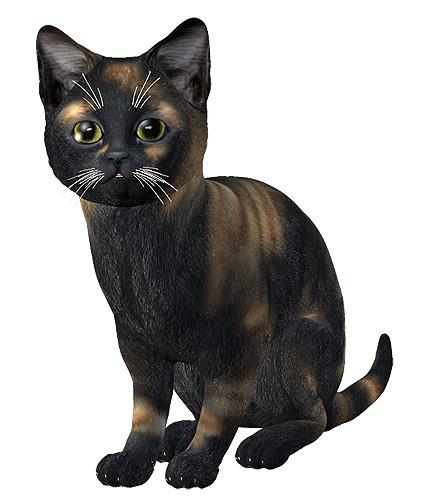
The free download is here:
https://www.renderosity.com/mod/rrfilelock/download.php?fileid=42301&key=2124
Making a Kitten Morph for Daz housecat - any cat experts out there?Hi guys,
I've searched the Daz store long and wide and have not found any kittens.
I know that Hivewire has one, but that would mean I would have to get the housecat first and I already have the Daz housecat.
All this said, I've decided to make a kitten morph for my cat.
The problem is I don't know what the body size proportions are like for a kitten compared to a cat. Because of that, I am unsure how to proceed.
I've searched on google but haven't been able to find any good resources.
I know that the head needs to be bigger and the body shorter but that is not enough to go on.
Anyone that knows what the correct body proportions for a cat are for different ages, please let me know.
Since this won't be a very proffesional morph, just something I'm doing for myself, I plan on putting it in the freebie thread once finished. This way, I can also get more testers to perfect it.
Thanks
Depending on what age you're looking for, this might be a usable reference: https://www.alleycat.org/resources/kitten-progression/
For proportions in relation to adult cats, there's an internet full of reference photos out there *g* and of course some kittens are stocky little chunks while others are all leg and tail.
Looking forward to what you come up with, and testing it!
Thanks for your comments.
I have looked at that as well and it is pretty usefull as reference images go, my problem is that I am yet not experienced enough to use reference images properly.
For example I can see that the muzzle is shorter and stuff but I can't figure out how much.
I have however made a first try at this, creating 2 custom morphs for changing the head and using the rest of housecat morphs to get it there.
In the middle is the normal cat. On the right is the kitten shape at full size for comparison, on the left is the same shape but scaled down for kitten size.
Wolf Dog 8, Husky Dog 8, and German Shepherd Dog 8 ??Stupid doggo question: Does Dog 8 have a "non-male" morph?
Making a Kitten Morph for Daz housecat - any cat experts out there?Hi guys,
I've searched the Daz store long and wide and have not found any kittens.
I know that Hivewire has one, but that would mean I would have to get the housecat first and I already have the Daz housecat.
All this said, I've decided to make a kitten morph for my cat.
The problem is I don't know what the body size proportions are like for a kitten compared to a cat. Because of that, I am unsure how to proceed.
I've searched on google but haven't been able to find any good resources.
I know that the head needs to be bigger and the body shorter but that is not enough to go on.
Anyone that knows what the correct body proportions for a cat are for different ages, please let me know.
Since this won't be a very proffesional morph, just something I'm doing for myself, I plan on putting it in the freebie thread once finished. This way, I can also get more testers to perfect it.
Thanks
Depending on what age you're looking for, this might be a usable reference: https://www.alleycat.org/resources/kitten-progression/
For proportions in relation to adult cats, there's an internet full of reference photos out there *g* and of course some kittens are stocky little chunks while others are all leg and tail.
Looking forward to what you come up with, and testing it!
Making a Kitten Morph for Daz housecat - any cat experts out there?Hi guys,
I've searched the Daz store long and wide and have not found any kittens.
I know that Hivewire has one, but that would mean I would have to get the housecat first and I already have the Daz housecat.
All this said, I've decided to make a kitten morph for my cat.
The problem is I don't know what the body size proportions are like for a kitten compared to a cat. Because of that, I am unsure how to proceed.
I've searched on google but haven't been able to find any good resources.
I know that the head needs to be bigger and the body shorter but that is not enough to go on.
Anyone that knows what the correct body proportions for a cat are for different ages, please let me know.
Since this won't be a very proffesional morph, just something I'm doing for myself, I plan on putting it in the freebie thread once finished. This way, I can also get more testers to perfect it.
Thanks
How the heck do you make an opacity mask for the surfaces tab?Just a reminder that it's actually hard to do the stuff PAs do. ;)
This is actually a case where it would be easier for a PA to do something than the it would be for the general public, because they have access to the original files. I’m sure things like makeup, tattoos, eyebrows and the like aren’t painted onto the skin itself, but are separate layers. That would make creating an opacity mask trivially easy, whereas the end user would have to resort to other methods.
As far as makeup and so on, those are actually pretty easy to acquire in layer form as "merchant resources" sold both here and at Renderosity. In a worst case scenario, if you have two versions of a face, one with makeup and the other without, you can separate the two elements using layers and the "difference" blend mode, and then transfer the result to another figure's texture, to LIE or a geoshell. Ultimately, the biggest difference in quality will be in the knowledge and skill base of the artists themselves, which in this business are usually quite formidable, and in the tools being used to create the item, since the average consumer has far less incentive to spend the oodles of cash needed for programs like Zbrush, Backsmith3D Pro, Substance Painter, etc..
Evil Clown HD for Genesis 8 MaleThe teeth are a morph of the existing ones, all part of the character. There is also a special Evil Clown Grin expression to bring out the best, erm, worst.
Breast movement...I don't mind the mods deleting everything I write. haha I am not a kid and you can't hurt my feelings. I don't lament what daz studio can't do I just use what it can do. I use DS for stills in Opengl or 3delight (if I need shadows) and do animation in software that uses game engine animation tools period. I have tried animation with Otoy Octain and Iray in Iclone 7 and it is horrible. I stick with what is fast even If I have to sacrifice level of detail so a model moves well in the game engine. Unity and Ureal are great with a good pair of VR googles but don't spend too much time those googles or they will fog up and cause you eye strain. I set a cell phone alarm and limit my time in VR to 1hr increments any more and you are asking for trouble. As far as breast movement is concerned I don't care about breast movement as much as making the model seem more alive by doing a couple of things like blinking a few times a second and a morph that expands the chest to simulate breathing. Something else that adds realism to your model is figiting. People move around alot and can't stand still so add little movements to head and posture ( most poses are too strait and most people slouch). Making something seem alive in animation is about all the little details. Hope this helps. ~ my 2 cents
We need Growing Up for Daz Dog 8, Zevo? Any PA?I'd love a puppy morph kit or at the very least, one to make toy breeds. But most likely, we'd get the full-body shapes since that's how the other breeds have been.Wolf Dog 8, Husky Dog 8, and German Shepherd Dog 8 ??Got the wolf, thoughts so far;
Only one coat colour? Could have gotten more but not a huge loss.
New UV to adapt? Not as good. I know why it is there, I just prefer if everything most the same shape used the save UV.No 'naked' morph. There IS a naked morph, yes!
I need to test out the new dforce hair thing to see how it shakes out. But it IS a full body one so that is good.how to create initial morphs for 'Classic Long Hair with Dforce'I tried everything you mentioned above but i still have same problem.. WARNING: Geometry doesn't match - failed to create morph. Any other suggestions please?
Do I have to purchase an 'Interactive Licence' before exporting a 3d model?well for my experience and what the support passed to me was which you only need to buy the "license" before you release the game for sell or public usage as long you are still in the "development" you can do whatever you are free to use any stuff, without have to worry about buy the licenses, i've only had bought some licenses during a "super license sales" where the licenses was like 70% less costing then during that time i bought some of the licenses i could but only due to the sales, otherwise you are free to use any daz asset outside daz and if is "for render" you can even sell, you only need the license if you are to distribut the stuff to others peoples have acess to the stuffs, but if you are just rendering or making animation outside daz you can do that but for game you just can free work and only buy the license when you are going to release the game or have "alpha or beta acesss to peoples" then is when you have to start to buy all licenses.
remember you must buy the license from the starter generation you are using, like if you are using the genesis 8 then before buy "any other license" you must buy the stater license product, while for render the product is 'free" to use any genesis character or morph you must purchase this interactive license first
https://www.daz3d.com/genesis-8-starter-essentials
then buy the licenses for each product you are buying, here a tip if you have bought any "bundle product" like victoria pro brundle 8 or michael pro bundle 8 or whatever other bundle, you only need to pay for the interactive license of the bundle it automatically make you don't need to pay for any mor for the licenses of the stuffs inside that bundle, for many bundles it can be a really price reduction, then when buy stuffs make sure to first pay attention to buy bundles firsts because it can reduce a lot the ammount of money you gonna pay for the licenses and only buy stuff you "really need".
here some tips from a fellow developer, becarefull with "cloths" and specially hairs, many really cool and awesome "outfits while looking awesome they are "too high poly to use in game unless you are going to have "few characters in the screen (like at best 3 to 4) at same time otherwise really try to find the "poly count of any outift you want to buy before".
the same goes specially for hairs, many daz hairs are "insane high poly" by insane i means 100+ vertices, specially "fibermesh" avoid it, any 'fibermesh" just forget, also the new "dforce hair and fur don't work outside daz then also avoid any dazforce hair or fur(outfits works fine), the most "low poly hairs" you can find more often in "old genesis" specially if they are from the "pure hair" series from genesis 1(generation 5), some "hairs from daz generation 6 pro bundles can be also "low poly" at last in a good number, some hairs from the generation 7 and genesis 8 can be low but are rare and most often if you look for "anime or cartoon style hairs, for "realistic hairs you need to dig a lot when using genesis 3 and 8, well the same can go for the others older generations but in they cases almost anything "outside" the generations bundles have a high chance to be high poly.
when comes to cloths i've ended found which the "best genesis to look for are", genesis 8 in general from the pro bundles, all pro bundles from old generations can be a "miss and hit", in the case of genesis 3(generation 7) they are most of the times miss and very high poly count.
but if you know how to do a proper retopology for the cloths and reduce the poly count and do the weight influence then you can use any cloth otherwise becarefull.
if you carefull look you can find some posts with "poly count" of some outfits and hairs, you can also ask the support for then pass the poly count but it can really take a lot of time, then maybe can be more fast looking here in the forum.
then my advices are :
avoid any dforce hair or fur based product
avoid any fibermesh based product
becarefull when buying outfits and specially hairs try to ask for the poly count before going buying stuffs here on forum or you can ending wuth some really amazing look stuffs but totally useless outside daz(if it's for game)
the most important license to buy first is the start license then the others you can buy later when you see a great deal
do not be like me and go in a "frenzy" buying stuffs because you can ending with a lot of disappointments and having to ask for a lot of refunds
daz have a police of refund if you buy anything you don't like or don't work for you, you have 30 days time to ask for a refund
some products come with a sor of "geoshell which outside daz is useless but in some cases they can give you a 'extra texture to work with" but in others they are useless, then any product purelly based on geoshell have a big chance to be useless for you, if the geoshell is just "part" of the product then it can be just a minor losing" but if it is the "main product itself" then becarefull and in any doubt don't buy it.
any other question i can help later.
Daz 3D is part of

Connect
DAZ Productions, Inc.
7533 S Center View Ct #4664
West Jordan, UT 84084Licensing Agreement | Terms of Service | Privacy Policy | EULA
© 2026 Daz Productions Inc. All Rights Reserved.