-
where is the search function in Daz central?
seriously, doesv [Daz Central] this thing have a search, if not its a pretty basic but indispensable tool.
Edited for Please put your question in the post body and the title - Daz 3D Forums
The My Bucket's Got a Hole In It Complaint threadLeatherGryphon said:
Subtropic Pixel said:
So I was in Walmart just a couple hours ago. While I was comparing coffee makers, I heard a terrific crash in the back of the store. It was loud; very loud! And I said to myself, what did they drop a boat back there?
So I walked back to see what was up, and sure enough, TWO BOATS had fallen off a cart that the workers were using to stock the store. They were standing around looking at them and obviously thinking, "what now?". Rowboats, carbon fiber or something.
So I said to the workers, "Wow, a boat crash at Walmart!" They did not appreciate my witty nautical humor, as evidenced by the side-eye glances all four of them gave me. Hey, get it, a boat crash at an inland Walmart? I mean really, THAT'S FUNNY!
Can't win them all, though, so I moved on to find some ant and roach baits. Hey, I tried.

Irony is best appreciated at a distance.

Hey, I had my mask on and I kept 6 feet away from the boats. What more could I have done, phoned it in?

Mystiarra said:
ahh hot cuppa tea makes life worth living.
meh monday, really wanna go bck to sleep
i dont understand why there no stiletto boots and heels for guys
Cowboy boots help me deal with cowpies, dogpies, and catpies much better than heels. Besides that, heels don't look good on us.

McGyver said:
Subtropic Pixel said:
So I was in Walmart just a couple hours ago. While I was comparing coffee makers, I heard a terrific crash in the back of the store. It was loud; very loud! And I said to myself, what did they drop a boat back there?
So I walked back to see what was up, and sure enough, TWO BOATS had fallen off a cart that the workers were using to stock the store. They were standing around looking at them and obviously thinking, "what now?". Rowboats, carbon fiber or something.
So I said to the workers, "Wow, a boat crash at Walmart!" They did not appreciate my witty nautical humor, as evidenced by the side-eye glances all four of them gave me. Hey, get it, a boat crash at an inland Walmart? I mean really, THAT'S FUNNY!
Can't win them all, though, so I moved on to find some ant and roach baits. Hey, I tried.
They sell rowboats at your Walmart...? I'm jealous... I bet the price checker devices work there and they probably stock the shelves and reorder stuff when they are out... the shopping carts probably have wheels too, not gnarled hexagonal disks tangled with clumps of hair and string*.
Yeah, we have rowboats, but then almost every neighborhood has ponds and lakes in it. So there's actually a market for it, although nobody has boats unless they have big homes with big boathouses.
When my wife's parents used to live in Illinois and Nebraska and we'd visit, I used be confused by how nice their Walmart's (and the now defunct Kmarts) were... Here they are just huge big box sadness depositories...
So I'll tell you this: Those "Big Box Sadness Depositories" are just super-busy stores. In lower-middle to upper-middle class neighborhoods, we're just buying everything in a Walmart. In fact, I see the buying going as an uncontrolled addiction, which is why the shelves are empty and the floors are trashed.
In the upper class neighborhoods (I visit all demographic areas, so I know), the Walmarts are somewhat less busy, less trashed, and have fewer empty shelves.
most of the aisles look like Visigoths sacked the damned shelves, whatever you went there for- they are out of, nothing has a price**, forget EVER getting anyone to open any locked display cases as there is one key and legend says it was once held by Dave in sporting goods, but he was defeated by Smalgrorg The Destroyer and now you must defeat Smalgorg to possess the key, but today is his day off and he'll probably be back next Thursday, maybe, but if you want you could look for the manager's and ask him to open it, but nobody has seen him in five years... but if you wanna give it whirl, there's a Ouija board and a couple of his bones in a bucket next to broken water fountain by the bathroom... just follow the odor...
Its like the whole store is LARPing Moscow State Food Store #42 in the winter of 1982...(obscure 80s Soviet food shortage reference).Yep, and I have a theory on this.
*Where the flippity flux does all this hair and string come from?... they don't have carpets in the store and as far as I can tell they don't have any musk oxen or woolly mammoths in the stores either, unless they only come out at night... But yet, almost all the Walmart's and Targets around here have huge clumps of hair and string jamming up the wheels of their shopping carts.
There is like whole toupee attached to each wheel... what the hell is going on there?You're right! I suspect it's because Walmart still lets feral chupacabra and cats shop late nights. The cats are lured in by string and catnip, and the chupacabra come for the cats. You know, kind of like "Ladies Night" at your favorite college watering hole!
Except that in this case, by the end of the night, the cats no longer need their wallets and purses, while the chupacabra have bought up everything by using the cats credit and debit cards.
That's my "hair and string theory," and I'm sticking to it.
If you need evidence, try this on for size: You may have heard that McDonalds is removing some of its "in-Walmart" stores. I submit to you that's because neither chupacabra nor cats eat at Mickey D's. So there, it's an open and shut case!
kyoto kid said:
It never used to be this bad as this market was part of a regional chain that a few years ago was bought out be a big grocery conglomerate from back east.
In Central Florida, we used to have all kinds of grocery stores, from Albertson's to Winn-Dixie and everything in between. Now it's just Publix and a thousand bodegas.
certaintree38 said:
The cats have been fighting lately. I am not sure why.
Have you considered getting them a chupacabra friend? Nothing says, "The enemy of my enemy is my friend" more than a common...predator? Hmmm, that sounded way better in my head...
The Newest Evolution Is Here: The Daz Season Pass!Daz_Jessica said:
Even non-Season Pass holders can join the contest, but Season Pass holders get early access to each contest!
So I thought non pass holders could enter the contest, but the new wording on the season pass says otherwise:

So will that wording change tomorrow, or has there been a change to the contest parameters?
And I can see why people thought she was toony. The central image in the contest header looks pretty toon-like.
 Daz Central and installing Content to D Drive
I created a folder (name it whatever you want, for example I named mine 'Daz Studio Contents') in the D drive (HDD), and using Daz Central (installed to my C drive which is SSD) I set base path to download Daz Studio to C drive also. Then opening Daz Studio, go to Content Directory Management option in the left sidebar, open Daz Studio Formats/Poser Formats, edit the directory and choose the folder you created. Then, whatever contents you place in that folder will be read by Daz Studio and appear in the Contents Folder for use in the program.
Daz Studio and LinuxCauriB said:
deanetruelove said:
can somebody do a step guide for what to do now that we are using Postgres 12? it would help if we could get a central Guide for keeping it running. thanks and have a good day!
I still use the guide from amyaimei on deviantart with a few modifications https://www.deviantart.com/amyaimei/journal/Install-DAZ-Studio-4-9-0-63-32-bit-on-Linux-593421068
I am running DS 4.15.0.2 on Ubuntu 20.04 with Wine-Staging 6.4, versions 6.5. and the new 6.6 will break dforce simulation, GPU rendering still doesn't work on the newer versions. I use Blender for rendering with the Diffeomorphic plugin.
Interesting what you note about Wine-staging 6.5 and 6.6. On my Archlinux system, Studio won't even launch with 6.5. Launches ok with Wine 6.5 though ( but it lacks the libs for OpenCL). Haven't had issues like this since the 5.1* line, where I was getting problems with evey odd/even release number (one or the other, I forget which).
Installing AssetsRichard Haseltine said:
That is heavily dependent on the Content Management System - I would guess that soemthing (security software, permission issue, some kind of system utility) keeps resetting the database to a previious state on closing DS, so that you lose the additions and so lose access to the files. You might try using Install Manager or Daz Central and see what happens then.
work done so far
1 - reinstalled all that was indicating to be so
2 - tried updating those that require (all 15 assets so indicating) gave up. for example 1 got to 71% on one asset then seem to stall at that point, left for quite a while no change.
3 - uninstalled then deleted closed Daz. then reinstalled through DIM. Still require updating, still won't
4 - as 2 above + deleted from DIM reinstalled through Daz connect, no difference
5 - Installed from Daz itself, no difference
Never had this problem before
thanks
pete
5 -
Installing AssetsThat is heavily dependent on the Content Management System - I would guess that soemthing (security software, permission issue, some kind of system utility) keeps resetting the database to a previious state on closing DS, so that you lose the additions and so lose access to the files. You might try using Install Manager or Daz Central and see what happens then.
Daz Studio and LinuxCauriB said:
deanetruelove said:
can somebody do a step guide for what to do now that we are using Postgres 12? it would help if we could get a central Guide for keeping it running. thanks and have a good day!
I still use the guide from amyaimei on deviantart with a few modifications https://www.deviantart.com/amyaimei/journal/Install-DAZ-Studio-4-9-0-63-32-bit-on-Linux-593421068
I am running DS 4.15.0.2 on Ubuntu 20.04 with Wine-Staging 6.4, versions 6.5. and the new 6.6 will break dforce simulation, GPU rendering still doesn't work on the newer versions. I use Blender for rendering with the Diffeomorphic plugin.
This is how it works for me, it might not work for you.
0. Use winetricks to get the followings: vcrun2005, vcrun2010, d3dx9 I never do these steps, as they get autoinstalled if needed. My first step is to install DS via DIM.
This looks interesting. I'm gonna use it to double check my current Linux install try. DIM can get to the locally running Postgresql without issue, but Studio doesn't seem to be able to get into any network services, localhost or the world.
Daz Studio and Linuxdeanetruelove said:
can somebody do a step guide for what to do now that we are using Postgres 12? it would help if we could get a central Guide for keeping it running. thanks and have a good day!
I still use the guide from amyaimei on deviantart with a few modifications https://www.deviantart.com/amyaimei/journal/Install-DAZ-Studio-4-9-0-63-32-bit-on-Linux-593421068
I am running DS 4.15.0.2 on Ubuntu 20.04 with Wine-Staging 6.4, versions 6.5. and the new 6.6 will break dforce simulation, GPU rendering still doesn't work on the newer versions. I use Blender for rendering with the Diffeomorphic plugin.
This is how it works for me, it might not work for you.
0. Use winetricks to get the followings: vcrun2005, vcrun2010, d3dx9 I never do these steps, as they get autoinstalled if needed. My first step is to install DS via DIM.
1. Install PostgreSQL
sudo apt-get install postgresql-12
2. Setup DAZ Studio Content DB
sudo -u postgres psql
CREATE ROLE dzcms LOGIN
SUPERUSER INHERIT CREATEDB CREATEROLE REPLICATION;
CREATE DATABASE "Content"
WITH OWNER = dzcms
ENCODING = 'UTF8'
TABLESPACE = pg_default
CONNECTION LIMIT = -1;
\c Content
CREATE EXTENSION citext
SCHEMA public
VERSION "1.4";
ALTER ROLE dzcms
SET search_path = dzcontent, public;
3. Modify PostgreSQL configuration to allow dzcms logon without password.
sudo gedit /etc/postgresql/12/main/pg_hba.conf
Change "md5" to "trust" for both IPv4 and IPv6 local connections:
# IPv4 local connections:
host all all 127.0.0.1/32 trust
# IPv6 local connections:
host all all ::1/128 trust
4. Restart PostgreSQL
sudo /etc/init.d/postgresql restart
5. Install DAZ Studio 4.9 by using wine as "Windows XP." It is VERY IMPORTANT, I spent days to figure out why the CMS is not working just because I installed it by using wine as "Windows 7."AFAIK it doesn`t matter, I always install DS before Postgres using wine as Windows 7
6. Setup DAZ Studio CMS connection before starting DAZ Studio.
Create the file .wine/drive_c/users/<your_linux_user_name>/Application Data/DAZ 3D/cms/cmscfg.json with the following contents:
{
"Port" : 5432,
"ConnectionURI" : "postgresql://dzcms@localhost:5432/Content"
}
7. Start DAZ Studio, the database Content should be populated after that.What is causing this?Removing the ceiling light will lessen the necessary calculations for Iray, so it will render quicker as a result. The render looks better and more realistic IMO.
With regard to Daz Central, do you think that unstalling it has somehow made you CPU rendering more efficient, released some sys ram and lowered the CPU load. The only way I see this happening is if Central runs as a seperate program like Install Manager and is eating up your CPU resources while it's running.
What is causing this?lilweep said:
jd641 said:
music2u4u said:
jd641 said - "You did not render those with your integrated graphics card. In order to use your graphics card with iray it must have CUDA cores which an AMD card does not have, so that's literally an impossibility.

Honestly though, those last renders look more like 3dlight and not iray but maybe I'm wrong. Can you try re-rendering the original images you posted in at the top of the thread with the original iray settings?"....
OK...here ya go. This is a less than one hour render of the same thing. All setting are the same as originally done before I removed the DAZ CENTRAL. It has some noise but it is a whole lot better. The original render cooked for about a half a day. Look at the difference. Also, it seems like there are some models that just won't render well at all. This one has a huge point light in the center of the room overhead as well as the window lighting. There are multiple shadow angles going on. I am gonna try to do another render of this with all the lights off and just use the headlight and see what it looks like. I remember I had this issue years ago with another model I bought here and after a review of it by Daz team, they also had the noise issue and refunded my money. Here is the one hour new render. I have included a screen cap of the settings I used and as you can see, it is a Nvida Iray engine render.

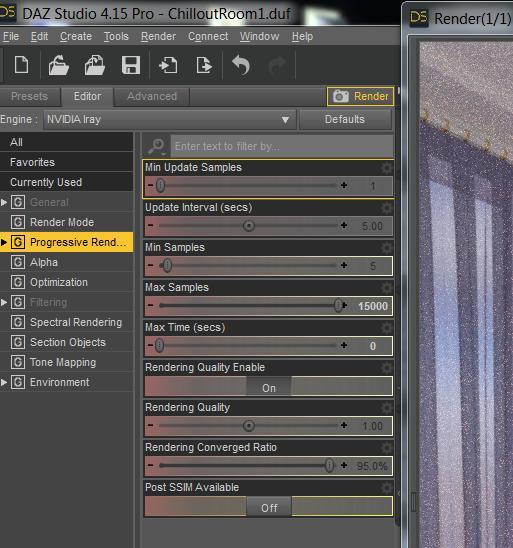
You're definitely rendering in iray, what I think you've misunderstood is what method of rendering iray is using. Your using your CPU running at two cores, which is why it's taking so long.
This is a freebie, so I have this scene as well. I'm going to see how it looks when I render with those settings and see how long it takes on my CPU vs GPU and see how fast the noise resolves on both.
*I forgot to ask what res you're rendering the image at. That would make a big difference!
Is that really a valuable use of your time.
It's no big deal. I just set it, go watch some tv and check the log for render time. :D
So far I've done both the 1070 and the 970:
970: 56 minutes
1070: 37 minutes.
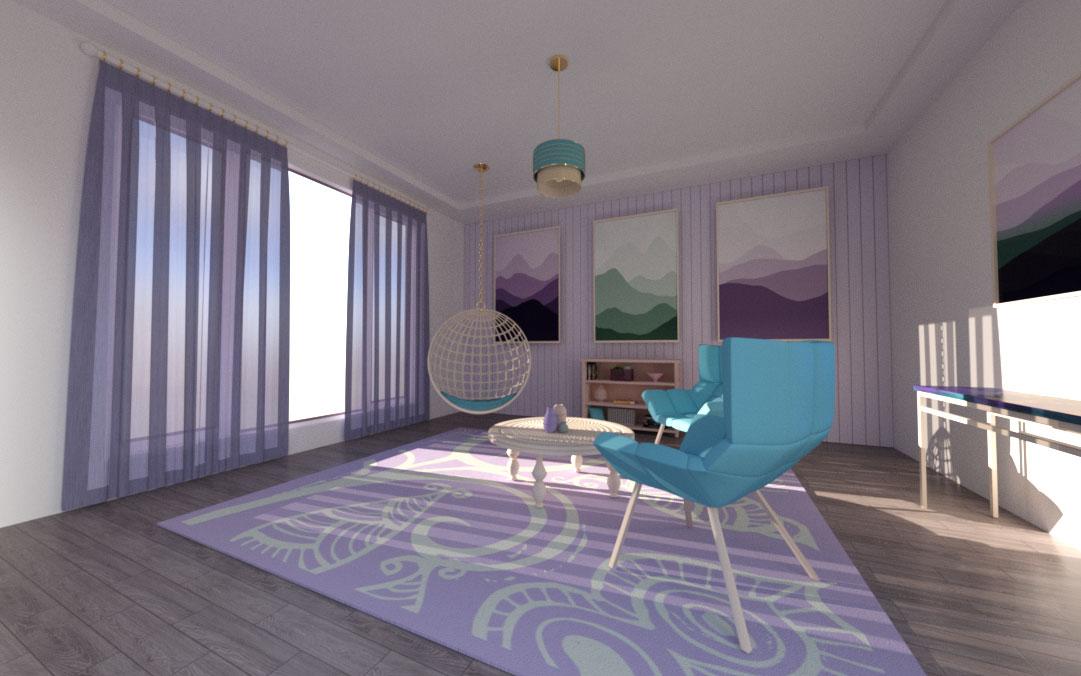
I'm currently running the CPU test, so far at 3% complete and 13 minutes run time it's noisy but not too bad, it's way less noisy comapred to the OP's first post, but the environmental lighting is different and I'm not using any addiontal lights except for what loads in the default scene. I dunno.
My completed render:
 What is causing this?
I fail to see how uninstalling Daz Central would have any affect on the opperation of the DS program itself with regard to render times, but apparently it did for you. Can anyone suggest why it might?
What is causing this?jd641 said:
music2u4u said:
jd641 said - "You did not render those with your integrated graphics card. In order to use your graphics card with iray it must have CUDA cores which an AMD card does not have, so that's literally an impossibility.
Honestly though, those last renders look more like 3dlight and not iray but maybe I'm wrong. Can you try re-rendering the original images you posted in at the top of the thread with the original iray settings?"....
OK...here ya go. This is a less than one hour render of the same thing. All setting are the same as originally done before I removed the DAZ CENTRAL. It has some noise but it is a whole lot better. The original render cooked for about a half a day. Look at the difference. Also, it seems like there are some models that just won't render well at all. This one has a huge point light in the center of the room overhead as well as the window lighting. There are multiple shadow angles going on. I am gonna try to do another render of this with all the lights off and just use the headlight and see what it looks like. I remember I had this issue years ago with another model I bought here and after a review of it by Daz team, they also had the noise issue and refunded my money. Here is the one hour new render. I have included a screen cap of the settings I used and as you can see, it is a Nvida Iray engine render.
You're definitely rendering in iray, what I think you've misunderstood is what method of rendering iray is using. Your using your CPU running at two cores, which is why it's taking so long.
This is a freebie, so I have this scene as well. I'm going to see how it looks when I render with those settings and see how long it takes on my CPU vs GPU and see how fast the noise resolves on both.
*I forgot to ask what res you're rendering the image at. That would make a big difference!
Is that really a valuable use of your time.
What is causing this?music2u4u said:
jd641 said - "You did not render those with your integrated graphics card. In order to use your graphics card with iray it must have CUDA cores which an AMD card does not have, so that's literally an impossibility.
Honestly though, those last renders look more like 3dlight and not iray but maybe I'm wrong. Can you try re-rendering the original images you posted in at the top of the thread with the original iray settings?"....
OK...here ya go. This is a less than one hour render of the same thing. All setting are the same as originally done before I removed the DAZ CENTRAL. It has some noise but it is a whole lot better. The original render cooked for about a half a day. Look at the difference. Also, it seems like there are some models that just won't render well at all. This one has a huge point light in the center of the room overhead as well as the window lighting. There are multiple shadow angles going on. I am gonna try to do another render of this with all the lights off and just use the headlight and see what it looks like. I remember I had this issue years ago with another model I bought here and after a review of it by Daz team, they also had the noise issue and refunded my money. Here is the one hour new render. I have included a screen cap of the settings I used and as you can see, it is a Nvida Iray engine render.
You're definitely rendering in iray, what I think you've misunderstood is what method of rendering iray is using. Your using your CPU running at two cores, which is why it's taking so long.
This is a freebie, so I have this scene as well. I'm going to see how it looks when I render with those settings and see how long it takes on my CPU vs GPU and see how fast the noise resolves on both.
*I forgot to ask what res you're rendering the image at. That would make a big difference!
What is causing this?music2u4u said:
jd641 said - "You did not render those with your integrated graphics card. In order to use your graphics card with iray it must have CUDA cores which an AMD card does not have, so that's literally an impossibility.
Honestly though, those last renders look more like 3dlight and not iray but maybe I'm wrong. Can you try re-rendering the original images you posted in at the top of the thread with the original iray settings?"....
OK...here ya go. This is a less than one hour render of the same thing. All setting are the same as originally done before I removed the DAZ CENTRAL. It has some noise but it is a whole lot better. The original render cooked for about a half a day. Look at the difference. Also, it seems like there are some models that just won't render well at all. This one has a huge point light in the center of the room overhead as well as the window lighting. There are multiple shadow angles going on. I am gonna try to do another render of this with all the lights off and just use the headlight and see what it looks like. I remember I had this issue years ago with another model I bought here and after a review of it by Daz team, they also had the noise issue and refunded my money. Here is the one hour new render. I have included a screen cap of the settings I used and as you can see, it is a Nvida Iray engine render.
IIRC, that is one of those high poly rooms we got for free in the PC+ club a while back.
What is causing this?music2u4u said:
jd641 said:
music2u4u said:
OK FOLKS!.....Now this is really weird. Last night I decided, for some unknown reason, to uninstall the DAZ CENTRAL that you have to get to get this Daz 4.15 version. I noticed that it is a seperate files location than the actual Daz program, so it uninstalled without taking the Daz 4.15 with it. After I got rid of it (because I would never use it to surf this site) I tried again to do some Iray renders. Low and behold, NOW they are rendering fine without snow (fireflies). Almost completely gone! Now why is that? There must be a connection. I do have a AMD card, not a Nvida. Someone said in here that the Iray renders do not support AMD cards. Well, look at these renders I did right after I uninstalled DAZ CENTRAL. Even my nighttime twister came out with no snow. Not even a speck and it is a dark render! WHY? Anyone?
You did not render those with your integrated graphics card. In order to use your graphics card with iray it must have CUDA cores which an AMD card does not have, so that's literally an impossibility.
Honestly though, those last renders look more like 3dlight and not iray but maybe I'm wrong. Can you try re-rendering the original images you posted in at the top of the thread with the original iray settings?
I'm also taking a guess here as to why your iray renders are so noisy: your CPU is being limited to 2 cores and it doesn't look like it would allow you to increase the core count, so even with a fast CPU it would take ages to clear all that noise with only two cores running. :(
I'm curious about the rest of the specs on your comp. Press your windows key + Pause key, when the "About" dialogue pops up, manually copy or use the "copy" button and paste your specs please. It should look something like this:
Processor Intel(R) Core(TM) i7-9800X CPU @ 3.80GHz 3.79 GHz
Installed RAM 128 GB (128 GB usable)
System type 64-bit operating system, x64-based processorEdition Windows 10 Pro
Version 20H2
Installed on 8/18/2020
OS build 19042.746
Experience Windows Feature Experience Pack 120.2212.551.0I most definitly DID render these with my intigrated graphics card. Not an impossibility then is it! Here is the info you asked for.
wow you're so adamant about something that didnt happen lol
What is causing this?jd641 said - "You did not render those with your integrated graphics card. In order to use your graphics card with iray it must have CUDA cores which an AMD card does not have, so that's literally an impossibility.
Honestly though, those last renders look more like 3dlight and not iray but maybe I'm wrong. Can you try re-rendering the original images you posted in at the top of the thread with the original iray settings?"....
OK...here ya go. This is a less than one hour render of the same thing. All setting are the same as originally done before I removed the DAZ CENTRAL. It has some noise but it is a whole lot better. The original render cooked for about a half a day. Look at the difference. Also, it seems like there are some models that just won't render well at all. This one has a huge point light in the center of the room overhead as well as the window lighting. There are multiple shadow angles going on. I am gonna try to do another render of this with all the lights off and just use the headlight and see what it looks like. I remember I had this issue years ago with another model I bought here and after a review of it by Daz team, they also had the noise issue and refunded my money. Here is the one hour new render. I have included a screen cap of the settings I used and as you can see, it is a Nvida Iray engine render.
Genres You'd Like to See in the Store?Mustakettu85 said:
watchdog79 said:
Mustakettu85 said:
watchdog79 said:
Lasciare said:
Categories by region and by period would be nice:
Eastern europe and RussiaI don't think you can fathom the size of the absolutely massive flamestorm this would ignite...
It wouldn't. DAZ has a strong anti-politics policy here in the forums.
I guess they should know better than implementing something that would offend a lot of their customers, then?
I know that quite a few PA here are Ukrainian, but when it comes to the userbase, are you sure there are enough Eastern Europeans to count as "a lot"?
I am not sure whether you understand the volatile nature of the history of the countries that some would call Eastern Europe. It is not limited to Ukraine only.
The problem is not just the Western/Eastern Europe separation that so many people still so stubbornly insist on, or the complete omission of Central Europe. It is also having one's culture tagged as what would appear to be a mere subset of Russian culture (which itself is a conglomerate of many different nations and cultures).
Europe is not a monolith. Or two monoliths. We are not a single federation like the USA. We are many distinctly different nations, some on better terms with some others, some on, well, unfortunately not so good terms with some others. I think you underestimate the tension still present here in Europe. This is why DAZ should stay away from labeling countries like this, and why DAZ is clever to not provide battlegrounds for such hate wars, nor would I think DAZ wants to be pointed at as the trigger of a completely avoidable drama scene. We have enough of those in real life. Consider this, please - the Internet is not DAZ website only. What starts here may spread beyond DAZ's reach. Bad for PR.
In my opinion, DAZ should continue providing a platform for artists to get their resources and publish their art, if the artists wish so, and not overdo it with the genre tags, as it may result in the store being a pain in the rear end to search through, more than it curently is. Imagine everyone trying to squeeze at least some of the genre tags currently "fashionable" in the real world onto their product store pages. Trying to search something that actually falls into the category one is looking for would become a nightmare.
Missing ThumbnailsAre there any further updates from DAZ regarding this? Based on reading through this thread, there appears to be no uniformity in the problem itself other than missing thumbnails. Issues seem to vary based on DIM, Central or Connect and it there seems to be no consistent pattern as to which thumbnails are missing. So I'm really confused as to how to even attempt to fix it.
In my case, I'm using Connect almost exclusively and my missing thumbnails are for products I've purchased since mid-March. It's not 100% every product but it is the vast majority. The icons are missing whether they appear in the Installed tab or the available tab. Updating metadata does nothing. Logging out/logging in does nothing.
Interesting note - when I update metadata, it consistently says it is only able to update 1 of 4 items or 1 of 5 items. I have never seen it in recent memory ever have a completely successful update.
What is causing this?jd641 said:
music2u4u said:
OK FOLKS!.....Now this is really weird. Last night I decided, for some unknown reason, to uninstall the DAZ CENTRAL that you have to get to get this Daz 4.15 version. I noticed that it is a seperate files location than the actual Daz program, so it uninstalled without taking the Daz 4.15 with it. After I got rid of it (because I would never use it to surf this site) I tried again to do some Iray renders. Low and behold, NOW they are rendering fine without snow (fireflies). Almost completely gone! Now why is that? There must be a connection. I do have a AMD card, not a Nvida. Someone said in here that the Iray renders do not support AMD cards. Well, look at these renders I did right after I uninstalled DAZ CENTRAL. Even my nighttime twister came out with no snow. Not even a speck and it is a dark render! WHY? Anyone?
You did not render those with your integrated graphics card. In order to use your graphics card with iray it must have CUDA cores which an AMD card does not have, so that's literally an impossibility.
Honestly though, those last renders look more like 3dlight and not iray but maybe I'm wrong. Can you try re-rendering the original images you posted in at the top of the thread with the original iray settings?
I'm also taking a guess here as to why your iray renders are so noisy: your CPU is being limited to 2 cores and it doesn't look like it would allow you to increase the core count, so even with a fast CPU it would take ages to clear all that noise with only two cores running. :(
I'm curious about the rest of the specs on your comp. Press your windows key + Pause key, when the "About" dialogue pops up, manually copy or use the "copy" button and paste your specs please. It should look something like this:
Processor Intel(R) Core(TM) i7-9800X CPU @ 3.80GHz 3.79 GHz
Installed RAM 128 GB (128 GB usable)
System type 64-bit operating system, x64-based processorEdition Windows 10 Pro
Version 20H2
Installed on 8/18/2020
OS build 19042.746
Experience Windows Feature Experience Pack 120.2212.551.0I most definitly DID render these with my intigrated graphics card. Not an impossibility then is it! Here is the info you asked for.

Daz 3D is part of

Connect
DAZ Productions, Inc.
7533 S Center View Ct #4664
West Jordan, UT 84084Licensing Agreement | Terms of Service | Privacy Policy | EULA
© 2026 Daz Productions Inc. All Rights Reserved.