-
Measure Bra Size
now i am waiting for a morph product covering this topic
[Released] Props & Poses Converter from Genesis 3 Female to Genesis 8 Female [Commercial]is it normal for it to be slow? I don't have a slouch of a system by any means, but a normal-sized pose pack takes about 30min to complete. I dumped one in last night before bed that had over 900 lines and it's still running almost 19hrs later. My system specs are Ryzen 7 1800x w/ 32GB RAM and 1080TI.
DS seems to get slower the more morphs you add to a figure; I don't know if it affects posing but it does affect loading G8F. If you temporarily rename all those character conversion morphs to a new path, from data/Daz 3D/Genesis 8/Female/Morphs to data/Daz 3D/Genesis 8/Female/OldMorphs, G8F will load faster. That might help with your pose conversion.
So I'm hitting this performance issue with converting poses as well, and it feels to me like it's a bug. It *seems* like props convert much faster than poses, although I haven't measured the former, only the latter.
I went through all my content directories and renamed Female to Femalex for all of Genesis 8 and most of Genesis 3, and added a new content directory with just the very minimum needed to load G3F and G8F without warnings.
(Please Forgive the wonky formatting, but the preview and the actual post didn't match at all and I had to do a lot of tweaking just to get it readable.)
Load times for G3F and G8F:
2020-01-20 02:11:48.625 File loaded in 0 min 14.7 sec.2020-01-20 02:11:48.625 Loaded file: genesis 3 female.duf2020-01-20 02:11:57.907 File loaded in 0 min 3.8 sec.2020-01-20 02:11:57.907 Loaded file: genesis 8 basic female.dufIt took 7 minutes to convert two poses (on an i9 @ 3.1 Ghz). Basically all the time is while "Writing assets..." is displayed.
Here's the DAZ log file of the process for the first one (the converter log file didn't have anything useful):
2020-01-20 01:40:24.691 DEBUG: START Conversion of D:/daz/main/People/Genesis 3 Female/Poses/Simply Everyday/Poses/Genesis 3 Female/Simply Everyday Female Base 01.duf[redundant informative stuff]
2020-01-20 01:40:24.940 DEBUG: Copy loaded pose from Genesis 3 Female to Genesis 8 Female2020-01-20 01:40:24.940 DEBUG: Copy Pose Properties from Genesis 3 Female to Genesis 8 Female2020-01-20 01:40:24.940 DEBUG: Pose Controls set? false2020-01-20 01:40:25.751 Copying pose from Genesis 3 Female to Genesis 8 Female2020-01-20 01:40:26.360 DEBUG: Ancestor Bone is hip[lots of Loaded morph deltas]
2020-01-20 01:40:27.686 Zeroing Genesis 3 Female Pose2020-01-20 01:40:27.686 DEBUG: Trigger Action DzZeroFigurePoseAction2020-01-20 01:40:27.717 DEBUG: Triggered Action DzZeroFigurePoseAction2020-01-20 01:40:27.717 DEBUG: Save Pose [very long line with all the bones]2020-01-20 01:40:27.811 Saving Pose to D:/daz/conversion3/People/Genesis 8 Female/Poses/Genesis 3 Female/Simply Everyday Female Base 01.duf2020-01-20 01:40:27.826 DEBUG: Defaults: {[1400 lines of JSON]
2020-01-20 01:40:27.889 DEBUG: Saved Item: D:/daz/conversion3/People/Genesis 8 Female/Poses/Genesis 3 Female/Simply Everyday Female Base 01.duf2020-01-20 01:43:59.068 Zeroing Genesis 8 Female Pose2020-01-20 01:43:59.161 DEBUG: Trigger Action DzZeroFigurePoseAction2020-01-20 01:43:59.239 DEBUG: Triggered Action DzZeroFigurePoseAction2020-01-20 01:43:59.239 DEBUG: End convert2020-01-20 01:43:59.645 DEBUG: END Conversion of D:/daz/main/People/Genesis 3 Female/Poses/Simply Everyday/Poses/Genesis 3 Female/Simply Everyday Female Base 01.duf2020-01-20 01:43:59.645 DEBUG: RemoveExtraSkeletons Genesis 3 Female Genesis 8 FemaleIn this log it looks like all of the time is between printing "DEBUG: Saved Item:" and "Zeroing Genesis 8". If tenses are consistent, "saved" happens after saving and "zeroing" happens before zeroing, so I'm not sure what's going on in between. Or maybe "Saved item" is before it saves and it's actually the save somehow taking 3.5 minutes. (I checked, just in case; saving a pose manually takes under a second, and zeroing g8 female pose is near instant.)
There's another bug here which I'll report in a separate message for clarity.
The "Powered by Hot Pockets" Complaint Thread...ugh head is sore from beating it against the wall for most of the evening trying to figure out why I cant get that one clothing item to fit. Found one other, the Belle Dress for G3F that has the same issue. Both it and Boho are by Aave Nainen. who adds a number of extra draping morphs to make for more realistic fits (sort of a pre-dForce process) , but again that doesn't 'explain why it fit perfectly fine earlier but refuses to now. I experimented with tried fitting some of her G2F items to the character, and they all worked just fine.
It's like something isn't being defined correctly between the clothing and character which is causing the process to crash every time. I even tried using the transfer utility as well but with no success.
How to PROPERLY save a WIP so sliders/dials stay intact for further work? Scene? Or some other?Thanks SixDs & Palomino for your help!

I have tried something a little different - I was originally using the default G8 model, and I had earlier held down CTRL+Z to clear edits I did not like the look of, rather than loading a fresh figure. This had introduced that weird eyelash glitch, which I then hit "Re-do" to clear (I re-did to undo the undo. Yes.). I don't KNOW if this played a part, but you never know...
For this fresh attempt I loaded the G8 devload figure, which I prefer as I can see what I'm doing a little better. Before doing anything I saved the scene. As a test, I messed around with sliders for a while making something that looked good, making sure I used sliders/dials from the different packs I have. Saved scene, closed DAZ.
I re-opened the scene, all was as I had done and looked just fine. I then applied the overall "Nose Shape [number]" dials 1 2 and 3 from HSTW Head Morph Kit 2 to further shape the nose. Saved scene, closed DAZ.
I re-opened DAZ, re-opened the scene, and the mesh was deformed again like it was earlier. I went to those HSTW Nose Shape 1 2 3 sliders, and un-applied them (set to 0). The mesh returned to normal in the viewport. Moved the sliders again - in particular, Nose Shape 3, and the nose deformed the same way it had earlier. The problem seemed to be that the strength of the slider was changing - when I applied it the first time & saved, its effect on the mesh had been fairly subtle and good for fine tuning (which is why I had chosen to use it), even though I had set it to 100. When I applied it this time, the effect on the mesh was far more dramatic - set to 100, the effect was far stonger. I set these sliders to 0 again, saved scene, closed DAZ.
As a further test, I opened DAZ, loaded a fresh G8F devload figure, saved scene, and this time applied ONLY HSTW Head Morph Kit 2 Nose Shape 03, 100% - which results in only a slight change to the nose shape. Saved scene, closed DAZ. Re-opened DAZ, re-opened scene, and the nose was again not what I had made. This slider may be broken.
(The good news is this effect CAN be removed if the slider is set back to 0 and the scene saved. I do not know if this does any permanent damage to the mesh however)
Genesis 8 Female > Actor > Head > HSTW Head Morph Kit 2 > Nose > Nose Shape 03 dial
*This sliders location in the drop-down list is the default as installed by DAZ Installer. I have not edited it.
EDIT: Slider still has the same behaviour even if only set to 50% & saved. If the scene is then re-opened, and the slider moved to 100, the nose shape is the same different shape I was seeing in my mesh earlier. I tested this on a fresh G8F devload figure & save.
EDIT: What is the best way to notify the vendor of this so they can take a look? Does DAZ do it? Do I?
Face Transfer and Illustrated facesCan anyone explain to me why when using the Face Transfer plug-in that some illustrated faces (comic book characters, etc) work and some don't? The face is the right kind of image (humanoid) and similar to a photo but some work and some don't. I thought it might be because the ones that worked were in color and the ones that didn't were black and white, but that theory doesn't seem to hold water either. I took an illustrated black & white image of a human male and colored it and the plug-in refuses to run, meaning I get the error message to try a different image. Yet I can take an image of a human male from a comic book and it runs fine. Am I missing a requirement here? Do I need to show examples?
Where do I find image map file for face transfer ...Need to fix eyes and seam ...
When you saved the file the textures are saved to a Face Transfer subfolder under your name under Textures under Runtime under My Library.
Where do I find image map file for face transfer ...Need to fix eyes and seam ...
Malik HD Main Promo Hair Is Short Afro Hair SOLVED@NorthOf45 Thanks. First place I looked. I have Malik Hair, and I have done some extensive morphing to it in order to alter its Neanderthal hairline. The peak morph doesn't really help much. I have been unable to whip it into something like the hair I see in Malik's promos, even when I fit it to another hair cap with lots of morphs.
Darwins' Schtuff Pt Deux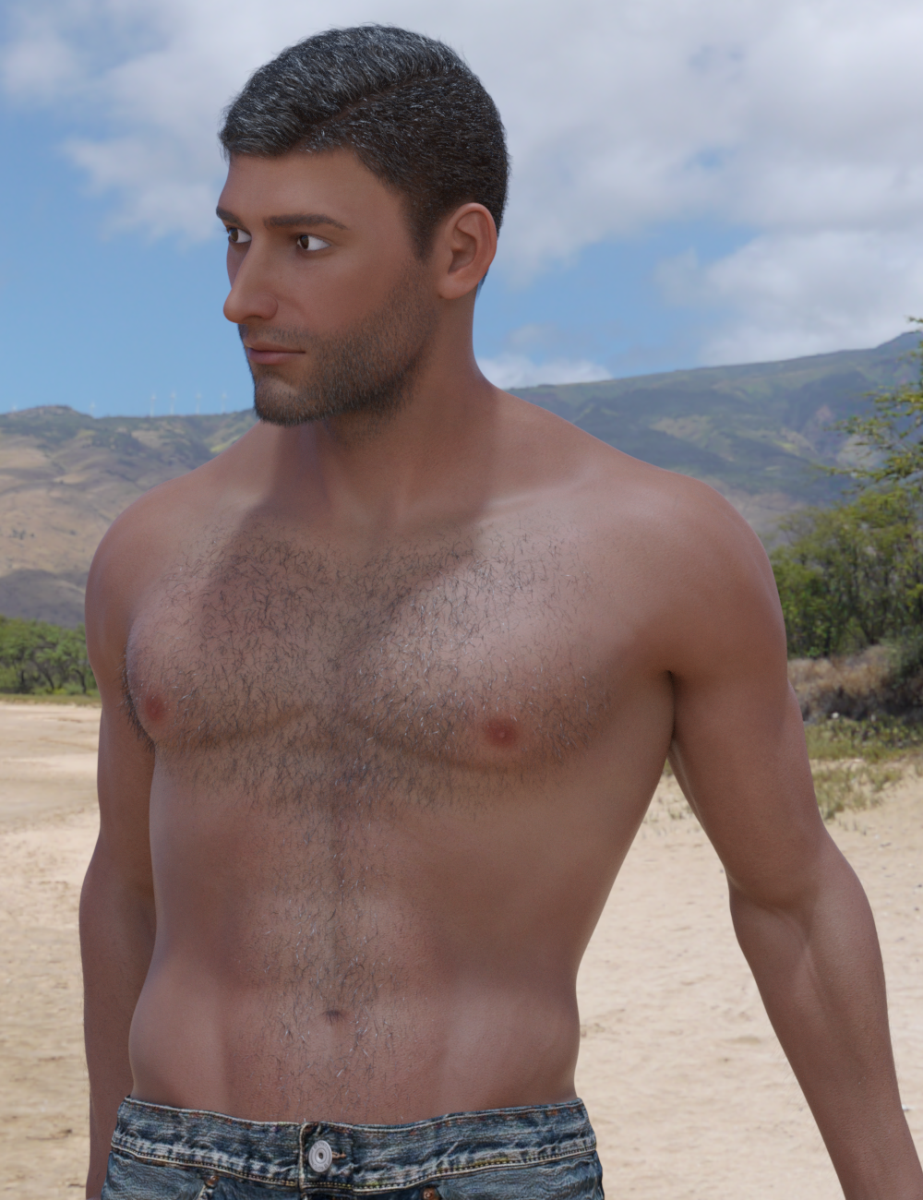
Body/head morphs done, HD Morph Details done (shown with the body/head morphs), basic skin started (shown); chest, arm, facial hare are from Changeling Chick, hair is Casual Spikes. HDRI and two point/two spot lights added for additional depth. Raw render.
Using Daz Studio for Game ModelsThere's no license required to use the program for game development, it's for using Daz content in your game that you need one.
Interactive licence needs to be purchased per product (or per bundle if they're in a bundle). There used to be licences which covered all products by a given vendof vendor (well, there was one for Daz originals, and a few vendors had one too) before Daz introduced individual interactive licences, which is probably why you can find references to those kind of "bulk" licences too.
Oh so that license has been discontinued. Okay. What about using the base Gen 8 model and morphing your own figure? Obviously need a license for the morph, but what licence do I need for the base model?
So basically I need to buy a license for every figure, wardrobe, prop, hair and such that I use?
An interactive license for Genesis 8 base figures is available on this page: https://www.daz3d.com/genesis-8-starter-essentials
And yes you need the individual licenses for each item you use.
Using Daz Studio for Game ModelsThere's no license required to use the program for game development, it's for using Daz content in your game that you need one.
Interactive licence needs to be purchased per product (or per bundle if they're in a bundle). There used to be licences which covered all products by a given vendof vendor (well, there was one for Daz originals, and a few vendors had one too) before Daz introduced individual interactive licences, which is probably why you can find references to those kind of "bulk" licences too.
Oh so that license has been discontinued. Okay. What about using the base Gen 8 model and morphing your own figure? Obviously need a license for the morph, but what licence do I need for the base model?
So basically I need to buy a license for every figure, wardrobe, prop, hair and such that I use?
Using Daz Studio for Game ModelsI'm starting to learn Unity, and realizing how pricey it would be to hire somebody to make unique character models for a game.
I know there's a $500 license through Daz to use the program for game development, but I've gotten a lot of conflicting info about the exact legal rights, like if I also need to buy a license for each item or morph I end up using, any specific restrictions, ect.
Anyone got any good resources to get "Explain like I'm 5" answers to legally using Daz figures and clothing for game models?
Do you already have this license? As far as I know it is no longer available. If you already have this license it covers all the items where the artist is shown as DAZ Original. It does not cover tems that are solely owned by the PA and seperate licenses are required for them.
Under the current system licenses are only available for individual items and a seperate license is required for each item where the 3D mesh (or any part of it) is used in the game
Using Daz Studio for Game ModelsI'm starting to learn Unity, and realizing how pricey it would be to hire somebody to make unique character models for a game.
I know there's a $500 license through Daz to use the program for game development, but I've gotten a lot of conflicting info about the exact legal rights, like if I also need to buy a license for each item or morph I end up using, any specific restrictions, ect.
Anyone got any good resources to get "Explain like I'm 5" answers to legally using Daz figures and clothing for game models?
Who is this?The skin texture looks like Babina 8. The face morph could be a custom morph.
Other place than DAZ and Rendo ?Oh, I missed the mother goose one. The other one I left out because of the shoulder puffs (hope that is the right term). Somehow I don't like the look of them. But mother goose could do the trick. I just need to make new textures. Let's see if I can do that.
Thanks.
If it is just the shoulds puffs you could either create a morph in a modelling program, or even simpler get https://www.daz3d.com/mesh-grabber and adjust to your liking,
Suddenly can't delete Morph keys??Is the this the General release (4.12.0.86) or the Public Build (4.12.1.40)?
General release.
If you can do that to order, in the beta, it would bear reporting as a possible bug.
Where do I report a bug?
Use a Techncial Support ticket https://www.daz3d.com/help/help-contact-us
I can confirm that deleting keys from the new timeline does not work. I have gone back to using my old graphmate/ keymate plugins to get any work done. :-(Wolf, I can delete key frames for joint rotations, but not for morphs. Is this the same for you? And has it always been like that for you in 4.12? I have been animating in the new timeline for a few months and thought it was working great. I haven't done a lot of morph animating in my tests so far, but I have done some, so I think I would have noticed that I couldn't delete morph key frames by now(?)
Richard, I'm a recent convert to Windows, so I'm not wise in the ways of PCs, but I noticed that there was an automatic update the other day. Could that be the culprit?
I would be surprised if it was down to an update, though not to the point of a priori complete disbelief
Suddenly can't delete Morph keys??Is the this the General release (4.12.0.86) or the Public Build (4.12.1.40)?
General release.
If you can do that to order, in the beta, it would bear reporting as a possible bug.
Where do I report a bug?
I can confirm that deleting keys from the new timeline does not work. I have gone back to using my old graphmate/ keymate plugins to get any work done. :-(Wolf, I can delete key frames for joint rotations, but not for morphs. Is this the same for you? And has it always been like that for you in 4.12? I have been animating in the new timeline for a few months and thought it was working great. I haven't done a lot of morph animating in my tests so far, but I have done some, so I think I would have noticed that I couldn't delete morph key frames by now(?)
Richard, I'm a recent convert to Windows, so I'm not wise in the ways of PCs, but I noticed that there was an automatic update the other day. Could that be the culprit?
Helpful Blender Scripts - shapekey transfer and material slot combinerThanks for sharing your scripts. As they are designed for your own workflow, could you expand on what that is, in particular how you transfer your Daz characters into Blender, and where the scripts fit into your workflow? That would be useful in understanding how and when these scripts will help the rest of us.
Sorry for the post and ghost. I wanted to put together a quick overview of my workflow and where these scripts fit in. It took longer than I thought.
I should probably make another whole post just for details if anyone is interested. It's has been a little while since I did these from start to finish, details are a bit rusty.I start with the Basic Male or Female character and add any geografts I might need,
I save copies with default UVs, and 2nd UVs if available. Then I use the Diffeomorphic Daz to Blender plugin to export and save a copy too.
I then merge fitted figure's geometry, delete the extra meshes that are created and convert the character back to SubD if needed.
In 4.11 and 4.12 there is a bug that makes the eyelashes disappear. I did submit the bug, hopefully it will get fixed.
I export the character as an FBX file 4 times
1 Base resolution UV1 no morphs (Base Poly)
2 Base resolution UV2 no morphs (Base Poly)
3 Subdivision 1, UV1, with Mouth Open, and Eyes Closed Morphs (1Subdivision Poly)
4 Subdivision 1, UV2, no morphs (1Subdivision Poly)In Blender
I import the 1Sub Poly first then the Base Poly next.
I remove the eyes from both ( I think i used a script for this too)
I apply a subdivision modifier on the Base Poly mesh, then transfer mesh data - vertex groups - to copy weight paints to the 1Sub Poly mesh.
There is a lot of cleanup to do after this as some of the weight paint get copied to the wrong vertex if they are too close.
Mostly around the mouth and eyelids, but also around the toes. Having the mouth open and eyes closed morphs helps when the rigging isn't working right.
Once I am happy with the cleanup efforts I import the 2nd uv character and transfer UV's to the one with UV1
I now have a 1 Subdivided Poly Daz model, fully rigged, with multiple UV channels.
Back in Daz Studio I start exporting my purchased characters.
I will dial in Aiko and click Currently Used in the shaping tab to see what morphs are applied to her.
I will dial out the Aiko Character morph and reapply the Body and Head morphs. This will make the head and body the correct shape but not adjust the size. Important for animations.
Can be resized later with math and stuff)
Add geografts, Save file and export and save using the Diffeomorphic Plugin
I Merge fitted figures like before, remove extra geometry, convert back to SubD if needed
Export FBX 2 times. 1Sub Poly with no morphs and one with any morphs you want to have.
Then I open the 1 Sub Poly Basic Character file was working with and import the 1Sub Poly -no morph Aiko. Remove Eyes, Join as shape to apply Aiko Morph to Basic Female character then remove the Basis Shapekey.
I now have Aiko with all the 1Sub Poly, with Weight Paint and 1st and 2nd UV info.Import Aiko into Blender using the Diffeomorphic plugin and run the Bone uitility to orientate the bone rolls correctly. Save Blender file.
Back in the 1Sub Poly Aiko file, append the Rig from the Diffeomorphic file and parent the 1Sub Poly Aiko mesh to her correctly sized and orientated rig.Almost done. I Import Aiko 1Sub Poly with all her morphs, remove eyes then (here it is!!!!) run the transfer shapekeys script to copy all the shapekeys to your characters and shorten the names to remove the "Genesis8Female__" part
Save a file as backup.
I will usually run the Material Script last and save as a separate "finished" file as it cannot be easily undone. It merges together material slots that are using the same texture.
Why is this important? In Blender and Unreal Engine 4 it is not necessary to have a separate material slots for the the Face, Lips, Ears, and EyeSocket especially if they are using the same texture. You can still achieve the same results of being able to change the lip colors or even textures applied to the ears by using masks instead. Also in Unreal Engine there is a cost per material slot you have in as scene so keeping the amount of slots to a minimum can help performance.
As always I look forward to any feedback or ideas.
Wow, that is quite some workflow! Thanks for writing it all up. I do use the Daz Importer ('Diffeomorphic') plug-in, but i am not targeting Unreal so have found the plugin's 'Merge Materials' option adequate for my purposes thus far. However, I will bookmark your scripts for possible future use.
Victoria 8 / Genesis 8 compatibility??GenX2 with its various add-ons can transfer morphs from generation 3 or 4 up to Genesis 3.
Victoria 8 / Genesis 8 compatibility??How about the possibility of shaping and using morphs based on the real early versions (from Vicky 1 to Vicky 4) for the later versions (Gen to Gen 8)? I've seen applets on here that do transfer some morphs from some version, but not the ones that early. I've got really old stuff and attempting to convert them for use with the later versions hasn't been successful so far.
Daz 3D is part of

Connect
DAZ Productions, Inc.
7533 S Center View Ct #4664
West Jordan, UT 84084Licensing Agreement | Terms of Service | Privacy Policy | EULA
© 2026 Daz Productions Inc. All Rights Reserved.