-
The Mac FAQ
inquire said:
Now I'm reading about thunderbolt 5. I have thunderbolt 2 on my Macintosh Pro, late 2013 edition. With connectors, I should be able to connect to a current Mac with thunderbolt 4, so that I could transfer my files over.
if I don't buy a Mac until there's one with thunderbolt 5, and if there isn't a connector to go from thunderbolt 2 to thunderbolt 5, would there be a service to copy my files over for me, or to transfer my files onto a drive that is thunderbolt 5 compatible? Would an outfit like Best Buy be able to do this? What would be the best way to accomplish this, or whom would I contact?
has anyone had experience with this issue before?
Thunderbolt 5 is compatible with Thunderbolt 3 and 4. The Apple Thunderbolt 2 -> 3 adapter can connect the drivers to the tunderbolt 5 port.
The Mac FAQNow I'm reading about thunderbolt 5. I have thunderbolt 2 on my Macintosh Pro, late 2013 edition. With connectors, I should be able to connect to a current Mac with thunderbolt 4, so that I could transfer my files over.
if I don't buy a Mac until there's one with thunderbolt 5, and if there isn't a connector to go from thunderbolt 2 to thunderbolt 5, would there be a service to copy my files over for me, or to transfer my files onto a drive that is thunderbolt 5 compatible? Would an outfit like Best Buy be able to do this? What would be the best way to accomplish this, or whom would I contact?
has anyone had experience with this issue before?
How can I create an Eyepatch that will morph onto the head of my character?The problem will be avoiding distortion - turning it into a figure would let it follow bone and morph movements, but not rigidly; there are ways to make it act rigidly but they are likely to require manual adjustments for each pose or morph change.
dForce issue with G9 KaedeDoes the dress start with part of its geometry inside Kaede's legs ?
If it's not the case, I don't know what could cause your problem but I'm sure wiser heads will have more ideas than mine.
If it's the case, it could messed up simulation and I had a kinda similar problem with a pair of pants for Genesis 8 I converted to Genesis 3: due to the different starting position of Genesis 3 legs compared to Genesis 8, both legs of the pants started inside each other (in my case, the fix was easy: change the starting position of Genesis 3 to match the one from Genesis 8).
In your situation, if it's indeed the cause, you can either fix the clothes (creating a morph to make it fit Kaede better and using it to replace the one automatically generated by Daz Studio when you fitted the clothes on Kaede) or doing a timeline simulation, to gradually dial Kaede shapes onto Genesis 9.
A 45 frames simulation can be set as follow:
- At Frame 0, load Genesis 9 and the clothes.
- At Frame 15, dial in Kaede's shapes into Genesis 9.
- At Frame 30, set the final pose
The last 15 frames are required to let the clothes flowing where they should (they are replacing the second part of a 'Current Frame' and 'Start Bones from Memorized Position' simulation).
The biggest advantage of this solution, compared to create a morph, is that everything is done in Daz.
The main downside of this solution is you now have to deal with a timeline but you can extract the shape of the clothes at the last frame to create a morph, then you can reset the timeline and use the morph in a non timelined scene (as a bonus, not having to save the full timeline means a smaller scene file):
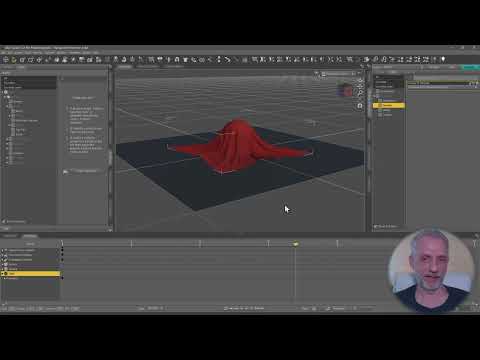 How can I create an Eyepatch that will morph onto the head of my character?
I have this eyepatch that I've made in c4d and constrained to my character via position constraint. But there is subtle face movement (eyebrows, squinting, cheeks & mouth moving etc) that clip through the patch because they arent bound to the rig or moved by joints etc. Is there a way for me to make the patch within daz so it can move & morph as a part of my characters actual skin movements?
Announcing: Daz Deals Browser Add-on IIpaolo_35229750 said:
Product URL Change:
From Best Price Notification
SKU:56239 - Mika 8 Morph Target Resource Kit for Genesis 8 Female
was: https://www.daz3d.com/mika-8-morph-target-resource-kit-for-genesis-8-female
now: https://www.daz3d.com/mika-8-enhanced-morphs-resource-kit-for-genesis-8-female
Thank you, I updated the product url.
My Favorite Script (Commercial)takezo_3001 said:
crosswind said:
After applying the saved Pose preset, the values in Scale of some joints are not correctly set (doubled to 200%)... probably a bug.
JSON file is attached. Ticket has been sent as well. Thanks in adv.
That's because you have checked the zero morph on new character, when it zeros the morphs that include the correctives as well, at least that's what happened to me, so I don't check the zero morph box...
Thanks, but I didn't check Zero Shape which is unchecked as default, and I just saved Pose Status only ~~ i.e. no Shape data in JSON file at all. Besides, the strange thing is that the Scale values in JSON file are correct ... so I think the culprit comes from the script per se...
My Favorite Script (Commercial)crosswind said:
After applying the saved Pose preset, the values in Scale of some joints are not correctly set (doubled to 200%)... probably a bug.
JSON file is attached. Ticket has been sent as well. Thanks in adv.
That's because you have checked the zero morph on new character, when it zeros the morphs that include the correctives as well, at least that's what happened to me, so I don't check the zero morph box...
Morphs not appearing/disappearingI was setting up a scene and when I came to moving the avatar's eyes to look a certain direction, I noted that genesis 9 had no morphs' to move the eyeballs.
I saw others use genesis 9 and they had the standard morphs, same as on the other genesis, so I am confused why they're not visible for me?
I did for a split second on loading up the scene, clicked on face and saw "look left," morph, and such, but they went away, are they interfering with other sets of morphs?
Whenever I have added they seem to pile up nicely rather then remove, or take a slot of another set of morphs, so I am a bit confused, help would be appriciated.
-- Simply, eye morphs with look at various directions are not there.
Help after update face transferDid you use the Save option in Face Transfer?
Announcing: Daz Deals Browser Add-on IIProduct URL Change:
From Best Price Notification
SKU:56239 - Mika 8 Morph Target Resource Kit for Genesis 8 Female
was: https://www.daz3d.com/mika-8-morph-target-resource-kit-for-genesis-8-female
now: https://www.daz3d.com/mika-8-enhanced-morphs-resource-kit-for-genesis-8-female
Unable to change Content Database Base LocationWolfwood said:
I would suggest to not change or delete the CMS part, at least not first. Move only the Content Path.
Copy all the files from your Library in C to the new location on D.
Open DIM and go to advance settings --> Installation Tab.
At the bottom, add the new path on D.
Change the shortcut, then delete the one in C.
Close settings(Accept), wait for DIM to reload or click Refresh.
Close and open and see if it was saved correctly.
It worked but the products I download still goes to my C disk, meaning I have to do it in your way if I want to transfer my plugins or products to the D disk.
Help after update face transferI on,y have one not 2 but my face transfer morphs are not saving. I know to hit save as, support asset, modifier asset. But once I save. And I load a genesis 8 character to apply the morph I move the slider and it is nothing like I tried to save. Please assist
diffeo import and bridge to cascadeurAfter I import the g8 character into blender, I import the character into cascadeur through the blender and cascadeur link plugin to animate it. When I was remapping the skeleton through arp, I found that if I clicked the body morph, the character would be very stiff after remap and the actions would not match at all.
By the way, I would ask when importing g8 characters, various effects of morphs are all together, but after importing g9 characters, I can't find these morph, such as facial expressiona muscle morph for older generationsA version of "SY Intense Muscle Genesis 8, 8.1, and 9" [ https://www.daz3d.com/sy-intense-muscle-genesis-8-81-and-9 ] for G3 & G2.
How to save a inhale pose made by chest shape changeYou can either change its Type to Modifier/Pose in Parameter Settings then you're able to save a Pose Preset... or just import it as a Custom Morph or mark it as Favorite and import Favorite Morph with Diffeomorphic.
How to save a inhale pose made by chest shape changeI am using the following breathing morph for breathing pose:
https://sharecg.com/v/97393/view/21/DAZ-Studio/G8-8.1-Female-Breathing-Morphs
The morph is working well but I can't find any way to save the pose as pose preset mainly because the morph is under Actor/Chest node and that node is not visible when I save it as pose preset. I can save it as shaping preset, but I cannot access the shaping preset in Blender using Diffeomorphic.
Any hint will be appreciated. Thanks.
Daz Studio BETA - version 4.23.0.4! (*UPDATED*)Imago said:
DoctorJellybean said:
I'm afraid I can't replicate on my (Windows) system.
First load a pretty heavy scene (at least 250Mb of size, not a simple prop in the middle of nowhere) and the load another scene of about same size double clicking on the scene file in the file manager while the first scene still loaded.
The crash happen more often if you have some props altered with Mesh Grabber 3 and not baked to morph.
Hey Imago, I just get triggered to ask something because "populated scene", "viewport manipulation", "crash" and "tbb" came together in your posts.
Do you, by any chance, use an intel system 13th gen or higher?
Fixing G9 attachments' rigging for attachments' morphs?So for example, here is the G9 mouth attachment with the head morph's new rigging, without the attachment's morph that fixes its placement.
And the second image is with the morph that fixes the placement. As you can see, the mouth bones are misaligned, especially the tongue, and it's the same with the eyes. I need the rigging to adjust to the attachment morph dynamically, as if in G8, the attachments were part of the main figure.
Third image is what happens if I apply the automatic adjustment with the attachment morph at 100%. You'd think that would fix it like it does the main figure's morphs, but I guess not.
Fixing G9 attachments' rigging for attachments' morphs?Previously in G8, mouth and eyes were part of the base figure, so rigging was naturally adjusted automatically to the whole mesh with "Adjust rigging to shape." But now in G9, everything is seperate. The problem with this is that if you have a custom head morph and need new morphs for eyes and mouth to fix their placement, adjust rigging to shape won't fix the rigging for the attachments' new morphs, because it keeps the 0-value rigging for the attachments' morphs when the figure's rigging has been adjusted and if I apply adjustment on the attachments, both the rigging and the object will explode.
Obvious solution is to manually fix the tongue and eye bones, but who has time for that, especially if you have multiple figures to work on. I guess another solution is to somehow merge the location fix morphs with the main figure head morph, which in turn probably would add the rigging adjustment for the attachments, but I have 0 idea how to do that.
Daz 3D is part of

Connect
DAZ Productions, Inc.
7533 S Center View Ct #4664
West Jordan, UT 84084Licensing Agreement | Terms of Service | Privacy Policy | EULA
© 2026 Daz Productions Inc. All Rights Reserved.