-
Is there a way to fit clothes over genitalia without advanced editing or post work?
Just a question: if they're wearing clothes, what's the point of using the genitalia? You'll probably get better results using a bulge morph on a male figure for example. Unless the clothes are transparent I suppose...
milliethegreat said:
Mesh grabber huh? Where do i get that and how does it help my issue?
There's a link in the post. Mesh grabber is a tool which enables you to deform a mesh, so you could use it to "pull" the clothes over the genitalia.
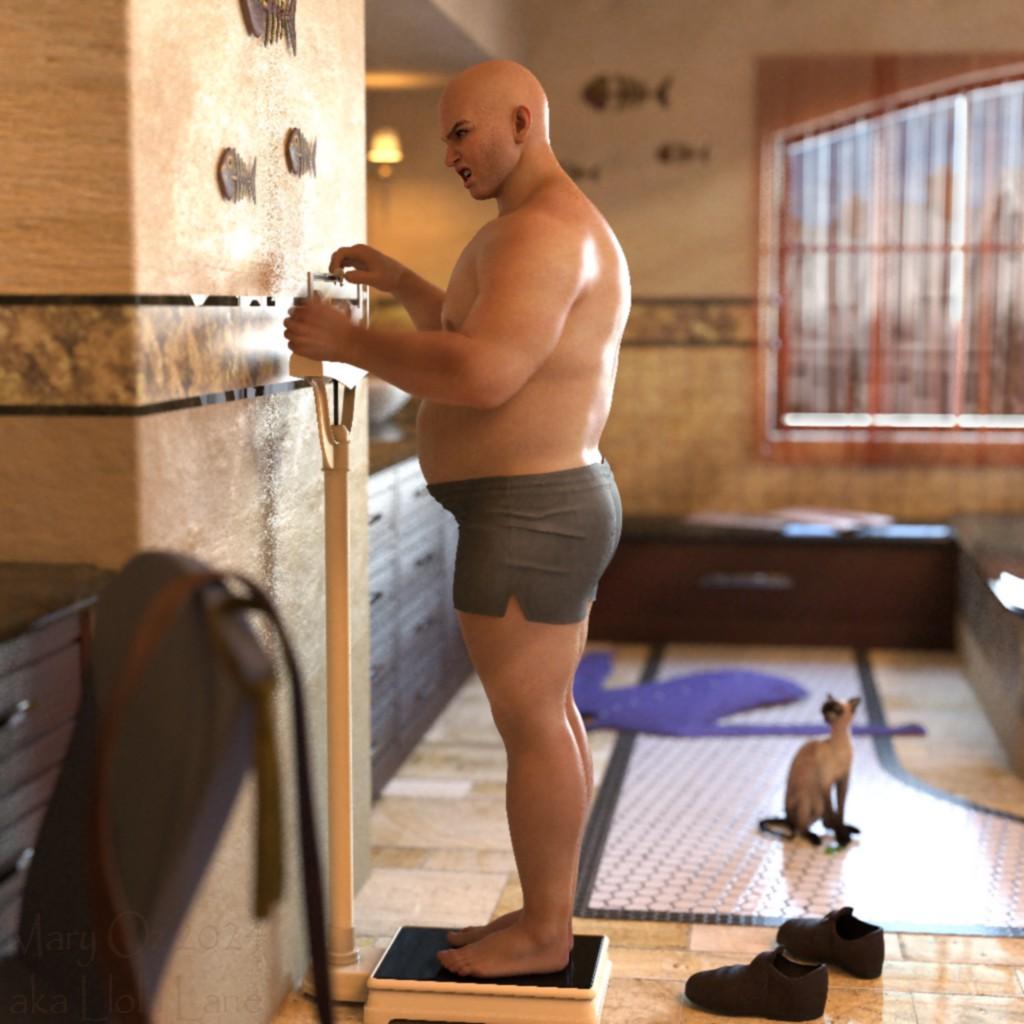
Epic Battle Render Contest (This Weekend!)USED: https://www.daz3d.com/mb-sancho-for-genesis-9 (with a little portly morph... lol) ... https://www.daz3d.com/fpe-dia-de-los-muertos-makeup-for-daz-house-cat (cat shape and fish)... https://www.daz3d.com/the-traveller-for-barnabus-ragwort (clothes/shoes on the floor/chair)
Lots of peoples' "Epic Battle" is weight loss!
No matter how much you hit it... the scale never lies!
"Weight Loss Battle"
 Shoe Rigging (Pro)
You probably need to create custom morphs to match the figure morph, projection will fail for much the same reason as projection of the basic rigging isn't good enough.
Projection MorphsStarLabz said:
crosswind said:
I used to play with projection morphs a long time ago, it should work as the mechanism never changes in DS AFAIK....
However, there're a few ways of making perfect fit... I wonder if it's really necessary to go for this cumbersome way, especially if one's already good at sculpting... let alone even if you made lots of projection morphs, they probably would not be able to apply for all cases of PBMs / FBMs used.
Chest area with various breast morphs dialed (especially with big boobs...) may bring various issues, some quick and perfect ways for fixing:
- crank up Smoothing Iteration value then export / import OBJ to update garment's Base Geometry
- sculpt the shape with external application and import as a fix morph
- for the dForce garments (or add dForce capability to non-dForce garments...), use timeline to simulation a fit morph (from PBMs / FBMs 0 to 100)
So what i did, even though it isnt a solution that is easy, i manually editied the Proj and Controller morphs. For some reason when making the controller and saving it out it didnt save out the correct identifier and point to the proj location, and in a few places it didnt place that into the dsf files when saving. When saving out to EMPTY Channel i noticed that it didnt behave like it should, idk what that was about... And i didnt change the auto follow as active and it also didnt save that info and i have to copy that line into the dsf files as well.
It is a pian to do it this way but since i now know that it doesnt work as intended i have a work-around so to speak. Still, this is an issue.
I use zBrush for all my sculpting and you will see that under the breast and especially the sternum area just doesnt play well with proj in clothing. For example, it just doesnt make since when you can do this on a stock g8 with just the breast gone, and in clothing that area that has NO MOVING verticies, there is a huge outward sharp line under and between the breast (sternum)... WHY? SO, i go back into zBrush, and in theory i push those areas INTO the body to force them toward the body to smooth that out. GoZ back to the char, dial it in and BAM either its worse by pushing it further out or deeper in.... the logic just doesnt make since to me, IT IS THE ONLY AREA on the body that this happens.... SO IS THERE a hidden built in DAZ component that does this, ie..a weight map? WHO KNOWS?? Is this info only given to PA's?
Oh, what you mentioned is really a good example.
What you get on the clothing with Breasts Gone morph dialed is just what Auto Follow does. 1stly the clothing was made on a G8F Base which has breasts of normal size. So there's a distance in between the chest area of the clothing and figure's sternum. Then the morph Breasts Gone only move the vertex positions of breasts per se while sternum stays there with nearly no change. The clothing only auto follows the deformation of breasts so the chest area still stays there, like the example in screenshot1. The vendor should fix the PBM - Breasts Gone on the clothing, especially when the morphs like Breasts Gone are from Daz Originals... However, in this example, the vendor didn't fix it. I know there're quite a lot of vendors don't test these PMBs on their products...
In the 2nd example in screenshot2, the vendor of this clothing fixed the PBM. So, there's no other specific info. or trick... just fix it ~~
Projection Morphscrosswind said:
I used to play with projection morphs a long time ago, it should work as the mechanism never changes in DS AFAIK....
However, there're a few ways of making perfect fit... I wonder if it's really necessary to go for this cumbersome way, especially if one's already good at sculpting... let alone even if you made lots of projection morphs, they probably would not be able to apply for all cases of PBMs / FBMs used.
Chest area with various breast morphs dialed (especially with big boobs...) may bring various issues, some quick and perfect ways for fixing:
- crank up Smoothing Iteration value then export / import OBJ to update garment's Base Geometry
- sculpt the shape with external application and import as a fix morph
- for the dForce garments (or add dForce capability to non-dForce garments...), use timeline to simulation a fit morph (from PBMs / FBMs 0 to 100)
So what i did, even though it isnt a solution that is easy, i manually editied the Proj and Controller morphs. For some reason when making the controller and saving it out it didnt save out the correct identifier and point to the proj location, and in a few places it didnt place that into the dsf files when saving. When saving out to EMPTY Channel i noticed that it didnt behave like it should, idk what that was about... And i didnt change the auto follow as active and it also didnt save that info and i have to copy that line into the dsf files as well.
It is a pian to do it this way but since i now know that it doesnt work as intended i have a work-around so to speak. Still, this is an issue.
I use zBrush for all my sculpting and you will see that under the breast and especially the sternum area just doesnt play well with proj in clothing. For example, it just doesnt make since when you can do this on a stock g8 with just the breast gone, and in clothing that area that has NO MOVING verticies, there is a huge outward sharp line under and between the breast (sternum)... WHY? SO, i go back into zBrush, and in theory i push those areas INTO the body to force them toward the body to smooth that out. GoZ back to the char, dial it in and BAM either its worse by pushing it further out or deeper in.... the logic just doesnt make since to me, IT IS THE ONLY AREA on the body that this happens.... SO IS THERE a hidden built in DAZ component that does this, ie..a weight map? WHO KNOWS?? Is this info only given to PA's?
Finding the model used in other store itemsThe character morph in the linked product seems Cairo HD G9 but skin textures are not... or a simple mixed one from the same vendor by using their characters... https://www.daz3d.com/cairo-hd-for-genesis-9
Some tips for searching a product / an item in promo:
1) 1stly check if there's a section of Additional products used in promo images at the bottom of the Product page.
2) Then check other products that the vendor made, most of the time you can find no matter the linked used products in promo or some clues...
3) Install Daz Deals add-on (free). If anyone ever asked / inquired about Who is Who / What is What questions for which there're solid answers, or any renders in Gallery indicates the used items, you'll see the foroum or gallery links on the Product page (ss1). Then you may have chance to quickly get the answers. (screenshot1)
FilaToon / Cell shaded rendering with FilamentSapphireBlue said:
3Diva said:
Mavka https://www.daz3d.com/mavka-for-genesis with some minor morph tweaks and with custom Filatoon shader presets.

Love this! Super cute and really nice shader set-up.
Thank you! I'm having a blast with Filatoon. Total game changer for me! :D
Primitive optionsramon73 said:
No idea if it is limited deep within the program, I would think that such a thing is doable to add for the devs. It would just be so nice to do things with prims 'on the fly' without reverting to other programs. Your sample renders are nice examples, tbh I was not even thinking that big. Even creating a simple prop like a picture frame would already be welcome to have (a pane and a hollow cube) instead of having to load a store bought prop everytime.
I have a frame that I used mesh grabber to create new shapes for and then used them to create morphs
So goes wide to either side or both or up but it never changes the size of the border like scaling would.I recently was working on a model of building and wanted siding so I made a simple object with daz.
create a flat plane 3 subdivisions,geo editor take out middle square and the one behind
mesh grabber take middle edges and make them all thinner
thickener make tall
meshgrabber pull in top front edges to bevel the sides
use meshgrabber ... export base object (to save it)
use meshgrabber to extend one side of the fron.. export that, undo that extend other side, export that, then do same for each side going back
use morph loader pro in daz to create the morphing object and save it as a scene subset.
second image shows the sidingM ... scale wise its 1 foot so the laps on the siding are 4 inches high
wrap it where you need it on a building make copies or instances ...stack above (after using the morphs to fit the base one)
McLean and SY and dreamlight all have sets of morphing objectsScript that Creates a List of all Morphs used on a Charactermarth_e said:
Thanks a lot, Praxis!
It works like a charm. This is a great script with some fantastic additional features! Thank you so much for sharing it!
I do have one question: I noticed that it organizes the morphs in a different order compared to how they appear in 'Currently Used Morphs' within Daz Studio. What criteria does the script use to sort the list of morphs?
Again, thanks a lot!!! I appreciate it!!Glad you like it!
The script just dumps the Morph information in the order that DAZ Studio holds it internally, i.e. as returned by the DzObject::getModifier() function on line # 607 of the script..
Somebody (not me
 ) could modify the script near line # 623 to get oValChan.getPath() and output that as well, and/or use that to organize the output into Path order (as presented in the DAZ Studio display). Hope that helps.DS Scene Content Load Time HDD vs SSD - It makes no difference
oddbob said:
hjake said:
Richard Haseltine said:
A lot of the load time is tracing through the connections between properties so that sldiers work correctly - loading the actual geometry doesn't take that long.
Thank you Richard. This furthers a question I asked 10 years ago.

SSD vs HDD for the content difference the SSD adds no benefit.
https://hpclscruffy.daz3d.com/forums/discussion/50161/daz-studio-library-of-content-and-sdd
Couple of things to condider, the external usb drive you mentioned in the original post is about 6 x slower then a decent gen 4 internal NVME drive.
At some point the storage speed won't be the bottleneck, cpu/ram speed will.
Couple of examples, I've got a 900mb internet connection, on my older PC with a sata ssd I can't quite get the full download speed. Not an issue with the newer system. Both systems are on the same wired network and bandwidth isn't an issue.
It used to be often repeated that ssds didn't help game loading times much, if at all. This was because the data has to be processed and loaded into ram. On my newer system the cpu and ram can keep up with the process and drive speed makes a big diffrerence, to the point where I can tell if something is coming off a newer nvme drive or an older sata drive.
I have attached my CrystalMark test for each drive. The USB-3 is 5Gbps and the SATA-6 is 6Gbps. My C drive is a Samsung 990 Pro NVME M.2 with heatsink. DAZ Studio is installed on my C Drive.
Motherboard: Gigabyte X570 Gaming X
CPU: AMD Ryzen 7 3700X 3600.0 MHZ
GPU: Gigabyte RTX 4080 Super
System Memory: 64GB (DDR4-3200 / PC4-25600) [2x Corsair and 2x G.Skill 16GB modules]
OS Drive C: Samsung 990 Pro 4TB
Considering the Crucial X9 provides a theoretical 3 times performance of the Baracuda HDD, if load times were impacted by drive performance then I should see some significant difference between SSD vs HDD. My conclusion is that modern hard drives are fast enough for your DAZ Content library because there is other things that DAZ Studio is doing which limit load performance. Richard mentioned that above in this thread.
What made me start thinking about this issue was that a couple of months ago DAZ Studio got an update and I noticed my G8 content (with a million morph library) was loading almost twice as fast and i had done nothing to my computer.
When I recently swapped my Samsung 860 EVO SDD SATA-6 for the Samsung 990 Pro NVMe M.2, I decided to revisit my 10 year old question about whether put all my content on a 4TB SSD would improve content load times. I could never afford a 4TB SSD back then if they had existed. My library is actual more than 4TB but there is a lot of old stuff I don't have installed, plus I don't installed all my DAZ tutorials purchased over the years and any poser version of a file if I have includes a DS version.
If DAZ Studio 5 is a ground up rebuild of DAZ Studio, then hopefully they have addressed the software limitation.
I would love for someone to demonstrate that i am mistaken and provide a detailed explanation of how they are get better load time with a 2TB or more DAZ Studio library. This is part of why I posted, if anyone knows how to do better please share with the class. I know the DAZ store offers cookies for you.
The Crucial X9 is 334.99 and the Seagate HDD is 37.65
Projection MorphsI used to play with projection morphs a long time ago, it should work as the mechanism never changes in DS AFAIK....
However, there're a few ways of making perfect fit... I wonder if it's really necessary to go for this cumbersome way, especially if one's already good at sculpting... let alone even if you made lots of projection morphs, they probably would not be able to apply for all cases of PBMs / FBMs used.
Chest area with various breast morphs dialed (especially with big boobs...) may bring various issues, some quick and perfect ways for fixing:
- crank up Smoothing Iteration value then export / import OBJ to update garment's Base Geometry
- sculpt the shape with external application and import as a fix morph
- for the dForce garments (or add dForce capability to non-dForce garments...), use timeline to simulation a fit morph (from PBMs / FBMs 0 to 100)
Projection MorphsSo... I have done these in the past and even re-followed the SickleYield tutorial and i STILL cant get the Projection morphs to work correctly... No matter how i do it, they just DONT WORK. I moved them back and forth, changed directories, etc. everything i do just fails.
PLUS, why does the center chest of a character stick out in clothing and NO MATTER HOW HARD WE TRY THATS THE HARDEST AREA TO CREATE PROJECTIONS.... Its like DAZ has a hidden proj, or weight map there that prevents good clean morphs that projects into clothing??? Thats IF you get the darn morphs to work correctly, which i cant.
I have the controller and it was linked to the proj morph, and i saved them out and did manually move and delete the ones that the tutorial started, reloaded, and the proj disappeared like is is supposed to, dialed in the controller, and NOTHING happens.. The projection morph IS located in the correct directories, i even switched them/ added both in both directories, ive tried everything, and STILL after i do this, the linked controller and hidden proj doesnt work. loaded a few clothing as i know it ONLY shows up in clothing and NOPE, nothing.
THE ONLY THING that WORKS is having it loaded as a real morph, add clothing, DIAL IN the proj as a generated morph, dial it out of the character, then REAPPLY it on the clothing. THAT is the ONLY thing that works.....
For the LOVE OF EVEYTHNG DAZ, please DAZ make your own tutoriall on how to CORRECLY do these morphs.
I need a solution to this issue please.
What do you do with cloth in extreme position of pJCM?Not suggest use MD to fix such pJCM / cbs because you have to use a Morph Target... If you Pin the mesh before importing Morph Target, you'll get wrong simulation result as the pinned mesh won't drape at all when simulating with the imported Morph Target. If you Pin the mesh after loading Morph Target, you'll have to mostly rely on dragging which almost has no diffrence from fixing it in Blender... let alone you may not get good result.
Then if you mean making double-layered garment... it's not really necessary in DS but if you do need to make one as well as with dForce ready, the inner layer better be set as a a dynamic surface add-on.
If you mean making a couple of garments that'll be treated as multiple layers on dynamic surfaces, I rarely see explosions with such a case as long as there's no / less abrupt gemetry intersection... so better show the case.
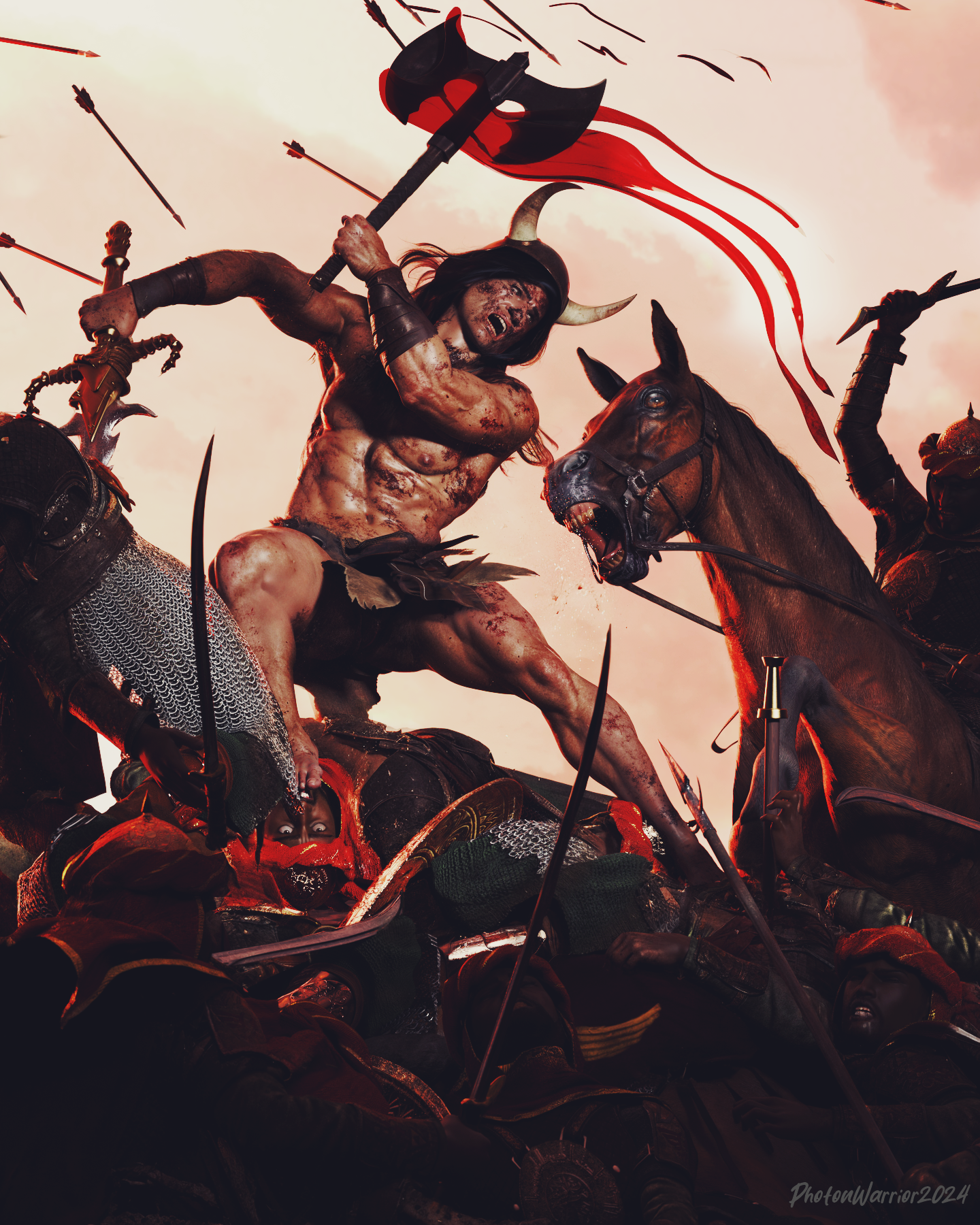
Epic Battle Render Contest (This Weekend!)Main character is G9 using Liam HD as base mixed with Swole and some other face morph tweaks. I still prefer UBER shaders for skin so skin textures are still Liam but the shader is a conversion back to the older one. Gave him geoshell M3D's bloody skins, which is amazing, TYVM for that. New custom normal maps. Blender pre work to fix stuff like reins and armour and blood effects and clothing. Post work in photoshop using some action filters to take out the Daz fake looking CGI specular and add more harsh contrast and skin tones. 85mm lens from https://www.daz3d.com/ig-photographers-toolbox-35mm-cameras always my main goto for best cameras.
 What do you do with cloth in extreme position of pJCM?
I use the move tool in Modo to fix the mesh, grabbing the polygons and moving them into place. If I use the smoothing modifier I will set it to not collide against the figure because it can cause unexpected issues and make it even harder to fix in a modeler (when the mesh is squished between the body and the arm it can really get distorted) and also with rolled edges/trims pushing through the outside of the cloth because its closer to the figure and pushed a different amount as the mesh further away from the figure.
If you find it challenging to do the full morph in one go, you can do them incrementally... - bend the arm half way, fix that, import the morph, dial it up and pose the arm to the full bend, then export with the morph active. Delete the halfway morph from the clothing. Fix the morph on the full bend and import :)
G8 Eyes Move In Opposite Direction Of PosePlease see attached pics. The eyes are supposed to be looking left of the figure according to the pose in the first image, but, as shown in the second pic: they are looking to the character's right. Up and down is similarly reversed. I cannot find anything on why this is and Gogle searches come up fruitless. I cannot be the only person running into this issue. Any suggestions would be appreciated. Chracteris G8 with a V4 converted face morph (Jane from RenaPD, I think.) Used Transfer for face shape conversion.
Morph with GeograftTry having some more understanding from this thread firstly ... https://www.daz3d.com/forums/discussion/627141/creating-morph-for-the-figure-and-geo-graft-together
- DS cannot "guess" a delta but only get it (data of vertex position change) from OBJ file
- The principle of making morphs on Base figure or geo-graft per se is explained in the above threadMarahzen's Musings on Creating Characters (and other matters)So here, at long last, is an image correlated to an actual scene in my story WIP.

As I mentioned earlier this thread, I've done almost no art related to the story since the first few weeks that I started using Daz. And sadly, I've done very little writing on the book in that time. I took this detour into art to create inspirational images intended for no one but myself, for a series of books that no one else will ever read, and somehow got sidetracked into buying the entirety of the Daz store.
So I did something today that I've never done before. I signed up for a writing session, which turned out to be a bunch of us working on our own during a Zoom session on whatever aspect of our current book that we wanted. Some people were writing, some were outlining. Once in a while we'd meet in the Zoom session for a quick chat. I ended up writing about 1,100 words on a new scene which I had some rough ideas for but hadn't done any work on yet.
I wasn't really sure what to expect so yesterday, I created this simple image representing the basic idea I had in mind for this scene I planned to write. This scene isn't really an accurate portrayal of the setting I ended up describing, but the base content - Mira, seen in earlier incarnations in images above, plots mischief with my main character while surveying paintings for sale. I've just realized that in all of this thread, I've never actually said much about my story or its characters, and I don't know if I meant to explore the story itself, or stick mainly with character creation in this thread. But either way, she has a lot of names. Mira here knows her as Khara; the boys in the outdoorsy/horse images knew her as Tai. Mira is planning to get a splash of attention in buying this painting, while Khara has something much darker in mind in going along with the game.
In terms of character creation, there's no huge changes in my process since my last comments on this thread. Both of these characters are created from the stock G9 figure, to which I applied the Face Transfer 2 shape saved for each of these characters, then some amount of Face Transfer Shapes to fix the profile. Both of these characters have tiny bits of random G9 female character shapes, which I have multiple "random shape" generators to do. I do that not to make my character look like some other commercial character, but just in small doses - like 5-10% - just to break up the "FT2-ness" that is somewhat inherent in most FT2 shapes. (I used 3D Universe's version here: Character Mixer Version 2 for Genesis 8 and 9 | Daz 3D) After that, I've applied the materials of G9 characters that I thought had good underpinnings for the real textures of these two characters, then replaced the base color mat files with the FT2-derived textures.
Here's a closer look at the characters as I created them in this scene:

 Morph with Geograft
Hi, wenn I create and load morphs for a geografted figure with morphloader pro, the vertices in the base figure that are hidden do not receive any delta value. Is there any way to make the system "guess" a delta for these? It turns out that the adjust rigging function in joint editor doesnt work well anymore in this case.
So in case of gegrafting replacement legs which hides large part of the original ones, what is the correct workflow to make morphs for this combination?
Thanks.
How remove watermark from DAZ face transfer----SOLVEDscouseaphrenia_c6c3d26832 said:
Richard Haseltine said:
The original is for Gensis 8.1, Face Transfer 2 is for Genesis 9 - they do not overlap (and the original does not get the enhanced features of 2, even when both are installed).
So how do I remove the watermark in FT2? There was no mention of needing a required product to use it?
The watermark is removed by having a license for the tool (Face Transfer for Gensis 8.1, Face Transfer 2 fro Gensis 9) - a license for Face Transfer has no effect on being able to save a Genesis 9 transfer and vice versa.
Daz 3D is part of

Connect
DAZ Productions, Inc.
7533 S Center View Ct #4664
West Jordan, UT 84084Licensing Agreement | Terms of Service | Privacy Policy | EULA
© 2026 Daz Productions Inc. All Rights Reserved.