-
All of my content is uninstalled [RESOLVED - sort of]
barbult said:
Drogo Nazhur said:
and how do i get it to NOT install in that "data" folder?
Answer:
- DO NOT install from inside Daz Studio (that uses Daz Connect and puts the files in the "cloud" folder on your computer).
- If you have already installed product from inside Daz Studio, UNINSTALL it from inside Daz Studio. then reinstall it from DIM or Daz Central (whichever you use, but not both).
- NEVER install a product two different ways (Daz Connect and DIM or Daz Central). Doing so will cause your product files to be installed in two places (duplicated files) and Daz Studio will always use the Daz Connect version. Any updates you install with DIM or Daz Central will be ignored.
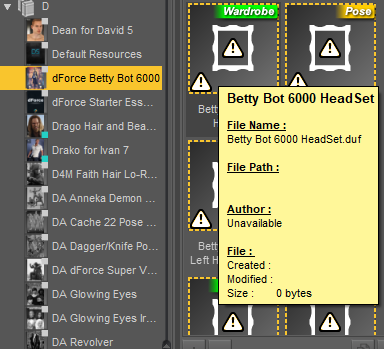
I purchased a band new product and installed it via Daz Central and this is what I'm getting ...
 All of my content is uninstalled [RESOLVED - sort of]
barbult said:
Drogo Nazhur said:
and how do i get it to NOT install in that "data" folder?
Answer:
- DO NOT install from inside Daz Studio (that uses Daz Connect and puts the files in the "cloud" folder on your computer).
- If you have already installed product from inside Daz Studio, UNINSTALL it from inside Daz Studio. then reinstall it from DIM or Daz Central (whichever you use, but not both).
- NEVER install a product two different ways (Daz Connect and DIM or Daz Central). Doing so will cause your product files to be installed in two places (duplicated files) and Daz Studio will always use the Daz Connect version. Any updates you install with DIM or Daz Central will be ignored.
I purchased a band new product and installed it via Daz Central and this is what I'm getting ...
All of my content is uninstalled [RESOLVED - sort of]Drogo Nazhur said:
and how do i get it to NOT install in that "data" folder?
Answer:
- DO NOT install from inside Daz Studio (that uses Daz Connect and puts the files in the "cloud" folder on your computer).
- If you have already installed product from inside Daz Studio, UNINSTALL it from inside Daz Studio. then reinstall it from DIM or Daz Central (whichever you use, but not both).
- NEVER install a product two different ways (Daz Connect and DIM or Daz Central). Doing so will cause your product files to be installed in two places (duplicated files) and Daz Studio will always use the Daz Connect version. Any updates you install with DIM or Daz Central will be ignored.
All of my content is uninstalled [RESOLVED - sort of]I just want to add that I have been using DAZ for years and have nearly a hundred pages of DAZ products install, so I am not new to this. Everything just suddently became uninstalled and I can't reinstall it. I tried right clicking and uninstalling and reinstalling it that way. I also tried to install it via DAZ central. That also did not work. I'm out of ideas.
dForce Faënor Outfit for Genesis 8 MalesWith daz centralDAZ installs then crashes on pose, can't get through guided introThe current version is 4.15.0.2, but I'm pretty sure that is what you have if you install through Daz Central. Still, check Help>About Daz Studio to be sure.
Does it give a crash report dialogue or does it drop straight to desktop?
do you have a favorite artist or character for eyes?memcneil70 said:
Cora Regina said:
Soto/Hellboy. The eyes that come with Maxx HD for Brute 8 (and with Maia HD IIRC) are drop-dead gorgeous. The ones that come with Dolb HD for Ollie 8 are also very nice. Incidentally, Dolb has what is hands down the best material for teeth that I've found. It's natural rather than blindingly bleached, and I use it constantly instead of what comes with most characters.
Chevybabe25's Natural Eyes products (for G8 and G8.1) render beautifully. I do find the blue/grey range to be limited; the greens, hazels, and browns are much more varied and vibrant. Still totally worth it and include great morphs, normals, and scleral variations (a default and one each for aged and non-white characters).
ForbiddenWhispers for Genesis 8 geoshell eye builders, and Awesome Eyes for Genesis 2.
Parris' Macro Eyes are my favorite for Genesis 3.
I have all of these except Maia and love them. I also look at each new character I buy and check out their eyes for hetrochromatic options and note them on my character spreadsheet so when I need a blue/brown set or green/gray I can find it easily. I would love a set of eyes by a PA that is designed for hetrochromatic use, as well as both eyes at once.
Mary
That would be fantastic, honestly. I really like the idea of being able to choose my own combos when needed and as someone with ME/CFS, I am more prepared than many to pay for conveniences like dozens of individual left and right eye presets that I don't have the stamina to save out myself.
I'd love to see a Natural Eyes add-on for heterochromia some day, for both the 8 and 8.1 versions.
On the subject of doing more with less, Maxx and Maia's eye maps are great for making custom heterochromia textures (as I'm sure are others but those come to mind). They all have the same pattern so complete heterochromia looks cohesive, and single irises with central or partial heterochromia match up perfectly no matter where you want the split to be. The blue ones actually have central heterochromia already, as do a number of the eyes in the Macro Eyes packages.
Knittingmommy's LaboratoryThe last few weeks have been frustratingly busy. I purchased a new 4 TB hard drive for my computer and decided I needed to put all my Daz assets on that drive because my C drive is smaller and getting filled up. I had a problem doing this since I was using Connect for most of my installs. So I finally decided to drop Connect completely. I was getting tired of all the errors that happened because Connect would mess up. Then when it kept insisting on looking at where the old directoy was, I washed my hands of it completely.
In the end, I had to do a completely clean uninstall of Daz Studio twice. The last time, I just started installing with Install Manager. Not even using Daz Central. I would have used DC, but there's no button to click all the selections when you sort. How could they not have that option? You have to go through and click install on EVERY SINGLE ITEM! No. Just no. So Install Manager is my main installer once again.
I think I've got everything sorted out again. I'll be curious to see if I still get the duplicate errors I was getting while using Connect. Or the errors where it said something was installed, but I couldn't access it without uninstalling and installing again. So frustrating!
In other news, I finally got a new graphics card. When I first bought this computer to replace the one that was stolen, it came with no graphics card whatsoever. Just the onboard graphics that comes with the motherboard. I ended up adding a really OLD nVidia graphics card from my husband's junk pile because it got me the right version of OpenGL to run Daz Studio, but it was too old to do much and had practically no memory so my computer was still using CPU to render. So my husband found a deal on a GT1030. It's not ideal, but have you seen the price of graphic cards lately? The one I really want is in the thousands of dollars. I'm saving some money for it, but it will be a while before I've got that much squirreled away.
I did a test render last night of The Pweek to see how my new card compared to using CPU. OMG!!! The difference in time was startlling. I've only ever rendered using CPU the whole time I've used DS. On my old system I had a Radeon card and while it did pretty good, it did mean I only rendered in CPU mode. Render times weren't that bad, definitely faster than my current system.
Here are the shocking stats:
Render time on the old nVidia card I just replaced:
2021-04-29 00:08:04.741 Total Rendering Time: 10 hours 9 minutes 11.12 seconds
Render time on the new nVidia GT1030 card I just installed:
2021-04-29 23:07:58.240 Total Rendering Time: 1 hours 36 minutes 14.27 seconds
Now on my old system, I probably could have rendered that in CPU mode in half the time as my current system in CPU mode. Unfortunately, I couldn't afford to replace my old system with a comporable system and I was in a rush because I needed a computer for my work. The plan was to slowly upgraded the computer as needed.
One thing I still need to do is get a new drive to replace my C drive. The thing is old and literally sounds like it's grinding whenever it gets acessed. So I'll be getting another 4TB hard drive next month and I'll go through the fun of swapping Windows 10 over to it. I'm not looking forward to that. Such fun! Not.
Can I say how shocked I am that this cute little guy is apparently no longer available in the Daz store? Such a shame! I'm glad I got him when I had the chance. I don't recall who creator was. I might have to go looking through the file to see if they have a new store somewhere else.
The Pweek:

ETA: I should probably mention that the size I'm rendering is a 3333 px by 3333 px square. I'm rendering this bigger so it's still a decent size when I convert it to 300 dpi for the clipart package it's going into.
Condominium Locker Room doesn't workDaz Install Manager is still the best avenue to install. Central is not mature enough as a software, Connect is nice but also has issues.
Condominium Locker Room doesn't workDaz Central
Condominium Locker Room doesn't workDaz Central or Daz Connect (through Daz Studio itself)?
There is no Daz to Blender script menu on Daz Studio 4.15Hi guys, I have installed the Plugin and apparently is fine, but when I open Daz Studio there is no "Script" menu. Same account and there is nothing working on Daz Studio. The plugin Daz to Blender Bridge does not appear on Daz Central using the same account. Any suggestion? Please.
Daz central on M1 MacWhen does it become compatabe with m1 macs?
Sylveren hair broken?horse1412000 said:
That's how installing with DAZ works though, you install with DAZ Central, then install it inside DAZ.
If you are having to install again then something is wrong - you are just ending up with two sets of the files, one of which is being ignored. Daz Central/Install manager should be entering their files into the database, and then Daz Studio should see them. Can you see the content in the Content Library, under Daz Studio Formats>My Daz 3D Library? If so it's installed into a folder DS can see. In that case, do the files have the content type marker at top-right (Actor, Materials etc.)?
Sylveren hair broken?That's how installing with DAZ works though, you install with DAZ Central, then install it inside DAZ.
Sylveren hair broken?I bought the Sylveren hair when it came out, and it has been broken ever since. I installed using DAZ Central, inside DAZ, not only does it take like an hour to install, it keeps acting like it needs to install an update. The files inside are categorized as "Lost & Found."
I've tried installing the "update," I've uninstalled it in both DAZ and DAZ Central, I even reset my database, but it refuses to be fixed.
Is anyone else having this issue?
Just updated my Graphics Cardgamingmed21 said:
i need help, i just got a new pc and my daz wont let me sign in... when i try it crashes, i got the same graphic card as you
The GPU almost certainly has nothing to do with this - more likely security software or settings, it is something that affects some users. You do not need to sign in to use Daz Studio, you can choose to work offline (but then you will need to use Install manager or Daz Central to isntall your content, and you will need to get your serial number(s) from your Account pages or right-click on an entry in Install Manager)
AIUTO...CHI CONOSCE L’ITALIANO? PARTE TREDICIImago said:
Anfy said:
Questione che immagino sia stata posta mille volte, solo che non la trovo nel forum:
poiché ho praticamente esaurito lo spazio con i vari items, vorrei acquistare un SDD più capiente (diciamo 2 TB) per avere aggio: se usassi un programa tipo EaseUS per clonare il contenuto dell'SSD sul nuovo (compreso il sistema operativo), continuerei a vedere, sul nuovo, i pacchetti DAZ nello Smart Content e Central? E i programmi, sempre DAZ, che richiedono un numero di serie?
Grazie!
Si, ma non hai bisogno di diventare scemo con quei programmi.
Se sostituisci il disco ti è sufficiente copiare e incollare la struttura delle cartelle nel disco nuovo e assicurarti di assegnare la stessa lettera al disco nuovo. Al primo avvio di DAZ Studio ti verrà notificato il cambio di hardware e dovrai solo loggare un momento in Connect (il tastino in alto nello smart content o Connect nella barra dei menu) per validare la tua installazione e non devi nemmeno modificare i percorsi dal manager interno.
Tuttavia ti sconsiglio l'uso di un SSD per le librerie, affidati ad un disco meccanico. La velocità maggiore di un SSD dà veramente pochi vantaggi con le librerie.

Ma cmq puoi dire a DS semplicemente di includere un altro percorso per le librerie no? Non si fa prima?
AIUTO...CHI CONOSCE L’ITALIANO? PARTE TREDICIAnfy said:
Questione che immagino sia stata posta mille volte, solo che non la trovo nel forum:
poiché ho praticamente esaurito lo spazio con i vari items, vorrei acquistare un SDD più capiente (diciamo 2 TB) per avere aggio: se usassi un programa tipo EaseUS per clonare il contenuto dell'SSD sul nuovo (compreso il sistema operativo), continuerei a vedere, sul nuovo, i pacchetti DAZ nello Smart Content e Central? E i programmi, sempre DAZ, che richiedono un numero di serie?
Grazie!
Dovrebbe funzionare senz'altro, altrimenti la fai più semplice come ti ha suggerito Imago.
AIUTO...CHI CONOSCE L’ITALIANO? PARTE TREDICIAnfy said:
Questione che immagino sia stata posta mille volte, solo che non la trovo nel forum:
poiché ho praticamente esaurito lo spazio con i vari items, vorrei acquistare un SDD più capiente (diciamo 2 TB) per avere aggio: se usassi un programa tipo EaseUS per clonare il contenuto dell'SSD sul nuovo (compreso il sistema operativo), continuerei a vedere, sul nuovo, i pacchetti DAZ nello Smart Content e Central? E i programmi, sempre DAZ, che richiedono un numero di serie?
Grazie!
Si, ma non hai bisogno di diventare scemo con quei programmi.
Se sostituisci il disco ti è sufficiente copiare e incollare la struttura delle cartelle nel disco nuovo e assicurarti di assegnare la stessa lettera al disco nuovo. Al primo avvio di DAZ Studio ti verrà notificato il cambio di hardware e dovrai solo loggare un momento in Connect (il tastino in alto nello smart content o Connect nella barra dei menu) per validare la tua installazione e non devi nemmeno modificare i percorsi dal manager interno.
Tuttavia ti sconsiglio l'uso di un SSD per le librerie, affidati ad un disco meccanico. La velocità maggiore di un SSD dà veramente pochi vantaggi con le librerie.
Daz 3D is part of

Connect
DAZ Productions, Inc.
7533 S Center View Ct #4664
West Jordan, UT 84084Licensing Agreement | Terms of Service | Privacy Policy | EULA
© 2026 Daz Productions Inc. All Rights Reserved.